BOS-900 - Empfänger Steren - Kostenlose Bedienungsanleitung
Finden Sie kostenlos die Bedienungsanleitung des Geräts BOS-900 Steren als PDF.


Benutzerfragen zu BOS-900 Steren
0 Frage zu diesem Gerät. Beantworten Sie die, die Sie kennen, oder stellen Sie Ihre eigene.
Eine neue Frage zu diesem Gerät stellen
Laden Sie die Anleitung für Ihr Empfänger kostenlos im PDF-Format! Finden Sie Ihr Handbuch BOS-900 - Steren und nehmen Sie Ihr elektronisches Gerät wieder in die Hand. Auf dieser Seite sind alle Dokumente veröffentlicht, die für die Verwendung Ihres Geräts notwendig sind. BOS-900 von der Marke Steren.
BEDIENUNGSANLEITUNG BOS-900 Steren
text_image
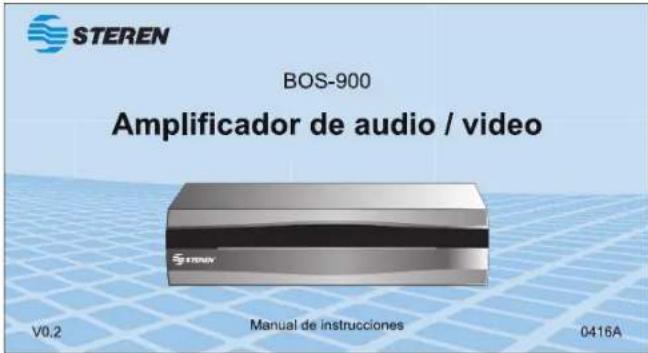
STEREN BOS-900 Amplificador de audio / video V0.2 Manual de instrucciones 0416AAnles de utilizar su nuevo producto Steren, les este instructivo para evitar cualquier mal funcionamiento.
IMPORTANTE
La información que se muestra en este manual sirve únicamente como referenciasobreelproducto. Debidoaactualizacionespuedenexistir diferencias.
Por favor, consulte nuestra página web (www.steren.com) para obtener la versión más reciente del instructivo.
PRECAUCIONES
- No intente abrir el equipo, puede ocasionar un mal funcionamiento y anular la garantía.
- No exponga el equipo a temperaturas extremas.
- No use ni almacene este equipo en lugares donde existan goteras o salpicaduras de agua. Puede causar un mal funcionamiento o un choque eléctrico.
- Siempre utilice un paño suave y seco para limpiar el equipo.
CARACTERÍSTICAS
El amplificador de señal distribuye la señal de audio y/o video de una TV, PC o VCR a uno o hasta cuatro equipos (monitores, bocinas, etc.) sin ningún tipo de pérdida.
Incluye entradas y salidas de video compuesto y S-Video.
INSTRUCCIONES
-
Coloque el amplificador cerca de la TV, PC o VCR. No lo ponga encima de ningún aparato electrónico.
-
Conecte los aparatos.
a) Conexiones de audio
Estéreo
- Conecte los cables de audio de la fuente a las entradas correspondientes de la sección 'INPUT'.
- Conecle el destino del audio la(s) entrada(s) correspondiente(s) de la sección "OUTPUT".
Mono
- Conecte la fuente de audio a la entrada "L" de la sección "INPUT". - Conecte el destino del audio a la(s) entrada(s) "L" de la sección "OUTPUT". El audio se enviará a ambas salidas (derecha e izquierda).
b) Conexiones de vídeo
Video compuesto a video compuesto
- Conecte la fuente de video a la entrada correspondiente de la sección "INPUT".
- Conecte el destino del video a la(s) entrada(s) correspondiente(s) de la sección "OUTPUT".
Video compuesto a S-Video
- Conecte la fuente de video a la entrada correspondiente de la sección "INPUT". - Conecte el destino del video a la(s) entrada(s) correspondiente(s) de la sección "OUTPUT", mediante un cable S-Video.
Si la fuente de video tiene ambas salidas de (Video compuesto y S-Video), utilice solamente la segunda para tener mejor calidad de imagen. No utilice ambas entradas y/o salidas al mismo tiempo.
S-Video a S-Video
- Conecte la fuente de video a la entrada correspondiente de la sección "INPUT", mediante un cable S-Video. - Conecte el destino del video a la(s) entrada(s) correspondiente(s) de la sección "OUTPUT", mediante un cable S-Video.
S-Video a video compuesto
- Conecte la fuente de video a la entrada correspondiente de la sección "INPUT", mediante un cable S-Video.
- Conecte el destino del video a la(s) entrada(s) correspondiente(s) de la sección "OUTPUT".
- Conecte el adaptador de corriente al amplificador y a un contacto eléctrico.
- Encienda los dispositivos conectados al amplificador.
El amplificador no tiene interruptor de encendido/apagado porque consume muy poca energía. Puede permanecer conectado siempre, excepto cuando no utilice los aparatos conectados durante largos periodos.
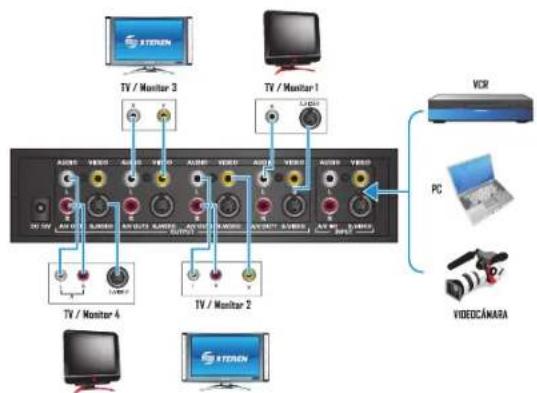
EJEMPLO DE CONEXIONES
flowchart
graph TD
    A["TV / Monitor 1"] -->|VCR| B["PC"]
    C["TV / Monitor 2"] -->|VCR| D["PC"]
    E["TV / Monitor 3"] -->|VCR| F["PC"]
    G["TV / Monitor 4"] --> H["PC"]
    I["TV / Monitor 5"] --> J["PC"]
    K["VideoCÁMARA"] --> L["PC"]
    M["STENON"] --> N["PC"]
ESPECIFICACIONES
- Amplificador de señal Alimentación: 12 V --- 250 mA
- Convertidor de voltaje Alimentación: 100 - 240 V \~ 60 Hz 200 mA Salida: 12 V = 250 mA
Dimensiones:196 x 131 x 50 mm
Peso: 364 g (sin convertidor)
Consumo nominal: 31, 2 Wh / día
Consumo en espera: no aplica

El diseño del producto y las especificaciones pueden variar sin previo aviso.


STEREN
Producto: Amplificador de audio / video
Model: BOS-900 Merry, Slossa
Marca. Storff
PÓLIZA DE GARANTÍA
Faba palos generizos el producto por el hemino de un año en todos sus palos y menor de otros, cuatro cualquier defecto de fabricación y funcionamiento, a partir de la fecha de entrega.
CONDICIONES
- Para hacer efectiva la garantía, presente esta páliza y el producto, en donde fue adquirido o en Electronica Steron S.A. de O.V.
2 - Electrica Steven S.Ade C.V. se compromete a reparar el producto en caso de solar defectados sin ningún cargo al consumidor. La gasalude transportación desde cubiertas por el provador.
3.- El tiempo de reparación en ningún caso será mayor a 30 días contados a partir de la recepción del producto en cualquera de los ellos donde pueda hace so efectiva la garantía. - El lugar donde puede acquiró portes, componentos, consumibles y accesorios, así como hacer válida esta garantía es en caciculara de las dimensiones mencionadas posteriormente
ESTA POLIZA NO SE HARA EFECTIVA EN LOS SIGUIENTES CASOS:
1 - Cuando el producto las sido utilizado en condiciones distintas a las normales.
2.- Cuando o producto no ha sido operado de acuerdo con el instructivo de uso.
3.- Cuando el producto ha sido alterada o repuesto por personal no autorizado por Electrónico Steren S.A. de C.V.
El consumidor podrá solicitar que se haga efectiva la garantía ante la propia casa comercial donde adquirió el producto. Si es presentis garantía se extraviera, el consumidor puede resurtra a su provocador para que lo expida otra poliza, previa presentación de la nota de compra o factura respectiva.
DATOS DEL DISTRIBUIDOR
Nombres de Distribuidor
Domiclo
Products
Vermos
Mocela
Mínica de serie
Fecha de entrega
ELECTRÓNICA STEREN S.A. DE C.V.
Camaranas 112, Onero Popular, 02840, México, D.F. RFC: EST850628 K51
STEREN PRODUCTO EMPACADO S.A. DE C.V.
Bilúco-Maxmina Melino No. 3408 Int. 2, 3 y 4, San Salvador Xachimansa
Mexico, IL 02479, BEE: SE1841215103
ELECTRÓNICA STEREN DEL CENTRO, S.A. DE C.V.
Rep. del Salvador 20 A y B, Centro. 06000, México. D.F. RFO: ESC9610205N4
ELECTRÓNICA STEREN DE GUADALAJARA, S.A.
Lopez Colila No. 51, Centre, 40100, Guadalajara, Jal. RTC: ESG810511116
ELECTRÓNICA STEREN DE MONTERREY, S.A.
Colon 120 Pte., Centro, 64000, Monterey, N.L. RFC: ESM830202MF8
ELECTRÓNICA STEREN DE TIJUANA, S.A. de C.V.
Cate 2a, Juárez 7639, Centro. 22000, Tijuera. B.C.N. RFC: E3T980909NU5
En caso de que su producto presente alguna falta, acuda al centro de distribución más cercano a su domicilio y en caso de tener alguna duda o pregunta por favor tiene a nuestro Centro de Atención a Clientas, en donde con gusto lo atendoremos en todo lo relacionado con
su producto Steron

Centro de Atención a Clientes
01 800 500 9000

STEREN
BOS-900
Audio / video & S-video output booster
V0.2
Instruction Manual
0416A
Before using your new Steren's product, please read this instruction manual to prevent any damage.
IMPORTANT
The Instructions of this manual are for reference about the product. There may be differences due to updates.
Please check our website (www.steren.com) to obtain the latest version of the instruction manual.
CAUTIONS
- Do not attempt to open the device, can cause a malfunction and void the warranty.
- Do not expose the equipment to extreme temperatures.
- Do not use or store this equipment in wet or damp locations. It may cause malfunction or electric shock.
• Always use a soft, dry cloth to clean the equipment.
HIGHLIGHTS
The signal amplifier distributes the signal of audio and/or video from a TV, PC or VCR one or up to four devices (monitors, speakers, etc.) without any loss.
It includes inputs and outputs for composite video and S-video.
INSTRUCTIONS
- Place the amplifier near the TV, PC or VCR. Do not place on top of any electronic device.
- Connect the devices.
a) Audio connections
Stereo
- Connect the audio cables from the source to the corresponding inputs on the 'INPUT' section.
- Connect the audio destination(s) input(s) to the corresponding "OUTPUT" section.
Mono
- Connect the audio source to the "L" input of the "INPUT" section. - Connect the audio destination(s) input (s) to the "L" connector in the 'OUTPUT' section. The audio is sent to both outputs (left and right).
b) Video connections
Composite to composite video
- Connect the video source to the corresponding entry in the "INPUT" section.
- Connect the destination for the corresponding video input(s) on the "OUTPUT" section.
Composite video to s-video
- Connect the video source to the corresponding entry in the "INPUT" section. - Connect the destination for the video input(s) corresponding(s) of the "OUTPUT" section, using a S-video cable.
If the video source has both outputs (Composite Video and S-video), use only the second to have better image quality. Do not use both inputs and/or outputs at the same time.
S-video to S-video
- Connect the video source to the corresponding entry in the "INPUT" section, using an S-video cable.
- Connect the destination for the video input (s) corresponding of the "OUTPUT" section, using a S-video cable.
S-video to composite video - Connect the video source to the corresponding entry in the "INPUT" section, using an S-video cable.
- Connect the destination for the video input (s) corresponding on the "OUTPUT" section.
- Connect the power adapter to the amplifier and to an electrical contact.
- Turn on the devices connected to the amplifier.
The amplifier has no on/off switch because it consumes very little power. You can keep it connected always, except when not using connected appliances for long periods.
CONNECTION EXAMPLES
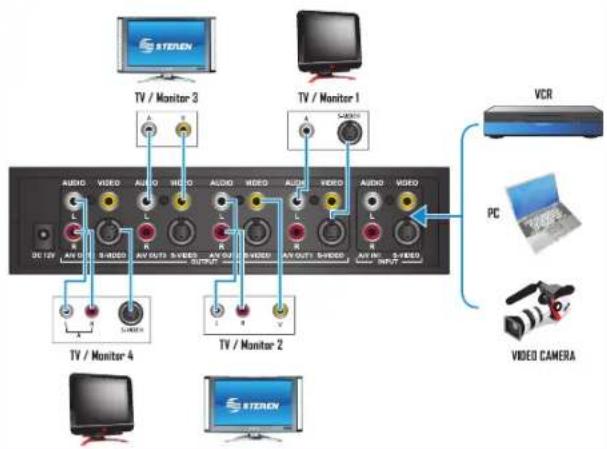
text_image
STEREN TV / Monitor 3 TV / Monitor 1 VCR PC VIDEO CAMERA TV / Monitor 4 TV / Monitor 2 STERENSPECIFICATIONS
- Signal amplifier
Input: 12 V = 250 mA
- Power converter
Input: 100 - 240 V \~ 60 Hz 200 mA
Output: 12 V---250 mA
Dimensions:196 x 131 x 50 mm
Weight: 364 g (without converter)
Nominal consumption: 31.2 Wh / día
Stand-by power consumption: not applicable
Product design and specifications are subject to change without notice.


Product: Audio / video & S-video output booster
Part number: BOS-900
Brand: Steren
WARRANTY
This Frozen product is worsened under normal usage against defects in workmanship and materials to the original purchase for one year from the date of purchase.
CONDITIONS
- This warranty card with all the required information, invoice or purchase ticket, product box or package, and product, must be presented when warranty service is required.
- If the product is in the warranty time, the company will repair it free of charge.
- The repairing time will not exceed 30 natural days, from the day the claim was received.
- Steron sell parts, components, consumables and accessories to customer, as well as warranty service, at any of the addresses mentioned later.
THIS WARRANTY IS VOID IN THE NEXT CASES:
If the product has been damaged by an accident, acts of God, mishanding, licky batteries, failure to follow enclosed instructions, improper repair by unauthorized personnel, improper safe keeping among others.
al The consumer can also claim the warranty service in the purchase establishment.
b) If you lose the warranty card, we can release it. If you show the invoices or purchase ticket.
RETAILER INFORMATION
Name of the retailer
Accresa
Product
Brand
Serial number
Date of delivery
In case your product falls or have questions, please contact your nearest center. If you are in Mexico, please call to our Call Center.
01 800 500 9000

01 800 500 9000