Elite Remote - Fernbedienung Ikan - Kostenlose Bedienungsanleitung
Finden Sie kostenlos die Bedienungsanleitung des Geräts Elite Remote Ikan als PDF.


Benutzerfragen zu Elite Remote Ikan
0 Frage zu diesem Gerät. Beantworten Sie die, die Sie kennen, oder stellen Sie Ihre eigene.
Eine neue Frage zu diesem Gerät stellen
Laden Sie die Anleitung für Ihr Fernbedienung kostenlos im PDF-Format! Finden Sie Ihr Handbuch Elite Remote - Ikan und nehmen Sie Ihr elektronisches Gerät wieder in die Hand. Auf dieser Seite sind alle Dokumente veröffentlicht, die für die Verwendung Ihres Geräts notwendig sind. Elite Remote von der Marke Ikan.
BEDIENUNGSANLEITUNG Elite Remote Ikan
ikan
Quick Start Guide
ELITE REMOTE
Bluetooth
text_image
Elite Remote eKanQuick Start Guide
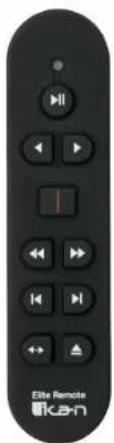
Thank you for purchasing the ELITE Remote – Bluetooth iPad teleprompter remote. Please follow these simple instructions to get started.
Downloading Compatible Apps
-
Go to the App Store on your tablet
-
Locate the search bar at the top right corner and key in the name of one of our compatible apps.

Teleprompter Premium


Teleprompt+ 3
- Select the app and install it.
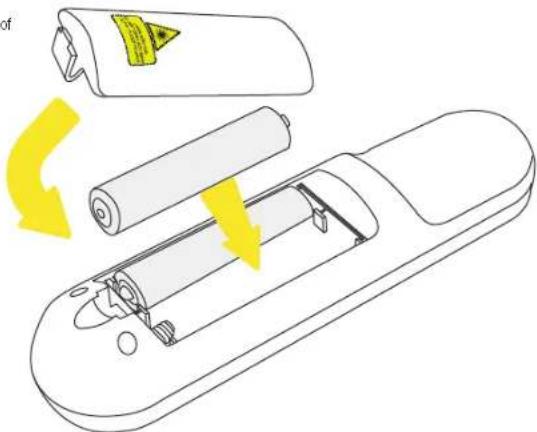
Inserting battery into ELITE Remote
- Remove the battery on the back of the remote
- Insert 2 AAA batteries into the battery compartment
- Re-install the battery cover
text_image
Diagram illustrating battery charging process with arrows indicating rotation and component movementTroubleshooting
If you have any issues with the ELITE Remote, please call us at 1.713.272.8822 Monday through Friday 9:00 am to 6:00 pm CST. Or you can email us at support@ikancorp.com.
Copyright Ikan 2018

Syncing ELITE Remote to your iPad
- Go to the "Settings" app on your iPad
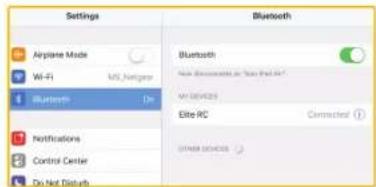
- Select the Bluetooth tab on the left side and confirm the Bluetooth option is on (switch will toggle green).
- Turn on the remote by inserting 2 AAA batteries into the battery compartment. A red light should blink momentarily on the front side of the remote.
text_image
Settings Airplane Mode Wi-Fi Bluetooth No. Netgear Bluetooth Non-Bluetooth or "Yes/Not Appl" Wi-Fi/2023 Elite RC Connected Notifications Control Center Do Not Default Bluetooth- Press and the hold the "Rewind & Forward" button for 3 seconds to sync the remote. A blue light should blink momentarily on the front side of the remote.
- The words "Elite RC" should appear on your iPad. Select it.
- Once connection between the iPad and the remote has been established, the status message next to "Elite RC" should change to Connected.
Re-establishing connection with your iPad
Once you sync your iPad and Elite remote, your iPad will always remember the Elite Remote. To re-establish connection, simply turn on the remote, press any button, and wait a few seconds. The remote will automatically re-establish connection with your iPad.
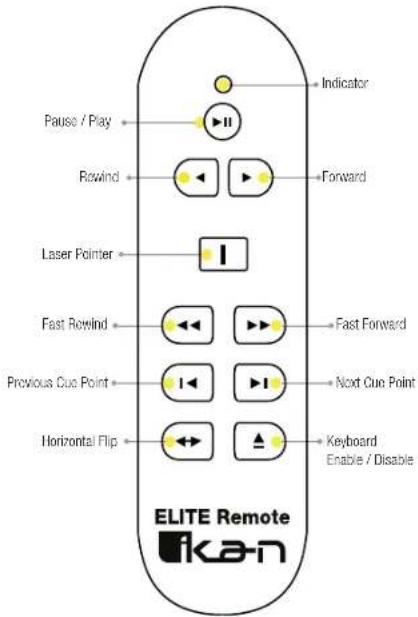
Controlling your iPad with ELITE Remote