
Surface Mouse - Tastatur MICROSOFT - Kostenlose Bedienungsanleitung
Finden Sie kostenlos die Bedienungsanleitung des Geräts Surface Mouse MICROSOFT als PDF.


| Produkttyp | Maus |
| Modell | Surface Mouse |
| Hersteller | Microsoft |
| Farben | Platin, Burgunderrot, Mitternachtsblau |
| Abmessungen (L x B x H) | 108 mm x 62 mm x 35 mm |
| Gewicht | ca. 90 g (inkl. Batterien) |
| Stromversorgung | 2 AAA-Batterien |
| Batterielebensdauer | bis zu 12 Monate |
| Konnektivität | Bluetooth 4.0/4.1 |
| Reichweite | bis zu 10 m |
| Sensor | Optischer Sensor mit 1000 DPI |
| Tasten | 3 Tasten (links, rechts, Mitte) + Scrollrad |
| Scrollrad | Berührungsempfindlich mit Taste |
| Kompatible Systeme | Windows 10/11, macOS, iPadOS |
| Lieferumfang | Maus, 2 AAA-Batterien, Kurzanleitung |
| Funktionen | Scrollrad mit Touch, verbesserte Ergonomie |
| Reinigung | Mit einem weichen, leicht feuchten Tuch abwischen |
| Lagertemperatur | -20 °C bis 60 °C |
| Betriebstemperatur | 5 °C bis 35 °C |
| Zertifizierungen | CE, FCC, Bluetooth SIG |
Häufig gestellte Fragen - Surface Mouse MICROSOFT
Benutzerfragen zu Surface Mouse MICROSOFT
0 Frage zu diesem Gerät. Beantworten Sie die, die Sie kennen, oder stellen Sie Ihre eigene.
Eine neue Frage zu diesem Gerät stellen
Laden Sie die Anleitung für Ihr Tastatur kostenlos im PDF-Format! Finden Sie Ihr Handbuch Surface Mouse - MICROSOFT und nehmen Sie Ihr elektronisches Gerät wieder in die Hand. Auf dieser Seite sind alle Dokumente veröffentlicht, die für die Verwendung Ihres Geräts notwendig sind. Surface Mouse von der Marke MICROSOFT.
BEDIENUNGSANLEITUNG Surface Mouse MICROSOFT
Microsoft Surface Mouse
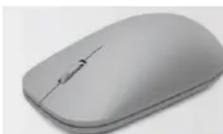
Microsoft
| Name Information | |
| Product Name | Microsoft Surface Mouse |
| Keyboard Name | Microsoft Surface Mouse |
| Product Dimensions | |
| Mouse Length | 4.53 inches (115.16 millimeters) |
| Mouse Width | 2.52 inches (64.16 millimeters) |
| Mouse Depth/Height | 1.32 inches (33.76 millimeters) |
| Mouse Weight | 3.21 ounces (90.9 grams) includes 2 AAA alkaline batteries; battery weight may vary |
| Compatibility and Localization | |
| Interface | Bluetooth Low Energy compatible 4.0 / 4.1 |
| Operating Systems ^1 | Operating system: Windows 10/8.1/8Windows 10 phoneAndroid 4.4.2-5.0Mac OS v10.10.5/10.11.1, and 10.11.4Device must support Bluetooth 4.0 or higher. Microsoft.com/hardware/compatibility. |
| Compatibility Logos | Windows 10Bluetooth Smart logo |
| Tracking Technology | |
| Mouse Tracking System | Microsoft-proprietary BlueTrack Technology |
| Imaging Rate | Dynamically adaptable to 4000 frames per second |
| X-Y Resolution | 1,000 points per inch (39.4 points per millimeter) |
| Tracking Speed | Up to 30 inches (762 millimeters) per second |
| Wireless Technology | |
| Wireless platform | Bluetooth 4.0 / 4.1 Low Energy |
| Wireless Frequency | 2.4 GHz frequency range |
| Wireless Range | 50 feet (15 meters) in open air, up to 23 feet (7 meters) in office environment typical |
| Bluetooth Profile Support | HID Over Gatt Profile (HOGP) |
| Product Feature Performance | |
| Right & Left Button Life | 3,000,000 actuations at no more than 2.5 actuations per second |
| Wheel Button Life | 350,000 actuations |
| Mouse Scrolling Features | Standard vertical scrolling |
| Wheel Vertical Scrolling Life | 100,000 revolutions (away from user)300,000 revolutions (towards user) |
| Storage Temperature & Humidity | -40 °F (-40 °C) to 140 °F (60 °C) at < 5% to 65% relative humidity (non-condensing) |
| Operating Temperature & Humidity | 32 °F (0 °C) to 104 °F (40 °C) at <5% to 80% relative humidity (non-condensing) |
| Power Requirements | |
| Battery Type and Quantity | 2 AAA Alkaline batteries (included) |
| Battery Life | Up to 12 months |
| Certification Information | |
| Country of Manufacture | People's Republic of China (PRC) |
| ISO 9001 Qualified Manufacturer | Yes |
| ISO 14001 Qualified Manufacturer | Yes |
| Restriction on Hazardous Substances | This device complies with all applicable worldwide regulations and restrictions including, but not limited to: EU directive 2002/95/EC on the Restriction of the Use of Certain Hazardous Substances in Electrical and Electronic Equipment and EU Registration Evaluation and Authorization of Chemicals (REACH) regulation regarding Substances of Very High Concern. |
| FCC ID | This Class B digital apparatus complies with Part 15 of the U.S. Federal Communications Commission (FCC) rules, Canadian ICES-003, and RSS-210. Operation is subject to the following two conditions: (1) this device may not cause interference, and (2) this device must accept any interference received, including interference that may cause undesired operation. Tested to comply with FCC (U.S. Federal Communications Commission) Standards. For home or office use. The term "IC:" before the certification/registration number only signifies that the Industry Canada technical specifications were met. Model number: 1741, Surface Mouse. FCC ID: C3K1741. IC ID: 3048A-1741. |
| Certification Information | |
| Agency and Regulatory Marks | ACMA Declaration of Conformity (Australia and New Zealand)DWLFM Certificate (Bahrain)RSS-247 and IC ID, Certificate of Acceptance (Canada)EIP Pollution Control Mark, EPUP (China)CMII Certificate (China)R&TTE Declaration of Conformity (European Union)WEEE (European Union)ETA Certificate (India)VCCI and TELEC Certificates (Japan)KCC Certificate (South Korea)MOC Certificate (Kuwait)SIRIM Certificate (Malaysia)ICT Certificate (Qatar)CITC Letter (Kingdom of Saudi Arabia)IDA Approval (Singapore)BSMI and NCC Certificates (Taiwan)NTC SDoC (Thailand)TRA Certificate (United Arab Emirates)FCC ID, Grant of Equipment Authorization (USA) |
| Warranty | 1 year |
| Windows Certification Kit (WCK) | ID: 1894410 Windows 10 |

Marke : MICROSOFT
Modell : Surface Mouse
Kategorie : Tastatur