
CTDF 1006-01 - Waschmaschine CANDY - Kostenlose Bedienungsanleitung
Finden Sie kostenlos die Bedienungsanleitung des Geräts CTDF 1006-01 CANDY als PDF.


Benutzerfragen zu CTDF 1006-01 CANDY
0 Frage zu diesem Gerät. Beantworten Sie die, die Sie kennen, oder stellen Sie Ihre eigene.
Eine neue Frage zu diesem Gerät stellen
Laden Sie die Anleitung für Ihr Waschmaschine kostenlos im PDF-Format! Finden Sie Ihr Handbuch CTDF 1006-01 - CANDY und nehmen Sie Ihr elektronisches Gerät wieder in die Hand. Auf dieser Seite sind alle Dokumente veröffentlicht, die für die Verwendung Ihres Geräts notwendig sind. CTDF 1006-01 von der Marke CANDY.
BEDIENUNGSANLEITUNG CTDF 1006-01 CANDY
text_image
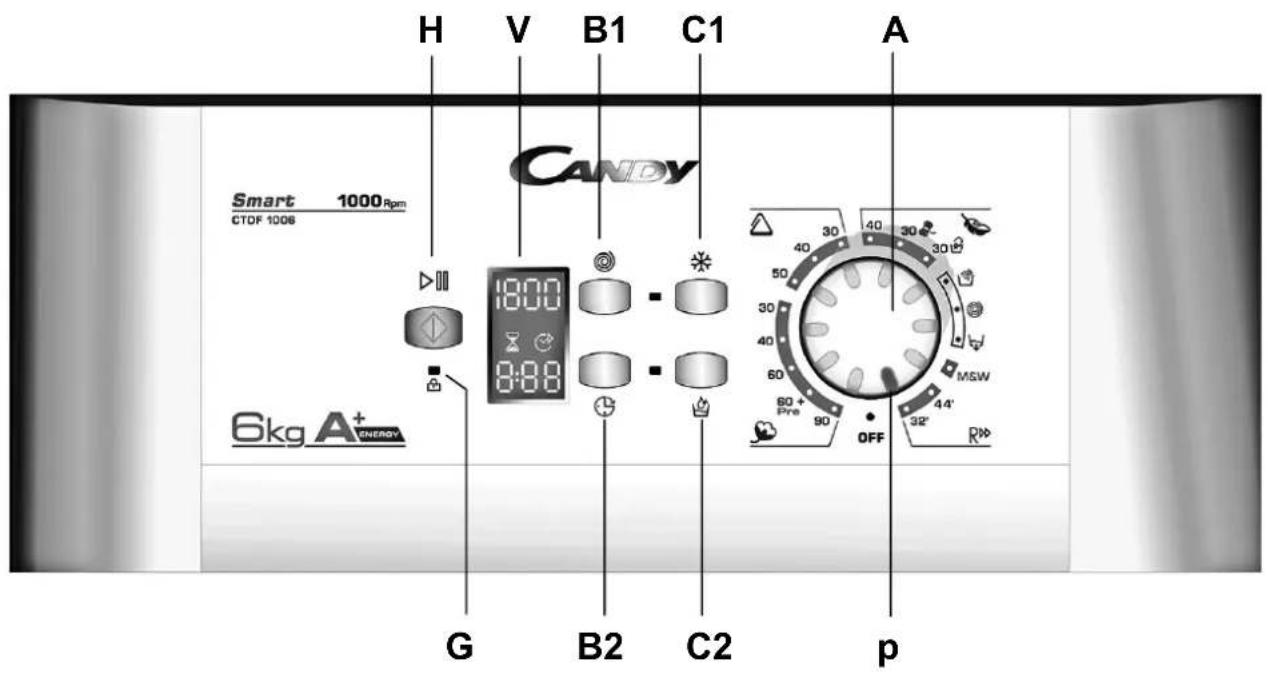
H V B1 C1 A Smart 1000Rpm CTDF 1008 6kg A+ Energy G B2 C2 p CANDY 1800 8:88 40 30 40 30 30 50 30 40 60 60 + Pre 90 OFF MSW 44' 32'A PROGRAMME SELECTOR
Use this control to select the desired wash programme. Turn the selector (it can be turned in both directions) so that the programme is opposite the reference indicator (p). The temperature selected will depend on the programme. (See the Programme Table).
B1 SPIN SPEED SELECTOR
B 2 DELAY START ⏱
C1 COLD WASH
C2 AQUAPLUS (SENSITIVE KEY)
G DOOR LIGHT
H START/PAUSE KEY
V "DIGITAL" Display
The display's indicator system allows you to be constantly informed about the status of the machine
p CONTROL POSITION INDICATOR
Programme table mod CTDF 1006
| programme programme for | aprox. time min. | max. temp. setting °C | spin speed rpm/min | max. load Kg. | washing powder load | option keys C | ||||
| I II | ||||||||||
| [19WWD]COTTONS | White display 90° 1000 6 | • • | • • | |||||||
| Fast coloureds with prewash display 60° 1000 6 | • • | • • | • | |||||||
| *Fast coloureds display 60° 1000 6 | • • | • • | ||||||||
| Fast coloureds display 40° 1000 6 | • • | • • | ||||||||
| Delicate coloureds display 30° 1000 6 | • • | • • | ||||||||
| [3748]MIXED SYNTHETICS | Fast coloureds display 50° 800 2 | • • | • • | |||||||
| Delicate coloureds display 40° 800 2 | • • | • • | ||||||||
| Delicate coloureds display 30° 800 2 | • • | • • | ||||||||
| [4152]DELICATES | Delicates | display | 40° | 600 | 1,5 | • • | • | |||
| Woollens | display | 30° 800 | 1 | • • | • | |||||
| Hand wash | display | 30° 800 | 2 | • • | • | |||||
| SPECIAL | Gentle rinse | display | 800 | • | • | |||||
| Gentle spin | display | 1000 | ||||||||
| Empty | display | |||||||||
| Mix&wash (M&W) | display | 40° 800 | 6 | • • | • • | |||||
| Fast 44 | display | 40° 800 | 3,5 | • • | • | |||||
| Fast 32 | display | 30° 800 | 2 | • • | • | |||||
* Programme as per EN 60456
Technical data mod. CTDF 1006
| Mains voltage | Wash power rating | Spin power rating | Pump motor power rating | Heating element power rating | Max. Power input | Mains fuse Amp. rating | Water pressure | Water consumption *prog. EN60456 | Energy consumption *prog. EN60456 |
| 220-230V. 50Hz | 175 W. | 340 W. | 30 W. | 1950 W. | 2150 W. | 10 A. | 0,05-0,8 Mpa | 49 L. | 1,02 Kw. |
IMPORTANT: Do not use liquid detergent for programs with a prewash cycle and/or timed start.
PREPARING THE WASH CYCLE
1.- Once the washing is loaded, ensure that the drum doors are properly closed.
2.- Add detergent and additives, not exceeding the maximum level indicator.
• detergent for pre-wash I
• detergent for wash programme II
- fabric conditioner

SELECTING THE DESIRED PROGRAMMES AND OPTIONS
3.- Turn the programme selector (A) to the desired programme.
4.- Press the key or keys for any options desired (C1, C2).
.- It is advisable to select the required options before pressing the Programme Start key (H).
- Remember that if the programme has already passed the stage at which an option is activated, that option will not be implemented.
C1 cold wash key ✦
By pressing this button it is possible to transform every programme into a cold washing one, without modify other characteristics (water level, times, rythmes, etc..).
Curtains, small carpets, man made delicate fabrics, non coulor fast garments can be safely washed thanks to this new device.
C2 aquaplus (sensitive key)

Thanks to the new SENSOR ACTIVA SYSTEM, by pressing the key it is possible to run a special washing cycle applicable to all programs and types of fabric, caring for their fibres and the delicate skin of the users who use them.
Taking on much more water, together with the new combined action of drum rotation cycles and taking on and discharging water allow you to obtain perfectly clean, rinsed clothes. More water is used in the wash to dissolve the detergent completely, ensuring an effective washing action. The water in the rinses has also been increased to eliminate all trace of detergent in the fibres.
This function has been specifically studied for people with delicate, sensitive skin, who can suffer irritation or allergy from the slightest detergent residue.
It is also advisable to use this function for children's clothes and delicate fabrics in general, especially for washing bathrobes, whose fibres tend to retain detergent.
This option is not available for the wool program.
6.- Select spin speed if required (B1)
B1 spin speed
Once the programme has been selected, the maximum spin speed allowed for that programme appears on the display. Pressing the spin button will reduce the speed by 100 rpm each time the button is pressed. The minimum speed allowed is 400 rpm, or it is possible to omit the spin by pressing the spin button repeatedly.
7.- To start the programme, once options have been chosen, press the key H. The washing machine will begin to operate. If you wish to cancel the option you have selected, press the key again. (The pilot light will go off).
B2 delay start button

This button allows you to pre-programme the wash cycle to delay the start of the cycle for up to 24 hours.
To delay the start use the following procedure:
Set the required programme.
Press the button once to activate it (h00 appears on the display) and then press it again to set a 1 hour delay (h01 appears on the display); the pre-set delay increases by 1 hour each time the button is pressed, until h24 appears on the display, at which point pressing the button again will reset the delay start to zero.
Confirm by pressing the "START/PAUSE" button (the light on the display starts to flash). The countdown will begin and when it has finished the programme will start automatically.
It is possible to cancel the delay start by taking the following action:
Press and hold the button for 5 seconds until the display will show the settings for the programme selected.
At this stage it is possible to start the programme previously selected by pressing the “START/PAUSE” button or to cancel the process by setting the selector to the OFF position and then selecting another programme.
cycle duration (V)
When a programme is selected the display automatically shows the cycle duration, which can vary, depending on the options selected. Once the programme has started you will be kept informed constantly of the time remaining to the end of the wash.
door light (G)

Once the START/PAUSE button has been pressed the light first flashes then stops flashing and remains until the end of the wash.
2 minutes after the end of the wash the light goes off to show that the door can now be opened.
Cancel-change programs
Once you have started a program, and wish to change or cancel it, you should proceed in the following manner,
- Put the program selector in the OFF position. At that instant, you have cancelled the program and can if you wish to do so, select a new one.
- Select the new program.
- Click the key (H) again.
The washing machine will perform the new selected program.
Programme pause
It is possible to momentarily stop the wash programme so that more washing can be added, and to do so, proceed as follows:
- Hold down the (H) key until the option key lamps begin to flash and the time remaining indicator display, and pilot lamp lights up.
- When the Door Lock lamp goes out (after approx. 2 minutes), open the door and add the desired washing.
- Correctly close the doors of the drum and the outer cover.
- Press the key H, and the washing machine will continue with the programme.
When the programme has been completed, the message "END" will appear in the indicator display, Wait until the Door Lock lamp (G) goes out (after approx. 2 minutes)
"To remove the washing, set the programme selector to the OFF position", before opening the washing-machine lid and the drum doors.