
KF301 - Smartphone LG - Kostenlose Bedienungsanleitung
Finden Sie kostenlos die Bedienungsanleitung des Geräts KF301 LG als PDF.


Benutzerfragen zu KF301 LG
0 Frage zu diesem Gerät. Beantworten Sie die, die Sie kennen, oder stellen Sie Ihre eigene.
Eine neue Frage zu diesem Gerät stellen
Laden Sie die Anleitung für Ihr Smartphone kostenlos im PDF-Format! Finden Sie Ihr Handbuch KF301 - LG und nehmen Sie Ihr elektronisches Gerät wieder in die Hand. Auf dieser Seite sind alle Dokumente veröffentlicht, die für die Verwendung Ihres Geräts notwendig sind. KF301 von der Marke LG.
BEDIENUNGSANLEITUNG KF301 LG
繁體中文
简体中文
ENGLISH
Life's Good
使用手册
KF301
www.lg.com
P/NO : MMBB0372902 (1.1)

Life's Good


Bluetooth QD ID BO16215
KF301 使用手册 — 繁體中文
此手冊中的部份內容可能會因手機程式之改良或不同網絡商提供的服務而令實際情況有所不同,這並不會另行通知。
natural_image
Front view of a gray LG phone with a circular sensor icon on the screen (no text or symbols beyond branding)内容
安裝智能咭和手機電池……4
安装智能咭....4
插圖....4
手機部件....5
開啓和關閉手機....6
撥打電話....6
撥打國際電話....6
接聽來電....6
選擇功能和選項....7
輸入文字....8
T9 模式.....8
123 模式(數字模式)……8
符號模式....8
安裝記憶咭....9
手機遺失追蹤 (ATMT)....10
功能表樹....11
快速功能参考....12
訊息....12
新訊息....12
收件匣....12
草稿匣....12
寄件匣....12
寄件備份....12
已儲存的項目....12
訊息列表....12
訊息設定....12
通訊錄....13
名稱....13
新增通訊錄....13
設定....13
群組....13
快速撥號....13
服務號碼....13
本機號碼....13
我的名片....13
通話記錄....14
所有通話....14
未接來電....14
已接來電....14
已撥電話....14
訊息計數器....14
通話時間....14
GPRS 計數器....14
通話費用....14
設定....14
情景模式....14
顯示....14
日期及時間....14
連接....14
通話....14
手機....15
Java 設定....15
安全....15
記憶體管理員....15
還原原廠設定....15
媒體匣....16
遊戲與應用程式....16
圖形....16
圖片 16
音樂檔案....16
已接收的檔案....16
錄製....16
提示音....16
影片....16
多媒體....16
相機....16
影片....16
音樂....16
FM 收音機....16
語音記錄器....16
鈴聲建立者....17
工具箱....17
鬧鐘....17
行事曆....17
待辦事項列表....17
備註....17
計算機....17
碼錶....17
日期搜尋器....17
單位換算器....17
時區設置....17
智能咭服務....17
應用程式....18
我的遊戲及應用程式……18
Java 設定....18
瀏覽器....18
首頁....18
Google....18
書簽....18
前次瀏覽網頁 18
設定....18
輸入位址....18
已儲存的頁面....18
安全與有效使用準則……19
配件....22
技術數據....23
安裝智能咭和手機電池
安裝智能咭
申請手機網絡後,您將獲得一張外掛程式智能咭,當中有申請的詳細資料,如 PIN 碼、各種可選服務和許多其他內容。
重要資訊!>由於智能咭及其觸點很容易因刮痕或彎曲而損壞,因此在使用、插入或取出智能咭時要加倍小心。將所有智能咭放置在兒童無法觸及的地方。
插圖
取下電池前,必須關掉手機並切斷電源。
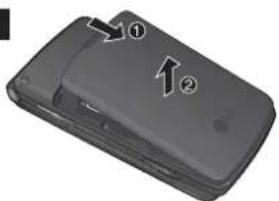
1 取下電池蓋。
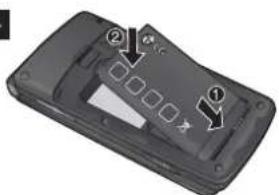
4 插入電池。
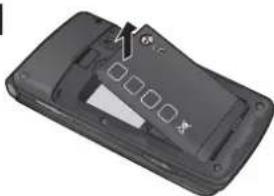
2 取下電池。
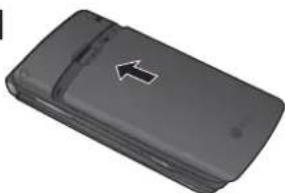
5 套上電池蓋。
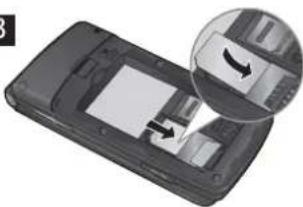
3 插入智能卡
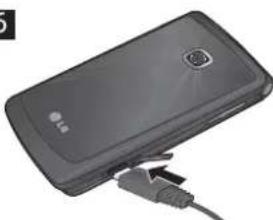
6 為電池充電。
備註:首次使用之前請為電池充滿電量。
1
text_image
Diagram of a smartphone showing two labeled parts with arrows indicating movement or change.2
natural_image
3D model of a black mobile phone casing with visible internal components and no text or symbols3
natural_image
Close-up of a smartphone showing the screen and keyboard with an inset close-up of the keyboard (no text or symbols visible)4
text_image
Diagram of a handheld device with labeled parts, showing internal components and directional arrows5
natural_image
3D rendered image of a mobile phone casing with a white arrow pointing to the side panel (no text or symbols visible)6
natural_image
Black handheld electronic device with a USB cable connector (no visible text or symbols)手機部件
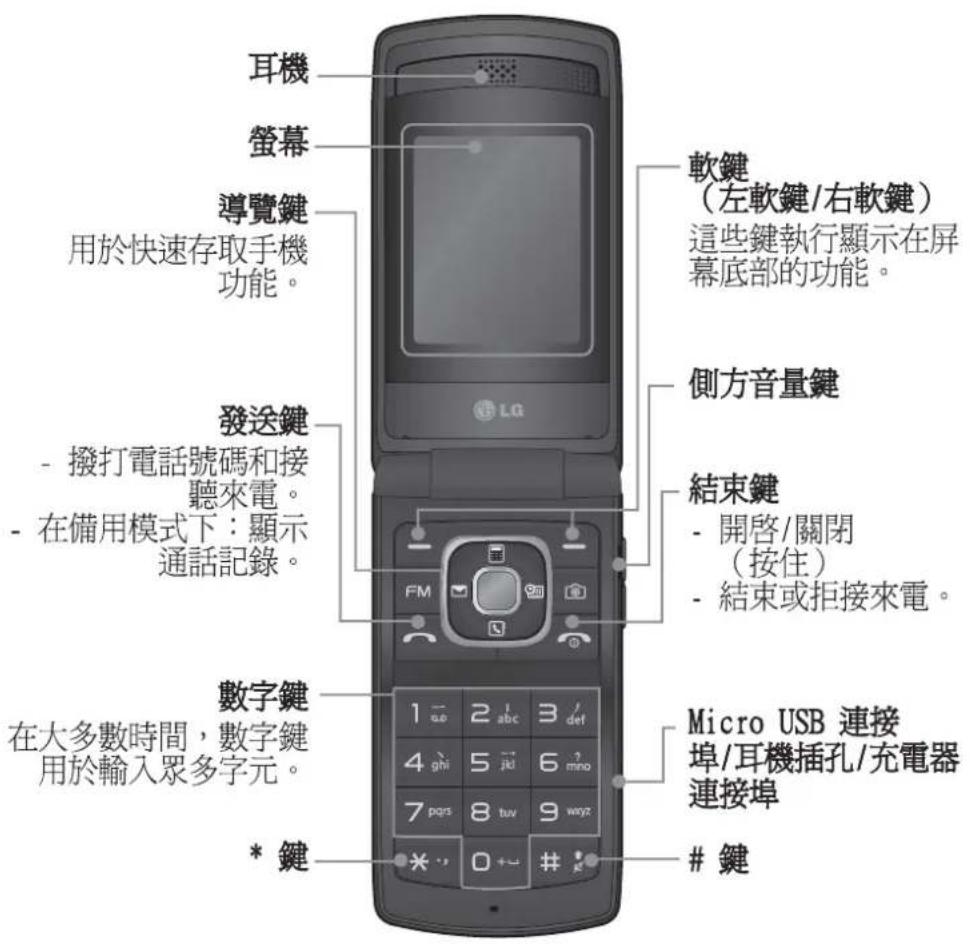
text_image
耳機 螢幕 導覽鍵 用於快速存取手機功能。 發送鍵 - 撥打電話號碼和接聽來電。 - 在備用模式下:顯示通話記錄。 數字鍵 在大多數時間,數字鍵用於輸入眾多字元。 * 鍵 軟鍵 (左軟鍵/右軟鍵) 這些鍵執行顯示在屏幕底部的功能。 側方音量鍵 結束鍵 - 開啓/關閉 (按住) - 結束或拒接來電。 Micro USB 連接埠/耳機插孔/充電器連接埠鍵
開啓和關閉手機
- 按住結束鍵,直到開機。
- 按住結束鍵,直到關機。
撥打電話
- 輸入電話號碼,包括區碼。
- 按 一 鍵撥打號碼。
- 要結束通話,請按 🔒 鍵。
撥打國際電話
- 按住 □→ 鍵可了解國際地區號碼。「+」字元自動選擇國際地區號碼。
2.輸入國家代碼、區域代碼和電話號碼。 - 按 [發送] 鍵撥打號碼。
接聽來電
- 接到來電時,手機會發出鈴聲。
- 如果已將按任意鍵設定為接聽模式(設定 > 通話 > 接聽模式),則按除 🔍 鍵外的任何鍵均可接聽來電。
- 要結束通話,請按 🔒 鍵。
選擇功能和選項
本手機提供了一組讓您可以自訂手機的功能。這些功能配置在功能表與子功能表中,利用兩個標示為 ▪ 和 ▪ 的軟鍵來存取。您可以利用每個功能表與子功能表查看及變更特定功能的設定。
軟鍵作用將隨當前的上下文而有所不同;螢幕下方位於每個軟鍵正上方的一行標簽會顯示軟鍵目前的功用。
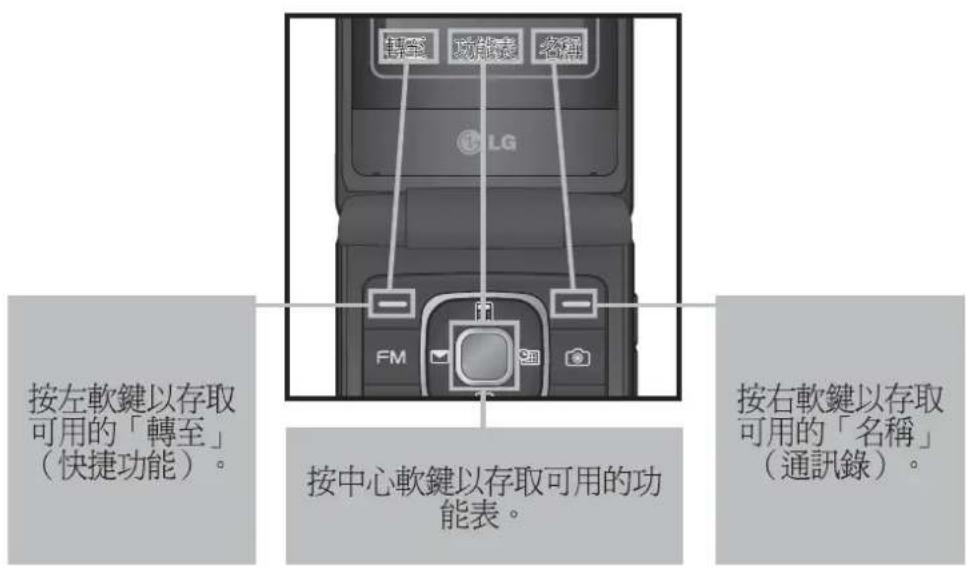
text_image
按左軟鍵以存取可用的「轉至」(快捷功能)。 按中心軟鍵以存取可用的功能表。 按右軟鍵以存取可用的「名稱」(通訊錄)。輸入文字
使用手機按鍵,您可輸入英數字元。
T9 模式
T9 預測文字輸入模式讓您可以透過最少的按鍵次數輕鬆輸入單字。當您按每個按鍵時,手機會開始根據內建字典顯示手機認爲您要鍵入的字元。
123 模式(數字模式)
按住按鍵即可輸入數字。
符號模式
您可以使用符號模式輸入各種符號或特殊字元。要輸入符號,請選擇選項 → 插入符號。使用導覽鍵選擇所需的符號並按「確定」鍵。
安裝記憶咭
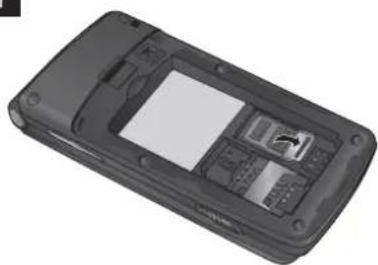
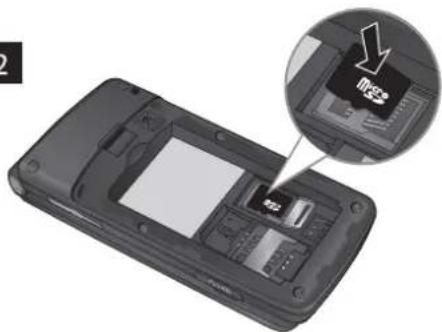
向上提起記憶咭蓋並插入 MicroSD 咕,確保記憶咭金色接觸區面朝下。關閉記憶咭蓋,直至聽到咔嗒聲。
要取出記憶咭,輕輕推動記憶咭,如圖所示。
備註:記憶咭是可選配件。
1
natural_image
Black mobile phone with visible keypad and display screen (no text or symbols)2
natural_image
Interior view of a mobile phone showing the main panel and internal components, with an inset close-up highlighting a device (no text or symbols visible)3
natural_image
Black mobile phone casing with visible internal components and display screen (no text or symbols)4
natural_image
Black mobile phone casing with visible keypad and display screen (no text or symbols)手機遺失追蹤 (ATMT)
手機遺失追蹤(ATMT)可追蹤丟失的手機。若某人在未經許可的情況下使用您的手機,系統將啟用此追蹤服務。
系統會在未授權使用者不知情的情況下,向您預設的電話號碼發送一則文字訊息提醒您。您可始終啟動 ATMT 並設定您的個人設定。
啓用手機遺失追蹤
- 在主功能表中,依次選擇設定 > 安全 > 手機遺失追蹤並按選擇。
- 選擇設定遺失追蹤並按選擇。
- 開啓或關閉並按選擇。
- 輸入安全密碼以啓用或停用此功能。
- 然後在「手機遺失追蹤」功能表中,編輯並儲存寄件者名稱中的名稱以及正在發送號碼列表中的號碼。
備註
預設 ATMT 碼為「0000」。設定 ATMT 設定前您需要輸入追蹤碼。
功能表樹
1 訊息
1 新訊息
2 收件匣
3 草稿匣
4 寄件匣
5 寄件備份
6 已儲存的項目
7 訊息列表
8 訊息設定
2 通訊錄
1 名稱
2 新增通訊錄
3 設定
4 群組
5 快速撥號
6 服務號碼
7 本機號碼
8 我的名片
3 通話記錄
1 所有通話
2 未接來電
3 已接來電
4 已撥電話
5 訊息計數器
6 通話時間
7 GPRS 計數器
8 通話費用
4 設定
1 情景模式
2 顯示
3 日期及時間
4 連接
5 通話
6 手機
7 Java 設定
8 安全
9 記憶體管理員
10 還原原廠設定
5 媒體匣
1 遊戲與應用程式
2 圖形
3 圖片
4 音樂檔案
5 已接收的檔案
6 錄製
7 提示音
8 影片
6 多媒體
1 相機
2 影片
3 音樂
4 FM 收音機
5 語音記錄器
6 鈴聲建立者
工具箱
1 鬂鐘
2 行事曆
3 待辦事項列表
4 備註
5 計算機
6 碼錶
7 日期搜尋器
8 單位換算器
9 時區設置
10 智能咭服務
8 應用程式
1 我的遊戲及應用程式
2 Java設定
9 瀏覽器
1 首頁
2 Google
3 書簽
4 前次瀏覽網頁
5 設定
6 輸入位址
7 已儲存的頁面
快速功能参考
此部份提供本手機功能的簡要說明。
訊息 功能表 1
| 新訊息 | 此功能表包含與 SMS(短訊服務)及 MMS(多媒體訊息服務)有關的功能。 |
| 收件匣 | 收到訊息後,系統將提示您。收到的訊息將儲存在「收件匣」中。 |
| 草稿匣 | 您可以將訊息暫時儲存在「草稿匣」中。 |
| 寄件匣 | 這是暫時儲存資料夾,用於儲存未寄出的訊息或已發送但未送達的訊息。 |
| 寄件備份 | 在發出訊息後,文字訊息或多媒體訊息將會儲存在「寄件備份」資料夾中。 |
| 已儲存的項目 | 您可以存取儲存的訊息、文字範本和多媒體範本。 |
| 訊息列表 | 資訊服務訊息為網絡發送給 GSM 的文字訊息。 |
| 訊息設定 | 該功能表可讓您設定網絡服務供應商的功能。 |
通訊錄 功能表 2
| 名稱 | 選擇名稱和輸入您要在聯絡人清單中搜尋的名稱。 |
| 新增通訊錄 | 您可記錄新聯絡人的地址。您可以輸入新聯絡人的名稱、其他電話號碼、電子郵件地址、群組及圖片。 |
| 設定 | 您可設定通訊錄顯示選項。 |
| 群組 | 您可在每個群組中列出最多成員。 |
| 快速撥號 | 您可為姓名清單項目指定2至8的任何一鍵。在備用螢幕中,按其中一個按鍵便可直接撥打與其相應的電話號碼。 |
| 服務號碼 | 使用此功能可存取您的網絡商提供的特定服務清單(如果智能咭支援)。 |
| 本機號碼 | 您可儲存和檢查智能咭中的本機號碼。 |
| 我的名片 | 此選項可讓您建立包含自己姓名與任何號碼的個人名片。 |
通話記錄 功能表 3
所有通話 您可檢視所有撥出電話或來電的列表。
未接來電 您可以檢視未接聽的來電。
已接來電 您可以檢視已接來電。
已撥電話 您可以檢視撥出的電話號碼。
訊息計數器 檢視已發送和已接收的訊息數。
通話時間 您可以查看來電與撥出電話的通話時間。您亦可以重設通話計時。
GPRS 計數器 您可查看在網絡上傳輸的數據量。
通話費用 檢視套用到已撥號碼的費用及所有已接來電及已撥電話的通話時間。您還可以進行「費用設定」。
設定 功能表 4
情景模式 您可以調整和自訂不同事件或環境的手機鈴聲。
顯示 可變更手機畫面的設定。
日期及時間 您可以設定與日期和時間相關的功能。
連接 您可以設定手機與其他裝置或網絡連接的條件或數據。
通話 可設定與通話相關的功能表。
設定 功能表 4(續)
| 手機 | 可讓您設定手機>語言:您可以變更手機上顯示文字的語言。這亦會影響語言輸入模式。>省電模式:提供下列選項,「關閉」/「僅夜間」/「始終開啓」,用於變更原廠設定省電設定。>手機資訊:顯示您的手機號碼、型號以及軟件版本。 |
| Java 設定 | 您可以選擇 Java 或服務提供商的設定檔設定。 |
| 安全 | 此功能表可讓您設定手機的安全性。>PIN 碼要求:您可將手機設定為開機時要求輸入智能咭的 PIN 碼。>手機鎖:您可以使用安全密碼來防止手機的未被授權使用。>若智能咭變更,鎖定手機:在智能咭變更時設定鎖定功能。>手機遺失追蹤:本手機的 ATMT 功能讓您可以在丟失手機或忘記將其放置在什麼地方時追蹤到手機所在。>更改密碼:PIN 碼是個人識別號碼(Personal Identification Number)的簡寫,用以防止未經授權的使用。您可更改存取密碼:安全密碼、PIN 碼、PIN2 碼、ATMT 密碼。 |
| 記憶體管理員 | 您可以檢查手機、智能咭以及外置記憶體(如已插入)的可用空間和記憶體使用狀況。 |
| 還原原廠設定 | 您可初始化離廠預設值。要啟動此功能,您需要使用安全密碼。 |
媒體匣 功能表 5
遊戲與應用程式 您可存取手機上的多種遊戲和應用程式。
圖形 可讓您檢視預設圖像檔案的清單。
圖片顯示圖像檔案的清單。
音樂檔案 列出儲存在記憶體中並且您可在此聆聽的音樂檔案。
已接收的檔案 您可檢視已接收檔案的清單。
錄製 此資料夾包含 FM 收音機錄製和語音錄製。
提示音 顯示您手機中的提示音與鈴聲的清單。您可在此處管理聲音或將聲音設定為鈴聲。
影片 顯示影片檔案的清單。
多媒體 功能表 6
相機 您可使用內置相機拍照,並可根據需要調整其設定。
影片 您可透過內置相機錄製影片短片。
音樂 您可利用手機中的歌曲輕鬆欣賞各種音樂。
FM 收音機 您可利用外置耳機收聽 FM 收音機。您可隨時聆聽最愛的電台。
備註:要聆聽收音機並保持最佳收音效果,您必須將耳機插入免提插孔。
語音記錄器 您可以錄製語音備忘。
多媒體 功能表 6(續)
鈴聲建立者 此功能可讓您使用此工具建立自己的個人鈴聲。
工具箱 功能表 7
鬧鐘 您可設定鬧鐘在指定時間響鈴。
行事曆 您可查看行事曆並為其中的選定日期新增事件。
待辦事項列表 您可檢視、修改和新增要完成的工作。
備註 您可新增備忘錄,檢視和管理已儲存的備忘錄。
計算機 計算機提供基本的計算功能,包括:加法、減法、乘法及除法。
碼錶 此選項可使您使用碼錶功能。
日期搜尋器 您可透過加(之後)或減(之前)天數來計算目標日期。
單位換算器 此功能可將任何測量數據轉換至所需的單位。有多種類型的數據可以轉換單位:貨幣、面積、長度、重量、溫度、體積、速度。
時區設置 時區設置功能可提供世界主要城市的時間資訊。您亦可將任何城市設定為住家所在城市,以及開啓或關閉日光節約。
智能咭服務 此功能取決於智能咭和網絡服務。
如果智能咭支援 SAT(即智能咭應用程式工具集)服務,本功能表將出現智能咭上儲存之網絡商服務名稱。
應用程式 功能表 8
我的遊戲及應用程式 將新遊戲和應用程式下載至手機上以供消遣。
Java 設定 設定 Java 網絡連接
瀏覽器 功能表 9
首頁 連線至主頁。 主頁將為於啟動網絡設定中定義的站點。
Google 您可由此直接存取 Google 網頁。
書簽 此功能表可讓您儲存最愛網頁的網址,以便稍後輕鬆存取。
前次瀏覽網頁 此功能表顯示最近瀏覽網頁的歷史記錄。
設定 您可設定與互聯網服務相關的網絡設定、暫存記憶和安全。
輸入位址 您可直接連線至所需的站點。在輸入特定網址後,按「確定」鍵以建立與網站的連接。
已儲存的頁面 可讓您檢視已儲存的網頁。
安全與有效使用準則
請讀取以下簡易的使用規則。違反這些準則可能會發生危險或觸犯法律。欲知詳細資訊,請參閱本手冊。
警告
出於安全考慮,請僅使用指定的原裝電池和充電器。
請於任何有特殊限制的地方關閉手機,例如醫院(可能會對醫療設備造成影響)。
請根據相關法例來處理棄置的電池。
產品保護及維護
警告!請僅使用經認可適用於此特定型號手機的電池、充電器及配件。使用其他種類的配件可能會導致手機的認可或保固失效,並可能引致危險。
請勿拆開此裝置。如手機需要維修,請由合資格的維修技師進行維修。
根據 LG 的政策,保固期內的維修可能會包括更換部件或主板,這些用於更換的部件或主板可能是新亦可能是返修的,但其功能與被更換的部件相同。
應使本裝置遠離熱源,如散熱器或烹調器具。
使用乾布清潔裝置表面。(請勿使用任何溶劑。)
,請勿將手機置於信用卡或車票附近,這可能會影響磁帶上的資料。
電子裝置
所有手機都可能會因為受到干擾而影響效能。
未經允許,請勿在醫療設備附近使用您的手機。避免將手機放置在起搏點上,例如您的胸口袋。
安全與有效使用準則(續)
道路安全
檢查您駕駛時地區使用手機的法例及規則。
駕駛時請勿使用手提手機。
如有免提聽筒套件,請使用免提聽筒套件。
若有駕駛條例要求,請駛離馬路並停泊好汽車後才撥打或接聽電話。
爆破地區
請勿在進行爆破時使用手機。請嚴格遵守相關限制、規定或條例。
潛在爆炸環境
請勿在燃料補給點使用手機。請勿在燃料或化學物質旁使用手機。
在飛機上
無線裝置可引致飛機干擾。
登機前,請先關掉手機。
兒童
將手機放在兒童接觸不到的安全地方。包括可能引起窒息的小零件。
緊急通話
緊急呼叫可能在某些電話網絡不能發出。因此,您不應僅倚賴手機作爲緊急通話的方式。請向您本地的服務供應商查詢。
電池資訊及保護
充電前,您無需將電池完全放電。跟其他電池系統不同,它不會產生可降低電池效能的記憶效應。
請僅使用 LG 電池和充電器。LG 充電器是為將電池壽命擴至最大而設。
請勿拆解電池組或造成電池組短路。
當電池不再提供可接受的效能,請更換電池。 電池組可重充數百次直至需要更換為止。
請勿直接將充電器暴露於日光下或高濕度環境(如浴室)中。
若使用類型不當的電池,則有發生爆炸的危險。
請根據製造商的指示來處理廢棄電池。
射頻能量暴露準則
無線電波暴露及比吸收率(SAR)資訊
本型號手機 KF301 之設計符合適用的無線電波暴露安全要求。此要求根據包括專為確保任何年齡、任何健康狀況的所有人士安全而設的安全極限的科學指引。
無線電波暴露指引的量度單位叫作比吸收率或 SAR。SAR 測試使用標準方法進行,用手機以在所有使用的頻帶最高的合格電源水平傳輸。
雖然不同型號 LG 手機的 SAR 水平有所差異,但所有這些手機的設計均符合無線電波暴露的相關指引。
國際非離子化輻射保護委員會(ICNIRP)建議的 SAR 限制,即平均十(10)克組織 2W/kg。
經 DASY4 測試,此型號手機在耳邊使用時的最高 SAR 值為 1.21W/kg(10 克),在身上佩戴時為 0.247W/kg(10 克)。
採用了電氣與電子工程師學會(IEEE)建議的 SAR 限制,即平均一(1)克組織 1.6 W/kg 的國家/地區居民的 SAR 數據資料。
配件
有不同的配件供您的手機使用。您可以根據您的個人通訊要求選擇這些選項。
標準電池
natural_image
Black rectangular electronic device with four square buttons and a small 'X' symbol on the side (no readable text or labels)旅行充電器
natural_image
Electric plug with attached cable, no visible text or symbols耳機
natural_image
Coiled medical or electronic device with earplugs and a connector (no visible text or symbols)備註
只可使用原裝 LG 配件。若不使用原裝 LG 配件,則保固可能失效。
不同的地區可能有不同的配件,請向我們的地區服務公司或代理商查詢更多詳情。
技術數據
環境溫度
最高:+55℃(放電)
+45°C(充電)
最低:-10℃
藍芽 QD ID B016215
| 1 | 2 | 3 | 4 | 5 | 6 | 7 | 8 | 9 | 10 | |
| 1.0 | 1.0 | 1.0 | 1.0 | 1.0 | 1.0 | 1.0 | 1.0 | 1.0 | 1.0 | 1.0 |
| 1.0 | 1.0 | 1.0 | 1.0 | 1.0 | 1.0 | 1.0 | 1.0 | 1.0 | 1.0 | 1.0 |
| 1.0 | 1.0 | 1.0 | 1.0 | 1.0 | 1.0 | 1.0 | 1.0 | 1.0 | 1.0 | 1.0 |
| 1.0 | 1.5 | 1.5 | 1.5 | 1.5 | 1.5 | 1.5 | 1.5 | 1.5 | 1.5 | 1.5 |
| 1.0 | 2.0 | 2.0 | 2.0 | 2.0 | 2.0 | 2.0 | 2.0 | 2.0 | 2.0 | 2.0 |
| 1.0 | 2.5 | 2.5 | 2.5 | 2.5 | 2.5 | 2.5 | 2.5 | 2.5 | 2.5 | 2.5 |
KF301 用户手册 — 简体中文
此手册中的部份内容可能会因手机程序之改良或不同网络商提供的服务而令实际情况有所不同,这并不会另行通知。
natural_image
Front view of a gray LG phone with a circular logo on the screen (no text or symbols beyond branding)目录
安装 SIM 卡和手机电池.....4
安装 SIM 卡.....4
说明....4
手机部件....5
开机和关机....6
拨打电话....6
拨打国际电话……6
接听电话....6
选择功能和选项....7
输入文本.....8
T9 模式.....8
123 模式(数字模式)……8
符号模式....8
安装存储卡....9
手机防盗跟踪器 (ATMT)....10
菜单树....11
快速功能参考....12
信息....12
创建信息....12
收件箱....12
草稿箱....12
发件箱....12
已发送....12
保存的项目....12
信息....12
信息设置....12
电话本....13
姓名……13
添加....13
设置....13
群组....13
快速拨号....13
服务号码....13
本机号码....13
我的名片....13
记录....14
通话记录....14
未接来电....14
已接来电....14
拨出号码....14
短信计数器....14
通话时间....14
分组数据计数器....14
通话费用....14
设置....14
情景模式....14
显示....14
日期和时间....14
连接....14
通话....14
手机....15
Java 设置....15
安全性....15
内存管理器....15
恢复出厂设置....15
图片库....16
游戏和应用程序....16
图片....16
图像....16
音乐文件....16
接收的文件....16
录制....16
按键音....16
视频....16
媒体……16
相机....16
视频....16
音乐....16
FM 收音机.... 16
语音备忘录....16
铃声创作....17
管理器....17
闹钟....17
日历....17
任务列表....17
备注……17
计算器....17
秒表....17
日期计算器....17
换算器....17
世界时间....17
SIM 卡服务..... 17
应用程序....18
我的应用程序....18
JAVA设置....18
网络....18
主页....18
Google....18
书签....18
上一个网址....18
设置....18
转到网址....18
已保存的页面....18
关于安全有效使用手机的准则..19
配件....22
Technical Data.....23
安装 SIM 卡和手机电池
安装 SIM 卡
当您预定了手机网络后,您将得到一个插入式 SIM 卡,该卡上载入了您的预定详细信息,如您的 PIN 码、任何可用的可选服务以及其他服务。
重要!> 插入式 SIM 卡及其内容很容易因刮擦或弯折而损坏,因此,在处理、插入或移除卡时,请小心谨慎。请将所有 SIM 卡置于儿童无法接触的地方。
说明
取出电池前,请始终关闭手机并断开与充电器的连接。
1 卸下后盖。
2 取出电池。
3 插入 SIM 卡。
4 插入电池组。
5 盖上后盖。
6 充电。
备注:第一次使用前,请完全充电。
text_image
1 ① ②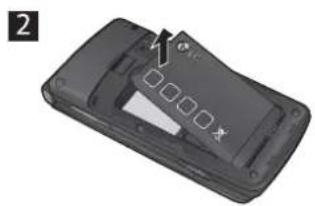
natural_image
3D model of a black handheld device with a white plastic cover and a small black mark on the side (no text or symbols visible)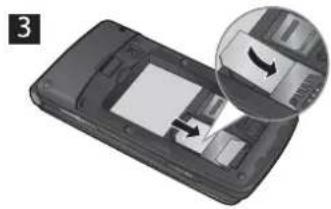
natural_image
Close-up of a mobile phone showing the screen and keypad with an inset close-up of its internal components (no text or symbols visible)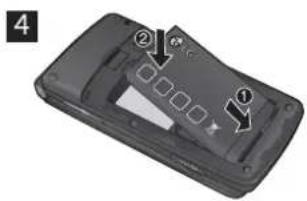
text_image
4 ② ①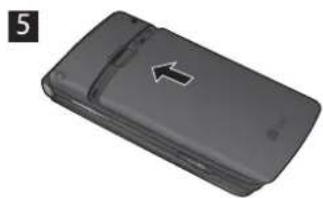
natural_image
Black rectangular device with a white arrow pointing to its side (no text or symbols visible)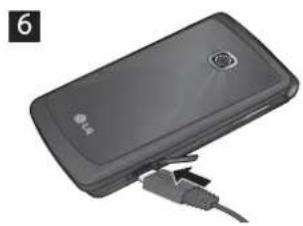
natural_image
Black handheld device with USB cable inserted, no visible text or symbols手机部件
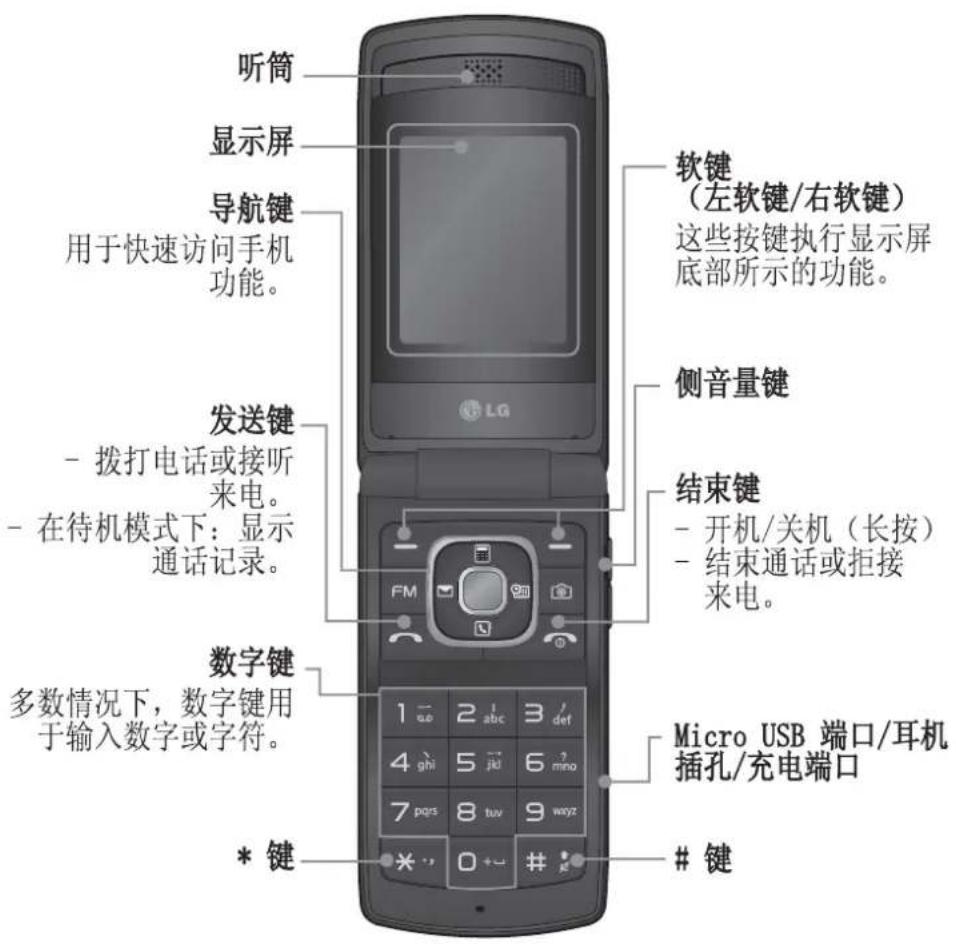
text_image
听筒 显示屏 导航键 用于快速访问手机功能。 发送键 - 拨打电话或接听来电。 - 在待机模式下:显示通话记录。 数字键 多数情况下,数字键用于输入数字或字符。 * 键 软键 (左软键/右软键) 这些按键执行显示屏底部所示的功能。 侧音量键 结束键 - 开机/关机(长按) - 结束通话或拒接来电。 Micro USB 端口/耳机插孔/充电端口键
开机和关机
- 按住结束键,直到开机。
- 按住结束键,直到关机。
拨打电话
- 输入电话号码,包括区号。
- 按 键呼叫号码。
- 要结束通话,请按 🔍 键。
拨打国际电话
- 长按 ☐+ 键以输入国际前缀。“+”字符自动选择国际接入码。
- 输入国家代码、地区代码和电话号码。
- 按 [发送] 键呼叫号码。
接听电话
- 当接收到电话时,手机响铃。
- 如果已将按任意键设置为接听模式(设置 > 通话 > 接听模式),则按除 🔍 键以外的任何按键可应答电话。
- 要结束通话,请按 🔍 键。
选择功能和选项
本款手机提供一系列可供您自定义手机的功能。这些功能位于菜单和子菜单中,可以通过两个标记为 ☐ 和 ☑ 的软键来访问。每个菜单和子菜单允许您查看和更改特定功能的设置。
根据当前的操作环境,软键发挥的作用也不同;每个按键上方、屏幕底部一行的文字指示其当前的作用。
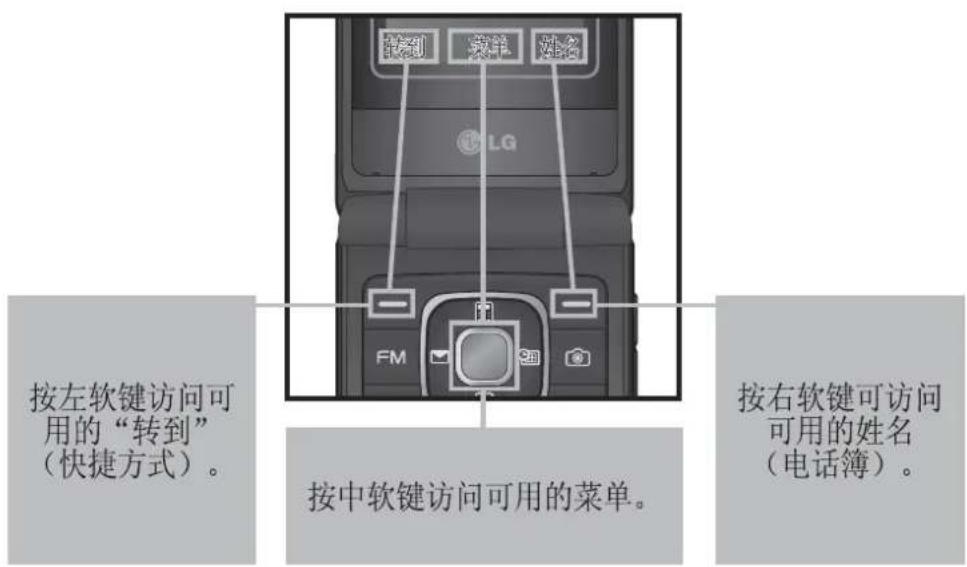
text_image
按左软键访问可用的“转到” (快捷方式)。 按中软键访问可用的菜单。 按右软键可访问可用的姓名 (电话簿)。输入文本
您可以使用手机键盘输入字母数字字符。
T9 模式
T9 预测性文本输入模式允许您以最少的按键次数输入单词。当您按每个按键时,手机开始显示它根据内置词典认为正确的字符。
123 模式(数字模式)
按住按钮按键键入数字。
符号模式
使用符号模式,您可以输入各种符号或特殊字符。要输入符号,请选择选项 → 插入符号。使用导航键键选择所需的符号,然后按“确定”键。
安装存储卡
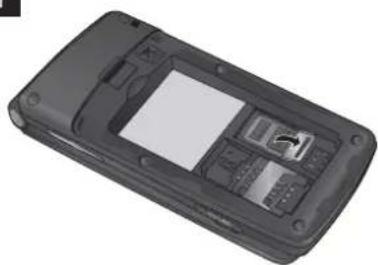
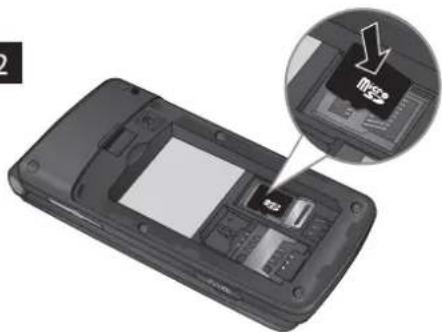
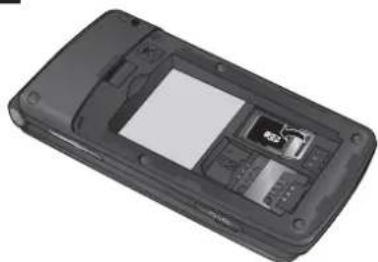
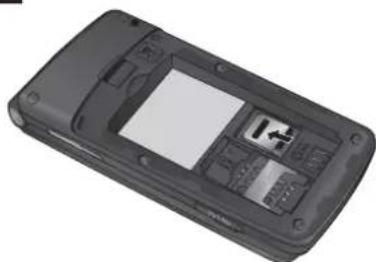
打开存储卡盖,将金色接触区域朝下插入 microSD 卡。关闭存储卡盖,使其卡合。
要取出存储卡,如图所示轻推。
备注:存储卡是可选配件。
1
natural_image
Black mobile phone with display screen and keypad (no visible text or symbols)2
natural_image
Interior view of a mobile phone showing the front panel and internal components, with an inset close-up highlighting a device (no text or symbols visible)3
natural_image
Black mobile phone casing with visible internal components and a small screen (no text or symbols)4
natural_image
3D rendering of a black mobile phone casing with visible keypad and display screen (no text or symbols)手机防盗跟踪器(ATMT)
手机防盗跟踪器(ATMT)允许您跟踪丢失的手机。如果有人未经您的许可使用您的手机,跟踪服务就会启动。
在未授权使用手机的人不知道的情况下,手机会向您设置的默认电话号码发送文本信息以通知您。您可以始终激活 ATMT,并配置个人设置。
激活手机防盗跟踪器
- 从主菜单中,选择设置 > 安全性 > 手机防盗跟踪器,然后按选择。
- 选择设置防盗,然后按选择。
- 选择开或关,然后按选择。
- 输入安全码启用或禁用此功能。
- 然后在手机防盗跟踪器菜单中,在发件人姓名中编辑和保存姓名,并在发送号码列表中编辑和保存号码。
备注
默认 ATMT 码为 “0000”。配置 ATMT 设置之前,您需要输入密码。
菜单树
1 信息
1 创建信息
2 收件箱
3 草稿箱
4 发件箱
5 已发送
6 保存的项目
7 信息 信息
8 信息设置
② 电话本
1 姓名
2 新联系人
3 设置
4 群组
5 快速拨号
6 服务号码
7 本机号码
8 我的名片
3 记录
1 通话记录
2 未接来电
3 已接来电
4 拨出号码
5 短信计数器
6 通话时间
7 分组数据计数器
8 通话费用
4 设置
1 网络设定
2 显示
3 日期和时间
4 连接
5 通话
6 手机
7 Java 设置
8 安全行
9 内存管理器
10 恢复出厂设置
5 图片库
1 游戏和应用程序
2 图片
3 图像
4 音乐文件
5 接收的文件
6 录制
7 按键音
8 视频
6 媒体
1 相机
2 视频
3 音乐
4 FM 收音机
5 语音备忘录
6 铃声创作
7 管理器
1 闹钟
2 日历
3 任务列表
4 备注
5 计算器
6 秒表
7 日期计算器
8 换算器
9 世界时间
10 SIM 卡服务
8 应用程序
1 我的应用程序
2 JAVA设置
9 网络
1 主页
2 Google
3 书签
4 上一个网址
5 设置
6 转到网址
7 保存的网页
快速功能参考
本节针对手机上的各功能提供了简短说明。
信息 菜单 1
| 创建信息 | 此菜单包括与短信(短信服务)和彩信(多媒体信息服务)有关的功能。 |
| 收件箱 | 当接收到信息时,您将会收到提示。这些信息存储在收件箱中。 |
| 草稿箱 | 您可以将临时信息保存在草稿箱中。 |
| 发件箱 | 这是信息在发送时的临时存储文件夹,或用于存储发送失败的信息。 |
| 已发送 | 信息发出后,文本信息或多媒体信息将保存在“已发送”文件夹中。 |
| 保存的项目 | 您可以访问保存的信息、文本模板和多媒体模板。 |
| 信息 | 小区广播信息是通过网络以文本信息形式向 GSM 用户发送的。 |
| 信息设置 | 此菜单允许您设置网络服务提供商的功能。 |
电话本 菜单 2
| 姓名 | 选择“姓名”并输入要从联系人列表中搜索的姓名。 |
| 添加 | 您可以注册新的联系人通讯信息。您可以输入新联系人的姓名、不同电话号码、电子邮件地址、群组和图像。 |
| 设置 | 您可以设置联系人显示选项。 |
| 群组 | 您可以列出每组的成员。 |
| 快速拨号 | 您可以为姓名列表项分配从2到8的任意按键。在待机模式下,可按此键直接呼叫。 |
| 服务号码 | 使用此功能访问网络运营商提供的特定服务列表(如果SIM卡支持)。 |
| 本机号码 | 您可以在SIM卡中保存和检查您自己的号码。 |
| 我的名片 | 此选项允许您创建自己的名片,包含姓名和任意号码。 |
记录 菜单 3
通话记录 您可以查看所有拨电和来电列表。
未接来电 您可以查看未应答的来电。
已接来电 您可以查看已接来电。
拨出号码 您可以查看拨出电话号码。
短信计数器 查看已发送和收到的信息数目。
通话时间 可查看来电和去电的通话持续时间长度。您也可以重置通话计时器。
分组数据计数器 您可以查看在网络上传输的数据量。
通话费用 查看拨电的费用,以及所有已接和拨出电话的时长。此外,您可以更改费用设置。
设置 菜单 4
情景模式 您可以针对不同事件或环境调整和自定义手机铃声。
显示 您可以更改手机显示的设置。
日期和时间 您可以设置与日期和时间相关的功能。
连接 您可以设置手机与其他设备或网络进行连接的条件或数据。
通话 您可以设置与呼叫相关的菜单。
设置 菜单 4(续)
手机 允许您设置手机
语言:您可以更改手机中显示文本的语言。此更改还将影响语言输入模式。
省电:从以下选项中选择,以更改出厂省电设置:关/仅夜间/始终打开。
手机信息:显示手机号码、型号和软件版本。
Java 设置 您可以选择 Java 或服务提供商的情景模式设置。
安全性 此菜单允许您安全设置手机。
需要 PIN 码:将手机设置为开机时需要请求 SIM 卡的 PIN 码。
手机锁:您可以使用安全密码来防止他人擅自使用手机。
SIM 卡更换时锁定:SIM 卡更换时设置锁定功能。
手机防盗跟踪器:本手机的 LMT 功能为您提供了跟踪系统,用于跟踪丢失或放错位置的手机。
更改密码:PIN 码是 Personal Identification Number 的缩写,用于限制未经授权的人员使用手机。您可以更改访问密码:安全码、PIN 码、PIN2 码、ATMT 码。
内存管理器 您可以检查手机、SIM 卡和外部储存卡(如已插入)的可用空间及储存器使用情况。
恢复出厂设置 您可以初始化所有出厂默认设置。要启动此功能,您需要安全密码。
图片库 菜单 5
游戏和应用程序 手机上提供了很多可供您选择的游戏和应用程序。
图片 允许您查看默认图像文件列表。
图像 显示图像文件列表。
音乐文件 列出内存中存储的音乐文件,您可以在此处收听。
接收的文件 您可以查看接收的文件列表。
录制 此文件夹包含 FM 收音机内容录制和录音。
按键音 显示手机中的提示音和铃声列表。在此,您可以管理或将声音设为铃音。
视频 显示视频文件列表。
媒体 菜单 6
相机 您可以使用内置相机拍照并根据需要调整设置。
视频 您可以使用内置相机录制视频剪辑。
音乐 使用手机中的歌曲,您可以轻松欣赏各种音乐。
FM 收音机 您可以使用外部耳机收听 FM 收音机。您可以随时收听喜欢的电台。
备注:您必须将耳麦插入免提接口,用来收听收音机并保证无线电接收信号良好。
语音备忘录 您可以录制语音备忘录。
媒体 菜单 6(续)
铃声创作 使用此工具,您可以创建个性铃音。
管理器 菜单 7
闹钟 您可以将闹钟设为在指定时间响铃。
日历 您可以查看日历并在所选日期中添加事件。
任务列表 您可以查看、编辑和添加要执行的任务。
备注 您可以添加新备忘录,查看并更改已保存的备忘录。
计算器 计算器提供基本的数学运算功能:加、减、乘、除。
秒表 使用此选项可使用秒表功能。
日期计算器 您可以通过添加(之后)或减去(之前)天数来计算目标日期。
换算器 此功能用于将任一度量值转换成所需的单位。有许多种单位可以转换:币种、面积、长度、重量、温度、体积和速度。
世界时间 世界时间功能提供世界各地主要城市的时间信息。此外,您也可以将任何城市设置为您的主城市,打开/关闭夏令时。
SIM 卡服务 此功能视 SIM 卡和网络服务而定。
如果 SIM 卡支持 SAT(即,SIM 卡应用程序套件)服务,则此菜单将是 SIM 卡上储存的运营商特定服务的名称。
应用程序 菜单 8
我的应用程序 将新游戏和应用程式下载至手机上以供消遣。
JAVA设置 设定 Java网络连接
网络 菜单 9
主页 连接到主页。 主页为在启动的网络设置中定义的站点。
Google 您可以直接从此处访问 Google 网页。
书签 此菜单使您可以存储喜爱网页的 URL 以便以后访问。
上一个网址 此菜单显示最近浏览的页面历史记录。
设置 您可以设置与互联网服务相关的网络设置、缓存、和安全性。
转到网址 您可以直接连接到所要的站点。在输入特定URL之后,按“确定”键以与网站建立连接。
已保存的页面 允许您访问保存的网页。
关于安全有效使用手机的准则
请阅读以下简单的准则。违反这些准则可能造成危险或者触犯法律。本手册中给出了进一步的详细信息。
警告
为了您的安全,请仅使用指定的原装电池和充电器。
在任何有特殊条例要求的区域关闭手机,例如,在医院中,因为它可能影响医疗设备。
应按照相关条例处置电池。
产品保养和维护
警告!仅使用经核准为用于此特定手机型号的电池、充电器和配件。使用任何其它类型可能导致适用于此手机的许可或保修失效,并可能造成危险。
不要拆解手机。当需要维修时,请将手机送往合格的服务技术人员处。保修(由 LG 决定)可能包括使用新的或返修的更换部件或板,只要其功能与更换的部件等效。
远离诸如暖气片或厨灶之类的热源。
使用干布清洁手机外壳。(不要使用任何溶剂。)
不要将手机放在信用卡或卡式车票旁边,它可能会影响磁条上的信息。
电子设备
所有手机都可能受到干扰,这种干扰会对性能造成影响。
在未经允许的情况下,不得在医疗装置附近使用手机。不要将手机放在心脏起搏点上,如:胸前的口袋内。
行车安全
查阅有关在驾驶时使用手机的本地法律法规。
不要在驾驶时使用手持式手机。
关于安全有效使用手机的准则(续)
如果有免提装置,请使用免提装置。
如果行驶条件需要,请在拨打或接听电话之前将车辆驶离道路并停车。
爆破区域
不要在正进行爆破的地区使用手机。请依照有关限制,并遵守任何规章或规定。
易爆环境
不要在加油站内使用手机。 不要在靠近燃料或化学制品处使用手机。
在飞机上
无线设备可能对飞机造成干扰。
登机前,请关机。
儿童
将手机放在儿童接触不到的安全地方。手机中包含细小零件,如果脱落可能导致窒息危险。
紧急电话
并非在所有蜂窝网络中均可使用紧急呼叫。因此,您不应仅依赖于手机的紧急呼叫功能。请向本地的服务提供商核准。
电池信息及保养
您无需在再次充电前对电池进行完全放电。与其它电池系统不同,本机电池不具有可能影响电池性能的记忆效应。
只能使用 LG 电池和充电器。LG 充电器设计为最大程度地延长电池使用寿命。
不要拆解电池组或将其短路。
当电池不再提供合乎要求的性能时,请更换电池。在需要更换之前,电池组可以反复充电数百次。
不要将电池充电器暴露在直射阳光下,也不要在诸如浴室之类的高湿环境中使用。
如果用不适当的电池进行替换,可能会有爆炸危险。
请按制造商的说明处置用过的电池。
暴露在射频能量之下
无线电波暴露和“特定吸收率”(SAR)信息。
此款 KF301 型手机已设计为遵守有关适用的无线电波暴露安全要求。此要求基于相关的科学准则,其中包括为确保所有人员(无论年龄和健康状况)安全而设计的安全裕量。
无线电波暴露准则采用一种称为“特定吸收率”或SAR的测量单位。SAR测试是在所有用到的频带中以手机的最高认可功率电平进行发射时使用标准化方法执行的。
不同的 LG 手机型号可能有不同的 SAR 能级,但它们均符合相关的无线电波暴露准则。
国际非游离辐射防护委员会(ICNIRP)建议的 SAR 上限值为:每十(10)克重的人体组织吸收的能量平均值不超过 2W/kg。
由 DASY4 对该型号手机进行的测试,人耳能够承受的 SAR 最大值为 1.21W/kg(10 克),戴在身体上时,其值为 0.247W/kg(10 克)。
电气电子工程师协会(IEEE)建议的 SAR 上限值为:每 1 克重的人体组织吸收的能量平均值不超过 1.6W/kg,此 SAR 数据适用于各个国家/地区的居民。
配件
有多种配件适用于您的手机。您可以根据个人的通信要求选择这些配件。
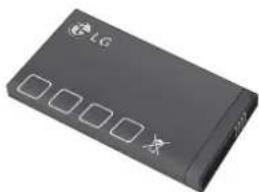
标准电池
natural_image
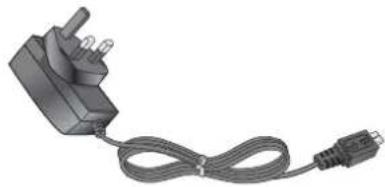
Black LG device with four square buttons and a lock icon (no visible text or symbols)旅行适配器
natural_image
Illustration of a black electrical plug connected to a cable with a connector (no text or symbols visible)耳机
natural_image
Medical or electronic device with coiled cable and earplugs (no visible text or symbols)备注
务必使用原装LG配件。否则可能导致保修失效。
在不同地区提供的配件可能不同;如需要进一步查询有关情况,请与我们的地区服务公司或代理联系。
技术参数
外部环境
最高温度:+55°C(放电)
+45°C(充电)
最低温度: -10^ C
蓝牙 QD ID B016215
| 1 | 2 | 3 | 4 | 5 | 6 | 7 | 8 | 9 | 10 | |
| 1.0 | 1.0 | 1.0 | 1.0 | 1.0 | 1.0 | 1.0 | 1.0 | 1.0 | 1.0 | 1.0 |
| 1.0 | 1.0 | 1.0 | 1.0 | 1.0 | 1.0 | 1.0 | 1.0 | 1.0 | 1.0 | 1.0 |
| 1.0 | 1.0 | 1.0 | 1.0 | 1.0 | 1.0 | 1.0 | 1.0 | 1.0 | 1.0 | 1.0 |
| 1.0 | 1.5 | 1.5 | 1.5 | 1.5 | 1.5 | 1.5 | 1.5 | 1.5 | 1.5 | 1.5 |
| 1.0 | 2.0 | 2.0 | 2.0 | 2.0 | 2.0 | 2.0 | 2.0 | 2.0 | 2.0 | 2.0 |
| 1.0 | 2.5 | 2.5 | 2.5 | 2.5 | 2.5 | 2.5 | 2.5 | 2.5 | 2.5 | 2.5 |
KF301 USER GUIDE - English
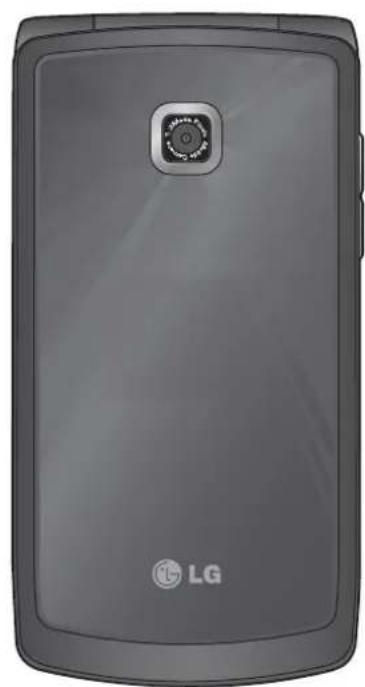
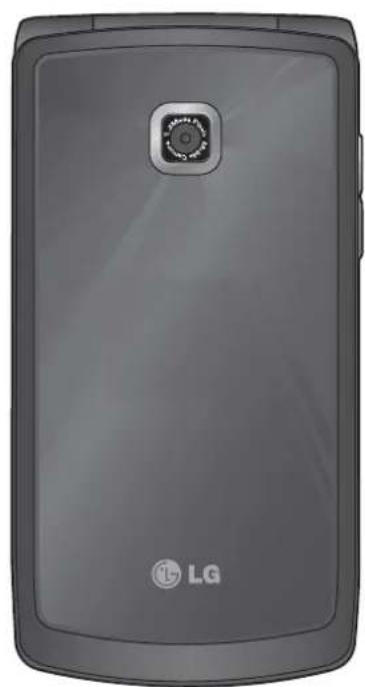
Some of the contents in this manual may differ from your phone depending on the software of the phone or your service provider.
natural_image
Front view of a gray LG portable phone with a circular sensor icon on the front panel (no text or symbols beyond branding)Contents
Installing the SIM card and the
handset battery 4
Installing the SIM Card....4
Illustrations......4
Phone Components .... 5
Turning Your Phone On and Off .....6
Making a call....6
Making an international call......6
Answering a call 6
Selecting functions and options ..7
Entering Text 8
T9 Mode 8
123 Mode (Numbers Mode)......8
Symbol Mode 8
Installing a Memory Card......9
Anti Theft Mobile Tracker (ATMT)..10
Menu tree....11
Quick feature reference......12
Messaging....12
Create message 12
Inbox....12
Drafts 12
Outbox....12
Sent items....12
Saved items....12
Info. messages....12
Message settings 12
Contacts 13
Names 13
New contact....13
Settings....13
Groups 13
Speed dials....13
Service dial numbers....13
Own number 13
My business card....13
Log....14
Call log 14
Missed calls 14
Received calls 14
Dialled numbers....14
Message recipients....14
Call duration 14
Packet Data counter....14
Call cost 14
Settings 15
Profiles 15
Display 15
Date & Time....15
Connectivity....15
Call....15
Phone 15
Java settings 15
Security......16
Memory manager....16
Restore factory settings....16
Gallery 17
Games & Apps....17
Graphics 17
Images....17
Music files....17
Received files....17
Recordings......17
Tones....17
Videos....17
Media....18
Camera....18
Video 18
Music....18
FM radio....18
Voice recorder 18
Ringtone creator....18
Organiser....19
Alarm clock....19
Calendar....19
To-do list 19
Notes....19
Calculator....19
Stopwatch....19
Date finder....19
Converter 19
World time....19
SIM services....19
Applications....20
My games & apps....20
Java settings 20
Web 20
Home....20
Google....20
Bookmarks......20
Last web address....20
Settings....20
Go to address....20
Saved pages....20
Guidelines for safe and efficient use..21
Accessories......25
Technical Data 26
Installing the SIM card and the handset battery
Installing the SIM Card
When you subscribe to a cellular network, you are provided with a plug-in SIM card loaded with your subscription details, such as your PIN, any optional services available and many others.
Important!> The plug-in SIM card and its contacts can be easily damaged by scratches or bending, so be careful when handling, inserting or removing the card. Keep all SIM cards out of the reach of small children.
Illustrations
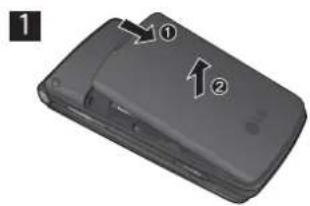
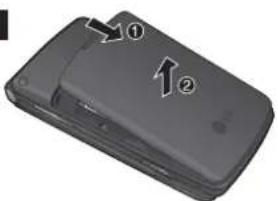
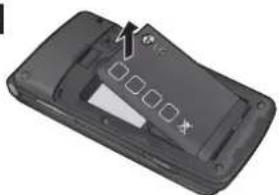
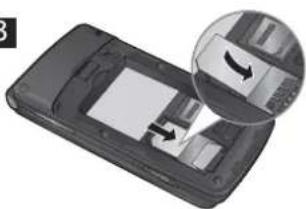
Always switch the device off and disconnect the charger before removing the battery.
1 Remove the back cover.
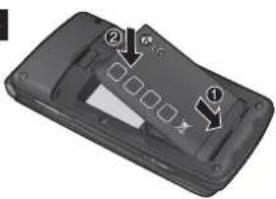
4 Insert the battery pack.
2 Lift battery away.
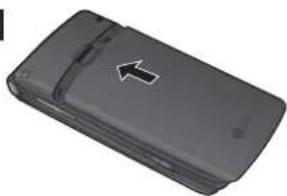
5 Attach the back cover.
3 Insert the SIM card.
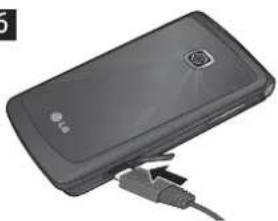
6 Charge the battery.
Note: Fully charge the battery before using it for the first time.
1
text_image
Diagram of a mobile phone showing two labeled buttons (① and ②) with arrows pointing to the interface.2
natural_image
3D model of a black mobile phone casing with a partially open lid and buttons, no visible text or symbols3
natural_image
Close-up of a smartphone showing the internal components and a magnified view of the screen (no text or symbols visible)4
text_image
Diagram of a mobile phone casing with labeled components and directional arrows indicating movement or flow.5
natural_image
Black mobile phone casing with a white arrow pointing to the side panel (no visible text or symbols)6
natural_image
Black handheld electronic device with USB cable connector (no visible text or symbols)Phone Components
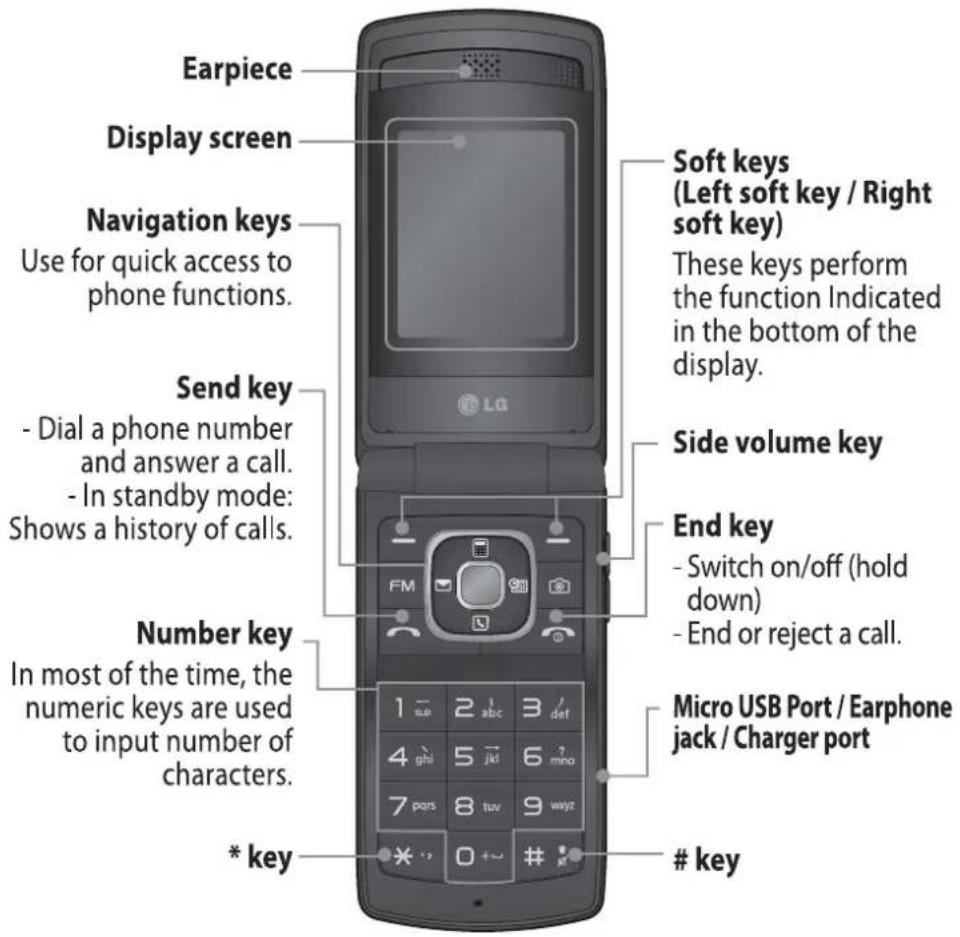
text_image
Earpiece Display screen Navigation keys Use for quick access to phone functions. Send key - Dial a phone number and answer a call. - In standby mode: Shows a history of calls. Number key In most of the time, the numeric keys are used to input number of characters. * key Soft keys (Left soft key / Right soft key) These keys perform the function Indicated in the bottom of the display. Side volume key End key - Switch on/off (hold down) - End or reject a call. Micro USB Port / Earphone jack / Charger portkey
Turning Your Phone On and Off
- Press and hold the End key until the power comes on.
- Press and hold the End key until the power goes off.
Making a call
- Enter a phone number including the area code.
- Press the 🔔 key to call the number.
- To end the call, press the 🔒 key.
Making an international call
- Press and hold the □+ key for the international prefix. The '+' character automatically selects the international access code.
- Enter the country code, area code, and the phone number.
- Press ⬇ [Send] key to call the number.
Answering a call
- When you receive a call, the phone rings.
- If the Press any key has been set as the Answer mode (Settings > Call > Answer mode), any key press will answer a call except for the 🔒 key.
- To end the call, press the 🔒 key.
Selecting functions and options
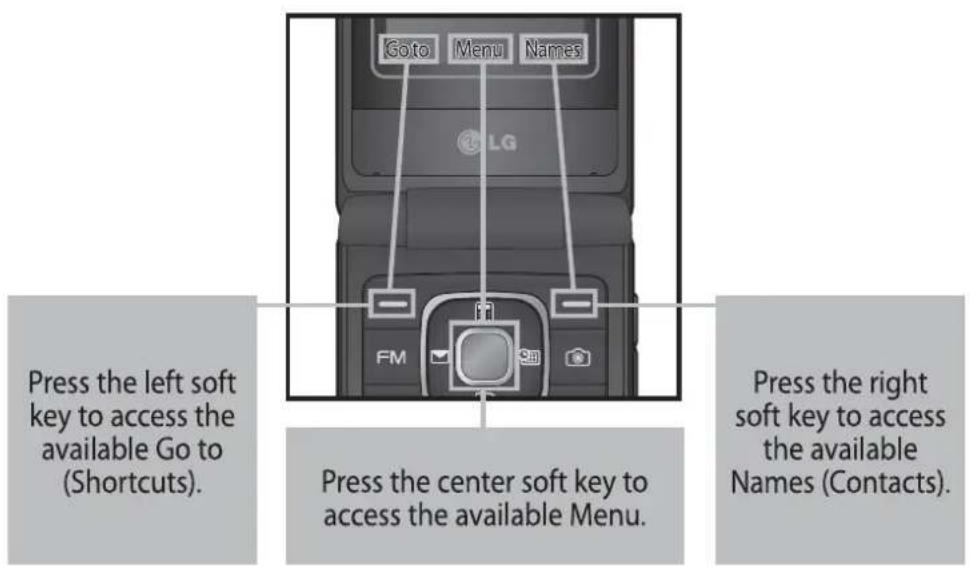
Your phone offers a set of functions that allow you to customize the phone. These functions are arranged in menus and sub-menus, accessed via the two soft keys marked □ and □. Each menu and sub-menu lets you view and alter the settings of a particular function.
The roles of the soft keys vary according to the current context; the label on the bottom line of the screen just above each key indicates its current role.
text_image
Goto Menu Names LG Press the left soft key to access the available Go to (Shortcuts). Press the center soft key to access the available Menu. Press the right soft key to access the available Names (Contacts).Entering Text
You can enter alphanumeric characters by using the phone's keypad.
T9 Mode
The T9 predictive text input mode lets you enter words easily with a minimum number of key presses. As you press each key, the phone begins to display the characters that it thinks you are typing based on the built-in dictionary.
123 Mode (Numbers Mode)
Type numbers using pressing and holding the button keys.
Symbol Mode
The symbol mode enables you to enter various symbols or special characters. To enter a symbol, select Options → Insert Symbol. Use the up & navigation keys to navigate through the symbols and select the desired symbol by pressing the alphanumeric keys then press the OK key.
Installing a Memory Card
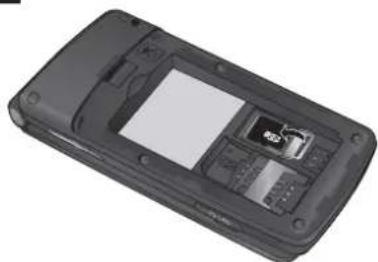
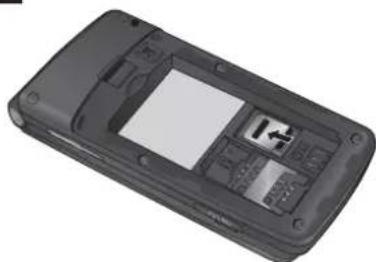
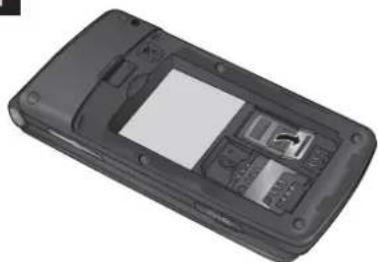
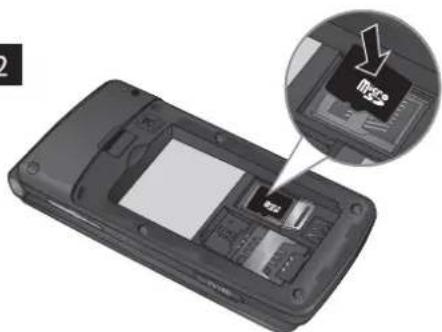
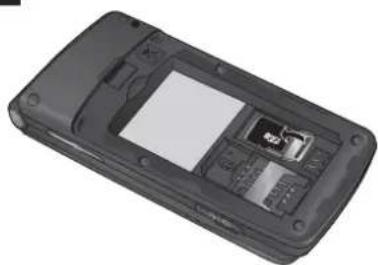
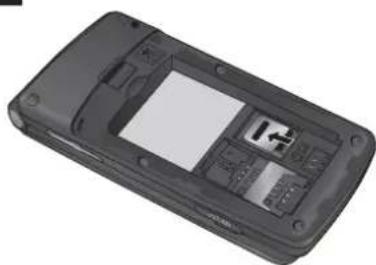
To insert a memory card first you should remove the back cover and remove the battery then Lift the memory card cover and insert a microSD card with the gold contact area facing downward. Close the memory card cover so that it clicks shut, then insert the battery then attach the back cover.
To remove the memory card, gently push it as shown in the diagram.
Note: A memory card is an optional accessory.
1
natural_image
Black mobile phone casing with visible keypad and display screen (no text or symbols)2
natural_image
Top-down view of a mobile phone casing showing internal components and a magnified inset highlighting a device (no text or symbols visible)3
natural_image
Black mobile phone casing with visible internal compartments and buttons (no text or symbols)4
natural_image
Black mobile phone casing with visible keypad and display screen (no text or symbols)Anti Theft Mobile Tracker (ATMT)
Anti-theft mobile tracker (ATMT) allows you to track your lost phone.
When someone has stolen your phone or SIM changed without your permission, the tracking service will be activated.
You are reminded by a text message sent to the default phone number you have set, without the unauthorized user's knowledge. You can always activate the ATMT and configure your personal settings.
To activate Anti-theft mobile tracker
-
From the main menu, select Settings > Security > Anti-theft mobile tracker and press Select.
-
Select Set Anti-theft and press Select.
-
Switch On or Off and press Select.
-
Input the security code to enable or disable this function.
-
Then in the Anti-theft mobile tracker menu, edit and save the name in Sender name and numbers in Sending number list.
Note
The default ATMT code is "0000". You have to enter the code before configuring the ATMT settings.
Menu tree
1 Messaging
1 Create message
2 Inbox
3 Drafts
4 Outbox
5 Sent items
6 Saved items
7 Info. messages
8 Message settings
2 Contacts
1 Names
2 New contact
3 Settings
4 Groups
5 Speed dials
6 Service dial numbers
7 Own number
8 My business card
3 Log
1 Call log
2 Missed calls
3 Received calls
4 Dialled numbers
5 Message recipients
6 Call duration
7 Packet Data counter
8 Call cost
4 Settings
1 Profiles
2 Display
3 Date & Time
4 Connectivity
5 Call
6 Phone
7 Java settings
8 Security
9 Memory manager
10 Restore factory settings
5 Gallery
1 Games & Apps
2 Graphics
3 Images
4 Music files
5 Received files
6 Recordings
7 Tones
8 Videos
6 Media
1 Camera
2 Video
3 Music
4 FM radio
5 Voice recorder
6 Ringtone creator
7 Organiser
1 Alarm clock
2 Calendar
3 To-do list
4 Notes
5 Calculator
6 Stopwatch
7 Date finder
8 Converter
9 World time
10 SIM services
8 Applications
1 My games & apps
2 Java settings
9 Web
1 Home
2 Google
3 Bookmarks
4 Last web address
5 Settings
6 Go to address
7 Saved pages
Quick feature reference
This section provides brief explanations of features on your phone.
Messaging Menu 1
| Create message | This menu includes functions related to SMS (Short Message Service) and MMS (Multimedia Message Service). |
| Inbox | You will be alerted when you have received messages. They will be stored in Inbox. |
| Drafts | You can save the message temporarily in Drafts. |
| Outbox | This is a temporary storage folder for the unsent messages or messages that you have sent but fail to deliver. |
| Sent items | After sending out the message, the text message or multimedia message is saved in the Sent folder. |
| Saved items | You can access your saved messages, text templates and multimedia templates. |
| Info. messages | Info service messages are text messages delivered by the network to GSM. |
| Message settings | This menu allows you to set features of your network service provider. |
Contacts Menu 2
| Names | Select Names and enter the name that you want to search from the contact list. |
| New contact | You can register a new contact address. You can enter the name, different phone numbers, email addresses, groups and image of a new contact. |
| Settings | You can set the contact display option. |
| Groups | You can list up to the members per each group. |
| Speed dials | You can assign any of the keys from 2 to 8 with a name list entry. You can call directly by pressing this key when you are in idle screen. |
| Service dial numbers | Use this function to access a particular list of services provided by your network operator (if supported by the SIM card). |
| Own number | You can save and check your own number in SIM card. |
| My business card | This option allows you to create your own business card featuring name and any numbers. |
Log Menu 3
Call log You can view all lists of outgoing or incoming calls.
Missed calls You can view the unanswered calls.
Received calls You can view the Received calls.
Dialled numbers You can view the outgoing call numbers.
Message recipients View the sent and received message counts.
Call duration Allows you to view the duration of your incoming and outgoing calls. You can also reset the call timers.
Packet Data counter You can check the amount of data transferred over the network.
Call cost View the charges applied to your dialled numbers and the call duration of all your received and dialled calls. Also you can do Cost Settings.
Settings Menu 4
Profiles You can adjust and customize the phone tones for different events, or environments.
Display You can change settings for the phone display.
Date & Time You can set functions relating to the date and time.
Connectivity You can set up the condition or data for the phone to connect with other device or network.
Call You can set the menu relevant to a call.
Phone Allows you to set the phone
Languages: You can change the language for the display texts in your phone. This change will also affect the Language Input mode.
Power save: Choose among the followings, Off/Night only/Always On, to change the factory set power saving settings.
Handset information: Shows your phone number, model number and S/W version.
Java settings You can select the profile settings of Java or service provider.
Settings Menu 4 (Continued)
Security
This menu allows you to set the phone's safety.
PIN code request: You can set the phone to ask for the PIN code of your SIM card when the phone is switched on.
Handset lock: You can use a security code to avoid unauthorized use of the phone.
Lock if SIM changed: Set the lock function if SIM changed.
Anti-theft mobile tracker: The ATMT feature of this phone provides you with the ability to have a tracking system in place for your mobile in case you lose or misplace it.
Change codes: PIN is an abbreviation of Personal Identification Number to prevent use by unauthorized persons. You can change the access codes: PIN code, PIN2 code, Security code.
Memory manager
You can check free space and memory usage of phone, SIM card and external memory (if inserted).
Restore factory settings
You can initialize all factory defaults. You need Security code to activate this function.
Gallery Menu 5
| Games & Apps | You can access a great selection of games and applications on your phone. |
| Graphics | Allow you to view the list of default image files. |
| Images | Shows the list of image files. |
| Music files | List the music files stored in memory and you can listen it here. |
| Received files | You can view the list of received files. |
| Recordings | This folder contains the FM radio recorded and voice recorded files. |
| Tones | Shows the list of alert tones and ring tones in your phone. From here you can manage or set sounds as ringtones. |
| Videos | Displays the list of video files. |
Media Menu 6
Camera You can take photos with the built in camera and adjust its settings to suit your needs.
Video You can record a video clip through the built-in camera.
Music Using the songs in your phone, you can easily enjoy various music.
FM radio You can receive FM radio with your external earphone. You can listen to your favourite radio station anytime.
Note: You have to insert Ear-mic into Handsfree connector in order to listen to the Radio and keep the good radio reception.
Voice recorder You can record voice memo.
Ringtone creator This function allows you to create your own personal ringtones by using this tool.
Organiser Menu 7
| Alarm clock | You can set the alarm clock to go on at a specified time. |
| Calendar | You can see the calendar and add the events here in selected date. |
| To-do list | You can view, edit and add tasks to do. |
| Notes | You can add new memo, view and manage saved memos. |
| Calculator | The calculator provides the basic arithmetic functions: addition, subtraction, multiplication and division. |
| Stopwatch | This option allows you to use the function of a stopwatch. |
| Date finder | You can count the target date by adding(After) or subtracting(Before) days. |
| Converter | This converts any measurement into a unit you want. There are many types that can be converted into units: Currency, Area, Length, Weight, Temperature, Volume, Velocity. |
| World time | The World time function provides time information on major cities worldwide. Also you can set any city as your Home city and Make Daylight savings ON/OFF. |
| SIM services | This feature depends on SIM and the network services. In case the SIM card supports SAT (i.e. SIM Application Toolkit) services, this menu will be the operator specific service name stored on the SIM card. |
Applications Menu 8
My games & apps Download new games and applications to mobile phones for entertainment.
Java settings Configure the network profile for the Java connection
Web Menu 9
Home Connects to a homepage. The homepage will be the site which is defined in the activated profile.
Google You can access Google web page directly from here.
Bookmarks This menu allows you to store the URL of favorite web pages for easy access at a later time.
Last web address This menu shows the history of recently browsed pages.
Settings You can set the profile, cache and security related to internet service.
Go to address You can connect directly to the site you want. After entering a specific URL, press OK key to make the connection done to connect to the site.
Saved pages Allows you to view your saved web pages.
Guidelines for safe and efficient use
Please read these simple guidelines. Not following these guidelines may be dangerous or illegal. Further detailed information is given in this manual.
Warning
For your safety, use ONLY specified ORIGINAL batteries and chargers.
Switch off the phone in any area where required by special regulations, e.g. in a hospital where it may affect medical equipment.
Batteries should be disposed off in accordance with relevant legislation.
Product care and maintenance
WARNING! Only use batteries, chargers and accessories approved for use with this particular phone model. The use of any other types may invalidate any approval or warranty applying to the phone, and may be dangerous.
Do not disassemble this unit. Take it to a qualified service technician when repair work is required. Repairs under warranty, at LG's option, may include replacement parts or boards that are either new or reconditioned, provided that they have functionality equal to that of the parts being replaced.
The unit should be kept away from heat sources such as radiators or cookers.
Use a dry cloth to clean the exterior of the unit. (Do not use any solvents.)
Do not keep the phone next to credit cards or transport tickets; it can affect the information on the magnetic strips.
Guidelines for safe and efficient use (Continued)
Electronic devices
All mobile phones may get interference, which could affect performance.
Do not use your mobile phone near medical equipment without requesting permission. Avoid placing the phone over a pacemaker, i.e. in your breast pocket.
Road safety
Check the laws and regulations on the use of mobile phones in the areas when you drive.
Do not use a hand-held phone while driving.
Use a hands-free kit, if available.
Pull off the road and park before making or answering a call if driving conditions so require.
Blasting area
Do not use the phone where blasting is in progress. Observe restrictions, and follow any regulations or rules.
Potentially explosive atmospheres
Do not use the phone at a refueling point. Do not use near fuel or chemicals.
In aircraft
Wireless devices can cause interference in aircraft.
Turn off your mobile phone before boarding any aircraft.
Children
Keep the phone in a safe place out of children's reach. It includes small parts which if detached may cause a choking hazard.
Emergency calls
Emergency calls may not be available under all cellular networks. Therefore, you should never depend solely on the phone for emergency calls. Check with your local service provider.
Battery information and care
You do not need to completely discharge the battery before recharging. Unlike other battery systems, there is no memory effect that could compromise the battery's performance.
Use only LG batteries and chargers. LG chargers are designed to maximize the battery life.
Do not disassemble or short-circuit the battery pack.
Replace the battery when it no longer provides acceptable performance. The battery pack may be recharged hundreds of times before it needs to be replaced.
Do not expose the battery charger to direct sunlight or use it in high humidity, such as the bathroom.
Risk of explosion if battery is replaced by an incorrect type.
Dispose off used batteries according to the manufacturer's instructions.
Guidelines for safe and efficient use (Continued)
Exposure to radio frequency energy
Radio wave exposure and Specific Absorption Rate (SAR) information
This mobile phone model KF301 has been designed to comply with applicable safety requirement for exposure to radio waves. This requirement is based on scientific guidelines that include safety margins designed to ensure safety of all persons, regardless of age and health.
The radio wave exposure guidelines employ a unit of measurement known as the Specific Absorption Rate, or SAR. Tests for SAR are conducted using standardised methods with the phone transmitting at its highest certified power level in all used frequency bands.
While there may be differences between the SAR levels of various LG phone models, they are all designed to meet the relevant guidelines for exposure to radio waves.
The SAR limit recommended by the International Commission on Non-Ionizing Radiation Protection (ICNIRP) is 2W/kg averaged over ten (10) gram of tissue.
The highest SAR value for this model phone tested by DASY4 for use at the ear is 1.21 W/kg (10g) and when worn on the body is 0.247 W/kg (10g).
SAR data information for residents in countries/regions that have adopted the SAR limit recommended by the Institute of Electrical and Electronics Engineers (IEEE) is 1.6 W/kg averaged over one (1) gram of tissue.
Accessories
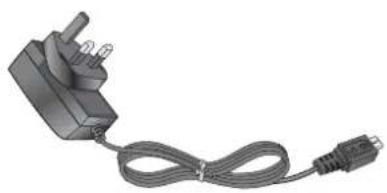
There are various accessories for your mobile phone. You can select these options according to your personal communication requirements.
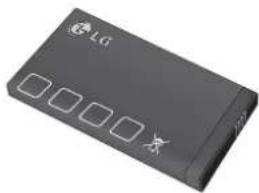
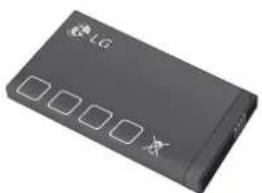
Standard Battery
natural_image
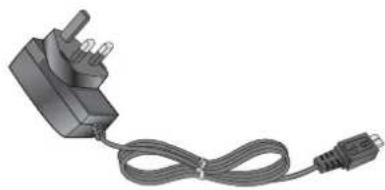
Black rectangular electronic device with four square buttons and a small 'LIC' logo on top (no readable text or symbols beyond branding)Travel Adapter
natural_image
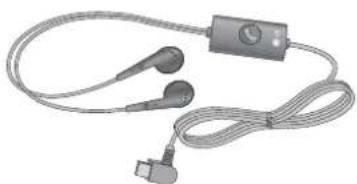
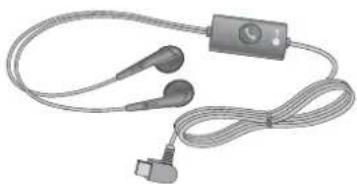
Electric plug with attached cable and connector (no text or symbols visible)Headset

natural_image
Coiled medical or electronic device with earplugs and a connector (no visible text or symbols)Note
Always use genuine LG accessories. Failure to do this may invalidate your warranty.
Accessories may be different in different regions; please check with our regional service company or agent for further enquires.
Technical Data
Ambient Temperatures
Max.: +55°C (discharging)
+45°C (charging)
Min : -10°C
Bluetooth QD ID B016215

LG
Life's Good
Warranty Card
產品保用證
Mobile Phone
手提電話
Warranty Card
產品保用證
LG Customer Care Centre
客戶維修服務中心
Welcome to contact for detailed information
歡迎致電查詢詳細資料
Customer Service Hotine 客戶服務熱線 : (852) 3543 7777
E-mail Us 客戶查詢電郵 : cshelpdesk@lge.com
LG Website 瀏覽網站 : www.lg.com
If you want to receive an additional 3 months warranty, please complete warranty registration within 1 month after purchase at
http://www.lg.com/hk/support/registration/support-sign-in.jsp or (852) 3543 7777.
如欲享受額外3個月產品保養,請在購買產品後1個月內登入
http://www.lg.com/hk/support/registration/support-sign-in.jsp
或致電(852) 3543 7777 登記
Privacy Statement
You are aware that any information supplied by you after purchase of our product will be retained by LG Electronics HK Ltd. and will not be released to third parties. You also authorize LG Electronics HK Ltd. to send you direct promotion materials. Please contact our Customer Service Hotline at (852) 3543 7777 if you wish to modify or erase your provided personal information.
私隱聲明
閣下在購買本公司產品後所提供的任何資料,將會由LG Electronics HK Ltd.保有,不會透露給予第三方,並授權本公司對閣下發出直接推廣通訊。如希望修改或刪除所提供的個人資料,可聯絡本公司客戶服務熱線(852)35437777作出相關安排。
Thank you for your purchase of LG Electronics product under the terms and conditions listed on this warranty card.
多謝閣下購買及使用本公司之產品,請參閱保用證所列之產品保用條款。
IMPORTANT : Please keep and present this warranty card and purchase invoice when services are rendered. Otherwise, this warranty will be voided.
重要事項:顧客請保留此保用證及購貨發票,並需在檢查/維修時出示,否則保用無效。

Mobile Phone Warranty Policy 手提電話保用條款
(1) LG Electronics Hong Kong Limited (hereafter LGEHK) provides warranty period from the date of purchase are as follows and only valid for mobile purchase in Hong Kong only (any promotion gift item is not included):
(i) Handset : 12 months (ii) Charger : 6months (iii) Battery : 6months (iv) Hand free earphone : 3months
(2) Warranty is valid only for authorized product; parallel import and counterfeit product are invalid.
(3) Product is under warranty against manufacturing defects by reason of faulty workmanship or internal electronic parts materials. This warranty does not cover defects arising from natural wear of the product (Including casing, key pad, display, antenna, and accessories, etc.)
(4) If check-up or repairing are required, customer must present the original invoice and warranty card on which the relevant IMEI number was printed. Upon any failure to present the above documentation, customer must pay for the costs of the services provided.
(5) All parts replaced within the warranty period are the property of LGEHK. We have rights to handle those parts as necessary.
(6) Data stored in handsets may be lost after the repair and thus should be properly stored by customer beforehand.
(7) Warranty will be voided under the following conditions, and LGEHK reserves the right to refuse providing service and/or shall demand charges for any costs of servicing from customer:
(i) Product has been tampered with or undergone unauthorized repair by third parties, improper installation, alternation or modification to this product, or damage, tearing, removal of the warranty sticker that is affixed to this product.
(ii) Defects arising from misuse, mishandling, abuse, accident, negligence and damage caused directly or indirectly by fire, flood, liquid water, corrosion, convulsion of nature, war, riot or civil commotion.
(iii) The IMEI number sticker on this product has been erased or modified.
(iv) The content of warranty policy has been modified without authorization.
(8) LGEHK is not responsible for any loss of data or system corruption during the process of transportation or repair to and from the Service Centre and due to the forces of nature.
(9) LGEHK reserves the right to terminate or modify the terms of this warranty card. For exceptional cases, subject to report of our investigation, we reserve the right to terminate this warranty card or modify terms of warranty policy.
(10) Our company will not be liable for any loss directly or indirectly caused by the breakdown of the product.
(11) This warranty card is restricted within Hong Kong SAR only.
(12) LG and its Authorized Service Centers reserve the right to use refurbished or reconditioned parts or whole products for the same or functionally equivalent model when conducting product repairs and replacement.
(1) 本公司為客戶提供保修期如下,只適用於香港購買之手機,並不包括各促銷活動之贈品(由購買日起計)
(i) 機身 : 12個月 (ii) 充電器 : 6個月
(iii)電池 : 6個月 (iv)免提耳機 : 3個月
(2) 保修服務只適用於原裝行貨;水貨及冒牌貨均屬無效
(3) 此保修只適用於生產上的瑕疵,如電子零件偶然出現毛病,並不包括手機的自然磨損包括外殼、鍵盤、顯示屏、天線、附件等。
(4) 用户要求維修服務時,須同時攜同手機、保用證及印有IMEI號碼之有效發票正本到本公司指定之維修中心進行維修,否則保修服務無效,客戶須繳付維修費用。
(5) 在保修期内维修更换後的所有零件、配置及附件,均属本公司所有,本公司有權作出任何處理。
(6) 手機內存資料有可能因維修後遺失,請顧客要自行保存。
(7) 在下列情況下本保用證將自動失效,本公司有權拒絕維修該手機或向客人徵收所有的維修費用。
(i) 手機曾作未許可之維修、不適當的安裝、更改,或貼於其上的維修貼紙遭受損毀、撕破、除去,保修服務即無效。
(ii) 手機曾被錯誤使用,錯誤處理,疏忽使用,直接或間接意外由火、液體、火災、腐蝕、地震、戰爭、暴亂或天災所造成的損壞。
(iii) 手櫃上的IMEI號碼貼紙一經修改或除去,保修服務即無效。
(iv) 擅自修改本保用證的內容。
(8) 本公司將對任何於使用、維修或匯送時引致之系統證誤及資料流失,或因天然災害,意外事件造成之損失概不負責。
(9) 本保用證的發出及終止權均屬本公司所有。就不明的情況或個案,經審查後,本公司有權發出或終止本保用證。
(10) 本公司將不負責由於產品損壞而直接或間接引致之任何損失。
(11) 此保用證只適用於香港特別行政區範圍內。
(12) 本公司及其授權之維修中心在維修或更換產品時,保留使用與產品或功能相同的部分或全部再生零件之權利。
Service Commitment
服務承諾
LG's mission is to create value for customers. We are committed to improve the life of our customers by putting the customers first, and delivering the best possible pre and after sales services in the way they want.
為顧客創造價值乃LG一貫宗旨。我們致力提供最貼心的售前及售後服務,一切以顧客為先,希望為客戶帶來最優質的生活。
| 1 | 2 | |
| 3 | 4 | |
| 5 | 6 | |
| 7 | 8 | |
| 9 | 10 | |
| 11 | 12 | |
| 13 | 14 | |
| 15 | 16 | |
| 17 | 18 | |
| 19 | 20 | |
| 21 | 22 | |
| 23 | 24 | |
| 25 | 26 | |
| 27 | 27 | |
| 29 | 28 | |
| 31 | 29 | |
| 33 | 30 | |
| 35 | 31 | |
| 37 | 32 | |
| 39 | 33 | |
| 41 | 34 | |
| 43 | 35 | |
| 45 | 36 | |
| 47 | 37 | |
| 49 | 38 | |
| 51 | 39 | |
| 53 | 40 | |
| 55 | 41 | |
| 57 | 42 | |
| 59 | 43 | |
| 61 | 44 | |
| 63 | 45 | |
| 65 | 46 | |
| 67 | 47 | |
| 69 | 48 | |
| 71 | 49 | |
| 73 | 50 | |
| 75 | 51 | |
| 77 | 52 | |
| 79 | 53 | |
| 81 | 54 | |
| 83 | 55 | |
| 85 | 56 | |
| 87 | 57 | |
| 89 | 58 | |
| 91 | 59 | |
| 93 | 60 | |
| 95 | 61 | |
| 97 | 62 | |
| 99 | 63 |
| 1 | 2 | 3 | 4 | 5 | 6 | 7 | 8 | 9 | 10 | |
| 1.0 | 1.0 | 1.0 | 1.0 | 1.0 | 1.0 | 1.0 | 1.0 | 1.0 | 1.0 | 1.0 |
| 1.0 | 1.0 | 1.0 | 1.0 | 1.0 | 1.0 | 1.0 | 1.0 | 1.0 | 1.0 | 1.0 |
| 1.0 | 1.0 | 1.0 | 1.0 | 1.0 | 1.0 | 1.0 | 1.0 | 1.0 | 1.0 | 1.0 |
| 1.0 | 1.5 | 1.5 | 1.5 | 1.5 | 1.5 | 1.5 | 1.5 | 1.5 | 1.5 | 1.5 |
| 1.0 | 2.0 | 2.0 | 2.0 | 2.0 | 2.0 | 2.0 | 2.0 | 2.0 | 2.0 | 2.0 |
| 1.0 | 2.5 | 2.5 | 2.5 | 2.5 | 2.5 | 2.5 | 2.5 | 2.5 | 2.5 | 2.5 |