SM10 - Aktenvernichter PC Line - Kostenlose Bedienungsanleitung
Finden Sie kostenlos die Bedienungsanleitung des Geräts SM10 PC Line als PDF.


Benutzerfragen zu SM10 PC Line
0 Frage zu diesem Gerät. Beantworten Sie die, die Sie kennen, oder stellen Sie Ihre eigene.
Eine neue Frage zu diesem Gerät stellen
Laden Sie die Anleitung für Ihr Aktenvernichter kostenlos im PDF-Format! Finden Sie Ihr Handbuch SM10 - PC Line und nehmen Sie Ihr elektronisches Gerät wieder in die Hand. Auf dieser Seite sind alle Dokumente veröffentlicht, die für die Verwendung Ihres Geräts notwendig sind. SM10 von der Marke PC Line.
BEDIENUNGSANLEITUNG SM10 PC Line
CONNECTING TO POWER
Before Switching on make sure that the voltage of your electricity supply is the same as that indicated on the rating plate.

If at any time in the future you should need to dispose of this product please
note that Waste electrical products should not be disposed of with house hold
waste. Please recycle where facilities exist. Check with your Local Authority or retailer for recycling advice. (Waste Electrical and Electronic Equipment Directive)
text_image
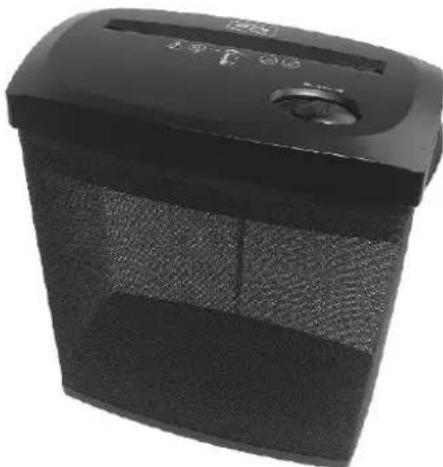
PC linePAPER SHREDDER
Model: SM10
INSTRUCTION MANUAL
natural_image
Black industrial blender with control panel and buttons (no visible text or symbols)IMPORTANT SAFEGUARDS
When using electrical appliances, basic safety precautions should always be observed including the following:
- Read all instructions before using this appliance.
- To protect against risk of electrical hazards, do not immerse cord, plugs, etc. of the appliance in water or other liquid.
- Keep children away from the machine. This machine's design and safety concept are based on adult dimensions to ensure that it can be operated safely by adults only.
- Unplug from the outlet when not in use and before cleaning.
- Do not operate any appliance with a damaged cord or plug or after the appliance malfunctions, or has been damaged in any manner. Return the appliance to the nearest authorized service facility.
- The use of accessory attachments not recommended or sold by the appliance manufacturer may cause injuries.
- Do not use outdoors.
- Do not use appliance for other than intended use.
- The socket-outlet shall be installed near the equipment and shall be easily accessible.
- If the supply cord or plug is damaged, it must be replaced or repaired by the manufacturer or its service agent or a similarly qualified person in order to avoid a hazard.
- CAUTION! To prevent electric shock disconnect from the mains before removing cover. No user serviceable parts inside. Refer servicing to qualified tradesperson.
- Do not allow this unit to be exposed to rain or moisture.
- The machine cannot be operated by more than one person at any given time! The machine was designed for safe operation by "one person only".
- During the shredding process no other work may be performed on the machine (for example cleaning, etc).
- Repairs must be executed by a qualified service personnel.
- Keep all loose articles of clothing, ties, jewelry, long hair or other loose objects away from opening, injury may result!
- Never insert fingers into opening. Serious injury may result!
- In case of danger unplug the machine.
- Always unplug the machine from the mains power supply before opening the machine.
- Always operate on a flat horizontal surface.
- When the bin is nearly full, shredded Paper Dust may be given off. Please clear the bin.
SAVE THIS INSTRUCTION FOR FUTURE REFERENCE.
INTRODUCTION
Congratulations on your purchase of the SM10 shredder. The shredder is a machine for the destruction of common written material. The unit accepts paper, credit card, small paper clips and staples! Shredding other types of materials can cause injuries (e.g. by splinters of hard materials) or may damage the shredder (e.g. destruction of the cutting system).
OPERATION
HOW TO OPERATE
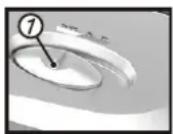
Fig. 1
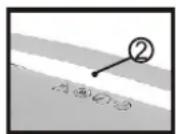
Fig. 2
- Remove shredder from its carton and unwind the cord to its full length
- Place the dust bin on a firm level surface in a stable upright position
- Take the main unit by the holdings on each side and put it onto the dust bin (Note: will only fit one way round due to saftey switch.)
- Connect the plug tothe 230V-240V AC mains
- Make sure the slide switch on "OFF" position
STAND BYMODE
- The unit will be ready for operation when you move the slide switch to the "ON/AUTO" position.
- Feed paper into the inlet guide to cutting system as well as press on the micro switch (fig.2).
- The unit will switch on automatically to run forward and draw paper in. The unit will switch back to stand by mode after shredding.
NOTE: Never feed the shredder with a large quantity of paper exceeding the maximum indicated in the technical specification. Should the machine be overfed and found to be stop working due to the paper jam. Please follow the solution under paper jam section.
OFF MODE
- The unit will turn off when you move the slide switch to "OFF" position.
RUN REVERSE
- The unit will continue to run the cutting blade in reverse direction when you move the slide switch to "REV" position.
PAPER JAM
If too much paper is fed to the cutting system the cutting system will jam. Please follow the below steps to solve the problem:
-Move the slide switch to the "REV" position.
-The cutting blade will run in reverse direction for freeing out the jammed paper.
-Pull out the paper carefully to clear the opening.
-Once the jammed paper is removed, slide the switch to the "ON/AUTO" position to go to stand by mode
-You can now continue to use the paper shredder.
MOTOR OVERHEAT SAFETY DEVICE
Your shredder is fitted with a safety device that switches off the unit in the event of overload. Should the unit stop working, turn the unit off and unplug from the mains. Unplug the machine from the main power allow the motor to cool down to room temperature before resuming operation. If the unit fails to operate or the safety device switches the unit again, return the unit to your nearest service center for examination or repair.
CARE AND MAINTENANE
The paper shredder requires regular cleaning to ensure trouble free operation :
- Always turn off and unplug the unit from the mains supply before cleaning.
- Never immerse in water.
- Use a damp cloth to wipe the exterior of the unit to remove dust and dirt.
- Never clean with scouring powders or hard implements.
- Ensure the unit is dry before plugging back into the mains supply.
- No user serviceable part inside.
- To avoid electrical shock, do not remove the base.
TECHNICAL SPECIFICATION
Model: SM10
Cutting size: 4 x 44mm (cross cut)
Cutting capacity:8 sheets (80g/m²A4 paper) or 1 credit card
Recommended daily capacity: 10-20 shredding passes
Maximum running time: 2 min 30s
Automatic cool-down period: approx 15 min
Supply voltage: 230-240V\~50Hz
Rated current: 1.5A