
Gamepad Ghost - Spielcontroller Tracer - Kostenlose Bedienungsanleitung
Finden Sie kostenlos die Bedienungsanleitung des Geräts Gamepad Ghost Tracer als PDF.


| Produkttyp | Spielcontroller |
| Marke | Tracer |
| Modell | Gamepad Ghost |
| Abmessungen | 157 mm x 99 mm x 60 mm |
| Gewicht | 161 g ± 10 g |
| Material | ABS mit Gummibeschichtung |
| Farbe | Schwarz (Oberschale) + Weiß (Unterschale) + Schwarz (Tasten) + Orange (Mittelstreifen) |
| Konnektivität | Bluetooth |
| Kompatibilität | PlayStation 3 |
| Vibration | Ja |
| Anzahl der Tasten | 12 (davon 4 Richtungstasten) |
| Besondere Tasten | HOME-Taste für PS3-Systemmenü |
| Stromversorgung | Wiederaufladbarer Lithium-Akku (intern) |
| Lademethode | USB-Kabel (Mini-USB) |
| Akku-Ladezeit | Ca. 2–3 Stunden |
| Akku-Betriebsdauer | Ca. 8–10 Stunden |
| Reichweite (Bluetooth) | Ca. 10 m |
| Wartung | Mit einem weichen, trockenen Tuch reinigen |
| Sicherheitshinweise | Nicht zerlegen, nicht fallen lassen, nach jeder Spielstunde eine Pause einlegen |
| Entsorgung | Elektro- und Elektronik-Altgeräte (WEEE) – nicht im Hausmüll entsorgen |
| Hersteller | Megabajt Sp. z o.o., ul. Rydygiera 8, 01-793 Warszawa |
Häufig gestellte Fragen - Gamepad Ghost Tracer
Benutzerfragen zu Gamepad Ghost Tracer
0 Frage zu diesem Gerät. Beantworten Sie die, die Sie kennen, oder stellen Sie Ihre eigene.
Eine neue Frage zu diesem Gerät stellen
Laden Sie die Anleitung für Ihr Spielcontroller kostenlos im PDF-Format! Finden Sie Ihr Handbuch Gamepad Ghost - Tracer und nehmen Sie Ihr elektronisches Gerät wieder in die Hand. Auf dieser Seite sind alle Dokumente veröffentlicht, die für die Verwendung Ihres Geräts notwendig sind. Gamepad Ghost von der Marke Tracer.
BEDIENUNGSANLEITUNG Gamepad Ghost Tracer
PL
Gamepad Ghost
Instrukcja obsługi

racer®
Oświadczenie:
Aby zapewnić bezpieczeństwo oraz przyjemność użytkowania, należy zapoznać się z niniejszą instrukcją obsługi przed użyciem produktu. Instrukcję należy zachować w dostępnym miejscu do wykorzystania w przyszłości.
Specyfikacja:
• Wymiary: 157mm* 99mm* 60mm
- Waga: 161g± 10g
- Materiał: ABS z gumową powłoką
- Kolor: Czarny (górny panel) + biały (dolny panel) + czarny (przyciski) + pomarańczowy (środkowy pasek)
Bezprzewodowy kontroler Bluetooth
- Kompatybilny z konsolą Playstation 3
- Wibracje
- Kompaktowa i ergonomiczna konstrukcja z analogowymi spustami
- Gumowa powłoka
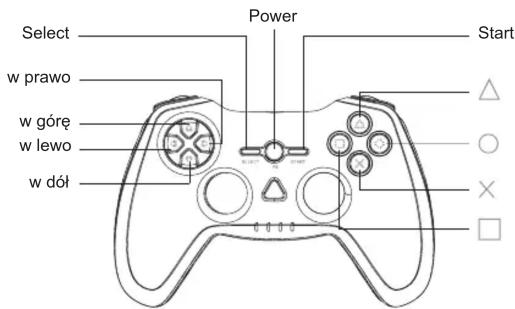
• 12 przycisków (4 przyciski kierunkowe) - Przycisk HOME zapewniający dostęp do menu systemowego Playstation 3
• Wbudowany akumulator litowy
Opis przycisków: Widok z przodu
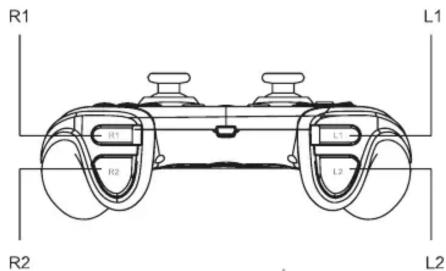
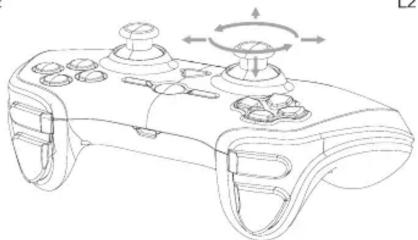
Widok z boku/z tyłu
natural_image
Line drawing of a game controller with scroll wheel and directional arrows indicating rotation (no text or symbols)Uwaga:
- Nie rozmontowywać kontrolera na części
- Nie przekręcać ani nie ciągnąć za kable
- Nie upuszczać, rzucać ani nie narażać kontrolera na silne wstrząsy
- Należy odpocząć po każdej godzinie gry
Ważne:
- Przed pierwszym użyciem kontrolera oraz po długim okresie przerwy należy naładować akumulator.
- Jeżeli kontroler nie jest używany przez dłuższy czas, należy go naładować przynajmniej raz na 3 miesiące.
- Aby uniknąć uszkodzenia portu lub wtyczki, należy upewnić się, że wtyczka mini USB jest odpowiednio ustawiona przed podłączeniem jej do kontrolera. Ładowanie akumulatora, który nie jest rozładowany, skraca jego życie.
Instalacja
Ładowanie kontrolera:
Gdy system jest włączony (dioda zasilania świeci się na zielono), podłącz kontroler do system za pomocą kabla USB. Wskaźniki portu zaczną powoli migać i rozpocznie
się proces ładowania. Po zakończeniu ładowania diody przestaną migać. Podczas ładowania można korzystać z kontrolera.
Parowanie kontrolera z systemem
Przed pierwszym użyciem kontrolera lub przed użyciem z innym systemem PS3 niż zwykle, należy najpierw sparować urządzenia.
Po włączeniu systemu oraz po podłączeniu kontrolera za pomocą kabla USB parowanie zostanie wykonane automatycznie.
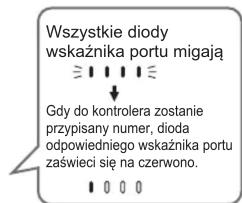
Podczas parowania z systemem PS3 do kontrolera zostanie przypisany numer.
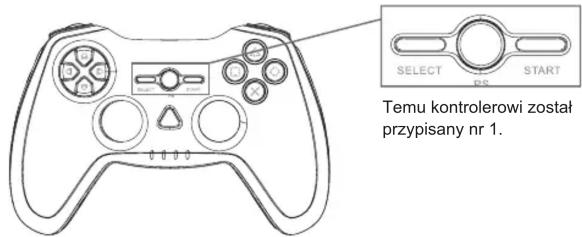
Numer kontrolera pokazuje się powyżej diod wskaźnika portu. W przypadku numerów 5 do 7 należy zsumować numery świecących się diod (np. dioda 4+ dioda 1 = kontroler 5).
Wskazówki
- Parowanie kontrolera oraz przypisywanie numeru są możliwe jedynie w przypadku, gdy system jest włączony (wskaźnik zasilania świeci stałym światłem na niebiesko).
- Gdy sparowany kontroler zostanie użyty z innym systemem PS3, parowanie z pierwotnym systemem zostanie anulowane. Po sparowaniu kontrolera z innym systemem oraz w przypadku ponownego użycia z pierwotnym, należy ponownie sparować kontroler.
- Jeżeli kontroler lub system jest wyłączony, wskaźniki portów na kontrolerze wyłączą się, a przypisany numer zostanie skasowany.
Korzystanie z kontrolera bezprzewodowo
- Po odłączeniu kabla USB kontroler automatycznie przełączy się w tryb bezprzewodowy. Aby skorzystać z trybu bezprzewodowego, akumulator kontrolera musi być naładowany.
- Kabel USB można odłączać i przyłączać, gdy system i kontroler są włączone.
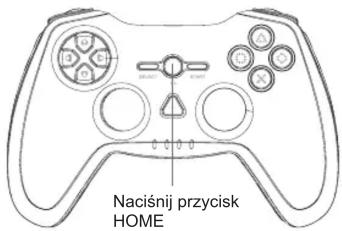
- Jeśli kontroler nie działa, wciśnij przycisk HOME i ponownie przypisz mu numer.
Poziom naładowania baterii
Po naciśnięciu przycisku HOME przez co najmniej 2 sekundy można sprawdzić na ekranie poziom naładowania baterii.
| Bateria w pełni naładowana | |
| Bateria częściowo rozładowana | |
| Niski poziom naładowania baterii | |
| Bateria rozładowana. Diody na porcie kontrolera migają szybko.Naładuj kontroler. |

Symbol odpadów pochodzących
ze sprzętu elektrycznego i elektronicznego
(WEEE - ang. Waste Electrical and Electronic Equipment)
Użycie symbolu WEEE oznacza, że niniejszy produkt nie może być traktowany jako odpad domowy. Zapewniając prawidłową utylizację pomagasz chronić środowisko naturalne. W celu uzyskania bardziej szczegółowych informacji dotyczących recyklingu niniejszego produktu należy skontaktować się z przedstawicielem władz lokalnych, dostawcą usług utylizacji odpadów lub sklepem, gdzie nabyto produkt.



Producent:
Megabajt Sp. z o.o., ul. Rydygiera 8, 01-793 Warszawa
EN
Gamepad Ghost
User's manual
Statement:
For your personal safety and enjoyment, we recommend that you read this manual thoroughly before using this product, and keep this manual handy for future reference.
Characteristics:
• Product Size: 157mm* 99mm* 60mm
• Product weight: 161g± 10g
• Material: ABS with Rubber Coating
• Color: Up case(black) + bottom case(white) + Buttons (Black) + middle strip (Orange)
Wireless gamepad connected by Bluetooth
- Compatible with ps3 operating system
• Realistic vibration
- Compact and ergonomic design with trigger analogue
- Rubber coating
• 12 buttons(4 directional buttons)
• HOME button to access the system menu of the Playstation 3
- Rechargeable Lithium battery built-in
Keys Description: Front View
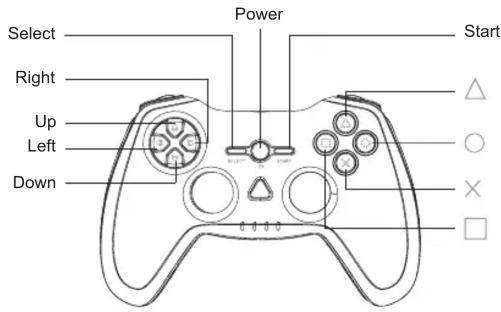
Back/ Side View
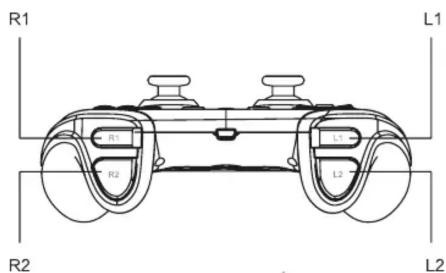
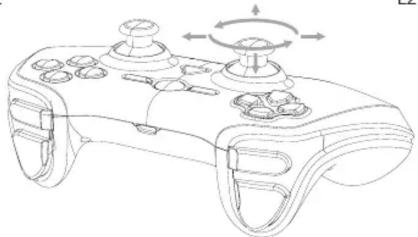
natural_image
Line drawing of a game controller with scroll wheel and scrollpad (no text or symbols)Caution:
- Never disassemble your gamepad
- Do not twist or pull strong the cable
- Do not drop, throw or apply any strong shock to your gamepad
- Please have a rest after one hour game playing
Important:
- Charge the battery before using the controller for the first time or after a long period of non-use.
- If the controller will not be used for a long period of time, you must charge it at least once every three months.
- In order not to damage the port or plug, make sure that the mini USB plug is well lined up to the port before plugging it in. Recharging a non- empty battery will shorten its life.
Installation
Charging the controller:
When the system is on (the on/off light is green), connect the controller to the system using an USB cable. The lights on the controller flash slowly and the charge begins
when the charge is complete, the lights stop flashing. The controller can be used while charging.
Pairing the controller to the system
When using the controller for the first time or when using it with another PS3 system, you must first pair the devices. If you turn the system on and connect the controller using an USB cable, pairing will be done automatically. When pairing the Bluetooth controller to the PS3 system, a number will be attributed to the controller.
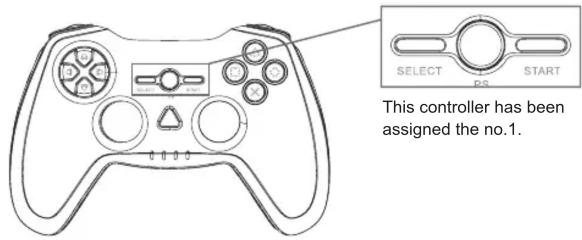
The controller number is indicated on the top of the port LEDs. For controllers 5 to 7, add the number of lit LEDs (e.g. LED 4+LED 1 = Controller No. 5).
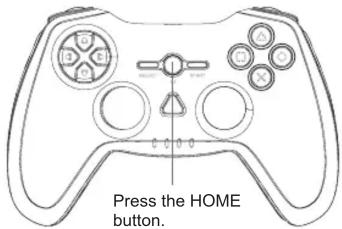
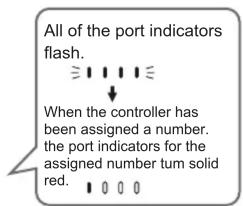
Tips
- The pairing and the controller number attribution can only be done when the system is switched on (the on/off switch light is continuously blue).
- When a paired controller is used with another PS3 system, the pairing with initial system is cancelled. When a controller is paired with another system, it has to be paired again with initial one when used again.
- If the controller or system is switched off, the lights of the port will switch off, and the attributed number will be erased.
Using the wireless controller
- If you disconnect the USB cable, the controller will switch to a wireless connection. To use it wireless, the battery of the controller must be cha
- The USB cable can be connected or disconnected when the controller and the system are on.
- If the controller does not work, press the HOME button and reattribute a number to the controller. Charge level of the battery. If you keep the home button pressed down for more than 2 seconds, you can check the battery level on your screen.
Charge level of the battery
If you keep the home button pressed down for more than 2 seconds, you can check the battery level on your screen.
| Battery is fully charged | |
| Battery has started to run down | |
| The charge of battery is low | |
| Battery is flat. The lights on the controller port flash quickly. Charge the controller. |

Symbol odpadów pochodzących
ze sprzętu elektrycznego i elektronicznego
(WEEE - ang. Waste Electrical and Electronic Equipment)
Użycie symbolu WEEE oznacza, że niniejszy produkt nie może być traktowany jako odpad domowy. Zapewniając prawidłową utylizacje pomagasz chronić środowisko naturalne. W celu uzyskania bardziej szczegółowych informacji dotyczących recyklingu niniejszego produktu należy skontaktować się z przedstawicielem władz lokalnych, dostawcą usług utylizacji odpadów lub sklepem, gdzie nabyto produkt.



Producent:
Megabajt Sp. z o.o., ul. Rydygiera 8, 01-793 Warszawa
- PL
- Gamepad Ghost
- Instrukcja obsługi
- Oświadczenie:
- Specyfikacja:
- Bezprzewodowy kontroler Bluetooth
- Uwaga:
- Ważne:
- Instalacja
- Ładowanie kontrolera:
- Parowanie kontrolera z systemem
- Wskazówki
- Korzystanie z kontrolera bezprzewodowo
- Poziom naładowania baterii
- EN
- User's manual
- Statement:
- Characteristics:
- Wireless gamepad connected by Bluetooth
- Caution:
- Important:
- Installation
- Charging the controller:
- Pairing the controller to the system
- Tips
- Using the wireless controller
- Charge level of the battery
Marke : Tracer
Modell : Gamepad Ghost
Kategorie : Spielcontroller