
23M45H-B - Bildschirm LG - Kostenlose Bedienungsanleitung
Finden Sie kostenlos die Bedienungsanleitung des Geräts 23M45H-B LG als PDF.


Benutzerfragen zu 23M45H-B LG
0 Frage zu diesem Gerät. Beantworten Sie die, die Sie kennen, oder stellen Sie Ihre eigene.
Eine neue Frage zu diesem Gerät stellen
Laden Sie die Anleitung für Ihr Bildschirm kostenlos im PDF-Format! Finden Sie Ihr Handbuch 23M45H-B - LG und nehmen Sie Ihr elektronisches Gerät wieder in die Hand. Auf dieser Seite sind alle Dokumente veröffentlicht, die für die Verwendung Ihres Geräts notwendig sind. 23M45H-B von der Marke LG.
BEDIENUNGSANLEITUNG 23M45H-B LG
OWNER'S MANUAL
LED LCD MONITOR
Please read this manual carefully before operating your set and retain it for future reference.
LED LCD MONITOR MODEL
22M45H
23M45H
24M45H
27M45H
CONTENTS
3 ASSEMBLING AND PREPARING
3 Unpacking
4 Parts and buttons
5 Setting up the Monitor set
5 - Attaching the Stand Base
5 - Detaching the Stand Base
6 - Mounting on a table
6 - Using the cable holder
8 - Mounting on a wall
9 USING THE MONITOR SET
9 Connecting to a PC
9 - D-SUB connection
9 - HDMI connection
11 CUSTOMIZING SETTINGS
12 Customizing Settings
12 - Menu Settings
13 - Picture
14 - Color
15 - Display
15 - Audio
16 - Others
17 READER Setting
18 FUNC. Setting
18 - SUPER ENERGY SAVING
19 - Picture Mode
20 - DUAL DISPLAY
20 - DUAL WEB
21 TROUBLESHOOTING
23 SPECIFICATIONS
23 22M45H
24 23M45H
25 24M45H
26 27M45H
27 Preset Modes (Resolution)
27 Indicator
28 PROPER POSTURE
28 Proper posture for using the Monitor set.
ASSEMBLING AND PREPARING
Unpacking
Check your product box for the following items. If there are any missing accessories, contact the local dealer where you purchased your product. The illustrations in this manual may differ from the actual product and accessories.
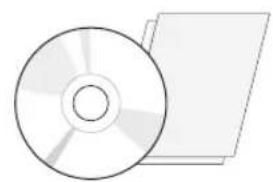
natural_image
Illustration of a CD or DVD disc and its corresponding physical object (no text or symbols visible)CD(Owner's Manual) / Card
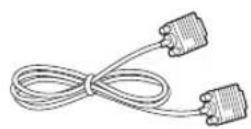
D-SUB Cable
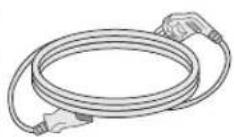
Power Cord
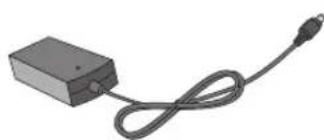
natural_image
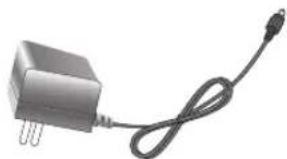
Simple black rectangular device with a coiled cable and connector, no text or symbols visibleAC-DC Adapter
natural_image
Electric motor with three leads and a cable (no text or symbols visible)AC-DC Adapter
( Depending on the country ) ( Depending on the country )
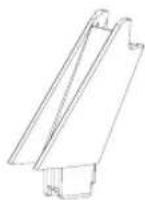
Stand Body
natural_image
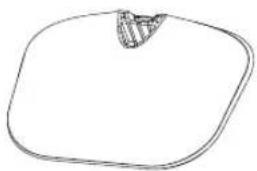
Simple line drawing of a rounded square shape with a small shaded top section (no text or symbols)Stand Base

CAUTION
- Do not use any unapproved accessories to ensure the safety and product life span.
- Any damages or injuries by using unapproved accessories are not covered by the warranty.

NOTE
- The accessories supplied with your product may vary depending on the model.
- Product specifications or contents in this manual may be changed without prior notice due to upgrade of product functions.
Parts and buttons
text_image
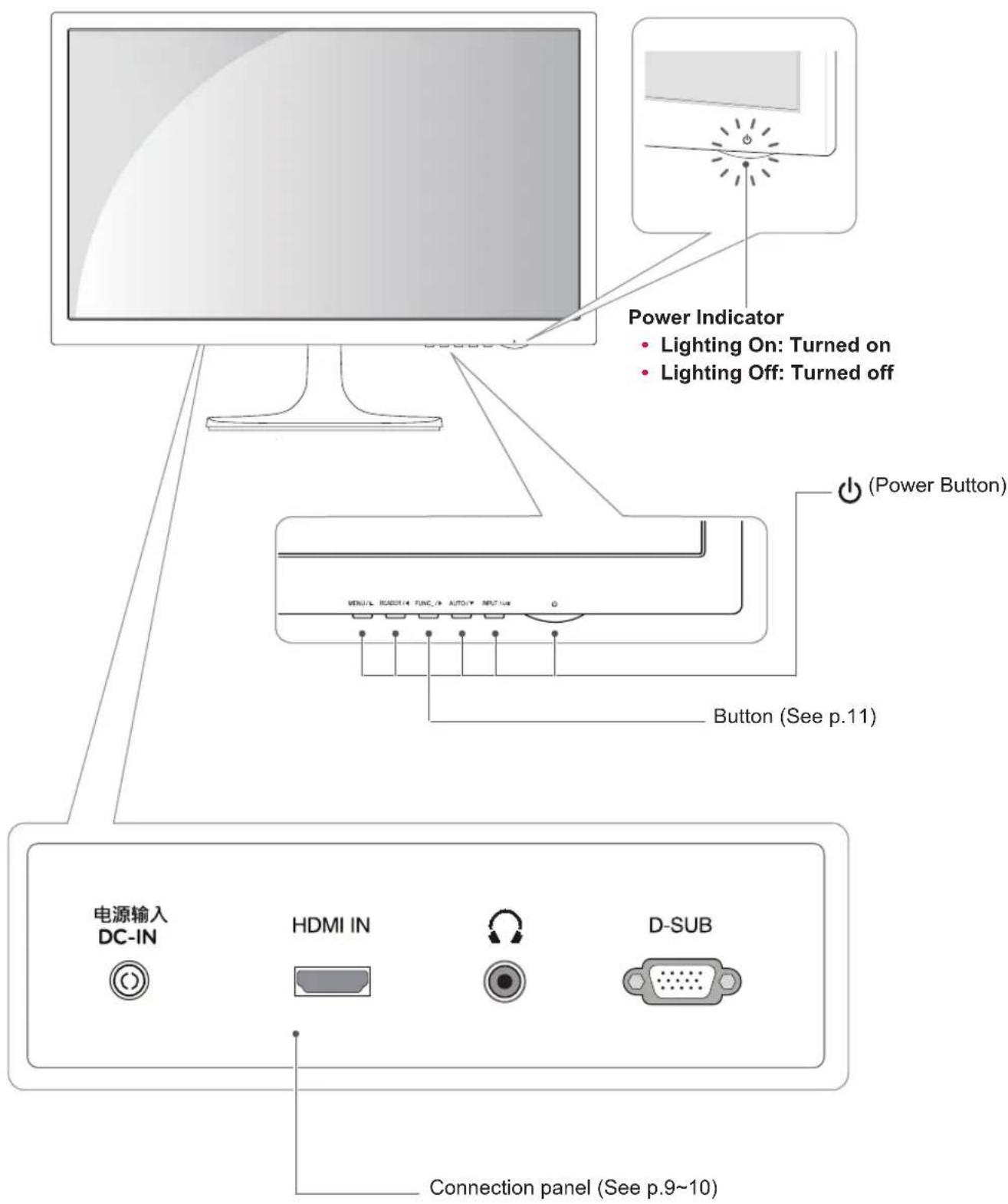
Power Indicator • Lighting On: Turned on • Lighting Off: Turned off (Power Button) Button (See p.11) 电源输入 DC-IN HDMI IN D-SUB Connection panel (See p.9~10)Setting up the Monitor set
Attaching the Stand Base
1 Place the Monitor set with the screen side down on a flat and cushioned surface.

CAUTION
Lay a foam mat or soft protective cloth on the surface to protect the screen from damage.
2 1 Attach the Stand Body to the monitor set.
2 Attach the Stand Base.
3 Tighten the screw to the right.
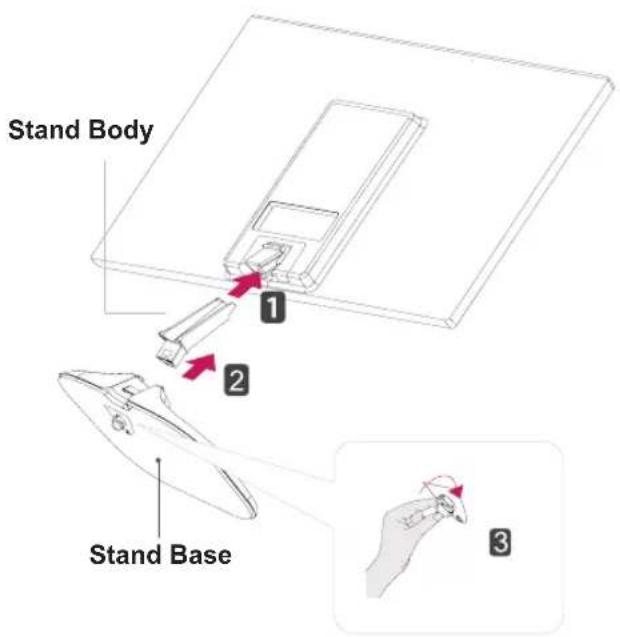
text_image
Stand Body 1 2 Stand Base 3Detaching the Stand Base
1 Place the Monitor set with the screen side down on a flat and cushioned surface.
2 1 Pull out the Stand Body and Stand Base from the monitor set.
2 Turn the screw to the left.
3 Pull out the Stand Base.
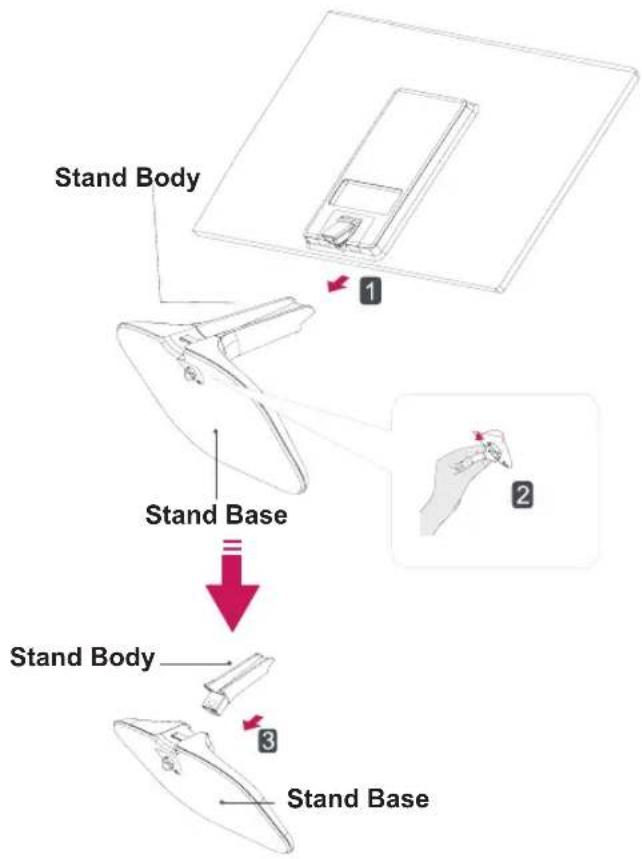
text_image
Stand Body Stand Base Stand Body Stand Base
CAUTION
- This illustration depicts the general model of connection. Your monitor may differ from the items shown in the picture.
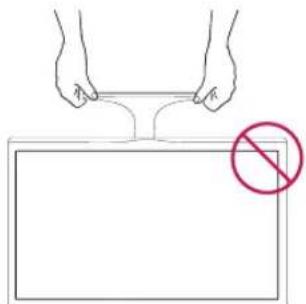
- Do not carry the product upside down holding only the stand base. The product may fall and get damaged or injure your foot.
Mounting on a table
1 Lift and tilt the Monitor set into its upright position on a table.
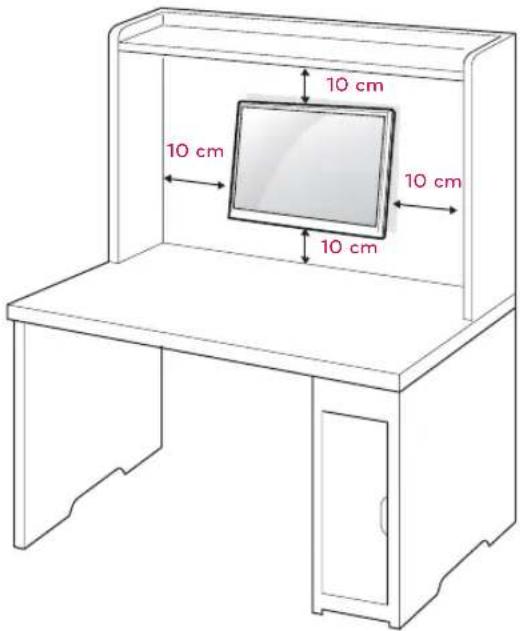
Leave a 10 cm (minimum) space from the wall for proper ventilation.
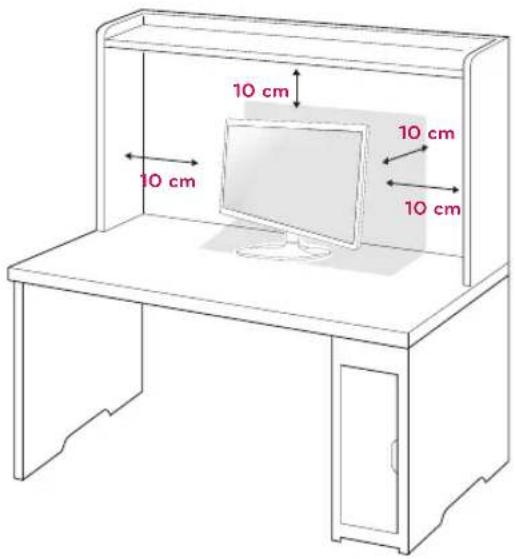
text_image
10 cm 10 cm 10 cm 10 cm2 Connect the AC-DC Adapter and Power Cord to a wall outlet.
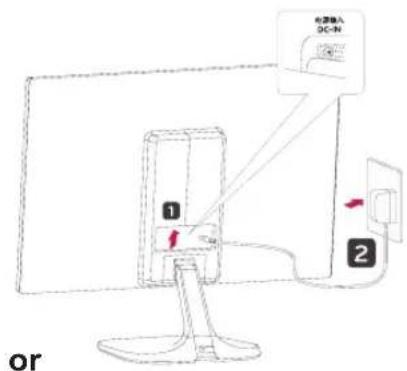
text_image
6.5mm DC-N 1 2 or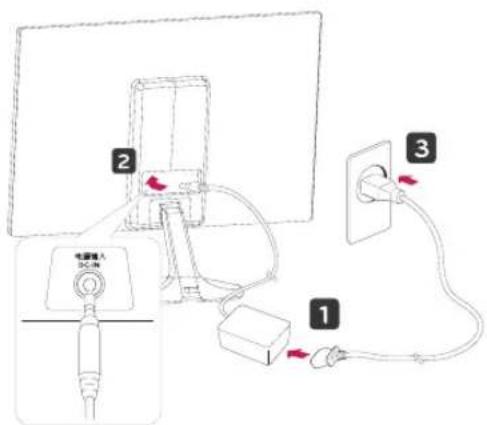
text_image
Diagram showing cable installation and connection to a monitor, with labeled components and wiring connections3 Press (Power) button on the bottom switch panel to turn the power on.

CAUTION
Unplug the power cord before moving the Monitor to another location. Otherwise electric shock may occur.
Using the cable holder
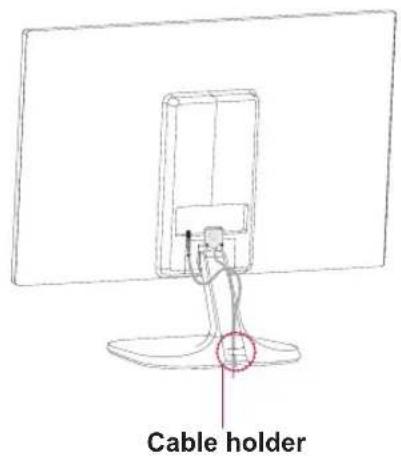
text_image
Cable holder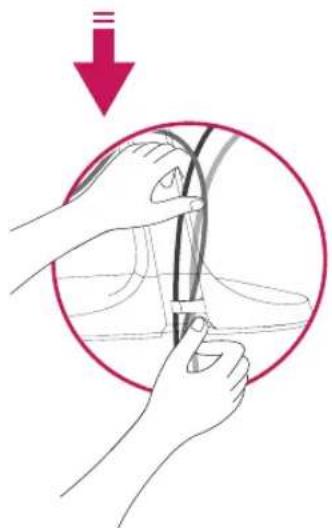
natural_image
Illustration of hands holding a cable or wire inside a circular frame, with a red downward arrow indicating motion (no text or symbols)
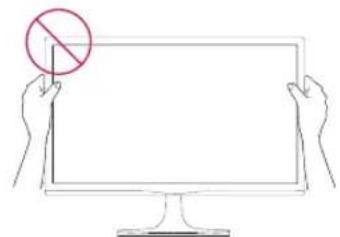
WARNING
When you adjust the angle, do not hold the bottom of the Monitor set frame as shown on the following illustration, as may injure your fingers.
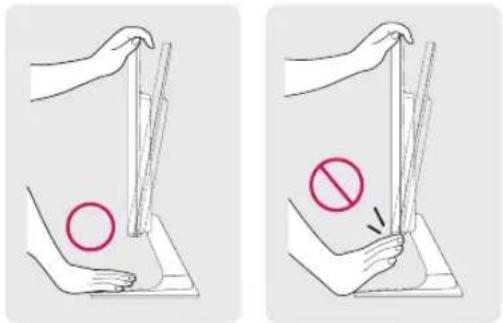
text_image
Illustration showing two methods of removing a circle from a surface, with one method indicated by a prohibition symbol.Do not touch or press the screen when adjusting the angle of the monitor.
natural_image
Line drawing of two hands holding a blank computer monitor with a red prohibition symbol on the screen (no text or labels)Do not hold this set like below picture.Monitor screen can detach from stand base and injure your body.
natural_image
Simple line drawing of two hands holding a rectangular object with a red prohibition symbol (no text or labels)
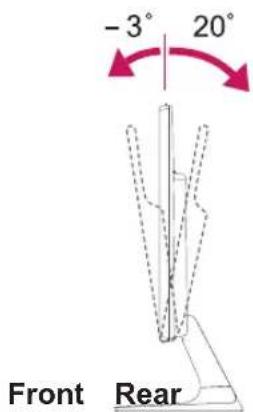
NOTE
Tilt from +20 to -3 degrees up or down to adjust the angle of the Monitor set to suit your view.
text_image
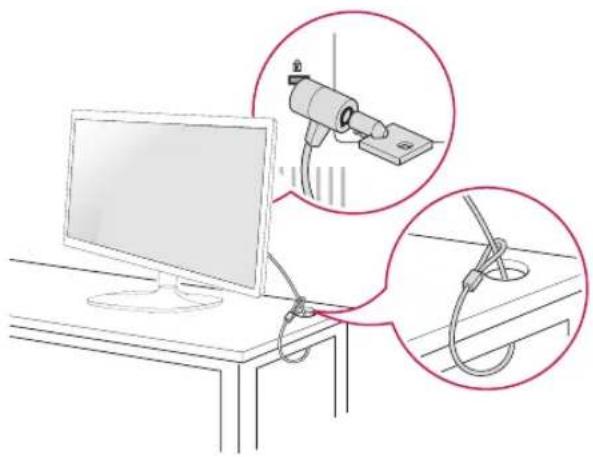
-3° 20° Front RearUsing the Kensington security system
The Kensington security system connector is located at the back of the Monitor set. For more information of installation and using, refer to the manual supplied with the Kensington security system or visit http://www.kensington.com.
Connect the Kensington security system cable between the Monitor set and a table.
natural_image
Illustration of a computer monitor connected to a cable with two magnified insets showing mechanical components (no text or symbols)
NOTE
The Kensington security system is optional. You can obtain it from most electronics stores.
Mounting on a wall
For proper ventilation, allow a clearance of 10 cm on each side and from the wall. Detailed instructions are available from your dealer, see the optional Tilt Wall Mounting Bracket Installation and Setup Guide.
text_image
10 cm 10 cm 10 cm 10 cmIf you intend to mount the Monitor set to a wall, attach Wall mounting interface (optional parts) to the back of the set.
When you install the Monitor set using a wall mounting interface (optional parts), attach it carefully so it will not drop.
1 Please, Use the screw and wall mount interface in accordance with VESA Standards.
2 If you use screw longer than standard, the monitor might be damaged internally.
3 If you use improper screw, the product might be damaged and drop from mounted position. In this case, LG Electronics is not responsible for it.
4 VESA compatible.
5 Please use VESA standard as below.
• 784.8 mm (30.9 inch) and under
* Wall Mount Pad Thickness : 2.6 mm
* Screw : Φ 4.0 mm x Pitch 0.7 mm x Length 10 mm
• 787.4 mm (31.0 inch) and above
* Please use VESA standard wall mount pad and screws.
| Model | 22M45H23M45H | 24M45H | 27M45H |
| VESA (A x B) | 75 x 75 100 | 0 x 100 200 | 0 x 100 |
| Standard screw | M4 M4 M4 | ||
| Number of screws | 4 4 4 |

CAUTION
- Disconnect the power cord first, and then move or install the Monitor set. Otherwise electric shock may occur.
- If you install the Monitor set on a ceiling or slanted wall, it may fall and result in severe injury.
- Use only an authorized LG wall mount and contact the local dealer or qualified personnel.
- Do not over tighten the screws as this may cause damage to the Monitor set and void your warranty.
- Use only screws and wall mounts that meet the VESA standard. Any damages or injuries by misuse or using an improper accessory are not covered by the warranty.

NOTE
- Use the screws that are listed on the VESA standard screw specifications.
- The wall mount kit will include an installation manual and necessary parts.
- The wall mount bracket is optional. You can obtain additional accessories from your local dealer.
- The length of screws may differ depending on the wall mount. Be sure to use the proper length.
- For more information, refer to the instructions supplied with the wall mount.
USING THE MONITOR SET
Connecting to a PC
- Your Monitor set supports Plug & Play ^* . *Plug & Play: A PC recognizes a connected device that users connect to a PC and turn on, without device configuration or user intervention.
D-SUB connection
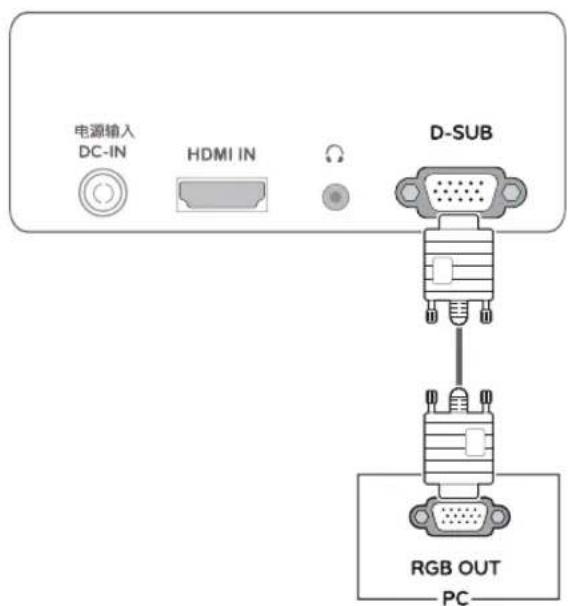
Transmits analog video from your PC to the Monitor set. Connect the PC and the Monitor set with the supplied D-sub 15 pin signal cable as shown in the following illustrations.
text_image
电源输入 DC-IN HDMI IN Ω D-SUB RGB OUT PC-
NOTE
- When using a D-Sub signal input cable connector for Macintosh
natural_image
Technical line drawing of a mechanical component with two views (top and side), no text or symbols present.- Mac adapter
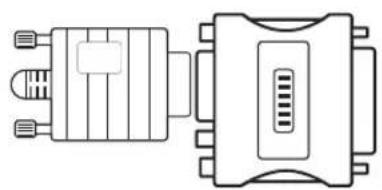
For Apple Macintosh use, a separate plug adapter is needed to change the 15 pin high density (3 row) D-SUB VGA connector on the supplied cable to a 15 pin 2 row connector.
HDMI connection
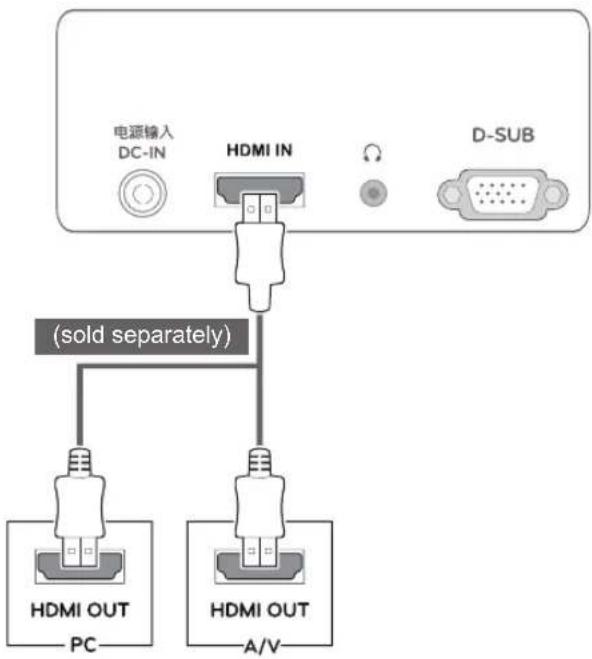
Transmits the digital video and audio signals from your PC or A/V to the Monitor set. Connect the PC or A/V and the Monitor set with the HDMI cable as shown in the following illustrations.
flowchart
graph TD
    A["电源输入 DC-IN"] --> B["HDMI IN"]
    B --> C["D-SUB"]
    B --> D["(sold separately)"]
    D --> E["HDMI OUT PC"]
    D --> F["HDMI OUT A/V"]

NOTE
- If you use HDMI PC, it can cause compatibility problem.

CAUTION
- Connect the signal input cable and tighten it by turning the screws clockwise.
- Do not press the screen with your finger for a long time as this may result in temporary distortion on the screen.
- Avoid displaying a fixed image on the screen for a long period of time to prevent image burn. Use a screensaver if possible.
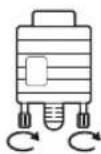

NOTE NOTE
- When you want to use two PC in our Monitor, please connect the signal cable(D-SUB/HDMI) respectively in Monitor set.
- If you turn the Monitor set on while it is cold, the screen may flicker. This is normal.
- Some red, green, or blue spots may appear on the screen. This is normal.
Self Image Setting Function
Press the power button on the bottom panel to turn the power on. When monitor power is turned on, the "Self Image Setting" Function is executed automatically. (Only supported in Analog Mode)
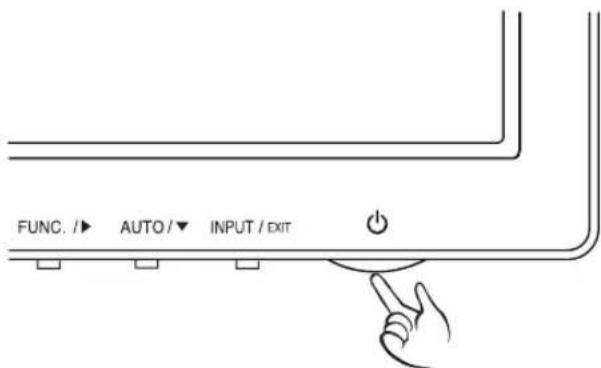
text_image
FUNC. /► AUTO /▼ INPUT / EXIT
- "Self Image Setting" Function.
This function provides the user with optimal display settings. When the user connects the monitor for the first time, this function automatically adjusts the display to optimal settings for individual input signals. (Only supported in Analog Mode)
• 'AUTO' Function.
When you encounter problems such as blurry screen, blurred letters, screen flicker or tilted screen while using the device or after changing screen resolution, press the AUTO function button to improve resolution. (Only supported in Analog Mode)
CUSTOMIZING SETTINGS
1 Press the desired button on the bottom of the Monitor set.
2 Change the value of the menu item by pressing the buttons on the bottom of the Monitor set.
To return to the upper menu or set other menu items, use the up arrow ( ) button.
3 SelectEXIT to leave the OSD menu.
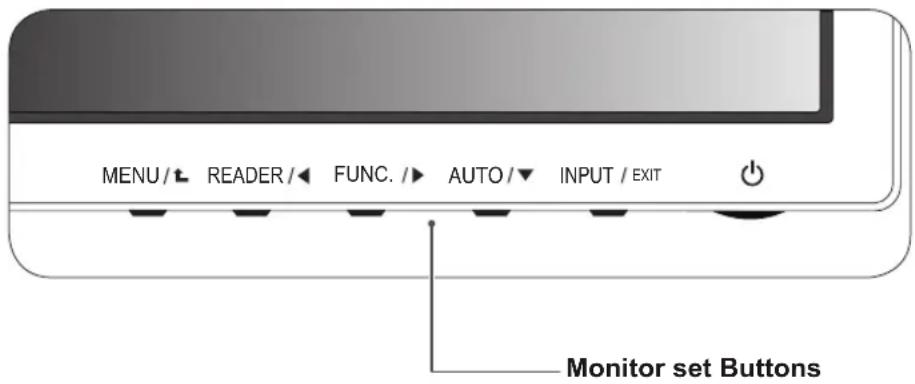
text_image
MENU /L READER /◀ FUNC. /▶ AUTO /▼ INPUT / EXIT Monitor set Buttons| Button Description | ||
| MENU / ⬆ | Accesses the main menus.(See p.12) | |
| OSD Locked/OSD Unlocked | This function allow you to lock the current control settings, so that they cannot be inadvertently changed.Press and hold the MENU button for several seconds. Then OSD of “OSD Lock” will appear. After that, user can select lock or unlock by pressing left/right button.If user selects the “Lock” icon by pressing the “OK” button, the message “OSD Locked” will appear. Otherwise, “OSD Unlocked” will appear. After selecting the “Lock”, If you want to change to Unlock, you can push the “MENU” button for several seconds. The message “OSD Unlocked” will appear. | |
| READER / ◀ | Use this button to enter Reader Mode menu. Its function works to display screen as paper-like picture for Eye comfort.If you want to more information(See p.17). | |
| FUNC. / ▶ | Use this button to enter SUPER ENERGY SAVING, Picture Mode, DUAL DISPLAY, DUAL WEB menus.(See p.18~20) | |
| AUTO / ▼ | When adjusting your display settings, always press the AUTO button on the MONITOR SETUP OSD. (Only supported in Analog Mode) | |
| The best display mode | 1920 x 1080 | |
| INPUT / EXIT | You can choose the input signal.When two input signals are connected, you can select the input signal (D-SUB/HDMI) you want.When only one signal is connected, it is automatically detected. The default setting is D-SUB. | |
| EXIT | ||
| EXIT the OSD(On Screen Display). | ||
| ➊ (Power Button) | Turns the power on or off. | |
| Power Indicator The power indicator stays white if the display is running properly (On Mode). If the display is in Sleep Mode, the power indicator blinks white. | ||
Customizing Settings
Menu Settings
1 PressMENU button on the bottom of the Monitor set to display the Menu OSD.
2 Set the options by pressing the ◀ or ▶ or ▼ buttons.
3 Select the Next Menu" button to enter the more option settings.
4 SelectEXIT to leave the OSD menu.
To return to the upper menu or set other menu items, use the up arrow (↑) button.
Each option is explained below.
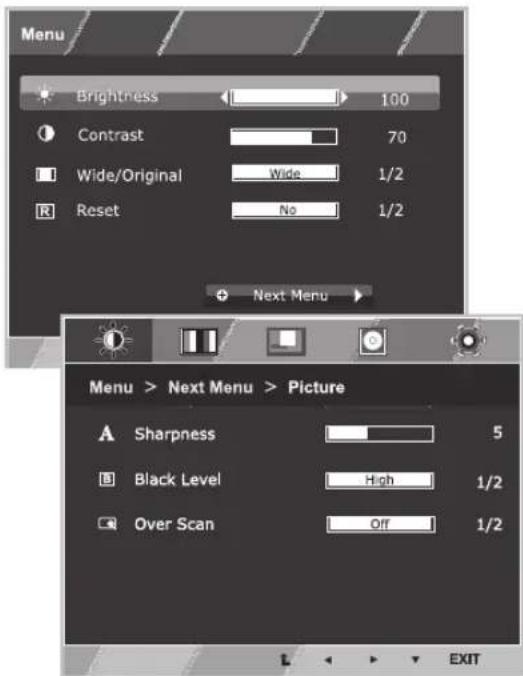
text_image
Menu Brightness 100 Contrast 70 Wide/Original Wide 1/2 Reset No 1/2 Next Menu Menu > Next Menu > Picture Sharpness 5 Black Level High 1/2 Over Scan Off 1/2 EXIT| Menu Analog HDMI Description | |||
| Brightness • | To adjust the brightness of the screen | ||
| Contrast • • | |||
| Wide/Original | • | • | Wide |
| Switch to full screen mode according to input image signal. | |||
| Original | |||
| Change the input image signal ratio to original.* This function works only if input resolution is lower than Monitor set ratio (16:9). | |||
| Reset | • | • | Restore all factory default settings. Press the◀, ▶buttons to reset immediately. |
| Menu > Next Menu Analog | HDMI | Description | ||
| Picture Sharpness • • | To adjust the clearness of the screen | |||
| Color Gamma | • | • | To customize the color of the screen | |
| Display | Horizontal | • | To adjust the position of the screen | |
| Vertical | ||||
| Clock | • | To improve the clarity and stability of the screen | ||
| Phase | ||||
| Audio | Volume | • | To adjust the volume | |
| Others Language | • | • | To customize the screen status for a user's operating environment | |
• Analog: D-SUB(Analog signal) input.
• HDMI: HDMI(Digital signal) input.
Picture
1 PressMENU button on the bottom of the Monitor set to display the Menu OSD.
2 Select the Next Menu" button to enter the more option settings.
3 Enter toPicture by pressing the ▼ button.
4 Set the options by pressing the ◀ or ▶ or ▼ buttons.
5 SelectEXIT to leave the OSD menu.
To return to the upper menu or set other menu items, use the up arrow (↑) button.
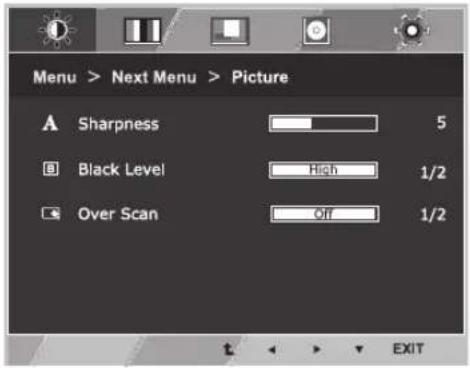
text_image
Menu > Next Menu > Picture A Sharpness 5 Black Level High 1/2 Over Scan Off 1/2 EXITEach option is explained below.
| Menu > Next Menu > Picture Description | |
| Sharpness To adjust the clearness of the screen. | |
| Black Level | You can set the offset level. If you select 'High', the screen will be bright and if you select 'Low', the screen will be dark.(only for HDMI input)* Offset?As the criteria for video signal, it is the darkest screen the monitor can show. |
| Over Scan To select the range of output image for DTV timing in HDMI input.(only for HDMI input)Recommend overscan function to turn on when connect AV equipment. | |
Color
1 PressMENU button on the bottom of the Monitor set to display the Menu OSD.
2 Select the Next Menu" button to enter the more option settings.
3 SelectColor by pressing the ▶ button.
4 Enter toColor by pressing the ▼ button.
5 Set the options by pressing the ◀ or ▶ or ▼ buttons.
6 SelectEXIT to leave the OSD menu.
To return to the upper menu or set other menu items, use the up arrow ( ) button.
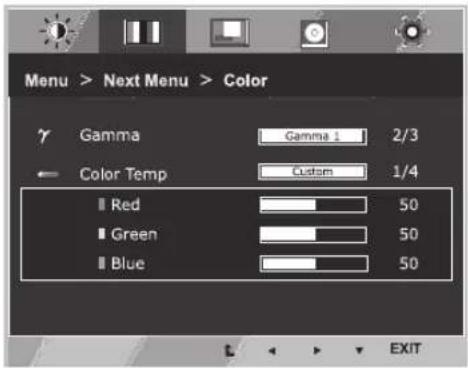
text_image
Menu > Next Menu > Color γ Gamma Gamma 1 2/3 ← Color Temp Custom 1/4 ■ Red 50 ■ Green 50 ■ Blue 50 EXITEach option is explained below.
| Menu > Next Menu > Color Description | |
| Gamma Set your own gamma value. | : Gamma 0, Gamma 1, Gamma 2 on the monitor, high gamma values display whitish images and low gamma values display blackish images. |
| Color Temp Custom | |
| • Red:Set your own red color levels.• Green:Set your own green color levels.• Blue:Set your own blue color levels. | |
| Select the screen color.Warm:Set the screen to warm color temperature (more red).Medium:Set the screen to medium color temperature.Cool:Set the screen to cool color temperature (more blue). | |
Display
1 PressMENU button on the bottom of the Monitor set to display the Menu OSD.
2 Select the Next Menu" button to enter the more option settings.
3 SelectDisplay by pressing the ▶ button.
4 Enter toDisplay by pressing the ▼ button.
5 Set the options by pressing the ◀ or ▶ or ▼ buttons.
6 SelectEXIT to leave the OSD menu.
To return to the upper menu or set other menu items, use the up arrow (↑) button.
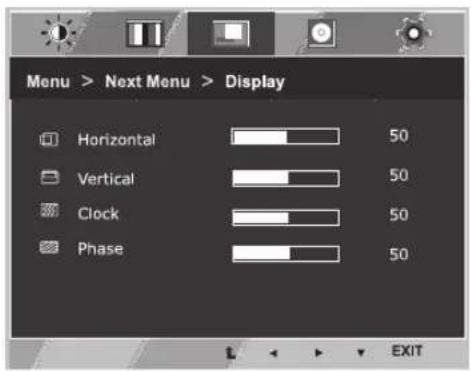
text_image
Menu > Next Menu > Display Horizontal 50 Vertical 50 Clock 50 Phase 50 L EXITEach option is explained below.
| Menu > Next Menu > Display Description | |
| Horizontal To move image left and right. | |
| Vertical To move image up and down. | |
| Clock To minimize any vertical bars or stripes visible on the screen background.The horizontal screen size will also change. | |
| Phase To adjust the focus of the display. This item allows you to remove any horizontal noise and clear or sharpen the image of characters. |
Audio
1 PressMENU button on the bottom of the Monitor set to display the Menu OSD.
2 Select the Next Menu" button to enter the more option settings.
3 SelectAudio by pressing the ▶ button.
4 Enter toVolume by pressing the ▼ button.
5 Set the options by pressing the ◀ or ▶ buttons.
6 SelectEXIT to leave the OSD menu.
To return to the upper menu or set other menu items, use the up arrow (↑) button.
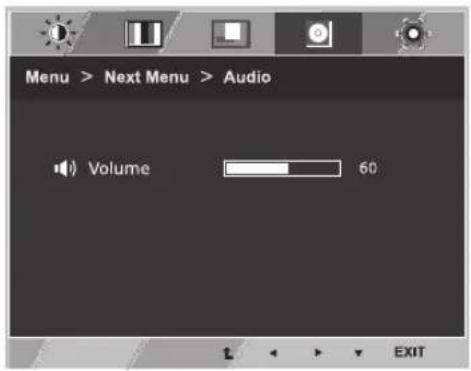
text_image
Menu > Next Menu > Audio Volume 60 EXITEach option is explained below.
| Menu > Next Menu > Audio Description | |
| Volume To adjust the volume of headphone/earphone.(Only for HDMI input) |
Others
1 PressMENU button on the bottom of the Monitor set to display the Menu OSD.
2 Select the Next Menu" button to enter the more option settings.
3 SelectOthers by pressing the ▶ button.
4 Enter to Others by pressing the ▼ button.
5 Set the options by pressing the ◀ or ▶ or ▼ buttons.
6 SelectEXIT to leave the OSD menu.
To return to the upper menu or set other menu items, use the up arrow (↑) button.
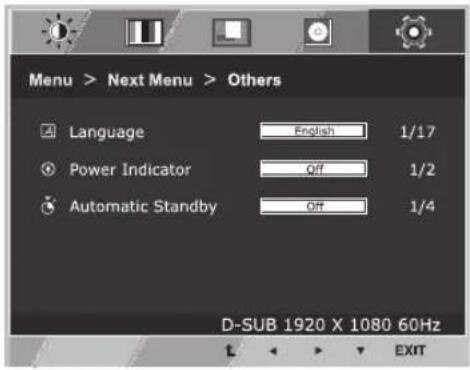
text_image
Menu > Next Menu > Others Language English 1/17 Power Indicator Off 1/2 Automatic Standby Off 1/4 D-SUB 1920 X 1080 60Hz EXITEach option is explained below.
| Menu > Next Menu > Others Description | |
| Language To choose the language | n which the control names are displayed. |
| Power Indicator | Use this function to set the power indicator on the bottom side of the monitor to On or Off.If you set Off, it will go off.If you set On at any time, the power indicator will automatically be turned on. |
| Automatic Standby | If you do not press any button on the monitor set for a certain period, the monitor set will automatically switch to standby mode. |
READER Setting
1 Press READER button on the bottom of the Monitor set to display the Reader Mode OSD.
2 Set the options by pressing the ◀ buttons.
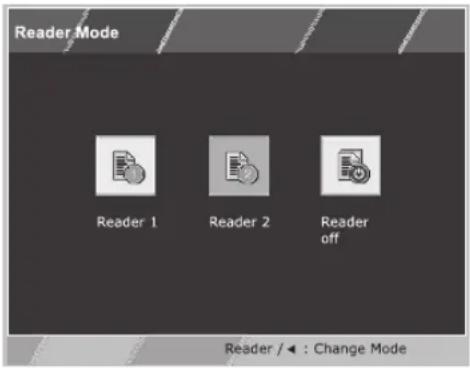
text_image
Reader Mode Reader 1 Reader 2 Reader off Reader / ← : Change ModeEach option is explained below.
| Reader Mode Description | |
| Reader 1 It is a mode that the screen is adjusted to the best for the newspaper. If you want screen more bright, you can control brightness in Menu OSD. | |
| Reader 2 It is a mode that the screen is adjusted to the best for the cartoon. If you want screen more bright, you can control brightness in Menu OSD. | |
| Reader Off It is a mode that reader mode is off. |

NOTE
If option of Reader Mode is Reader 1 or Reader 2, Picture Mode will automatically be Custom and Super Energy Saving will automatically be Off.
FUNC. Setting
SUPER ENERGY SAVING
1 Press FUNC. button on the bottom of the Monitor set to display the FUNC. OSD.
2 Enter to SUPER ENERGY SAVING by pressing the ▼ button.
3 Set the options by pressing the ◀ or ▶ or ▼ buttons.
4 SelectEXIT to leave the OSD menu. To return to the upper menu or set other menu items, use the up arrow (↑) button.
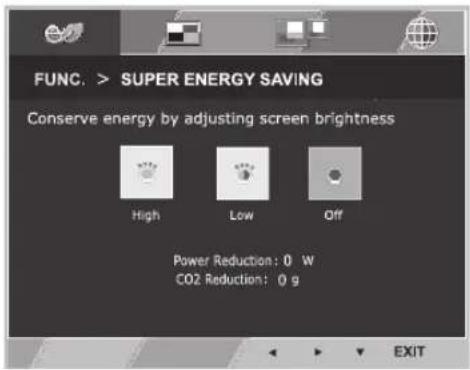
text_image
FUNC. > SUPER ENERGY SAVING Conserve energy by adjusting screen brightness High Low Off Power Reduction: 0 W CO2 Reduction: 0 g EXITEach option is explained below.
| SUPER ENERGY SAVING Description | |
| High | Enables SUPER ENERGY SAVING you can save energy with this energy- high efficient function. |
| Low | Enables SUPER ENERGY SAVING you can save energy with this energy- low efficient function. |
| Off Disables SUPER ENERGY | SAVING. |

NOTE
• TOTAL POWER REDUCTION: How much power is saved while using the monitor.
• TOTAL CO2 REDUCTION: Change the TOTAL POWER REDUCTION to CO2.
• SAVING DATA(W/h)
| 546 mm(21.5 inch) | 584 mm(23 inch) | 600 mm(23.6 inch) | 686 mm(27 inch) | |
| SUPER SAVING(High) | 4 W/h 4 | W/h 4 W/h | 6 W/h | |
| SUPER SAVING(Low) | 2 W/h 2 | W/h 2 W/h | 3 W/h |
- Saving Data depends on the Panel. So, those values should be different from each panel and panel vendor. If option of Super Energy Saving is High or Low, monitor luminance become higher or lower depend on source.
- LG calculated these values by using “broadcast video signal” (including broadcast video: IEC 62087)
- SUPER SAVING refers to how much power can be saved using the SUPER ENERGY SAVING function.
- If option of Super Energy Saving is High or Low, Picture Mode will automatically be Custom and Reader Mode will automatically be Reader Off.
Picture Mode
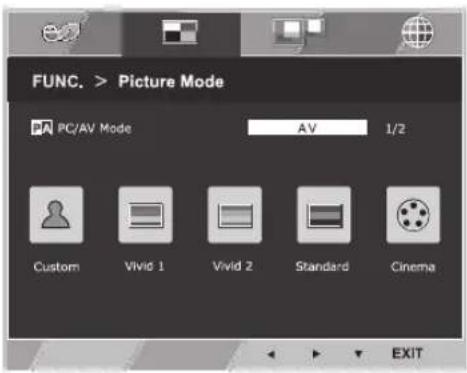
1 PressFUNC. button on the bottom of the Monitor set to display the FUNC. OSD.
2 SelectPicture Mode by pressing the ▶ button.
3 Enter toPicture Mode by pressing the ▼ button.
4 Set the options by pressing the ◀ or ▶ buttons.
5 Select EXIT to leave the OSD menu. To return to the upper menu or set other menu items, use the up arrow(↑)button.
PC Mode
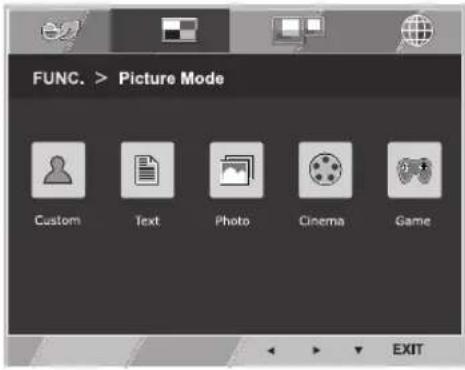
text_image
FUNC. > Picture Mode Custom Text Photo Cinema Game EXITAV Mode
text_image
FUNC. > Picture Mode PC/AV Mode AV 1/2 Custom Vivid 1 Vivid 2 Standard Cinema EXITEach option is explained below.
| Picture Mode | Description |
| Custom | It is a mode that the user can adjust each element. It can adjust the color mode of the Main Menu. |
| Text It is a mode that the screen is adjusted to the best for the textworks. | |
| Photo It is a mode that the screen is adjusted to the best to view pictures. | |
| Cinema It is a mode that the screen is adjusted to the best to view the videos. | |
| Game It is a mode that the screen is adjusted to the best to play a game. | |
| Picture Mode Description | |
| Custom | It is a mode that the user can adjust each element. It can adjust the color mode of the Main Menu. |
| Vivid 1 | Adjusts the video image for the retail environment by enhancing the contrast, brightness, Colour, and sharpness. |
| Vivid 2 | |
| Standard Adjusts the image for the normal environment. | |
| Cinema It is a mode that the screen is adjusted to the best to view the videos. | |

NOTE
If option of Picture Mode is non-Custom, Reader Mode will automatically be Reader Off and Super Energy Saving will automatically be Off.
* Before using below functions, please install DUAL SMART SOLUTION programme.
DUAL DISPLAY
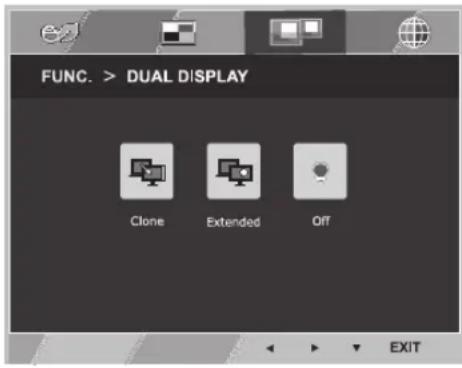
1 Press FUNC. button on the bottom of the Monitor set to display the FUNC. OSD.
2 SelectDUAL DISPLAY by pressing the ▶ button.
3 Enter toDUAL DISPLAY by pressing the ▼ button.
4 Set the options by pressing the ◀ or ▶ buttons.
5 SelectEXIT to leave the OSD menu. To return to the upper menu or set other menu items, use the up arrow (↑) button.
text_image
FUNC. > DUAL DISPLAY Clone Extended Off EXITEach option is explained below.
| DUAL DISPLAY Description | |
| Clone By selecting Clone,user | can use secondary monitor as done mode of primary monitor. |
| Extended By selecting Extended | user can use secondary monitor as extended mode of primary monitor. |
| Off If select Off,DUAL DISPLAY | is off. |
* Before using below functions, please install DUAL SMART SOLUTION programme.
DUAL WEB
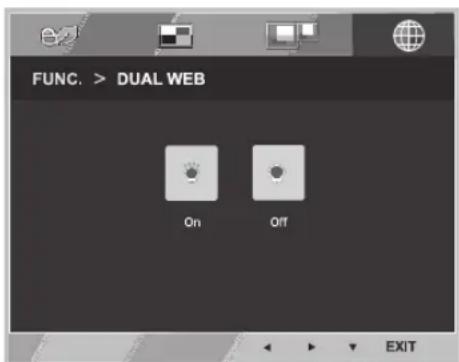
1 Press FUNC. button on the bottom of the Monitor set to display the FUNC. OSD.
2 SelectDUAL WEB by pressing the ▶ button.
3 Enter toDUAL WEB by pressing the ▼ button.
4 Set the options by pressing the ◀ or ▶ buttons.
5 SelectEXIT to leave the OSD menu. To return to the upper menu or set other menu items, use the up arrow (↑) button.
text_image
FUNC. > DUAL WEB On Off EXITEach option is explained below.
| DUAL WEB Description | |
| On Help user to browse web efficiently by dividing in half. Help to arrange and move windowson screen. Help user to control dividedwindows ratio. | |
| Off If select Off,DUAL WEB is off. |

NOTE
- When monitor goes to power saving mode with pc saving option-> Pressing any button -> OSD appear and user should press dual button -> User can bring back to normal mode.
TROUBLESHOOTING
Check the following before calling for service.
| No image appears | |
| Is the power cord of the display connected? | Check and see if the power cord is connected properly to the power outlet. |
| Is the power indicator light on? | Press the Power button. |
| Is the power on and the power indicator White? | Adjust the brightness and the contrast. |
| Is the power indicator flickering? | If the display is in power saving mode, try moving the mouse or pressing any key on the keyboard to bring up the screen.Try to turn on the PC. |
| Do you see an "OUT OF RANGE" message on the screen? | This message appears when the signal from the PC (video card) is out of horizontal or vertical frequency range of the display. See the 'Specifications' section of this manual and configure your display again. |
| Do you see a "NO SIGNAL" message on the screen? | When the monitor is on "No-Signal" in 5 minutes, the monitor goes to DPM mode. |
| Do you see a "OSD LOCKED" message on the screen? | |
| Do you see “OSD LOCKED” when you push MENU button? | • You can secure the current control settings, so that they cannot be inadvertently changed. You can unlock the OSD controls at any time by pushing the MENU button for several seconds: the message “OSD UNLOCKED” will appear. |
| Display image is incorrect | |
| Display Position is incorrect. | Press the AUTO button to automatically adjust your display image to the ideal setting. |
| On the screen background, vertical bars or stripes are visible. | Press the AUTO button to automatically adjust your display image to the ideal setting. |
| Any horizontal noise appearing in any image or characters are not clearly portrayed. | Press the AUTO button to automatically adjust your display image to the ideal setting.Check Control Panel ▶ Display ▶ Settings and adjust the display to the recommended resolution or adjust the display image to the ideal setting. Set the color setting higher than 24 bits (true color). |

CAUTION
- Check Control Panel ▶ Display ▶ Settings and see if the frequency or the resolution were changed. If yes, readjust the video card to the recommend resolution.
- If the recommended resolution (optimal resolution) is not selected, letters may be blurred and the screen may be dimmed, truncated or biased. Make sure to select the recommend resolution.
- The setting method can differ by computer and O/S (Operation System), and resolution mentioned above may not be supported by the video card performance. In this case, please ask to the computer or the video card manufacturer.
| Display image is incorrect | |
| The screen color is mono or abnormal. | Check if the signal cable is properly connected and use a screwdriver to fasten if necessary.Make sure the video card is properly inserted in the slot.Set the color setting higher than 24 bits (true color) atControl Panel▶ Settings. |
| The screen blinks. | Check if the screen is set to interlace mode and if yes, change it to the recommend resolution. |
| Do you see an "Unrecognized monitor, Plug&Play (VESA DDC) monitor found" message? | |
| Have you installed the display driver? | Be sure to install the display driver from the display driver CD (or diskette) that comes with your display. Or, you can also download the driver from our web site: http://www.lg.com.Make sure to check if the video card supports Plug&Play function. |
| The screen is flickering. | |
| Did you select the recommended resolution? | • If the selected resolution is HDMI 1080i 60/50 Hz, the screen may be flickering. Change the resolution to the recommended resolution 1080P. |
SPECIFICATIONS
22M45H
| Display Screen Type | 54.6 cm (21.5 inch) | Flat Panel Active matrix-TFT LCDAnti-Glare coatingVisible diagonal size: 54.6 cm |
| Pixel Pitch 0.247 mm x | 0.247 mm (Pixel Pitch) | |
| Sync Input Horizontal Frequency 30 kHz to 83 kHz (Automatic) | ||
| Vertical Frequency 56 Hz to 75 Hz (D-SUB)56 Hz to 61 Hz (HDMI) | ||
| Input Form Separate Sync. Digital | ||
| Video Input Signal Input 15 pin D-SUB Connector /HDMI Connector | ||
| Input Form RGB Analog (0.7 Vp-p/ 75 ohm) | ||
| Resolution Max D-SUB(Analog) : 1920 x 1080 @ 60 HzHDMI (Digital) : 1920 x 1080 @ 60 Hz | ||
| Recommend VESA 1920 x 1080 @ 60 Hz | ||
| Plug & Play DDC 2B(Analog,HDMI) | ||
| Power Consumption On Mode : 21 W (ENERGY STAR® standard)*Sleep Mode ≤ 0.3 WOff Mode ≤ 0.3 W | ||
| Power Input 19 V--- 1.2 A | ||
| AC-DC Adapter Type ADS-40SG-19-3 19025G, manufactured by SHENZHEN HONOR ELECTRONICor Type ADS-40FSG-19 19025GPG-1, manufactured by SHENZHEN HONOR ELECTRONICor Type ADS-40FSG-19 19025GPBR-1, manufactured by SHENZHEN HONOR ELECTRONICor Type ADS-40FSG-19 19025GPI-1, manufactured by SHENZHEN HONOR ELECTRONICor Type ADS-40FSG-19 19025GPCU-1, manufactured by SHENZHEN HONOR ELECTRONICor Type ADS-40FSG-19 19025GPB-2, manufactured by SHENZHEN HONOR ELECTRONICor Type LCAP21, manufactured by LIEN CHANG ELECTRONIC ENTERPRISEor Type LCAP26-A, manufactured by LIEN CHANG ELECTRONIC ENTERPRISEor Type LCAP26-E, manufactured by LIEN CHANG ELECTRONIC ENTERPRISEor Type LCAP26-I, manufactured by LIEN CHANG ELECTRONIC ENTERPRISEor Type LCAP26-B, manufactured by LIEN CHANG ELECTRONIC ENTERPRISEor Type PSAB-L203A, manufactured by LG Innotek Co.,Ltdor Type PSAB-L202B, manufactured by LG Innotek Co.,Ltdor Type PSAB-L202C, manufactured by LG Innotek Co.,Ltdor Type PSAB-L202D, manufactured by LG Innotek Co.,Ltd | ||
| OUTPUT: 19 V--- 1.3 A | ||
| Dimensions (Width x Height x Depth) With Stand 50.8 cm x 41.7 cm x 18.8 cm | ||
| Without Stand 50.8 cm x 31.6 cm x 6.0 cm | ||
| Weight 2.6 kg | ||
| Tilt Range -3° to 20° | ||
| Environmental conditions Operating Temperature Operating Humidity 10°C to 35 °C10 % to 80 % | ||
| Storage Temperature Storage Humidity -20°C to 60 °C5 % to 90 % non-Condensing | ||
| Stand Base Attached ( ), Detached (O) | ||
| Power cord Wall-outlet type | ||
Product specifications shown above may be changed without prior notice due to upgrade of product functions.
* The power consumption level can be different by operating condition and monitor setting.
* The On mode power consumption is measured with ENERGY STAR® test standard.
* ENERGY STAR® is a US registered mark of the United States Environmental Protection Agency.
SPECIFICATIONS
23M45H
| Display Screen Type | 58.4 cm (23 inch) Flat | Panel Active matrix-TFT LCDAnti-Glare coatingVisible diagonal size: 58.4 cm |
| Pixel Pitch 0.265 mm x | 0.265 mm (Pixel Pitch) | |
| Sync Input Horizontal Frequency 30 kHz to 83 kHz (Automatic) | ||
| Vertical Frequency 56 Hz to 75 Hz (D-SUB)56 Hz to 61 Hz (HDMI) | ||
| Input Form Separate Sync. Digital | ||
| Video Input Signal Input 15 pin D-SUB Connector /HDMI Connector | ||
| Input Form RGB Analog (0.7 Vp-p/ 75 ohm) | ||
| Resolution Max D-SUB(Analog) : 1920 x 1080 @ 60 HzHDMI (Digital) : 1920 x 1080 @ 60 Hz | ||
| Recommend VESA 1920 x 1080 @ 60 Hz | ||
| Plug & Play DDC 2B(Analog,HDMI) | ||
| Power Consumption On Mode : 21 W (ENERGY STAR® standard)*Sleep Mode ≤ 0.3 WOff Mode ≤ 0.3 W | ||
| Power Input 19 V --- 1.3 A | ||
| AC-DC Adapter Type ADS-40SG-19-3 19025G, manufactured by SHENZHEN HONOR ELECTRONIC or Type ADS-40FSG-19 19025GPG-1, manufactured by SHENZHEN HONOR ELECTRONIC or Type ADS-40FSG-19 19025GPBR-1, manufactured by SHENZHEN HONOR ELECTRONIC or Type ADS-40FSG-19 19025GPI-1, manufactured by SHENZHEN HONOR ELECTRONIC or Type ADS-40FSG-19 19025GPCU-1, manufactured by SHENZHEN HONOR ELECTRONIC or Type ADS-40FSG-19 19025GPB-2, manufactured by SHENZHEN HONOR ELECTRONIC or Type LCAP21, manufactured by LIEN CHANG ELECTRONIC ENTERPRISE or Type LCAP26-A, manufactured by LIEN CHANG ELECTRONIC ENTERPRISE or Type LCAP26-E, manufactured by LIEN CHANG ELECTRONIC ENTERPRISE or Type LCAP26-I, manufactured by LIEN CHANG ELECTRONIC ENTERPRISE or Type LCAP26-B, manufactured by LIEN CHANG ELECTRONIC ENTERPRISE or Type PSAB-L203A, manufactured by LG Innotek Co.,Ltd or Type PSAB-L202B, manufactured by LG Innotek Co.,Ltd or Type PSAB-L202C, manufactured by LG Innotek Co.,Ltd or Type PSAB-L202D, manufactured by LG Innotek Co.,Ltd | ||
Product specifications shown above may be changed without prior notice due to upgrade of product functions.
* The power consumption level can be different by operating condition and monitor setting.
* The On mode power consumption is measured with ENERGY STAR® test standard.
* ENERGY STAR® is a US registered mark of the United States Environmental Protection Agency.
SPECIFICATIONS
24M45H
| Display Screen Type | 60.0 cm (23.6 inch) | Flat Panel Active matrix-TFT LCDAnti-Glare coatingVisible diagonal size: 60.0 cm |
| Pixel Pitch 0.272 mm x | 0.272 mm (Pixel Pitch) | |
| Sync Input Horizontal Frequency 30 kHz to 83 kHz (Automatic) | ||
| Vertical Frequency 56 Hz to 75 Hz (D-SUB)56 Hz to 61 Hz (HDMI) | ||
| Input Form Separate Sync. Digital | ||
| Video Input Signal Input 15 pin D-SUB Connector /HDMI Connector | ||
| Input Form RGB Analog (0.7 Vp-p/ 75 ohm) | ||
| Resolution Max D-SUB(Analog): 1920 x 1080 @ 60 HzHDMI (Digital): 1920 x 1080 @ 60 Hz | ||
| Recommend VESA 1920 x 1080 @ 60 Hz | ||
| Plug & Play DDC 2B(Analog,HDMI) | ||
| Power Consumption On Mode: 21 W (ENERGY STAR® standard)*Sleep Mode ≤ 0.3 WOff Mode ≤ 0.3 W | ||
| Power Input 19 V --- 1.3 A | ||
| AC-DC Adapter Type ADS-40SG-19-3 19025G, manufactured by SHENZHEN HONOR ELECTRONICor Type ADS-40FSG-19 19025GPG-1, manufactured by SHENZHEN HONOR ELECTRONICor Type ADS-40FSG-19 19025GPBR-1, manufactured by SHENZHEN HONOR ELECTRONICor Type ADS-40FSG-19 19025GPI-1, manufactured by SHENZHEN HONOR ELECTRONICor Type ADS-40FSG-19 19025GPCU-1, manufactured by SHENZHEN HONOR ELECTRONICor Type ADS-40FSG-19 19025GPB-2, manufactured by SHENZHEN HONOR ELECTRONICor Type LCAP21, manufactured by LIEN CHANG ELECTRONIC ENTERPRISEor Type LCAP26-A, manufactured by LIEN CHANG ELECTRONIC ENTERPRISEor Type LCAP26-E, manufactured by LIEN CHANG ELECTRONIC ENTERPRISEor Type LCAP26-I, manufactured by LIEN CHANG ELECTRONIC ENTERPRISEor Type LCAP26-B, manufactured by LIEN CHANG ELECTRONIC ENTERPRISEor Type PSAB-L203A, manufactured by LG Innotek Co.,Ltdor Type PSAB-L202B, manufactured by LG Innotek Co.,Ltdor Type PSAB-L202C, manufactured by LG Innotek Co.,Ltdor Type PSAB-L202D, manufactured by LG Innotek Co.,Ltd | ||
| OUTPUT: 19 V --- 1.3 A | ||
| Dimensions (Width x Height x Depth) With Stand 55.6 cm x 44.5 cm x 18.8 cm | ||
| Without Stand 55.6 cm x 34.4 cm x 5.9 cm | ||
| Weight 3.0 kg | ||
| Tilt Range -3° to 20° | ||
| Environmental conditions Operating Temperature Operating Humidity 10°C to 35 °C10 % to 80 % | ||
| Storage Temperature Storage Humidity -20°C to 60 °C5 % to 90 % non-Condensing | ||
| Stand Base Attached ( ), Detached (O) | ||
| Power cord Wall-outlet type | ||
Product specifications shown above may be changed without prior notice due to upgrade of product functions.
* The power consumption level can be different by operating condition and monitor setting.
* The On mode power consumption is measured with ENERGY STAR® test standard.
* ENERGY STAR® is a US registered mark of the United States Environmental Protection Agency.
SPECIFICATIONS
27M45H
| Display Screen Type | 68.6 cm (27 inch) Flat | Panel Active matrix-TFT LCDAnti-Glare coatingVisible diagonal size: 68.6 cm |
| Pixel Pitch 0.311 mm x | 0.311 mm (Pixel Pitch) | |
| Sync Input Horizontal Frequency | 30 kHz to 83 kHz (Automatic) | |
| Vertical Frequency | 56 Hz to 75 Hz (D-SUB)56 Hz to 61 Hz (HDMI) | |
| Input Form Separate Sync. Digital | ||
| Video Input Signal Input 15 pin D-SUB Connector /HDMI Connector | ||
| Input Form RGB Analog (0.7 Vp-p/ 75 ohm) | ||
| Resolution Max D-SUB(Analog): 1920 x 1080 @ 60 HzHDMI (Digital): 1920 x 1080 @ 60 Hz | ||
| Recommend VESA 1920 x 1080 @ 60 Hz | ||
| Plug & Play DDC 2B(Analog,HDMI) | ||
| Power Consumption On Mode: 27 W (ENERGY STAR® standard) *Sleep Mode ≤ 0.3 WOff Mode ≤ 0.3 W | ||
| Power Input 19 V 1.6-A | ||
| AC-DC Adapter Type ADS-40SG-19-3 19032G, manufactured by SHENZHEN HONOR ELECTRONIC or ADS-40FSG-19 19032GPG-1, manufactured by SHENZHEN HONOR ELECTRON or ADS-40FSG-19 19032GPBR-1, manufactured by SHENZHEN HONOR ELECTRON or ADS-40FSG-19 19032GPI-1, manufactured by SHENZHEN HONOR ELECTRON or ADS-40FSG-19 19032GPCU-1, manufactured by SHENZHEN HONOR ELECTRON | ||
| OUTPUT: 19 V--- 1.7 A | ||
| Dimensions (Width x Height x Depth) With Stand 64.1 cm x 48.8 cm x 21.2 cm | ||
| Without Stand 64.1 cm x 39.2 cm x 4.7 cm | ||
| Weight 4.2 kg | ||
| Tilt Range -3° to 20° | ||
| Environmental conditions Operating Temperature Operating Humidity 10°C to 35 °C10 % to 80 % | ||
| Storage Temperature Storage Humidity -20°C to 60 °C5 % to 90 % non-Condensing | ||
| Stand Base Attached ( ), Detached (O) | ||
| Power cord Wall-outlet type | ||
Product specifications shown above may be changed without prior notice due to upgrade of product functions.
* The power consumption level can be different by operating condition and monitor setting.
* The On mode power consumption is measured with ENERGY STAR® test standard.
* ENERGY STAR® is a US registered mark of the United States Environmental Protection Agency.
Preset Modes (Resolution)
D-SUB Timing
| Display Modes (Resolution) | Horizontal Frequency(kHz) | Vertical Frequency(Hz) | Polarity(H/V) | ||||
| 720 x 400 | 31.468 | 70 | -/+ | ||||
| 640 x 480 | 31.469 | 60 | -/- | ||||
| 640 x 480 | 37.500 | 75 | -/- | ||||
| 800 x 600 | 37.879 | 60 | +/+ | ||||
| 800 x 600 | 46.875 | 75 | +/+ | ||||
| 1024 x 768 | 48.363 | 60 | -/- | ||||
| 1024 x 768 | 60.023 | 75 | +/+ | ||||
| 1152 x 864 | 67.500 | 75 | +/+ | ||||
| 1280 x 1024 | 63.981 | 60 | +/+ | ||||
| 1280 x 1024 | 79.976 | 75 | +/+ | ||||
| 1680 x 1050 | 65.290 | 60 | -/+ | ||||
| 1920 x 1080 | 67.500 | 60 | +/+ | Recommend Mode | |||
HDMI Timing
| Factory support mode(Preset Mode) | HorizontalFrequency(kHz) | VerticalFrequency(Hz) | HDMI |
| 480P 31.50 60 O | |||
| 576P 31.25 50 O | |||
| 720P 37.50 50 O | |||
| 720P 45.00 60 O | |||
| 1080i 28.12 50 O | |||
| 1080i 33.75 60 O | |||
| 1080P 56.25 50 O | |||
| 1080P 67.50 60 | ORecommend Mode |
Indicator
| Mode LED Color | |
| On Mode White | |
| Sleep Mode | Blinking White |
| Off Mode Off |
PROPER POSTURE
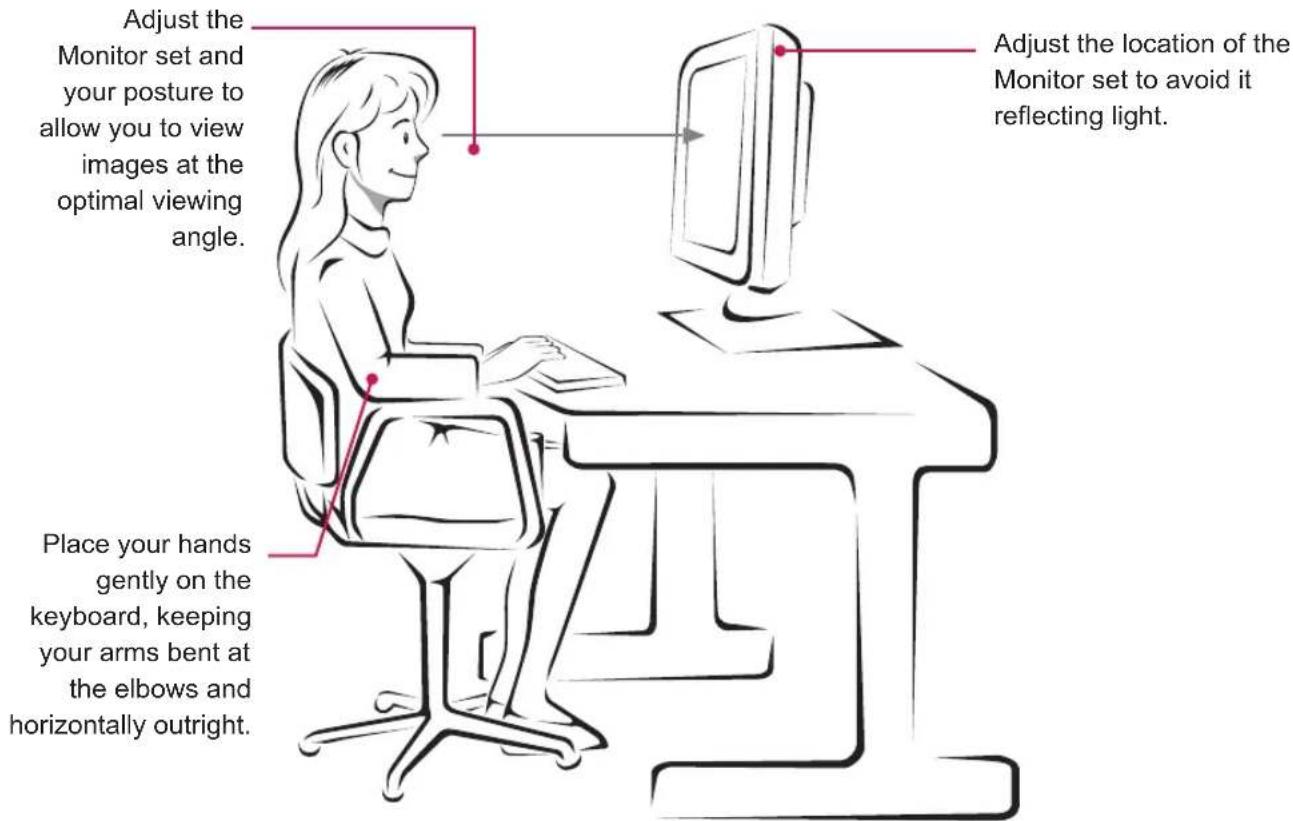
Proper posture for using the Monitor set.
text_image
Adjust the Monitor set and your posture to allow you to view images at the optimal viewing angle. Place your hands gently on the keyboard, keeping your arms bent at the elbows and horizontally outright. Adjust the location of the Monitor set to avoid it reflecting light.
LG
Life's Good
Declaration of Conformity
Trade Name: LG
Model : 22M45HA, 23M45HA, 24M45HA, 27M45HA
Responsible Party: LG Electronics Inc.
Address : 1000 Sylvan Ave. Englewood Cliffs NJ 07632 U.S.A
TEL: 201-266-2534
*above information is only for USA FCC Regulatory
Make sure to read the Safety Precautions before using the product.
Keep the Owner's Manual (CD) in an accessible place for future reference.
The model and serial number of the SET is located on the back and one side of the SET.
Record it below should you ever need service.
MODEL
SERIAL
ENERGY STAR is a set of power-saving guidelines issued by the U.S.Environmental Protection Agency(EPA).

As an ENERGY STAR Partner LGE U. S. A., Inc. has determined that this product meets the ENERGY STAR guidelines for energy efficiency.