VT-400 - Stativ Magnus - Kostenlose Bedienungsanleitung
Finden Sie kostenlos die Bedienungsanleitung des Geräts VT-400 Magnus als PDF.


Benutzerfragen zu VT-400 Magnus
0 Frage zu diesem Gerät. Beantworten Sie die, die Sie kennen, oder stellen Sie Ihre eigene.
Eine neue Frage zu diesem Gerät stellen
Laden Sie die Anleitung für Ihr Stativ kostenlos im PDF-Format! Finden Sie Ihr Handbuch VT-400 - Magnus und nehmen Sie Ihr elektronisches Gerät wieder in die Hand. Auf dieser Seite sind alle Dokumente veröffentlicht, die für die Verwendung Ihres Geräts notwendig sind. VT-400 von der Marke Magnus.
BEDIENUNGSANLEITUNG VT-400 Magnus
MAGNUS ^ Video Tripod
Omer's Manual
VT-400
natural_image
Mechanical tripod with tripod arms and tripod base (no text or symbols visible)MAGNUS
ONE-YEAR LIMITED WARRANTY
This Magnus product is warranted to the original purchaser to be free from defects in materials and workmanship under normal consumer use for a period of one (1) year from the original purchase date or thirty (30) days after replacement, whichever occurs later. The warranty provider's responsibility with respect to this limited warranty shall be limited solely to repair or replacement, at the provider's discretion, of any product that fails during normal use of this product in its intended manner and in its intended environment. Inoperability of the product or part(s) shall be determined by the warranty provider. If the product has been discontinued, the warranty provider reserves the right to replace it with a model of equivalent quality and function. This warranty does not cover damage or defect caused by misuse, neglect, accident, alteration, abuse, improper installation or maintenance. EXCEPT AS PROVIDED HEREIN, THE WARRANTY PROVIDER MAKES NEITHER ANY EXPRESS WARRANTIES NOR ANY IMPLIED WARRANTIES, INCLUDING BUT NOT LIMITED TO ANY IMPLIED WARRANTY OF MICRO-ANTABILITY OR FITNESS FOR A PARTICULAR PURPOSE. This warranty provides you with specific legal rights, and you may also have additional rights that vary from state to state. To obtain warranty coverage, contact the Magnus Customer Service Department to obtain a return merchandise authorization ("RMA") number, and return the defective product to Magnus along with the RMA number and proof of purchase. Shipment of the defective product is at the purchaser's own risk and expense. For more information or to arrange service, visit www.magnustriptools.com or call Customer Service at 212 594 2353.

MAGNUS*
Amdas Group Ltd
Intergenic registered trademarks of the Codex Group 40.20% Codex Group 17.88 mg non-secured Product security provided by the Codex Group, www.indersp.com
231
Thank you for choosing Magnus.
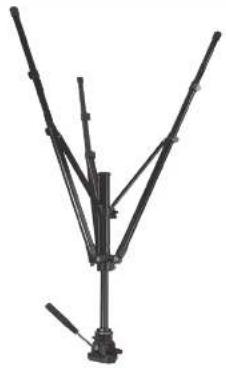
The Magnus VT-400 is a video tripod that provides easy to use features for your recording needs. It offers a 2-way fluid pan head, 3 section legs with flip locks, and a gear-driven center column. Raise your camera's height from 22 to 64 inches, and adjust the friction for the pan, till, and height for precise control. The quick-release plate makes it easy to detach and react through the camera to switch between handheld and tripod shooting.
Safety Warnings
- Please read and follow these instructions, and keep this manual in a safe place.
- Never set up or pull down a load while a camera countless.
- Do not move the tripod or adjust the legs while a camera is mounted.
- Do not exceed the maximum weight capacity of the tripod.
- Never leave a camera unattended on the tripod.
- The camera should be securely listened to the quick-release mounting plate before mounting onto the tripod.
- Never mount a camera to the tripod until of tripod legs are raised and stabilized.
- Do not lift or move the tripod by the head.
- Keep hands clear of the inside of the legs to avoid tripping fingers.
- The safe operation of the tripod is the responsibility of the user.
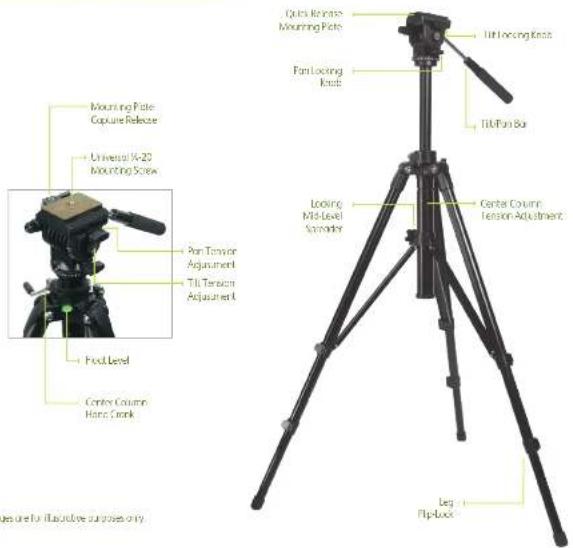
Video Tripod Components
text_image
Mounting Rate Cupure Release Universal X-20 Mounting Screw Pan Torrion Adjustment Tilt Tension Adjustment Fool Level Centry Column Pane Screw Optics Range Mounting Rate Tilt Locking Knot Fan Locking Knock Tilt Fan Bo Looking Mild-Level Sensifier Center Column Tension Adjustment Leg Flip-Box Figure for Executive purposes onlySpecifications
Load Capacity: 15 lb. (6.8 kg)
Height Range: 22° to 64° (55.8 to 162.5 cm)
Folded Length: 27.2" (69 cm)
Weight: 5.95 lb. (2.7 kg)
Using The Tripod
natural_image
Close-up of hands adjusting a black tripod with metal clips (no visible text or symbols)
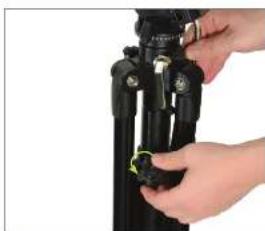
Unlock the Mid-Level Spreader
Unlock the mid-level spreader by rotating the looking knob counterclockwise.
text_image
Float Level
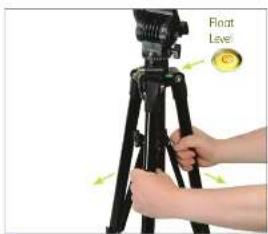
Spread the Tripod
Spread the tripod legs to the desired width. Check the float level to verify that the tripod is level. Readjust the legs if necessary.
natural_image
Hand holding a black tripod with a green clip, against a white background (no text or symbols visible)
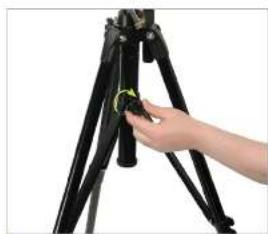
Lock the Mid-Level Spreader
Lock the mid-level spreader by rotating the looking knob dockwise.
natural_image
Close-up of a black mechanical component with a yellow-green directional arrow indicating rotation (no text or symbols)
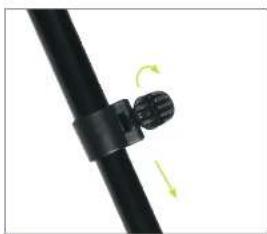
Extend the Legs
Always extend the legs from the top flip-locks first. Pull each flip-lock and extend the leg to its desired height. Match the length of the legs and relock the flip-locks. Check the float level to verify the tripod is level.
text_image
Center Column Lock Knob
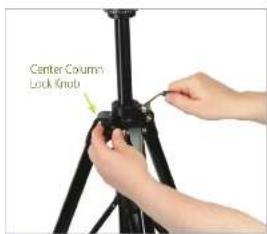
Raise the Center Column
If you need to raise the center column, unlock the center column by rotating the locking knob counterclockwise. Use the hand crank to raise or lower the head platform. Never raise or lower the head by pushing or pulling it.
natural_image
Close-up of a hand adjusting a black tripod with a yellow measurement tape (no visible text or symbols)
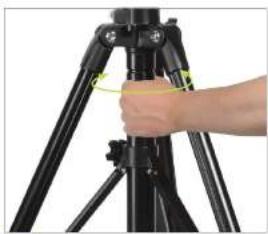
Adjusting the Center Column Tension
You can adjust the center column tension to accommodate heavier cameras so that the column doesn't slip down from the weight. Loosen the center column and mid-level spreader locking knobs. Rotate the center column clockwise to loosen and counterclockwise to tighten.
natural_image
Close-up of hands holding a black DSLR camera (no visible text or symbols)
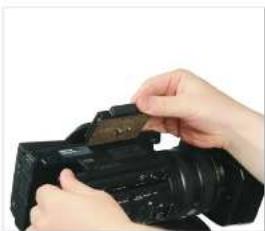
Mount the Camera to the Plate
Attach the mounting plate to your camera. Be certain that the retractable alignment pin sets into its pocket on the camera. Screw the threaded stud on the plate into the bottom of the camera. Make sure the thumb screw is flush against the bottom of the plate.
natural_image
Close-up of a professional video camera being mounted on a tripod, with a close-up inset showing the camera's tip (no visible text or symbols)
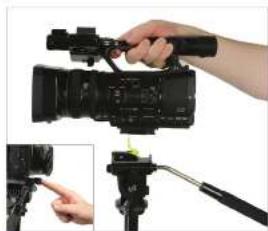
Mount the Camera to the Tripod
Make certain that your tripod legs are locked and the tripod is stable and ready for mounting your camera. From the right side of the tripod, slide the mounting plate down and left onto the tripod head. Push down until the mounting plate locks into place. Push the mounting plate lock back into place to finish mounting the camera to the tripod.
text_image
Pen Lock
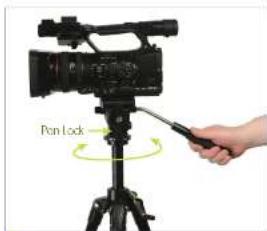
Pan
Release the pan lack knob. Using the tilt/pan bar, rotate the tripod head left or right to pan.
natural_image
Close-up of hands operating a video camera on a tripod, with a green arrow indicating rotation (no text or symbols visible)
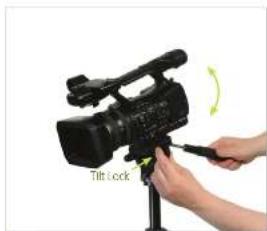
Tilt
Release the tilt lock knob. Using the tilt/pan bar, tilt the tripod head up or down.
There are individual tension adjustment knobs for the pan and tilt features. To adjust, rotate the knob clockwise to increase tension, and counterclockwise to decrease tension.