SDI2USB3 - Audio-/Video-Konverter INOGENI - Kostenlose Bedienungsanleitung
Finden Sie kostenlos die Bedienungsanleitung des Geräts SDI2USB3 INOGENI als PDF.


Benutzerfragen zu SDI2USB3 INOGENI
0 Frage zu diesem Gerät. Beantworten Sie die, die Sie kennen, oder stellen Sie Ihre eigene.
Eine neue Frage zu diesem Gerät stellen
Laden Sie die Anleitung für Ihr Audio-/Video-Konverter kostenlos im PDF-Format! Finden Sie Ihr Handbuch SDI2USB3 - INOGENI und nehmen Sie Ihr elektronisches Gerät wieder in die Hand. Auf dieser Seite sind alle Dokumente veröffentlicht, die für die Verwendung Ihres Geräts notwendig sind. SDI2USB3 von der Marke INOGENI.
BEDIENUNGSANLEITUNG SDI2USB3 INOGENI
INOGENI

4K2USB3: 4K to USB 3.0
4KX2USB3: 4K+LOOP to USB 3.0
HD2USB3: HD to USB 3.0
DVI2USB3: DVI to USB 3.0
VGA2USB3: VGA to USB 3.0
SDI2USB3: SDI to USB 3.0
Quick Start Guide
WWW.INOGENI.COM
Thank you!
With theNOGENI to USB 3.0 capture device, you have just acquired the finest and easiest to use DVI/HDMI/VGA/CVBS/3GSDI to USB 3.0 converter. Engineered by video professionals, for video professionals, it is the most compatible USB 3.0 device across most OSes and USB 3.0 chipsets. No driver installation insures trouble-free operation, just Plug'n Go!
Since the list of features and software/hardware compatibilities is growing constantly, please consult the website, www.inogeni.com, for the latest information.
You will also find the latest firmware, FAQs and upgrade tools on the web site.
Connection Diagram:
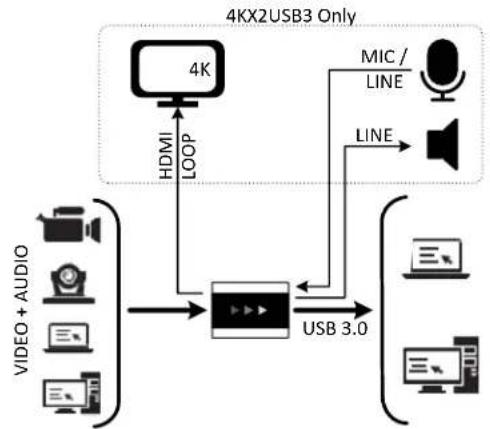
flowchart
graph TD
    A["VIDEO + AUDIO"] --> B["3.0 USB 3.0"]
    B --> C["4KX2USB3 Only"]
    C --> D["MIC / LINE"]
    C --> E["LINE"]
    D --> F["4K"]
    E --> G["扬声器"]
    B --> H["USB 3.0"]
    H --> I["Video"]
    H --> J["Computer"]
    H --> K["Video"]
    style A fill:#f9f,stroke:#333
    style B fill:#ccf,stroke:#333
    style C fill:#cfc,stroke:#333
    style D fill:#fcc,stroke:#333
    style E fill:#cff,stroke:#333
    style F fill:#ffc,stroke:#333
    style G fill:#cfc,stroke:#333
    style H fill:#fcc,stroke:#333
    style I fill:#ffc,stroke:#333
    style J fill:#cfc,stroke:#333
    style K fill:#fcc,stroke:#333
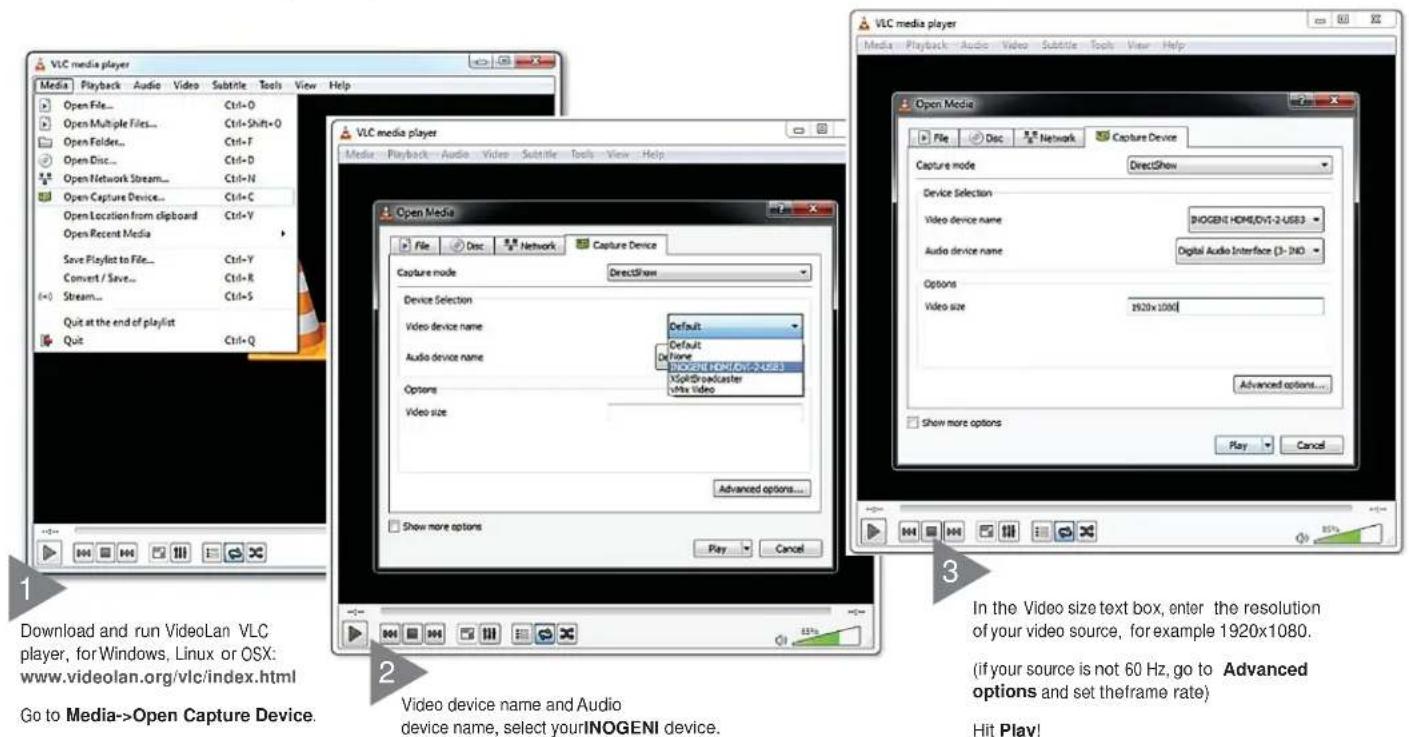
Quickstart:
Eager to tryit, Now?
Connect the INOGENI to a USB 3.0 port and to your video source.
text_image
VLC media player Media | Playback | Audio | Video | Subtitle | Tools | View | Help Open File... Open Multiple Files... Open Folder... Open Disc... Open Network Stream... Open Capture Device... Open Location from clipboard Open Recent Media Save Playlist to File... Convert / Save... Stream... Quit at the end of playlist Quit Ctrl+O Ctrl+F Ctrl+D Ctrl+N Ctrl+C Ctrl+Y Ctrl+R Ctrl+S Ctrl+Q 1 Download and run VideoLan VLC player, for Windows, Linux or OSX: www.videolan.org/vlc/index.html Go to Media->Open Capture Device. 2 Video device name and Audio device name, select yourINOGENI device. 3 In the Video size text box, enter the resolution of your video source, for example 1920x1080. (if your source is not 60 Hz, go to Advanced options and set theframe rate) Hit Play!In the Video size text box, enter the resolution of your video source, for example 1920x1080.
(if your source is not 60 Hz, go to Advanced options and set theframe rate)
Hit Play!
You should see and hear your live video!
Package contents
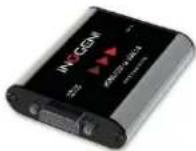
1-INOGENI
2-User Guide
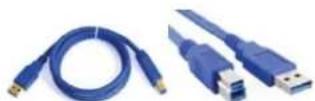
3-USB 3.0 cable
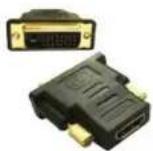
4-HDMI to DVI adapter (DVIUSB model only)
Quick troubleshooting:
1- Theport on your must be USB 3.0. The tab inside the connector is blue, or you will see the USB"SS"(Superspeed) logo beside it.
2-USB 3.0 is a relatively new technology, be sure to have the latest USB 3.0 drivers for your computer. Visit your computer website.
3-The frame rate of the source must match exactly the frame rate selected in your application for optimal performance.
4-You can load a Diagnostic tool and Sample application from www.inogeni.com.
5-Please visit www.inogeni.com for frequently-asked-questions (FAQs).
6-You can contact INOGENI technical supportat support@inogeni.com
Compatibility:
Since INOGENI uses the standard Windows/Linux/OSX video capture driver, no driver installation is necessary and it insures maximum compatibility with most capture and streaming applications. Please visit the web site for the latest applications that were tested with the INOGENI device.
We would beglad to hear from you and your application with the INOGENI, please give us your feedback at support@inogeni.com.
For technical support, email us at support@inogeni.com.
© Copyright 2019 by Inogeninc. All rights reserved.
LimitedTwo (2)YearWarranty on Paris and Labour
Inogeni warrants the products against material defects in materials or workmanship under normal use and service for a period of two (2) year after the date of the original purchase. During this period, Inogeni will, at Inogeni option, repair or replace a defective product with a new or recertified or equivalent product without charge to you for parts or labour.
TO THE FULLEST EXTENT ALLOWED BY LAW. THE WARRANTIES. REMEDIES AND LIMITATIONS CONTAINED HEREIN ARE EXCLUSIVE AND ARE IN LIEU OF ALL OTHER WARRANTIES, TERMS OR CONDITIONS, EXPRESS OR IMPLIED, EITHER IN FACT OR BY OPERATION OF LAW, STATUTORY OR OTHERWISE INCLUDING WITHOUT LIMITATION, WARRANTIES, TERMS OR CONDITIONS OF MERCHANTABILITY, FITNESS FOR A PARTICULAR PURPOSE, QUALITY, CORRESPONDENCE WITH CESCRIPION AND NON-INFRINGEMENT, ALL OF WHICH ARE EXPRESSLY DISCLAIMED. INOGENI WILL NOT BE LIABLE UNDER THIS WARRANTY IF ITS TESTING AND EXAMINATION DISCLOSE THAT THE ALLEGED DEFECT OR MALFUNCTION IN THE PRODUCT OR SOFTWARE DOES NOT EXIST OR WAS CAUSED BY CUSTOMER'S OR ANY THIRD PARTY'S MISUSE, NEGLECT, IMPROPER INSTALLATION OR TESTING, UNAUTHORIZED ATTEMPTS TO OPEN, REPAIR OR MODIFY THE PRODUCT OR SOFTWARE OR ANY OTHER CAUSE BEYOND THE RANGE OF THE INTENDED USE, OR BY ACCIDENT, FIRE LIGHTNING, OTHER HAZARDS OR ACTS OF GOD. THIS WARRANTY WILL NOT APPLY TO PRODUCTS USED FOR NUCLEAR RELATED, WEAPONS RELATED, MEDICAL OR LIFE SAVING PURPOSES TO THE FULLEST EXTENT ALLOWED BY LAW. INOGENI ALSO EXCLUDES FOR ITSELF AND ITS SUPPLIERS ANY LIABILITY WHETHER BASED IN CONTRACT OR TORT (INCLUDING NEGLIGENCE), FOR INCIDENTAL, CONSEQUENTIAL, INDIRECT, SPECIAL OR PUNITIVE DAMAGES OF ANY KIND, OR FOR LOSS OF REVENUE OR PROFITS, LOSS OF BUSINESS, LOSS OF INFORMATION OR DATA, OR OTHER FINANCIAL LOSS ARISING OUT OF OR IN CONNECTION WITH THE SALE, INSTALLATION, MAINTENANCE, USE, PERFORMANCE, FAILURE, OR INTERRUPTION OF ITS PRODUCTS. EVEN IF INOGENI, ITS SUPPLIERS OR ITS RESELLER HAS BEEN ADVISED OF THE POSSIBILITY OF SUCH DAMAGES INOGENI'S SOLE LIABILITY WITH RESPECT TO ITS PRODUCT IS LIMITED TO REPAIR OR REPLACEMENT OF THE PRODUCT AT INOGENI'S OPTION. THIS DISCLAIMER OF LIABILITY FOR DAMAGES WILL NOT BE AFFECTED IF ANY REMEDY PROVIDED HEREIN SHALL FAIL FOR ESSENTIAL PURPOSE.
DISCLAIMER: Some jurisdictions may not allow the exclusion or limitation of incidental or consequential damages for productsupp lied to customers, or the limitation of liability for personal injury, sothe foregoing limitations and exclusions may not apply or may be limited in their application to you. When implied warranties are not allowed to be excluded in their entirety, they will
be limited to the duration of the applicable written warranty. This warranty gives you specific legal rights that may vary depending on the law of the applicable jurisdiction.
Shipping
Inogeni will pay for shipping cost from Inogeni to the customer, worldwide, provided the product is indeed under warranty and there is no damage caused by improper installation or modification of the product. Inogeni reserves the right to claim for shipping fees along with service charges for any product that is returned incomplete or not under warranty. Return Authorization (RMA) is required for all warranty return products. Please contact support@inogeni.com to obtain a RMA number and instructions.
FCC Notice
NOTE: This equipment has been tested and found to comply with the limits for a ClassA digital device, pursuant to Part 15 of the FCC Rules. These limits are designed to provide reasonable protection against harmful interference when the equipment is operated in a commercial environment. This equipment generates, uses, and can radiate radio frequency energy and, if not installed and used in accordance with the instruction manual, may cause harmful interference to radio communications. Operation of this equipment in a residential area is likely to cause harmful interference in which case the user will be required to correct the interference at his own expense.
European Union EMC Directive conformance statement
This product is in conformity with the protection requirements of EU Council Directive 2004/108/EC on the approximation of the laws of the Member States relating to electromagnetic compatibility.
This product has been tested and found to comply with the limits for Class A Information Technology Equipment according to CISPR22/European Standard EN 55022. The limits for Class A equipment were derived for commercial and industrial environments to provide reasonable protection against interference with licensed communication equipment.
ICES-003
CAN ICES-3(A)NMB-3(A)
Manufacturer:
Inogeni Inc.
530-979 Ave de Bourgogne
Quebec, QC G1W 2L4
Canada