Amazon Key - Nicht kategorisiert Kwikset - Kostenlose Bedienungsanleitung
Finden Sie kostenlos die Bedienungsanleitung des Geräts Amazon Key Kwikset als PDF.


Benutzerfragen zu Amazon Key Kwikset
0 Frage zu diesem Gerät. Beantworten Sie die, die Sie kennen, oder stellen Sie Ihre eigene.
Eine neue Frage zu diesem Gerät stellen
Laden Sie die Anleitung für Ihr Nicht kategorisiert kostenlos im PDF-Format! Finden Sie Ihr Handbuch Amazon Key - Kwikset und nehmen Sie Ihr elektronisches Gerät wieder in die Hand. Auf dieser Seite sind alle Dokumente veröffentlicht, die für die Verwendung Ihres Geräts notwendig sind. Amazon Key von der Marke Kwikset.
BEDIENUNGSANLEITUNG Amazon Key Kwikset
AMAZON KEY LOCKSET ENROLLMENT & TROUBLESHOOTING
LOCKSET ENROLLMENT
Step by Step Amazon Key Lockset Enrollment
- Install Kwikset lockset
- Install Amazon Key Cloud Cam
- Open Amazon Key app
- Tap "Add a lock" on the app home screen
- Choose the appropriate lock model
- Push buon "A" on the lock interior 4 mes
- Follow in-app instrucons to complete the enrollment process
TROUBLESHOOTING
I am trying to pair my lock to my Amazon Key Cloud Cam but having a hard me nding the device.
- Ensure the lockset purchased is Amazon Key compatible.
- For most successful results, initial pairing process should take place within 1 foot of the Amazon Key Cloud Cam. Once paired, install the interior assembly of the lockset on the door to complete hardware installation.
- The lock's installed locaon should be within a reasonable distance from the Amazon Key Cloud Cam (\~60 feet).
My lock connected ne before, but is now not connected to the Amazon Key Cloud Cam.
- Ensure your Amazon Key Cloud Cam is online and properly connected to your Wi-Fi.
- Check that the lock is powered and the baeries are installed correctly and not low or dead.
- Conrm the installed locaon of the lock is within a reasonable distance from the Amazon Key Cloud Cam (\~60 feet), and that the range of eld is not obstructed.
- Temporarily remove the interior cover and interior assembly from the door and ensure the cable is connected correctly and not damaged.
I installed the lock just ne, but the motor does not seem to be locking/unlocking appropriately.
- Did you perform the door handing process? This is a crucial part of successful deadbolt installaon in which the lockset is taught which way to throw the bolt depending on whether the door prep is right handed or le handed. Refer back to the installaon guide for assistance.
My lock gets stuck from me to me or does not seem to move freely.
- Open the door and try manually turning the interior turnpiece to feel for any sickness. If yes, try loosening the 2 moung screws as they may have been overghtened during hardware installaon.
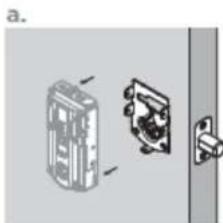
natural_image
Diagram showing a door lock mechanism with internal components and a separate view of the lock (no text or symbols present)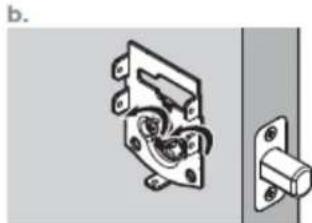
natural_image
Mechanical switch mechanism diagram showing internal components and mounting bracket (no text or labels)- If operang freely while the door is open, try closing the door and manually turning the interior turnpiece to feel for any potenal drag or obstrucon – if slight drag or obstrucon exists:
a. Check for any potenal misalignment between the deadbolt or latch and the door jam.
b. Ensure the bolt hole is clear of anything that might interfere with the deadbolt.