TL-TP70-HDIR - Audio-/Videoverlängerung TechLogix Networx - Kostenlose Bedienungsanleitung
Finden Sie kostenlos die Bedienungsanleitung des Geräts TL-TP70-HDIR TechLogix Networx als PDF.


Benutzerfragen zu TL-TP70-HDIR TechLogix Networx
0 Frage zu diesem Gerät. Beantworten Sie die, die Sie kennen, oder stellen Sie Ihre eigene.
Eine neue Frage zu diesem Gerät stellen
Laden Sie die Anleitung für Ihr Audio-/Videoverlängerung kostenlos im PDF-Format! Finden Sie Ihr Handbuch TL-TP70-HDIR - TechLogix Networx und nehmen Sie Ihr elektronisches Gerät wieder in die Hand. Auf dieser Seite sind alle Dokumente veröffentlicht, die für die Verwendung Ihres Geräts notwendig sind. TL-TP70-HDIR von der Marke TechLogix Networx.
BEDIENUNGSANLEITUNG TL-TP70-HDIR TechLogix Networx

natural_image
Abstract molecular-like shape composed of three connected spheres, one gray and two blue, with no text or symbols.TechLogix
N e t w o r x
User Manual
TL-TP70-HDIR
70m Extender with ARC and IR
natural_image
Black electronic device with ports and connectors (no visible text or symbols)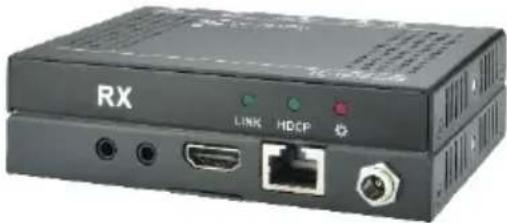
natural_image
Exterior view of a black RX device with ports and connectors (no readable text or symbols beyond branding)Preface
Read this user manual carefully before using this product. Pictures shown in this manual is for reference only, different model and specifications are subject to real product.
This manual is only for operation instruction only, not for any maintenance usage.
Trademarks
Product model and logo are trademarks. Any other trademarks mentioned in this manual are acknowledged as the properties of the trademark owner. No part of this publication may be copied or reproduced without prior written consent.
FCC Statement
This equipment generates, uses and can radiate radio frequency energy and, if not installed and used in accordance with the instructions, may cause harmful interference to radio communications. It has been tested and found to comply with the limits for a Class A digital device, pursuant to part 15 of the FCC Rules. These limits are designed to provide reasonable protection against harmful interference in a commercial installation.
Operation of this equipment in a residential area is likely to cause interference, in which case the user at their own expense will be required to take whatever measures may be necessary to correct the interference
Any changes or modifications not expressly approved by the manufacture would void the user's authority to operate the equipment.

text_image
CE FCC FEDERAL COMMUNICATIONS CONN USA · NOISSINUMSAFETY PRECAUTIONS
To insure the best from the product, please read all instructions carefully before using the device. Save this manual for further reference.
● Unpack the equipment carefully and save the original box and packing material for possible future shipment
- Follow basic safety precautions to reduce the risk of fire, electrical shock and injury to persons.
- Do not dismantle the housing or modify the module. It may result in electrical shock or burn.
- Using supplies or parts not meeting the products' specifications may cause damage, deterioration or malfunction.
● Refer all servicing to qualified service personnel.
- To prevent fire or shock hazard, do not expose the unit to rain, moisture or install this product near water.
- Do not put any heavy items on the extension cable in case of extrusion.
- Do not remove the housing of the device as opening or removing housing may expose you to dangerous voltage or other hazards.
● Install the device in a place with fine ventilation to avoid damage caused by overheat.
- Keep the module away from liquids.
- Spillage into the housing may result in fire, electrical shock, or equipment damage. If an object or liquid falls or spills on to the housing, unplug the module immediately.
- Do not twist or pull by force ends of the optical cable. It can cause malfunction.
- Do not use liquid or aerosol cleaners to clean this unit. Always unplug the power to the device before cleaning.
● Unplug the power cord when left unused for a long period of time.
● Information on disposal for scrapped devices: do not burn or mix with general household waste, please treat them as normal electrical wastes.
Contents
- Introduction....1
1.1 Introduction to TL-TP70-HDIR ....1
1.2 Features....1
1.3 Package List .... 1
- Panel Description ....2
2.1 HDBaseT Transmitter 2
2.2 HDBaseT Receiver......Error! Bookmark not defined.
- System Connection....4
3.1 Usage Precautions....4
3.2 System Diagram....4
3.3 Connection Procedures 4
3.4 PoC Solution ....5
3.5 ARC Solution....6
3.6 Application ....7
- Specification 8
4.1 Supported Resolution....9
- Panel Drawing....10
- Troubleshooting & Maintenance....11
- After-sales Service 12
1. Introduction
1.1 Introduction to TL-TP70-HDIR
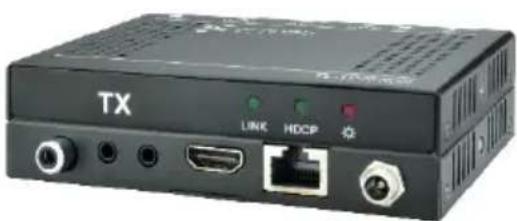
The TL-TP70-HDIR is an ultra thin design extender set consisting of a transmitter and a receiver. Using HDBaseT technology, the set transmits a 1080p signal to the receiver up to 70m via a shielded Cat5e/Cat6 cable. Bi-directional IR communication is included to allow control of an IR source or display. PoC power allows you to connect the power supply at either the transmitter or the receiver to power both units. The set also supports ARC, which enables audio up streaming from display to an audio system using either HDMI or the coax digital output.
1.2 Features
● HDMI1.4 compliant, supports resolutions up to 4Kx2K
● Maximum transmission distance is 70m for 1080p and 40m for 4Kx2K over a single shielded CAT5e/CAT6 cable
● High Bandwidth: 10.2Gps.
● Compliant with HDCP1.4
● Uses HDBaseT technology for reliability and features
● Supports bi-directional PoC
● Supports ARC on HDMI or coax digital output
● Bi-directional IR control
1.3 Package List
☆ 1 x TL-TP70-HDIR (including TX and RX)
✨ 4 x Mounting Brackets
✨ 4 x Screws
8 x Rubber Feet
✨ 1 x Power Adapter (DC 12V 1A)
✨ 1x IR Emitter (5V)
✨ 1 x IR Receiver (5V, with carrier)
1 x User Manual

Please confirm if the product and the accessories are all included, if not, please contact the dealer.
2. Panel Description
2.1 HDBaseT Transmitter
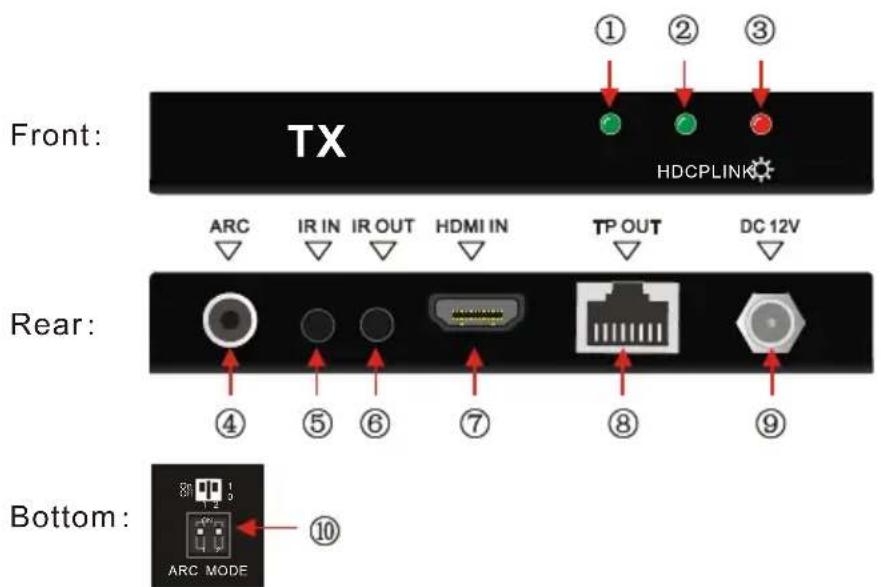
text_image
Front: TX HDCPLINK ARC IR IN IR OUT HDMI IN TP OUT DC 12V Rear: ④ ⑤ ⑥ ⑦ ⑧ ⑨ Bottom: ARC MODE ⑩Figure 2-1 Panel Description of TX
| No. | Name | Description |
| 1 | LINK | HDBT Link status indicator, lights when the transmitter & receiver are linked and communicating |
| 2 | HDCP | HDCP compliant indicator➢Lights when input signal is HDCP encrypted➢Blinks when the input signal is not HDCP encrypted➢Turns off when there is no input |
| 3 | Power | Illuminates red when the unit is powered on |
| 4 | ARC | Output port for ARC audio |
| 5 | IR IN | Connect the included 5V IR Receiver (with carrier) to receive infrared signal, it will output at the RX IR OUT |
| 6 | IR OUT | Connect the included 5V IR Emitter and attach to the IR window of the device you wish to control. |
| 7 | HDMI IN | Connect HDMI source |
| 8 | TP OUT | Connect to the TP IN socket on the HDBaseT Receiver via shielded CAT5e/ CAT6 cable, supports bi-directional PoC |
| 9 | DC 12V | Insert the DC 12V power adapter here (optionally connect to the RX – only one unit needs power connected). |
| 10 | ARC Switcher | Dip switch for ARC mode (see page 5). |
2.2 HDBaseT Receiver
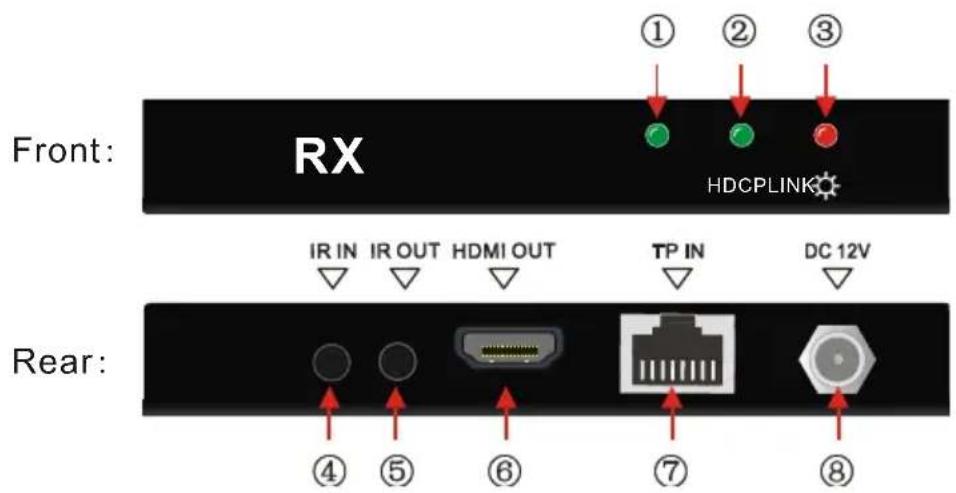
text_image
Front: RX HDCPLINK IR IN IR OUT HDMI OUT TP IN DC 12V Rear: ④ ⑤ ⑥ ⑦ ⑧Figure 2- 2 Panel Description of RX
| No. | Name | Description |
| 1 | LINK | HDBT Link status indicator, lights when the transmitter & receiver are linked and communicating |
| 2 | HDCP | HDCP compliant indicator➢Lights when input signal is HDCP encrypted➢Blinks when the input signal is not HDCP encrypted➢Turns off when there is no input |
| 3 | Power | Illuminates red when the unit is powered on |
| 4 | IR IN | Connect the included 5V IR Receiver (with carrier) to receive infrared signal, it will output at the RX IR OUT |
| 5 | IR OUT | Connect the included 5V IR Emitter and attach to the IR window of the device you wish to control. |
| 6 | HDMI OUT | Connect to an HDMI display |
| 7 | TP IN | Connect to the TP OUT socket on the HDBaseT Transmitter via shielded CAT5e/ CAT6 cable, supports bi-directional PoC. |
| 8 | DC 12V | Insert the DC 12V power adapter here (optionally connect to the TX – only one unit needs power connected). |
3. System Connection
3.1 Usage Precautions
1) System should be installed in a clean environment and has a proper temperature and humidity.
2) All of the power switches, plugs, sockets and power cords should be insulated for safety.
3) All devices should be connected before powering the extenders.
4) Use shielded straight-thru Cat5e/Cat6 cable with TIA/EIA T568B terminations.
3.2 System Diagram
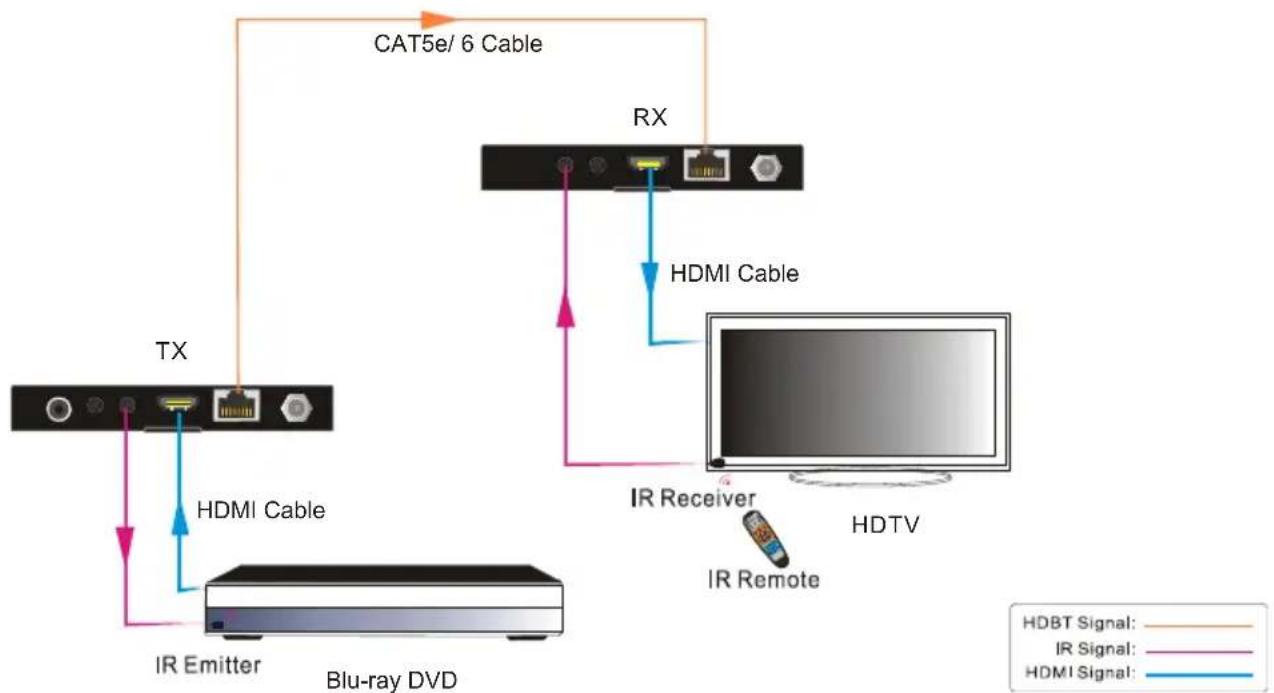
flowchart
graph TD
    A["TX"] -->|HDMI Cable| B["IR Emitter"]
    B --> C["Blu-ray DVD"]
    D["RX"] -->|HDMI Cable| E["IR Receiver"]
    E --> F["HDTV"]
    F --> G["IR Remote"]
    G -->|HDMI Signal| D
    D -->|CAT5e/6 Cable| H["Satellite"]
    style A fill:#f9f,stroke:#333
    style B fill:#ccf,stroke:#333
    style C fill:#cfc,stroke:#333
    style D fill:#fcc,stroke:#333
    style E fill:#cff,stroke:#333
    style F fill:#ffc,stroke:#333
    style G fill:#cfc,stroke:#333
    style H fill:#fcc,stroke:#333
Figure 3-1 System Connection
3.3 Connection Procedures
Step1. Connect an HDMI source (such as a Blu-ray player) to the HDMI IN port of the transmitter with an HDMI cable.
Step2. Connect the TP OUT port of the transmitter to TP IN port of the receiver via a shielded CAT5e/CAT6 cable.
Step3. Connect an HDMI display (such as an HDTV) to the HDMI OUT port of the receiver with an HDMI cable.
Step4. When using the bi-directional IR control, do the following.
a) Connect the included IR receiver to the IR IN port at either the transmitter or the receiver.
b) Connect the included IR Emitter to the IR OUT port at the other end.
Step5. Connect the included DC 12V power adaptor to the power port of the transmitter; the receiver will be energized synchronously.
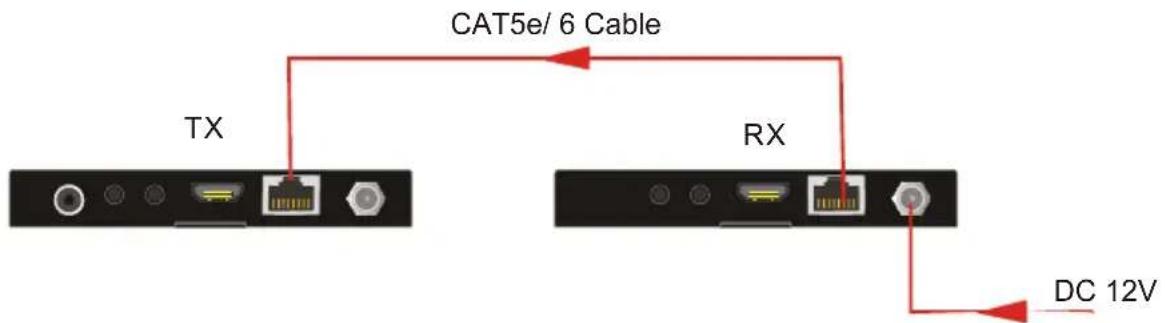
3.4 PoC Solution
The TL-TP70-HDIR boasts HDBT ports which support PoC. Connect the DC adapter to either the transmitter or the receiver, the other end will be energized simultaneously. (see in the following figure):
text_image
CAT5e/ 6 Cable TX RX DC 12VFigure 3-2 PoC Connection
3.5 ARC Solution
The coax digital audio port and the HDMI ports support ARC (Audio Return Channel) which enables a display via a single audio/ HDMI cable to send (upstream) audio to amplifiers/speakers, increasing user flexibility.
The transmitter provides an ARC switch on the bottom panel to enable ARC mode selection. There are 2 modes in total, and connections will vary in different ARC modes to ensure normal ARC output. See the chart below:
| ARC Mode | Description | Connection |
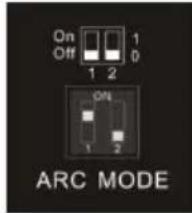 10 10 | TX becomes the ARC (and CEC) host, allowing the ARC audio to be output from the COAX digital output. | Connect a source device (e.g.Blu-Ray DVD or AVR that does not support ARC) to the HDMI input. Connect the COAX digital audio output to an audio amplifier. |
When the ARC switch is set as "10", connect the devices according to the following figure:
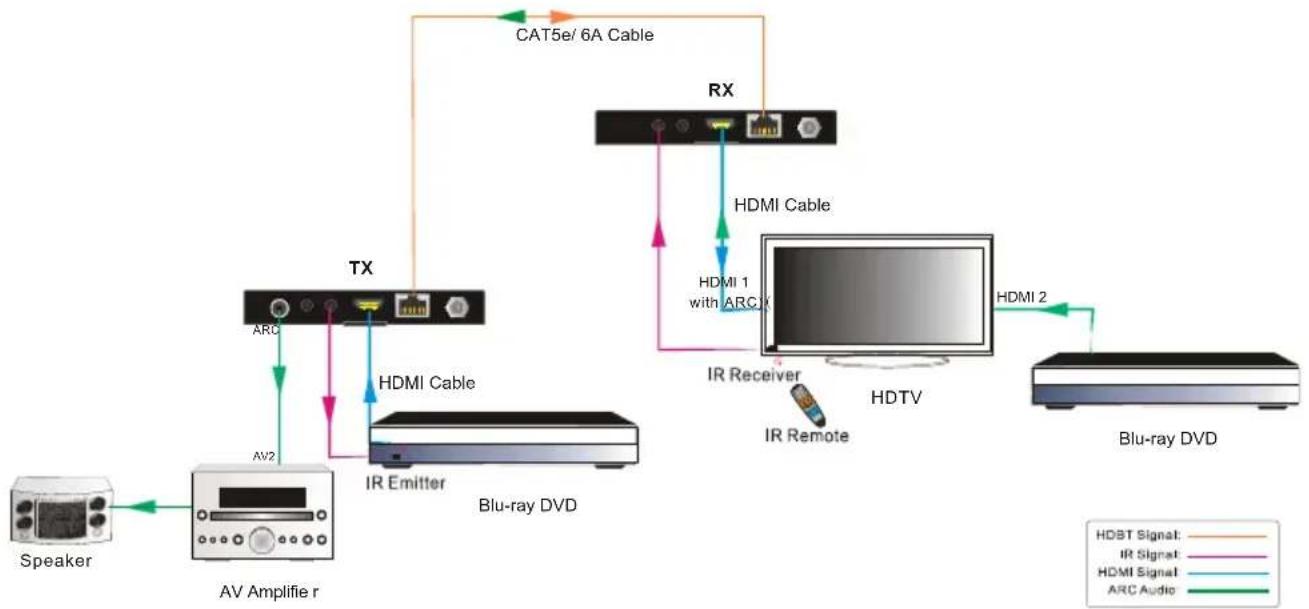
flowchart
graph TD
    Speaker --> AVAmplifier["AV Amplifier r"]
    AVAmplifier --> TX
    TX --> ARC
    TX --> IREmitter["IR Emitter"]
    IREmitter --> AV2
    AV2 --> TX
    TX --> RX
    RX --> HDMI_Cable["HDMI Cable"]
    RX --> HDMI1["HDMI 1 with ARC"]
    RX --> IRReceiver["IR Receiver"]
    RX --> IRRemote["IR Remote"]
    RX --> HDMI2["HDMI 2"]
    HDMI1 --> HDTV["HDTV"]
    IRReceiver --> HDTV
    IRRemote --> HDTV
    HDTV --> Blu-rayDVD["Blu-ray DVD"]
    Blu-rayDVD --> HDMI2
    CAT5e6["CAT5e/ 6A Cable"] --> RX
    HDTV --> BIPT["HIPT Signal: HDBT Signal: IR Signal: HDMI Signal: ARC Audio"]
Figure 3- 3 System Connection (ARC "10")
| ARC Mode | Description | Connection |
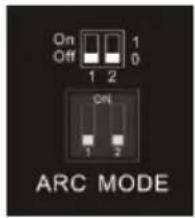 00 00 | ARC will be passed through the HDMI input of the TX to an AVR that supports ARC. | Connect an ARC device (e.g. Amplifier) to the TX and an ARC display (Smart TV) to the RX. |
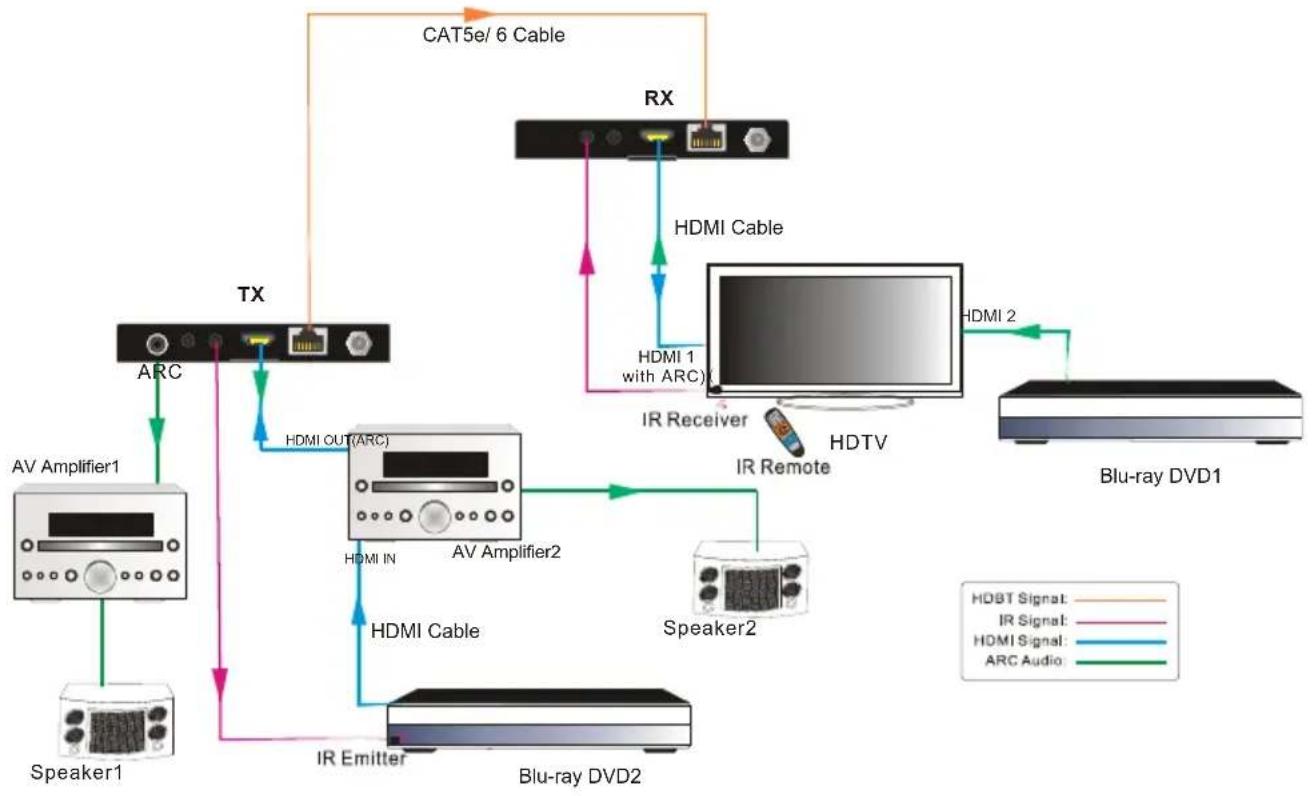
When the ARC switcher switched as "00", connect the devices according to the following figure:
flowchart
graph TD
    A["Speaker1"] --> B["AV Amplifier1"]
    B --> C["TX"]
    C --> D["ARC"]
    D --> E["XT"]
    E --> F["HDMI OUT(ARC)"]
    F --> G["AV Amplifier2"]
    G --> H["HDMI IN"]
    H --> I["Blu-ray DVD2"]
    I --> J["IR Emitter"]
    J --> K["Speaker2"]
    K --> L["HDMI Cable"]
    L --> M["IR Receiver"]
    M --> N["HDTV"]
    N --> O["HDMI 2"]
    O --> P["Blu-ray DVD1"]
    P --> Q["Speaker2"]
    Q --> R["HDMI Cable"]
    R --> S["HDMI 1 with ARC"]
    S --> T["RX"]
    T --> U["CAT5e/6 Cable"]
    U --> V["HDMI Cable"]
    V --> W["IR Remote"]
    W --> X["HDTV"]
    X --> Y["HDMI 2"]
    Y --> Z["Blu-ray DVD1"]
    style A fill:#f9f,stroke:#333
    style P fill:#ccf,stroke:#333
Figure 3-4 System Connection (ARC "00")

1) All utilized devices including the HDMI cable should support ARC.
3.6 Application
The TL-TP70-HDIR has many applications that it can be used in for extending HDMI signals, such as meeting rooms, sports bars, and corporate board rooms. Because of the ARC function, the set is especially useful for residential applications.
4. Specification
| Model Spec | HDBaseT Transmitter | HDBaseT Receiver |
| Input | ||
| Signal | 1 HDMI, 1 IR | 1 IR, 1 TP |
| Connector | 1 19-pin Type-A female HDMI1 3.5mm mini jack | 1 3.5mm mini jack1 RJ-45 |
| Output | ||
| Output | 1 ARC, 1 IR, 1 TP | 1 HDMI,1 IR |
| Connector | 1 SPDIF1 3.5mm mini jack1 RJ-45 | 1 19-pin Type-A female HDMI1 3.5mm mini jack |
| General | ||
| Resolution Range | 800x600@60Hz~4K×2K@30Hz | |
| Transmission Mode | HDBaseT | |
| Transmission Distance | 1080p 70m (TX and RX powered separately)1080p 65m (PoC Solution)4k ≤ 40m | |
| Bandwidth | 10.2Gbps | |
| HDMI Standard | HDMI1.4 and HDCP1.4 | |
| Temperature | 0~ 50°C | |
| Reference Humidity | 10% ~ 90% | |
| Power Supply | DC 12V, 1A | |
| Power Consumption | 3.3W | 6.4W |
| Dimension (W*H*D) | 115 x 16x 84 mm | 115 x 16x 84 mm |
| Weight | 140g | 140g |
All nominal levels are at ±10%.
4.1 Supported Resolutions
| Aspect Ratio | Resolution | Refresh Rate |
| 4Kx 2K | 4096x2160 | 24/25/30Hz |
| 3840x2160 | 24/25/30Hz | |
| 16:9 | 1920x1080 | 60Hz |
| 1600x900 | 60Hz | |
| 1366x768 | 60Hz | |
| 1280x720 | 60Hz | |
| 1024x576 | 60Hz | |
| 16:10 | 1920x1200 | 60Hz |
| 1680x1050 | 60Hz | |
| 1440x900 | 60Hz | |
| 1360x768 | 60Hz | |
| 1280x800 | 60Hz | |
| 4:3 | 1600x1200 | 60/65/70/75/85Hz |
| 1400x1050 | 60Hz | |
| 1280x1024 | 60/75/85/96Hz | |
| 1024x768 | 60/70/75/85Hz | |
| 800x600 | 56/60/72/75/85Hz | |
| 640x480 | 60/72/75Hz |
Note: The TL-TP70-HDIR supports 4k HDMI signal, choose quality HDMI cables compliant with HDMI1.4 for reliable transmission.
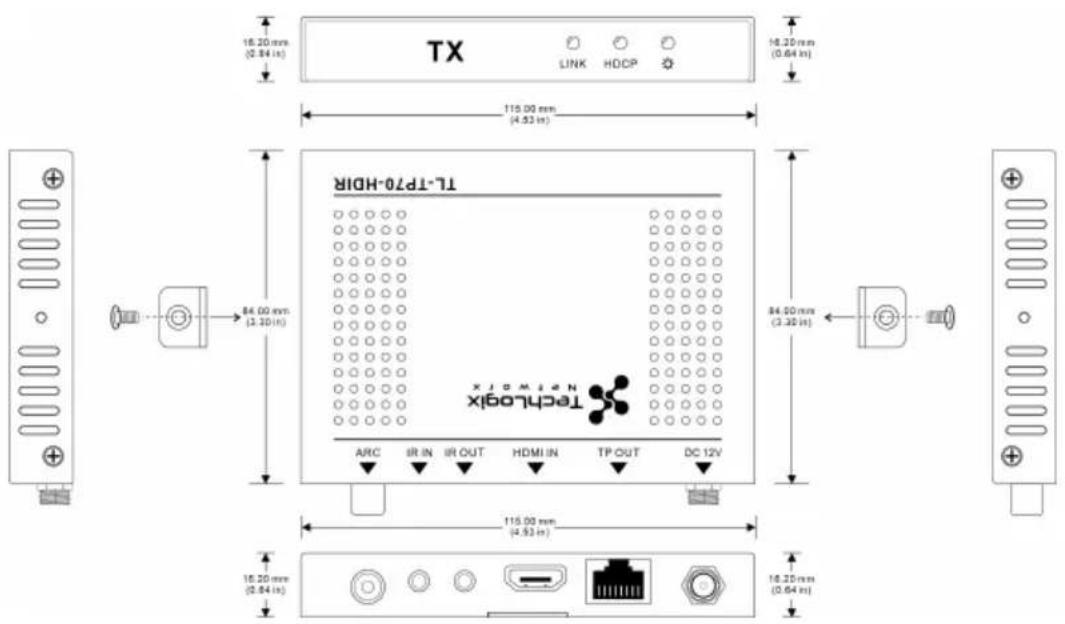
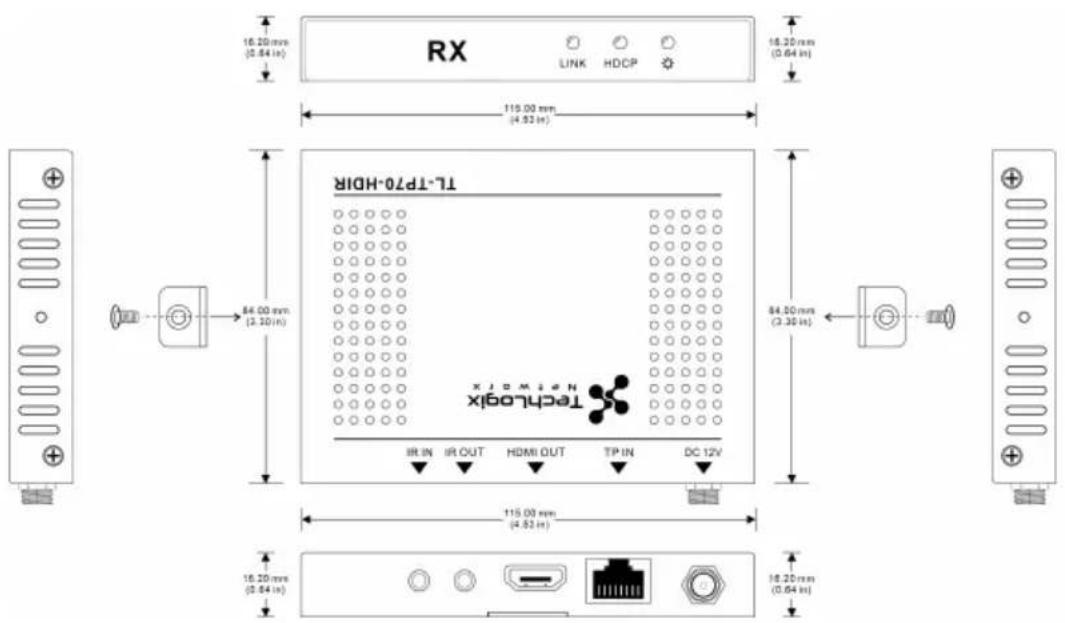
5. Panel Drawing
text_image
TX LINK HDCP 16.20 mm (0.84 in) 16.20 mm (0.64 in) 115.00 mm (4.52 in) TL-TP70-HDUR TECHLOGIX ARC IR IN IR OUT HDMI IN TP OUT DC 12V 84.00 mm (3.20 in) 84.00 mm (3.20 in) 115.00 mm (4.52 in) 16.20 mm (0.84 in) 16.20 mm (0.64 in)HDBaseT Transmitter
text_image
RX LINK HDCP 16.20 mm (0.84 in) 16.20 mm (0.64 in) 115.00 mm (4.92 in) TL-TP70-HDIR TechLogic IR IN IR OUT HDMI OUT TP IN DC 12V 84.00 mm (2.30 in) 84.20 mm (2.30 in) 115.00 mm (4.92 in) 16.20 mm (0.84 in) 16.20 mm (0.64 in)HDBaseT Receiver
- Ensure that the display device has been set to the correct input.
- Ensure that the HDMI cables used for both the source/transmitter and the receiver/display are properly connected and are working. Test the HDMI cables directly from a source to display and ensure their operation.
- Ensure that the Cat5e/Cat6 cable has not been damaged and that it has been terminated correctly with T568B on both ends. A temporary length of Cat5e/Cat6 can be used for testing to ensure that the devices are all compatible and working properly.
● Ensure proper grounding of the power supply.
● Known issues with HDMI 1.2 source devices:
Older compatibility (HDMI 1.2) may result in HDBaseT transmission issues. Please contact Technical Support of your local distributor for a solution to these issues.
● No output at the ARC port
● In Bypass CEC mode:
Loose or failed HDMI or ARC connection;
Ensure HDMI IN port of TX is connected to an ARC device;
There is connection at the ARC port of TX and the device is working normally.
- In Force ARC mode:
Loose or failed HDMI or ARC connection;
There is connection at the ARC port of TX and the device is working normally.
● Color loss or poor picture quality:
- Ensure that the HDMI cables used for both the source and transmitter and the receiver and display are properly connected and are of good quality. Test the HDMI cables directly from a source to display and ensure their picture quality.
● Ensure proper grounding of the power supply. - If the static becomes stronger or picture quality becomes worse when connecting the video connectors, this may be due to improper grounding.
- Check the grounding and make sure all the components are properly grounded to a common ground. Improper grounding may cause damage to the receiver.
1) Product Limited Warranty: We warrant that our products will be free from defects in materials and workmanship for three years. Please see warranty page posted on www.tlnetworkx.com for more info.
2) What the warranty does not cover:
● Warranty expiration.
● Factory applied serial number has been altered or removed from the product.
● Damage, deterioration or malfunction caused by:
● Normal wear and tear
● Use of supplies or parts not meeting our specifications
- No certificate or invoice as the proof of warranty.
- The product model showed on the warranty card does not match with the model of the product for repairing or had been altered.
● Damage caused by force majeure.
● Non-authorized service
● Other causes which does not relate to a product defect
● Delivery, installation or labor charges for installation or setup of the product
3) Technical Support: Email or call our after-sales department, please prepare the following information about your cases.
● Product version and name.
● Detailed failure situations.
● Date and place of purchase.
Remarks: For any questions or problems, please try to get help from your local distributor.