Switch2 - Nicht kategorisiert Paxton - Kostenlose Bedienungsanleitung
Finden Sie kostenlos die Bedienungsanleitung des Geräts Switch2 Paxton als PDF.


Benutzerfragen zu Switch2 Paxton
0 Frage zu diesem Gerät. Beantworten Sie die, die Sie kennen, oder stellen Sie Ihre eigene.
Eine neue Frage zu diesem Gerät stellen
Laden Sie die Anleitung für Ihr Nicht kategorisiert kostenlos im PDF-Format! Finden Sie Ihr Handbuch Switch2 - Paxton und nehmen Sie Ihr elektronisches Gerät wieder in die Hand. Auf dieser Seite sind alle Dokumente veröffentlicht, die für die Verwendung Ihres Geräts notwendig sind. Switch2 von der Marke Paxton.
BEDIENUNGSANLEITUNG Switch2 Paxton
Ins-30036 Hands free keyfob pack for Switch2
09/12/2009
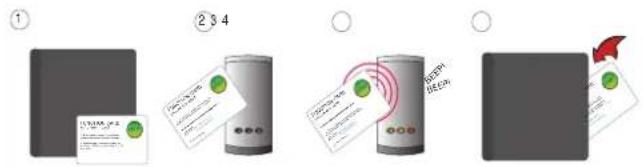
Initialising a new system

text_image
① ② 3 4 ③ BEEP BEEP BEEP- Take the enrolment card from the new pack.
- Present the enrolment card to the reader.
- The reader beeps and the LED's light up.
- ALL USERS ARE NOW VALID. Return enrolment card to pack.
Adding another pack to an existing system
To add a new pack, first present an enrolment card from an existing active pack, followed by the enrolment card from the new pack.
Issuing keyfobs
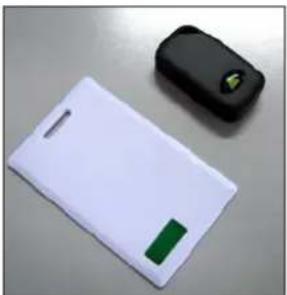
Each user has a matching pair of tokens. DO NOT MIX UP THE PAIRS
natural_image
Two electronic devices on a gray surface: a white rectangular device with a green tab and a black rectangular device with a green logo (no visible text or symbols)Shadow card - write name of user on this card.
Keyfob - give to user.
The keyfobs are provided in plastic pouches to keep each keyfob with its associated shadow card. The card wallet is provided to store the shadow cards once the keyfobs have been issued.
WARNING: Do not deal with more than one user at the same time. The security and administration of your system will be seriously compromised if unmarked cards become mixed up.
Bar a user
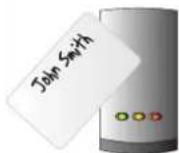
Take the matching shadow card and present it to each reader on your site. The user keyfob is now barred.
A barred keyfob can be re-validated by presenting an active enrolment card followed by the user keyfob to the reader.
C€0889