
TX-28LD1 - Fernseher PANASONIC - Kostenlose Bedienungsanleitung
Finden Sie kostenlos die Bedienungsanleitung des Geräts TX-28LD1 PANASONIC als PDF.


Benutzerfragen zu TX-28LD1 PANASONIC
0 Frage zu diesem Gerät. Beantworten Sie die, die Sie kennen, oder stellen Sie Ihre eigene.
Eine neue Frage zu diesem Gerät stellen
Laden Sie die Anleitung für Ihr Fernseher kostenlos im PDF-Format! Finden Sie Ihr Handbuch TX-28LD1 - PANASONIC und nehmen Sie Ihr elektronisches Gerät wieder in die Hand. Auf dieser Seite sind alle Dokumente veröffentlicht, die für die Verwendung Ihres Geräts notwendig sind. TX-28LD1 von der Marke PANASONIC.
BEDIENUNGSANLEITUNG TX-28LD1 PANASONIC
Panasonic
OperatingInstructions
ColourTelevision
TX2818D1
(U.K. Standard
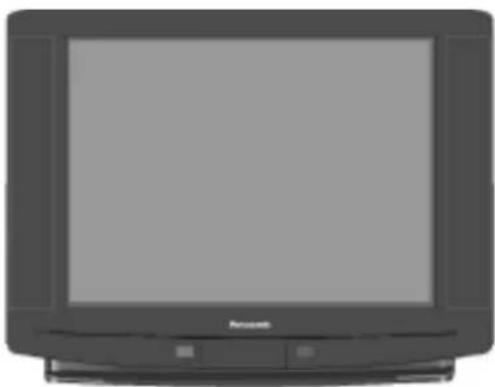
natural_image
Front view of a vintage flat-screen television with a blank screen (no visible text or symbols)Pleasereadtheseinstructionscompletelybefore useandretainthemforfuturereference.
DearPanasonicCustomer,
WelcometothePanasonicfamilyofcustomers.Wehopethatyouhavemanyyearsofenjoymentfromyournewcolourtelevision.Thisisaveryadvancedtelevision,however,theQuickStartGuidewilltellyou how to have the TV operating quickly; you can then read the following pages to fully utilise the advancedfeatures.
CONTENTS
Warnings and Precautions....2
Accessories. 3.
Battery Installation....3
Quick Start Guide....4
Basic Controls....6.
On Screen Display Menus....7
Main Menu 9.
Sound Menu....10
Setup Menu 1.1
Tuning Menu....12
Manual Tuning ....13
Auto Setup Menu....14
Station Naming....15
Programme Edit....16
Shipping Condition....18
AV Select and Setup....1.9
Teletext Operation 20
VCR and Satellite Receiver Guidance 23
VCR Operation 24
Audio / Video (AV) Connections....25
Via the front AV3 Video and Audio (RCA) 25
Connection of Stereo Headphones 25
SCART Terminal Information 25
Via the Rear AV1 / AV2 21 Pin (SCART) and RCA Audio Out...26
Trouble-shooting 27
For your guidance....28
Specifications....28
- This TV is designed to operate on A.C. 220 – 240V, 50Hz.
- This TV is capable of receiving the following transmission standard, PAL I.
- To prevent damage which might result in electric shock or fire, do not expose this TV set to rain or excessive moisture.
• WARNING : HIGH VOLTAGE !!!
Do not remove the rear cover as live parts are accessible when it is removed. There are no user serviceable parts inside. - Avoid exposing the TV set to direct sunlight and other sources of heat.
- Remove the mains plug from the wall socket when the TV set is not used for a prolonged period of time.
• CABINET AND PICTURE TUBE CARE
Remove the mains plug from the wall socket. The cabinet and picture tube can be cleaned with a soft cloth moistened with mild detergent and water. Do not use solutions containing benzol or petroleum. TV sets can produce static electricity, care must be taken whenever touching the TV screen.
- Adequate ventilation is essential to prevent failure of electrical components. We recommend that a gap of at least 5cm is left all around this TV even when it is placed inside a cabinet or between shelves.
FOR YOUR SAFETY PLEASE READ THE FOLLOWING TEXT CAREFULLY
This appliance is supplied with a fitted three pin mains plug for your safety and convenience. A 5 amp fuse is fitted in this plug. If the fuse is replaced then the replacement fuse must be 5 amp rated and should be approved by ASTA or BSI to BS1362.
Check for the ASTA mark or the BSI mark on the body of the fuse.
If the fitted plug has a removable fuse cover you must ensure that it is refitted when the fuse is replaced. If you lose the fuse cover the plug must not be used until a replacement cover is obtained. Replacement fuse covers can be purchased through your local Panasonic dealer.
The plug fitted to this appliance incorporates a mains filter circuit. If this is removed or replaced with a non-filtered plug this television will no longer meet the European standards for Electromagnetic Compatibility (EMC). If the fitted plug is unsuitable for the socket outlet in your home an appropriate adapter should be used.
Nonetheless, if the fitted plug is replaced, the fuse should be taken out and the cut-off plug disposed of safely. There is danger of severe electrical shock if the cut off plug is inserted into any 13 amp socket.
If a new plug is to be fitted please observe the wiring code as shown below. If in any doubt please consult a qualified electrician.
How to replace the fuse (for plug type shown in example 1):
Lift out the removable fuse compartment with a screwdriver and replace the fuse, then refit securely into the mains plug (See example 1).
How to replace the fuse (for plug type shown in example 2):
Lift open the fuse compartment in the mains plug with a screwdriver and replace the fuse, then press the fuse cover down securely. (See example 2).
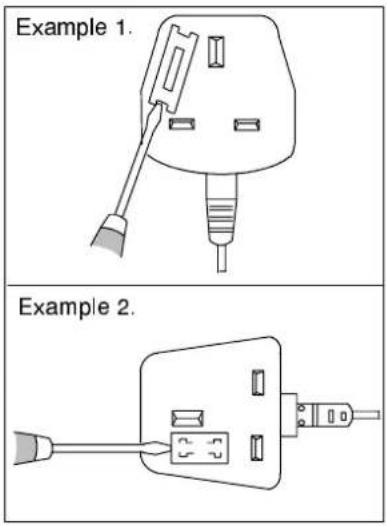
text_image
Example 1. Example 2.IMPORTANT :— The wires in the mains lead of this appliance are coloured in accordance with the following code :—
BLUE : NEUTRAL BROWN : LIVE
As the colours of the wires in the mains lead of this appliance may not correspond to the markings identifying the terminals in your plug, proceed as follows:—
-
The BLUE wire must be connected to the terminal marked 'N' or coloured black.
-
The BROWN wire must be connected to the terminal marked 'L' or coloured red.
-
The BLUE wire must be connected to the terminal marked 'N' or coloured black.
- The BROWN wire must be connected to the terminal marked 'L' or coloured red.
IMPORTANT NOTE: Under no circumstances should either of these wires be connected to the Earth terminal of the three pin plug, marked with the letter 'E' or the earth symbol (⊥).
Check that you have the accessories and ditcheshow shown
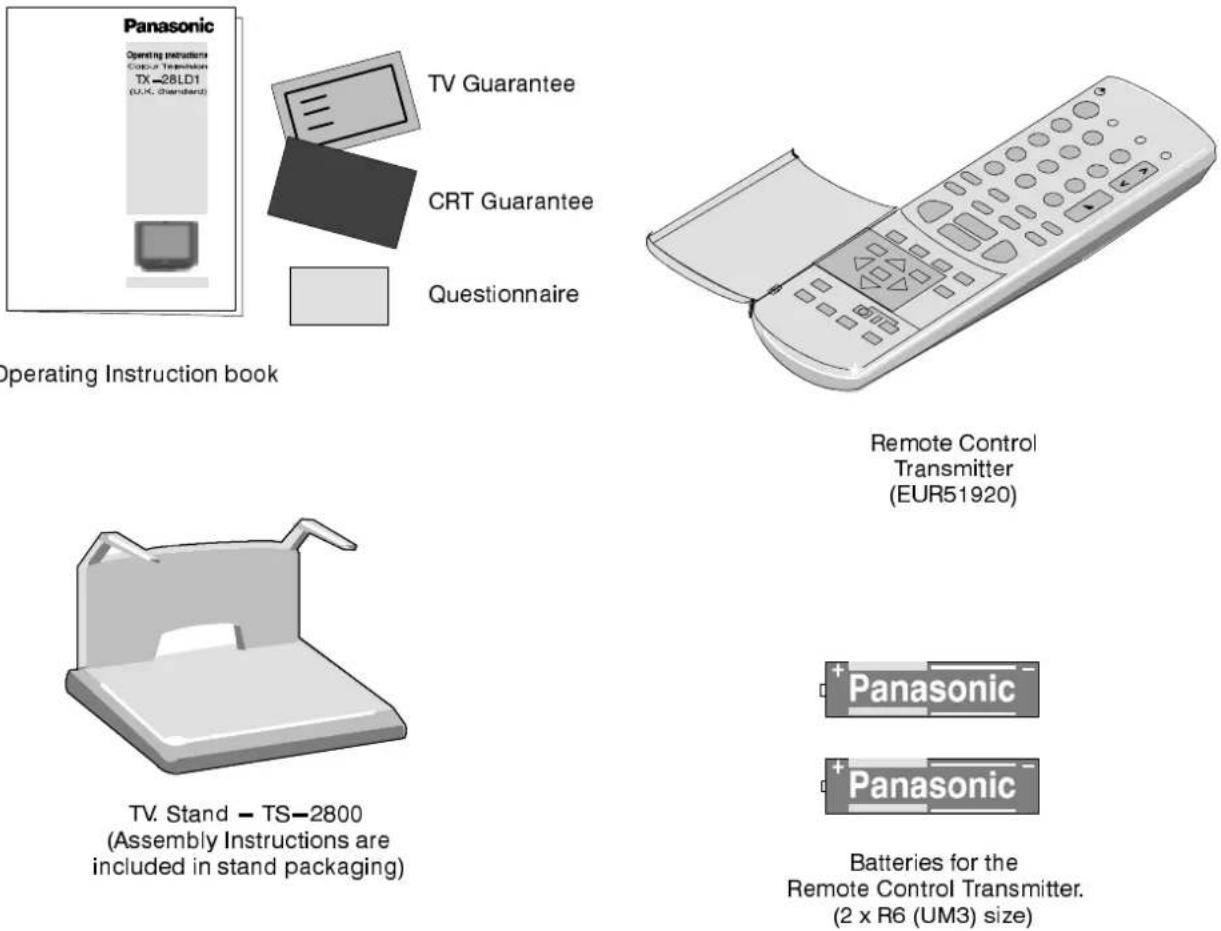
TV Guarantee
CRT Guarantee
Questionnaire
Operating Instruction book
Remote Control
Transmitter
(EUR51920)
TV. Stand - TS-2800
(Assembly Instructions are
included in stand packaging)
Batteries for the
Remote Control Transmitter.
(2 x R6 (UM3) size)
FITTINGREMOTECONNRDBABATERBSES
123
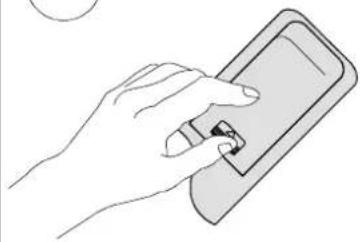
natural_image
Line drawing of a hand holding a smartphone with a small object on the screen (no text or symbols)Slide off the battery cover
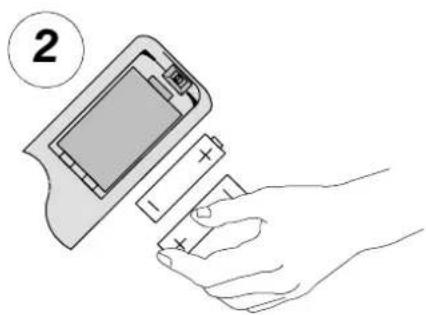
natural_image
Illustration of a hand inserting batteries into a battery pack (no text or symbols)Insert batteries - note correct polarity
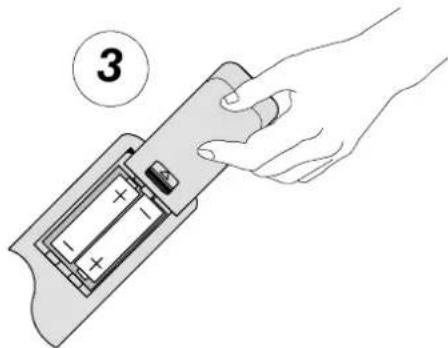
natural_image
Hand inserting a battery into a device, showing internal charge distribution (no text or symbols)Replace the cover
Note:
- Make sure that the batteries are fitted the correct way round.
- Do not mix old batteries with new batteries. Remove old, exhausted batteries immediately.
- Do not mix different battery types, i.e. Alkaline and Manganese. Do not use rechargeable (Ni-Cad) batteries.
1.2.3.....
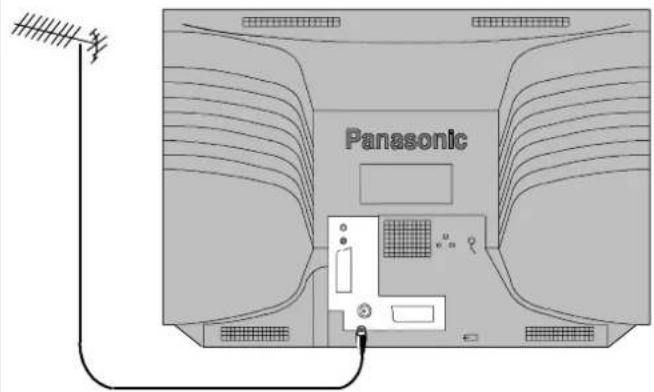
text_image
Panasonic1
TV only
Connect Aerial co-axial cable direct to TV RF IN socket.
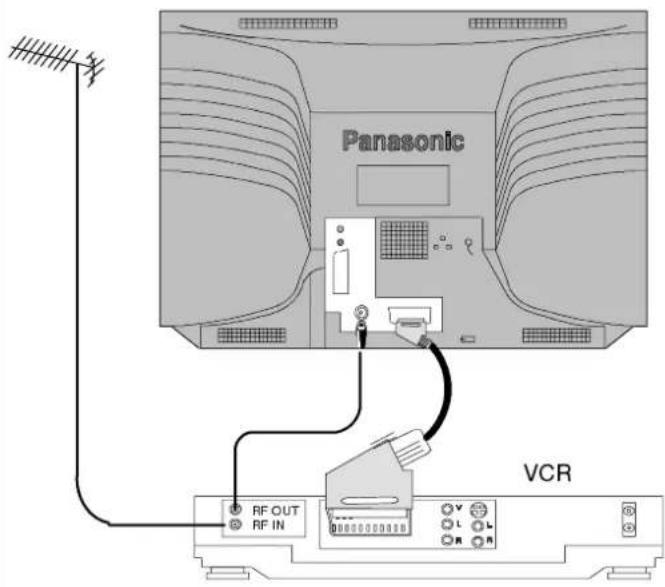
text_image
Panasonic VCR RF OUT RF INOR
USING A VCR
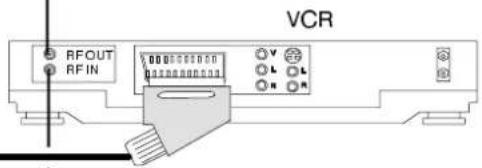
Connect Aerial co-axial cable to RF Input socket of VCR and a RF coaxial cable from VCR RF Out socket to TV RF IN socket.
The VCR can also be connected to the TV using a SCART to SCART lead if you are using a stereo VCR. Use the AV1 21 pin terminal for a VCR. To connect an S-Video VCR use the AV2S 21 pin terminal.
Further information for VCR and Satellite Receiver installation with this TV can be found on page 23.
OR
USING A VCR AND SATELLITE RECEIVER
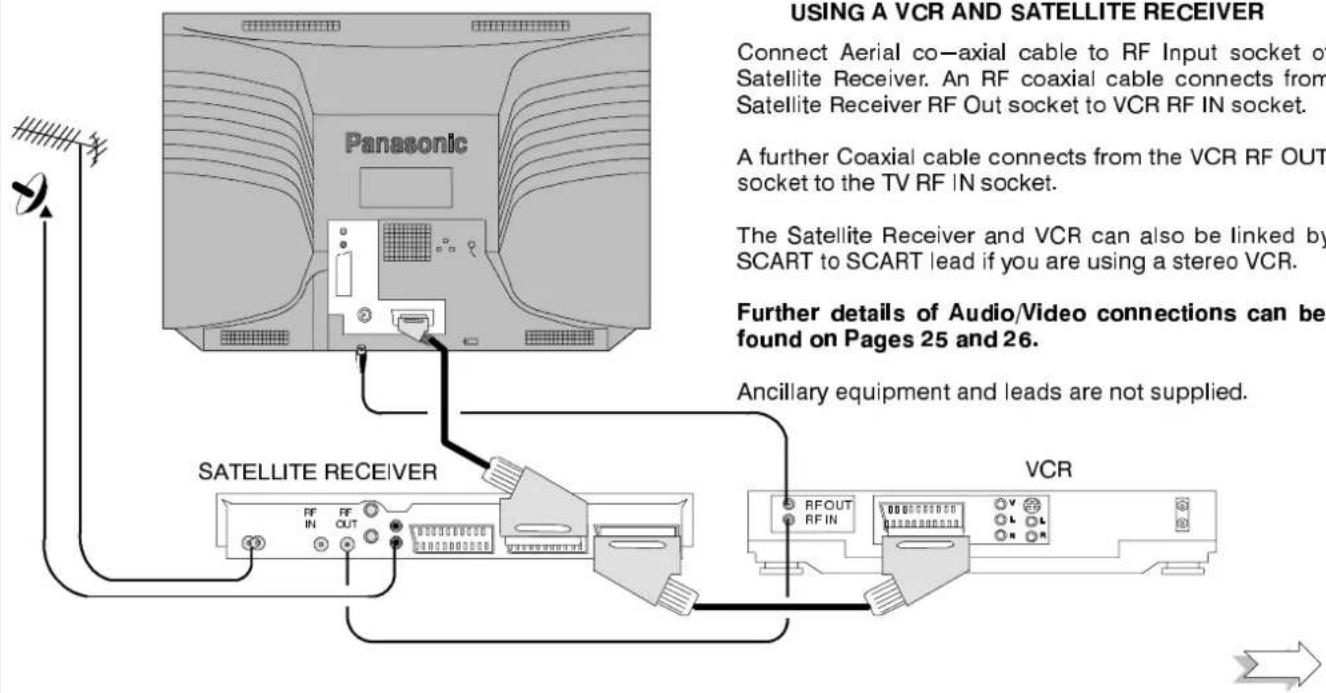
Connect Aerial co-axial cable to RF Input socket of Satellite Receiver. An RF coaxial cable connects from Satellite Receiver RF Out socket to VCR RF IN socket.
A further Coaxial cable connects from the VCR RF OUT socket to the TV RF IN socket.
The Satellite Receiver and VCR can also be linked by SCART to SCART lead if you are using a stereo VCR.
Further details of Audio/Video connections can be found on Pages 25 and 26.
Ancillary equipment and leads are not supplied.
text_image
RFOUT RFIN VCR V L L R
text_image
USING A VCR AND SATELLITE RECEIVER Connect Aerial co-axial cable to RF Input socket of Satellite Receiver. An RF coaxial cable connects from Satellite Receiver RF Out socket to VCR RF IN socket. A further Coaxial cable connects from the VCR RF OUT socket to the TV RF IN socket. The Satellite Receiver and VCR can also be linked by SCART to SCART lead if you are using a stereo VCR. Further details of Audio/Video connections can be found on Pages 25 and 26. Ancillary equipment and leads are not supplied. SATELLITE RECEIVER VCR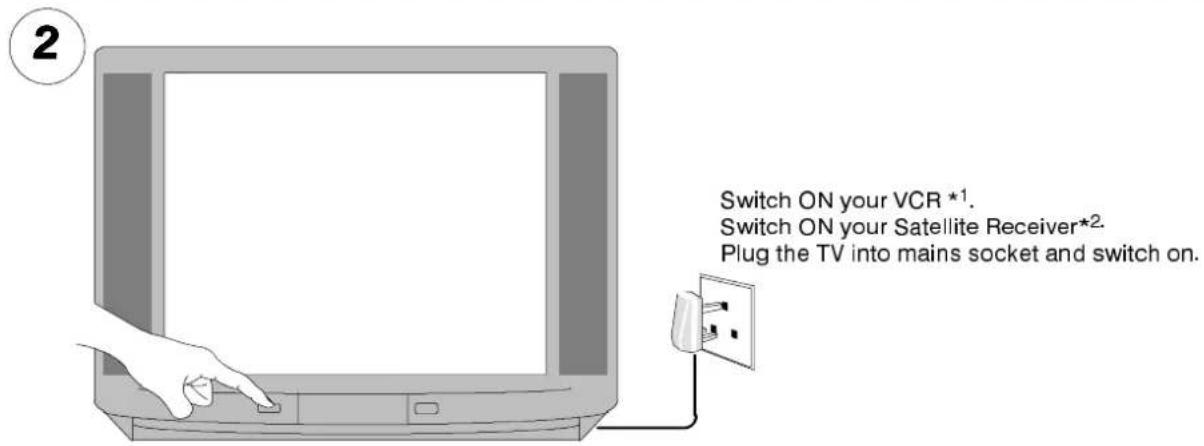
text_image
Switch ON your VCR *1. Switch ON your Satellite Receiver*2. Plug the TV into mains socket and switch on.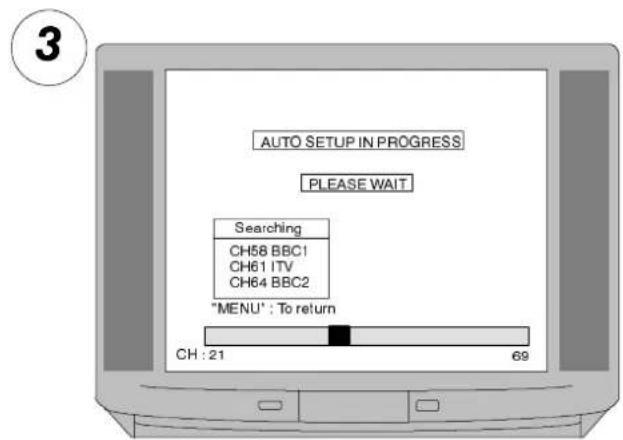
text_image
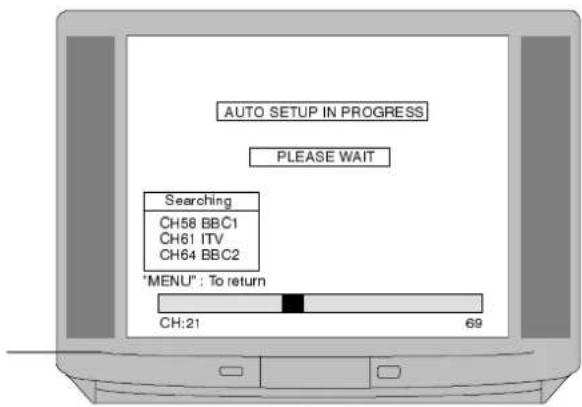
AUTO SETUP IN PROGRESS PLEASE WAIT Searching CH58 BBC1 CH61 ITV CH64 BBC2 "MENU" : To return CH : 21 69Programmes will appear immediately if your dealer has programmed the TV for you.
If the TV has not been programmed for you then Auto setup will begin. TV stations will be located, sorted into order and stored ready for use*3.
*4 Switch the VCR Test Signal 'off'.
...READDTOTGOG O!
text_image
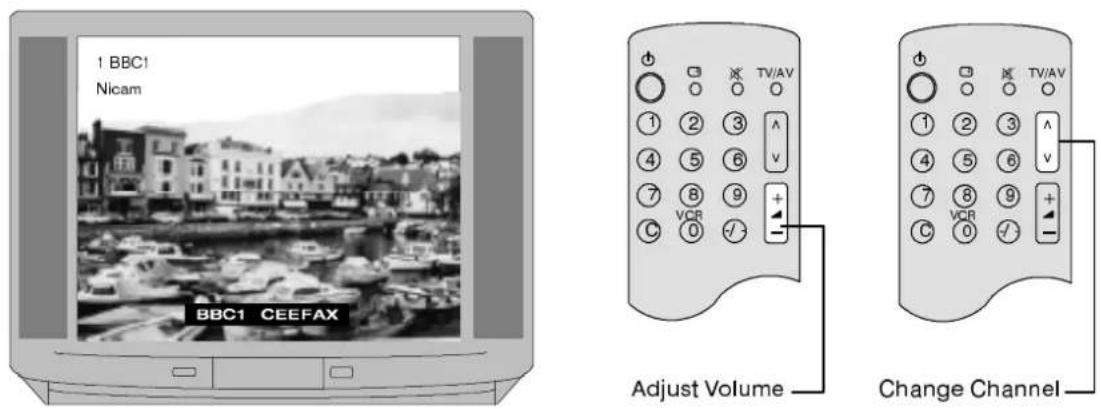
1 BBC1 Nicam BBC1 CEEFAX Adjust Volume TV/AV VCR C + - + - Change Channel*1. We recommend that you have the VCR's test signal 'on' - refer to your VCR instruction book to locate the VCR Test Signal switch (usually on the rear of the VCR).
*2. We recommend that your Satellite Receiver is set to either SKY ONE or SKY NEWS to ensure reliable tuning.
*3. The sorting order depends upon the TV signal, the broadcasting system, and reception conditions. If the order is not to your preference it can be rearranged. Refer to the Programme Edit menu on page 16 for details.
*4. If your VCR Test Signal appears as a programme position it can be deleted using the Programme Edit menu detailed on page 16.
IT IS IMPORTANT that you use only programme position '0' for your VCR. If your VCR does not appear to operate on programme position '0' (the VCR position), refer to page 23 for guidance.
natural_image
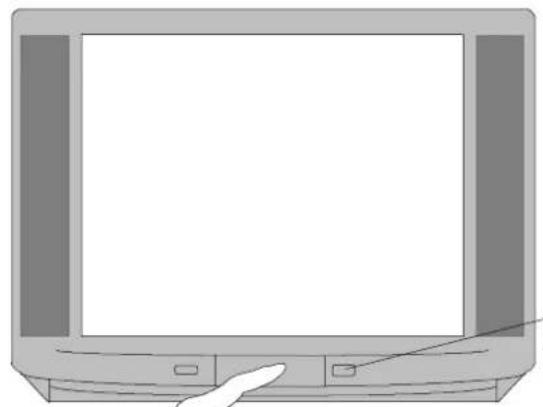
Illustration of a flat-screen computer monitor with a hand pointing at the front panel (no text or symbols visible)Press to release latch and open lid
red light
indicates
Standby mode
text_image
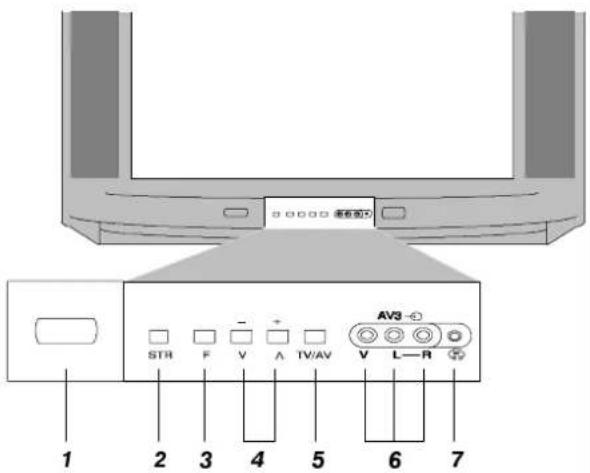
1 2 3 4 5 6 7 STR F V + Ⅸ/Ⅸ V L—R AV3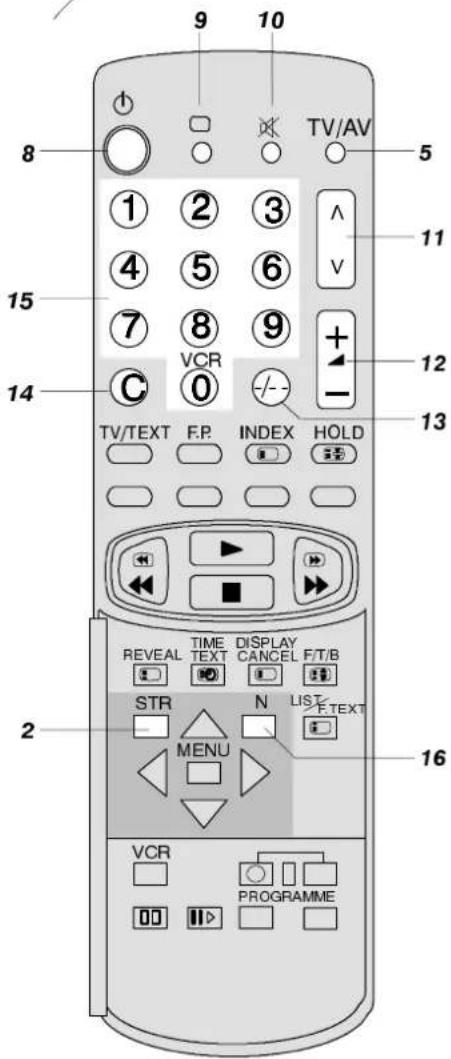
text_image
9 10 TV/AV 8 ① ② ③ V 11 4 ⑤ ⑥ + - 15 ⑦ ⑧ ⑨ C VCR 12 0 -/-- 14 TV/TEXT F.P. INDEX HOLD 13 REVEAL TIME DISPLAY TEXT CANCEL F/T/B STR N LIST MENU 16 2 VCR PROGRAMME1 Mains On/Off switch.
2 Normalisation Store (STR) adjust the Volume, Contrast, Brightness, Colour, Sharpness, (Tint in M.NTSC / NTSC) Bass, Treble and Balance to your normal settings. Press STR when either the Main or Sound menus are displayed to store them in memory. Refer to note 16 below.
3 Function select (F) Displays the on screen functions. Press repeatedly to select from the available functions of Volume, Contrast, Brightness, Colour, Sharpness, (Tint in M.NTSC / NTSC), Bass, Treble, Balance and Tuning mode (see note below).
4 + / - / ∧ / ∨ Increase or decrease the channel settings. If a function is displayed you can adjust the level.
5 TV/AV switches between TV and Audio/Video operations.
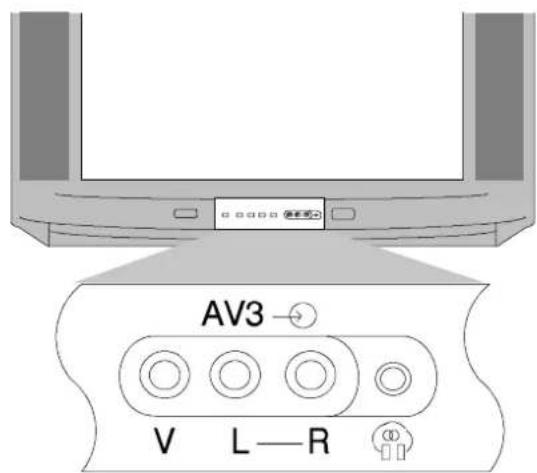
6 RCA Audio/Video sockets for the connection of Audio/Video equipment, e.g. VCR.
7 Headphone socket for connection of stereo headphones with 3.5mm plug.
8 Standby to switch TV on or off Standby mode. Set can also be switched on from Standby by pressing a 0-9 programme button or by pressing + / - /ʌ /V on the front control panel. NOTE TV cannot be switched on using the Mains On/Off switch if it is in Standby mode.
9 Status displays the Programme position, name and channel number also the time and Teletext system (if available) and Audio Systems.
Press ◀ ▶ to display Programme / Channel table 1 to 31 plus VCR, 32 to 63, 64 to 95 and again for 96 to 99.
10 Sound Mute to instantly mute or restore sound. Screen will display 'Mute' if in use.
11 Programme Up/Down to increase or decrease programme position.
12 + / - Increases or decreases the Volume.
13 Programme position to select programme positions from 10–99.
14 Direct channel access allows direct access to local channels via the 0–9 keys.
15 0-9 to select programme numbers or Teletext pages.
16 Normalisation (N) to recall the levels previously set with the store (STR) key.
Although you will normally use tuning methods provided by the tuning menus that appear later in this book, it is possible to operate basic tuning control by repeatedly pressing the 'F' key on the front panel until the Tuning mode is reached. Pressing the front panel - or + keys will lead to the Tuning procedure menu. Following the on screen instructions will allow you to tune and save any programme positions.
Tuning procedure (Front panel)
| - + | : To start search |
| "TV / AV" | : Select programme position |
| "STR" | : To store position |
| "F" | : To exit |
ON SCREEN DISPLAY MENUS
This TV has a comprehensive system of On Screen Display menus to access adjustments and options.
All menus (except AV select) start from the Main menu. If you follow the on screen instructions you will be able to move to further menus.
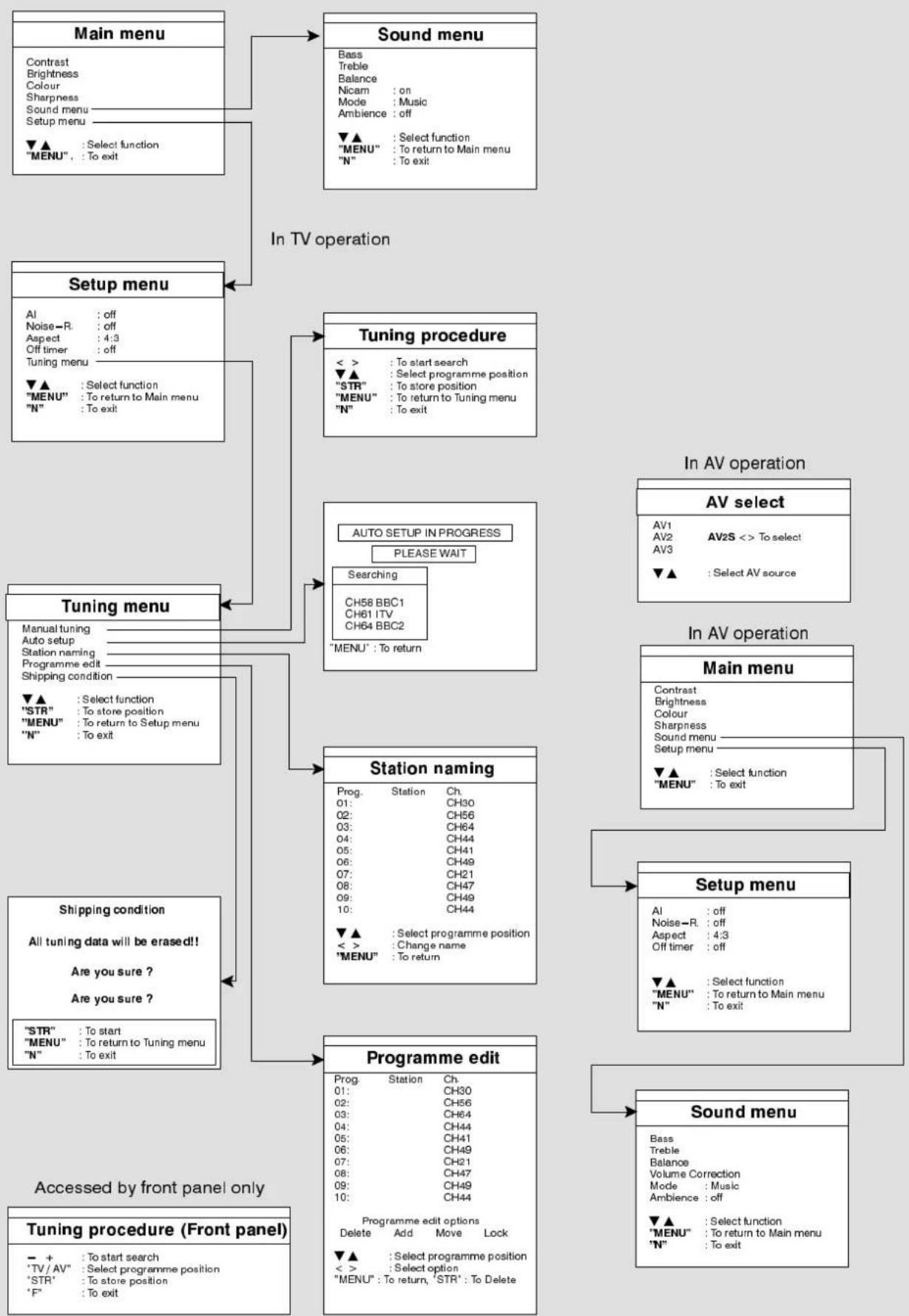
flowchart
graph TD
    A["Main menu"] --> B["Sound menu"]
    B --> C["Setup menu"]
    C --> D["Tuning procedure"]
    D --> E["Auto SETUP IN PROGRESS"]
    E --> F["Station naming"]
    F --> G["Programme edit"]

    subgraph In_TV_operation
        H["Setup menu"] --> I["Tuning procedure"]
        I --> J["Auto SETUP IN PROGRESS"]
        J --> K["Station naming"]
        K --> L["Programme edit"]
    end

    subgraph In_AV_operation
        M["AV select"] --> N["Main menu"]
        N --> O["Setup menu"]
        O --> P["Sound menu"]

    style A fill:#f9f,stroke:#333
    style B fill:#ccf,stroke:#333
    style C fill:#cfc,stroke:#333
    style D fill:#fcc,stroke:#333
    style E fill:#cff,stroke:#333
    style F fill:#ffc,stroke:#333
    style G fill:#cfc,stroke:#333
    style H fill:#fcc,stroke:#333
    style I fill:#cfc,stroke:#333
    style J fill:#fcc,stroke:#333
    style K fill:#cfc,stroke:#333
    style L fill:#fcc,stroke:#333
    style M fill:#cfc,stroke:#333
    style N fill:#fcc,stroke:#333
    style O fill:#cfc,stroke:#333
text_image
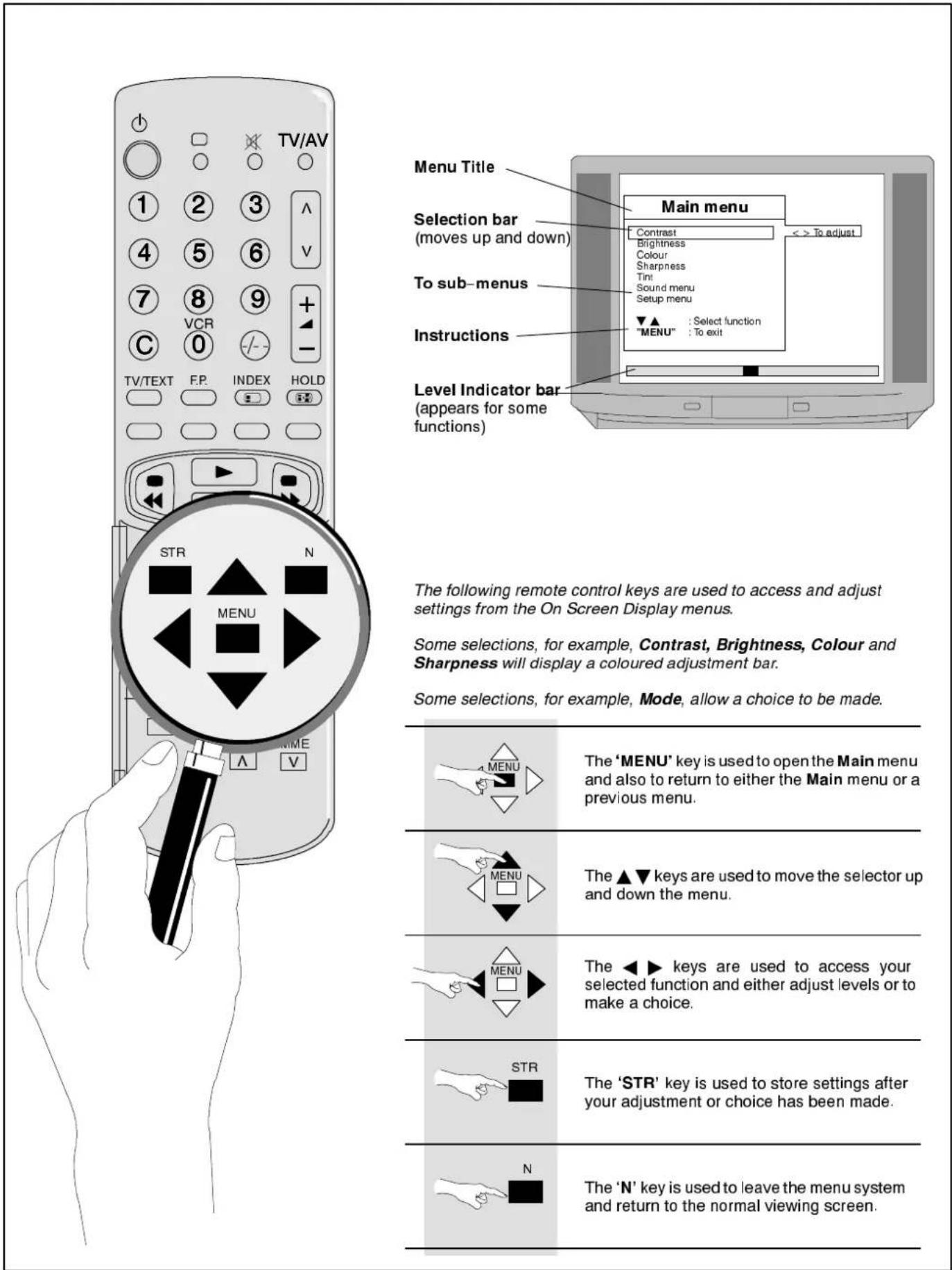
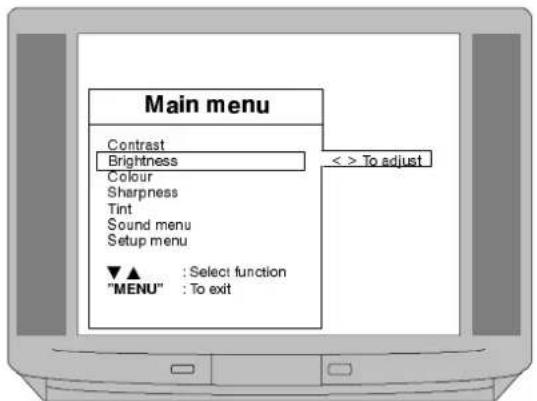
TV/AV Menu Title Selection bar (moves up and down) To sub-menus Instructions Level Indicator bar (appears for some functions) Main menu Contrast brightness Colour Sharpness Tint Sound menu Setup menu ▼▲ : Select function "MENU" : To exit STR N MENU The 'MENU' key is used to open the Main menu and also to return to either the Main menu or a previous menu. The ▲▼ keys are used to move the selector up and down the menu. The ◀► keys are used to access your selected function and either adjust levels or to make a choice. STR The 'STR' key is used to store settings after your adjustment or choice has been made. N The 'N' key is used to leave the menu system and return to the normal viewing screen. The following remote control keys are used to access and adjust settings from the On Screen Display menus. Some selections, for example, Contrast, Brightness, Colour and Sharpness will display a coloured adjustment bar. Some selections, for example, Mode, allow a choice to be made.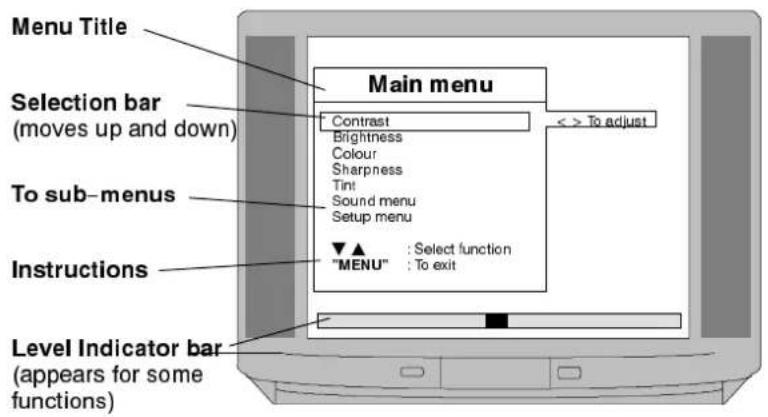
text_image
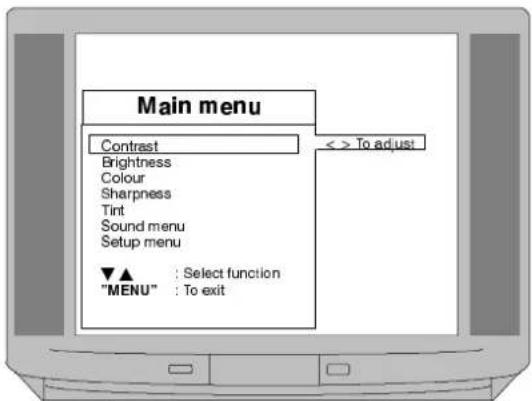
Menu Title Main menu Selection bar (moves up and down) To sub-menus Instructions Level Indicator bar (appears for some functions) Contrast Brightness Colour Sharpness Tint Sound menu Setup menu ▼▲ : Select function "MENU" : To exit < > To adjustThe following remote control keys are used to access and adjust settings from the On Screen Display menus.
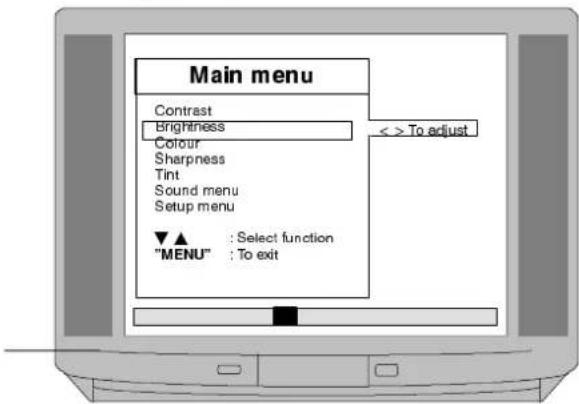
Some selections, for example, Contrast, Brightness, Colour and Sharpness will display a coloured adjustment bar.
Some selections, for example, Mode, allow a choice to be made.
 | The ‘MENU’ key is used to open the Main menu and also to return to either the Main menu or a previous menu. |
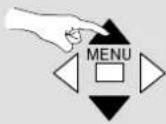 | The ▲▼ keys are used to move the selector up and down the menu. |
 | The ◀▶ keys are used to access your selected function and either adjust levels or to make a choice. |
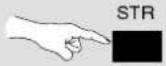 | The ‘STR’ key is used to store settings after your adjustment or choice has been made. |
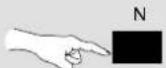 | The ‘N’ key is used to leave the menu system and return to the normal viewing screen. |
Notes :
The levels of Contrast, Brightness, Colour, Sharpness and Tint are adjusted by using the coloured bar, that will appear on selection, as a guide.
Pressing STR (whilst in either the Main or Sound menus) after making adjustments to the Contrast, Brightness, Colour, Sharpness, (Tint in M.NTSC / NTSC), Volume, Bass and/or Treble will store these adjustments in memory as your normal settings. Pressing the N button at any time will restore the TV to these settings.
Tint function will only appear on the Main menu if M.NTSC or NTSC inputs are connected.
The coloured adjuster bars will disappear after a short time if no adjustment is made.
If Sound or Setup menus are selected then they will lead to further menus as detailed on pages 10 and 11.
1
MENU

To open Main menu
text_image
Main menu Contrast Brightness Colour Sharpness Tint Sound menu Setup menu ▼▲ : Select function "MENU" : To exit2

To move selector up or down to the function that you wish to access

To access your choice
text_image
Main menu Contrast Brightness Colour Sharpness Tint Sound menu Setup menu ▼▲ : Select function "MENU" : To exit < > To adjust3
◀ ▶ To increase or decrease level using colour bar as guide or to access Sound or Setup menus
text_image
Main menu Contrast Brightness Colour Sharpness Tint Sound menu Setup menu ▼▲ : Select function "MENU" : To exit < > To adjust4
MENU

To return to viewing screen
natural_image
Black-and-white photo of a harbor scene with boats and buildings, no visible text or symbolsNotes :
Bass - adjusts the bass response.
Treble - adjusts the treble response.
Balance - adjusts the sound output levels between the left and right channels.
Volume Correction - (in AV mode only) allows different volume levels to be set for TV and AV signals.
NICAM - Select either NICAM : on for stereo sound reproduction or NICAM : off for FM Mono sound output.
If NICAM Mono is being transmitted select either FM Mono, NICAM Mono I (M1) or NICAM Mono II (M2). The outputs depend upon the signal being transmitted. It is advisable to switch to FM Mono if reception deteriorates. When NICAM transmissions are not being received the sound will be FM Mono only.
Mode - the sound quality can be set to Music or Speech, as required, by selecting the appropriate choice.
Ambience - a dynamic sound enhancer that gives a feeling of greater acoustic presence.
Pressing STR (whilst in either the Main or Sound menus) after making adjustments to the Volume, Bass, Treble, Contrast, Brightness, Colour, Sharpness and/or (Tint in M.NTSC / NTSC), will store these adjustments in memory as your normal settings. Pressing the N button at any time will restore the TV to these settings.
1
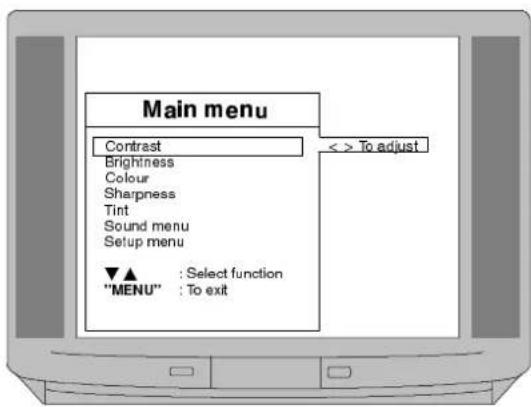
text_image
MENU Press to open Main menu Main menu Contrast < > To adjust Brightness Colour Sharpness Tint Sound menu Setup menu ▼▲ : Select function "MENU" : To exit2

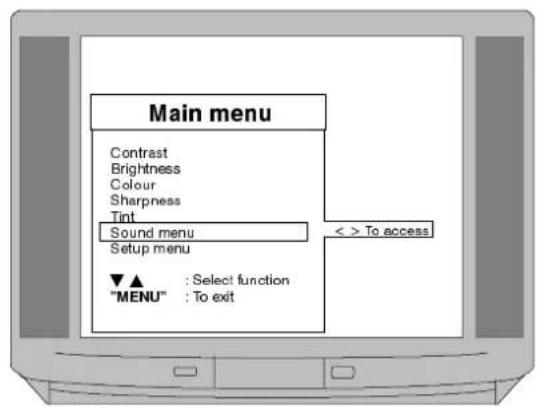
text_image
Main menu Contrast Brightness Colour Sharpness Tint Sound menu Setup menu ▼▲ : Select function "MENU" : To exit < > To access3
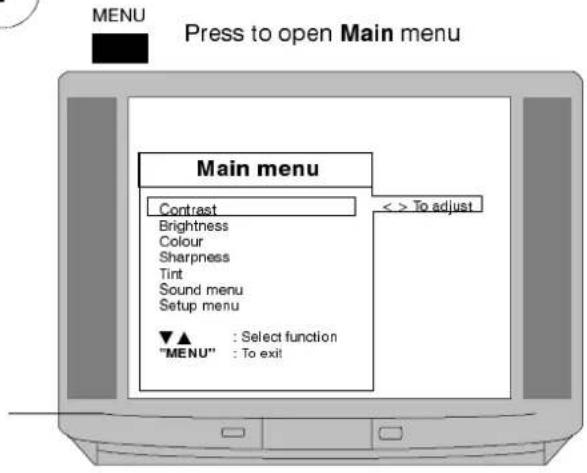
▼ ▲ To move to required function.
◀ ▶ To increase or decrease level using colour bar as guide or to choose from options
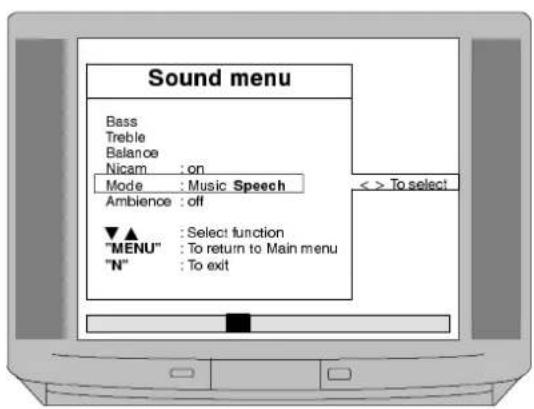
text_image
Sound menu Bass Treble Balance Nicam : on Mode : Music Speech Ambience : off ▼▲ : Select function "MENU" : To return to Main menu "N" : To exit << To select4
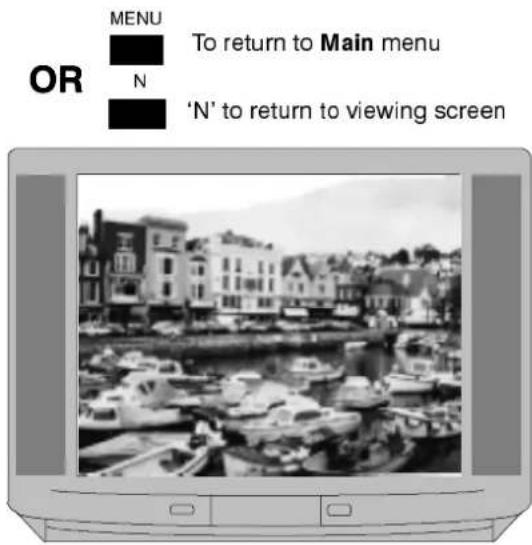
text_image
OR MENU To return to Main menu N 'N' to return to viewing screenNotes :
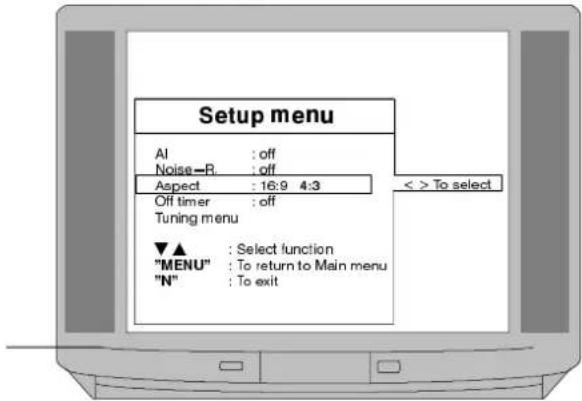
A.I. (Artificial Intelligence) allows the TV to automatically analyze the incoming picture and process it to give the best contrast, optimum field of depth and vivid colour tones.
Noise-R (Picture Noise Reduction) automatically reduces unwanted picture interference.
Aspect (Picture Format) select 16:9 if receiving a 16:9 format signal through the AV 21 pin terminals. Select 4:3 for normal picture format.
Off Timer allows you to select either 30, 60 or 90 minutes time before TV switches off to Standby mode.
Tuning menu allows access to the tuning menu detailed on next page.
1

Press to open Main menu
text_image
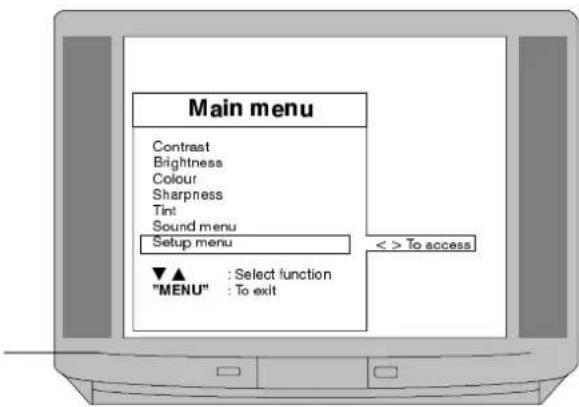
Main menu Contrast Brightness Colour Sharpness Tint Sound menu Setup menu ▼▲ : Select function "MENU" : To exit2


To move to Setup menu

▶ To access Setup menu
text_image
Main menu Contrast Brightness Colour Sharpness Tint Sound menu Setup menu ▼▲ : Select function "MENU" : To exit < > To access3

To move to required function

To access and select from
options or Tuning menu
text_image
Setup menu AI : off Noise—R : off Aspect : 16:9 4:3 Off timer : off Tuning menu ▼▲ : Select function "MENU" : To return to Main menu "N" : To exit4
OR
To return to Main menu
'N' to return to viewing screen
natural_image
Black-and-white photo of a harbor scene with docked boats and historic buildings (no visible text or symbols)Notes :
This TV will either have been programmed by your dealer ready for use or it will have automatically tuned itself to your local stations when it was installed.
However, there may be circumstances when you want to either re-initialise the auto tuning or to tune in known stations manually.
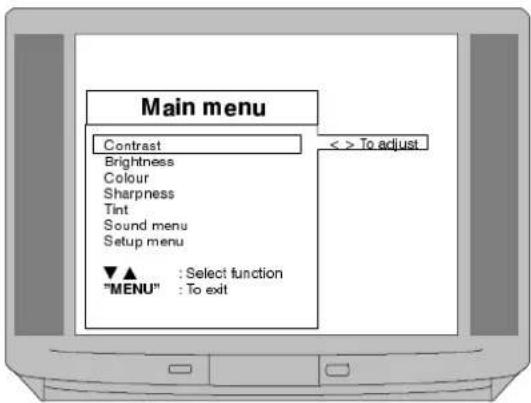
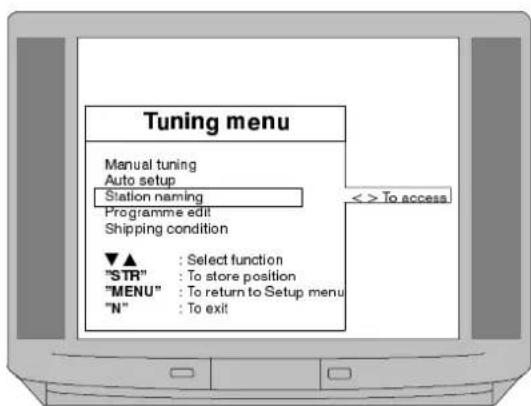
Both methods, Auto setup and Manual Tuning, as well as Station naming, Programme edit and Shipping condition are accessed through the Tuning menu.

MENU

Press to open Main menu
text_image
Main menu Contrast Brightness Colour Sharpness Tint Sound menu Setup menu ▼▲ : Select function "MENU" : To exit < > To adjust2
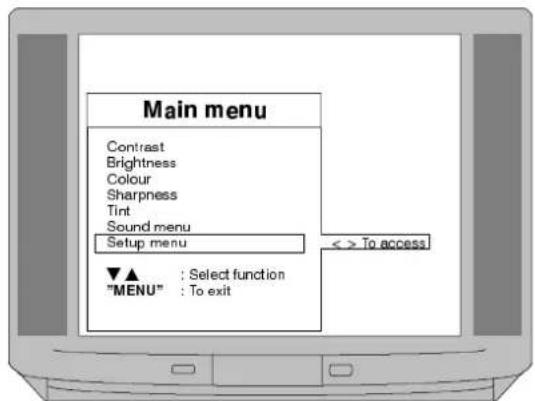
▼ ▲ To move to Setup menu
◀ ▶ To access Setup menu
▼ ▲ To move to Tuning menu
◀ ▶ To access Tuning menu
text_image
Main menu Contrast Brightness Colour Sharpness Tint Sound menu Setup menu ▼▲ : Select function "MENU" : To exit < > To access
▼ ▲ To select function
◀ ▶ To access the required function
text_image
Tuning menu Manual tuning Auto setup Station naming Programme edit Shipping condition ▼▲ : Select function "STR" : To store position "MENU" : To return to Setup menu "N" : To exit4
Proceed to your choice ;
Manual Tuning is described on page 13.
Auto Setup is described on page 14.
Station Naming is described on page 15.
Programme Edit menu is described on page 16.

Notes :
The required channels can be manually stored by either searching for the required channel using the on screen display or by keying in the channel number if known.
If your VCR does not operate on programme position '0' then it is probable that your VCR is not tuned to channel 32. This can be corrected by selecting programme position '0' and adjusting the RF output channel of your VCR, further details appear on page 23. IT IS IMPORTANT that you use only programme position '0' for your VCR'. Programme positions other than '0' are not suitable for use with your VCR.
It is possible that in some areas, you may suffer interference patterning on screen when using your VCR. This can be corrected by changing the RF output channel of your VCR to a different setting, further details appear on page 23.

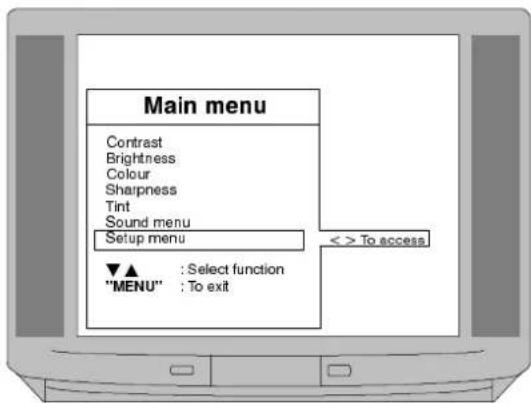
MENU

To open Main menu

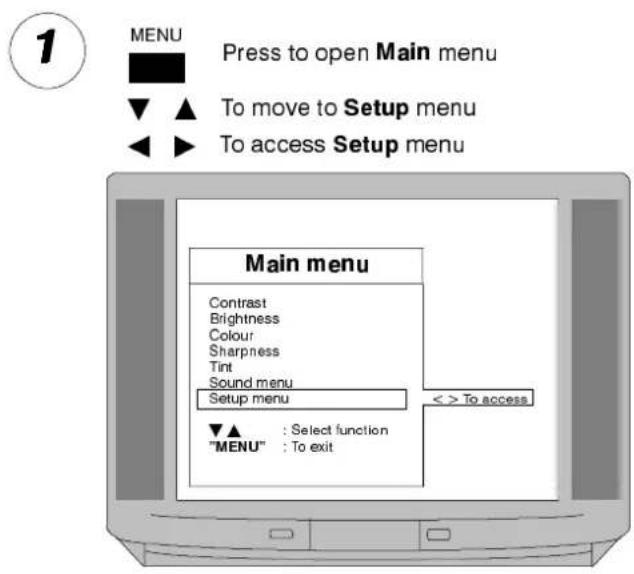
To move to Setup menu
text_image
Main menu Contrast Brightness Colour Sharpness Tint Sound menu Setup menu < > To access ▼▲ : Select function "MENU" : To exit2
◀ ▶ To access Setup menu
▼ ▲ To move to Tuning menu
◀ ▶ To access Tuning menu
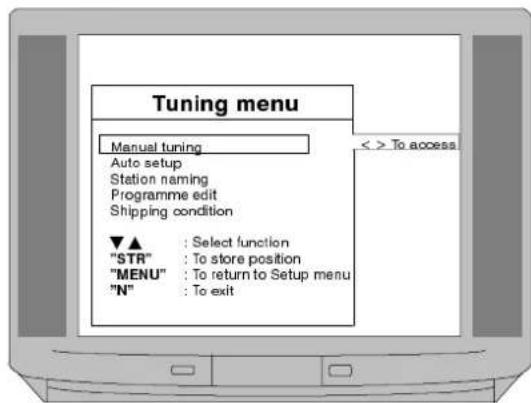
▼ ▲ To move to Manual tuning menu
◀ ▶ To access Manual tuning
text_image
Tuning menu Manual tuning Auto setup Station naming Programme edit Shipping condition ▼▲ : Select function "STR" : To store position "MENU" : To return to Setup menu "N" : To exit < > To access
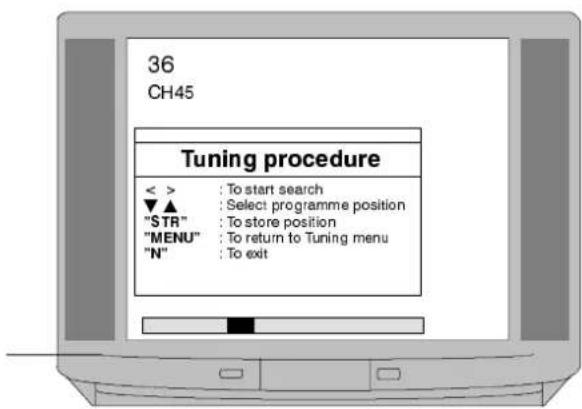
◀ ▶ To start search
▼ ▲ To choose required programme position
Programme position and current channel are displayed top left of screen
text_image
36 CH45 Tuning procedure < > : To start search ▼▲ : Select programme position "STR" : To store position "MENU" : To return to Tuning menu "N" : To exitOR
text_image
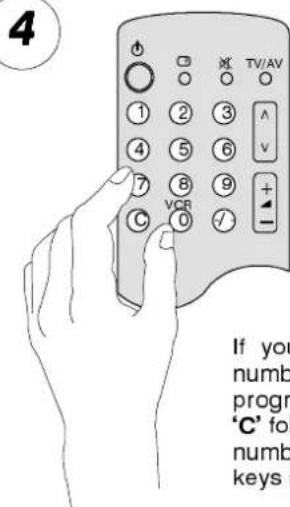
4 TV/AV ① ② ③ ④ ⑤ ⑥ ⑦ ⑧ ⑨ C VCR - / - If you numb program 'C' fol numb keys (If you know the channel number - select the programme position. Press 'C' followed by the channel number using the numeric keys (within 6 seconds).
STR

To store position
MENU
OR

To return to Tuning menu

To return to viewing screen
STR

To store position
MENU

N

To return to viewing screen
Notes :
Your dealer may have programmed the TV ready for use. If this has not been done then the Auto setup menu will have run automatically the first time that you switched the TV on. Under normal circumstances there will be no need to access this menu. However, if, for example, you move to a different area then you will probably want the TV to tune itself to your new local stations.
This can be done either through the Auto setup menu or through the Shipping Condition menu. Details of Shipping condition menu appear on page 18.
It is possible, especially in areas where you are able to receive more than one transmitter, that you may prefer to rearrange the order of the selection of stations. This can be achieved through the Programme edit menu, as detailed on pages 16 and 17.
text_image
MENU Press to open Main menu ▼ ▲ To move to Setup menu ◀ ▶ To access Setup menu Main menu Contrast Brightness Colour Sharpness Tint Sound menu Setup menu < > To access ▼▲ : Select function "MENU" : To exit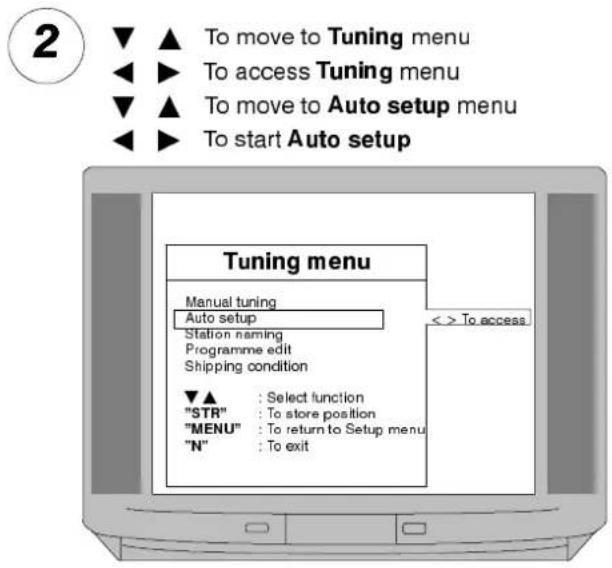
text_image
2 ▼ ▲ To move to Tuning menu ◀◀ ▶ To access Tuning menu ▼▲ ▲ To move to Auto setup menu ◀◀ ▶ To start Auto setup Tuning menu Manual tuning Auto setup Station naming Programme edit Shipping condition ▼▲ : Select function "STR" : To store position "MENU" : To return to Setup menu "N" : To exit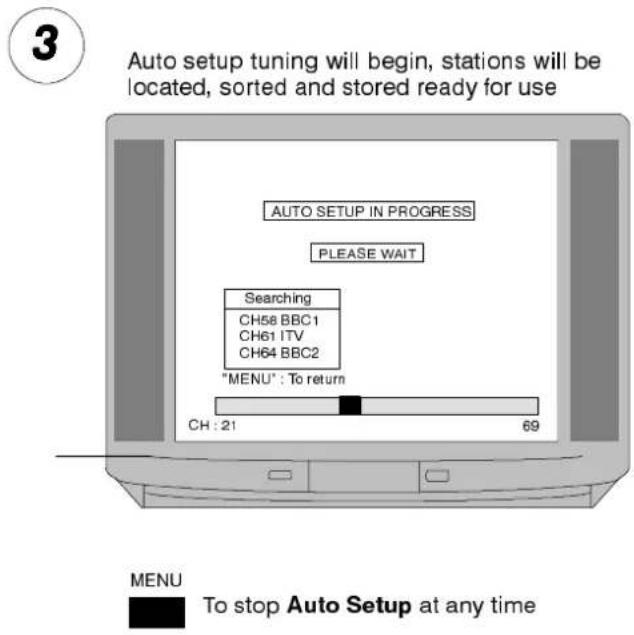
text_image
3 Auto setup tuning will begin, stations will be located, sorted and stored ready for use AUTO SETUP IN PROGRESS PLEASE WAIT Searching CH58 BBC1 CH61 ITV CH64 BBC2 "MENU": To return CH : 21 69 MENU To stop Auto Setup at any time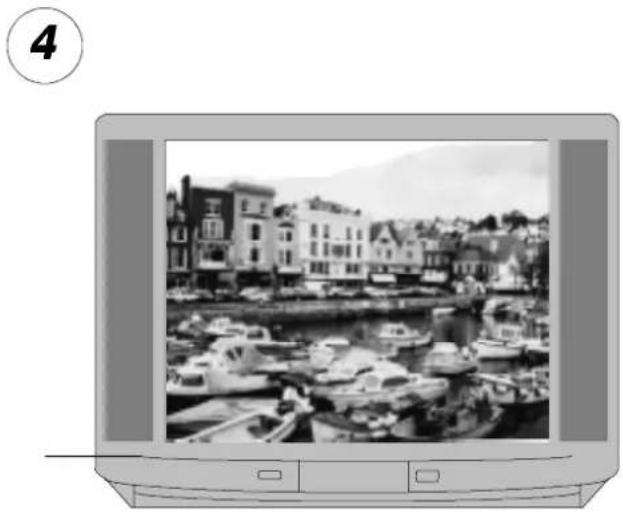
natural_image
Black-and-white photo of a harbor scene with boats and buildings, no visible text or symbolsNotes :
Each channel may be given an individual name so that you can remember the channels by name as well as programme number. For example you could rename 'BBC-1' to 'ONE' if you wished.
text_image
MENU Press to open Main menu To move to Setup menu To access Setup menu Main menu Contrast Brightness Colour Sharpness Tint Sound menu Setup menu < > To access ▼▲ : Select function "MENU" : To exit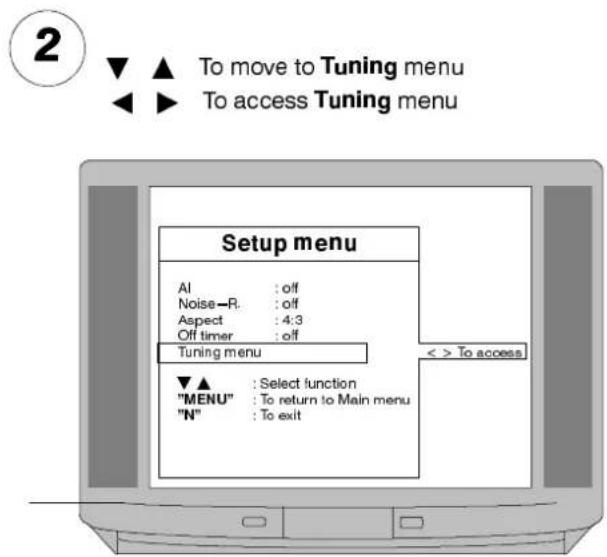
text_image
2 To move to Tuning menu To access Tuning menu Setup menu AI : off Noise—R. : off Aspect : 4:3 Off timer : off Tuning menu ▼▲ : Select function "MENU" : To return to Main menu "N" : To exit < > To access
text_image
3 ▼ ▲ To move Station naming menu ◀ ▶ To access Station naming menu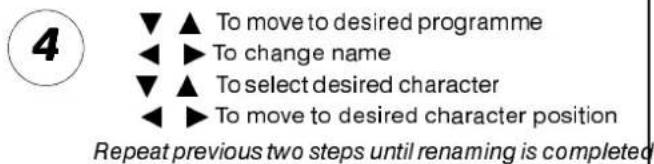
text_image
4 ▼ ▲ To move to desired programme ◀ ▶ To change name ▼ ▲ To select desired character ◀ ▶ To move to desired character position Repeat previous two steps until renaming is completed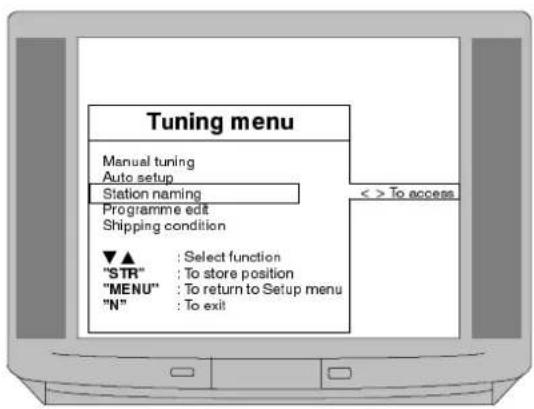
text_image
Tuning menu Manual tuning Auto setup Station naming Programme edit Shipping condition ▼▲ : Select function "STR" : To store position "MENU" : To return to Setup menu "N" : To exit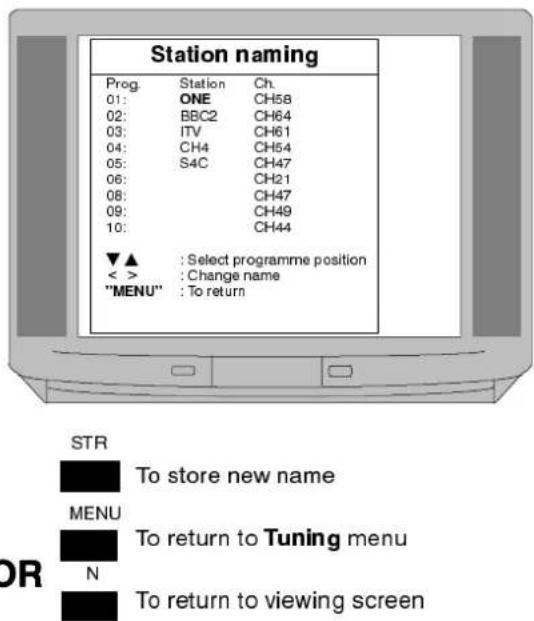
text_image
Station naming Prog. Station Ch. 01: ONE CH58 02: BBC2 CH64 03: ITV CH61 04: CH4 CH54 05: S4C CH47 06: CH21 08: CH47 09: CH49 10: CH44 ▼▲ : Select programme position < > : Change name "MENU" : To return STR To store new name MENU To return to Tuning menu N To return to viewing screenNotes :
The named programme positions can be moved to another place in the programme order or deleted from the order. New programmes can be added to the order. Programme positions can also be locked to prevent access.
Access to programme position '0'–VCR is prevented in this menu.

MENU

Press to open Main menu

To move to Setup menu

To access Setup menu
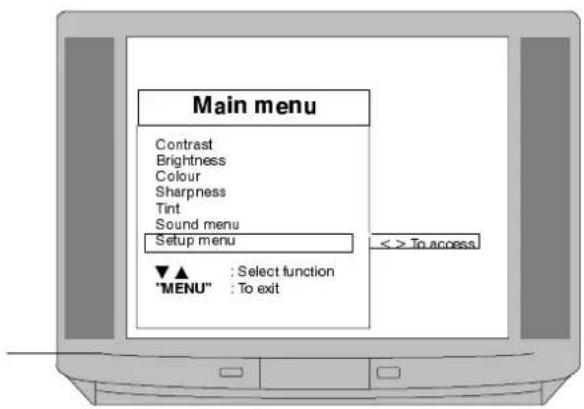
text_image
Main menu Contrast Brightness Colour Sharpness Tint Sound menu Setup menu ▼▲ : Select function "MENU" : To exit < > To access2

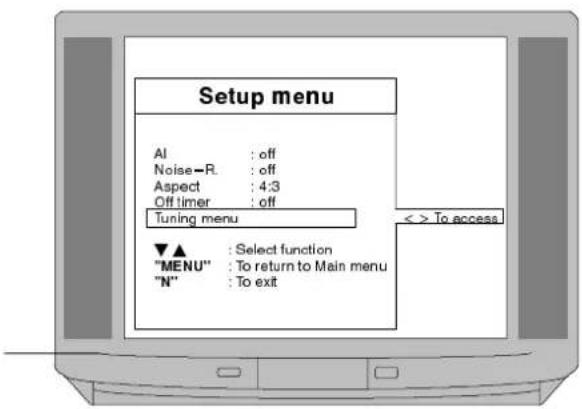
text_image
Setup menu AI : off Noise-R : off Aspect : 4:3 Off timer : off Tuning menu ▼▲ : Select function "MENU" : To return to Main menu "N" : To exit << To access3

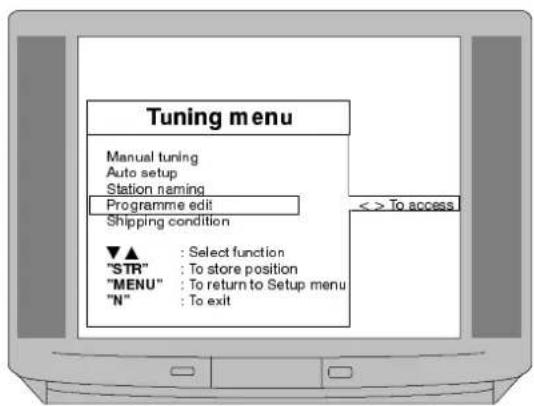
text_image
Tuning menu Manual tuning Auto setup Station naming Programme edit Shipping condition ▼▲ : Select function "STR" : To store position "MENU" : To return to Setup menu "N" : To exit << To access4
▼ ▲ To select the desired programme position. Programme position '0' is reserved for VCR operation.
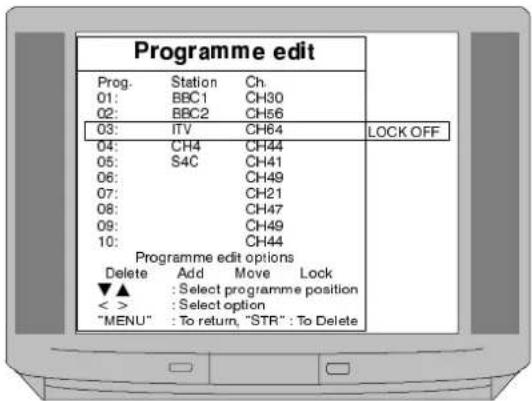
text_image
Programme edit Prog. Station Ch. 01: BBC1 CH30 02: BBC2 CH56 03: ITV CH64 LOCK OFF 04: CH4 CH44 05: S4C CH41 06: CH49 07: CH21 08: CH47 09: CH49 10: CH44 Programme edit options Delete Add Move Lock ▼▲ : Select programme position < > : Select option "MENU": To return, "STR": To DeleteContinue to options 5,6,7 or 8

Notes :
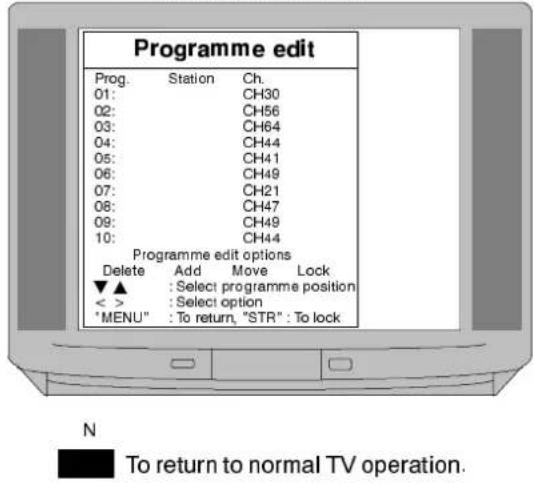
Option 5 allows station names and channels to be deleted
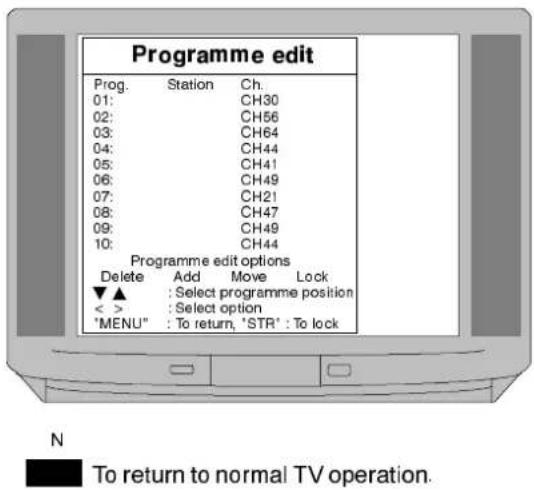
Option 6 allows new programmes and channels to be added
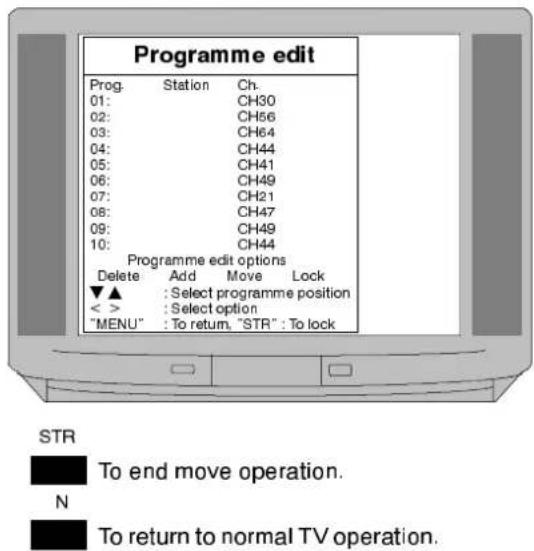
Option 7 allows programme positions to be moved
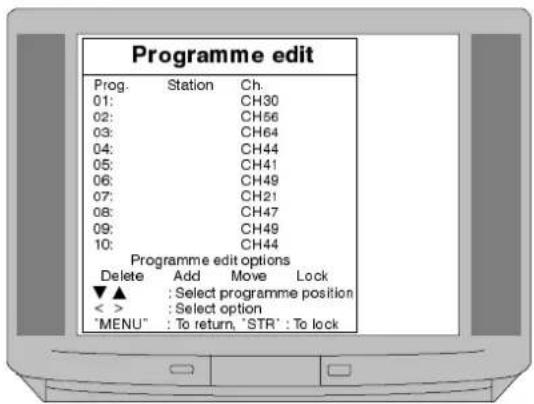
Option 8 allows programme positions to be locked

DELETE OPERATION

To select Delete
STR

Press twice to delete selected station and channel
text_image
Programme edit Prog. Station Ch. 01: CH30 02: CH56 03: CH64 04: CH44 05: CH41 06: CH49 07: CH21 08: CH47 09: CH49 10: CH44 Programme edit options Delete Add Move Lock ▼▲ : Select programme position < > : Select option *MENU" : To return, "STR" : To lock N To return to normal TV operation.6
ADD OPERATION

To select Add
STR

Press twice to insert a blank channel in the current programme position.
text_image
Programme edit Prog. Station Ch. 01: CH30 02: CH56 03: CH64 04: CH44 05: CH41 06: CH49 07: CH21 08: CH47 09: CH49 10: CH44 Programme edit options Delete Add Move Lock ▼▲ : Select programme position < > : Select option "MENU" : To return, "STR" : To lock N To return to normal TV operation.The channel can then be tuned as described under Manual tuning on Page 13.

MOVE OPERATION

To select Move
STR

To move

To select the new programme position for the current channel
text_image
Programme edit Prog. Station Ch. 01: CH30 02: CH56 03: CH64 04: CH44 05: CH41 06: CH49 07: CH21 08: CH47 09: CH49 10: CH44 Programme edit options Delete Add Move Lock ▼▲ : Select programme position < > : Select option "MENU": To return, "STR": To lock STR To end move operation. N To return to normal TV operation.8
LOCK OPERATION

To select Lock
STR

To lock or unlock the current programme position.
text_image
Programme edit Prog. Station Ch. 01: CH30 02: CH56 03: CH64 04: CH44 05: CH41 06: CH49 07: CH21 08: CH47 09: CH49 10: CH44 Programme edit options Delete Add Move Lock ▼▲ : Select programme position < > : Select option "MENU": To return, "STR": To lockN

To return to normal TV operation.
Notes :
Your dealer may have programmed the TV ready for use. If this has not been done then the Auto setup menu runs automatically the first time that you switch the TV on. Under normal circumstances there will be no need to access this menu. However, if, for example, you move to a different area then you will probably want the TV to tune itself to your new local stations.
This can be done either through the Shipping Condition menu or through the Auto setup menu.
The Shipping condition menu will reset all data, clearing all tuning information and resetting all control levels back to factory settings. You may need to adjust your VCR or programme position '0' VCR after operating the Shipping Condition menu, refer to page 23.
It is possible, especially in areas where you are able to receive more than one transmitter, that you may prefer to rearrange the order of the selection of stations. This can be achieved through the Programme edit menu, as detailed on pages 16 and 17.
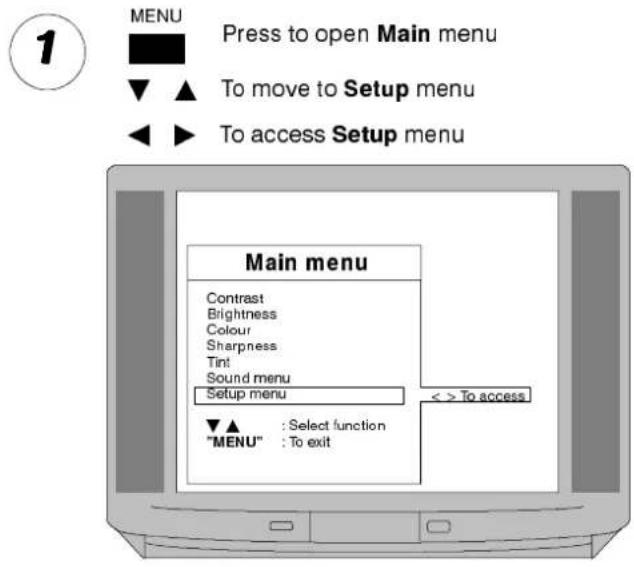
text_image
MENU Press to open Main menu To move to Setup menu To access Setup menu Main menu Contrast Brightness Colour Sharpness Tint Sound menu Setup menu < > To access ▼▲ : Select function "MENU" : To exit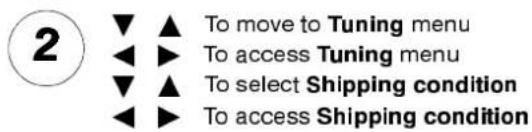
text_image
2 ▼ ▲ To move to Tuning menu ◀◀ ▶ To access Tuning menu ▼ ▲ ▲ To select Shipping condition ◀◀ ▶ To access Shipping condition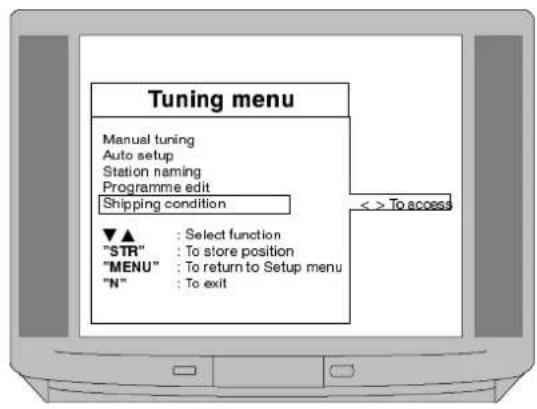
text_image
Tuning menu Manual tuning Auto setup Station naming Programme edit Shipping condition << To access ▼▲ : Select function "STR" : To store position "MENU" : To return to Setup menu "N" : To exit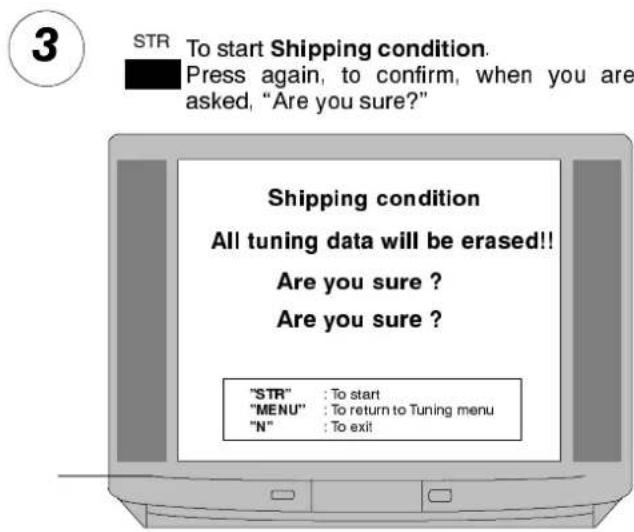
text_image
3 STR To start Shipping condition. Press again, to confirm, when you are asked, "Are you sure?" Shipping condition All tuning data will be erased!! Are you sure ? Are you sure ? "STR" : To start "MENU" : To return to Tuning menu "N" : To exit!
text_image
4 Press ◀ ► to start Auto setup Auto setup tuning will begin, stations will be located, sorted and stored ready for use.Wait for Tuning menu to reappear
text_image
AUTO SETUP IN PROGRESS PLEASE WAIT Searching CH58 BBC1 CH61 ITV CH64 BBC2 "MENU": To return CH:21 69Notes :
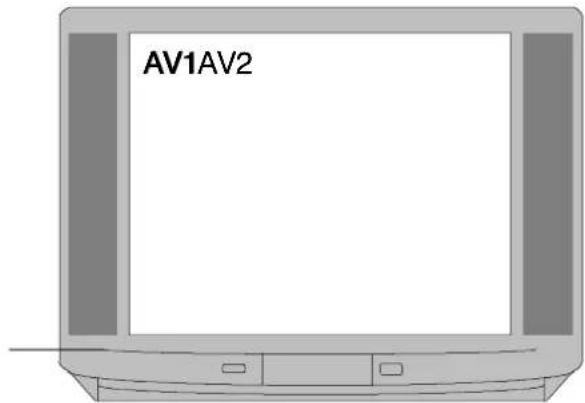
Some items of Audio/Visual equipment will automatically switch AV1 and AV2 into AV mode – the screen will display EC1 or EC2.
AV2S is suitable for S-Video cassette recorders or camcorders.
NTSC is the United States colour broadcast system (also used in some other countries). If you are using the AV function to replay an NTSC recording from a VCR the TV will automatically recognise the signal.
Examples of AV connections are shown on pages 25 and 26.
1
Press 'TV / AV' to switch to Audio/Video mode
text_image
AV1AV22
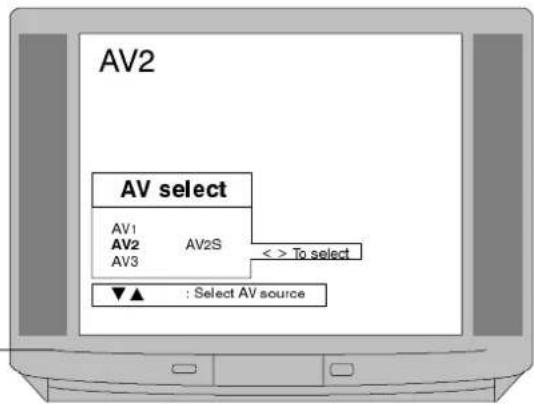
▼ ▲ To select the desired AV source AV1, AV2 or AV3.
When AV2 is selected, to choose AV2 or AV2S.
text_image
AV2 AV select AV1 AV2S AV2 AV3 << To select ▼▲ : Select AV sourceThe menu will clear within a few seconds.
Press 'TV / AV' if you wish to return to TV mode
3
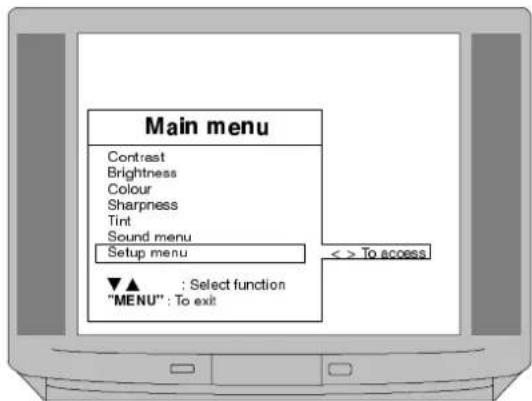
You may wish to make adjustments within the Sound and Setup menus.

Press to open Main menu

To move to Sound or Setup menus

nd menu details refer to page 10.
For Sound menu details refer to page 10.
For Setup menu details refer to page 11.
text_image
Main menu Contrast Brightness Colour Sharpness Tint Sound menu Setup menu < > To access ▼▲ : Select function "MENU": To exit4
By accessing the Sound menu and adjusting the Volume correction you can set a different volume level for the AV inputs.
Teletext features may vary depending on the Broadcasting Companies and are only available if the channel selected is transmitting Teletext. This TV set is capable of receiving German TOP Teletext transmissions, it will automatically switch to them if a German broadcast is being received, for example, from Satellite channels.
Pressing the 'MENU' key whilst in Teletext operation will allow the Contrast setting to be adjusted.
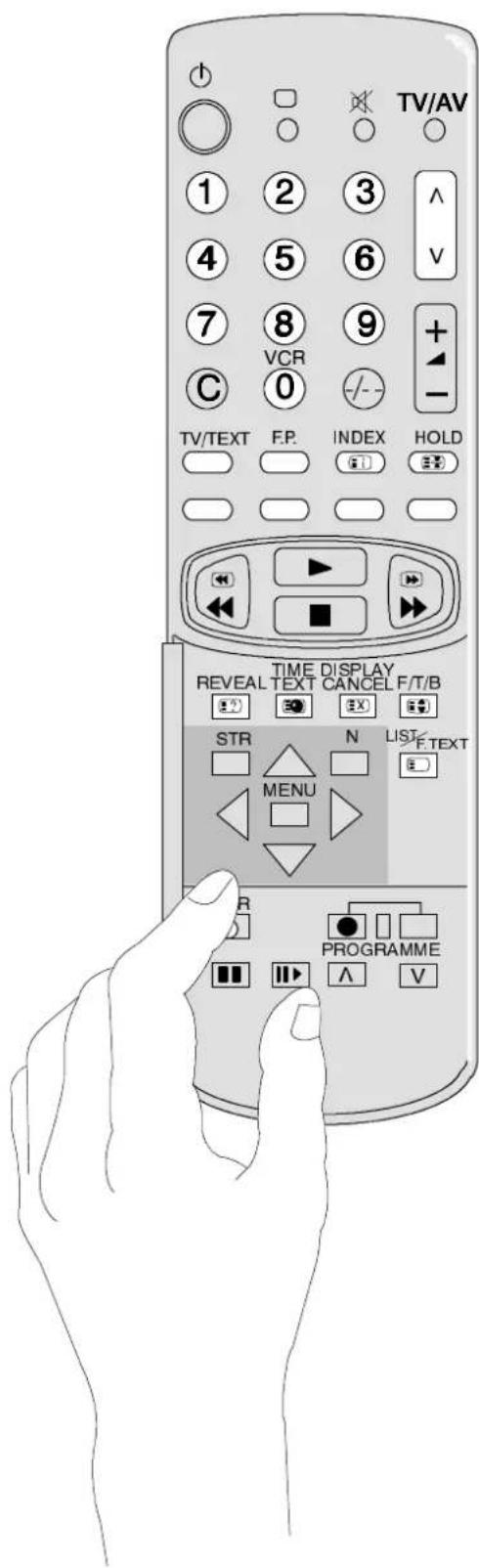
text_image
TV/AV ① ② ③ ^ ④ ⑤ ⑥ V ⑦ ⑧ ⑨ + C 0 TV/TEXT F.P. INDEX HOLD TIME DISPLAY REVEAL TEXT CANCEL F/T/B STR N LIST/F.TEXT MENU R PROGRAMME ^ V| TV / TEXTPress to enter and exit Teletext operation. | |
| Page SelectionThe Teletext pages can be selected either by using the Up / Down keys or by entering the page number using the 0–9 keys. | |
| List / FASTEXTSee following pages. | |
| IndexReturns to main index page when in FASTEXT mode. | |
| F / T / BExpands page for easier reading. | |
| RevealReveals hidden words and clues for quiz pages. | |
| Display CancelSee following pages. | |
| F.P.Favourite PageStores a favourite page in memory for instant recall. | |
| HoldHolds the current page. | |
| Time TextSee following pages. | |
| Red / Green / Yellow / Blue KeysSee following pages. |
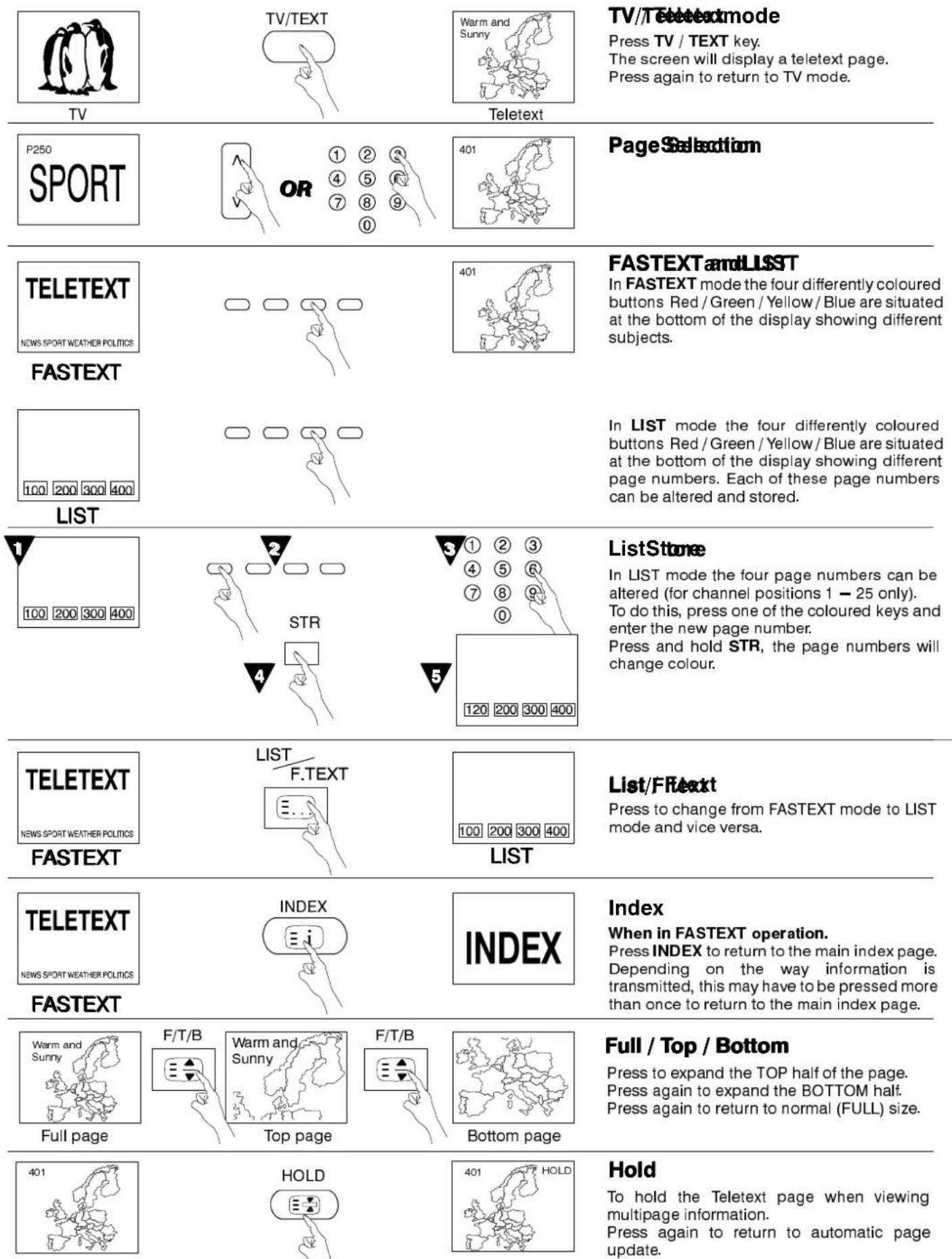
TV/Téteetexmode
Press TV / TEXT key.
The screen will display a teletext page.
Press again to return to TV mode.
Page Selection
FASTEXTandLLSST
In FASTEXT mode the four differently coloured buttons Red / Green / Yellow / Blue are situated at the bottom of the display showing different subjects.
In LIST mode the four differently coloured buttons Red / Green / Yellow / Blue are situated at the bottom of the display showing different page numbers. Each of these page numbers can be altered and stored.
ListStone
In LIST mode the four page numbers can be altered (for channel positions 1 - 25 only).
To do this, press one of the coloured keys and enter the new page number.
Press and hold STR, the page numbers will change colour.
List/FFext
Press to change from FASTEXT mode to LIST mode and vice versa.
Index
When in FASTEXT operation.
Press INDEX to return to the main index page. Depending on the way information is transmitted, this may have to be pressed more than once to return to the main index page.
Full / Top / Bottom
Press to expand the TOP half of the page. Press again to expand the BOTTOM half. Press again to return to normal (FULL) size.
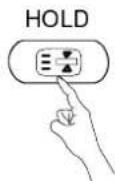
Hold
To hold the Teletext page when viewing multipage information.
Press again to return to automatic page update.

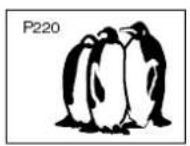
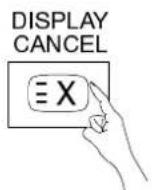
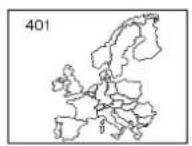
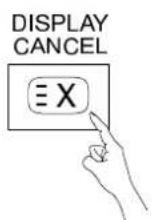
DisplayCancell
News Flash
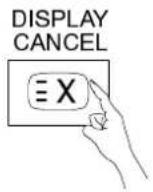
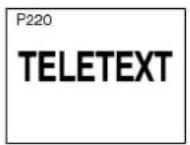
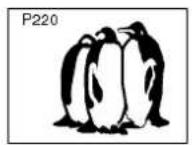
When a news flash page has been selected, press DISPLAY CANCEL to view the TV picture, when an update is received, it will be displayed or screen.
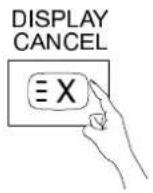
Press DISPLAY CANCEL to remove updated news.
Press TV / TEXT to return to normal TV.
Press DISPLAY CANCEL to view the TV picture whilst searching for a Teletext page.
When found, the screen will display the page number at the top left.
Press DISPLAY CANCEL to view the page.
Press TV / TEXT to return to normal TV.
Update
Press DISPLAY CANCEL to see the update of information on certain pages.
When an update is received, the page number will be displayed at the top left of the screen.
Press DISPLAY CANCEL to view the page.
Press TV / TEXT to return to normal TV.
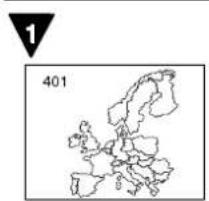
natural_image
Outline map of Europe with a numbered marker (1) and number 401, no textual labels or annotations beyond the markers.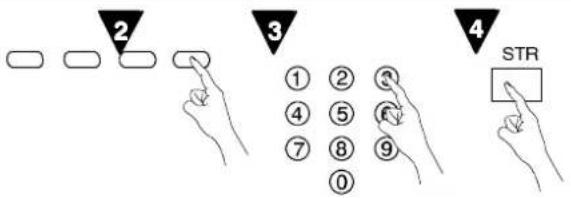
text_image
2 3 4 STR

Favourite Page (F.P.)
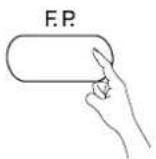
Stores a favourite page in memory for instant recall. To store such a page, the TV must be in LIST mode, and the programme position must be from 1 – 25. Press the BLUE key, select the page number, then press STR. The page number is now stored.
Press F.P. to recall this page.
Note: Depending on the transmission sequence when the F.P. key is pressed, the contents of the favourite page may take some time to appear. Only the page number is stored, not it's contents
SubContactPageAccess
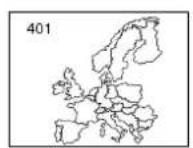
When teletext information exceeds more than one page, it may take some time for the automatic changing of the sub pages to reach the sub page you require. It is possible to enter your required sub page and continue watching the normal programme until the correct sub page is found. Select the required page number using keys 0 - 9.
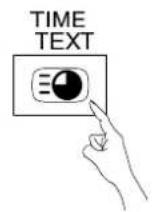
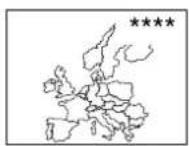
Press TIME TEXT, **** will be displayed (top right of the screen).
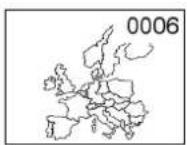
Enter desired sub page number before the **** disappears.
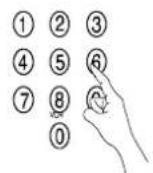
To select page 6 enter 0, 0, 0 and 6.
If in LIST mode, a 'T' will appear in the current box at the bottom.
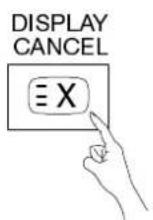
Press DISPLAY CANCEL to view a normal TV programme.
When the page is available, press DISPLAY CANCEL to view the page.
To clear the page perform one of the following :
- Select a new page number.
- Press TV/TEXT to return to normal TV operation.
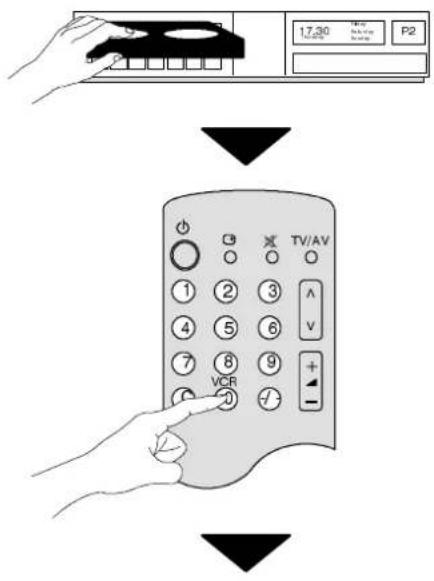
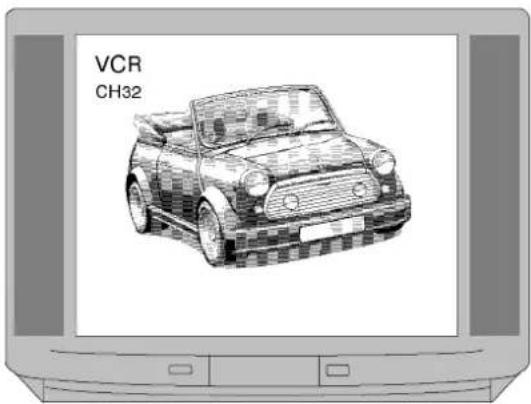
Your new TV is supplied with programme position '0' tuned to receive channel 32 of your VCR. Usually VCRs are also supplied tuned ready to output their signal on channel 32 and under these circumstances your VCR will work immediately through the TV without further adjustment.
However, if for some reason your VCR is tuned to a different channel then you will not receive any picture or sound from your VCR on programme position '0' of the TV. It will be necessary to either set the RF tuning of your VCR to channel 32, or to adjust the tuning of the TV's programme position '0' until it receives the RF output channel of your VCR.
To connect a VHS VCR use the AV1 socket. To connect an S-Video VCR use the AV2 socket.
It is intended that this advice is used in conjunction with the instruction books for your ancillary equipment.
TOTUNNEY COURRY OR TOTCHETHE TV
text_image
17:30 P2 TV/AV VCR
text_image
17:30 VCR TV/AV RFTUNNING rearoff VCR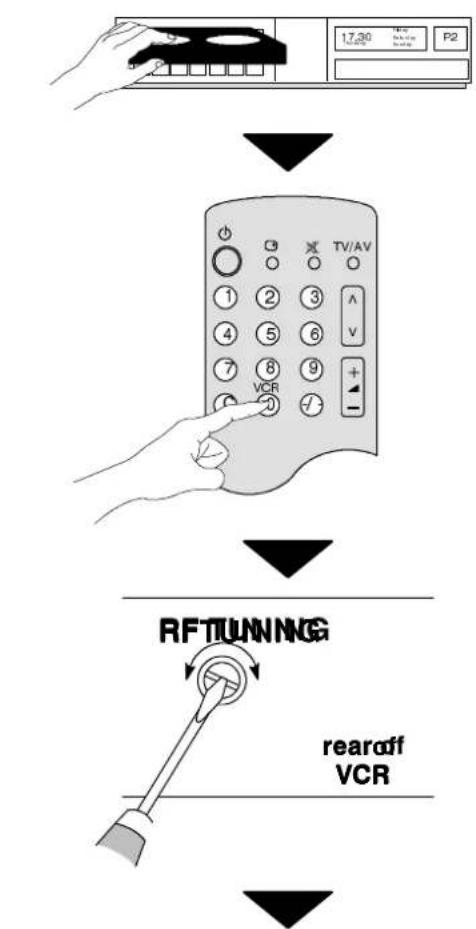
flowchart
graph TD
    A["Hand Hand"] --> B["Control Panel"]
    B --> C["Phone 1: TV/AV"]
    C --> D["Phone 2: VCR"]
    D --> E["Phone 3: TV/AV"]
    E --> F["Phone 4: VCR"]
    F --> G["Phone 5: VCR"]
    G --> H["Phone 6: VCR"]
    H --> I["Phone 7: VCR"]
    I --> J["Phone 8: VCR"]
    J --> K["Phone 9: VCR"]
    K --> L["Phone 10: VCR"]
    L --> M["Phone 11: VCR"]
    M --> N["Phone 12: VCR"]
    N --> O["Phone 13: VCR"]
    O --> P["Phone 14: VCR"]
    P --> Q["Phone 15: VCR"]
    Q --> R["Phone 16: VCR"]
    R --> S["Phone 17: VCR"]
    S --> T["Phone 18: VCR"]
    T --> U["Phone 19: VCR"]
    U --> V["Phone 20: VCR"]
    V --> W["Phone 21: VCR"]
    W --> X["Phone 22: VCR"]
    X --> Y["Phone 23: VCR"]
    Y --> Z["Phone 24: VCR"]
    Z --> AA["Phone 25: VCR"]
    AA --> AB["Phone 26: VCR"]
    AB --> AC["Phone 27: VCR"]
    AC --> AD["Phone 28: VCR"]
    AD --> AE["Phone 29: VCR"]
    AE --> AF["Phone 30: VCR"]
    AF --> AG["Phone 31: VCR"]
    AG --> AH["Phone 32: VCR"]
    AH --> AI["Phone 33: VCR"]
    AI --> AJ["Phone 34: VCR"]
    AJ --> AK["Phone 35: VCR"]
    AK --> AL["Phone 36: VCR"]
    AL --> AM["Phone 37: VCR"]
    AM --> AN["Phone 38: VCR"]
    AN --> AO["Phone 39: VCR"]
    AO --> AP["Phone 40: VCR"]
    AP --> AQ["Phone 41: VCR"]
    AQ --> AR["Phone 42: VCR"]
    AR --> AS["Phone 43: VCR"]
    AS --> AT["Phone 44: VCR"]
    AT --> AU["Phone 45: VCR"]
    AU --> AV["Phone 46: VCR"]
    AV --> AW["Phone 47: VCR"]
    AW --> AX["Phone 48: VCR"]
    AX --> AY["Phone 49: VCR"]
    AY --> AZ["Phone 50: VCR"]
flowchart
graph TD
    A["Hand Hand"] --> B["Control Panel"]
    B --> C["Phone 1: TV/AV"]
    C --> D["Phone 2: VCR"]
    D --> E["Phone 3: TV/AV"]
    E --> F["Phone 4: VCR"]
    F --> G["Phone 5: VCR"]
    G --> H["Phone 6: VCR"]
    H --> I["Phone 7: VCR"]
    I --> J["Phone 8: VCR"]
    J --> K["Phone 9: VCR"]
    K --> L["Phone 10: VCR"]
    L --> M["Phone 11: VCR"]
    M --> N["Phone 12: VCR"]
    N --> O["Phone 13: VCR"]
    O --> P["Phone 14: VCR"]
    P --> Q["Phone 15: VCR"]
    Q --> R["Phone 16: VCR"]
    R --> S["Phone 17: VCR"]
    S --> T["Phone 18: VCR"]
    T --> U["Phone 19: VCR"]
    U --> V["Phone 20: VCR"]
    V --> W["Phone 21: VCR"]
    W --> X["Phone 22: VCR"]
    X --> Y["Phone 23: VCR"]
    Y --> Z["Phone 24: VCR"]
    Z --> AA["Phone 25: VCR"]
    AA --> AB["Phone 26: VCR"]
    AB --> AC["Phone 27: VCR"]
    AC --> AD["Phone 28: VCR"]
    AD --> AE["Phone 29: VCR"]
    AE --> AF["Phone 30: VCR"]
    AF --> AG["Phone 31: VCR"]
    AG --> AH["Phone 32: VCR"]
    AH --> AI["Phone 33: VCR"]
    AI --> AJ["Phone 34: VCR"]
    AJ --> AK["Phone 35: VCR"]
    AK --> AL["Phone 36: VCR"]
    AL --> AM["Phone 37: VCR"]
    AM --> AN["Phone 38: VCR"]
    AN --> AO["Phone 39: VCR"]
    AO --> AP["Phone 40: VCR"]
    AP --> AQ["Phone 41: VCR"]
    AQ --> AR["Phone 42: VCR"]
    AR --> AS["Phone 43: VCR"]
    AS --> AT["Phone 44: VCR"]
    AT --> AU["Phone 45: VCR"]
    AU --> AV["Phone 46: VCR"]
    AV --> AW["Phone 47: VCR"]
    AW --> AX["Phone 48: VCR"]
    AX --> AY["Phone 49: VCR"]
    AY --> AZ["Phone 50: VCR"]
flowchart
graph TD
    A["Hand Hand"] --> B["Control Panel"]
    B --> C["Phone 1: TV/AV"]
    C --> D["Phone 2: VCR"]
    D --> E["Phone 3: TV/AV"]
    E --> F["Phone 4: VCR"]
    F --> G["Phone 5: VCR"]
    G --> H["Phone 6: VCR"]
    H --> I["Phone 7: VCR"]
    I --> J["Phone 8: VCR"]
    J --> K["Phone 9: VCR"]
    K --> L["Phone 10: VCR"]
    L --> M["Phone 11: VCR"]
    M --> N["Phone 12: VCR"]
    N --> O["Phone 13: VCR"]
    O --> P["Phone 14: VCR"]
    P --> Q["Phone 15: VCR"]
    Q --> R["Phone 16: VCR"]
    R --> S["Phone 17: VCR"]
    S --> T["Phone 18: VCR"]
    T --> U["Phone 19: VCR"]
    U --> V["Phone 20: VCR"]
    V --> W["Phone 21: VCR"]
    W --> X["Phone 22: VCR"]
    X --> Y["Phone 23: VCR"]
    Y --> Z["Phone 24: VCR"]
    Z --> AA["Phone 25: VCR"]
    AA --> AB["Phone 26: VCR"]
    AB --> AC["Phone 27: VCR"]
    AC --> AD["Phone 28: VCR"]
    AD --> AE["Phone 29: VCR"]
    AE --> AF["Phone 30: VCR"]
    AF --> AG["Phone 31: VCR"]
    AG --> AH["Phone 32: VCR"]
    AH --> AI["Phone 33: VCR"]
    AI --> AJ["Phone 34: VCR"]
    AJ --> AK["Phone 35: VCR"]
    AK --> AL["Phone 36: VCR"]
    AL --> AM["Phone 37: VCR"]
    AM --> AN["Phone 38: VCR"]
    AN --> AO["Phone 39: VCR"]
    AO --> AP["Phone 40: VCR"]
    AP --> AQ["Phone 41: VCR"]
    AQ --> AR["Phone 42: VCR"]
    AR --> AS["Phone 43: VCR"]
    AS --> AT["Phone 44: VCR"]
    AT --> AU["Phone 45: VCR"]
    AU --> AV["Phone 46: VCR"]
    AV --> AW["Phone 47: VCR"]
    AW --> AX["Phone 48: VCR"]
    AX --> AY["Phone 49: VCR"]
    AY --> AZ["Phone 50: VCR"]
flowchart
graph TD
    A["Hand Hand"] --> B["Control Panel"]
    B --> C["Phone 1: TV/AV"]
    C --> D["Phone 2: VCR"]
    D --> E["Phone 3: TV/AV"]
    E --> F["Phone 4: VCR"]
    F --> G["Phone 5: VCR"]
    G --> H["Phone 6: VCR"]
    H --> I["Phone 7: VCR"]
    I --> J["Phone 8: VCR"]
    J --> K["Phone 9: VCR"]
    K --> L["Phone 10: VCR"]
    L --> M["Phone 11: VCR"]
    M --> N["Phone 12: VCR"]
    N --> O["Phone 13: VCR"]
    O --> P["Phone 14: VCR"]
    P --> Q["Phone 15: VCR"]
    Q --> R["Phone 16: VCR"]
    R --> S["Phone 17: VCR"]
    S --> T["Phone 18: VCR"]
    T --> U["Phone 19: VCR"]
    U --> V["Phone 20: VCR"]
    V --> W["Phone 21: VCR"]
    W --> X["Phone 22: VCR"]
    X --> Y["Phone 23: VCR"]
    Y --> Z["Phone 24: VCR"]
    Z --> AA["Phone 25: VCR"]
    AA --> AB["Phone 26: VCR"]
    AB --> AC["Phone 27: VCR"]
    AC --> AD["Phone 28: VCR"]
    AD --> AE["Phone 29: VCR"]
    AE --> AF["Phone 30: VCR"]
    AF --> AG["Phone 31: VCR"]
    AG --> AH["Phone 32: VCR"]
    AH --> AI["Phone 33: VCR"]
    AI --> AJ["Phone 34: VCR"]
    AJ --> AK["Phone 35: VCR"]
    AK --> AL["Phone 36: VCR"]
    AL --> AM["Phone 37: VCR"]
    AM --> AN["Phone 38: VCR"]
    AN --> AO["Phone 39: VCR"]
    AO --> AP["Phone 40: VCR"]
    AP --> AQ["Phone 41: VCR"]
    AQ --> AR["Phone 42: VCR"]
    AR --> AS["Phone 43: VCR"]
    AS --> AT["Phone 44: VCR"]
    AT --> AU["Phone 45: VCR"]
    AU --> AV["Phone 46: VCR"]
    AV --> AW["Phone 47: VCR"]
    AW --> AX["Phone 48: VCR"]
    AX --> AY["Phone 49: VCR"]
    AY --> AZ["Phone 50: VCR"]
flowchart
graph TD
    A["Hand Hand"] --> B["Control Panel"]
    B --> C["Phone 1: TV/AV"]
    C --> D["Phone 2: VCR"]
    D --> E["Phone 3: TV/AV"]
    E --> F["Phone 4: VCR"]
    F --> G["Phone 5: VCR"]
    G --> H["Phone 6: VCR"]
    H --> I["Phone 7: VCR"]
    I --> J["Phone 8: VCR"]
    J --> K["Phone 9: VCR"]
    K --> L["Phone 10: VCR"]
    L --> M["Phone 11: VCR"]
    M --> N["Phone 12: VCR"]
    N --> O["Phone 13: VCR"]
    O --> P["Phone 14: VCR"]
    P --> Q["Phone 15: VCR"]
    Q --> R["Phone 16: VCR"]
    R --> S["Phone 17: VCR"]
    S --> T["Phone 18: VCR"]
    T --> U["Phone 19: VCR"]
    U --> V["Phone 20: VCR"]
    V --> W["Phone 21: VCR"]
    W --> X["Phone 22: VCR"]
    X --> Y["Phone 23: VCR"]
    Y --> Z["Phone 24: VCR"]
    Z --> AA["Phone 25: VCR"]
    AA --> AB["Phone 26: VCR"]
    AB --> AC["Phone 27: VCR"]
    AC --> AD["Phone 28: VCR"]
    AD --> AE["Phone 29: VCR"]
    AE --> AF["Phone 30: VCR"]
    AF --> AG["Phone 31: VCR"]
    AG --> AH["Phone 32: VCR"]
    AH --> AI["Phone 33: VCR"]
    AI --> AJ["Phone 34: VCR"]
    AJ --> AK["Phone 35: VCR"]
    AK --> AL["Phone 36: VCR"]
    AL --> AM["Phone 37: VCR"]
    AM --> AN["Phone 38: VCR"]
    AN --> AO["Phone 39: VCR"]
    AO --> AP["Phone 40: VCR"]
    AP --> AQ["Phone 41: VCR"]
    AQ --> AR["Phone 42: VCR"]
    AR --> AS["Phone 43: VCR"]
    AS --> AT["Phone 44: VCR"]
    AT --> AU["Phone 45: VCR"]
    AU --> AV["Phone 46: VCR"]
    AV --> AW["Phone 47: VCR"]
    AW --> AX["Phone 48: VCR"]
    AX --> AY["Phone 49: VCR"]
    AY --> AZ["Phone 50: VCR"]
TOTUNNEYQOURVTTOTHEMERVCR
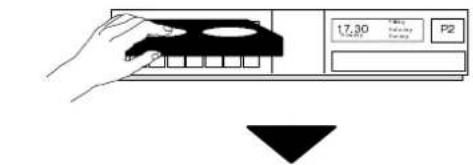
Insert recorded tape and select playback
SetTMdo programme position '0' VCR
Adjust tuning
text_image
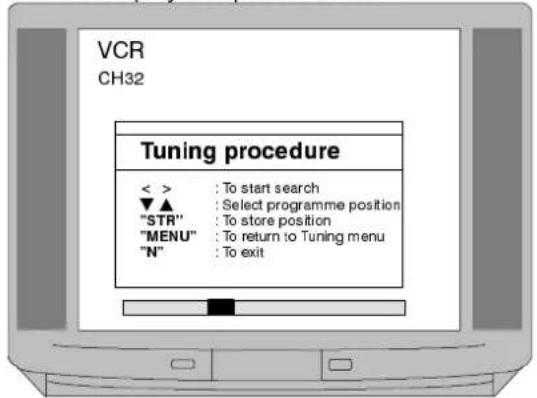
17.30 P2Access the Manual tuning menu as detailed on page 13.
▼ ▲ To select programme position '0'
◀ ▶ To start search for VCR playback Programme position and current channel are displayed top left of screen
text_image
VCR CH32 Tuning procedure < > : To start search ▼▲ : Select programme position "STR" : To store position "MENU" : To return to Tuning menu "N" : To exitSTR

To store position
N

To return to viewing screen

text_image
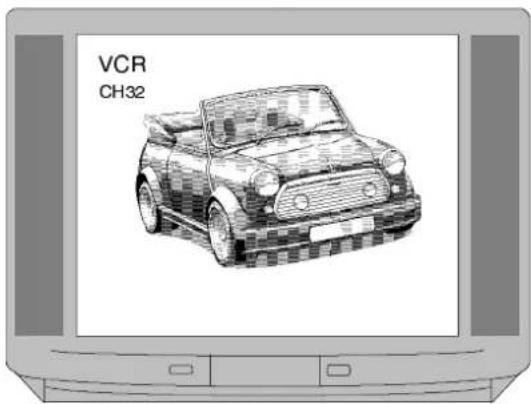
VCR CH32Operation completed
Seelbowfor VCRandl Satellite Receiver installation
text_image
VCR CH32If you are going to use a Satellite Receiver and a VCR it is important, to avoid tuning problems, that they are both tuned to output their signals on differing channels. For example, if your VCR is tuned to output channel 32, your Satellite Receiver could be set to output channel 34. Refer to your instruction books for precise tuning information.
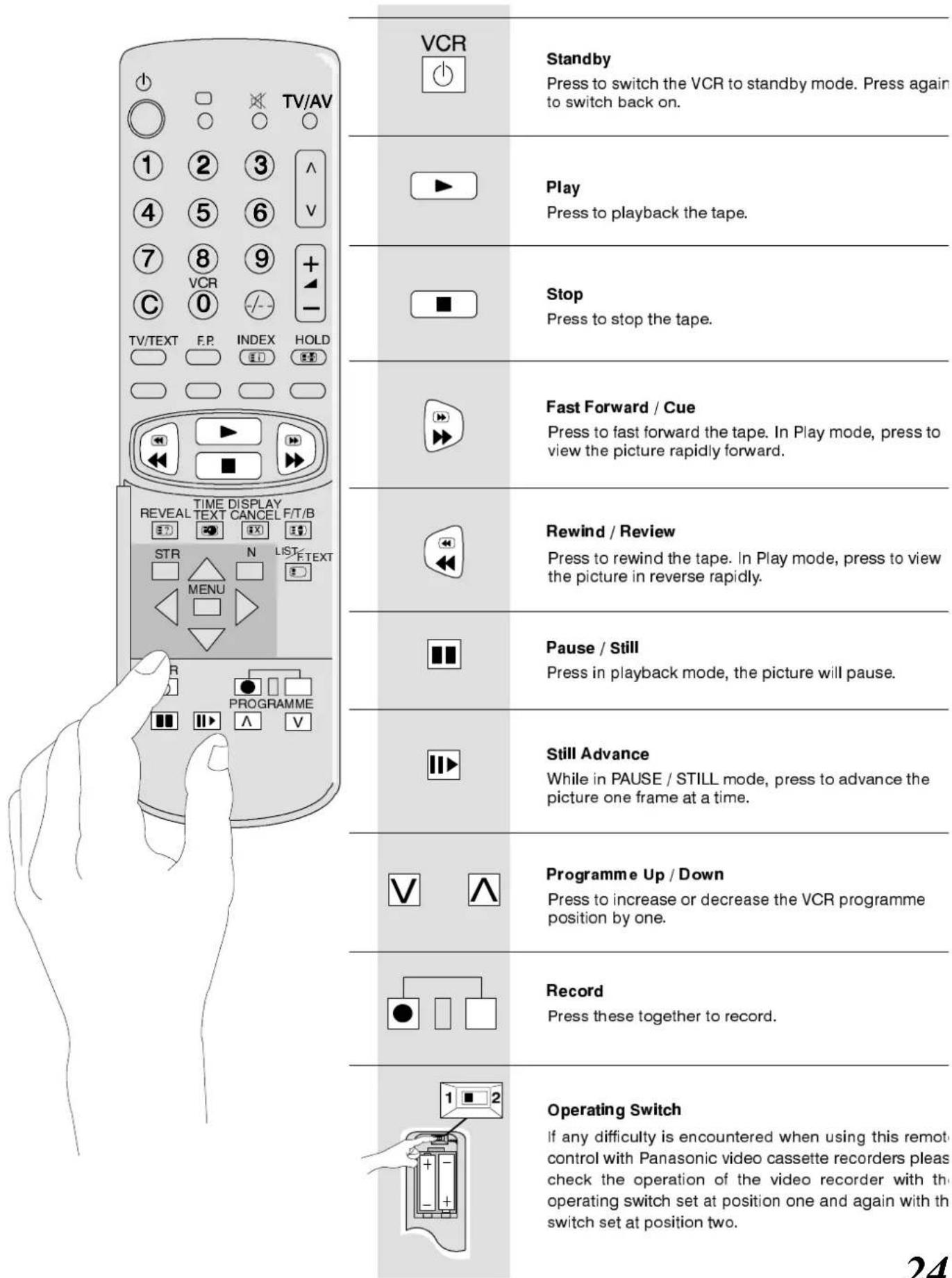
The Remote Control is capable of operating some functions of selected Panasonic VCRs, please consult your dealer for details. Some VCRs have different functions, so to ensure compatibility, please refer to the VCR's instruction book.
text_image
TV/AV VCR Standby Press to switch the VCR to standby mode. Press again to switch back on. Play Press to playback the tape. Stop Press to stop the tape. Fast Forward / Cue Press to fast forward the tape. In Play mode, press to view the picture rapidly forward. Rewind / Review Press to rewind the tape. In Play mode, press to view the picture in reverse rapidly. Pause / Still Press in playback mode, the picture will pause. Still Advance While in PAUSE / STILL mode, press to advance the picture one frame at a time. Programme Up / Down Press to increase or decrease the VCR programme position by one. Record Press these together to record. Operating Switch If any difficulty is encountered when using this remot control with Panasonic video cassette recorders pleas check the operation of the video recorder with th operating switch set at position one and again with th switch set at position two.FrontAV3RCAAudio/VideoandH eadphoneSockets
text_image
AV3 V L—R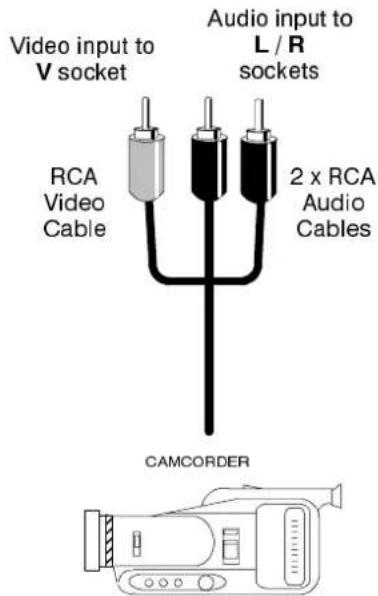
text_image
Video input to V socket Audio input to L / R sockets RCA Video Cable 2 x RCA Audio Cables CAMCORDER
text_image
Output from Headphone socket 3.5mm Stereo Jack Plug STEREO HEADPHONES with 3.5mm Jack PlugNote :
Ancillary equipment and cables shown are not supplied with this TV set.
SCARTTerminal information
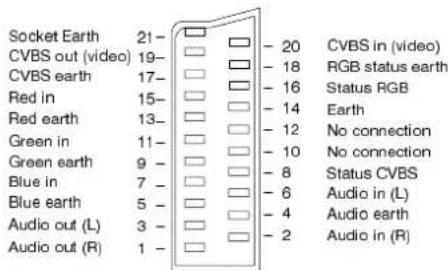
AV1 21 pin SCART terminal
text_image
Socket Earth 21- CVBS out (video) 19- CVBS earth 17- Red in 15- Red earth 13- Green in 11- Green earth 9- Blue in 7- Blue earth 5- Audio out (L) 3- Audio out (R) 1- - 20 CVBS in (video) - 18 RGB status earth - 16 Status RGB - 14 Earth - 12 No connection - 10 No connection - 8 Status CVBS - 6 Audio in (L) - 4 Audio earth - 2 Audio in (R)Suitable inputs for AV1 include RGB (Red/Green/Blue).
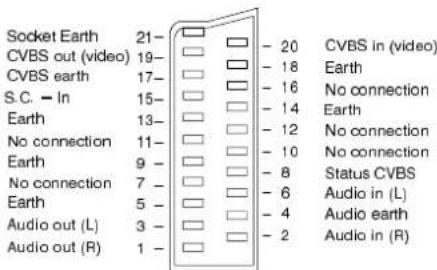
AV2 21 pin SCART terminal
text_image
Socket Earth 21- CVBS out (video) 19- CVBS earth 17- S.C. - In 15- Earth 13- No connection 11- Earth 9 - No connection 7 - Earth 5 - Audio out (L) 3 - Audio out (R) 1 - - 20 CVBS in (video) - 18 Earth - 16 No connection - 14 Earth - 12 No connection - 10 No connection - 8 Status CVBS - 6 Audio in (L) - 4 Audio earth - 2 Audio in (R)Pins 15 and 20 are dependent on AV2 S-VIDEO / VIDEO switching.
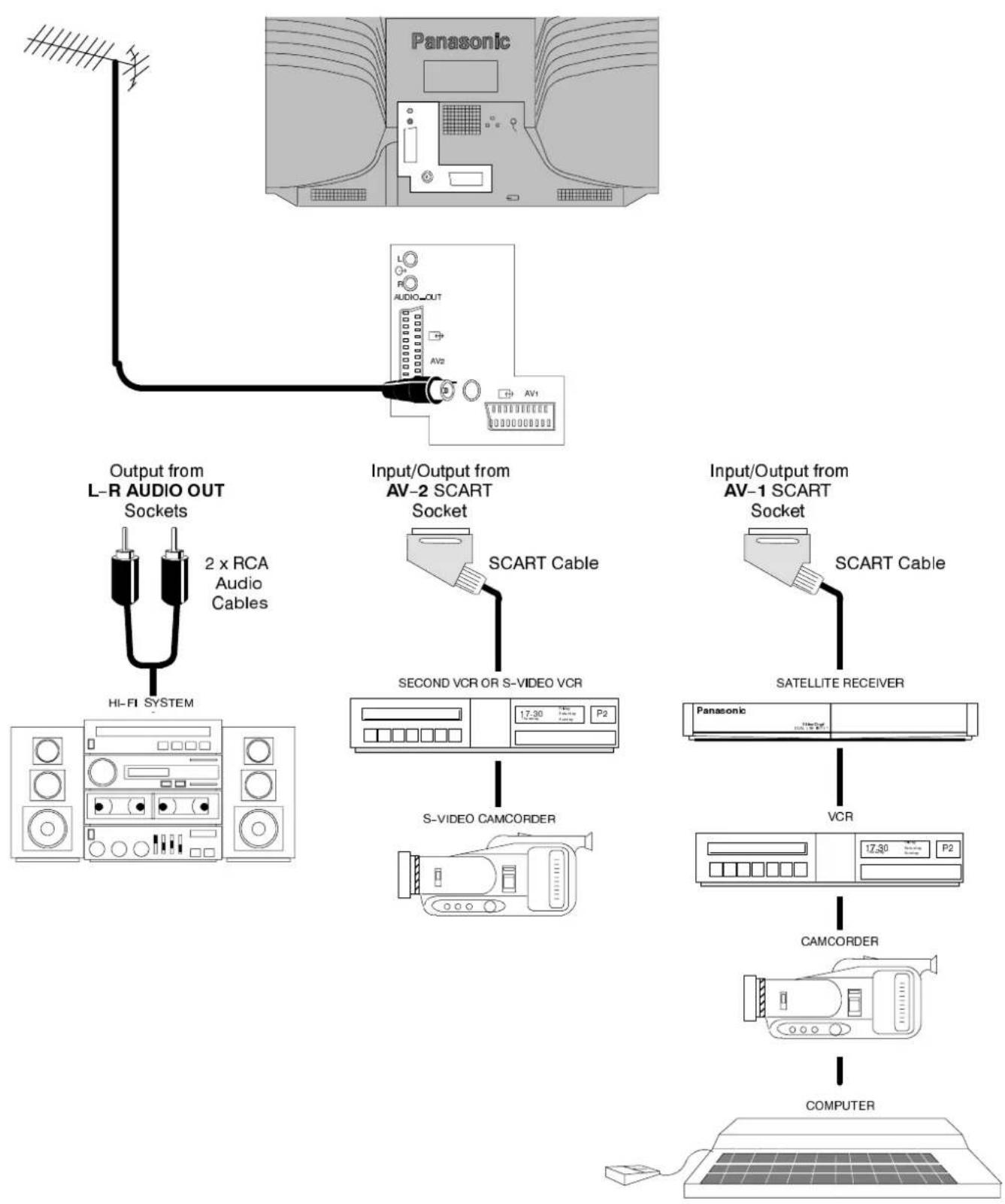
Rear AW11/AX2(S)9 PInBio ARCTaRT and RCA Audio Out terminals
flowchart
graph TD
    A["Panasonic Audio Out"] --> B["Output from L-R AUDIO OUT Sockets"]
    B --> C["2 x RCA Audio Cables"]
    C --> D["HI-FI SYSTEM"]
    D --> E["Socket"]
    E --> F["Input/Output from AV-2 SCART Socket"]
    F --> G["SCART Cable"]
    G --> H["SECOND VCR OR S-VIDEO VCR"]
    H --> I["S-VIDEO CAMCORDER"]
    I --> J["PC2"]
    J --> K["VCR"]
    K --> L["PC2"]
    L --> M["SATELLITE RECEIVER"]
    M --> N["Panasonic"]
    N --> O["VCR"]
    O --> P["Camcorder"]
    P --> Q["COMPUTER"]
Notes:
Ancillary equipment and cables shown are not supplied with this TV set.
Do not connect a computer with TTL output (5V) to this set.
Additional information can be found under AV Select on page 19.
| Symptoms | Checks | ||
| Picture | Sound | ||
 Snowy Picture Snowy Picture | 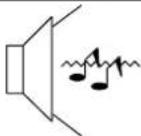 Noisy Sound Noisy Sound | Aerial location, direction or connection | |
 Multiple Images Multiple Images |  Normal Sound Normal Sound | Aerial location, direction or connection | |
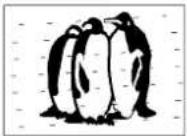 Interference Interference | 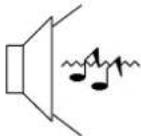 Noisy Sound Noisy Sound | Electrical appliances Cars / Motorcycles Fluorescent lights Switch on Noise-R in Setup menu to reduce picture noise Switch NICAM to Mono to improve sound. | |
 Normal Picture Normal Picture |  No Sound No Sound | Volume level Sound mute switched on | |
 No Picture No Picture | 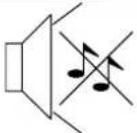 No Sound No Sound | TV set to AV mode Not plugged into A.C. outlet Not switched on Picture / Sound controls set at minimum levels Check if in standby mode | |
 No Colour No Colour |  Normal Sound Normal Sound | Colour controls set at minimum levels | |
 Poor or Distorted Picture Poor or Distorted Picture |  Weak or No Sound Weak or No Sound | Retune Channel(s) | |
 Coloured Patches Coloured Patches |  Normal Sound Normal Sound | Magnetic Interference from unshielded equipment Receiver moved while switched ON, switch TV off for 30 minutes. | |
■Service
Before requesting service, please refer to the trouble—shooting guide on previous page to determine the symptoms. To obtain service please contact your local Panasonic dealer quoting the model number and serial number (both are located at the rear of the TV).
■ TVG Games/Horror Computers
Extended use of TV games or home computers with any television set can cause a permanent 'shadow' on the screen. This type of irreversible picture tube damage, can be limited by observing the following points:
- Reduce the brightness and contrast levels to a minimum viewing level.
- Do not operate the television set for a continuous period of time while using TV games or home computers.
- This type of picture tube damage, is not an operating defect, and as such is not covered by the Panasonic warranty.
■ LastPositionMemory
Certain functions have a last position memory, i.e. the setting at the time of switch-off will be the setting used when the receiver is switched on again:
| Programme | Tint (M. NTSC / NTSC only) |
| AV Position | Contrast |
| Volume | Sharpness |
| NICAM On/Off | Aspect |
| Bass | Standby |
| Treble | Artificial Intelligence (AI) |
| Colour | Brightness |
| Status | Balance |
| Music/speech mode | Ambience |
| Volume correction (In AV mode only) | |
■SleepFeature
If the set is not switched off when the TV station stops transmitting, it will automatically go to standby mode after 30 minutes. This function will not operate when the TV is in AV mode.
SPECIFICATIONS
| TX-28LD1/M | ||
| Power Source | 220 - 240V 50Hz A.C. | |
| Power Consumption | 97W | |
| Picture TubeFST 110° | 66cm visible diagonal | |
| Audio Output | 15W x 2 (MPO) | |
| Dimensions | HWD | 582 mm752 mm472 mm |
| Weight (Kg) | 32 | |
| Receiving Systems / Band name | PAL I (UHF E21-69),PAL 525/60 Playback NTSC tape from PAL Video recorders (VCR)M.NTSC Playback from M.NTSC Video recorders (VCR)NTSC (AV input only) Playback from NTSC Videorecorders (VCR) | |
| Aerial - rear | UHF | |
| Headphones - Front | 3,5mm | |
| AV - Rear | AV1 - 21 pin terminal - Audio / Video in / out, RGB in.AV2 - 21 pin terminal - Audio / Video in / out, S-Video in.2 x RCA Audio Monitor Out. | |
| AV - Front | AV3 - 2 x RCA Audio in, 1 x RCA Video in. | |
- Specifications are subject to change without notice. Weight and dimensions shown are approximate.
Panasonic(U.K.)Ltd.
WilloughbyRoad, Bracknell,
BerkshireRG128FP