K3 - Externe Batterie PowerOak - Kostenlose Bedienungsanleitung
Finden Sie kostenlos die Bedienungsanleitung des Geräts K3 PowerOak als PDF.


Benutzerfragen zu K3 PowerOak
0 Frage zu diesem Gerät. Beantworten Sie die, die Sie kennen, oder stellen Sie Ihre eigene.
Eine neue Frage zu diesem Gerät stellen
Laden Sie die Anleitung für Ihr Externe Batterie kostenlos im PDF-Format! Finden Sie Ihr Handbuch K3 - PowerOak und nehmen Sie Ihr elektronisches Gerät wieder in die Hand. Auf dieser Seite sind alle Dokumente veröffentlicht, die für die Verwendung Ihres Geräts notwendig sind. K3 von der Marke PowerOak.
BEDIENUNGSANLEITUNG K3 PowerOak
PowerOak K3
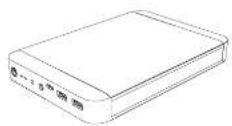
Laptop Power Bank
Ala-ada aetra commler 12 month summary
Email: Inogpower@11 http://www.enerockd/
We suggest to change our CD power bank's equity and margins.
Product Parameter
Budary, L. Folgner
Ceratry 2013m/s / 1316h
Export 42651756
L852 57121A
Type C PD2.0 G9121620V73A
Charging line
The C#S-100000000000000000000000000000000000000000
Skopera kupa -12°C 45°C
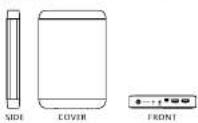
Final Size: 150 x 150 x 20 mm
Package Includes
K3 Palmer Bank
K3 charger X1
DC to MacBook 1 Connector X1 DC to MacBook E Connector X2
Type-C to Type-C Cable
Multifunctional map
Safety Guidelines
- Do not use ICI in damp environment
- Keep KS out of children's reach
- So not put, as then the 4.6 or high temperature (above)
• Do not Hungary
Internal circuit
- Use the original adaptor to charge K3.
• Only our company's technicians of authorized maintenance operations are utilized and designed
repair 8.2
- Please check the charging voltage of laptop cell phone
first, make sure the charging voltage is consistent with the

Product Introduction
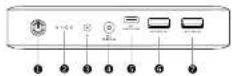
① On-off Function Button
Capacity indicating lights
③ Input port: 12.6V/2.5A
Output port: DC16.8V/1.5A
Output port: Type-CSV 9V 12V/3A
Output port: DCSV/2.1A
7 Output port: DC5V/2.1A

Attention Please!
Please do not charge your cell phone (or other 5V USB)
powered devices with output port. It may damage your device.
Function instruction
- 53 supports charging and discharging at the same
time
- Power on: press "On/OFF" button to switch on, Led
lights shows current capacity of the power bank.
- Power heating process (2x) is switch off
after 50 seconds, there is no showing or
duchergire
- LED discharging display
0\~25%: 1st led light (on the left) on
25%\~50%. 1st-2nd led light on
50%-75% 1st-3rd light on
75%-100% 1st-4th led light or
Low voltage indicating. When 1st led light (on the
30% times, please change the power bank in time
(1) 25% of the total
0-25% tested light drinks (on the left) drinks 35% [9%] tested light on and light drink
16% = 75%, 1st-2nd light an, 3rd led light blink
75%-100% 3m-3cd led light on 42h led light h
Fully charged: 1st-4th ice light on
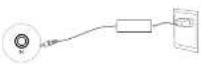
How to Charge K3 Power Bank
Connect the DC port of the charger to the input port of KG power bank, and the other and to the wall outlet
How to use K3 charge digital device
This product has a smart identification function, can
change apple laptops,smart phones and other digital
devices, especially devices with
- Charge Apple laptop, call phone
- Two USB output ports: SV72.1A, can charge Apple
and other brand cell phone and tablet,
- type-C output ports; car change cell phone and
(b) Unit 411= type C connector.
- Power bank starts charging automatically when
turns off automatically after 60s when disconnected
the changing desire

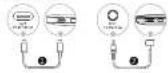
- How to charge MacBook
- Please check the input voltage of your Macbook
carefully to choose the appropriate
before charging your Outlook
• Typ-Clumpal porc: 5V-9V-12V/1A, CnC-rs# 12mm Juman & Marlack series
-
-
-
-
-
-
-
-
-
-
-
-
-
-
-
-
-
-
-
-
-
-
-
-
-
-
-
-
-
-
-
-
-
-
-
-
-
-
-
-
-
-
-
-
-
-
-
-
-
-
-
-
-
-
-
-
-
-
-
-
-
-
-
-
-
-
-
-
-
-
-
-
-
-
-
-
-
-
-
-
-
-
-
-
-
-
-
-
-
-
-
-
-
-
-
-
-
- 99.
-
-
-
-
-
-
-
-
-
-
-
-
-
-
-
-
-
-
-
-
-
-
-
-
-
-
-
-
-
-
-
-
-
-
-
-
-
-
-
-
-
-
-
-
-
-
-
-
-
-
-
-
-
-
-
-
-
-
-
-
-
-
-
-
-
-
-
-
-
-
-
-
-
-
-
-
-
-
-
-
-
-
-
-
-
-
-
-
-
-
-
-
-
-
-
-
- Output power, 20% of the current charge up to 10 pcp.
- MacRock milk T head at 5 hard, or pin?
- Power bank stocks changing automation
- Power-same seal exchanging automatically which connected with the chaining device. River bank
turns pH automatically after 50s when disconcerted
the charging device
Warranty Card
Manufacture Date
Sales Flats
[Unreadable]
(1) 2017年
Manufacturer
Warranty Instructions
12 Months Warranty
Please contact us for free service at infogpowereak.nl
- Following situations will no against the warranty
tarma
A. Any problems, malfunction or damages due to
incorrect using methods or caused by unauthorized
disassembly or repair.
B. The damage caused by force majeure, fire and other
extreme abnormal conditions
C. Without the warranty card or the card records is not
Clear, Complete. Of Without the Sales Company seal
Kanaalcijk Moord L11 | 5642 IA | Erchoven | Nederland
M+31(0) 050863214 | E:info@poceraok.nl | W www.poceraok.nl
Veg line up:
g
电话:05377087