
EF 28MM F/2.8 IS USM - Objektiv CANON - Kostenlose Bedienungsanleitung
Finden Sie kostenlos die Bedienungsanleitung des Geräts EF 28MM F/2.8 IS USM CANON als PDF.


Benutzerfragen zu EF 28MM F/2.8 IS USM CANON
0 Frage zu diesem Gerät. Beantworten Sie die, die Sie kennen, oder stellen Sie Ihre eigene.
Eine neue Frage zu diesem Gerät stellen
Laden Sie die Anleitung für Ihr Objektiv kostenlos im PDF-Format! Finden Sie Ihr Handbuch EF 28MM F/2.8 IS USM - CANON und nehmen Sie Ihr elektronisches Gerät wieder in die Hand. Auf dieser Seite sind alle Dokumente veröffentlicht, die für die Verwendung Ihres Geräts notwendig sind. EF 28MM F/2.8 IS USM von der Marke CANON.
BEDIENUNGSANLEITUNG EF 28MM F/2.8 IS USM CANON
Canon
EF Lenses
EF24mm f/2.8 IS USM
EF28mm f/2.8 IS USM
Instructions
Thank you for purchasing a Canon product.
EF24mm f/2.8 IS USM and EF28mm f/2.8 IS USM are compact, wide-angle
single focus lenses that provide high image quality.
- "IS" stands for Image Stabilizer. - "USM" stands for Ultrasonic Motor.
Safety Precautions
- Do not look at the sun or a bright light source through the lens or camera. Doing so could result in loss of vision.
Looking at the sun directly through the lens is especially hazardous.
- Whether it is attached to the camera or not, do not leave the lens under the sun without the lens cap attached. This is to prevent the lens from concentrating the sun's rays, which could cause a fire.
Handling Cautions
- If the lens is taken from a cold environment into a warm one, condensation may develop on the lens surface and internal parts. To prevent condensation in this case, first put the lens into an airtight plastic bag before taking it from a cold to warm environment. Then take out the lens after it has warmed gradually. Do the same when taking the lens from a warm environment into a cold one.
- Do not leave the lens in excessive heat such as in a car in direct sunlight. High temperatures can cause the lens to malfunction.
Conventions used in this instruction
Warning to prevent lens or camera malfunction or damage.
Supplementary notes on using the lens and taking pictures.
1. Mounting and Detaching the Lens
See your camera's instructions for details on mounting and detaching the lens.

● After detaching the lens, place the lens with the rear end up to prevent the lens surface and contacts from getting scratched.
- If the contacts get soiled, scratched, or have fingerprints on them, corrosion or faulty connections can result. The camera and lens may not operate properly.
- If the contacts get soiled or have fingerprints on them, clean them with a soft cloth.
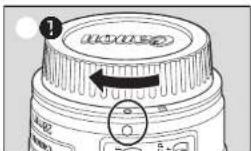
- If you remove the lens, cover it with the dust cap. To attach it properly, align the lens mount index and the ○ index of the dust cap, and turn clockwise ①To remove it, reverse the order.
Nomenclature
① Distance scale
② Distance index
⑧ Focusing ring
④ Focus mode switch
- Image Stabilizer switch
⑥ Lens mount index
⑦ Contacts
6 Contacts
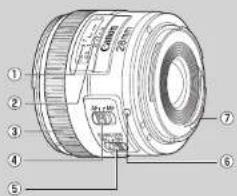
text_image
Labeled diagram of a camera lens with numbered parts for identification2. Setting the Focus Mode
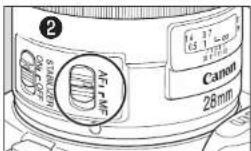
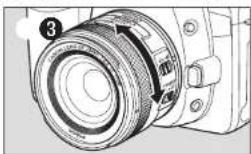
To shoot in autofocus (AF) mode, set the focus mode switch to AF ^② . To shoot in manual focus (MF) mode, set the focus mode switch to MF, and focus by turning the focusing ring. The focusing ring always works, regardless of the focus mode ^③ .

After autofocusing in ONE SHOT AF mode, focus manually by pressing the shutter button halfway and turning the focusing ring. (Full-time manual focus)
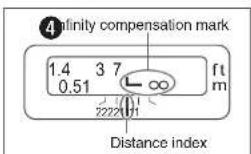
3. Infinity Compensation Mark
To compensate for shifting of the infinity focus point that results from changes in temperature.
The infinity position at normal temperature is the point at which the vertical line of the distance scale L mark is aligned with the distance index ⑧.

For accurate manual focusing of subjects at infinity, look through the viewfinder or look at the magnified image* on the LCD screen while rotating the focusing ring.
* For cameras with Live View shooting capability.
4. Image Stabilizer
You can use the Image Stabilizer in AF or MF mode.
This function provides optimal image stabilization depending on shooting conditions (such as shooting still subjects and following shots).
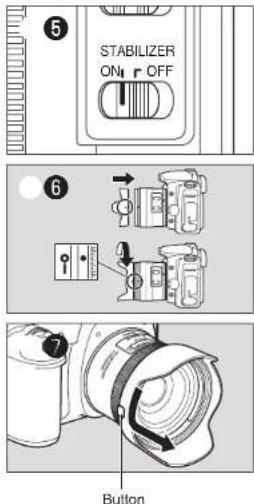
- Set the STABILIZER switch to ON
- If you are not going to use the image stabilizer function, set the switch to OFF.
- When you press the shutter button halfway, the Image Stabilizer will start
operating.
● Make sure the image in the viewfinder is stable, then press the shutter button the rest of the way down to take the picture.

● The Image Stabilizer cannot compensate for a blurred shot caused by a subject that moved.
The Image Stabilizer may not be fully effective if you shoot from a
- Violently shaking vehicle or other transportation
The Image Stabilizer consumes more power than normal shooting, so fewer shots can be taken if you use the function.

- When shooting a still subject, it compensates for camera shake in all directions.
- It compensates for vertical camera shake during following shots in a horizontal direction, and compensates for horizontal camera shake during following shots in a vertical direction.
- When you use a tripod, the Image Stabilizer should be turned off to save battery power.
The stabilizer is equally effective for handheld photography and photography with a monopod. The Image Stabilizer effect may be reduced, however, depending on the shooting environment.
● The Image Stabilizer also operates when the lens is used with extension tube EF12 II or EF25 II.
- If you set the camera's Custom Function to change the assigned button to operate the AF, the Image Stabilizer will operate when you press the newly assigned AF button.
5. Hood (Sold Separately)
The EW-65B hood can keep unwanted light out of the lens, and also protects the lens from rain, snow, and dust.
To attach the hood, align the hood's attachment position mark with the red dot on the front of the lens, then turn the hood in the direction of the arrow until the lens's red dot is aligned with the hood's stop position mark ⑥.
To remove the hood, hold down the button on the side and turn the hood in the direction of the arrow until the position mark on the hood aligns with the red dot ⑦. The hood can be reverse-mounted on the lens for storage.

● Part of the picture may be blocked if the hood is not attached properly.
- When attaching or detaching the hood, grasp the base of the hood to turn it. To prevent deformation, do not grasp the rim of the hood to turn it.
6. Filters (Sold Separately)
You can attach filters to the filter mounting thread on the front of the lens.

- Only one filter may be attached.
Use a polarizing Canon filter (58mm)
● To adjust the polarizing filter, first remove the lens hood.
7. Extension Tubes (Sold Separately)
You can attach extension tube EF12 II or EF25 II for magnified shots. For shooting distance and magnification, see the extension tube specifications.

MF mode is recommended for accurate focusing.
8. Close-up Lenses (Sold Separately)
Attaching a close-up lens 250D/500D (58mm) enables close-up photography. For magnification, see the close-up lens specifications.

MF mode is recommended for accurate focusing.
● The extenders cannot be used with this lens.
● CASE (Sold Separately) LP1014
This device complies with Part 15 of the FCC Rules. Operation is subject to the following two conditions: (1) This device may not cause harmful interference, and (2) this device must accept any interference received, including interference that may cause undesired operation. Do not make any changes or modifications to the equipment unless otherwise specified in the instructions. If such changes or modifications should be made, you could be required to stop operation of the equipment. This equipment has been tested and found to comply with the limits for a class B digital device, pursuant to part 15 of the FCC Rules. These limits are designed to provide reasonable protection against harmful interference in a residential installation. This equipment generates, uses and can radiate radio frequency energy and, if not installed and used in accordance with the instructions, may cause harmful interference to radio communications. However, there is no guarantee that interference will not occur in a particular installation. If this equipment does cause harmful interference to radio or television reception, which can be determined by turning the equipment off and on, the user is encouraged to try to correct the interference by one or more of the following measures: • Reorient or relocate the receiving antenna. • Increase the separation between the equipment and receiver. • Consult the dealer or an experienced radio/TV technician for help.
| Extension Tube Specifications(Sold Separately) | Magnification(X) | Focusing Distance Range(mm) (inch) | |
| EF24mm 1/2.8 IS USM | EF12 II | 0.71-0.50 | 139-146 (5.5-5.7) |
| EF25 II | 1.30-1.11 | 138-134 (5.4-5.3) | |
| EF28mm 1/2.8 IS USM | EF12 II | 0.62-0.43 | 147-160 (5.8-6.3) |
| EF25 II | 1.13-0.95 | 141-139 (5.6-5.5) | |
| Close-up Lens Specifications(Sold Separately) | Magnification(x) | |
| EF24mm f/2.8 IS USM | 250D | 0.10-0.31 |
| 500D | 0.05-0.27 | |
| EF28mm f/2.8 IS USM | 250D | 0.12-0.31 |
| 500D | 0.06-0.26 | |
Specifications
Sold Separately
| Angle of view | Lens construction | Minimum aperture | Max. magnification | Min. focusing distance | Filter diameter | Max. diameter and length Weight Hood* Lens | Cap Case* | ||||||
| Diagonal Vertical Horizontal | |||||||||||||
| EF24mm f/2.8 IS USM | 84° | 53° | 74° | 9-11 | 22 | 0.23x | 0.20m/0.68ft | 58mm | 68.4x55.7mm (2.7"x2.2") | 280g/9.9oz. | EW-65B | E-58U/E-58 II | LP1014 |
| EF28mm f/2.8 IS USM | 75° | 46° | 65° | 7-9 | 22 | 0.20x | 0.23m/0.74ft | 58mm | 68.4x51.5mm (2.7"x2.0") | 280g/9.2oz. | EW-65B | E-58U/E-58 II | LP1014 |
CT1-8580-002 1208SZ © CANON INC. 2012