256713D - Computerkabel Hobbes - Kostenlose Bedienungsanleitung
Finden Sie kostenlos die Bedienungsanleitung des Geräts 256713D Hobbes als PDF.


Benutzerfragen zu 256713D Hobbes
0 Frage zu diesem Gerät. Beantworten Sie die, die Sie kennen, oder stellen Sie Ihre eigene.
Eine neue Frage zu diesem Gerät stellen
Laden Sie die Anleitung für Ihr Computerkabel kostenlos im PDF-Format! Finden Sie Ihr Handbuch 256713D - Hobbes und nehmen Sie Ihr elektronisches Gerät wieder in die Hand. Auf dieser Seite sind alle Dokumente veröffentlicht, die für die Verwendung Ihres Geräts notwendig sind. 256713D von der Marke Hobbes.
BEDIENUNGSANLEITUNG 256713D Hobbes
SmarTone and SmartProbe
user manual
Model No. 256713D
text_image
Wire Map Analog Rev. Trace Identify Wire Map Signal Springs 1 2 3 4 5 6 7 8 9 10 11 12 13 14 15 16 17 18 19 20 21 22 23 24 25 26 27 28 29 30 31 32 33 34 35 36 37 38 39 40 41 42 43 44 45 46 47 48 49 50 51 52 53 54 55 56 57 58 59 60 61 62 63 64 65 66 67 68 69 70 71 72 73 74 75 76 77 78 79 80 81 82 83 84 85 86 87 88 89 90 91 92 93 94 95 96 97 98 99 100 Wim Map AnalogRev. Hobbes® SmartProbe™ SmarTone™ Good Tel Service + Ring Power ok Open No Service Low Bat Single Tone Dual Tone Single Zone Dual Tone TELE Cape TEST HobbesFeatures 03
SmarTone introduction 05
SmarTone operation 05
SmartProbe introduction 08
SmartProbe operation 08
Upgrade descriptions 13
Accessories 14
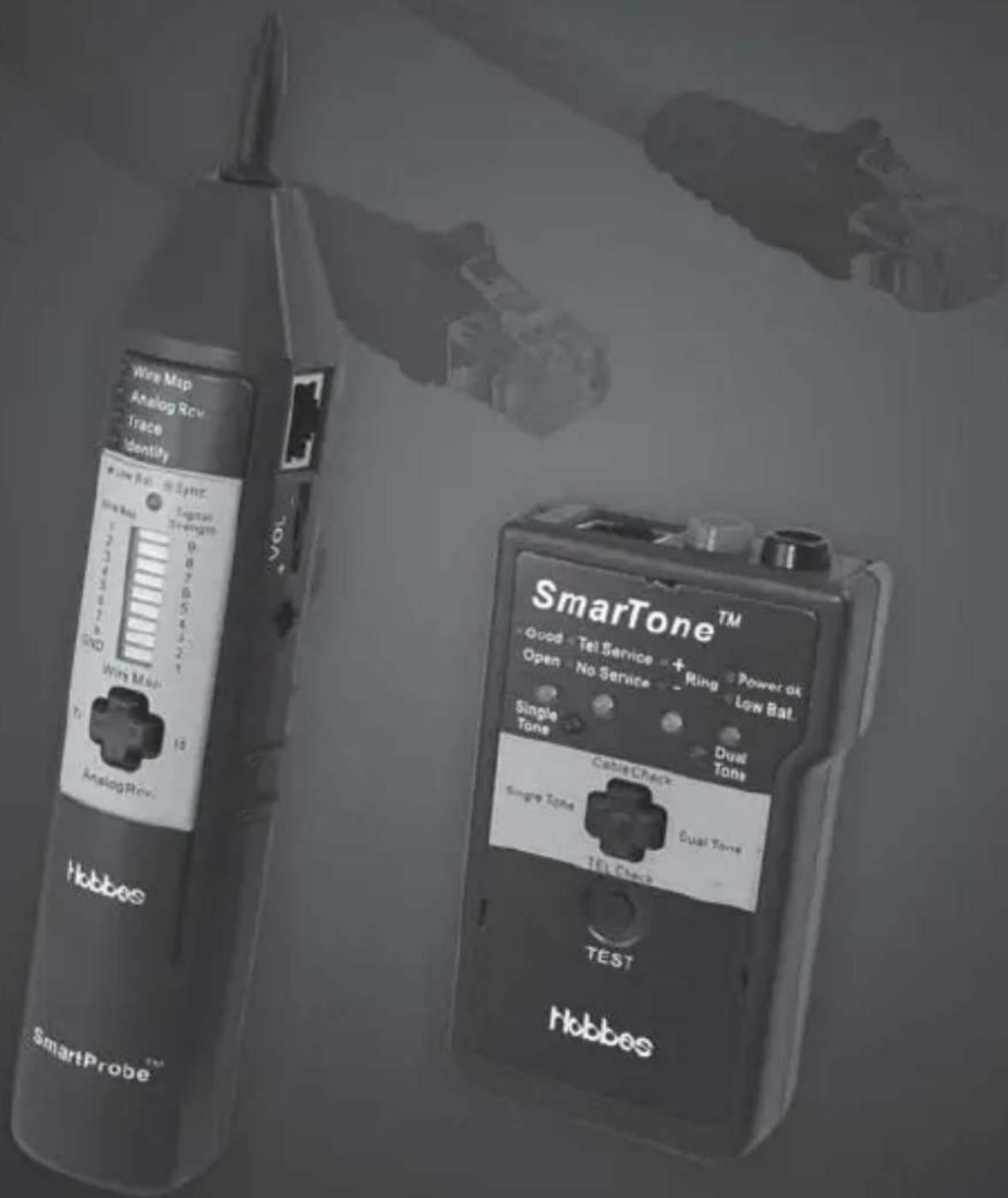
The kit consists of two units: Digital Probe and Tone Generator. They use digital signal technology to locate and isolate cables in high speed and with high precision, avoiding noises and false signals. It is compatible with 1kHz analog tone. It can also test cable continuity, telephone service and polarity, as well as perform cable map functions.
Features
- Uses digital signal technology, avoiding noise and false signal
- Locates and isolates cables in high speed and with high precision
- Locate cables at a distance
- Isolate cables in bundles or at patch panels
- Send digital tone in two modes: one–note digital tone & two–note digital tone
• Receiving tone sensitivity level: 9 levels
- LED bar and speaker can be used as indicators
• Encoded digital tone includes 1kHz analog tone
- Can use probe to trace 1kHz analog tone
- Cable map test, pin-to-pin, open/short/reversed/cross/mis-wire
- Cable continuity test
- Telephone service and polarity test: +polarity; -polarity; ringing
- Low battery indicator
SmarTone introduction
The Tone Generator is a replaceable battery powered unit with an RJ-45 jack. The unit has a single rocking four-position push button which is used to select the appropriate function.
The left and the right are digital tone transmission, they are Single Tone and Dual Tone; the two tones are compatible with 1kHz analog tone. They also send a wire map testing pulse simultaneously. The up position is cable continuity test. The down position is telephone service and polarity indication.
SmarTone operation
Control of the unit by four-position push button as follows:
1. Generating Single Tone
Press the button in left position and release; the red LED to the left of the button will be lit up. The unit is generating Single Tone now.
The encoded digital tone includes 1kHz analog tone, and sends wire map testing pulse simultaneously.
2. Generating Dual Tone
Press the button in right position and release; the red LED to the right of the button will be lit up. The unit is generating Dual Tone now. It is also compatible with 1kHz analog tone; and sends wire map testing pulse simultaneously.
3. Testing cable continuity
The tone generator can test one-pin cable for open or continuity errors.
A. Connect the tone generator to the cable by using the accessories: RJ-45 head to alligator clips.
B. Press and release the button in top position, it is now testing for cable continuity.
C. The No.1 LED indicates “open” by lighting up red, and “continuity” by lighting up green. (If the resistance is more than 10K ohm, it indicates “open”, otherwise it indicates “continuity”)
- Testing telephone service and polarity. The tone generator can detect telephone service and circuit polarity on RJ-45 jack or on a bare line.
A. Connect the tone generator to the circuit by RJ-45 jack. You may also use the accessories to connect the tone generator to bare line. (Accessories: RJ-45 head to alligator clips.)
B. Press the button in bottom position and release; the No.2 dual colored Red/Green LED will be lit up green. The unit is now testing telephone service and polarity. It indicates “Ringing” by flashing red, “pause”, and green repeatedly. If there is no good telephone wire to be tested, the No.2 dual colored Red/Green LED will be lit up red. --The No.3 LED indicates “+ polarity” by lighting up red; “- polarity” by lighting up green; “ringing” by flashing red, “pause”, and green repeatedly.
-
The No.4 LED is for battery indicator. Flashing green indicates battery low.
-
If the unit is not activated for approx. 30 minutes, it will turn itself off to conserve the battery.
SmartProbe introduction
The Digital Probe consists of a battery powered receiver unit with an RJ-45 jack which indicates detection of the digital tone and 1kHz analog tone via an LED Bar and buzzer sounder. For receiving the digital tone, it can also locate cables from a distance and isolate cables in bundles or at patch panels.
SmartProbe operation
Control of the unit by a four-position push button as follows:
- Wire map function It can find most cable faults by pin-to-pin, such as open, short, reversed, cross, miss-wire, etc.
A. Connect the Tone Generator to one end of the cable; and make it work in the “generating Single Tone” mode or “generating Dual Tone” mode. In these two modes, the Tone Generator can send wire map testing pulse simultaneously.
B. Connect the Digital Probe to the other end of the cable to be tested; press the Digital Probe's button in the top position and release; the No.1 LED will light up. The unit is working in "wire map function" mode.
C. The Digital Probe's SYNC LED, LED Bar, and speaker indicate the wire map as follows:
a. Each LED on LED Bar corresponds to a pin on RJ-45 jack. They are numbered 1, 2, 3, 4, 5, 6, 7, 8 and Gnd.
b. Good: The SYNC LED lights up green. Each LED will be lit up for about 1 second. Then the next in sequence. The speaker beeps "Bi-".
c. Short: The SYNC LED lights up red, if two or more LED's turn on for 1 second at the same time, it indicates the corresponding pins are shorted together.
d. Open: The SYNC LED lights up red. If one LED flashes and the next LED do not turn on, it indicates the next pin is open.
e. Reversed/Cross/Miss-wire: The SYNC LED lights up red, the LED does not turn on one by one, but in a random sequence.
-
Receiving 1kHz analog tone Press the Digital Probe's button in bottom position and release; the No.2 LED will light up. The unit is receiving 1kHz analog tone. You can use the probe to trace a 1kHz analog tone form a 1kHz toner.
-
Locating cables
A. Connect the Tone Generator to one end of the cable; and make it work in the “generating Single Tone” mode or “generating Dual Tone” mode.
B. Press the Digital Probe's button in left position and release; the No.3 LED will light up. The unit is now locating cables from a distance.
C. Use the probe to trace the tone and locate cable quickly from a distance. The SYNC LED flashes green when the probe is receiving the digital tone signal.
D. The probe's LED Bar will light up from 1 to 9 as the received signal strength increases; and wrap back from 9 to 1 as received signal strength decreases.
- Isolating cables
A. Connect the Tone Generator to one end of the cable; and make it work in the “generating Single Tone” mode or “generating Dual Tone” mode.
B. Press the Digital Probe's button in right position and release; the No.4 LED will light up. The unit is now working in "Isolating cables" mode.
C. Use the probe to trace the tone and isolate the tone source in the cable bundles or at the patch panels. The SYNC LED flashes green when the probe is receiving the digital tone signal.
D. The probe's LED Bar light up from 1 to 9 as the received signal strength increases; and wraps back from 9 to 1 as received signal strength decreases.
- The SYNC LED is also a battery indicator. It flashes red when battery is low.
Upgrade Descriptions
We have made some improvements to the Digital tone generator by adding the Analog tone function on the original version.
To operate the new function
On the Tone Generator operations: Power on the device as usual.
- To operate on the Digital tone mode, press the Single Tone or Dual Tone Key once and the Single Tone or Dual Tone LED will be lighted up.
- To switch to the Analog tone mode, press the Single Tone or Dual Tone Key and the Single Tone or Dual Tone LED will be turned to blink.
- To switch between Single Tone or Dual Tone will keep the status of Analog or Digital mode. On the probe operation: No change, works as previously.
Accessories:
RJ-45 head (PIN4, PIN5) to alligator clips x 2
Battery:
SmarTone: 9V alkaline
SmartProbe: 9V alkaline
Dimensions:
SmarTone: 104mm x 63mm x 25mm
SmartProbe: 205mm x 35mm x 33.5mm
Weight:
SmarTone: 108.4g
SmartProbe: 100.2g