MR-2000U - Zahlungsterminal Posiflex - Kostenlose Bedienungsanleitung
Finden Sie kostenlos die Bedienungsanleitung des Geräts MR-2000U Posiflex als PDF.


Benutzerfragen zu MR-2000U Posiflex
0 Frage zu diesem Gerät. Beantworten Sie die, die Sie kennen, oder stellen Sie Ihre eigene.
Eine neue Frage zu diesem Gerät stellen
Laden Sie die Anleitung für Ihr Zahlungsterminal kostenlos im PDF-Format! Finden Sie Ihr Handbuch MR-2000U - Posiflex und nehmen Sie Ihr elektronisches Gerät wieder in die Hand. Auf dieser Seite sind alle Dokumente veröffentlicht, die für die Verwendung Ihres Geräts notwendig sind. MR-2000U von der Marke Posiflex.
BEDIENUNGSANLEITUNG MR-2000U Posiflex
MR-2000 Series
MAGNETIC STRIPE READER
USER'S MANUAL
Rev.: C
I. FEATURES
● Double or triple tracks as indicated in MODEL IDENTIFICATION
● Built-in keyboard wedge interface or RS-232 interface or USB interface as indicated in MODEL IDENTIFICATION
Built-in decoder
• Dual directional operation
● Interface cable included
● Heavy duty die cast case
● 3 tracks type MSR can read also AAMVA and CA DMV card
FCC NOTICE
This equipment generates, uses, and can radiate radio frequency energy and, if not installed and used in accordance with the instructions manual, may cause interference to radio communications. It has been tested and found to comply with limits for a Class A digital device pursuant to subpart J of Part 15 of FCC Rules, which are designed to provide reasonable protection against interference when operated in a commercial environment. Operation of this equipment in a residential area is likely to cause interference in which case the user at his own expense will be required to take whatever measures to correct the interference.
WARRANTY LIMITS
Warranty will terminate automatically when the equipment is opened by any person other than the authorized technicians. The user should consult his/her dealer for the problem happened. Warranty voids if the user does not follow the instructions in application of this merchandise. The manufacturer is by no means responsible for any damage or hazard caused by improper application.
The hardware utility program, including instructions for its use, is provided "AS IS" without warranty of any kind. Posiflex Technologies, Inc. further disclaims all implied warranties including without limitation any implied warranties of merchantability or of fitness for a particular purpose. The entire risk arising out of the use or performance of the software and documentation remains with you.
ABOUT THIS MANUAL
This manual is written in an attempt with full strength to assist the user to utilize the stand-alone magnetic stripe reader MR2000 series of Posiflex POS products. This series of products provide excellent flexibility and reliability in application. This manual covers both operational and technical aspects of these units.
The manufacturer of the MR2000 series heartily apologizes to the user for reserving the right to change or to modify this manual without notice due to the rapid and constant progress and improvement on science and technology. The user may always obtain the most up to date information through any of our web sites: http://www.posiflex.com or http://www.posiflex.com.tw or http://www.posiflexusa.com.
Copyright Posiflex Technologies, Inc. 2009
All rights are strictly reserved. No part of this documentation may be reproduced, stored in a retrieval system, or transmitted in any form or by any means, electronic, mechanical, photocopying, or otherwise, without the prior written consent of Posiflex Technologies, Inc. the publisher of this documentation
TRADE MARKS AND SERVICE MARKS
P/N: 19030900030
CE POSIFLEX is a registered trademark of Posiflex Technologies, Inc. an ISO-9001 and ISO-14001 certified manufacturer. Other brand and product names are trademarks and registered trademarks and service marks of their respective owners.
II. MODEL IDENTIFICATIONS
| InterfaceApplicable tracks | PS/2 KB wedge | RS232 USB | |
| ISO track 1 & 2 | MR2000-2 | MR2000R-2 | MR2000U-2 |
| ISO track 2 & 3 | MR2000-2/3 | MR2000R-2/3 | MR2000U-2/3 |
| ISO track 1 & 2 | MR2000-3 | MR2000R-3 | MR2000U-3 |
| JIS track 1 & II | MR2000-JIS | (N. A.) | (N. A.) |
III. SPECIFICATIONS
- Reader specification
| Applicable card type | ISO 7811 | JIS X 6302 |
| Card feed method | Manual | |
| Card feed direction | Bi-direction | |
| Read / write function | Read only | |
| Card feed speed | 5 to 55 inches/sec. | 100 ~ 1200 mm/sec. |
| Error rate | Less than 0.5% | Less than 0.1% |
- Card data format
| Data standard | IATA | ABA | THRIFT | JIS I J|S II | |
| Track used | Track 1 | Track 2 | Track 3 | (Track 2) | Rear side |
| Applicable to models | MR2000-2, 2/3, 3MR2000R-2, 2/3, 3MR2000U-2, 2/3, 3 | MR2000-JISMR2000U-JIS | |||
| Recording method | F^2F (FM) | ||||
| Recording density | 210 BPI | 75 BPI | 210 BPI | 75 BPI | 210 BPI |
| Recording capacity characters / bits | 79 / 7 | 40 / 5 | 107 / 5 | 40 / 5 | 72 / 7 |
Note 1: AAMVA and CA DMV standards are supported in 3 track ISO models
Note 2: For 2 track ISO readers like MR2000-2 or MR2000U-2/3 info about the missing track in above table is not applicable
● Dimensions: 14.5 cm (L) X 4.6 cm (W) X 3.4 cm (H)
● Weight: 490 gm
● LED: dual color -- green for good read or ready to read red for invalid read
● Rated voltage: 5 VDC
● Rated current: 100 mA max.
IV. CABLE CONNECTION GUIDE
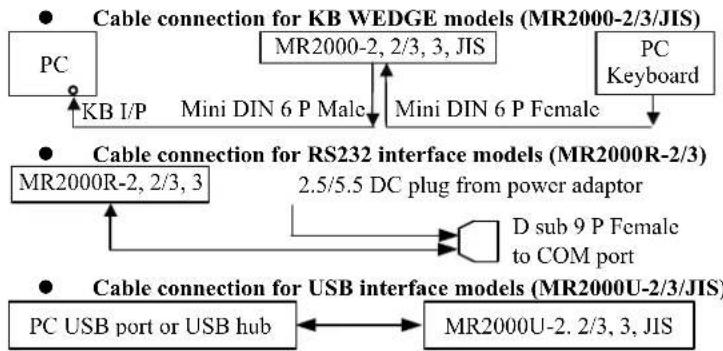
flowchart
graph TD
    A["PC"] -->|KB I/P| B["Mini DIN 6 P Male"]
    B --> C["Mini DIN 6 P Female"]
    D["MR2000-2, 2/3, 3, JIS"] --> E["PC Keyboard"]
    F["MR2000R-2, 2/3, 3"] --> G["D sub 9 P Female to COM port"]
    H["PC USB port or USB hub"] <--> I["MR2000U-2. 2/3, 3, JIS"]
    J["Cable connection for KB WEDGE models (MR2000-2/3/JIS)"]
    K["Cable connection for RS232 interface models (MR2000R-2/3)"]
    L["Cable connection for USB interface models (MR2000U-2/3/JIS)"]
V. ADJUSTABLE PARAMETERS
Some parameters in readout format of the MR-2000 series in PS/2 KB interface and USB interface can be controlled by software downloaded from our web site: http://www.posiflex.com. However, saved parameters must be retrieved after power off and on under proper arrangement for the PS/2 KB interface model while for USB models parameters are automatically saved even after power off and on. It is also possible to adjust some parameters with modification in hardware described below if not by software. Please note that the individual track enable mentioned applies only when the track is supported in physical reader head.
For MR2000-2, 2/3, 3 and MR2000R-2, 2/3, 3:
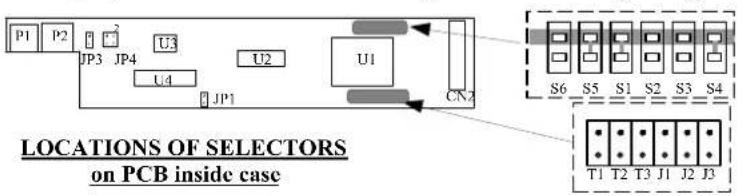
Changing the status of each jumper in the lower dotted area at right that is the enlarged image of
the shaded area on the control PCB determines parameters illustrated in the table below. For MR2000R-2, 2/3, 3, the communication protocol is default at 9600 bps, none parity, 8 data bits, 1 stop bit.
text_image
P1 P2 JP3 JP4 U3 U2 U1 CN2 LOCATIONS OF SELECTORS on PCB inside case S6 S5 S1 S2 S3 S4 T1 T2 T3 J1 J2 J3Table 1
| STATUS\FUNCTION & JUMPER | LEADING / STOP CODEJ1 | ALT + NUMJ2 | TRACK 1T1 | TRACK 2T2 | TRACK 3T3 |
| SHORT DISABLED DISABLED | ENABLED | ENABLED | ENABLED | ||
| OPEN ENABLED ENABLED | DISABLED | DISABLED | DISABLED | ||
| DEFAULT | OPEN | DEPENDS | SHORT SHORT SHORT | ||
For MR2000U-2, 2/3, 3
Changing the jumper status on the control PCB inside die cast case determines parameters illustrated in the table below.
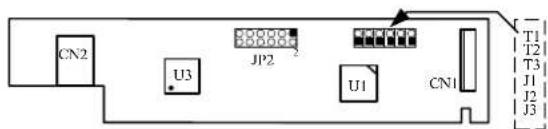
text_image
CN2 U3 JP2 U1 CN1 T1 T2 T3 J1 J2 J3Table 2
| FUNCTION | JUMPER | SHORT | OPEN | DEFAULT |
| LEADING / STOP CODE | J1 | DISABLED | ENABLED | OPEN |
| ALT + NUM | JP2, PIN 1-2 | DISABLED | ENABLED | SHORT |
| INIT NUM LOCK | JP2, PIN 3-4 | DISABLED | ENABLED | SHORT |
| CLASS | JP2, PIN 7-8 | HID | VENDOR | SHORT |
| OS | JP2, PIN 9-10 | WINDOWS / LINUX | DOS | SHORT |
| TRACK 1 | T1 | ENABLED | DISABLED | SHORT |
| TRACK 2 | T2 | ENABLED | DISABLED | SHORT |
| TRACK 3 | T3 | ENABLED | DISABLED | SHORT |
Note 1: To use the USB interface MSR in operating system without USB support, please set USB keyboard enabled in BIOS (CMOS) setup.
Note 2: Since this USB interface MSR works as a USB keyboard which is a normal HID (Human Interface Devices) in USB classification, no special driver shall be required. However, it should be set as vendor class for Linux system and special driver is required.