ioLogik R1214 - Industrielle Automatisierung Moxa - Kostenlose Bedienungsanleitung
Finden Sie kostenlos die Bedienungsanleitung des Geräts ioLogik R1214 Moxa als PDF.


Benutzerfragen zu ioLogik R1214 Moxa
0 Frage zu diesem Gerät. Beantworten Sie die, die Sie kennen, oder stellen Sie Ihre eigene.
Eine neue Frage zu diesem Gerät stellen
Laden Sie die Anleitung für Ihr Industrielle Automatisierung kostenlos im PDF-Format! Finden Sie Ihr Handbuch ioLogik R1214 - Moxa und nehmen Sie Ihr elektronisches Gerät wieder in die Hand. Auf dieser Seite sind alle Dokumente veröffentlicht, die für die Verwendung Ihres Geräts notwendig sind. ioLogik R1214 von der Marke Moxa.
BEDIENUNGSANLEITUNG ioLogik R1214 Moxa
MOXA®
ioLogik R1200 Series
Quick Installation Guide
Second Edition, April 2015
Overview
The ioLogik R1200 comes with 2 RS-485 serial ports, which can be used in one of two ways:
-
For backup or asset monitoring, or
-
As an RS-485 repeater.
The ioLogik R1200 has the industry's first all-in-one design and provides Automatic Field Configuration via USB. No technical background is needed, and maintenance is easy since users can upload a device's configuration settings and firmware via USB, without needing to take a PC to the field site.
Model Selection:
| IoLoglk | DI | DIO | Relay | AI | AO |
| R1210 | 16 | - | - | - | - |
| R1212 | 8 | 8 | - | - | - |
| R1214 | 6 | - | 6 | - | - |
| R1240 | - | - | - | 8 | - |
| R1241 | - | - | - | - | 4 |
Package Checklist
• 1 ioLogik R1200 series remote I/O product
• Documentation and software CD
- Quick installation guide (printed)
Specifications
| System | |
| Serial IO | 2 x RS-485-2W: Data+, Data-, GND (5-contact terminal block) |
| Protection | 8 KV ESD, 1 KV surge, 3 KV EFT |
| Protocols | Modbus/RTU |
| Power Input | 24 VDC nominal, 12 to 48 VDC |
| Wiring | I/O cable max. 14 AWG |
| Dimensions | 27.8 x 124 x 84 mm (1.09 x 4.88 x 3.31 in |
| Weight | under 200 g |
| Operating Temperature | Standard Models: -10 to 75°C (14 to 167°F)Wide Temperature Models: -40 to 85°C (-40 to 185°F) |
| Storage Temperature | -40 to 85°C (-40 to 185°F) |
P/N: 1802012002011
| Ambient Relative Humidity | 5 to 95% (non-condensing) |
| Altitude | Up to 2000 m |
| Note: Please contact Moxa if you require products guaranteed to function properly at higher altitudes. | |
| Standards and Certifications | UL 508, CE, FCC Class A |
| Warranty Period | 5 years (excluding ioLogik R1214*) |
| Details | See www.moxa.com/warranty |
| *Because of the limited lifetime of power relay, products that use this component are covered by a 2-year warranty. | |
| Communication Parameters (Initial mode) | |
| Parity | None, Even, Odd (default = None) |
| Data Bits | 8 |
| Stop Bits | 1, 2 (default = 1) |
| Flow Control | None, XON/XOFF (default = None) |
| Baudrate | 1200 to 921.6 kbps (default = 9600) |
| Digital Input | |
| Sensor Type | NPN, PNP, and Dry contact |
| I/O Mode | DI or Event Counter |
| Dry Contact | • On: short to GND• Off: open |
| Wet Contact(DI to COM) | • On: 10 to 30 VDC• Off: 0 to 3 VDC |
| Isolation | 3K VDC or 2K Vrms |
| Counter/Frequency | 2.5 kHz, power off storage |
| Digital Output | |
| I/O Mode | DO or Pulse Output |
| Pulse Wave Width/Frequency | 0.1 ms / 5 kHz |
| Over-voltage Protection | 45 VDC |
| Over-current Protection | 2.6 A (4 channels @650 mA) |
| Over-temperature Shutdown | 175°C (typical), 150°C (min.) |
| Current Rating | 200 mA per channel |
| Isolation | 3K VDC or 2K Vrms |
| Relay Output | |
| Type | Form A (N.O.) relay outputs, 5A |
| Contact Rating | 5 A @ 30 VDC, 5 A @ 250 VAC, 5 A @ 110 VAC |
| Inductance Load | 2 A |
| Resistance Load | 5 A |
| Breakdown Voltage | 500 VAC |
| Relay On/Off Time | 1500 ms (Max.) |
| Initial Insulation Resistance | 1G min. @ 500 VDC |
| Expected Life | 100,000 times (Typical) |
| Initial Contact Resistance | 30 milli-ohms (Max.) |
| Pulse Output | 0.3 Hz at rated load |
| Analog Input | |
| Type | Differential Input |
| Resolution | 16 bits |
| I/O Mode | Voltage / Current |
| Input Range | 0 to 10 VDC, 4 to 20 mA |
| Accuracy | ± 0.1% FSR @ 25°C± 0.3% FSR @ -10 and 60°C± 0.5% FSR @ -40 and 75°C |
| Sampling Rate (all channels) | 12 samples/sec |
| Input Impedance | 10M ohms (minimum) |
| Built-in Resistor for Current Input | 120 ohms |
| Analog Output | |
| Resolution | 12 bits |
| Output Range | 0 to 10 VDC, 4 to 20 mA |
| Voltage Output | 10 mA (Max.) |
| Accuracy | ± 0.1% FSR @ 25°C± 0.3% FSR @ -40 and 75°C |
| Load Resistor | • Internal power: 400 ohms• External 24V power: 1000 ohms |
Installation
Power and Networking
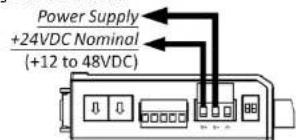
Connect the +12 to +48 VDC power line to the ioLogik R1200's
terminal block V+ terminal; connect the ground from the power
supply to the V-terminal. Connect the ground pin ( ) if earth
ground is available.
text_image
Power Supply +24VDC Nominal (+12 to 48VDC)NOTE For safety reasons, the wires attached to the power should be at least 2 mm (12 gauge) in diameter.
Switch Settings
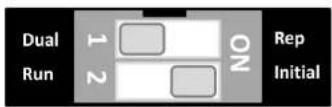
The R1200 series provides Dual/Rep and Run/Initial switch settings to set up the communication mode.
| Duel (Default) | Dual RS-485 mode |
| Rep | Repeater mode |
| Run | User define communication parameters |
| Initial (Default) | Initial RS-485 communication parameters |
Jumper Settings
The models with DIO or AI channels require configuring the jumpers inside the enclosure. Remove the screw located on the back panel and open the cover to configure the jumpers.
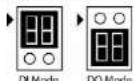
DIO mode configuration is shown to the right (default: DO Mode).
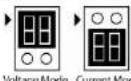
Analog mode configuration is shown to the right (default: Voltage Mode).
Mounting
The ioLogik R1200 is designed with a vertical form factor, and can be used with both DIN-Rail and wall mounting applications. When mounting on a rail, release the bottom mounting kit, install the ioLogik on the rail, and then restore the bottom mounting kit to fix the ioLogik to the rail. When using wall mounting, release both the upper and bottom DIN-Rail kits.
LED Indicators
| Type | LED Color | LED Action | |
| PWR | Green | On: | Power On |
| Off: | Power Off | ||
| RDY | Green/Red | Green: | System Ready |
| GreenBlinking: | Located | ||
| Red: | System Boot-up Error | ||
| RedBlinking: | Firmware upgrade / USB upgrade | ||
| Green/RedBlinking: | Safe Mode | ||
| Off: | System NOT Ready | ||
| P1 | Green/Amber | Green: | Tx |
| Amber: | Rx | ||
| Blinking: | Data Transmitting | ||
| Off: | Disconnected | ||
| P2 | Green/Amber | Green: | Tx |
| Amber: | Rx | ||
| Blinking: | Data Transmitting | ||
| Off: | Disconnected | ||
I/O Wiring
Digital Input/Output (Sink Type)
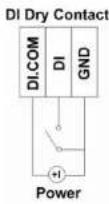
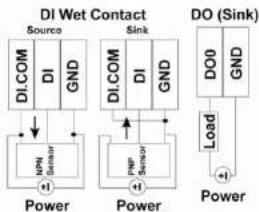
flowchart
graph TD
    A["DI.COM DI GND"] --> B["DI.COM DI GND"]
    B --> C["DI.COM DI GND"]
    C --> D["DI.COM DI GND"]
    D --> E["DO (Sink)"]
    F["Power"] --> G["+1"]
    H["Power"] --> I["+1"]
    J["Power"] --> K["+1"]
    L["Power"] --> M["+1"]
    N["Power"] --> O["+1"]
    P["Power"] --> Q["+1"]
    R["Power"] --> S["+1"]
    T["Power"] --> U["+1"]
    V["Power"] --> W["+1"]
    X["Power"] --> Y["+1"]
    Z["Power"] --> AA["+1"]
    AB["DO (Sink)"] --> AC["DO0 GND"]
    AC --> AD["Load"]
Analog Input
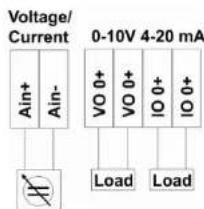
text_image
Voltage/ Current 0-10V 4-20 mA Ain+ Ain- VO 0+ VO 0+ IO 0+ IO 0+ Load LoadRelay Output (Form A)
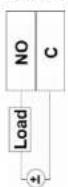
Power
System Configuration
ioSearch Utility
ioSearch is a search utility that helps users locate an ioLogik R1200 on the local network. The utility can be found in the Document and Software CD → Software → ioSearch; the latest version can be downloaded from Moxa's website.
Load Factory Default Settings
There are three ways to restore the IoLogik R1200 to the factory default settings.
- Hold the RESET button for 5 seconds.
- Right click the specified IoLogik in the IoSearch utility and select "Reset to Default."
- Select "Load Factory Default" from the web console.
Modbus Address Table
Please refer to the user's manual for details of the IoLogik's Modbus address.
NOTE A "load" in a circuit schematic is a component or portion of the circuit that consumes electric power. For the diagrams shown in this document, "load" refers to the devices or systems connected to the remote I/O unit.
MOXA®
www.moxa.com/support
The Americas: +1-714-528-6777 (toll-free: 1-888-669-2872) Europe: +49-89-3 70 03 99-0 Asia-Pacific: +886-2-8919-1230 China: +86-21-5258-9955 (toll-free: 800-820-5036)
© 2015 Moxa Inc., All Rights Reserved