ES-8001-02 Investigator - Uhr Earnshaw - Kostenlose Bedienungsanleitung
Finden Sie kostenlos die Bedienungsanleitung des Geräts ES-8001-02 Investigator Earnshaw als PDF.


Benutzerfragen zu ES-8001-02 Investigator Earnshaw
0 Frage zu diesem Gerät. Beantworten Sie die, die Sie kennen, oder stellen Sie Ihre eigene.
Eine neue Frage zu diesem Gerät stellen
Laden Sie die Anleitung für Ihr Uhr kostenlos im PDF-Format! Finden Sie Ihr Handbuch ES-8001-02 Investigator - Earnshaw und nehmen Sie Ihr elektronisches Gerät wieder in die Hand. Auf dieser Seite sind alle Dokumente veröffentlicht, die für die Verwendung Ihres Geräts notwendig sind. ES-8001-02 Investigator von der Marke Earnshaw.
BEDIENUNGSANLEITUNG ES-8001-02 Investigator Earnshaw
JAPAN QUARTZ CHRONOGRAPH WITH DATE
text_image
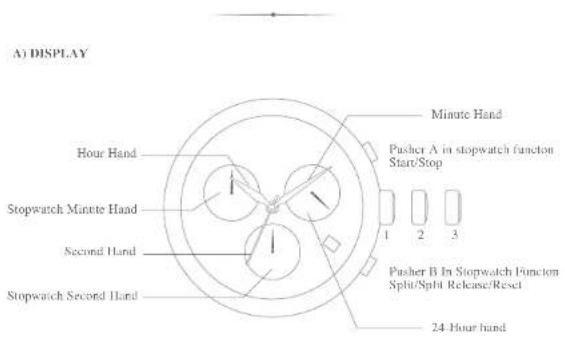
A) DISPLAY Minute Hand Pusher A in stopwatch function Start/Stop Hour Hand Stopwatch Minute Hand Second Hand Stopwatch Second Hand 1 2 3 Pusher B In Stopwatch Function Split/Split Release/Reset 24 Hour handB) DATE & TIME SETTING
- Pull out the crown to position 2.
- Turn the crown clockwise until the previous day's date appears.
- Pull out the crown to position 3 when the second hand is at the 12 o'clock position. It will stop on the spot.
- Turn the crown to set the hour, minute and 24-hour hands to the desired time. As the hour hand moves, the 24-hour hand also moves correspondingly.
* When the crown is at position 3. Do not press any button. Otherwise, the chronograph bands will move. - Push the crown back into the position 1 in accordance with a time signal.
Do not set the date between 9:00p.m. and 1:00a.m.. Otherwise, the day may not change properly. If it is necessary to set the date during that time period, first change the time to any time outside it, set the date and then reset the correct time.
C) HOW TO USE ST OP WATCH
The measured time is indicated by the stopwatch hands that move independently of the center and 24-hour hands.
- The stopwatch can measure up to 60 minutes in seconds.
1) Standard Measurement
- Press Pusher A to start.
- Press Pusher A to stop.
- Press Pusher B to reset.
E
EARNSHAW
1805
II) Accumulate elapsed time measurement
-
Press Pusher A to start.
-
Press Pusher A to stop.
-
Press Pusher A to restart.
(Restarting and stopping the stopwatch can be repeated as many time as necessary by pressing Pusher A. For resetting, please press Pusher A to stop the stopwatch and then press Pusher B to reset.)
III) Split time measurement
-
Press Pusher A to start.
-
Press Pusher B to Split/Split Release.
-
Press Pusher A to stop.
-
Press Pusher B to reset.
(Measurement and release of the split time can be repeated as many times as necessary by pressing Pusher B.)
D) ADJUSTING THE STOPWATCH HAND POSITION
Before setting the time, check if the stopwatch and minute hands are at the "0" (12 o'clock) position. If the stopwatch is in use, please stop and reset. If either of the stopwatch hands are not at the "0" position, reset them in the following steps:
-
Pull crown out to position 3.
-
Press Pusher A or B to reset the stopwatch second and minute hands to "0" position.
By pressing Pusher A, the hands move anti-clockwise.
By pressing Pusher B, the hands move clockwise.
- Push the crown back to position 1.