6P23 - Uhr Grandeux - Kostenlose Bedienungsanleitung
Finden Sie kostenlos die Bedienungsanleitung des Geräts 6P23 Grandeux als PDF.


Benutzerfragen zu 6P23 Grandeux
0 Frage zu diesem Gerät. Beantworten Sie die, die Sie kennen, oder stellen Sie Ihre eigene.
Eine neue Frage zu diesem Gerät stellen
Laden Sie die Anleitung für Ihr Uhr kostenlos im PDF-Format! Finden Sie Ihr Handbuch 6P23 - Grandeux und nehmen Sie Ihr elektronisches Gerät wieder in die Hand. Auf dieser Seite sind alle Dokumente veröffentlicht, die für die Verwendung Ihres Geräts notwendig sind. 6P23 von der Marke Grandeux.
BEDIENUNGSANLEITUNG 6P23 Grandeux
CAL. 6P23/6P25/6P27/6P29
ANALOG QUARTZ INSTRUCTION MANUAL
English
.1.
SPECIFICATIONS
1) Function
Hour (12H), Minute, Second, Date, 24 Hour indication. (6P23) Hour (12H), Minute, Second, Day, Date. (6P25)
Hour (12H), Minute, Second, Day, Date, 24Hour indication. (6p27/6P29)
2) Accuracy
Average ±20 second/month under normal circumstances (5°C to 35°C / 41°F to 95°F)
3) Battery Life : About 3 years (SR621SW)
* The battery is a monitor power cell that has been factory-installed. For this reason, it may wear out before the 3 years from the time of purchase are up.
4) Operating Temperature
-10°C to 60°C / 14°F to 140°F
.2.
NAMES OF PARTS AND THEIR FUNCTION
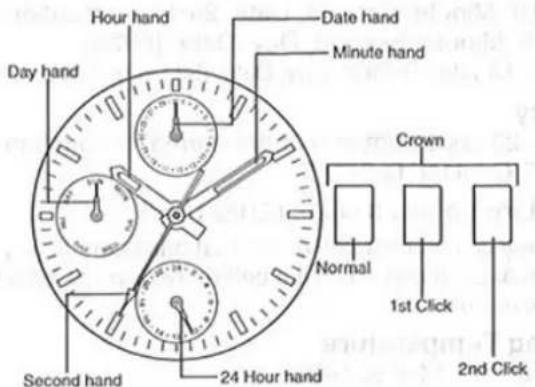
The basic handling method is the same even if the caliber No.or design is different.
(6P27)
text_image
Day hand Hour hand Date hand Minute hand Second hand 24 Hour hand Crown Normal 1st Click 2nd Click.3.
text_image
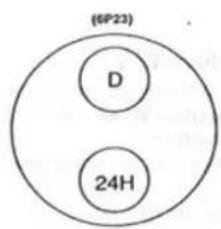
(6P23) D 24H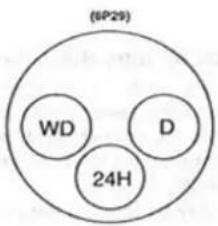
text_image
(SP29) WD D 24H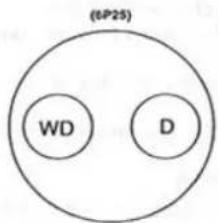
text_image
(1-P25) WD D24H:24 hours
D : Date
WD : Day
.4.
OPERATION
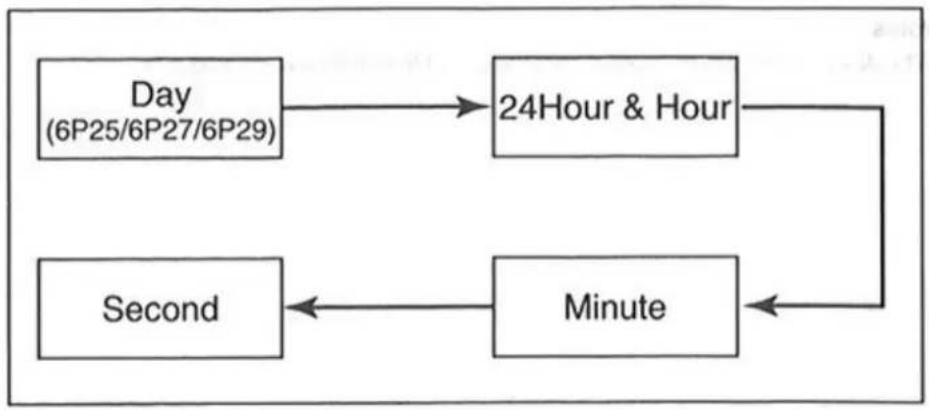
1) Setting the Second, Minute, Hour, 24Hour, Day
The second, minute, hour, 24-hour system, and day are set by the same operation.
- Pull out the crown to the second click position when the second hand reaches the 12-o'clock position to stop the second hand there.
- Rotate the crown forward (to rotate the hour and minute hands clockwise) to set the day. (6P25/6P27/6P29)
- You cannot set the day by rotating the crown in reverse.
- After setting the day, set the hour and minute hands.
- Check a.m. or p.m. by the 24-hour hand. (6P23/6P27/6P29)
- When setting the minute hand, put it 4 or 5 minutes forward from the current time, and then return it to the current time.
- After setting the time, push in the crown to the normal position, synchronizing with the time signal.
The second hand starts moving again at the time when the crown is pushed back.
2) Setting the Date (Quick change function)
Pull the crown out to the first click position and set the date by rotating the crown
backward(to rotate the hour and minute hands counter-crockwise).
If the date is set between 9:00 p.m. and 0:00 a.m., the date will not change correctly.
Notes
• The day and date are changed during the period from 0:00 a.m. to 5:30 a.m.
.6.
Setting Procedure
flowchart
graph TD
    A["Day\n(6P25/6P27/6P29)"] --> B["24Hour & Hour"]
    B --> C["Minute"]
    C --> D["Second"]
    D --> A
.7.