POE14-033 - Netzwerkkarte / Adapter Phihong - Kostenlose Bedienungsanleitung
Finden Sie kostenlos die Bedienungsanleitung des Geräts POE14-033 Phihong als PDF.


Benutzerfragen zu POE14-033 Phihong
0 Frage zu diesem Gerät. Beantworten Sie die, die Sie kennen, oder stellen Sie Ihre eigene.
Eine neue Frage zu diesem Gerät stellen
Laden Sie die Anleitung für Ihr Netzwerkkarte / Adapter kostenlos im PDF-Format! Finden Sie Ihr Handbuch POE14-033 - Phihong und nehmen Sie Ihr elektronisches Gerät wieder in die Hand. Auf dieser Seite sind alle Dokumente veröffentlicht, die für die Verwendung Ihres Geräts notwendig sind. POE14-033 von der Marke Phihong.
BEDIENUNGSANLEITUNG POE14-033 Phihong
Power over Ethernet became the new IEEE standard in 2003 allowing users to send both power and data to network devices without modifying their existing Ethernet based network. By sending power with data over a Local Area Network, users can now minimize their need for extensive wiring and electrical power outlets which has both practical and aesthetic realizations.
Most new devices on the market now designed to operate on a network will be compliant with the IEEE802.3af standard; however users who are upgrading their network do not necessarily need to upgrade their accessory devices. The dilemma comes as what to do with all of this non-PoE equipment after installing a PoE network. Phihong has an answer with the POE14 series. The POE14 is a small device that will connects to the network and splits the Power into a DC-DC converter and passes the data through to the device.
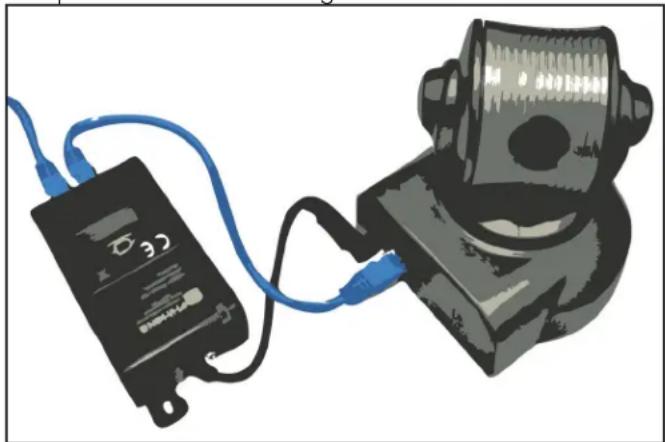
natural_image
Illustration of a black electronic device connected to a black cylindrical device with blue cables (no text or symbols visible)By using your standard Category 5 or above Ethernet cables, the POE14 can take its power from the network switch or midspan/power injector if applicable. The device will then split the power into a desired voltage and the data will run separately as well. The POE14 comes in 4 standard output voltages so users can find the one that meets their specific needs. The diagram above shows the basic set up of a POE14 Splitter connected to a non-poe ready IP camera. The Splitter is table mounted adjacent to the camera and takes the power from the Ethernet and divides it into a data Ethernet and a DC power line to the camera. The POE14
is designed to accommodate low powered devices such as wireless access points and IP Telephones. A recent addition of the POE14-137 has an output DC voltage of 13.7 for backup battery charging capabilities.
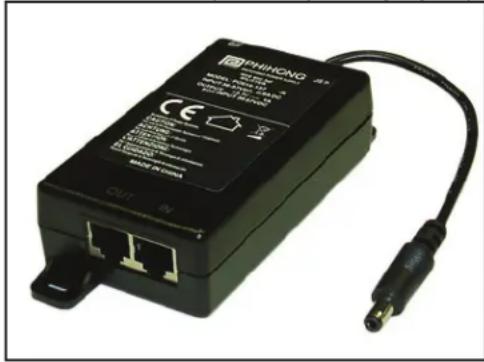
text_image
PHINONG 2024-01-03 MATERIALS BY: PHINONG CUT INInstallation Sequence:
- Using the appropriate Category 5 or 6 Ethernet cable, connect the PoE In to the Power Injector or midspan.
- Using the same category Ethernet cable, connect the PoE Out to the input RJ45 jack located on the device.
- Insert the DC Power cable from the splitter to input power adapter on the device.
- Allow a few moments for the Green LED to light up assuring that everything is connected.
| Input Power | IEEE802.3af compatible, 36-57VDC |
| Output Power | -033 — 3V -120 — 12V |
| -050 — 5V -137 — 13.7V | |
| Ethernet | Categories 5, 5e or 6 |
| Input/Output Connectors | PoE and Data - RJ45DC Cable - Center Positive Barrel10mm x 2.1mm x 5.5mm (tips may be changed) |
| Safety | CE Certifi ed |
| Dimensions | 94 x 52 x 30mm(3.7 x 2.0 x 1.2in) |
| Weight | 0.1kg (0.22lb) |
| Operating Temperature | 0 to +40°C32 to +104°F |
What are the benefits to using PoE?
Power over Ethernet is best suited to users who want to expand and extend the capabilities of their existing network switches. PoE uses standard Category 3, 5 or 6 cables and uses them to transfer both data and power to remote locations. Since extensive wiring is not needed, these remote locations are able to be easily changed. PoE power standards are also universal. Unlike traditional power supplies which are only compatible with specific standards to their region, PoE is able to self regulate to work with a variety of international power standards. PoE also offers more flexibility in power events, such as a surge or brownout.
Why am I limited to 100 meters?
Power can be transmitted over an Ethernet cable to distances that exceed 100 meters depending on the amount of power being put out by the midspan and loss on the cable across the distance. If the port powering the Ethernet puts out 15.4W (IEEE802.3af standard) of power and the distance is 100 meters then the power could dissipate to 12.95W in the worst case scenario by the time it reaches the end device. PoE is possible over distances greater than 100 meters but is not IEEE802.3 standard and is not guaranteed or recommended. Should a distance exceed 100 meters or more then Phihong offers a selection of PoE extenders. Although power is possible at greater distances, users may experience severe data loss after traveling 100 meters or more.
What is the difference between IEEE802.3af and IEEE802.3at?
In 2003 IEEE created a standard for Power over Ethernet called IEEE802.3af which uses a voltage range of 44-57VDC and a maximum output of 15.4W. Then in 2009 IEEE ratifi ed the IEEE802.3at standard which expanded the existing standard to include applications requiring up to 25.95W of power for use on higher power PoE devices such as WiMAX or Pan/Tilt/Zoom Security Cameras, and would be used on networks with Gigabit compatibility. To meet the new standard, the PoE output is increased at the output port to 33.6W per port on a midspan. The POE21-120F is compliant with all parts of the IEEE802.3at standard.
This device splits my data and power; can I charge batteries with the DC output power?
Yes the POE14-137 has been designed especially to meet this function. While the rest of the POE14 series does have a DC output voltage, it is not enough to charge a 12V battery for back up usage. To meet this need the user would need greater than 12V to generate a charge; the POE14-137 has an output voltage of 13.7V to meet this need. Practical applications could be back up energy for cameras or lighting in the case of power failure in an emergency situation.
Do I need a special configuration for my network?
No, all Phihong PoE splitter technology is considered "plug and play" which means that there is no software or fi rmware installations required for the device to operate on the network. All that is needed is the correct output by the midspan and Ethernet cables (category 5 or above). Phihong recommends professional installation should any issues arise.
Where should I install my PoE Splitter?
Your new PoE Splitter may be installed to be wall or table mounted. The unit should be installed immediately adjacent to the device to allow for proper connection via the DC cable as this may not be extended to accommodate space requirements.
Can I use this device with equipment that is not PoE ready?
Yes, this splitter is compatible with non-PoE ready equipment. Ensure that you check the voltage requirements for your device to ensure that the splitter will not provide an output voltage higher or lower than your device requirements. There is a listing above of the available models with their output voltages. Check to see if your device can be covered by one of the available standard devices.
If your question is not listed here and need further information please contact Phihong Sales. For a full listing of available contact information please visit the Contact Us section of the Phihong website www.phihong.com.