
CyberTrack V10 - Webcam Adesso - Kostenlose Bedienungsanleitung
Finden Sie kostenlos die Bedienungsanleitung des Geräts CyberTrack V10 Adesso als PDF.


Benutzerfragen zu CyberTrack V10 Adesso
0 Frage zu diesem Gerät. Beantworten Sie die, die Sie kennen, oder stellen Sie Ihre eigene.
Eine neue Frage zu diesem Gerät stellen
Laden Sie die Anleitung für Ihr Webcam kostenlos im PDF-Format! Finden Sie Ihr Handbuch CyberTrack V10 - Adesso und nehmen Sie Ihr elektronisches Gerät wieder in die Hand. Auf dieser Seite sind alle Dokumente veröffentlicht, die für die Verwendung Ihres Geräts notwendig sind. CyberTrack V10 von der Marke Adesso.
BEDIENUNGSANLEITUNG CyberTrack V10 Adesso

CyberTrack V10
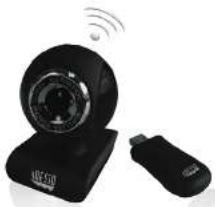
2.4 GHz Wireless Webcam
natural_image
Black wireless router with Wi-Fi signal and USB port, no visible text or symbolsModel: CyberTrack V10
QuickGuide
English
www.adesso.com
①
CONTENTS

A
CyberTrack V10
Welcome

B
USB Wireless
Energent

C
Quick Start Guide

D
Software CD

E
DESCRIPTION
text_image
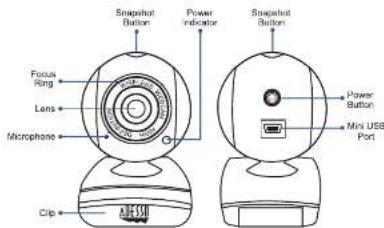
Focus Ring Lens Microphone Clip Snapshot Button Power indicator Snapshot Button Power Button Mini USB PortNOTE: To adjust focus use the Focus Ring located in front of lens.
④
LIMITED WARRANTY
Adesso provides a one year limited warranty for all of its products against defects in material and workmanship.
During this period, Adesso will repair or replace any product which proves to be defective. However, Adesso will not warranty any product which has been subject to improper freight handling, shipping abuse, neglect, improper installation or unauthorized repair. The warranty will not cover products installed with components not approved by Adesso and products where the sealed assembly trace has been broken.
If you discover a defect, Adesso will, at its option, repair or replace the product at no charge to you provided you return it during the warranty period with freight charges pre-paid to Adesso. Before returning any product, you must obtain a Return Merchandise Authorization number (RMA). This RMA # must be clearly marked on the outside of the package you are returning for warranty service. Be certain to also include your name, shipping address (no PO Boxes), telephone number, and a copy of the invoice showing proof of purchase in the package.
SUPPORT
We have listed most of our FAQ's (Frequently Asked Questions) at http://www.adesso.com/faqs.asp. Please visit our FAQ Service & Support pages before you contact our E-mail or Telephone Support.
Email Support: If our FAQ's do not help you resolve your issues, please email support@adesso.com.
Telephone Support:
Toll Free: (800) 795-6788
9:00AM to 5:00PM PST Monday - Friday
②
INSTALLATION
- Flip and clip webcam on monitor edge or lay flat on desktop.
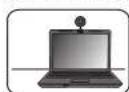
Flip & Clip
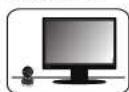
Lay Flat
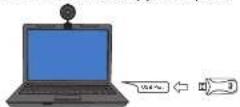
- Turn your computer ON and then Plug the webcam USB Wireless Receiver (provided) into your computer's USB port. The USB Wireless Receiver indicator light will light up in red after it is detected by your computer.
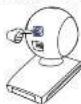
- Press the webcam Power Switch once to pair webcam with receiver. Webcam Power Indicator light will turn on when connection is successful. Webcam is now ready for use.
⑤
INTRODUCTION
Adesso's CyberTrax V10 2.4 GHz Wireless Webcam takes the webcam to a new level, giving you up to 10 feet of wireless freedom. Enjoy video chats, video recording and broadcasting cord free! This webcam offers you broad Instant Messenger compatibility, so you can enjoy video conferencing with today's most popular Instant Messenger applications. Also take advantage of the pan and tilt feature that makes it easy to record in any direction without having to detach your webcam from your computer. The integrated wide-angle microphone lets your voice come through loud and clear, whether you are chatting with loved ones or doing business on a video call. With all these great features, you can easily record and transmit your videos to everyone!
SPECIFICATIONS
• Connection: 2.4 GHz RF Wireless Technology
- Range: Up to 10 feet
• Resolution: 300K Pixels
• Image Sensor: 1/6" CMOS Sensor
• Interface: USB 2.0
• Frame Rate: 15 fps at 640 x 480 (VGA mode)
25 fps at 320 x 240 (QVGA mode, within 5 ft.)
• Focus Setting: Manual
• Power: 850 mAh Rechargeable Li-ion Battery
• Usage Time: Up to 4 hours
REQUIREMENTS
- Hardware: VGA Display Card Supported with DIRECTX
- Operating System: Windows ^5 7, Windows ^6 Vista & Windows ^6 XP
- Connectivity Interface: USB 2.0 Port
③
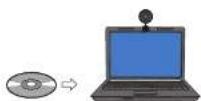
- Insert the enclosed Software CD (optional) into the CD-ROM drive of your computer to install bonus webcam software, Webcam Companion 4. The installation menu will pop up automatically (click setup.exe if software installation menu does not run automatically), click Webcam Companion 4 to install software.
Note: Webcam Companion 4 license key is located on software CD envelope.
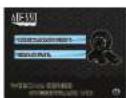
Note: For more help on using Webcam Companion 4 see user manual on Software CD.
Video & Audio Setup for Instant Messenger
Use the following setup instructions according to your instant messenger application settings:
- Select the video source "USB Camera"
- Select the audio source "USB Camera"
- Hit "Save" or 'Apply' for the update settings
Note
- Adjust Focus Ring in front of the webcam lens for image focus.
- Connect Mini USB Cable (included) to the USB port of your computer to charge webcam.
- Power Indicator turns red when webcam is in operation.
- Power Indicator turns green when the webcam battery is being charged and the webcam is not in use.
- If the image is weak or has no response, make sure the webcam is less than 10 fl away from the USB Wireless Receiver.
CyberTrack V10 081111 V5