JC-78D - Kühlschrank Temptech - Kostenlose Bedienungsanleitung
Finden Sie kostenlos die Bedienungsanleitung des Geräts JC-78D Temptech als PDF.


Benutzerfragen zu JC-78D Temptech
0 Frage zu diesem Gerät. Beantworten Sie die, die Sie kennen, oder stellen Sie Ihre eigene.
Eine neue Frage zu diesem Gerät stellen
Laden Sie die Anleitung für Ihr Kühlschrank kostenlos im PDF-Format! Finden Sie Ihr Handbuch JC-78D - Temptech und nehmen Sie Ihr elektronisches Gerät wieder in die Hand. Auf dieser Seite sind alle Dokumente veröffentlicht, die für die Verwendung Ihres Geräts notwendig sind. JC-78D von der Marke Temptech.
BEDIENUNGSANLEITUNG JC-78D Temptech

text_image
TemptechTHERMOELECTRIC COOLER
INSTRUCTION MANUAL
● Before use, please read this manual carefully.
- This appliance is Semi-conductor electric refrigerating appliance, which belongs to Category 10 other appliance according to ErP 643/2009, Its design temperature is 17°C.
- Other appliance means a compartment, other than a Chinese traditional wine storage compartment, intended for the storage of particular foodstuffs at a temperature warmer than +14°C, and the particular foodstuff is cabernet, claret or vin rouge and so on.
- The range of storage temperature is from 8°C to 18°C, 10°C to 18°C or 12°C to 18°C, but the test condition for energy consumption is equal to 15°C or higher at the ambient temperature 25°C.
It's suitable for use in bedrooms, apartments, hotels, hospitals and offices.
Before Putting Into Use
- Clean the appliance, and be thorough, especially in the interior (See "HOW TO CLEAN").
- In case the interior accessories are not correctly placed, rearrange them as described in chapter "NAME OF THE PARTS".
Instructions for Use
These instructions for use are intended for the user. They describe the appliance and its correct and safe use. They were prepared for various types/models of refrigerators therefore you may find in it description of some functions and accessories that your appliance does not have.
Tips for Energy Savings
- Try not to open the door too often, especially when the weather is wet and hot. Once you open the door, close it as soon as possible.
- Every now and then check if the appliance is sufficiently ventilated (adequate air circulation around the appliance).
-
Set thermostat from higher to lower settings as soon as possible (depends on how loaded the appliance is ambient temperature etc).
-
Before loading the appliance with packages of fresh foods, make sure they are cooled to ambient temperature. For hot foods, please cool to room temperature before placing it in the refrigerator.
- Set it on higher temperature can minimize the energy consumption of the household refrigerating appliance at ordinary temperature.
Important
DANGER: Risk of child entrapment. Before you throw away your old refrigerator:
Take off the door.
- Leave the shelves in place so that children may not easily climb inside.
- The appliance must be correctly connected to the power supply. (See: "HOW TO INSTALL").
- Do not touch the cooled surfaces while the appliance operates, especially not with wet hands, because the skin may stick to the cold surfaces.
- Disconnect the appliance from the power supply before repairing it (only a qualified technician should repair it), before cleaning or not in use for long time.
- Do not place power plug, microwave oven or other home appliance on the top of the refrigerator.
● The rating plate is inside the appliance or outside on the rear wall. - Do not place refrigerator under the direct sun light, high temperature and high humidity
- Do not place any object near upper back of the unit which will affect the cooling of refrigerator.
- This appliance is not intended for use by persons (including children) with reduced physical, sensory or mental capabilities, or lack of experience and knowledge, unless they have been given supervision or instruction concerning use of the appliance by a person responsible for their safety.
● Children should be supervised to ensure that they do not play with the appliance.
Structure
tw6gb
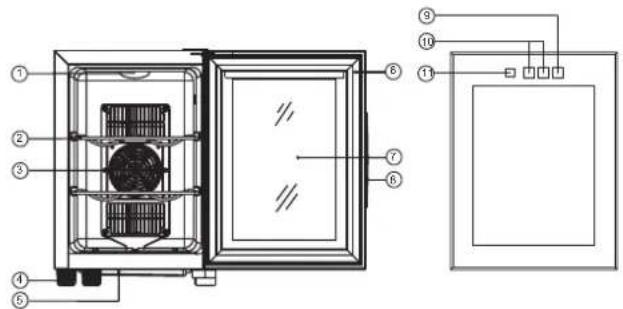
text_image
Technical diagram of a refrigerator internal structure with numbered components and wiring connections- LIGHT
- SHELF
- FAN MASK
- FOOT
- WATER BOX
-
MAGNETIC SEAL
-
GLASS
- DOOR FRAME
- LIGHT SWITCH
- TEMPERATURE CONTROL PANEL
- TEMPERATURE DISPLAY
JC-23A
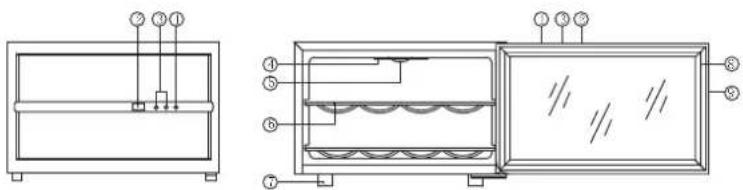
text_image
Technical diagram showing two views of a device with labeled components and internal structures, likely from an engineering or manufacturing context.- LIGHT SWITCH
- LCD DISPLAY
- TEMPERATURE ADJUSTMENT BUTTONS
-
LIGHT COVER
-
INTERIOR LIGHTS
- CHROME SHELVE
- FEET
- MAGNETIC SEAL
- DOOR
Structure
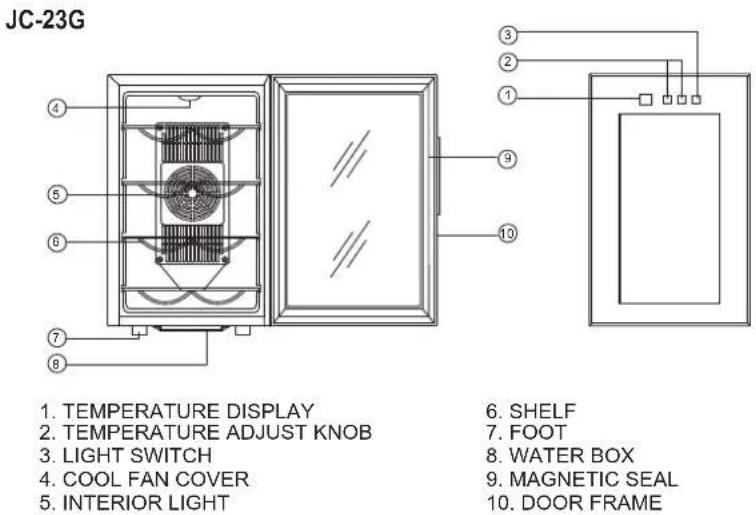
-
TEMPERATURE DISPLAY
-
TEMPERATURE ADJUST KNOB
-
LIGHT SWITCH
-
COOL FAN COVER
-
INTERIOR LIGHT
-
SHELF
-
FOOT
-
WATER BOX
-
MAGNETIC SEAL
-
DOOR FRAME
JC-33C
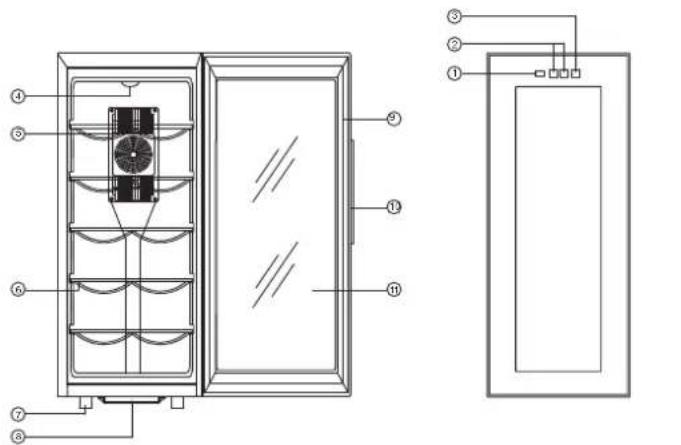
-
TEMPERATURE DISPLAY
-
TEMPERATURE ADJUST KNOB
-
LIGHT SWITCH
-
INTERIOR LIGHT
-
COOL FAN COVER
-
SHELF
-
FOOT
-
WATER BOX
-
MAGNETIC SEAL
-
DOOR FRAME
-
GLASS
JC-48G
text_image
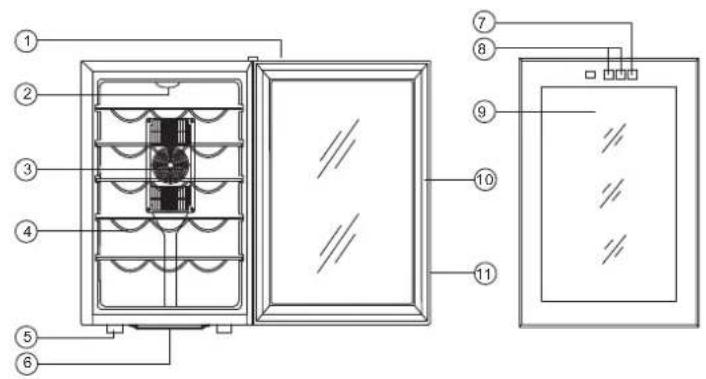
Technical diagram of a refrigerator with numbered components and labeled parts- REAM COVER
- LIGHT
- FAN MASK
- SHELF
- FOOT
-
WATER BOX
-
LIGHT SWITCH
- TEMPERATURE CONTROL PANEL
- GLASS
- MAGNETIC SEAL
- DOOR FRAME
JC-48D
text_image
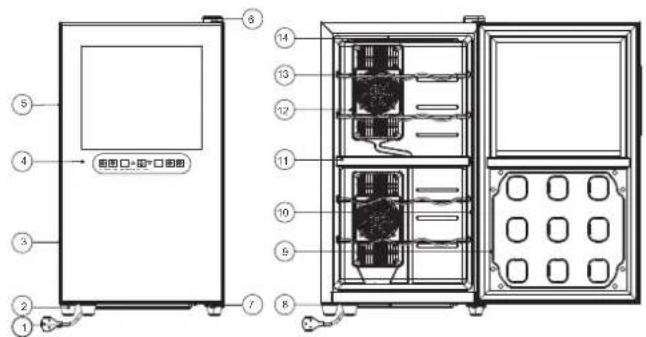
图图口+图*口图图 图图口+图*口图图- POWER CORD
- FOOT
- DOOR FRAME
- GLASS DOOR
- RECESSED HANDLE
- TOP DOOR HINGE COVER
-
BOTTOM DOOR HINGE
-
WATER TRAY
- DOOR LINER
- DOOR SEAL
- ISOLATED BOARD
- COLD FAN MASK
- SHELF
- LAMP COVER
JC-65G
text_image
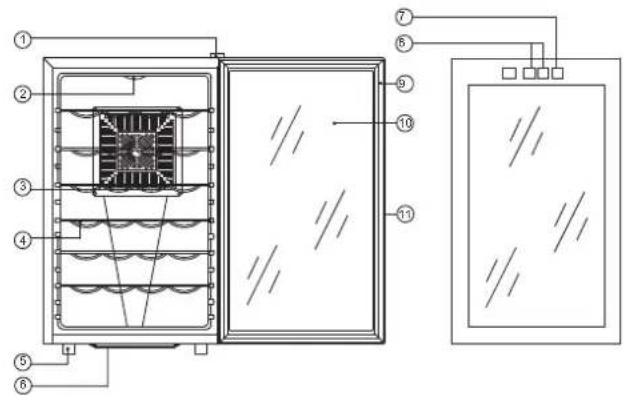
Technical diagram of a refrigerator or oven with numbered components and internal structure, likely for assembly or labeling.- REAM COVER
- LIGHT
- FAN MASK
- SHELF
- FOOT
-
WATER BOX
-
LIGHT SWITCH
- TEMPERATURE CONTROL PANEL
- MAGNETIC SEAL
- GLASS
- DOOR FRAME
JC-78D
text_image
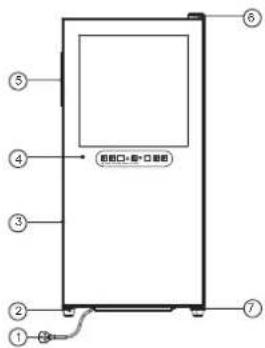
⑤ ④ ③ ② ① ⑥ 前框口-框-口单框 ⑦- POWER CORD
- FOOT
- DOOR FRAME
- GLASS DOOR
- RECESSED HANDLE
- TOP DOOR HINGE COVER
- BOTTOM DOOR HINGE
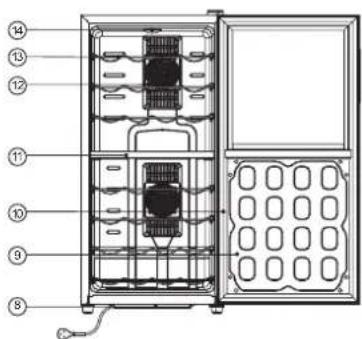
text_image
Technical diagram of an internal device with numbered components, likely a refrigerator or oven assembly.- WATER TRAY
- DOOR LINER
- DOOR SEAL
- ISOLATED BOARD
- COLD FAN MASK
- SHELF
- LAMP COVER
JC-180A
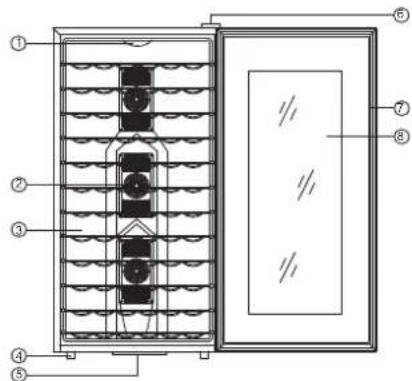
text_image
Technical diagram of a multi-chamber heating or cooling unit with numbered components and internal structure annotations- LIGHT
- FAN MASK
- SHELF
- FOOT
- WATER BOX
- REAM COVER
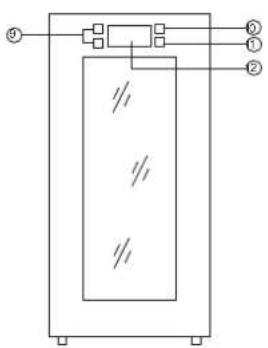
text_image
Technical diagram of a mechanical or electrical component with labeled parts ①, ②, and ③.- MAGNETIC SEAL
- GLASS
- TEMPERATURE CONTROL PANEL
- LIGHT SWITCH
- SET SWITCH
- LCD
HOW TO OPERATE Starting Your New Refrigerator
- Clean the refrigerator thoroughly. Wipe the outside with a soft dry cloth, the interior with a clean moist cloth.
- Insert the power supply cord into the socket.
Normal operating
When the refrigerator works with full power, the two LEDs on the circuit board will flash. The red one shows the power input status. The green one shows the output status of the cooling system. Meanwhile the fan inside the refrigerator begins to work. When the door is opened, the light under the temperature adjustor will turn on automatically.
The temperature range for refrigerator is 8°C to 18°C, 10°C to 18°C or 12°C to 18°C. When the temperature is set on one certain point and the temperature inside reaches this point, the automatic temperature control system begins to work and the cooling system goes into linear temperature keeping status.
Note: Wait 3-5 minutes before restarting if you unplug the refrigerator. The unit may fail to operate properly if restarted too quickly.
HOW TO CLEAN
Cleaners: Never use harsh, abrasive cleaners, heavy-duty cleaners, or solvents on any surface.
Exterior: Wipe with damp, sudsy cloth, rinse and dry. For stubborn stains and for periodic waxing, use silicon wax.
Refrigeration Section: Wash shelves and other removable parts in warm sudsy water, rinse and dry. Wash interior with baking soda solution (3 tablespoons to 1 liter of water) or warm sudsy water, rinse and dry.
Magnetic Door Seals: Wash with warm sudsy water.
The Finishing Touch: Replace all parts and return thermostat dial to desired setting.
WHAT TO DO ...
When the refrigerator is not in use for a prolonged period of time:
- Remove the power plug from the power supply.
- Remove all contents from the refrigerator.
● Dry the interior and leave the door open for a few days.
When you wish to move the refrigerator:
- Secure all movable parts and contents. (Package them separately if necessary.)
● Transport the refrigerator only in an upright position.
If the refrigerator seems too warm inside:
- Check that the door has not been opened too frequently or for a long period.
- Check that the interior circulation is not obstructed by having too many goods stored (The refrigerator is overloaded)
Did you store anything hot, without first cooling it to room temperature?
Is there sufficient clearance around all sides and above the refrigerator?
If the refrigerator starts making any unusual noises:
Is it wobbling? Re-level it and check if it now operates normally.
- Have any objects fallen behind the refrigerator? If so, remove them and check if operation is now normal.
- Are any containers inside the refrigerator vibrating or resonating? If so, rearrange them then check to see if operation has returned to normal.
If the inside light flashes:
- Set temperature is higher than inner temperature.
● The automatic defrost function starting to work.
Disposal of the appliance
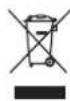
This marking indicates that this product should not be disposed with other household wastes throughout the EU. To prevent possible harm to the environment or human health from uncontrolled waste disposal, recycle it responsibly to promote the sustainable reuse of material resources. To return your used device, please use the return and collection systems or contact the retailer where the product was purchased. They can take this product for environmental safe recycling.
Technical data:
| Model No. | tw6gb | JC-23G | JC-33C | JC-48D | JC-48G |
| Volume | 16 L | 23L | 33L | 48 L | 48L |
| Rated Voltage | 220V~240V | 220V~240V | 220V~240V | 220V~240V | 220V~240V |
| Rated Frequency | 50Hz | 50Hz | 50Hz | 50Hz | 50Hz |
| Climate Type | SN : N | SN : N | SN : N | SN : N | SN : N |
| Input Power | 50W | 50W | 50W | 100W | 70W |
| Power Consumption KW-h/24h | 0.27 | 0.5 | 0.34 | 0.54 | 0.47 |
| Temperature Control Range | 8-18°C | 8-18°C | 12-18°C | 8-18°C&12-18°C | 12-18°C |
| Net Weight | 8.0kg | 9.3kg | 11.3kg | 16 kg | 14.1kg |
| Product Size (WXHXD)mm | 302X460X562 | 252X456X515 | 252X616X507 | 355X650X506 | 355X645X503 |
| Model No. | JC-48G | JC-65G | JC-78D | JC-180A |
| Volume | 48L | 65L | 78L | 180L |
| Rated Voltage | 220V~240V | 220V~240V | 220V~240V | 220V~240V |
| Rated Frequency | 50Hz | 50Hz | 50Hz | 50Hz |
| Climate Type | SN:N | SN:N | SN:N | SN:N |
| Input Power | 70W | 70W | 140W | 185W |
| Power Consumption KW-h/24h | 0.47 | 0.5 | 0.45 | 2.2 |
| Temperature Control Range | 12-18°C | 12-18°C | 8-18°C&12-18°C | 12-18°C |
| Net Weight | 14.1kg | 19.3kg | 22.6kg | 44.8kg |
| Product Size (WXHXD)mm | 355X645X503 | 460X738X520 | 400X849X515 | 570X1200X515 |