Speedlight TR-180 - Blitz Triopo - Kostenlose Bedienungsanleitung
Finden Sie kostenlos die Bedienungsanleitung des Geräts Speedlight TR-180 Triopo als PDF.


Benutzerfragen zu Speedlight TR-180 Triopo
0 Frage zu diesem Gerät. Beantworten Sie die, die Sie kennen, oder stellen Sie Ihre eigene.
Eine neue Frage zu diesem Gerät stellen
Laden Sie die Anleitung für Ihr Blitz kostenlos im PDF-Format! Finden Sie Ihr Handbuch Speedlight TR-180 - Triopo und nehmen Sie Ihr elektronisches Gerät wieder in die Hand. Auf dieser Seite sind alle Dokumente veröffentlicht, die für die Verwendung Ihres Geräts notwendig sind. Speedlight TR-180 von der Marke Triopo.
BEDIENUNGSANLEITUNG Speedlight TR-180 Triopo
TRiOPO
SPEEDLIGHT
ELEKTRONENBLITZCERÄT
FLASH ÉLECTRONIQUE
スピードライト
TR Speedlite TRS SERIES
Instruction Manual
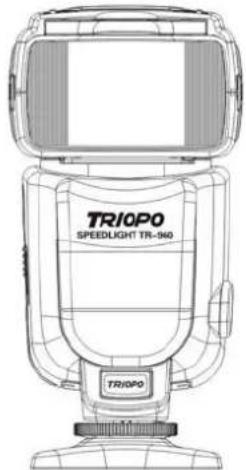
text_image
TR10PO SPEEDLIGHT TR-940 TR10PO乐清市(中国)创意影视器材有限公司
地址:浙江省乐清市石帆镇绅坊工业区创意园区
TEL:+86-577-62382525 62382111
FAX:+86-577-62381234
E-mail:a8@triopo.cn triopo@triopo.cn
Http://www.bacli123.com www.triopo.cn
ADD:Building a,shenfang Industry Zone,Shifan Town,Yueqing City,Zhejiang Province,China
产品及尺寸如有改动,恕不另行通知
PRODUCT AND SIZE SUBJECT TO CHANGE WITHOUT NOTICE
FIRST, SAFETY INSTRUCTION
Please read the safe carefully before you use the products.
In this manual, safety instructions marked by the following notation:
Warn
If you ignore the instructions marked with this symbol may result in personal injury or death and property damage.
Note
If you ignore the instructions marked with this symbol could result in property damage.
Warning (Flash)
1、If as corrosive liquids seep from the batteries and into your eyes, immediately rinse the eye with running water and medical treatment. If not treated quickly, eyes could be seriously hurt.
2、If as corrosive liquids seep from the batteries and contact with skin or clothing, wash immediately with running water. Prolonged contact will damage the skin.
3、Do not attempt to disassemble or repair the flash unit, or may cause electric shock or component failure, resulting in injury.
4、fall or damaged components such as flash, do not touch any exposed internal metal parts. Doing so may cause electric shock or personal injury. Disconnect power or remove the battery, the flash unit to your dealer or local TRIPO authorized service center for repair.
5、If found heat, smoke or burning smell, immediately stop operation and remove the battery to prevent fire or burning component. Before removing the battery in the flash unit should be fully cooled, then the unit to your local TRIPO dealer or authorized service center for repair.
6、flash components, not flooding, or to exposure to rain, salt water or water vapor, unless there is adequate protection to keep out the liquid and vapor. Components such
as water, may cause fire or electric shock element. In this case, immediately turn off power or remove the battery, the flash unit to the local TRIPO dealer or authorized service center for repair.
Note: Maintenance soaked in water or water vapor in the economy of electronic components generally uneconomical.
7、there is the presence of flammable or explosive gases do not use this device. If there are flammable gases (including propane, gasoline, and dust) in place in the flash unit, it may cause an explosion or fire.
8、Don't use flash unit directly to the driver, or may cause traffic accidents.
9、Do not use the flash unit directly when it is close the eyes of others, or may damage the retina. Do not use in infants less than 1 meter flash components.
10、the flash head contact with the body or objects do not use this device. To prevent fire or burning component
11、do not let small children touch accessories to prevent their being swallowed. If accidentally swallowed accessories, should seek medical care immediately.
12、using the battery specified in the instructions. Other non-specified batteries may leak corrosive liquids, explode or catch fire.
13、Do not mix battery types, brands or old batteries, or batteries may leak corrosive liquids, explode or catch fire. If a commodity used more than one battery, always use the same battery purchase.
14、Battery charger may not be used for non-rechargeable batteries (such as manganese batteries, alkaline manganese batteries or lithium batteries) to charge, could leak corrosive liquids, explode or catch fire.
15、when a standard size (AA, AAA, C, D) or other common rechargeable batteries (such as nickel cadmium and nickel-metal hydride batteries) to charge that must be specified by the battery maker to use the battery charger, and carefully read the instructions. Charging, the batteries do not get the anti-polarity, and should be fully cooled before recharging the battery, or batteries may leak corrosive liquids, explode or
SECOND, THE FEATURE OF PRODUCTS
TR series: High performance, high compatibility, high-power flash output
Wireless trigger sensors: Remote sensing CELL 2 mode for off-camera TTL flash sync.
Increase the external power outlet: TR series adds an external power outlet, call back the higher rate to meet your needs.
Quick call back: full output only 2.9 seconds recycle time, do not apply the new battery can also call back to obtain a rapid rate, only 4–5 seconds
Support high-speed continuous shooting: 1 / 16 and below the brightness, TR Series to support high-speed continuous shooting 12EPS.
Power-saving mode: When the flash without any action on the backlight turned off after 20 seconds, 60 seconds when the flash does not work, CPU automatically goes to sleep does not work more than 30 minutes, CPU will automatically shut down.
High-precision output: from 1 / 128 to 1 / 1, 8 stalls to lose, each stall has two fine-tuning compensation.
Overheat protection: built-temperature detection (thermal protection)
Support second-curtain sync: uses a slow shutter for making smear subject, the flash will be off the moment the shutter flash spill, this is the rear-curtain sync function.
THIRD, PARTS INFORMATION
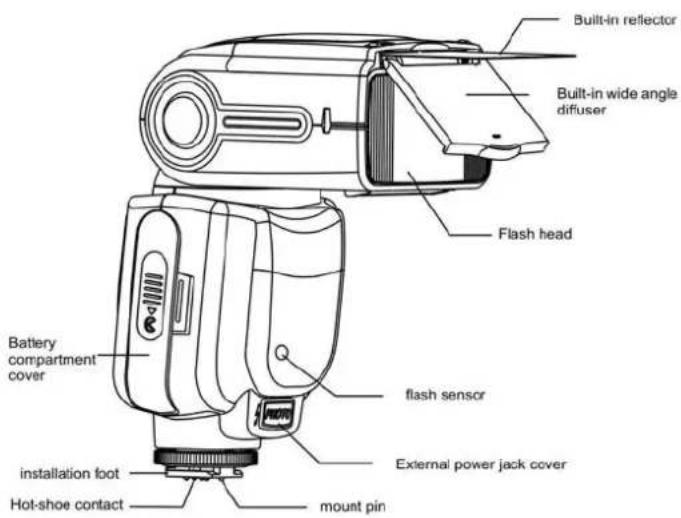
text_image
Built-in reflector Built-in wide angle diffuser Flash head Battery compartment cover flash sensor external power jack cover installation foot hot-shoe contact mount pin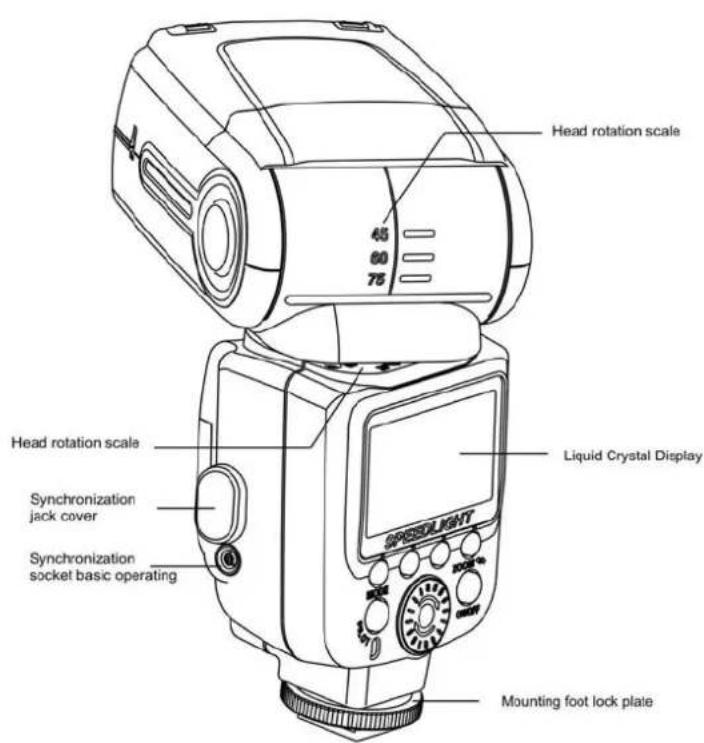
text_image
Head rotation scale 65 80 75 Head rotation scale Liquid Crystal Display SPEEDLIGHT Synchronization jack cover Synchronization socket basic operating Mounting foot lock plate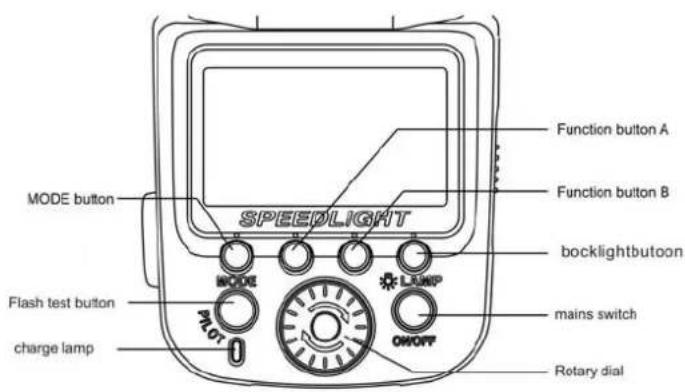
text_image
MODE button SPEEDLIGHT Function button A Function button B bocklightbutoon Flash test button charge lamp PLOT LAMP mains switch ONOFF Rotary dial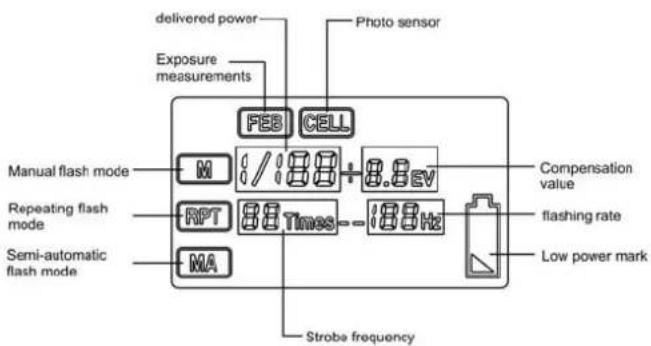
text_image
delivered power Photo sensor Exposure measurements FEB CELL Manual flash mode M / 188 + 8.8 EV Repeating flash mode RPT 88 Times - 188 Hz Semi-automatic flash mode MA Compensation value flashing rate Low power mark Strobe frequencyFOURTH,
BASIC OPERATING
FIRST STEP:INSTALLING THE BATTERIES
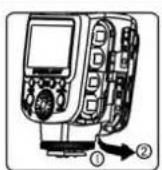
1, open the battery compartment cover.
According to the direction of arrow to slid the battery cover, then open

2, Put into the batteries
According to the battery icon in the bulkhead [+] and [-] signs into the battery, make sure the battery positive and negative contacts are correctly oriented.
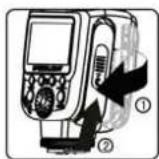
- Close the battery cover
Sliding direction of the arrow battery cover, turn it off
Applicable battery
●Insert the four following types of batteries AA type cartridge
1. Alkaline manganese batteries battery (1.5V)
2. Lithium battery (1.5V) 3.Oxyride battery (1.5V)
3.Ni-MH (nickel-hydride) battery (1.2V)
●When change batteries, use same and same brand battery.
●due to the irregular shape of the battery contacts, use alkaline batteries other than AA batteries may cause poor contact.
●If you change the battery after the several continuous flashing, please be careful.
SECOND STEP: PUT THE FLASH ON THE CAMERA
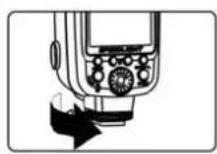
- Prepare to fix flash.
Rotating the locking plate up to the highest point as the marked arrow.

- Install the flash
Installing the flash light's mounting support into the hot shoe of camera.
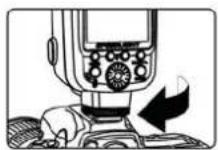
- locking flash.
Tightening the locking plate as the marked arrow.

- Remove the flash
Rotating the locking plate up to the highest point, then remove the flash from the hot shoe.
●Note: Make sure the flash and camera body are turned off
● Do not forcibly pull out force
THE THIRD STEP: TURN ON THE POWER
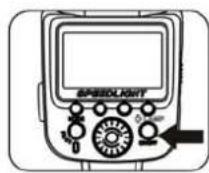
- turn on the power Press power button (ON / OFF) for two seconds to turn on the power.
- turn off the power Press power button (ON / OFF) for two seconds to turn off the power.
●Notice: Remove the battery should be preceded by the flash off the power.
● To save battery power, the flash will be idle for 3 minutes into sleep, when the LCD screen off. Wake up the flash, press the flash test button.
●When test flash, press (PILOT) test button.
Extended Interface
External power supply by extending the interface and complete PC synchronization
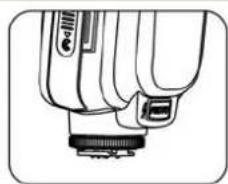
natural_image
Line drawing of a handheld device with a connector and ports (no text or symbols)- the external power connector
Connect the external power supply: provides more adequate power supply.
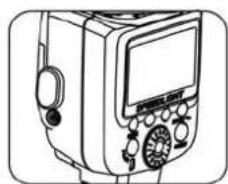
natural_image
Line drawing of a handheld electronic device with control panel and display (no text or symbols)- Connected PC Sync
To PC sync cable: Synchronized with the camera flash to flash.
MANUAL MODE
When you need manual exposure, you can set the flash to manual exposure mode, and you can select 1/1--1/128 different exposure output, and can press the zoom button (ZOOM), into the manual zoom, in order to meet the creative requirements.
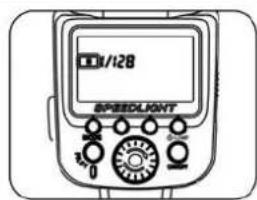
text_image
1/128 SPEEDLIGHT1、Selecting a flash mode
-
Press the mode button (MODE)
-
Press the mode button (MODE)

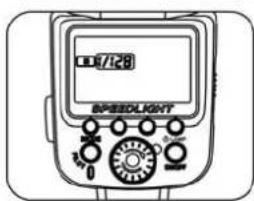
text_image
10/128 BPEEDLIGHT-
power settings.
-
Press function button B, set the flash output successively power.
-
according to the function button B, set the flash output power.
(1) Rotate the dial clockwise, the flash output in turn increases
icon: 1 / 128 → 1 / 128 +0.3 EV → 1 / 128 +0.7 EV ... 1 / 1
(2) Rotate dial, turn the flash output power successively decreases.
Icon: 1 / 1 → 1/1-0.3EV → 1/1-0.7EV → 1 / 2 ... 1 / 128
REPEATING FLASH MODE
Repeating flash mode, flash repeatedly during a single exposure, creating stroboscopic multiple -exposure effect. When shooting fast-moving subjects, this mode is very useful. In a repeat of the flash mode, single exposure during repeated flash strobe, create multiple exposure effect.. this model is very useful when quick shot moving subjects
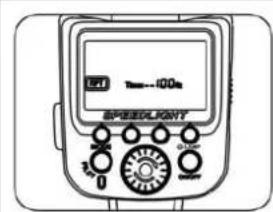
text_image
1.41 1mm~100m SPEEDLIGHT 3.0 0 200V 500V-
set the repeat flash mode
-
Press the Mode button (MODE).
-
until the LCD display
2、camera settings
The camera's exposure mode to "M" (Manual)
3、Frequency setting
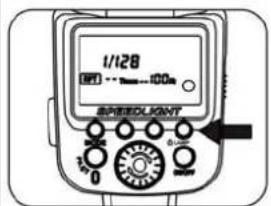
Press the function button B to display flashing, rotate the dial to set the frequency. Free flash frequency of 1HZ - 100HZ
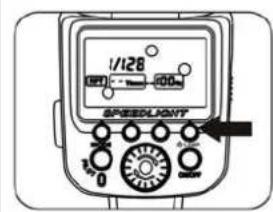
text_image
1/128 SPEEDLIGHT 0 0.000 0.000 0.000 0.000 0.000- set the number of flashes
Press the function button B to display Three flashing, rotate the dial to set the flash capacity. Number of flashes available for the 1Times-40 Times.
5、Exposure power setting.
Press the function button B to the LCD screen 1/128 flashes, rotate the dialto set the flash power
text_image
1/128 OFF → 100 SPEEDLIGHT 0 0.5m| Flash power and flash the number of relational tables | ||||||
| Flash power | 1/128 | 1/64 | 1/32 | 1/16 | 1/8 | 1/4 |
| Number of flashes | 1-40 | 1-20 | 1-12 | 1-8 | 1-4 | 1-2 |
● Always use fresh or fully charged battery, and repeat the flash operation two times have plenty of time to flash when the line call back.
●This mode uses a slower shutter speed, it is recommended to use a tripod to prevent camera / flash shake.
● Display the flash shooting distance for the selected output and aperture.
SEMI-AUTOMATIC FLASH MODE
text_image
1/128 SPEEDLIGHT-
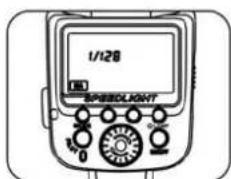
Setting up semi-automatic flash mode
-
Pressing button (MODE).
-
until MA is displayed on the LCD

2、Three type exposure function setting
-
Pressing button A until 📄 flickering on the LCD.
-
Rotating rotary dial plate to choose turn on or turn off.
-
When 📄 flicker, Please press button B and rotate dial plate to set
three type of surround flash power then press button B again to confirm.
The range of surround flash power:
1/64 ± 0.3EV → 1/64 ± 0.7EV → 1/32 ± 0.3EV...
1/2 ± 0.7EV
text_image
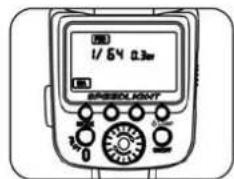
1/54.03m SPEEDLANTNoted: If three times surround flash power is 1/64 0.3EV. The flash exposure will take in turn among 1/64 0.3EV, 1/64 -0.3EV, 1/64 +0.3EV.
Diagram of three times surround flash power

This flash light include wireless sensor, can be used as a subordinate flash light or MCU(main control unit), it can provide two different kinds of subordinate mode. When it need to work without mounting in a camera or work with other flash units, mode CELL1/CELL2 can be choice.
text_image
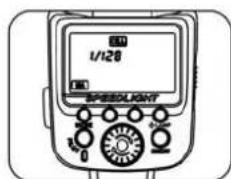
1/120 SPEEDLIGHTMode CELL1/CELL2
-
Pressing function button A until CELL display on the LCD
-
Rotating rotary dial plate to choose CELL1, CELL2 turn on or turn off.
-
Pressing button B and rotating rotary dial plate to set induction flash power when CELL1 or CELL2 are displaying.
The range of induction flash power:
1/128→1/128+0.3EV→1/128+0.7EV→1/64→1/64+0.3EV...1/1
Noted: when turn on FEB CELL in the same time, only CELL1 can be chose otherwise it will be turn off.
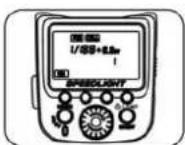
Wireless trigger mode CELL1
-
Pressing function button (MODE) until MA is displayed on the LCD.
-
Pressing function button A until CELL flickering on the LCD.
-
Rotating rotary dial plate choose CELL1.
Under mode CELL1, it will sync flash with the MCU (main control unit) when the first time, the effect is same as triggered by wireless trigger. If you want to work under this mode please set your MCU as manual flash. TTL flash system and RED EYE reduce function are not advised under this mode. NaviTM Roller is used for adjusting output flash intension.
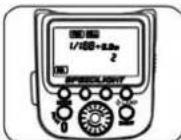
Wireless trigger mode CELL2
-
Pressing function button (MODE) until MA is displayed on the LCD.
-
Pressing function button A until CELL flickering on the LCD.
-
Rotating rotary dial plate choose CELL2.
Under mode CELL2, can work with MCU under mode TTL. When it cannot sync flash with MCU under mode CELL1 please turn to mode CELL2.NaviTM Roller is used for adjusting output flash intension.
SIXTH, ADVANCED APPLICATIONS
■ Automatic AF(assist lamp)
When working under a darkness condition, the automatic AF which is in the right ahead of flash light may temporary project red hard light to assist automatic focusing.
It may disturb people who is shot, you can close it in the optional function menu or turn to manual focusing.
■ Adjusting direction.
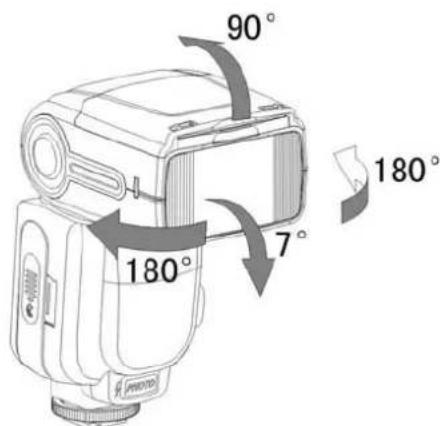
text_image
90° 180° 7° 180°This flash light can rotate up to 90 degree and down to 7 degree. And horizontal rotating 360 degree. Rotating the flash to the ceiling or wall can make your works more natural.
USING BUILT-IN REFLECT CARD
When under reflection flash shooting, using built-in reflect card to make shooting item's eyes more bright, sharp, and can avoid lighting the front of the shooting item.
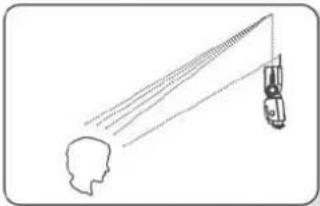
natural_image
Simple line drawing of a human head silhouette with a car-mounted sensor or antenna, no text or symbols present.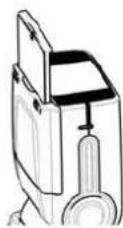
-
Rotating the head of flash light up to 90 degree.
-
Pull-out wide angle spread board and reflect card.
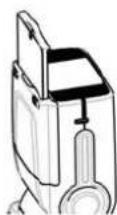
- Pull-in wide angle spread board and leave reflect card.
UINSG BUILT-IN WIDE PANEL
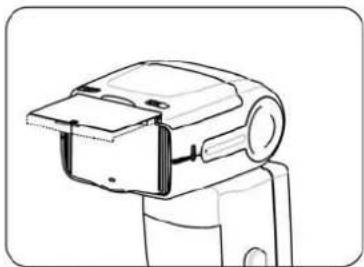
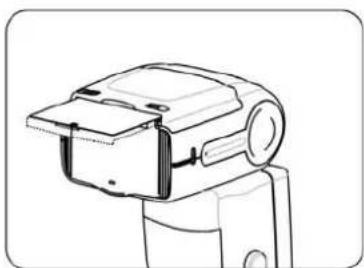
When distance less than 2m from camera to main part, the wide panel to shooting to get nauter photos. Also, Built-in wide flash diffusion plate can be extended to wide-angle coverage
natural_image
Line drawing of a mechanical device with no visible text or symbols- pull-out built-in wide panel. Slowly and completely pull-out built-in wide panel, and then put on the speedlite head
natural_image
Line drawing of a mechanical device with no visible text or symbols2、Push in reflector plate And pull-out reflector plate and then push in the speedlite head ..
Adjust speedlites head to slope, whirl angel and choose reflection plane.
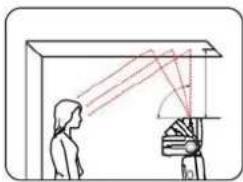
natural_image
Diagram showing light rays reflecting off a curved surface with a human silhouette (no text or symbols)When speedlite head pickuped and the ceiling as a reflection. Usuall, we can use the simplest to get the best effect.
Holding the camera and horizontal turning plate to get the same effect. Please attention, please don't use the speedlite head's falshing direct shine to the body.
The effective distance about form 1 m to 2 m between speedlite head and reflection plane.
When shooting colour photos, please choose white or stong reflection pain to flashing.
Else ,shoot photos will be not very good and near the reflection palne's colour .
Using the lambency to shooting.
Fix the TRIPO lambency shade on the speedlite ,the reflect lighting will be solw fire to cause the soft light to get no shadow .
It will be the same effect as any camera in level or portrait position. When the speedlite in 60 degree, it will be get good effects.
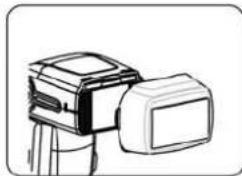
natural_image
Line drawing of a camera with lens and screen (no text or symbols)As picutre, fix TRIOPO lambency shade
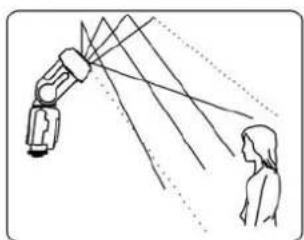
natural_image
Diagram showing a robotic arm projecting light rays to a human silhouette, with no text or symbols present.Using TRIOPO lambency shade manual The distance from camera to body is different in the center of camera aperture and around. So, the around light will be not enough.
1、Using built-in seedlite or external speedlite as a main light
Use the speed light by different type to do different angle
When be used, wireless signal can be refelct by wall in door. So the whirl vice speed light has more space.
Using the vic speed light, please test S1 or S2 model whether is synchronous before photography.
please don't put any arriers between the main and vice speed light. The arrier prevent to send wireless signal.
Imporved Optic control sensor, the wireless optic contrl will be higher. The S1/S2 model can be worked in outdoor. The distance of optic contrl sensor is 15 meters. When in outdoor, the optic contrl sensor needed main speed light, the speed light can't be used in sunshine. If your speed light shine's position had clashed. Please whirl the head of speed light to satisfy photography request.
2.high-speed burst mode
The speed light can be high-speed burst function. Plesae set camera into burst mode, and then shooting.
Please attention : the photos quantity in connection with brightness.so please keep enough battery power.
3. Trailing-shutter curtain function
You can use solwly shutter for photo shooting thing to create trailing smear. This is Trailing-shutter curtain (Trailing-shutter curtain needed camre to supprot. If you need to set way, please according to your carmer's instruction manual.).
4.reflect falsh
Reflect falsh means the head fo speed light point wall or ceiling . and then reflect back to cause light to lighten thing to shooting .the dashed will be reduced to arrive the best shooting result .
If wall or ceiling too far reflect falsh possilbe too low to cause underexposure. Please choose the white ,falt 's wall or ceiling so that can be get high-reffect .If the relect surface is not white ,the photo will be appered colour cast.
5. Using(reflect board) flashing
please take out the (refect board) and (Built-in wide panel) from speed light head, push-back(Built-in wide panel). Using this type to shooting, the main eye can be caused high light point. Let someone 's eye will be more beautiful. This function will be get the best effect via speed light to adjust an angel of 90 degree.
6. Using (Built-in wide panel)
Please pull-out (Built-in wide panel) and push-back (reflect board), according to the picure to operation, the flash rang will be fash at the same time. The effect will be softly and nature.
SEVENTH, PARAMETER ACCESSORIES
Circuit design: Insulated Gate Bipolar Transistor(IGBT)
Flash index:35meters(ISO 100, 35 MM)
Up and down whirl angle degree :0 -90 degree
Left and right whirl angle degree; 0–360 degree
Flash control: 8 grade high-speed control(1/128-1/1)
Recycle time: about 3 seconds(using AA alkaline cell)
peripheral interface: hot shoe. PC mount, external charge mount
Power: 4 pcs AA alkaline cell or AA nickel -hydrogen(NI-MH) battery
Lighting time: 100–1500 times (using AA alkaline cell)
Wireless distance: indoor 20–30 meters, outdoor 10–15 meters
Additional function: PC synchronous, sniff mode, overtemperature protection
Volume:200*75*57mm
Net weight :340 g
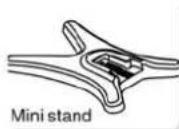
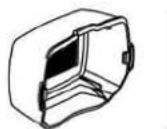
speed light.
protect (1)
protect bag (1)
mini stand (1)
instrucation manual (1)