
AT11 - Auto Halterung PHILIPS - Kostenlose Bedienungsanleitung
Finden Sie kostenlos die Bedienungsanleitung des Geräts AT11 PHILIPS als PDF.


| Produkttyp | Tragbarer Lautsprecher |
| Marke | Philips |
| Modell | AT11 |
| Abmessungen (B x H x T) | 238 x 108 x 125 mm |
| Gewicht | 0,69 kg |
| Stromversorgung | 5 V, 1000 mA über Micro-USB |
| Akku | 3,7 V, 2000 mAh Lithium-Polymer |
| Bluetooth-Version | 3.0+EDR |
| Bluetooth-Reichweite | ca. 10 m (freie Sicht) |
| FM-Tuner | 87,5 – 108 MHz |
| Audioeingang | 3,5 mm Klinke |
| SD-Kartensteckplatz | Ja (SD/SDHC) |
| USB-Anschluss | Ja (USB 2.0) |
| Ausgangsleistung | 3 W |
| Frequenzbereich | 60 – 20000 Hz |
| Signal-Rausch-Verhältnis | >70 dBA |
| EQ-Modi | DRC, Normal, Pop, Rock, Jazz, Classic |
| Energieverbrauch Standby | <0,5 W |
| Lieferumfang | Hauptgerät, USB-Kabel, Bedienungsanleitung |
Häufig gestellte Fragen - AT11 PHILIPS
Benutzerfragen zu AT11 PHILIPS
0 Frage zu diesem Gerät. Beantworten Sie die, die Sie kennen, oder stellen Sie Ihre eigene.
Eine neue Frage zu diesem Gerät stellen
Laden Sie die Anleitung für Ihr Auto Halterung kostenlos im PDF-Format! Finden Sie Ihr Handbuch AT11 - PHILIPS und nehmen Sie Ihr elektronisches Gerät wieder in die Hand. Auf dieser Seite sind alle Dokumente veröffentlicht, die für die Verwendung Ihres Geräts notwendig sind. AT11 von der Marke PHILIPS.
BEDIENUNGSANLEITUNG AT11 PHILIPS
PHILIPS
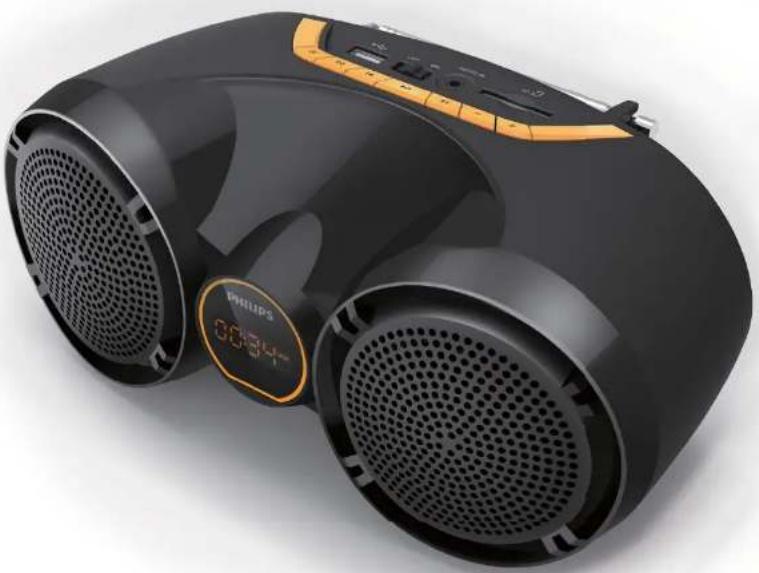
Tragbarer Lautsprecher
AT11/94
Benutzerhandbuch
Registrieren Sie Ihr Produkt und erhalten Sie Unterstützung unter www.philips.com/welcome
Inhalt
1 Inhalt 2 2 Wichtig 3 3 Ihr tragbarer Lautsprecher 4
Einführung 4 Lieferumfang 4 Produktübersicht 5
Erste Schritte 6 Stromversorgung 6 Ein- oder Ausschalten 6 Quelle auswählen 6
4 Wiedergabe 7
Bluetooth-Betriebsanleitung 7 Wiedergabe von SD-Karte oder USB-Gerät 8 FM-Radio hören 9 Wiedergabe von externem Gerät 9 Lautstärke einstellen 9
5 Produktinformationen 10
Technische Daten 10 Informationen zur USB-Wiedergabe 10
6 Fehlerbehebung 11
Über Bluetooth-Geräte 11
7 Hinweis 12
Umweltschutz 12 Markenrechtlicher Hinweis 12
8 Garantie 13
Wichtig

Warnung
• Entfernen Sie niemals das Gehäuse dieses Produkts. • Schmieren Sie niemals Teile dieses Produkts. • Stellen Sie dieses Produkt niemals auf andere elektrische Geräte. - Halten Sie dieses Produkt von direkter Sonneneinstrahlung, offenen Flammen oder Hitze fern.
• Lesen Sie diese Anleitung. • Befolgen Sie alle Anweisungen. • Verwenden Sie dieses Gerät nicht in der Nähe von Wasser. - Blockieren Sie keine Belüftungsöffnungen. Installieren Sie es gemäß den Anweisungen des Herstellers. - Installieren Sie es nicht in der Nähe von Wärmequellen wie Heizkörpern, Heizregistern, Öfen oder anderen Geräten (einschließlich Verstärkern), die Wärme erzeugen. • Verwenden Sie nur vom Hersteller angegebene Aufsätze/Zubehör. - Überlassen Sie alle Wartungsarbeiten qualifiziertem Fachpersonal. Wartung ist erforderlich, wenn das Gerät in irgendeiner Weise beschädigt wurde, z. B. wenn Flüssigkeit verschüttet wurde oder Gegenstände in das Gerät gefallen sind, das Gerät Regen oder Feuchtigkeit ausgesetzt war, nicht normal funktioniert oder fallen gelassen wurde. • Der Akku darf keiner übermäßigen Hitze wie Sonnenschein, Feuer oder Ähnlichem ausgesetzt werden. • Das Gerät darf nicht tropfendem oder spritzendem Wasser ausgesetzt werden. • Stellen Sie keine Gefahrenquellen auf das Gerät (z. B. mit Flüssigkeit gefüllte Gegenstände, brennende Kerzen).

Hinweis
• Das Typenschild befindet sich auf der Unterseite des Geräts.
Ihr tragbarer Lautsprecher
Herzlichen Glückwunsch zu Ihrem Kauf und willkommen bei Philips! Um den vollen Nutzen aus dem Support von Philips zu ziehen, registrieren Sie Ihr Produkt unter www.philips.com/welcome.
Einführung
Mit diesem Lautsprecher können Sie:
- FM-Radio hören; und
• Audio von SD/SDHC-Karte, USB-Geräten, Bluetooth-fähigen Geräten und anderen externen Geräten genießen.
Lieferumfang
Überprüfen und identifizieren Sie den Inhalt Ihrer Verpackung:
- Hauptgerät
• USB-Kabel zum Aufladen
- Benutzerhandbuch
Ihr tragbarer Lautsprecher
Übersicht über das Produkt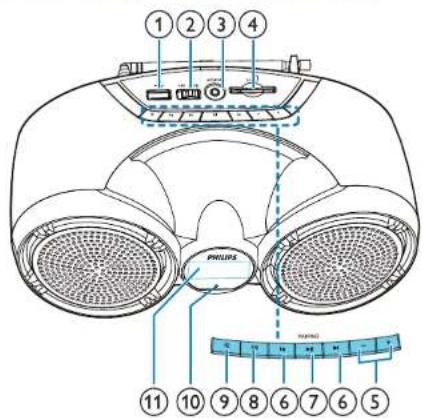
①

- Schließen Sie ein USB-Speichergerät an.
②
EIN/AUS-Schalter
• Schalten Sie das Produkt ein oder aus.
③
AUDIO IN
- Schließen Sie ein externes Audiogerät an.
④
SD
- Schließen Sie eine SD/SDHC-Karte an.
5
-/+
- Lautstärke einstellen.
⑥
◀/▶
- Titel auswählen.
• Innerhalb der Wiedergabe suchen.
• Im FM-Modus drücken, um einen gespeicherten Radiosender auszuwählen.
⑦ ▶II/PAIRING
• Im SD-, USB- oder Bluetooth-Modus drücken, um die Wiedergabe zu pausieren oder fortzusetzen.
• Im Bluetooth-Modus drei Sekunden lang gedrückt halten, um die Bluetooth-Verbindung zu trennen oder den Pairing-Modus zu aktivieren.
- Im FM-Modus zwei Sekunden lang gedrückt halten, um automatisch nach UKW-Radiosendern zu suchen.
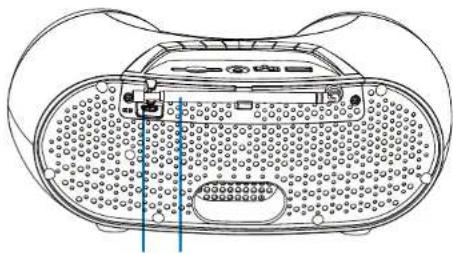
13 12
⑧ EQ
• Wählen Sie einen anderen Soundeffekt-Modus.
⑨ SOURCE
- Wählen Sie eine Audioquelle.
⑩ Ladeanzeige
• LED leuchtet während des Ladens des Akkus
⑪ Display
• Zeigt den aktuellen Status an.
⑫ FM-Antenne
- Verbessert den UKW-Radioempfang.
⑬ DC 5V
• Laden Sie den eingebauten Akku auf.
Erste Schritte
Befolgen Sie immer die Anweisungen in diesem Kapitel in der Reihenfolge. Wenn Sie sich an Philips wenden, werden Sie nach Modell- und Seriennummer dieses Geräts gefragt. Die Modell- und Seriennummer befinden sich auf der Unterseite des Geräts. Notieren Sie die Nummern hier:
Modell-Nr. ____ Serien-Nr. ____
Stromversorgung
Das Produkt wird mit dem eingebauten wiederaufladbaren Akku betrieben.

Hinweis
- Der wiederaufladbare Akku hat eine begrenzte Anzahl von Ladezyklen. Akkulaufzeit und Anzahl der Ladezyklen variieren je nach Nutzung und Einstellungen.
So laden Sie den eingebauten Akku auf:
Schließen Sie das mitgelieferte USB-Kabel an:
• die DC-5V-Buchse auf der Rückseite des Produkts. • die USB-Buchse eines Computers.
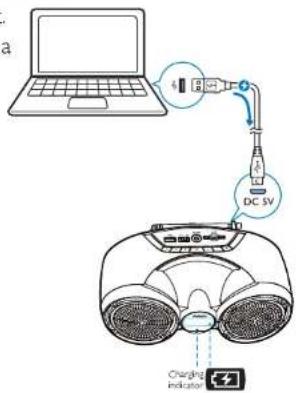
| Battery status | Battery icon ( ☑ ) behavior |
| Low battery | Flashing |
| While charging | Charging indicator on |
| Fully charged or charging stopped | Off |
Ein- und Ausschalten
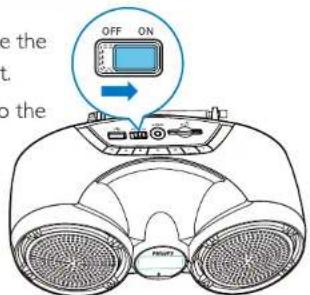
• Um das Produkt einzuschalten, schieben Sie den OFF/ON-Schalter nach rechts.
→ Das Produkt wechselt zur zuletzt gewählten Quelle.
• Um das Produkt auszuschalten, schieben Sie den Schalter nach links.
Wechsel in den ECO-Standby-Modus
Im SD-, USB-, Audio-In- oder Bluetooth-Modus wechselt das Produkt in den ECO-Standby-Modus automatisch in den folgenden Situationen:
• Die Musikwiedergabe wird für 15 Minuten gestoppt; • Es ist für 15 Minuten keine Micro-SD-Karte, kein USB-Gerät oder kein Audio-In-Kabel angeschlossen; oder • Die Bluetooth-Verbindung wird für 15 Minuten getrennt.
So kehren Sie zum SD-/USB-/Audio-In-/Bluetooth-Modus zurück:
• Drücken Sie ▶II, um die Wiedergabe fortzusetzen; oder - Schieben Sie den Schalter, um das Produkt zuerst auszuschalten und dann wieder einzuschalten.
Eine Quelle auswählen
Drücken Sie wiederholt SOURCE, um eine Audioquelle auszuwählen: FM-Tuner, USB, SD-Karte, Bluetooth oder AUDIO IN.
Bedienungsanleitung für Bluetooth
Mit diesem Produkt können Sie Audio von Bluetooth-fähigen Geräten hören.
Ein Gerät verbinden

Hinweis
• Stellen Sie sicher, dass Ihr Bluetooth-Gerät mit diesem Produkt kompatibel ist. - Lesen Sie vor dem Koppeln eines Geräts mit diesem Produkt dessen Benutzerhandbuch zur Bluetooth-Kompatibilität. • Stellen Sie sicher, dass die Bluetooth-Funktion auf Ihrem Gerät aktiviert ist und Ihr Gerät für alle anderen Bluetooth-Geräte sichtbar ist. - Jedes Hindernis zwischen diesem Produkt und einem Bluetooth-Gerät kann die Betriebsreichweite verringern. - Halten Sie sich von anderen elektronischen Geräten fern, die Störungen verursachen können. • Die Betriebsreichweite zwischen diesem Produkt und einem Bluetooth-Gerät beträgt ungefähr 10 Meter (30 Fuß).
1 Drücken Sie wiederholt SOURCE, um die Bluetooth-Quelle auszuwählen. → [bt] blinkt auf dem Display. 2 Halten Sie PAIRING 3 Sekunden lang gedrückt, um den Bluetooth-Kopplungsmodus zu aktivieren. 3 Aktivieren Sie auf Ihrem Bluetooth-Gerät Bluetooth und suchen Sie nach Bluetooth-Geräten (siehe Benutzerhandbuch des Geräts). 4 Suchen Sie für die Kopplung mit einem Mobiltelefon oder anderen Bluetooth-Geräten nach dem Gerät mit dem Namen "Philips AT11" und koppeln Sie es. Geben Sie bei Bedarf das Standardkennwort "0000" ein. → Nach erfolgreicher Kopplung und Verbindung piept das Produkt und [bt] blinkt nicht mehr.
So trennen Sie das Bluetooth-fähige Gerät:
• Halten Sie PAIRING 3 Sekunden lang gedrückt; • Deaktivieren Sie Bluetooth auf Ihrem Gerät; oder - Bewegen Sie das Gerät außerhalb der Kommunikationsreichweite. → Das Produkt piept und [bt] beginnt zu blinken.
So verbinden Sie das Bluetooth-fähige Gerät erneut:
- Wenn dieses Produkt in den Bluetooth-Modus wechselt, verbindet es automatisch das zuletzt verbundene Gerät erneut; oder
- Wählen Sie auf Ihrem Bluetooth-Gerät "Philips AT11" in Ihrem Bluetooth-Menü, um die Verbindung zu starten.
So verbinden Sie ein anderes Bluetooth-fähiges Gerät:
1 Halten Sie PAIRING 3 Sekunden lang gedrückt, um das aktuell verbundene Gerät zu trennen. → Das Produkt wechselt in den Bluetooth-Kopplungsmodus. 2 Verbinden Sie ein anderes Bluetooth-Gerät.
Wiedergabe vom Bluetooth-Gerät
Nach erfolgreicher Bluetooth-Verbindung spielen Sie Audio auf dem Bluetooth-Gerät ab.
→ Audio wird von Ihrem Bluetooth-Gerät zum Produkt gestreamt.
Wiedergabe
Wiedergabe von einer SD-Karte oder einem USB-Gerät

Hinweis
• Stellen Sie sicher, dass das USB-Speichergerät oder die SD-Karte abspielbare Audioinhalte enthält.
Wiedergabe von einer SD-Karte
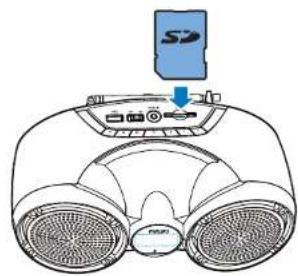
1 Drücken Sie wiederholt SOURCE, um die SD-Kartenquelle auszuwählen. → [SD] wird angezeigt.
2 Stecken Sie eine SD/SDHC-Karte in den Kartensteckplatz. → Die Wiedergabe startet automatisch.
Wiedergabe von einem USB-Speichergerät
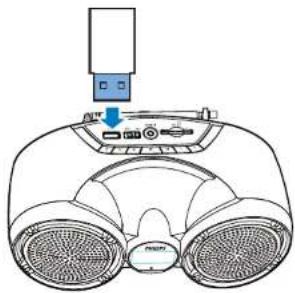
1 Drücken Sie wiederholt SOURCE, um die USB-Quelle auszuwählen. → [USB] wird angezeigt. 2 Stecken Sie das USB-Gerät in den Anschluss. → Die Wiedergabe startet automatisch.
Wiedergabe steuern
Im USB- oder SD-Modus befolgen Sie die folgenden Anweisungen, um die Wiedergabe zu steuern.
Taste Funktion
Drücken Sie, um zum vorherigen oder nächsten Titel zu springen. Halten Sie die Taste gedrückt, um während der Wiedergabe schnell vor- oder zurückzuspulen, und lassen Sie sie dann los, um die Wiedergabe fortzusetzen.
▶II Drücken Sie, um die Wiedergabe zu starten, zu pausieren oder zu stoppen.
Taste Funktion
ED Drücken Sie wiederholt, um einen EQ-Effekt auszuwählen:
• [drc]: Dynamikbereichskompensation. • [nor]: normale Dynamik. • [POP]: Pop-Sound. • [ROC]: Rock and Roll. • [JAZ]: Jazz • [Cut]: Standard-Effekt (Standard-EQ). • Hinweis: FM ohne EQ-Funktion.
Wiedergabe
FM-Radio hören
FM-Radiosender einstellen

Hinweis
- Halten Sie das Produkt von anderen elektronischen Geräten fern, um Funkstörungen zu vermeiden.
1 Die FM-Antenne vollständig ausziehen.
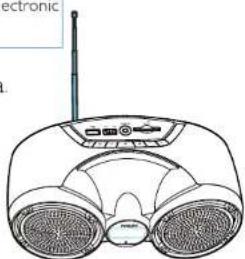
2 Drücken Sie wiederholt SOURCE, um die FM-Tunerquelle auszuwählen. 3 Halten Sie ◀/▶ zwei Sekunden lang gedrückt.
→ Das Produkt stimmt automatisch auf einen Sender mit starkem Empfang ab.
Wiederholen Sie Schritt 3, um weitere Radiosender einzustellen.
UKW-Radiosender automatisch speichern

Hinweis
• Sie können maximal 20 Radiosender als Presets speichern.
Halten Sie im UKW-Tunermodus ▶II zwei Sekunden lang gedrückt. Alle verfügbaren Radiosender werden automatisch gespeichert, danach wird der erste gespeicherte Sender ausgestrahlt.
Einen Radiosender als Preset auswählen
Drücken Sie im Tunermodus wiederholt ◀/▶I, um einen vorherigen/nächsten Sender auszuwählen.
Wiedergabe von einem externen Gerät
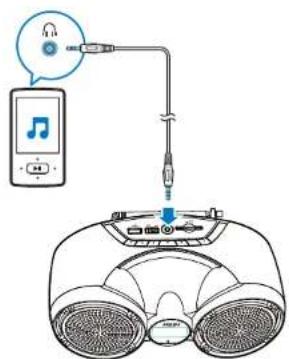
Mit diesem Produkt können Sie ein externes Audiogerät wie einen MP3-Player anhören.
1 Drücken Sie wiederholt SOURCE, um die AUX-Quelle auszuwählen. 2 Verbinden Sie ein Audiokabel mit 3,5-mm-Steckern an beiden Enden mit der AUDIO IN-Buchse am Produkt und der Kopfhörerbuchse des externen Geräts. 3 Spielen Sie Audio auf dem Gerät ab (siehe dessen Bedienungsanleitung).
Lautstärke einstellen
Drücken Sie während der Wiedergabe -/+, um die Lautstärke zu verringern oder zu erhöhen.

Tipp
- Sie können -/+ zwei Sekunden lang gedrückt halten, um die Lautstärke kontinuierlich zu verringern oder zu erhöhen.
Produktinformationen

Hinweis
• Produktinformationen können ohne vorherige Ankündigung geändert werden.
Technische Daten Verstärker
| Total Output Power | 3 W |
| Frequency Response | 60 -20000 Hz, ±3 dB |
| Signal to Noise Ratio | >70 dBA |
| Aux Input | 500mV RMS 10kohm |
Tuner (FM)
| Tuning Range | FM: 87.5-108 MHz |
| Tuning Grid | 100 KHz |
| - Mono, 26dB S/N Ratio | <22 dBf |
| - Stereo, 46dB S/N Ratio | >43 dBf |
| Search Selectivity | >28 dBf |
| Total Harmonic Distortion | <2% |
| Signal to Noise Ratio | >55dB |
Bluetooth
| Bluetooth Version | V3.0+EDR |
| Bluetooth Frequency Band | 2.402GHz ~ 2.48GHz ISM Band |
| Bluetooth Distance | 10 m (Free space) |
Lautsprecher
| Speaker Impedance | 3 ohm |
| Speaker Driver | 3" full range |
| Sensitivity | >82dB±3dB/m/W |
Allgemeine Informationen
| Power Supply (through Micro USB socket) | 5 V == 1000 mA |
| Built-in Battery (Li-polymer battery) | 3.7 V, 2000 mAh |
| MP3 bit rates | 32 - 320 kbps |
| Eco Standby Power Consumption | <0.5 W |
| Dimensions - Main Unit (W x H x D) | 238 x 108 x 125 mm |
| Weight - Main Unit | 0.69 kg |
Informationen zur USB-Wiedergabe
Kompatible USB-Geräte:
• USB-Speichersticks (USB2.0) • USB-Player (USB2.0) • Speicherkarten (erfordert einen zusätzlichen Kartenleser für die Verwendung mit diesem Gerät; einige Multi-Karten-USB-Leser werden möglicherweise nicht unterstützt.)
Unterstützte Formate:
• USB- oder Speicherdateiformat: FAT12, FAT16, FAT32 (Sektorgröße: 512 Bytes) • MP3-Bitrate (Datenrate): 32-320 Kbit/s und variable Bitrate • Verzeichnisverschachtelung bis maximal 8 Ebenen • Anzahl der Alben/Ordner: maximal 99 • Anzahl der Titel/Tracks: maximal 999 • Dateiname in Unicode UTF8 (maximale Länge: 16 Bytes)
Fehlerbehebung

Warnung
• Entfernen Sie niemals das Gehäuse dieses Geräts.
Um die Garantie nicht zu beeinträchtigen, versuchen Sie niemals, das System selbst zu reparieren. Wenn Sie bei der Verwendung dieses Geräts auf Probleme stoßen, prüfen Sie die folgenden Punkte, bevor Sie den Kundendienst anfordern. Wenn das Problem weiterhin besteht, besuchen Sie die Philips-Website (www.philips.com/support).
Wenn Sie sich an Philips wenden, stellen Sie sicher, dass das Gerät in der Nähe ist und Modellnummer sowie Seriennummer verfügbar sind.
Keine Stromversorgung
• Laden Sie den Akku auf.
Kein Ton oder schlechter Ton
• Stellen Sie die Lautstärke an diesem Produkt ein. • Stellen Sie die Lautstärke am angeschlossenen Gerät ein. • Prüfen Sie, ob Sie die richtige Audioquelle ausgewählt haben.
Keine Reaktion des Produkts
• Schalten Sie das Produkt ein. • Laden Sie den Akku auf. • Schalten Sie das Produkt zuerst aus und dann wieder ein, um es aus dem Standby-Modus zu aktivieren.
Schlechter Radioempfang
- Vergrößern Sie den Abstand zwischen dem Produkt und anderen elektrischen Geräten. • Ziehen Sie die FM-Antenne vollständig aus und positionieren Sie sie neu.
USB-Gerät wird nicht unterstützt
• Das USB-Gerät ist mit dem Gerät nicht kompatibel. Versuchen Sie ein anderes.
Über Bluetooth-Geräte
Die Audioqualität ist nach der Verbindung mit einem Bluetooth-fähigen Gerät schlecht.
• Der Bluetooth-Empfang ist schlecht. Bringen Sie das Gerät näher an dieses Produkt oder entfernen Sie Hindernisse zwischen ihnen.
Das Gerät AT11 wird auf Ihrem Gerät nicht zum Koppeln gefunden.
- Halten Sie PAIRING drei Sekunden lang gedrückt, und versuchen Sie es dann erneut.
Keine Verbindung mit dem Gerät möglich.
• Die Bluetooth-Funktion des Geräts ist nicht aktiviert. Lesen Sie im Benutzerhandbuch des Geräts nach, wie Sie die Funktion aktivieren. - Dieses Produkt ist bereits mit einem anderen Bluetooth-fähigen Gerät verbunden. Trennen Sie dieses Gerät und versuchen Sie es dann erneut.
Das gekoppelte Gerät verbindet und trennt sich ständig.
• Der Bluetooth-Empfang ist schlecht. Bringen Sie das Gerät näher an dieses Produkt oder entfernen Sie Hindernisse zwischen ihnen. - Bei einigen Geräten kann die Bluetooth-Verbindung als Energiesparfunktion automatisch deaktiviert werden. Dies deutet nicht auf eine Fehlfunktion dieses Produkts hin.
Hinweis
Änderungen oder Modifikationen an diesem Gerät, die nicht ausdrücklich von Gibson Innovations genehmigt wurden, können die Berechtigung des Benutzers zum Betrieb des Geräts aufheben.
Umweltschutz
Entsorgung Ihres alten Produkts und der Batterie
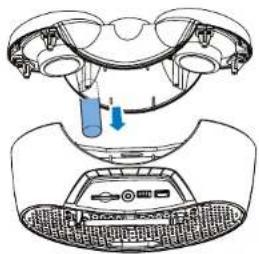
Wir empfehlen Ihnen dringend, Ihr Produkt zu einer offiziellen Sammelstelle oder einem Philips-Servicecenter zu bringen, um den Akku von einem Fachmann entfernen zu lassen. Informieren Sie sich über das örtliche getrennte Sammelsystem für elektrische und elektronische Produkte und Akkus.
Befolgen Sie die örtlichen Vorschriften und entsorgen Sie das Produkt und die Akkus niemals mit dem normalen Hausmüll. Die ordnungsgemäße Entsorgung alter Produkte und Akkus trägt dazu bei, negative Folgen für Umwelt und Gesundheit zu vermeiden.

Vorsicht
- Das Entfernen des eingebauten Akkus führt zum Verlust der Garantie und kann das Produkt beschädigen.
Bringen Sie Ihr Produkt immer zu einem Fachmann, um den eingebauten Akku entfernen zu lassen.
Umweltinformationen
Auf unnötige Verpackungen wurde verzichtet. Wir haben versucht, die Verpackung so zu gestalten, dass sie leicht in drei Materialien getrennt werden kann: Karton (Karton), Polystyrolschaum (Puffer) und Polyethylen (Beutel, Schutzfolie). Ihr System besteht aus Materialien, die recycelt und wiederverwendet werden können, wenn sie von einem spezialisierten Unternehmen zerlegt werden. Bitte beachten Sie die örtlichen Vorschriften zur Entsorgung von Verpackungsmaterialien, verbrauchten Batterien und Altgeräten.
Markenhinweis
Bluetooth
Die Bluetooth®-Wortmarke und -Logos sind eingetragene Marken von Bluetooth SIG, Inc. und werden von Gibson Innovations Limited unter Lizenz verwendet. Andere Marken und Handelsnamen sind Eigentum ihrer jeweiligen Inhaber.
Garantie
Dieser Philips Portable Speaker ist für einen Zeitraum von 12 Monaten ab dem Kaufdatum gegen alle Defekte aufgrund von Material- oder Verarbeitungsfehlern garantiert. Sollte während der Garantiezeit ein Defekt auftreten, verpflichtet sich Gibson Innovations India Private Limited, das Gerät KOSTENLOS an der Verkaufsstelle, an der das Produkt gekauft wurde, oder in einem der autorisierten Philips-Kundendienstzentren zu ersetzen.
Die Garantie ist nicht gültig in folgenden Fällen:
- Der Kaufbeleg liegt dieser Garantiekarte nicht bei.
- Die Garantiekarte wurde nicht unmittelbar nach dem Kauf ausgefüllt.
- Das Gerät wird nicht gemäß dieser Anleitung verwendet.
- Defekte werden durch unsachgemäße oder fahrlässige Verwendung verursacht.
- Reparaturen werden von anderen Personen als dem autorisierten Philips-Kundendienst durchgeführt.
- Die Seriennummer wurde manipuliert.
- Defekte aufgrund von Ursachen, die außerhalb der Kontrolle liegen, wie Blitzschlag, anormale Spannung, höhere Gewalt oder während des Transports zum Wohnsitz des Käufers.
Alle Verbrauchsmaterialien und Teile, die einem normalen Verschleiß unterliegen, sind von der Garantie ausgeschlossen.
Modell-Nr. ____ Produkt-Serien-Nr. ____
Rechnungs-Nr. Kaufdatum
Name und Adresse des Kunden: ____
Unterschrift und Stempel des Händlers
Fragen? Kontaktieren Sie Philips
Immer für Sie da
Besuchen Sie uns unter www.india.philips.com
Kontakt unter: 1860 180 1111, 1800 102 2929
Oder customercare.india@philips.com
Gibson Innovations India Private Limited 4. Etage, Block-1, Vatika Business Park, Sektor 49, Sohna Road, Gurgaon-122018, Haryana, Indien

Die Philips-Marke und das Philips-Schild-Emblem sind eingetragene Marken der Koninklijke Philips N.V. und werden unter Lizenz verwendet.
Dieses Produkt wurde von Gibson Innovation India Private Ltd. hergestellt und unter deren Verantwortung verkauft. Gibson Innovations India Private Ltd. ist der Garantiegeber für dieses Produkt.
AT11_94_UM_V1.0



- PHILIPS
- BENUTZERHANDBUCH
- INHALT
- WICHTIG
- WARNUNG
- HINWEIS
- IHR TRAGBARER LAUTSPRECHER
- EINFÜHRUNG
- LIEFERUMFANG
- ERSTE SCHRITTE
- STROMVERSORGUNG
- SO LADEN SIE DEN EINGEBAUTEN AKKU AUF
- EIN- UND AUSSCHALTEN
- WECHSEL IN DEN ECO-STANDBY-MODUS
- SO KEHREN SIE ZUM SD-/USB-/AUDIO-IN-/BLUETOOTH-MODUS ZURÜCK
- EINE QUELLE AUSWÄHLEN
- BEDIENUNGSANLEITUNG FÜR BLUETOOTH
- EIN GERÄT VERBINDEN
- SO TRENNEN SIE DAS BLUETOOTH-FÄHIGE GERÄT
- SO VERBINDEN SIE DAS BLUETOOTH-FÄHIGE GERÄT ERNEUT
- SO VERBINDEN SIE EIN ANDERES BLUETOOTH-FÄHIGES GERÄT
- WIEDERGABE VOM BLUETOOTH-GERÄT
- WIEDERGABE
- WIEDERGABE VON EINER SD-KARTE ODER EINEM USB-GERÄT
- WIEDERGABE VON EINER SD-KARTE
- WIEDERGABE VON EINEM USB-SPEICHERGERÄT
- WIEDERGABE STEUERN
- TASTE FUNKTION
- II DRÜCKEN SIE, UM DIE WIEDERGABE ZU STARTEN, ZU PAUSIEREN ODER ZU STOPPEN
- FM-RADIO HÖREN
- FM-RADIOSENDER EINSTELLEN
- UKW-RADIOSENDER AUTOMATISCH SPEICHERN
- EINEN RADIOSENDER ALS PRESET AUSWÄHLEN
- WIEDERGABE VON EINEM EXTERNEN GERÄT
- LAUTSTÄRKE EINSTELLEN
- PRODUKTINFORMATIONEN
- INFORMATIONEN ZUR USB-WIEDERGABE
- KOMPATIBLE USB-GERÄTE
- UNTERSTÜTZTE FORMATE
- FEHLERBEHEBUNG
- KEINE STROMVERSORGUNG
- KEIN TON ODER SCHLECHTER TON
- KEINE REAKTION DES PRODUKTS
- SCHLECHTER RADIOEMPFANG
- USB-GERÄT WIRD NICHT UNTERSTÜTZT
- ÜBER BLUETOOTH-GERÄTE
- DIE AUDIOQUALITÄT IST NACH DER VERBINDUNG MIT EINEM BLUETOOTH-FÄHIGEN GERÄT SCHLECHT
- DAS GERÄT AT11 WIRD AUF IHREM GERÄT NICHT ZUM KOPPELN GEFUNDEN
- KEINE VERBINDUNG MIT DEM GERÄT MÖGLICH
- DAS GEKOPPELTE GERÄT VERBINDET UND TRENNT SICH STÄNDIG
- UMWELTSCHUTZ
- ENTSORGUNG IHRES ALTEN PRODUKTS UND DER BATTERIE
- VORSICHT
- UMWELTINFORMATIONEN
- MARKENHINWEIS
- BLUETOOTH
- GARANTIE
- DIE GARANTIE IST NICHT GÜLTIG IN FOLGENDEN FÄLLEN
Marke : PHILIPS
Modell : AT11
Kategorie : Auto Halterung