
ICC-1418D - Taschenrechner SANYO - Kostenlose Bedienungsanleitung
Finden Sie kostenlos die Bedienungsanleitung des Geräts ICC-1418D SANYO als PDF.


| Produkttyp | Elektronischer Tischrechner |
| Modell | ICC-1418D |
| Marke | Sanyo |
| Anzeige | Vollbild-Fluoreszenzröhren (14-stellig), Nullunterdrückung, Minuszeichen-, Überlauf- und Batteriealarmanzeige |
| Dezimalpunkt | Fließender Eingang/Fester Ausgang, wählbar auf 0, 2, 3, 4, 6 Stellen; Auf-/Abrunden oder Abschneiden |
| Speicher | 1 unabhängiger Speicher mit Summenakkumulation (Sigma-Taste) |
| Kapazität | Addition/Subtraktion: max. 14 Ziffern ±, Multiplikation: max. 15 Ziffern (Faktor × Multiplikator), Division: max. 14 Ziffern (Dividend/Divisor), Ergebnis: max. 14 Ziffern |
| Funktionen | Grundrechenarten, Kettenmultiplikation/-division, Konstantenrechnung, gemischte Rechnung, Potenzrechnung, Produkt von Summe/Differenz, Kehrwert, Prozentrechnung, Steigerung/Minderung, Rechnungswesen (Rechnung, Abschreibung, proportionale Verteilung), Wahrscheinlichkeit, Kredit-, Zinseszinsrechnung, Polynome |
| Stromversorgung | Netzadapter (AC 8 W); eingebaute aufladbare Cadnica-Akkus (DC 6,2 V/7,8 V, 4,5 W) |
| Batterieladezeit | Mindestens 15 Stunden bei ausgeschaltetem Gerät für vollständig entladene Akkus |
| Abmessungen (H×B×T) | 60 mm × 226 mm × 140 mm |
| Gewicht | 1,3 kg |
| Betriebstemperatur | 0 °C bis 40 °C |
| Tastatur | 10er-Tastatur mit symmetrischem Layout für schnelle Berührungsbedienung |
| Besondere Merkmale | Speziell entwickelte LSI-Schaltkreise, automatische Konstante, echter Kreditsaldo mit Gleitkomma-Minuszeichen, Überlauffehleranzeige |
| Lieferumfang | Netzadapter und Bedienungsanleitung (PDF verfügbar) |
| Zubehör | Ersatzakku (Typ Cadnica) und Adapter optional |
Häufig gestellte Fragen - ICC-1418D SANYO
Benutzerfragen zu ICC-1418D SANYO
0 Frage zu diesem Gerät. Beantworten Sie die, die Sie kennen, oder stellen Sie Ihre eigene.
Eine neue Frage zu diesem Gerät stellen
Laden Sie die Anleitung für Ihr Taschenrechner kostenlos im PDF-Format! Finden Sie Ihr Handbuch ICC-1418D - SANYO und nehmen Sie Ihr elektronisches Gerät wieder in die Hand. Auf dieser Seite sind alle Dokumente veröffentlicht, die für die Verwendung Ihres Geräts notwendig sind. ICC-1418D von der Marke SANYO.
BEDIENUNGSANLEITUNG ICC-1418D SANYO
SANYO ELECTRONIC CALCULATOR ICC-1418D INSTRUCTION MANUAL
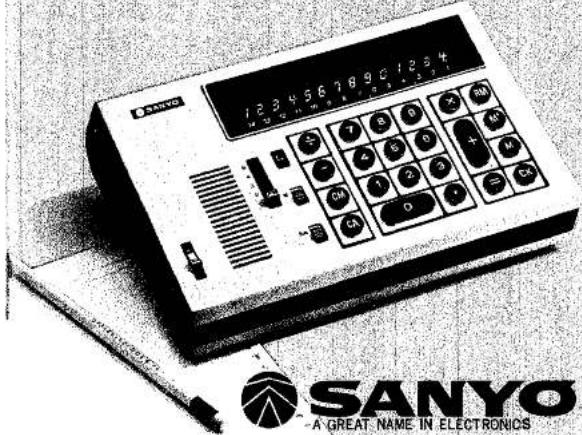
CONTENTS
- Features 3
- Name of Parts 4
- Keys and Switches 5
- Indicators 8
- Preparations 9
- Calculations ...... 10
I. Basic Calculations .... 10
- Addition 10
- Subtraction 10
- Multiplication .... 10
- Successive Multiplication .... 11
- Division 12
- Successive Division 13
II. Advanced Calculations ...... 14
- Multiplication with a Constant ..... 14
- Division by a Constant 14
- Mixed Calculation 15
- Power Calculation .... 15
- Addition and Subtraction of Products with Sub-Total and Grand Total.... 16
-
Product of Sum and Difference 17
-
Addition and Subtraction of Quotient with Sub-
Total and Grand Total 18 - Quotient of Sum and Difference .... 18
- Reciprocal of Calculation 19
III. Practical Calculations....20
- Percentage Calculation 20
- Increase/Decrease Rate Calculation 20
- Invoice Calculation 21
- Depreciation Calculation 22
- Proportional Division 23
- Probability Calculation 24
- Credit Loan Payment Calculation 25
- Simple Interest/Compound Interest Calculation ..... 27
-
High-Power Multinomial Calculation 28
-
Battery Recharging 29
- Specifications 30
1. FEATURES
- Specially designed LSIs
The LSIs, specially designed by Sanyo, insure unsurpassed reliability. - Decimal point
The floating input/fixed output system is used allowing the operator to pre-select the decimal position required in the answer, regardless of the number of decimals entered in the problem. Decimal position are 0, 2, 3, 4, and 6 places. - Independent memory
A directly addressable memory allows entry of number into the memory. The sigma key allows accumulation of results for Grand Total. - Automatic constant
The first number in multiplication and second number in division are automatically set up as a constant. - True credit balance with a floating minus sign
Sign appears immediately to the left-most digit number. - Round-off/Drop-off switch
By using the round-off switch, all numbers are immediately rounded off. - Sequential operation
Chain multiplication or division can be accomplished without the need to attain unnecessary intermediate results. - Touch operation
Convenient, fast touch operation can be accomplished due to symmetric keyboard design.
2. NAME OF PARTS
AC adaptor
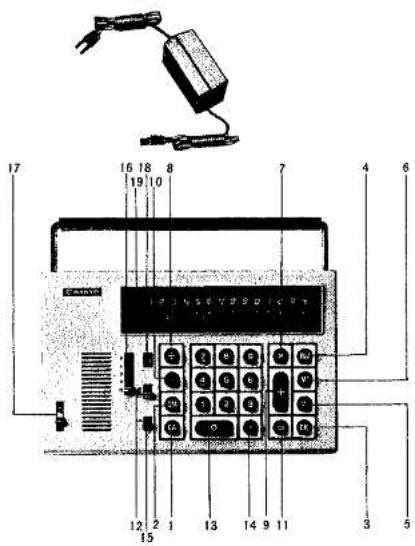
- Clear all key
- Clear memory key
- Clear key
- Recall memory key
- Memory minus key
- Memory plus key
- Multiplication key
- Division key
- Plus key
- Minus key
- Equal key
- Sigma switch
- Numeric keys
- Decimal point key
- Round-off switch
- Decimal point selector switch
- Power switch
- Battery alarm lamp
- Error (over-flow) lamp/Minus sign indicator
3. KEYS AND SWITCHES

Clear All Key
Clears entire machine except the memory.

Clear Memory Key
Clears memory.

Recall Memory Key
Recalls and displays figure stored in the memory.

Sigma Switch
Use this switch to accumulate totals for Grand Total.

Numeric Keys
Figures are indexed by touching these keys and are then displayed on the indicator.

Memory Plus Key
When this key is depressed, the figures displayed are added to the memory and stored in the memory.

Memory Minus Key
When this key is depressed, the figures displayed are subtracted from the memory and stored in the memory.

Plus Key
Used for additions. When this key is depressed, the contents of the display are added to the results of the previous calculation and the sum is displayed on the indicator.

Minus Key
Used for subtractions. When this key is depressed, the contents of the display are subtracted from the result of the previous calculation and the difference is displayed on the indicator.

Multiplication Key
In multiplications, depress this key after registering the multiplicand. The calculator is then in the multiplication position.

Division Key
In divisions, depress this key after registering the dividend. The calculator is then in division position.
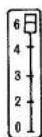
Decimal Point Selector Switch
Pre-select the position of the decimal point with this switch.

Equal Key
Depress this key to obtain final answers. Also clear the working register.

Round-off Key

Power Switch
The last digit displayed on the indicator is result of counting fraction over 1/2 as one and disregarding those below 1/2.

Decimal Point Key

Clear Key
Depress this key at the appropriate position when registering the figures with a decimal point.
Clears only the last figures registered.
4. INDICATORS
- Figure display
Full size fluorescent tubes. Each figure including the decimal is formed from 9 segments, and the display, controlled by logic circuits, is as shown below.
1234567890.
- Minus sign
The only time the minus sign indicator lights when the result is a negative figure as shown below.
-123.
- Error (over-flow) lamp
When a figure or the result of a calculation exceeds capacity of calculator, this lamp lights and further calculation is impossible. Depress the CA key to clear the display. The error lamp will light in the following instances:
a. When a figure registered into the calculator exceeds 14 digits.
b. In additions and subtractions, when the number of figure registered into the calculator plus the number of pre-selected decimal figures exceed the capacity of calculator.
- Battery alarm lamp
This lamp shows the condition of the rechargeable Cadnica battery. For further details, refer to the section on Battery Recharging.
5. PREPARATIONS
Prepare for operation in the following order before starting calculations.
- Turn on the power switch.
- Confirm that when the key and key are depressed, only the first digit shows 0 and the other digits go off.
- Check if the error lamp lights, when registering a random figure of more than 15 digits.
If there are no anomalies in the above check, try the following simple calculations.
(1) Set the decimal point selector switch at 2
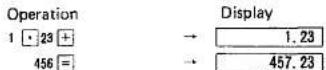
(2) Set the round-off switch and the decimal point selector switch at 4.
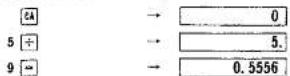
(3) Set the round-off switch and the decimal point selector switch at 3.

6. CALCULATIONS
I. BASIC CALCULATIONS
- ADDITION
| Ex. | 12.3+45.67=57.97 |
| 0 | |
| 12 3 + | |
| 45 67 + | |
| 57.97 |
- SUBTRACTION
| Ex. 1 | 24.8-11.5=13.3 | |
| 64 | →0 | |
| 24 8 + | →24.80 | |
| 11 5 - | →13.30 | |
| Ex. 2 | 18.6+24.9-14.2+3.8=33.1 | |
| 64 | →0 | |
| 18 6 + | →18.60 | |
| 24 9 + | →43.50 | |
| 14 2 - | →29.30 | |
| 3 8 + | →33.10 |
- MULTIPLICATION
| Ex. 1 | 123×27=3321 | |
| EA | →0 | |
| 123× | →123. | |
| 27= | →3321. |
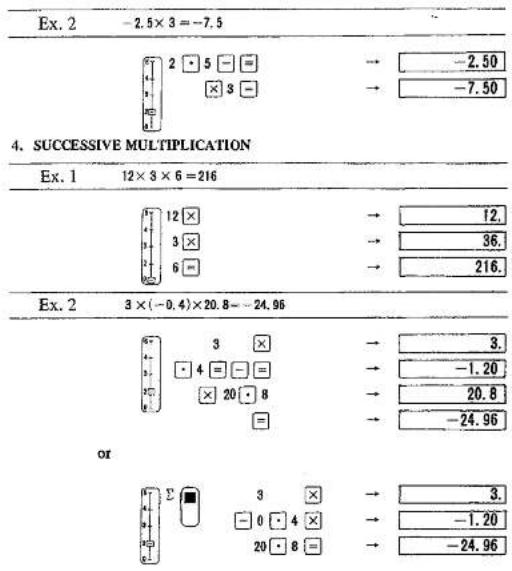
NOTE 1 With multiplication or successive multiplication, clearing is automatic and there is no need to depress the CA key for each calculations.
NOTE 2 The product must not exceed 14 digits.
NOTE 3 When using key switch, - key is used as a exclusive minus entry key.
- DIVISION
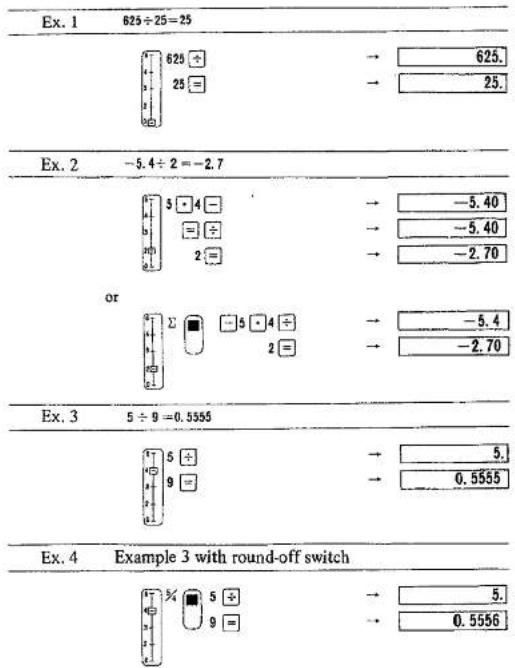
- SUCCESSIVE DIVISION
| Ex. | 18.2÷3.5÷2.3=2.250869 | |
 | 18 2 ÷ 3 5 ÷ 2 3 = | → 18.2 → 5.2000 → 2.2609 |
NOTE 1. In division, both dividend and divisor can be registered up to 14 digits.
NOTE 2. With division and successive division, clearing is automatic and there is no need to depress the [M] key for each calculations.
II. ADVANCED CALCULATIONS
- MULTIPLICATION WITH A CONSTANT
| Ex. | 3.14×2=6.283.14×3=9.423.14×2.8=8.792 | |
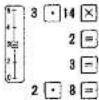 | → 3.14→ 6.280→ 9.420→ 8.792 |
- DIVISION BY A CONSTANT
| Ex. | 56÷2.8=2063÷2.8=22.514.7÷2.8=5.25 |
| → 56.→ 20.00→ 22.50→ 5.25 |
NOTE 1. In multiplication and division with a-constant, register the constant as multiplicand or divisor.
NOTE 2. In these calculations, it is not necessary to depress the × key or [÷] key for each calculations. If they are depressed during a calculation, a wrong result will be obtained.
- MIXED CALCULATION
| Ex. 1 | 3.6 × 2 ÷ 8 = 0.9 | ||
| → | 3.6 | ||
| → | 7.20 | ||
| → | 0.90 | ||
| Ex. 2 | (12 × 2 ÷ 3) - 2 + 3 = 9 | ||
| 12 | → | 12. | |
| 2 | → | 24. | |
| 3 | → | 8. | |
| Ex. 3 | (32 × 3 + 26 + 96 × 2) × 413 × 8 = 32.20513 | ||
| → | 0 | 26 | |
| → | 0 | → | |
| 32 | → | 32. | |
| 3 | → | 96.0000 | |
| 96 | → | 96. | |
| 2 | → | 192.0000 | |
- POWER CALCULATION
| Ex. 1 | 2*=32 | |
| →0 | ||
| →2, | ||
| →4, | ||
| →8, | ||
| →16, | ||
| →32, |
a^n=z (a is positive)
To show this calculation with an equation, it is equivalent to 2 × 2 × 2 × 2 × 2=
32. Therefore, in calculating a^n , the key should be depressed (n - 1) times.
Especially, if n = 2, 4, 8, .... 2 ^m , the ☒ key and the ☐ key should be depressed m times after registering a.
1
1
| Ex. 2 | 3"=6561 | |
| 64 | →0 | |
| × | →3. | |
| = | →9. | |
| × | →9. | |
| = | →81. | |
| × | →81. | |
| = | →6561. |
- ADDITION AND SUBTRACTION OF PRODUCTS WITH SUBTOTAL AND GRAND TOTAL.
| Ex. | 2.6×18=46.8(S1)3.2×9=28.8(S2)-6.9×13=-89.7(S3)Grand total -14.1 | |
| → 0 | ||
| → 0 | ||
| 2 6 ×18 = | → 2.6 | |
| → 46.80 S1 | ||
| 3 2 ×9 = | → 3.2 | |
| → 28.80 S2 | ||
| -6 9 ×13 = | → -6.9 | |
| → -89.70 S3 | ||
| → -14.10 | ||
NOTE The CA and CM key must first be depressed to clear the result of the previous calculation
- PRODUCT OF SUM AND DIFFERENCE
| Ex. | (47.2-29.8)×(19.2-12.6)=508.2 | |
| EA | → 0 | |
| IN | → 0 | |
| 47 2 W+ | → 47.20 | |
| 29 8 W+ | → 29.80 | |
| 19 2 + | → 19.20 | |
| 12 6 - | → 6.60 | |
| = | → 6.60 | |
| × | → 6.60 | |
| NM | → 77.00 | |
| = | → 508.20 | |
- ADDITION AND SUBTRACTION OF QUOTIENT WITH SUBTOTAL AND GRAND TOTAL.
| Ex. | 125÷4=31.25(S1)628÷8=78.5(S2)326÷20=16.3(S3)Grand total 126.05 | |
| E | → 0 | |
| → 0 | ||
| → 125. | ||
| → 31.25 S1 | ||
| → 628. | ||
| → 78.50 S2 | ||
| → 326. | ||
| → 16.30 S3 | ||
| → 126.05 | ||
- QUOTIENT OF SUM AND DIFFERENCE
| Ex. 1 (28+46)÷(22+31)=1.396 | ||
| 2A | → 0 | |
| CN | → 0 | |
| 22 M- | → 22.000 | |
| 31 M- | → 31.000 | |
| 28 + | → 28.000 | |
| 46 + | → 74.000 | |
| = | → 74.000 | |
| + | → 74.000 | |
| TM | → 53.000 | |
| = | → 1.396 | |
- RECIPROCAL CALCULATION
| Ex. | 1(2+3)×4+5=0.04 | |
| [IMAGE] | → 0 | |
| [IMAGE] | → 0 | |
| 2 + | → 2.00 | |
| 3 = | → 5.00 | |
| × | → 5.00 | |
| 4 = | → 20.00 | |
| + | → 20.00 | |
| 5 = | → 25.00 | |
| W' | → 25.00 | |
| 1 + | → 1: | |
| RM | → 25.00 | |
| = | → 0.04 | |
III. PRACTICAL CALCULATIONS
- PERCENTAGE CALCULATION
| Ex. | Sales breakdown in percentage. | |
| A | Dept. | 123,000 |
| B | Dept. | 456,000 |
| C | Dept. | $ 789,000 |
| 123000 + | ||
| 456000 + | ||
| 789000 + | ||
| - | ||
| M | ||
| 128000 + | ||
| M | ||
| = | ||
| 456000 - | ||
| 789000 = | ||
- INCREASE/DECREASE RATE CALCULATION
| Ex. The percentage increase/decrease rate of this month's sales(5,024,000) to last month's sales ( 4,238,000).(this month's sales) - (last month's sales) | ||
| last month's sales | x 100 (%) | |
| 0 | ||
| 0 | ||
| 5024000.000 | ||
| 786000.000 | ||
| 786000.000 | ||
| 786000.000 | ||
| 0.185 | ||
| 0.185 | ||
| 18.500 % 20 | ||
- INVOICE CALCULATION
| Item | Quantity | Unit price | Total |
| A | 29 | 28.30 | 820.70 |
| B | 105 | 290.00 | 30,450.00 |
| C | 63 | 523.00 | 32,449.00 |
| D | 47 | 67.30 | 3,163.10 |
| Grand total 67,382.80 | |||
- DEPRECIATION CALCULATION
| Ex. | Obtain the price of fixed assets as booked at the end of each period (cost: $500,000, Life: 5 years, depreciation rate: 0.369) | |
| 1st year | 500,000 → (500,000 × 0.369) = A | |
| 2nd year | A - (A × 0.369) = B | |
| 3rd year | B - (B × 0.369) = C | |
| 4th year | C - (C × 0.369) = D | |
| 5th year | D - (D × 0.369) ≈ E | |
| (Quantities in parenthesis are the depreciation of a corresponding year) | ||
| 500000 | → 0 | |
| → 0 | ||
| → 500000. | ||
| -369 | → -184500. | |
| → -184500. | ||
| → 315500. | ||
| → 315500. | ||
| -369 | → -116419. | |
| → -116419. | ||
| → 199081. | ||
| → 199081. | ||
| -369 | → -73460. | |
| → -73460. | ||
| → 125621. | ||
- PROPORTIONAL DIVISION
| Ex. | Divide the profits (78,000) among stores in proportion to their sales. | |
| A Store | 45,000 | |
| B Store | 34,000 | |
| C Store | 23,000 | |
| → 0 | ||
| → 0 | ||
| 45000 + | → 45000.000 | |
| 34000 + | → 79000.000 | |
| 23000 + | → 102000.000 | |
| → 102000.000 | ||
| → 102000.000 | ||
| 78000 + | → 78000. | |
| → 102000.000 | ||
| → 0.764 | ||
| → 0.764 | ||
| 45000 - | → 34380.000 A | |
| 34000 = | → 25976.000 E | |
| 23000 = | → 17572.000 C | |
- PROBABILITY CALCULATION
| Ex. Obtain the probability that the "10", "Jack", "Queen", "King", and "Ace" of Hearts can be collected the first try in a bridge game. | |
| P=5/52×4/51×3/5×2/49×1/48 | |
| → 0 | |
| → 52. | |
| → 2652. | |
| → 132600. | |
| → 6497400. | |
| → 311875200. | |
| → 62375040. | |
| → 15593760. | |
| → 5197920. | |
| → 2598960. | |
That is, the chance comes once in 2,598,960 times.
- CREDIT LOAN PAYMENT CALCULATION
| R=P× 1 - 1(1+i)^n = 318000 × 0.0231 - 11.023^ | |
| → 0 | |
| → 0 | |
| → 1.023 | |
| → 1.0465 | |
| → 1.0705 | |
| → 1.0951 | |
| → 1.1202 | |
| → 1.1459 | |
| → 1.1722 | |
| → 1.1991 | |
| → 1.2266 | |
| → 1.2548 | |
| → 1.2548 | |
| → 1.2548 | |
| → 1.2548 | |
| → 0.7969 | |
| → -0.7969 | |
| → 0.2031 | |
| = | → | 0.2031 |
| # | → | 0.2031 |
| # | → | 0.2031 |
| 023 | → | 0.023 |
| # | → | 0.2031 |
| = | → | 0.1132 |
| × | → | 0.1132 |
| 318000 | → | 35997.6000 |
- SIMPLE INTEREST/COMPOUND INTEREST CALCULATION
| Ex. | $ 10,000 is invested at 5.5% per annum. Total assets after five years are to be calculated with simple interest and compound interest. | |
| (a) | Simple interest Total assets = (Original investment) × (1 + annual interest × years) = 10,000 × (1 + 0.055 × 5) | |
| GA | → 0 | |
| -0.055 | → 0.055 | |
| 5 | → 0.275 | |
| + | → 0.275 | |
| 1 | → 1.275 | |
| = | → 1.275 | |
| × | → 1.275 | |
| 10000 | → 12750.000 | |
| (b) | Compound interest Total assets = (Original investment) × (1 + annual interest)years = 10,000 (1 + 0.055)5 | |
| GA | → 0 | |
| 1 | → 1.000 | |
| -0.055 | → 1.055 | |
| * | → 1.055 | |
| × | → 1.055 | |
| × | → 1.113 | |
| × | → 1.174 | |
| × | → 1.238 | |
| = | → 1.306 | |
| × | → 1.306 | |
| 10000 | → 13060.000 | |
- HIGH-POWER MULTINOMINAL CALCULATION
| Ex. y=3x4+6x2-8x2+x-1 | |
| Calculate y when x = 8. | |
8. BATTERY RECHARGING
* Recharge before using for the first time.
* Built-in lifetime rechargeable CADNICA batteries.
The Cadnica batteries are rechargeable, small, hermetically sealed cells. They never need replacing and are handy and economical in use.
+ Recharging procedure
- Insert adaptor AC plug into power socket.
- Insert adaptor DC plug into three pin socket as far as it will go.
- Recharging takes place whether the power switch is ON or OFF and recharging is possible even when the calculator is in use.
* Recharging time
Recharging of totally exhausted batteries takes at least 15 hours at power switch off.
* Battery alarm lamp
| Lamp | Battery condition |
| Light-off | Recharging unnecessary |
| Light-on | Recharging absolutely necessary |
9. SPECIFICATIONS
| Type | Electronic desk top calculator |
| Model | ICC-1418D |
| Numeric key | 10-key system |
| Display | Full size fluorescent tubes, with zeros suppression, error lamp, minus sign, battery alarm lamp; |
| Decimal point | Floating input/Fixed output (0, 2, 3, 4, 6) round-off / drop-off |
| Memory | 1 memory |
| Capacity | Add/sub. Max. 14 digits ± 14 digitsMultiplication: Multiplicand + Multiplier ≤15 digitsProducts Max. 14 digitsDivision: Dividend: Max. 14 digitsDivisor: Max. 14 digitsQuotient: Max. 14 digits |
| Functions | 4-rules, successive multi. and div., constant multi. and div., mixed calculation, power calculation, products sum and difference, reciprocal calculation, memory calculation, applied calculations and others. |
| Components | Mos-LSIs, Hybrid-ICs |
| Operating temp. | 0^ 40^ ( 32^ - 104^ ) |
| Power supply | Adaptor: AC Local voltage ±10% 50/60 HzCalculator: DC 6.2 V, 7.8V |
| Power consumption | Adaptor: AC 8WCalculator: DC 4.5W |
| Dimensions | 60(H) x 226(W) x 140(D) mm2-3/8(H) x 8-15/16(W) x 5-9/16(D) inch |
| Weight | 1.3 kg (2 lbs.14ozs.) |

SANYO
A GREAT NAME IN ELECTRONICS
Sanyo Electric, Inc., Office Equipment Division
51 Joseph Street Moonachie, N.J. 07074
Printed in Japan
R-4770297
Marke : SANYO
Modell : ICC-1418D
Kategorie : Taschenrechner