Jade SR - Lautsprecher Wharfedale - Kostenlose Bedienungsanleitung
Finden Sie kostenlos die Bedienungsanleitung des Geräts Jade SR Wharfedale als PDF.


Benutzerfragen zu Jade SR Wharfedale
0 Frage zu diesem Gerät. Beantworten Sie die, die Sie kennen, oder stellen Sie Ihre eigene.
Eine neue Frage zu diesem Gerät stellen
Laden Sie die Anleitung für Ihr Lautsprecher kostenlos im PDF-Format! Finden Sie Ihr Handbuch Jade SR - Wharfedale und nehmen Sie Ihr elektronisches Gerät wieder in die Hand. Auf dieser Seite sind alle Dokumente veröffentlicht, die für die Verwendung Ihres Geräts notwendig sind. Jade SR von der Marke Wharfedale.
BEDIENUNGSANLEITUNG Jade SR Wharfedale
natural_image
Technical line drawing of a mechanical component with circular features and mounting holes (no text or symbols)Wharfedale
AG House, Sovereign Court, Ermine Business Park, Huntingdon, Camas, PE29 6XU, UK Tel: +44(0)1480-447700 Fax: +44(0)1480-431767 http://www.wharfedale.co.uk AG reserves the right to a for the design and specifications without notice. All rights reserved © AG Group Ltd. Wharfascie is a member of the international Audio Group. CODE: WH11-MNLO08
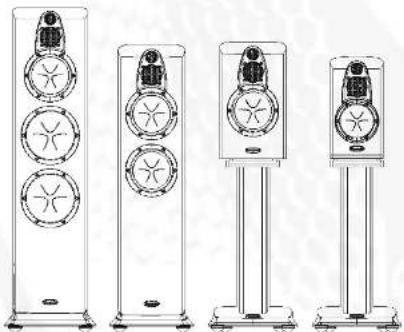
Jade Series
Jade -1
Jade-3
Jade -5
Jade-7
Jade-C1
Jade-C2
Jade-SR
natural_image
Four vertical stand-mounted electronic devices with circular components, shown from different angles (no text or symbols visible)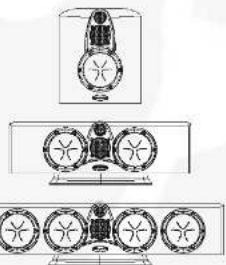
natural_image
Technical line drawing of a mechanical assembly with multiple circular components and housing (no text or symbols)Wharfedale
BRITAIN'S MOST FAMOUS LOUDSPEAKERS
User's Manual
Jade
Jade
UserWarnings
Now you have opened the carton, please read the following notes carefully. They will help you to install your loudspeakers correctly and safely.
- Switch off the amplifier and all sources before making connections to your sound system.
- When you switch on the system or change sources, set the volume control to minimum and turn up the level gradually.
- The position of your Volume Control is NOT a reliable guide as to the maximum capabilities of your system. Playing the system with extreme settings of volume and tone controls may damage the amplifier and loudspeakers.
- Do not connect loudspeaker terminals to the mains supply.
- Ensure that your loudspeakers are correctly wired and are in phase.
• Do not subject your loudspeakers to excessive cold, heat or sunlight. - WARNING: To reduce the risk of fire or electrical shock do not expose this product to rain or moisture.
- The product must not be exposed to dripping and splashing and no object filled with liquids – such as a vase of flowers – should be placed on the product.
- No naked flame sources – such as candles – must be placed on the product.
- Do not place heavy objects on top of loudspeaker cabinets. If you play them with the grilles removed be careful to protect the drive units from children and pets.
- Do not use makeshift stands. Always fit a manufacturer's approved stand using the instructions and the fixings provided. Your dealer will advise you.
- Do not attempt to dismantle the loudspeaker. There are no user serviceable parts inside and you will invalidate the warranty.
Unpacking Your Loudspeakers
- If you are unpacking the larger loudspeakers please remember that these units are heavy. We suggest that you have someone to assist you.
- Lift the loudspeaker carefully out of the packing. Do NOT try and lift the loudspeaker using the protective bag.
- Unpack any accessories carefully. If there is any sign of damage or if the contents are incomplete, report this to your dealer as soon as possible.
- Retain the packing for future safe transport of the product. If you dispose of the packing, do so with respect to any recycling provisions in your area.
- Stand mounting and AV loudspeakers are ready to be connected after unpacking. The larger loudspeakers will need to be fitted with the supplied spike kits.
• The Jade-SR may be wall mounted if required. Instructions are on Page 9.
Fitting Spikes to Floorstanding Loudspeakers
The Jade-5 and Jade-7 speakers are supplied with two sets of floor spikes. The wide set is for use with solid wood and hard floors. The narrow spikes are for use with carpeted or soft floors.
WARNING:
Spikes are sharp. Keep children and pets well away from the working area when assembling and using spikes. When using spikes with floorcoverings of any kind, ensure that the spikes do not pierce cables, or any object that may be hidden under the floor surface.
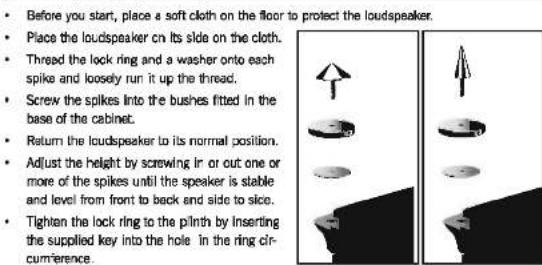
- Place the loudspeaker on its side on the cloth.
- Thread the lock ring and a washer onto each spike and loosely run it up the thread.
- Screw the spikes into the bushes fitted in the base of the cabinet.
- Return the loudspeaker to its normal position.
- Adjust the height by screwing in or out one or more of the spikes until the speaker is stable and level from front to back and side to side.
- Tighten the lock ring to the pilnth by inserting the supplied key into the hole in the ring circumference.
WARNING: Floor standing speakers are heavy - the narrow spikes are designed to penetrate soft floor coverings and could damage wood and stone floors over extended periods.
Spike Seats
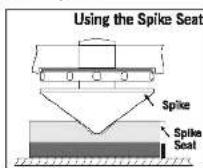
A set of spike seats is provided to protect sensitive floors from possible damage. The loudspeaker should be mounted on the wide spikes and the spike seats should be placed under each spike as shown. Level the loudspeakers with the spike seats in pace.
Jade
Jade
Cables and Connectors
Choosing Cables
A specialist audio cable usually offers better performance than general purpose 'bell' or 'zip' wire. Choose a cable of suitable diameter – cable that is too thin will limit the dynamics of the sound and may impair the bass response.
An audio cable is polarised, with two cores of different colours, or often a raised rib or coloured tracer in the case of twin cable.
Before you purchase your cable, we suggest that you give careful thought to the positioning of your loudspeakers. This is especially the case if you are bi-wiring your loudspeakers.
Cable lengths to loudspeaker pairs should be the same for left and right channels in order to equalise the signal transmission. Allow some slack in your speaker cables so you can alter their position to best advantage, but do not have your cables over-long.
Preparing Loudspeaker Cable
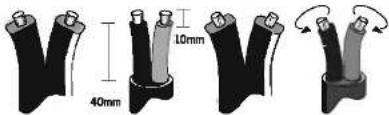
Split the twin cores to a depth of about 40mm. Carefully strip the insulation from each end, leaving about 10mm of bare wire. If the cable is stranded, lightly twist to gather any loose strands.
text_image
40mm 10mmConnecting Screw Terminals
All the loudspeakers in the Jade series use screw terminals. Safe Connection of Terminals
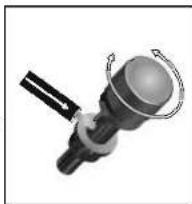
Unscrew the terminal. Insert the bare end of the cable into the hole in the base of the terminal. Tighten securely.
When connecting terminals make sure you leave no strands of bare wire that can short across to adjacent terminals. As an alternative to bare wire you can use specialist spade connectors. Your dealer will be pleased to advise you.
natural_image
Mechanical component diagram showing a cylindrical assembly with a ring and two curved arrows indicating motion (no text or symbols)Connections and Terminals
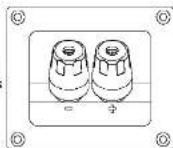
Jade loudspeakers use a two different bi-wiring panels and one standard terminal panel
Biwireable Crossover Panels
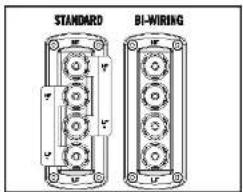
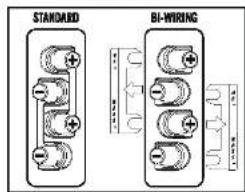
A bi-wiring panel has four terminal binding posts. The upper terminals connect to the treble units, the lower pair to the bass unit.
As supplied the treble and bass terminal pairs are connected via removable stracs. This arrangement facilitates standard single wiring, and advanced bi-wiring which offers significant performance advantages. Follow the drawings carefully to see the correct orientation of the loudspeaker terminals.
Jade-1/3/5/7
text_image
STANDARD BI-WIRINGJade-C1/C2
text_image
STANDARD BI-WIRINGWhy Bi-Wire?
Bi-wiring involves the use of two separate cables between the amplifier and the loudspeakers. One pair connects to the treble unit the other to the bass driver.
Using separate cables for treble and bass units in a bi-wiring configuration reduces intermodulation effects and improves headroom and clarity. To bi-wire, you will need to install two lengths of twin core cable between the amplifier and each loudspeaker.
Standard Crossover Panels
The Jade-SR uses a standard crossover panel.
As surround speakers receive less bass information and operate at lower volume levels than the front loudspeakers, bi-wiring provides no real benefit.
Jade
Jade
Positioning Stereo Loudspeakers
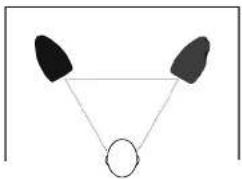
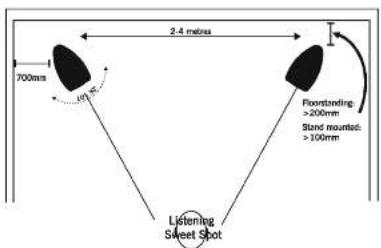
The distance between the speakers should ideally be the same as the distance between you and the speakers.
natural_image
Simple geometric diagram with two black shapes and a white circle connected by lines (no text or symbols)If the loudspeakers are placed too close to the walls the bass will increase but may be boomy and indistinct. If the loudspeakers are placed further away from the walls, the inward angle ('toe in') may be increased by up to 30%. The optimum listening position is in the area broadly known as the 'sweet spot'. The more extreme the angle the narrower will be the sweet spot. Facing the speakers straight out may result in an indistinct stereo image. As personal taste plays a large role, experiment with different configurations and play a wide range of programme material before finalising the position of your speakers.
text_image
2-4 meters 700mm 100mm Flooring: >200mm Stand mounted: >100mm Listening Sweet ShotStand Mounting
The Jade 1 and 3 are designed for stand mounting. The stands should be sturdy and offer optimum support for the loudspeaker A custom stand for these models is available - your dealer will be pleased to assist you. As an alternative the speakers may be wall mounted on rigid brackets or placed on rigid shelves.
Ideally the top of the speaker should be at ear level to a seated listener. If the rear panels of the speakers are placed close to the walls the amount of bass will be increased but the clarity may well suffer - you should experiment until you get the best result.
Connecting Stereo Loudspeakers
Standard Loudspeaker Wiring
Choose a suitable length of twin core speaker cable for each channel, and prepare the ends. Unscrew each terminal a few turns.
Connect the red, positive (+) terminal of the Left loudspeaker to the corresponding red, positive (+) amplifier terminal. Connect the black, negative (-) terminals similarly. Tighten the terminals securely. Repeat this procedure for the Right Channel.
Make sure that the binding straps are securely in place.
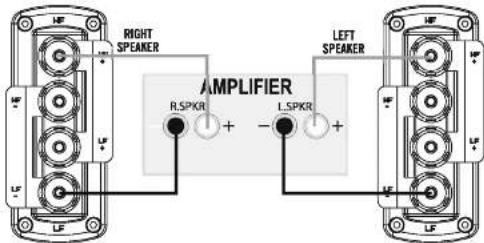
text_image
RIGHT SPEAKER AMPLIFIER R.5PKR + - L.5PKR + LEFT SPEAKERBi-Wiring
To bi-wire, you will need to install two lengths of twin core cable between the amplifier and each loudspeaker. Remember to remove the bi-wiring straps before connecting the loudspeakers.
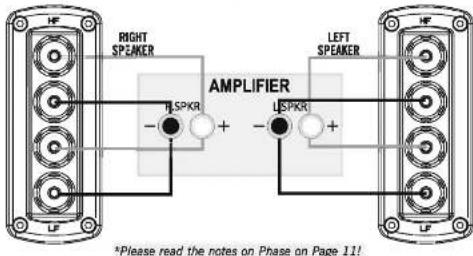
text_image
RIGHT SPAKER AMPLIFIER - LSPKR + - LSPKR + *Please read the notes on Phase on Page 11!Bi-Amplifying
The advantages of bi-wiring can be further enhanced by connecting the treble and bass elements of the loudspeaker to a dedicated amplifier. To do this you will need two stereo (or four mono) amplifiers. This method of connection improves dynamics and reduces intermodulation distortion to vanishingly low levels. If you are considering bi-amplification you should consult your dealer for advice.
Jade
Jade
Positioning Home Theatre Loudspeakers
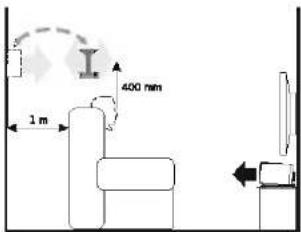
Front Loudspeakers: The front loudspeakers are placed on either side of the TV monitor, 2 to 3 metres apart. The speakers should be angled slightly so they are aimed towards the listeners. Rear Surround channels: The reproduced sound should be as room filling as possible. We recommend placing the speakers in a high position, behind the listener's head. If the rear wall is more than 1 metre behind the listening seat, an alternative position is on the side walls. If the walls are a long way from the listening seat, consider stand mounting the loudspeakers.
The Jade-SR is designed for wall mounting. The design of this loudspeaker enables its use either on the rear or the side walls of the room presenting both direct and ambient reflected sounds.
Centre Channel: Most of the dialogue comes from the centre loudspeaker. Speech should appear to originate from the actors mouths. Operating height is important. Ideally the front and centre channel speakers should be at the same height. The front of the cabinet should be level with the TV screen.
The Jade-C1 and C2 centre channel loudspeakers may be placed on top of the TV cabinet if it is safe to do so. An optional pedestal is available to facilitate adjustment of sound projection.
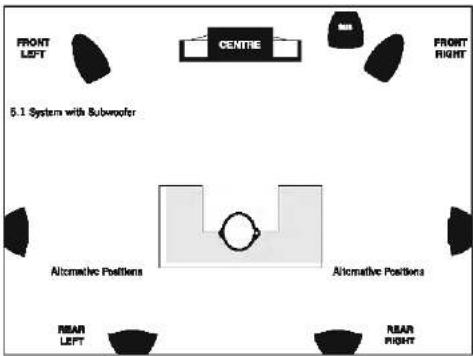
text_image
FRONT LEFT CENTRE 5.1 System with Subwoofer FRONT RIGHT Alternative Positions Alternative Positions NEAR LEFT NEAR RIGHTSubwoofer: As deep bass is fundamentally non-directional, this allows you to place a subwoofer in a variety of locations. Placing the subwoofer near a corner or particularly close to a wall will boost the bass but may impair clarity. Refer to your subwoofer manual for further information.
Wall Mounting the Jade-SR
Ensure the wall is sound, free of obstructions, hidden pipes etc. and capable of supporting the loudspeaker plus a small amount of pulling force. You will also need suitable wall fixings and some No.8 Round Head screws of sufficient depth to suit your wall (typically 40mm).
Measure the distance between the loudspeaker mounting centres. Draw a horizontal line on the wall and mark off two mounting holes at the measured distance.
Drill and plug two holes for each speaker.
Screw 2 No.8 screws into the holes leaving 5 mm of thread protruding
Connect the connecting wire to the loudspeaker but do not connect the cable to the amplifier. You will need to use low profile cable -your dealer will recommend a suitable product.
Lift the loudspeaker up to the mounting position.
Align the keyhole slots over the screw heads and gently pull down until the speaker is securely fastened. You may now connect the loudspeaker to the amplifier.
This operation may need two people. If you are in any doubt about your ability to carry out this procedure, consult a suitably qualified builder or domestic electrician.
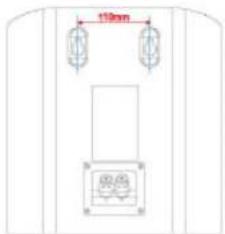
text_image
10mm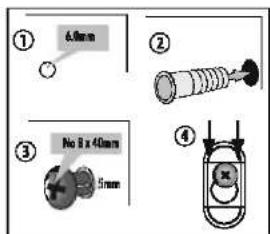
text_image
① 4.0mm ② No 8 x 40mm 5mm ③Positioning the Centre and Surround Loudspeakers
text_image
400 mm 1 mJade-C1 and C2:
While the screen should be placed with its centre at or below eye level to a seated viewer, the speaker can be placed below the screen.
Jade-SR:
You can mount surround loudspeakers either on the sides or rear walls but always above and behind the listening position.
Jade
Jade
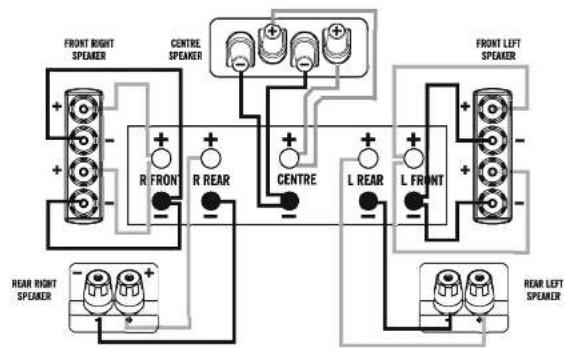
5.1 Multichannel System Connections
flowchart
graph TD
    A["FRONT RIGHT SPEAKER"] --> B["R FRONT"]
    B --> C["R REAR"]
    C --> D["CENTRE"]
    D --> E["L REAR"]
    E --> F["L FRONT"]
    F --> G["FRONT LEFT SPEAKER"]
    H["REAR RIGHT SPEAKER"] --> I["+"]
    J["REAR LEFT SPEAKER"] --> K["+"]
    L["FRONT RIGHT SPEAKER"] --> M["+"]
    N["FRONT LEFT SPEAKER"] --> O["+"]
    P["REAR RIGHT SPEAKER"] --> Q["+"]
    R["FRONT LEFT SPEAKER"] --> S["+"]
    T["REAR LEFT SPEAKER"] --> U["+"]
*Please read the notes on Phase on Page 11!
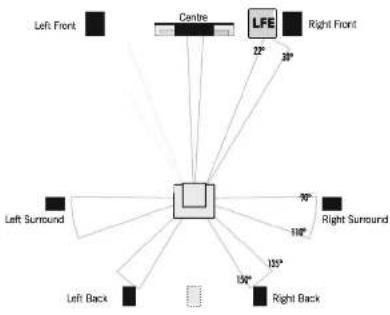
Dolby Labs A/V System Recommended Layout
flowchart
graph TD
    A["Center"] --> B["Left Front"]
    A --> C["Centre"]
    A --> D["LFE"]
    A --> E["Right Front"]
    A --> F["Left Surround"]
    A --> G["Right Surround"]
    A --> H["Left Back"]
    A --> I["Right Back"]
    A --> J["10°"]
    A --> K["15°"]
    A --> L["100°"]
    A --> M["90°"]
This is the recommended layout for 7.1 multichannel systems.
5.1 systems:
The Bac< Loudspeakers are not used.
6.1 systems:
These systems feature a mono back loudspeaker (shown in grey). We recommend that for 6.1 systems you use a pair of loudspeakers connected in parallel and placed as shown. This will provide an improved rear sound stage. As this connection imposes an extra load on a single rear channel amplifier, consult your dealer before proceeding.
Home Theatre Topics
Setting Speaker Sizes
Most digital A/V Processors require you to specify the size of speakers in all channels. These are usually 'Large' or 'Small'. Always set the Jade-C1 to 'Small'. Depending on the size and capacity of your subwoofer you may set the Jade-C2 to 'Small' or 'Large'. As the Surround Channels will most likely be Jade-SR loudspeakers, set these to 'Small' as well.
If You Are Using A Subwoofer:
Jade-1 and 3 when used as Front Speakers: Set these to "Small". The subwoofer will now receive all the system bass signals.
Jade-5: Set to 'Large' or 'Small' depending on preference and the capacity of the subwoofer.
Jade-7: Set this to 'Large'. The subwoofer then will reproduce only the LFE and bass signals from the effects channels.
If you are not using a subwoofer: Set all the front speakers to 'Large'. Set the subwoofer option on the processor to 'Off' or 'No'. The front channels will now receive all the system bass.
Setting Speaker Levels
Once the loudspeaker settings have been finalised, put the A/V amplifier into its 'test' mode (see instructions supplied with your processor). Adjust the level of each channel in turn until all channels are reproduced at equal loudness.
On some programme material the surround channel may seem lower than the front. Do not readjust this level. You may, however, need to adjust the subwoofer output level. Avoid setting too high a level or you will swamp the sound with bass. This can be tiring to listen to, and may limit the subwoofer's ability to respond to large bass transients. You should also set a sensible level going into the subwoofer from the A/V processor.
Delay Settings
Many AVV processors feature delay settings. The purpose of delay is to enable surround and dialogue information to arrive at the listener's ears at the same time as the front channels, even when the listening seat is in a non-ideal position. On some processors, this can be achieved by setting the distance from the listening position to each speaker, but other systems allow only a time delay setting. Rear Delay: If the listening position is equidistant from the front and rear speakers, set a low delay setting. The closer the listener is to the rear speakers the higher the delay setting used should be. Centre Delay: If the centre speaker is level with (or slightly behind) the front speakers, set the delay to zero. If the centre speaker is forward of the front speakers, increase the delay.
LFE
In the cinema the low frequency effects channel is an extra bass channel with its own subwoofer. In domestic systems the LFE channel typically feeds into the subwoofer. Where no subwoofer is used, the LFE signal is combined with the front channels and sent to the front speakers. When you set the LFE level at your A/V processor, use care as powerful low frequencies can overload domestic loudspeakers. If you hear popping or thumping noises coming from the front loudspeakers or subwoofer, immediately turn the A/V Processor's volume level down and then lower the LFE level. This should cure the problem. If it does not, lower the volume level at the subwoofer (if you are using one) until the problem disappears.
Phase
Please read the relevant sections of your AV amplifier manual and familiarise yourself with the various issues. If you are unsure, consult your dealer for help.
A home theatre system should have a precise front stage, a diffuse rear stage and good localisation of dialogue. If the colours on the loudspeaker terminals do not correspond with those on the amplifier, the sound will appear poorly focussed or 'out of phase'. For this reason it is essential that the speakers are connected according to the wiring diagrams in this manual.
Connecting loudspeakers correctly (in phase) is essential whether the system is stereo or multichannel. This is especially important if you are bi-wiring - if only one element in a bi-wired system is incorrectly connected (out of phase), the effects can be very noticeable yet hard to pinpoint.
Jade
Jade
Loudspeaker Specifications
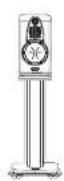
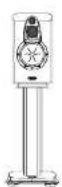
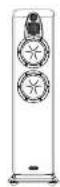
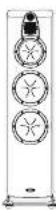
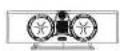
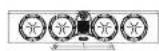

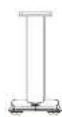
| Parameter | Jade-1 | Jade-3 | Jade-5 | Jade-7 | Jade-C1 | Jade-C2 | Jade-SR | Jade Stand |
| Description | 3 Way Aperiodic | 3 Way Closed Box | 3 Way Aperiodic | 4 Way Aperiodic | 3-Way Aperiodic | 3-Way Aperiodic | 3 Way Closed Box | - |
| Format | Stand Mounting | Stand Mounting | Floorstanding | Floorsanding | Centre Channel | Centre Channel | Wall Mounting | - |
| Bass Driver | 125mm Acufibre | 165mm Acufibre | 2 x 165mm Acufibre | 2 x200mm Acufibre | 2 x 125mm Acufibre | 4 x 125mm Acufibre | 125mm Acufibre | - |
| Mid Bass Driver | - | - | - | 165mm Acufibre | - | - | - | - |
| Cone Midrange | 75mm Alu-Pulp | 75mm Alu-Pulp | 75mm Alu-Pulp | 75mm Alu-Pulp | 75mm Alu-Pulp | 75mm Alu-Pulp | 75mm Alu-Pulp | - |
| Tweeter | 25mm Aluminium | 25mm Aluminium | 25mm Aluminium | 25mm Aluminium | 25mm Aluminium | 25mm Aluminium | 25mm Aluminium | - |
| Nominal Impedance | 6 Ohms | 6 Ohms | 6 Ohms | 6 Ohms | 6 Ohms | 6 Ohms | 6 Ohms | - |
| Frequency Response +/- 3dB | 65Hz-24kHz | 45Hz - 24kHz | 42Hz - 24kHz | 38Hz - 24kHz | 75Hz - 24kHz | 58Hz - 24kHz | 80Hz-24kHz | - |
| SPL 2.83V @ 1M | 85dB | 86dB | 87dB | 88dB | 87dB | 88dB | 85dB | - |
| Recommended Amplifier Power | 30-120W | 30-150W | 50-200W | 50-250W | 30-150W | 50-200W | 30-120W | - |
| Crossover Frequencies | 570Hz, 2.5kHz | 350Hz, 2.8kHz | 340Hz, 2.4kHz | 180Hz, 590Hz, 2.8kHz | 710Hz, 3.2kHz | 240Hz, 810Hz, 3.3kHz | 710Hz, 3.2kHz | - |
| Magnetically Shielded | No | No | No | No | Yes | Yes | No | - |
| Dimensions H x W x D (mm) | 376 x 195 x 328 | 433 x 246 x 400 | 1055 x 246 x 400 | 1180 x 273 x 448 | 195 x 664 x 300 | 195 x 914 x 300 | 347 x 300 x 165 | 645 x 330 x 473 |
| Net Weight | 8.95kg (each) | 11.8kg (each) | 27.5kg (each) | 37kg (each) | 13.2kg | 18.6kg | 6.5kg (each) | 10.0kg |
| Included Accessories | Rubber Feet | Rubber Feet | Spikes (two sets) | Spikes (two sets) | Rubber Feet | Rubber Feet | Rubber Feet | Spike, Rubber Feet |
| *Optional stands available | *Optional stands available | *Optional pedestals available | *Optional pedestals available |
*Design and specifications are subject to change without further notice.
Jade
Jade
Looking After Your Loudspeaker
- Your loudspeakers use a specially hardwearing sealed finish. They should bot be waxed or treated with spray polishes which will smear and dim their fine finish.
- Occasionally polish them with a dry or barely moist cloth to remove dust and finger marks, etc.
- Occasionally, remove the loudspeaker grilles and brush them gently with a soft brush before replacing them carefully.
- Never stand objects on your loudspeakers. In particular do no stand flowerpots etc. on them - they are not jardinieres!
- Avoid getting any liquid behind the grille. If you spill liquid on your loudspeakers, take them to your dealer for attention before using them again.
- Do not open the speakers; there are no user serviceable parts inside.
- Never touch the drive units either with an object or your hands.
- Do not site loudspeakers in areas of bright sunlight as over the long term their finish will dull and the colour may shade.
Quality Management
Your Wharfedale Jade loudspeakers are premium products, constructed to the highest standards. From the top grade furniture construction and finish to the carefully designed and selected acoustic components, the Jade range is a testament to fine design, fine engineering and fine craftsmanship. We hope you will derive many years of good service from our products.
Servicing
Servicing of Wharfedale products should only be carried out by authorised service agents. If service is required the equipment should be returned, securely packaged, preferably using original packaging, to your dealer.
In the UK equipment may be returned to the IAG Service Centre. In other countries equipment may be returned to the retailer or an appointed service agent. Always telephone before returning any equipment. A note should be enclosed giving your name, address, telephone number, and a brief description of the reason for return.
If you require service outside the Warranty period, do not hesitate to contact your dealer. You can also visit our website at www.wharfedale.co.uk for further information.
Principal Service Address
For technical support, servicing or product queries and information please contact either your local retailer or the offices below.
IAG Service Dept.
Unit 4
St Margaret's Way
Stukeley Meadows Industrial Estate
Huntingdon
Cambs
PE29 6EB
England
Tel: 144 (0)1480 452561
Fax: +44 (0)1480 413403
www.wharfedale.co.uk

Waste electrical products should not be disposed of with household waste. Please recycle where facilities exist. Check with your Local Authority or retailer for recycling advice.