FSAV19M16 - Klimaanlage Fortress - Kostenlose Bedienungsanleitung
Finden Sie kostenlos die Bedienungsanleitung des Geräts FSAV19M16 Fortress als PDF.


Benutzerfragen zu FSAV19M16 Fortress
0 Frage zu diesem Gerät. Beantworten Sie die, die Sie kennen, oder stellen Sie Ihre eigene.
Eine neue Frage zu diesem Gerät stellen
Laden Sie die Anleitung für Ihr Klimaanlage kostenlos im PDF-Format! Finden Sie Ihr Handbuch FSAV19M16 - Fortress und nehmen Sie Ihr elektronisches Gerät wieder in die Hand. Auf dieser Seite sind alle Dokumente veröffentlicht, die für die Verwendung Ihres Geräts notwendig sind. FSAV19M16 von der Marke Fortress.
BEDIENUNGSANLEITUNG FSAV19M16 Fortress
fortress
豐澤牌
Inverter Split Air Conditioner
User Manual
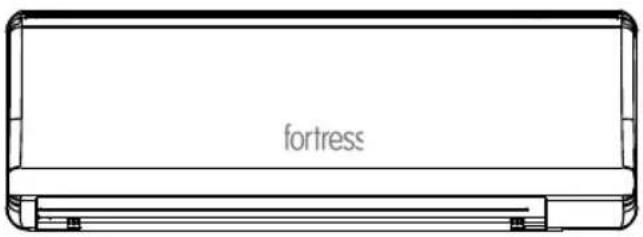
text_image
fortressModel: FSAV10M16 FSAV13M16 FSAV19M16
* Before operating or installing the appliance, please read this manual and all the safety instructions thoroughly and retain it for future reference.
CONTENTS
SAFETY INSTRUCTION 2
PARTS DESCRIPTION 4
OPERATION INSTRUCTION 6
MAINTENANCE INSTRUCTION 9
TROUBLESHOOTING ....11
SPECIFICATIONS ....13
WARRANTY 14
Read This User Manual
You can find many helpful information on how to use and maintain the air conditioner properly. Just a little preventive care on the parts can extend the life of the air conditioner. Read the troubleshooting tips before call the service centre. Many common problems can be solved by the chart of troubleshooting tips.
PLEASE CONTACT AN INSTALLATION SPECIALIST FOR INSTALLATION BEFORE OPERATION.

CAUTION
- Contact the authorised service technician for repair or maintenance of this unit.
- Contact the authorised service technician for installation of this unit.
- The air conditioner is not intended for use by person (including children) with reduced physical, sensory or mental capabilities or lack of experience and knowledge, unless they have been given supervision or instruction concerning use of appliance by a person responsible for their safety.
- Children should be supervised to ensure that they do not play with the air conditioner.
- If the power cord is damaged, it must be replaced by the manufacturer, the authorised service technician or a qualified person in order to avoid hazards.
- Make sure the unit power and the circuit breaker are turned off before cleaning and maintenance.
SAFETY INSTRUCTION
Please follow below instructions to prevent injury and property damage.
■ Meanings of symbols in this user manual.


Never do this.
Always do this.

WARNING
It may cause death or serious injury
Do not put the power cord near flammable gas or combustibles, such as gasoline, benzene, thinner, etc.
- It may cause an explosion or fire.
① Close the door while the air conditioner is running.
- It may affect the cooling or heating effectiveness.
Do not damage or use an unspecified power cord.
- It may cause electric shock or fire. - If the power cord is damaged, it must be replaced by the manufacturer or an authorised service centre or a qualified person in order to avoid a hazard.
Do not change the power cord length or share the outlet with other appliances.
- It may cause electric shock or fire due to heat generation.
Do not operate with wet hands.
- It may cause electric shock.
Do not direct airflow at room occupants.
• This could damage your health.
① Ensure earthed effectively.
- Incorrect earthing may cause electric shock.
Do not allow water to run into electric parts.
- It may cause failure of machine or electric shock.
① Always install circuit breaker and a dedicated power circuit.
- Incorrect installation may cause fire or electric shock.
① Disconnect the main power if strange sounds, smell or smoke comes from the unit.
- It may cause fire or electric shock.
Do not put the power cord close to any heating sources. Do not operate or stop the unit by switching on or off the power.
- It may cause fire or electric shock.
Do not open the unit during operation.
- It may cause electric shock.
①Ventilate room before operating air conditioner if there is a gas leakage from another appliance.
● It may cause explosion, fire or burns.
Do not disassemble or modify the unit.
- It may cause failure or electric shock.
①Connect with the power properly.
- It may cause electric shock or fire.

CAUTION
It may cause injury or damage to property
When remove the air filter, do not touch the metal parts of the unit.
- It may cause an injury.
Do not clean the air conditioner inner with water
- The insulation will be degraded if water enter the unit. It may cause an electric shock.
① Ventilate the room well when used together with a stove, etc.
- An oxygen shortage may occur.
Switch off the main power and the circuit breaker before cleaning and maintenance.
- Do not clean the unit when power on as it may cause fire, electric shock or injury.
Do not put a pet or plant to direct air flow.
- This could injure the pet or the plant.
Do not use this air conditioner to preserve precision devices, food, pets, plants, and art objects.
- It may cause deterioration of quality.
Stop operation and close the window in storm or hurricane.
● Windows opened may cause wetting of indoor and soaking of household furniture.
Do not drink water drained from air conditioner.
- It contains contaminants and could make you sick.
Turn off the main power when not using the unit for a prolonged period.
- It may cause failure of product or fire.
Do not put anything around air-inlets or inside the air-outlet.
- It may cause failure of appliance or accident.
① Ensure the installation bracket of the outdoor appliance is not damaged due to prolonged exposure
- If bracket is damaged, it may cause damage due to falling of unit.
① Ensure the air filter is inserted securely. Recommended clean the filter once every two weeks.
- Operation without filter may cause failure.
Do not use strong detergent such as thinner but use a soft cloth.
- Appearance may be deteriorated due to change of product color or scratching of its surface.
Do not put anything on the power cord and ensure that the power cord is not compressed.
- It may cause fire or electric shock.
① Be careful when unpacking and installing. Sharp edges could cause injury.
If water enters the unit, turn the unit off and switch off the circuit breaker. Isolate supply by taking the power-plug out and contact a qualified service technician.
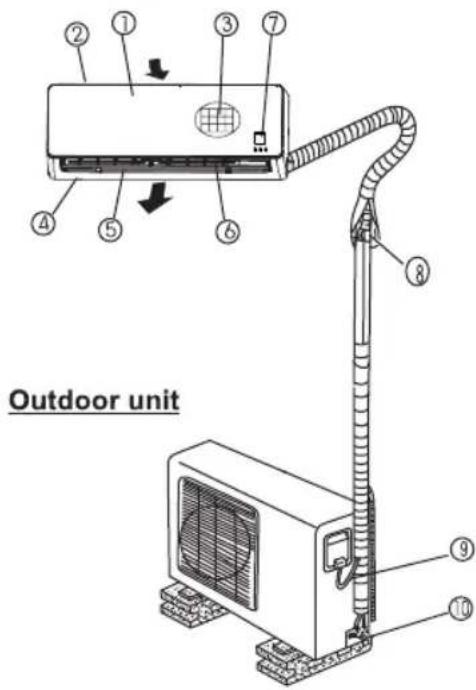
PARTS DESCRIPTION
Indoor unit
text_image
Outdoor unitIndicator
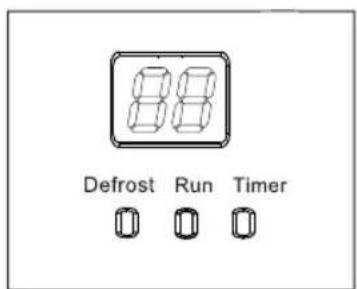
text_image
88 Defrost Run TimerIndoor unit
- Front panel
- Air inlet
- Air filter
- Air outlet
- Horizontal louver
- Vertical louver
- Display panel
Outdoor unit
- Connection pipe
- Connection cable
- Pressure valve
NOTE:
All the pictures in this manual are for explanation purposes only. Your air conditioner may be slightly different. The actual shape shall be prevailed.
Indicator
DEFROST indicator
The indicator will illuminate when the air conditioner starts defrosting automatically or when the warm air control feature is activated in heat mode.
RUN indicator
The indicator will illuminate when the air conditioner is in operation.
TIMER indicator
The indicator will illuminate when TIMER setting is ON.
Digital display
- The temperature settings will be displayed when the air conditioner is in operation.
• Displays the error signal.
Special functions
Refrigerant Leakage Detection
The digital display will appear 'EC' when the outdoor unit detects refrigerant leakage.
SELF CLEAN (Anti-mildew function)
- When turning off the unit on COOL, DRY mode, the air conditioner will continue operating for about 7-10 minutes at LOW fan speed. If turning off the unit on HEA' mode, it will continue operating for about 30 seconds at LOW fan speed. This will help to dry up the condensed water inside the evaporator, and prevent the breeding of mildew.
- Under Anti-mildew operation, do not restart the air conditioner until the unit is completely off.
Vertical swing function
After the appliance starts up, users can control the vertical louver swing by the remote control.
Follow Me function (Second temperature sensor)
Air conditioner is usually provided one sensor for temperature automation. This product is specially provided extra sensor on the remote control for appropriate temperature usage for the users.
NOTE: This manual does not include Remote Control Operations, see the <
OPERATION INSTRUCTIONS
Operating temperature
| ModeTemperature | COOL | HEAT | DRY |
| Room temperature | 17°C~32°C | 0°C~30°C | 10°C~32°C |
| Outdoor temperature | 0°C~50°C | -15°C~30°C | 0°C~50°C |
| NOTE:1. Optimum performance will be achieved within these operating temperatures.If the air conditioner is used out of the above conditions, certain safety protection features may come into operation and cause the unit to function abnormally.2. If the air conditioner runs for a long time in cooling mode and the humidity is high, condensed water may drip out of the unit. Please sets the vertical louver to its maximum angle (vertically to the floor), and set HIGH fan mode. | |||
NOTE:
- Optimum performance will be achieved within these operating temperatures. If the air conditioner is used out of the above conditions, certain safety protection features may come into operation and cause the unit to function abnormally.
- If the air conditioner runs for a long time in cooling mode and the humidity is high, condensed water may drip out of the unit. Please sets the vertical louver to its maximum angle (vertically to the floor), and set HIGH fan mode.
Manual operation
Manual operation can be used temporarily in case the remote control is disable or maintenance necessary.
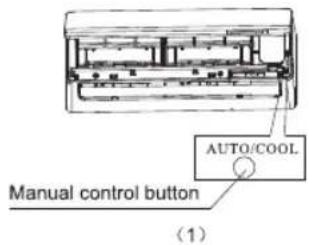
text_image
AUTO/COOL Manual control button (1)① Open and lift the front panel up to an angle until it remains fixed with a clicking sound.
② Press the manual control button once will lead to AUTO operation. If press the button twice within five seconds, the unit will be operated under COOL mode. To turn off the unit, press the button continuously.
③ Close the panel firmly to its original position.
CAUTION:
- It can only be used when the remote control is disable or maintenance necessary.
- Once remote control resume operation, use the remote control directly.
- The unit must be turned off before operating by the manual control button.
- HEAT mode cannot be activated by the manual control button.
Air flow direction control
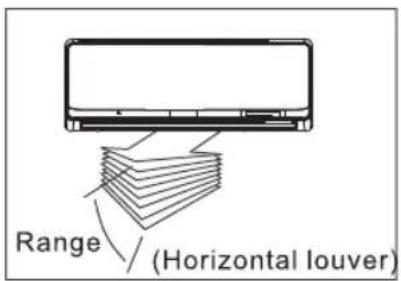
text_image
Range (Horizontal louver)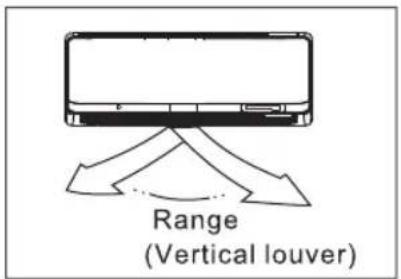
text_image
Range (Vertical louver)- Adjust the air flow direction properly. Otherwise, it might cause discomfort or cause uneven room temperatures.
- Adjust the horizontal/vertical louver by the remote control.
To set the horizontal/vertical air flow direction
- Perform this function while the unit is in operation.
- Use the remote control to adjust the air flow direction.
The vertical/horizontal louver changes approximately 6 degree in angle for each press, the louver can also be set to swing up, down, left and right automatically. Please refer to the «REMOTE CONTROL USER MANUAL» for details.
IMPORTANT: Do not put your fingers into the panel of blower and suction side. The high-speed fan inside may cause danger.

CAUTION
- Do not operate the air conditioner for long periods with the air flow direction set downward in COOL or DRY mode. Otherwise, condensation may occur on the surface of the horizontal louver causing moisture to drop on to the floor or on furnishings.
- When the air conditioner is switched on immediately after it was stopped, the horizontal louver might not move for approximately 10 seconds.
- Open angle of the horizontal louver should not be set too small, as COOLING or HEATING performance may be impaired due to too restricted air flow area.
- Do not move the horizontal louver manually. Otherwise the horizontal louver will be out of sync.
- During operation, do not operate with horizontal louver in closed position to block the air outlet.
- When the air conditioner is connected to the power (initial power), the horizontal louver may generate a sound for 10 seconds, this is a normal operation.
How the air conditioner works
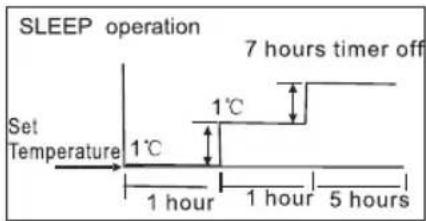
text_image
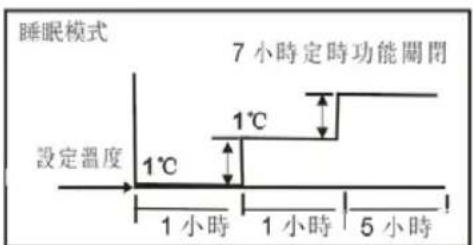
SLEEP operation Set Temperature 1°C 1°C 1 hour 1 hour 5 hours 7 hours timer offCOOL mode
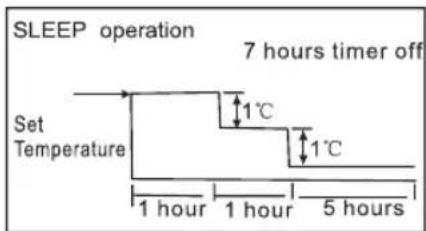
flowchart
graph TD
    A["Set Temperature"] --> B["1 hour"]
    B --> C["1 hour"]
    C --> D["5 hours"]
    D --> E["7 hours timer off"]
    style A fill:#f9f,stroke:#333
    style E fill:#ccf,stroke:#333
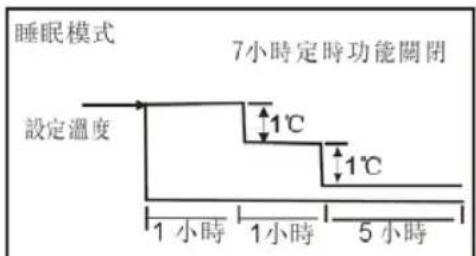
HEAT mode
AUTO mode
- When you set the air conditioner in AUTO mode, it will automatically select COOL, HEAT or FAN mode operation depending on the temperature you have selected and the room temperature.
- The air conditioner will control the room temperature automatically around the temperature point set by you.
- If the AUTO mode is uncomfortable, you can set desired conditions manually.
COOL mode
- The temperature setting are adjustable between 17^ C to 30^ C. Cooling begins automatically when the room temperature around 1^ C above the set point, and stops when the room temperature around 1^ C below the set point. The fan will remain running.
HEAT mode
- The temperature setting are adjustable between 30^ C to 17^ C. Heating begins automatically when the room temperature around 1^ C below the set point, and stops when the room temperature around 1^ C above the set point. The fan will remain running.
- SLEEP mode
When you press SLEEP button on the remote control during COOL, HEAT or AUTO mode, the air conditioner will automatically increase (COOL) or decrease (HEAT) 1°C per hour for the first 2 hours, then hold steadily for the next 5 hours, and switch off afterwards.
- This mode saves energy and brings comfort at night.
DRY mode
- The fan speed will be automatically controlled under the dry mode.
- During the dry mode, if the room temperature is lower than 10^ C, the compressor will stop operation and restart until the room temperature is above 12^ C.
MAINTENANCE INSTRUCTION
natural_image
Illustration of hands installing or adjusting a mechanical component with arrows indicating motion (no text or symbols)Cleaning the Grille, Case and Remote Control
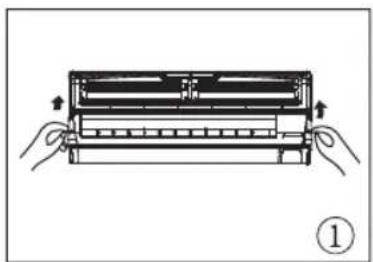
- Turn the unit off before cleaning. To clean and wipe with a soft and dry cloth. Do not use bleach or abrasives.
NOTE: Supply power must be disconnected before cleaning the indoor unit.
text_image
Filter Handle ②
CAUTION
- Wipe the indoor unit with a dry cloth if it is dirty.
- Do not use a chemically treated cloth or duster to clean the unit.
- Do not use benzine, thinner, polishing powder, or similar solvents for cleaning. These may cause the plastic surface to crack or deform.
natural_image
Diagram showing a hand pressing down a car interior with a black arrow indicating the down-left corner (no text or symbols present)Cleaning the air filter
A clogged air filter reduces the cooling / heating efficiency of this unit. Clean the filter every 2 weeks is recommended.
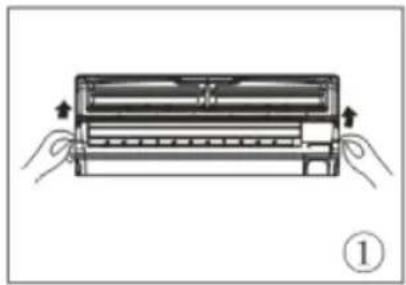
- Lift the indoor unit panel up to an angle until a click sound is heard.
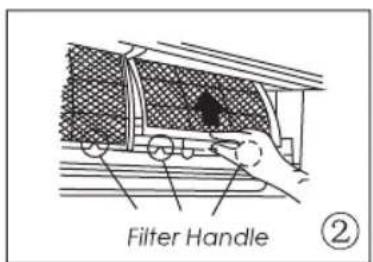
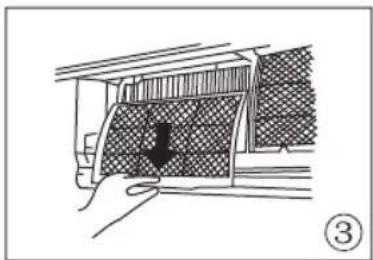
- Hold the handle of the air filter and lift it up slightly to take it out from the filter holder, then pull it downwards.
- Remove the air filter from the indoor unit.
text_image
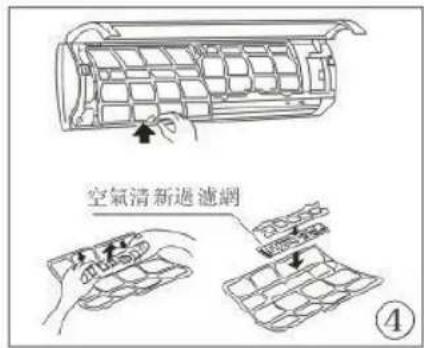
Air freshening filter ④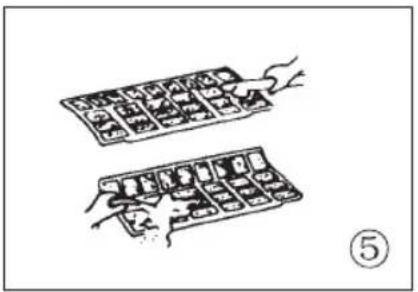
natural_image
Illustration of two hands holding a grid of small objects, no text or symbols present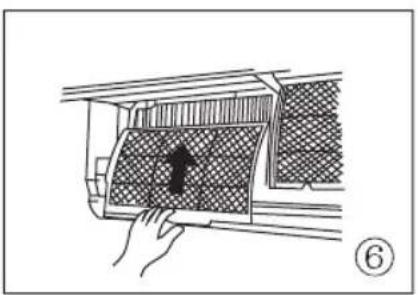
natural_image
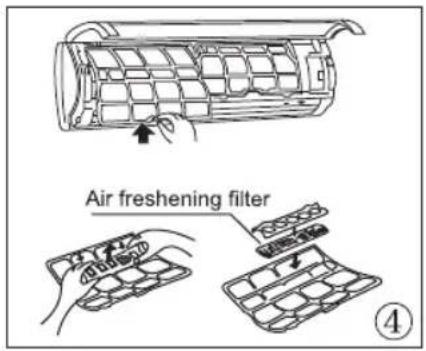
Diagram of a hand placing a mesh panel into a car air vent (no text or symbols)- Remove the air filter and air freshening filter from its support frame.
(The air freshening filter include: Tea polyphenols / Cold catalyst filter). The removing and installation methods are slightly different, see the pictures marked ④ on the left. (Clean the air freshening filter at least once a month is recommended.)
-
Clean the air filter and air freshening filter with a vacuum cleaner or water, then dry them in a cool and dry place.
-
Install the air freshening filter back into position. Insert the upper portion of the air filter back into the unit, make sure that the left and right edges line up correctly, and place the air filter back into position.
NOTE
When the unit is not in use for a prolonged period, please perform the following.
(1) Operate the FAN mode for about half a day to dry inside of the unit.
(2) Stop the air conditioner and disconnect the power. Remove the batteries from the remote control.
(3) The outdoor unit requires periodic maintenance and cleaning. Do not attempt to do this yourself. Contact your dealer or service provider.
Checks before operation
- Check if the wiring is broken off or disconnected.
- Check if the air filter is installed.
- Check if the air outlet or inlet is blocked after the air conditioner has not been used for a prolonged period.

Caution
- Do not touch the metal parts of the unit when removing the air filter. Injuries can occur when handling sharp metal edges.
- Do not use water to clean inside the air conditioner. Exposure to water can destroy the insulation and lead to possible electric shock.
- When cleaning the unit, please ensure the power and the circuit breaker are turned off.
TROUBLESHOOTING
The following events may occur during normal operation.
1. Compressor protection
The compressor cannot restart for 3-4 minutes after it stops.
2. Defrosting
- Frost may be generated on the outdoor unit during heat cycle when the outdoor temperature is low and the humidity is high resulting in lower heating efficiency of the air conditioner.
- During this condition, the air conditioner will stop heating operation and start defrosting automatically.
- The time to defrost may vary from approximately 4 to 10 minutes according to the outdoor temperature and the amount of frost built up on the outdoor unit.
3. White mist coming out from the indoor unit
- White mist may come out due to a large temperature difference between the air inlet and air outlet on COOL mode in an indoor environment that has a high relative humidity.
- White mist may come out due to moisture generated from defrosting process when the air conditioner restarts in HEAT mode operation after defrosting.
4. Low noise of the air conditioner
- You may hear a low hissing sound when the compressor is running or has just stopped running. It is the sound of the refrigerant flowing or coming to stop.
- You can also hear a low "squeak" sound when the compressor is running or has just stopped running. This is caused by heat expansion and cold contraction of the plastic parts in the unit when the temperature is changing.
- A noise may happen due to louver restoring to its original position when the power is turned on.
5. Dust is blown out from the indoor unit.
This is a normal condition when the air conditioner has not been used for a prolonged period or during first use of the unit.
6. A peculiar smell comes out from the indoor unit.
This is caused by the indoor unit giving off smells permeated from building material, furniture, or smoke.
7. The air conditioner turns to FAN mode from COOL or HEAT mode.
When indoor temperature reaches the temperature setting on the air conditioner, the compressor will stop automatically, and the air conditioner will turn to FAN mode. The compressor will start again when the indoor temperature rises on COOL mode or falls on HEAT mode to the set point.
-
The air conditioner runs Anti-mildew function after turning off the unit.
-
When turning off the unit under COOL and DRY mode, the air conditioner will run Anti-mildew function for 7-10 minutes.
- If turning off the unit when HEAT mode, the unit will continue operating for about 30 seconds at LOW fan speed, then the operation will be stopped and the unit will turn off automatically.
9. Water leakage
Water leakage may generate on the surface of the indoor unit when cooling in a high relatively humidity (relative humidity higher than 80%). Adjust the horizontal louver to the maximum air outlet position and select HIGH fan speed.
10. Heat mode
The air conditioner draws in heat from the outdoor unit and releases it via the indoor unit during heating operation. When the outdoor temperature falls, heat drawn in by the air conditioner will decrease accordingly. At the same time, heat loading of the air conditioner will increase due to larger difference between indoor and outdoor temperature. If a comfortable temperature can't be achieved by the air conditioner, we suggest you use a supplementary heating device.
11. Auto-restart function
● Power failure during operation will stop the unit completely.
- When the power restores, the unit will restart automatically with all the previous settings preserved by the memory function.
| Stop the air conditioner immediately if one of the following faults occur. Disconnect the power and contact the service center. | |
| Trouble | OPERATION indicator or other indicators continue flashing and it cannot be fixed by restarting the air conditioner. |
| Fuse blows frequently or circuit breaker trips frequently. | |
| Other objects or water penetrate inside the air conditioner. | |
| The remote control does not work or works abnormally. | |
| If one of the following code appears on the display area : E0,E1,E2,E3......or P0,P1,P2,P3...... | |
| Malfunctions | Cause | Solution |
| Unit does not start | Power cut | Wait for the power to be restored. |
| Unit unplugged | Check if the plug is securely in the wall receptacle. | |
| Fuse may be blown | Replace the fuse. | |
| Battery in the remote control may be exhausted | Replace the battery. | |
| The time you have set with the timer is incorrect | Wait or cancel the timer setting. | |
| The cooling / heating efficiency is not very well while air flowing out from the air conditioner | Inappropriate temperature setting | Set the temperature correctly. For detailed method, please refer to the «Remote Control User Manual» . |
| Air filter is blocked | Clean the air filter. | |
| Doors or windows are open | Close the doors or windows. | |
| Air inlet or outlet of indoor or outdoor unit has been blocked | Clear obstructions away first, then restart the unit. | |
| Compressor 3 minutes protection has been activated | Wait. | |
| If the trouble persists, please contact the customer service center.Be sure to inform them of the detailed malfunctions and the unit model. | ||
Notes: Do not attempt to repair the unit yourself.
Always consult an authorised service provider.
SPECIFICATIONS
| TYPES | BODY DIMENSION(mm)(W x H x D) | WIRING SIZE(mm2) | |
| INDOOR | OUTDOOR | ||
| FSAV10M16 | 750x280x198 | 770x555x300 | ≥slant 3 × 1.0 |
| FSAV13M16 | 835x280x198 | 770x555x300 | ≥slant 3 × 1.0 |
| FSAV19M16 | 990x315x218 | 800x554x333 | ≥slant 3 × 1.5 |
WARRANTY
- The product has 2 years warranty from the date of purchase.
- The warranty shall not apply:
A. to any product subjected to misuse, alteration, act of God, improper handling, improper transport, improper testing or unauthorized repair;
B. to cosmetic problems or defects which result from normal wear and tear under ordinary use yet not affecting the performance or use of the product;
C. if the product is disassembled or altered;
D. to any packing, transportation, export/ import tax or any related expenses.
Within warranty coverage period, all checking, repair and spare parts cost will be waived for those defects arising from normal usage. Free replacements of spare parts do not include the following:
- Any filter, outer cabinet, plastics accessories
-
Product not used for personal or domestic purpose
-
CUSTOMER MUST PRESENT THE SALES INVOICE OR RECEIPT FOR 2 YEARS WARRANTY SERVICES.
-
All require for service, please contact Fortress Service Centre Hotline, Tel: 2555-5788
NOTES
- This appliance must be plugged or connected into a specific 220-240V socket. Please make sure the plug is fully plugged-in before use. Do not use any adapter or extension cord.
- This appliance is a high energy consumption product, please do not use it with other high energy consumption products in the same supply socket.
• THE APPLIANCE IS FOR HOUSEHOLD USE ONLY.
ENVIRONMENT
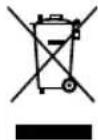
Do not throw away the appliance with the normal household waste at the end of its life, but hand it in at an official collection point for recycling. By doing this, you help preserving the environment.
IMPORTANT NOTICES
IN NO EVENT SHALL OUR COMPANY OR THE SUPPLIER BE LIABLE TO YOU OR ANY OTHER PARTY FOR ANY DIRECT, INDIRECT, GENERAL SPECIAL, INCIDENTAL, CONSEQUENTIAL, EXEMPLARY OR OTHER DAMAGES ARISING OUT OF THE USE ORINABILITY TO USE THE PRODUCT (INCLUDING, WITHOUT LIMITATION, DAMAGES FOR INJURY, LOSS OF PROPERTY, BUSINESS PROFITS, BUSINESS INTERRUPTION) OR FROM ANY BREACH OF WARRANTY, EVEN IF OUR COMPANY OR SUPPLIER HAS BEEN ADVISED OF THE POSSIBILITY OF SUCH DAMAGES. IN NO CASE SHALL OUR COMPANY OR SUPPLIER'S LIABILITY EXCEED THE AMOUNT YOU PAID FOR THE PRODUCT.
Specifications, designs and dimensions are subject to change without prior notice.
fortress 豐澤牌
變頻分體冷氣機
使用說明書
text_image
fortress型號
FSAV10M16 FSAV13M16 FSAV19M16
使用或安裝本產品前,請仔細閱讀本說明書,及所有安全注意事項,並請妥善保存,以備日後參考查閱。
目錄
| 安全注意事項 | 2 |
| 產品零件介紹 | 4 |
| 操作說明 | 6 |
| 保養指示 | 9 |
| 疑難小百科 | 11 |
| 規格表 | 13 |
| 保用期資料 | 14 |
閱讀本使用說明書
本使用說明書提供了許多有關冷氣機的正確使用與保養實用提示,只要稍加注意,就能延長冷氣機的使用壽命。在疑難小百科中,可以找到許多常見問題的解決方法。聯絡維修中心前,請先瀏覽疑難小百科。
使用前,請聯絡專門的技術人員進行安裝。

注意
- 請聯絡授權的技術人員進行維修或保養本產品。
- 請聯絡授權的技術人員安裝本產品。
- 除非有安全人員的指導或協助下,並確保使用者的安全,否則本機器不可由兒童、精神病人、殘疾人士及反應過慢之人士使用。
- 切勿讓兒童把玩冷氣機。
- 電源線只能由廠方授權的技術人員或同樣合資格的技術人員進行更換,以免發生意外。
- 清潔或保養前,請先關掉電源與供電斷路器。
安全注意事項
為避免造成任何人身傷害以及財產損失,請遵守以下指引。
■ 本使用說明書所使用符號的含義如下:
| 切勿執行。 | |
| 必須執行。 |
警告
可能造成死亡或者嚴重傷害
| 電源線不可靠近可燃氣體或易燃物,如汽油、苯、稀釋劑等 | 當冷氣機運行時,請關上門窗 | 不可損壞電源線或使用不符合規格的電源線 |
| 否則可能導致爆炸或火災 | 否則會影響製冷或製暖效果 | 否則會導致觸電或火災如果電源線已經損壞,必須由製造商、已經授權的維修中心或者合資格的人士進行更換,以免造成危險 |
| 不可更改電源線長度或與其他電器共用插座 | 手未擦乾,不可操作冷氣機 | 送風口不要直接對著房間內的人 |
| 否則會因為過熱而導致觸電或火災 | 否則會觸電 | 否則會有損健康 |
| 請必須確定接地妥當 | 不要弄濕帶電部份 | 務必安裝斷路器以及專門的電源電路 |
| 接地不當可能導致觸電 | 否則可能引起冷氣機故障或觸電 | 安裝不當會導致火災或觸電 |
| 如果冷氣機出現怪聲、異味或者冒煙,請立即斷電 | 電源線不可靠近熱源請勿透過開關電源操作或停止本機 | 冷氣機運轉時,不要打開機身 |
| 否則可能導致火災或觸電 | 否則可能導致火災或觸電 | 否則可能觸電 |
| 如果曾經出現煤氣泄漏,使用冷氣機前請先對房間進行通風 | 請妥善連接電源 | 不可拆卸或改裝冷氣機 |
| 否則可能導致爆炸、火災或燒傷 | 否則可能導致觸電或火災 | 否則可能導致故障或觸電 |
小心
可能造成傷害或財產損失
| 拆除空氣過濾網時,不要接觸冷氣機的金屬部份 | 不要用水清洗冷氣機內部 | 當與暖爐等一起使用時,要保持房間通風良好 |
| 否則會受傷 | 如果有水進入冷氣機,會影響絕緣功能,可能導致觸電 | 否則會出現缺氧 |
| 清潔或維修冷氣機前,要關掉電源,並關閉斷路器 | 不要把寵物或植物正對送風口 | 不要利用冷氣機來保護精密儀器、保存食品、照顧寵物與植物、保管藝術品等 |
| 通電時不要清潔冷氣機,否則可能導致火災或觸電,造成人身傷害 | 否則會對寵物或植物造成傷害 | 否則可能造成財物受損 |
| 狂風暴雨時,請關掉冷氣機並關閉窗戶 | 不要飲用冷氣機的冷凝水 | 長期不使用冷氣機時請關掉主電源開關 |
| 此時打開窗戶會導致室內潮濕,並讓傢具受潮 | 水中含有雜質,會使人生病 | 否則可能導致產品故障或火災 |
| 不要在進氣口附近或排氣口內部放置任何物件 | 確保放於室外的安裝架不會因為長期外露而受損 | 務必固定好空氣過濾網,建議每兩星期清潔一次 |
| 否則會導致冷氣機故障或意外 | 如果安裝架受損,冷氣機可能墮下,造成破壞 | 不加空氣過濾網運轉,可能導致故障 |
| 不要使用稀釋劑等強力清潔劑,只能使用乾布 | 不要在電源線上放置任何物品,確保電源線沒有被擠壓 | |
| 可能會導致冷氣機褪色、表面被刮花,破壞外觀 | 否則有火災或觸電危險 | |
| 開箱及安裝時必須小心,鋒利邊緣容易造成傷害 | 如果冷氣機進水,請馬上關閉冷氣機及斷路器。拔出電源插頭,並與合資格的維修技術人員聯絡 |
產品零件介紹
室內機
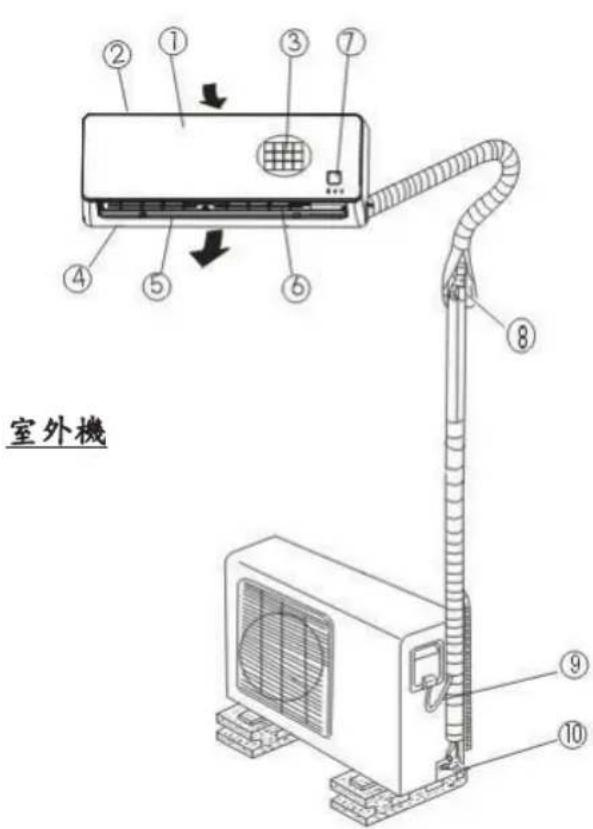
text_image
① ② ③ ④ ⑤ ⑥ ⑦ ⑧ ⑨ ⑩ 室外機指示燈
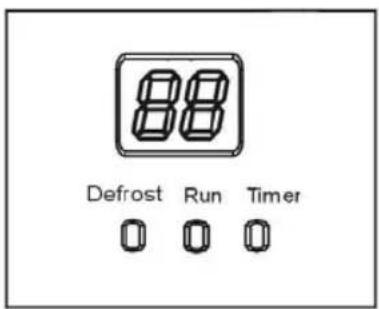
text_image
88 Defrost Run Timer室內機
- 前面板
- 入風口
- 空氣過濾網
- 出風口
- 水平送風葉
- 垂直送風葉
- 顯示屏幕
室外機
- 連接管道
- 連接電線
- 壓力閥
註:
本說明書內的所有圖片只供參考。您的冷氣機可能略有不同,一概以實物為準。
指示燈
除霜指示燈(Defrost):
此燈亮起時代表冷氣機已自動開啟除霜功能或已啟動暖氣控制功能。
運作指示燈(Run):
此燈亮起時代表冷氣機正在運作中。
定時設定指示燈(Timer):
此燈亮起代表定時設定已啟動。
顯示屏幕:
冷氣機運作時顯示溫度設定。
- 顯示故障代號。
特别功能
偵測雪種洩漏
當室外機偵測到雪種洩漏時,顯示屏幕將會顯示“EC”。
自動清潔(防霉功能)
- 當冷氣機於抽濕或製冷模式下關機時,冷氣機將以低風速持續運作約 7-10 分鐘。如在製暖模式下關閉,冷氣機將會持續以低風速運作約 30 秒。這有助吹乾蒸發器內部的凝結水,以防止霉菌滋生。
- 當防霉功能運作時,請勿重新開啟冷氣機。待機體完全靜止後,方可再度開啟。
垂直擺動功能
冷氣機開啟後,可利用遙控器控制垂直送風葉的擺動。
隨身感功能(第二溫度感應對比)
一般冷氣只有一顆感應器設置在室內機上以作溫度對比,自動調節溫度。現此功能特設多一顆感應器在遙控器以作溫度對比,使溫度更加切合使用者需要。
註:本說明書不包含遙控器操作部分的說明。遙控器的操作說明詳見包裝內的「遙控器使用說明書」。
操作說明
操作溫度
| 溫度\模式 | 製冷 | 制暖 | 抽濕 |
| 室內溫度 | 17°C~32°C | 0°C~30°C | 10°C~32°C |
| 室外溫度 | 0°C~50°C | -15°C~30°C | 0°C~50°C |
| 注意:1. 冷氣機在以上溫度運作將可達至最佳效能。若於上述條件外使用冷氣機,在運作上可能出現一定的安全保護功能,因而導致此機功能失常。2. 如果冷氣機長時間在製冷模式下或在高濕度環境下運作,凝結水可能滴落在冷氣機表面。請將垂直送風葉風口設定至最大角度(垂直向地板),並設定為高風速模式。 | |||
手動操作
如遙控器失效或需要維修時,你可以暫時手動操作本機。
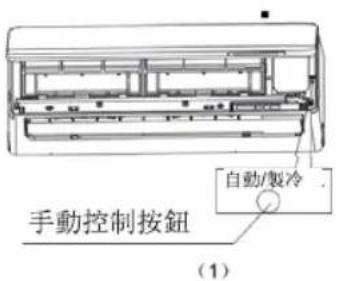
text_image
手動控制按鈕 自動/製冷 (1)① 掀開前面板及往上推至固定位置並發出“咔”一聲。
② 按手動按鈕啟動自動模式。若五秒內按手動控制按鈕兩次,本機將以製冷模式操作。長按此按鈕可關機。
③ 緊緊關上前面板到原來位置。
注意:
- 只供遥控器失效或需要維修時使用。
- 當遙控器恢復運作,請直接使用遙控器。
- 在開始手動操作時,必須先關閉本機。
- 不能以手動控制按鈕啟動製暖模式。
送風角度控制
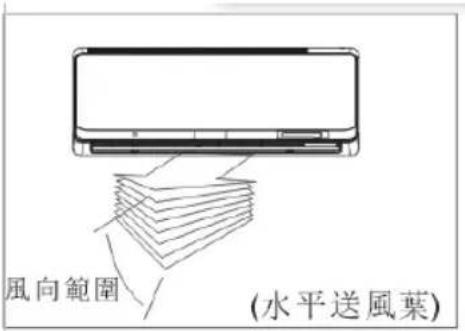
text_image
風向範圍 (水平送風葉)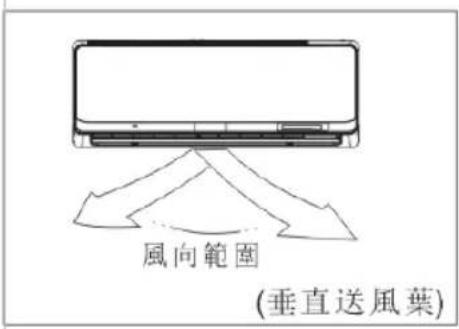
text_image
風向範圍 (垂直送風葉)- 請適當地調整送風角度,否則可能會造成不舒服感覺,或室內溫度不均勻。
- 使用遙控器調較水平/垂直送風葉。
設定水平/垂直送風方向
- 當冷氣機啟動時,方可設定此功能。
- 使用遙控器調較送風角度。每按一次按鈕,可使水平/垂直送風葉移動約 6^ ,或使其自動上下左右擺動。詳見「遙控器使用說明書」。
重要事項:切勿將手指放進出風和入風處。本機內的高風速扇葉可構成危險。
注意
- 當本機以製冷或抽濕模式操作中,請勿長時間將送風角度調向下,否則水平送風葉表面可能積聚凝結水,導致水分滴落在地板或傢俬上。
- 當冷氣機在關機後立即重開,水平送風葉可能約 10 秒內不會擺動。
- 水平送風葉的開合角度不可設定過小,否則冷氣或暖氣可能因流通面積受限而削弱性能。
- 切勿手動水平送風葉,否則會使其動作不協調。
- 操作時,切勿將水平送風葉設置在封閉狀態下,而堵塞出風口。
- 當冷氣機接上電源(原電源)後,水平送風葉或會傳出聲響約 10 秒,此乃正常現象。
冷氣機操作模式
自動模式
- 當冷氣機設定為自動模式時,冷氣機會依設定的溫度和室內溫度自動選擇製冷、製暖、送風模式。
- 冷氣機會自動將室溫控制在您所設定的溫度。
如自動模式不適合,亦可手動選擇溫度。
製冷模式
- 溫度設定可調節範圍為 17℃ 至 30℃。當房間溫度超過設定值約 1℃ 時,冷氣機就開始自動製冷,而當房間溫度低於設定值約 1℃ 時就會停止,但風扇不會停止運轉。
製暖冷模式
- 溫度設定可調節範圍為 30℃至 17℃。當房間溫度低於設定值約 1℃時,冷氣機就開始自動製暖,而當房間溫度超過設定值約 1℃時就會停止,但風扇不會停止運轉。
text_image
睡眠模式 7小時定時功能關閉 設定溫度 1°C 1°C 1小時 1小時 5小時製冷模式
text_image
睡眠模式 7小時定時功能關閉 設定溫度 1°C 1°C 1小時 1小時 5小時製暖模式
睡眠操作
- 在製冷、製暖或自動模式操作時,按遙控器的睡眠按鈕,冷氣機會在首2小時每小時自動提高1°C(製冷)或下調1°C(製暖),並在隨後5小時中保持溫度,之後會自動關機。
- 此功能可在夜間為您節省能源同時帶來舒適。
抽濕模式
- 在抽濕模式下,送風速度將會自動控制。
- 以抽濕模式運作時,如室溫低於 10^ C ,壓縮器將會停止運作,並會在室溫高於 12^ C 時重新開啟。
保養指示
natural_image
Illustration of hands installing or adjusting a device component (no text or symbols visible)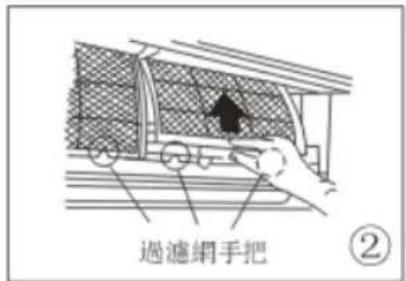
text_image
過濾網手把 ②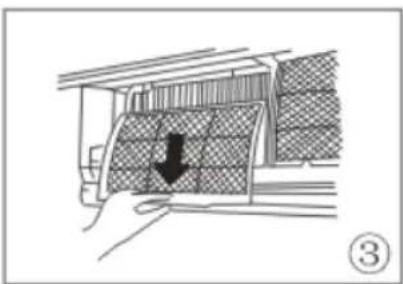
natural_image
Diagram showing a structural component with a downward arrow, no text or symbols present清洗格栅、機殼及遙控器
- 清洗前請先關機。請用柔軟的乾毛巾抹擦。請勿使用漂白劑或沙粉。
注意:在清洗室內機之前,必須先切斷電源。
注意
如發現室內機骯髒,請使用乾布抹擦。
- 請勿使用經化學加工的布料或除塵器清洗機體。
- 請勿使用揮發油、稀釋劑、拋光粉或類似溶劑清潔,這或會導致塑膠表面破裂或變形。
清洗空氣過濾網
空氣過濾網堵塞會令本產品的製冷/製暖效果減弱。建議每兩星期清洗過濾網一次。
- 打開室內機組面板直至出現“咔”一聲即停下。
- 抓住空氣過濾網的手把,輕輕揭開空氣過濾網,然後將其從架中拿起,向下拉落。
- 從室內機中取出空氣過濾網。
text_image
空氣清新過濾網 ④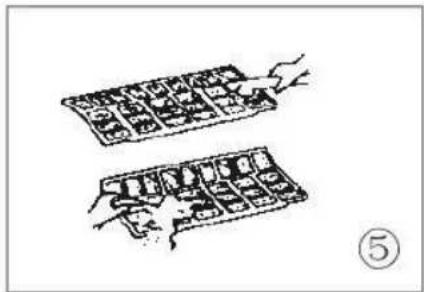
natural_image
Two hand-drawn diagrams showing a grid of objects, possibly tools or devices, with no visible text or symbols.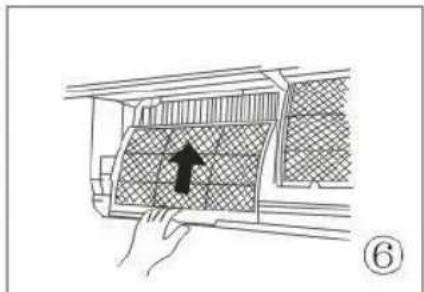
natural_image
Diagram of a hand holding a grid-patterned object with an arrow pointing to it, no text or symbols present.- 從支架上取出空氣過濾網及空氣清新過濾網。 (空氣清新過濾網包括:茶多酚過濾網/冷觸媒過濾網)。移除及安裝方法略有不同,見左面標示 ④ 的附圖(建議最少每月清洗空氣清新過濾網一次)。
- 以吸塵機或清水清潔空氣過濾網及空氣清新過濾網,然後放在乾爽的地方晾乾。
- 將空氣過濾網裝回原位。 先將空氣過濾網的前半部分嵌進機體上,確保左右兩邊放入正確位置,然後將整個空氣過濾網嵌回原位。
注意
如你打算長時間不使用本產品,請:
(1) 以送風模式運作約半日,以吹乾機體內部。
(2) 關閉冷氣機及切斷電源。取走遙控器內的電池。
(3) 室外機須定期保養及清洗。請勿自行清洗,應與零售商或服務供應商聯繫。
操作前先檢查
- 請檢查電線有否損壞或斷開。
- 請檢查是否已安裝空氣過濾網。
- 如長時間沒有使用冷氣機,請檢查出風口或入風口有否堵塞。

注意
- 當移除空氣過濾網時,請勿碰觸金屬部件。碰觸尖銳的金屬邊緣可引致損傷。
- 請勿使用清水清洗冷氣機內部。機體入水會令絕緣體受損,可能會導致觸電。
- 當清潔機體時,請先確保已關閉電源及斷路器。
疑難小百科
正常操作時可能發生下列現象。
1. 壓縮器保護
- 壓縮器在停頓後 3-4 分鐘內不能重新啟動
2. 除霜模式
- 在室外溫度偏低和濕度高的情況下,室外機在吹出暖氣時可能會結霜,降低冷氣機製暖效率。
- 於此情況下,冷氣機將停止製暖操作並自動開啟除霜模式。
- 除霜時間需時約4-10分鐘不等,視乎室外溫度和室外機上結霜的情況而定。
3. 室內機冒出白霧
- 當入風口與出風口溫差較大時,在製冷模式運作下,室內濕度較高,就可能出現白霧。
- 除霜模式運作時,當冷氣機在除霜後重新啟動製暖模式時,亦可能導致白霧產生。
4. 冷氣機發出微弱噪音
- 在壓縮器運轉或剛停止運轉時會聽到嘶嘶聲。這是雪種流動或停止時發出的聲音。
- 在壓縮器運轉或剛停止運轉時會聽到吱吱聲。這是機體中塑膠零件因溫度變化產生冷縮熱漲所發出的聲音。
- 電源剛開啟時,可能會聽到送風葉移回到原位所發出的聲音。
5. 室內機吹出灰塵
冷氣機組經過長時間停用後或首次啟用時,發生這種狀況是正常現象。
6. 室內機發出異味
這是因室內機散發出來自建築材料、傢俱或煙霧的氣味所造成的現象。
7. 冷氣機由製冷或製暖模式轉為送風模式
當室內溫度達到冷氣機所設定的溫度時,壓縮器會自動停止運作,冷氣機將轉為送風模式。當室內溫度在製冷模式中上升,或在製暖模式中下降,壓縮器便會再度運作。
8. 冷氣機在關機後啟動防霧功能
於製冷或抽濕模式下關閉冷氣機,冷氣機的防霧功能將會運作 7-10 分鐘。如在製暖模式下關機,本機將會以低風速繼續運作 30 秒。然後便會停止運作並自動關機。
9. 漏水
當相對濕度較高(相對濕度>80%)的環境下,冷氣運作時室內機表面會產生滴水現象。此時可調整水平送風葉至最大出風位置,並選用高風速運轉。
10. 製暖模式
製暖模式運作時,冷氣機會從室外機引入暖氣,再透過室內機將暖氣釋出。當室外溫度下降時,冷氣機引入的暖氣溫度也相對地下降。與此同時,因為室內和室外的溫差擴大,冷氣機的供暖負荷也同樣地上升。如果冷氣機不能提供舒適的溫度,請使用額外的暖氣裝置。
11. 自動重新啟動功能
- 運轉期間遇到停電會使本機完全停止。
- 本機在電力恢復時,會自動重新啟動在記憶功能中所有先前的設定。
| 如出現下列任何一種情況,請立即關機,切斷電源並聯絡維修服務部。 | |
| 異常情況 | 操作中指示燈或其他指示燈持續閃動,而切斷電源後重啟後仍然如此。 |
| 保險絲經常燒斷或斷路器經常啟動。 | |
| 其他雜物或水滲進機體內。 | |
| 遙控器不能操作或操作異常。 | |
| 顯示板上出現下列號碼:E0、E1、E2、E3......或P0、P1、P2、P3...... | |
| 故障 | 原因 | 解決方法 |
| 冷氣機無法啟動 | 停電 | 等待電力恢復正常 |
| 冷氣機的插頭未有插好 | 檢查插頭是否已插好 | |
| 保險絲可能燒斷 | 更換保險絲 | |
| 遙控器內的電池可能已經耗盡 | 更換電池 | |
| 時間掣設定的時間不正確 | 等待或取消時間設定 | |
| 冷氣機有出風但製冷或制熱效果欠佳 | 溫度設定不當 | 設定適當溫度。有關詳盡方法,請參閱「遙控器說明書」一節 |
| 空氣過濾網被堵塞 | 清洗空氣過濾網 | |
| 門或窗是開著的 | 關閉門窗 | |
| 室內或室外機的入風位或出風位被堵塞 | 先移走堵塞物,然後重啟冷氣機。 | |
| 壓縮機的三分鐘保護設定啟動 | 等待 | |
| 如異常情況持續,請聯絡客戶服務部。務請告知他們詳細的異常情況及冷氣機型號。 | ||
注意:請勿嘗試自行修理本產品。
務必向授權服務供應商查詢。
規格表
| 機型 | 機身大小(毫米)(寬×高×深) | 配線規格(平方毫米) | |
| 室內機 | 室外機 | ||
| FSAV10M16 | 750x280x198 | 770x555x300 | ≥3*1.0 |
| FSAV13M16 | 835x280x198 | 770x555x300 | ≥3*1.0 |
| FSAV19M16 | 990x315x218 | 800x554x333 | ≥3*1.5 |
保用期資料
-
由購買日期計正常使用下提供兩年年保用。
-
保用不包括下列各項:
A. 產品錯誤使用、被更改、天災、因運輸拆卸不當、錯誤測試或不合格維修;
B. 在正常使用情況下產生的正常損耗導致外觀問題或瑕疵而不影響產品功能;
C. 如產品被拆開或更改;
D. 產品的包裝、運輸費及出入口關稅或任何相關費用。
在保用期內,所有正常使用下損壞的電器之檢查、維修及零件費均會獲得豁免。免費更換的零件並不包括以下項目:
- 各類隔塵網、外殼、塑膠附件及配件。
-
非家庭使用或非個人用途之貨品。
-
請妥善保存產品購買發票/單據。必須出示產品購買發票/單據方可獲兩年保養服務。
-
如需要任何維修服務,請聯絡豐澤維修服務部 電話:2555-5788
注意事項
- 本產品必須插在或連接 220-240V 的專用插座,並確保插頭完全插入插座後方能使用。切勿使用萬能插座及延長電源線。
• 本產品屬高耗電量電器,不應與其他高耗電量電器共用插座。 - 此產品只作一般家庭用途。
環境保護
本產品使用壽命結束時請勿與一般家庭廢棄物一併丟棄。請將該產品放置於政府指定的回收站。此舉能為環保盡一份心力。
重要信息
儘管本公司或其生產商受知會,在任何情況下本公司或其生產商將不須就任何聲明、承諾及保證的索償而負責及不會向客戶或第三方承擔任何因使用或未能使用此產品所帶來直接的、非直接的、非專業的、特殊的、偶然的、間接的、有代表性的或其他任何損傷的責任(包括但不限於身體的損傷、財產的損失、公司盈利的損失、公司運作受中斷)。在任何情況下本公司或其生產商所承擔之責任將不會超過此產品之購買金額。
產品如有任何技術規格更改不作另行通知。
16122000A26102