PC21 - Uhr Lorus - Kostenlose Bedienungsanleitung
Finden Sie kostenlos die Bedienungsanleitung des Geräts PC21 Lorus als PDF.


Benutzerfragen zu PC21 Lorus
0 Frage zu diesem Gerät. Beantworten Sie die, die Sie kennen, oder stellen Sie Ihre eigene.
Eine neue Frage zu diesem Gerät stellen
Laden Sie die Anleitung für Ihr Uhr kostenlos im PDF-Format! Finden Sie Ihr Handbuch PC21 - Lorus und nehmen Sie Ihr elektronisches Gerät wieder in die Hand. Auf dieser Seite sind alle Dokumente veröffentlicht, die für die Verwendung Ihres Geräts notwendig sind. PC21 von der Marke Lorus.
BEDIENUNGSANLEITUNG PC21 Lorus
NREAD
12/2011
Instruction Manual

LORUS
ANALOGUE QUARTZ

LORUS
■HOW TO USE NON-CALENDAR MODEL

Normal position
First click
Put the crown OUP to the FIRST clock and set the time, then push the crown N.
Note: When you set the time, first set the minute hand to a properly covered time. Then return the rule hand to be correct time by turning it COUNTLOCKWISE.
■HOW TO USE DAY/DATE MODEL
The day of the week can be displayed by lingually (English/another language) and you can select other
1. How to set the day and date
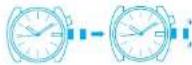

Put out the grow to the first click position, ( he crown o' th: watch can be outed out to the second click poston )
Turn the crown and set the previous day and date. (the day and date can be selected a thermotively and displayed in English or the other language.) (For Cal PC33, fum otherwise to set the date only.)
Put out the crown to the second o'clock position and set the present day and date by turning the minute hand.
Day selling for Cal. PC33
At the second click position, I am the non-clockwise and counter-clockwise repeatedly between 11:5 p.m. and 3/5 c.m. to select the desired day and language.
Note: Do not attempt to set the day and date between the times of 9:30 am and 4:00 am as this may cause the day and do e d solays to change out of sequence.
2. How to set the time


Pull out the crown to the second click position and the second hard stop. The second hard should be stepped on 12 clock position.
Turn he grown and set the cooling ring.
Push the crown in other terms cost on in occurrence with a the sign.
• Be sure to check that the AM/PM is correctly set (The day and date are designed to change once every 24 hours).
- To adjust the correct time for a square watch, it is necessary to advance the minute hand 4 c/5 minutes ahead of the correct time and then turn. It counts clockwise to set the designated line
LUMIBRITE WATCH
* I your watch is a LORUS LUM BRILL watch. It has to low ng features.
LORUS LUMBER TE watches closer and store light energy from natural and artificial light sources and on light in the dark. They are made of environmentally friendly materials, and therefore, are harmless to human beings and the environment.
- With a full charge, LORUS LU VIBRITE watches grow in the six hours longer than conventional luminous watches of this type. It exposed to a light of more than 600 lux (i.e., the brightness of a typical office) for appreciation of 10 minutes or direct sunlight for 2 minutes, they will grow for hours
- Since LORUS LUMISKIF watches emit the ght they store, the brightness will decrease gradually over time. The length of time they will glow may also differ slightly depending on such factors as the brightness of and distance from the light source used to charge the watch.
- With a full charge, LORUS LU VIBRITE watches grow in the six hours longer than conventional luminous watches of this type. It exposed to a light of more than 600 lux (i.e., the brightness of a typical office) for appreciation of 10 minutes or direct sunlight for 2 minutes, they will grow for hours
- Since LORUS LUMISKIF watches emit the ght they store, the brightness will decrease gradually over time. The length of time they will glow may also differ slightly depending on such factors as the brightness of and distance from the light source used to charge the watch.
BATTERY CHANGE
As the battery is inserted of the factory to check the function and performance of the watch. Is so dull. He once in your possession may be less than the special period.
Be sure to replace the battery to prevent any possible malfunction as soon as it runs down. To replace the battery, we recommend taking the watch to a local watch retainer.
■ CARE OF YOUR LORUS WATCH
BATTERY

CAUTION
Do not expose the old battery to fire or recharge it. Keep it at a place beyond the reach of children. If a child swallows it, consult a doctor immediately.
- WATER RESISTANT
| Name or Standard Indicator or Date (see Table) | Not specified with a other a) applies of 12.1 | 5-mining at listing in water | 3-min dark |
| No Indication | NO | NO | NO |
| WATER RESISTANT | Yes | NO NO | NO |
| WATER RESISTANT* (100N/10 BAR) at above | YES | YES NO | NO |
| WATER RESISTANT* (100N/10 BAR) at above | YES | YES YES NO |
* If your watch is 200 M/23 BAR, 100 M/10 BAR or 50 M/s BAR water resistant, it is so indicated on the clo /case book
- Be to press the buttons or turn the crown when the watch is wet.
• I the water is exposed to salt water, since I in fresh water can then wine thoroughly
Caution:
Logather shops are no water resistant except so indicated, even if the watch hecd is water resistant.
- ALLERGIC REACTION
Because the case and band touch the skin directly, it is important to clean their regularity. If not, shirt sleeves may be saline and those with delicate skin may develop a mask. Please wear the watch with some pay to avoid any possible charge a reaction. If you develop a rash on your wrist, stop wearing and consulting physician.
• MAGNETISM
Your watch will be adversely affected by strong magnetism. Keep flow away from close contact with natural causes.
- SHOCKS AND VIBRATIONS
Your watch may be worn for rental spots activities, but be careful nor to drop it or hit it on hard surfaces.
• TEMPERATURE
Your watch is preadjusted so that constant accuracy may be insured at hotel temperature.
SERVICE
When your LCRS watch requires reset or providing, please see the enclosed WARRAN Y/QUARANLE
■HOW TO ADJUST BAND LENGTH
Sliding clasp band
-
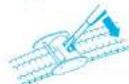
Try up the adjusting fao with a small screwdriver or something with a sharpened tip.
-
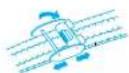
Slide the close to adjust it to a desired size.
- The grooves on the lock side of the correct should fill into the convex portion on the close, then close the adjust flop.
- Wrong method
If you do this way, the adjusting flap may be destroyed.


Eruited a library