Z018 - Uhr Lorus - Kostenlose Bedienungsanleitung
Finden Sie kostenlos die Bedienungsanleitung des Geräts Z018 Lorus als PDF.


Benutzerfragen zu Z018 Lorus
0 Frage zu diesem Gerät. Beantworten Sie die, die Sie kennen, oder stellen Sie Ihre eigene.
Eine neue Frage zu diesem Gerät stellen
Laden Sie die Anleitung für Ihr Uhr kostenlos im PDF-Format! Finden Sie Ihr Handbuch Z018 - Lorus und nehmen Sie Ihr elektronisches Gerät wieder in die Hand. Auf dieser Seite sind alle Dokumente veröffentlicht, die für die Verwendung Ihres Geräts notwendig sind. Z018 von der Marke Lorus.
BEDIENUNGSANLEITUNG Z018 Lorus
CHARACTERISTICS
- Time/calendar display: Hour, Minute, Second, March, Date and day of the work
- Time indication: 12 hour display format with PM on color and 24 hour display format are available.
- Daily alarm: The alarm can act to sound as the device too much on a 24% bus
- Chime: The came can be set to sounds every sour or the sour with a sine a bean.
- Stopwatch: The stopwatch can measure up to 20 hours, 50 minutes and 50 seconds, 17'00 second increments. Lap time measurement is available.
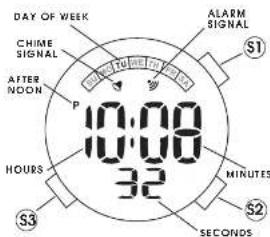
■ BUTTONS AND DISPLAYS
text_image
DAY OF WEEK CHIME SIGNAL AFTER NOON P 10:00 10:00 32 HOURS S3 ALARM SIGNAL MINUTES S2 SECONDSThe display in other modes
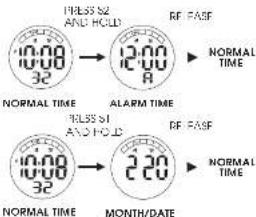
* Press 52 and hold it to show the ALARM IML. The ease to return to NORMAL IML = display.
Press SI and hold the show the MON H/DA L. or DALL/MONIF release to return to NORMAL IIVs display.
text_image
PRESS 52 AND HOLD RF FASF NORMAL TIME 10:00 32 12:00 10:00 A RF FASF NORMAL TIME 10:00 32 ALARM TIME 10:00 32 RF FASF NORMAL TIME 10:00 32 2:30 MONTH/DATE■ HOW TO SET THE TIME/CALENDAR
-
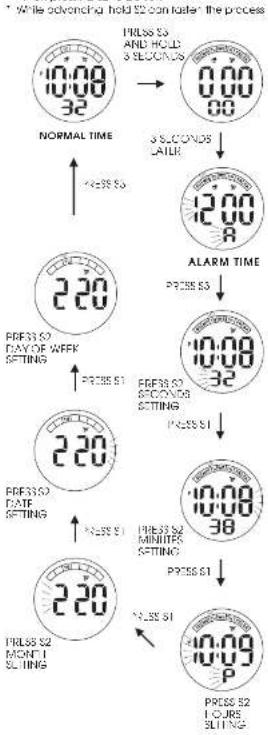
from NORMAL TML display, press and hold so for 2 seconds to show the A-AM UK display
-
From SI again to move on to SECOND's setting, the second diary is on losing.
-
Pass 52 in accordance with a line sign. The second digits are reset to "10" and s or c on a immediately.
When the record digits court any number from 30 to 59, one 5/2 is put on, one minutes is added. A record digit count any number from 02 to 29, minutes will not be changed.
Selection of the cliffs to be adjusted (flossing) is made in the order below by pressing \1 and then pressing \2 to be set.
flowchart
graph TD
    A["10:00 32"] --> B["NORMAL TIME"]
    B --> C["220"]
    C --> D["ALARM TIME"]
    D --> E["12:00 8"]
    E --> F["10:00 32"]
    F --> G["10:00 38"]
    G --> H["10:09 P"]
    C --> I["220 DAY OF WEEK SETTING"]
    I --> J["220 DATE SETTING"]
    J --> K["220 MONET SLITING"]
    C --> L["PRESS S3 AND HOLD 3 SECONDS"]
    L --> M["PRESS S3"]
    M --> N["PRESS S3"]
    N --> O["PRESS S3"]
    O --> P["PRESS S3"]
    P --> Q["PRESS S3"]
    Q --> R["PRESS S3"]
    R --> S["PRESS S3"]
* While advancing hold \$2 con foster the process
■HOW TO SWICH MONTH/DATE DISPLAY
-
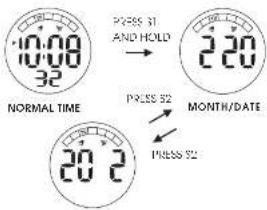
From NORMAL TIME scale, area S and hold to snow the NORTH/CAPE scale.
-
Press S2 to switch to the DATE/MONTH display.
- Press S2 again to switch back to the MONTH/DATE display.
* The display format in either MONTH/DATE to action or in DATE/MONCH Indication can be selected alternately by moving \$2.
text_image
10:00 32 NORMAL TIME PRESS 31 AND HOLD 2:00 MONTH/DATE PRESS 52 PRESS 52 20:2DATE/MONTH
■HOW TO SWITCH 12-HOUR/24-HOUR FORMAT
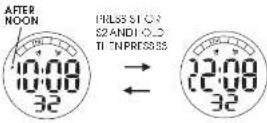
12 HOUR
24 HOUR
press 52 o 51 and h o c t. Then press 53 to switch the display.
The time display format I either 12-hour indication or a 24 hour indication can be acted alternately.
Under the 12-hour Indicolor format, "IM" mark appears in the afternoon, but no AM mark appears in the morning. Under the 24 hour adication format, no mark appears on the display
■ HOW TO SET ALARM TIME
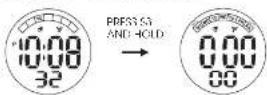
NORMAL TIME
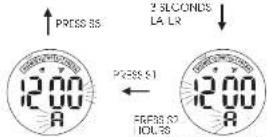
PRESS S2 MINUTE SLI NG

-
From NORMAL TIME display, cross and hold 30 for 3 seconds to show the A ARM TIME display. The hour digit was learning.
-
Cross S2 to set HOURS setting
-
rise SI to move on to N NJ=9 setting
-
16852 to 99K VJZ-80-ing
-
416 all the selling are cheaper, less \$7.
-
Are this setting and complete cross of a return to the NORMAL IML display. * Selection of the digits to be adjusted (flushing) is made by pressing \1 and then pressing \2 to be set.
* While advancing hold \$2 can taste the process
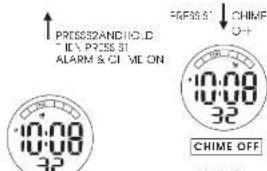
Engagement/Disengagement of ALARM & CHIME
- Press SU and hold it, one then press SI, the ALAIN and CHML can be endangered or disengaged in the order below.
* The A-APM signal and/or C-ILK signal appears or suppresses on the realy occurring y.
The ALAM sounds for 20 seconds of the designated time. Press £2 to stop the computer starts sound.
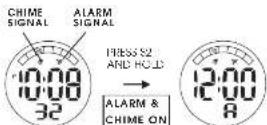
NORMAL TIME
ALARM TIME
text_image
PRESS AND HOLD - IC\ PRESS 31 ALARM & CHIME ON 10:00 32 CHIME OFF 10:00 32 CHIME OFF FRES 5' CHIME +/-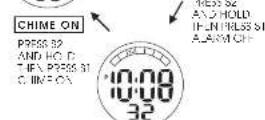
ALARM & CHIME OFF

- After all the adjustment are completed, there is a return to the NORMAL THE deploy.
* Press SI of any time to return to NORMAL TIME DISPLAY.


■ HOW TO USE STOPWATCH
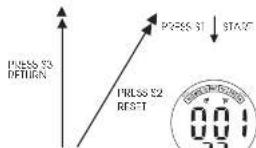
* From NORMAL TIME display, press \$5 to go to the STOPWATCH mode.
STOPWATCH MODE
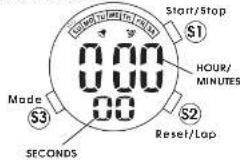

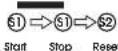
- Yes 51 to start or stop the SIO WATCH.
- Yes 52 to reset the SIO WATCH to "0:00:00."
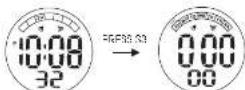
NORMAL TIME
STOPWATCH
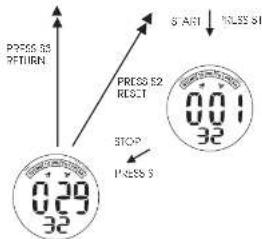
flowchart
graph TD
    A["0.29 32"] --> B["RESET"]
    B --> C["STOP"]
    C --> D["0.01 32"]
    D --> E["ACK"]
    E --> F["8 ARI"]
    F --> G["9.55 31"]
    style A fill:#f9f,stroke:#333
    style B fill:#ccf,stroke:#333
    style C fill:#cfc,stroke:#333
    style D fill:#fcc,stroke:#333
    style E fill:#cff,stroke:#333
    style F fill:#ffc,stroke:#333
    style G fill:#fcc,stroke:#333
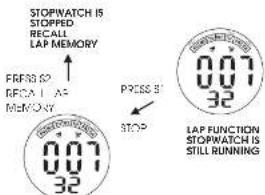
Lap Time Measurement
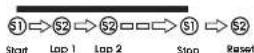
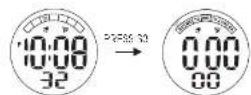
NORMAL TIME
STOPWATCH


text_image
STOPWATCH IS STOPPED RECALL LAP MEMORY PRESS 20 OFFCA LAP MEMORY 0.07 32 PRESS 31 STOP STOPWATCH IS 0.07 32 LAP FUNCTION STOPWATCH IS STILL RUNNINGSTOPWATCH IS STOPPED

■ BATTERY CHANGE
-
The miniat, a battery SEKO CR'220, Maxwell CR1220 or SONY CR1220, which bears your water should act approximately 2.5 years, however, because it is installed or the factory, the actual life of the battery once in your pages on may be seen than 2.5 years.
-
Be sure to replace the battery to prevent any possible malfunction or soon as it turns down.
- To replace the battery we recommend taking the watch in a lock, watch repair shop.
Note:
If the alarm is used for more than 20 seconds a day, he always be may be less than the specified period. After the call entries are replaced with new ones so the in-calender and alarm.
■ CARE OF YOUR LORUS WATCH
This wa can contain precise electronic components. Never attempt to open the case or remove the back cover.
BATTERY

Do not expose the old battery to fire or recharge it. Keep it at a place beyond the reach of children. If a child swallows it, consult a doctor immediately.
• WATER RESISTANT
| NoIndication | Sachoringand control of water, water and water in the field | Water, gas and gas in the field | Water, gas and gas in the field | Water, gas and gas in the field |
| YES | NO | NO | NO | |
| WATER RESISTANT | YES | NO | NO | NO |
| WATER RESISTANT (SOM/S BAG) | YES | YES | NO | NO |
| WATER RESISTANT (SODIMINEAS or above) | YES | YES | YES | NO |
* If your water is 200 M/20 BAR, 'CO M/10 BAR or 50 M/15 BAR water resistant. It also indicates on the dial/sea back
• Do not operate the brothers when the watch is vent.
- If the watch is exposed to salt water, it is free water; and there was it in progress dry.
• She is you find any water or condensation inside the water, immediately have it checked. Water can corrode electric parts inside the pipe.
Caution:
Leather stocks are not water resistant except so indicated, even if the watch here is water resistant.
- ALLERGIC REACTION
Because the case and hand touch the skin directly, it is important to care them regularly. If not, she always may be scared and those will delicate him may develop a star. Please wear the welter with some play to avoid any possible a green emotion. If you move on a man on your wall, stop wearing and casual a depression.
MAGNETISM
Your watch will be adversely affected by strong magnetism. Keep it away from close contact with magnetic objects.
SHOCKS AND VIBRATIONS
Your watch may be worn for normal sports activities, but be careful not to drop it a bit it on here surfaces.
TEMPERATURE
Your woman is bread used so that constant accuracy may be insured at normal temperature.
CLEANING
Use only a soft cloth and clear water for clearing your watch. Never use chemicals, as the waterproof gasket w- canoes
SERVICE
When your LORUS water requires repair or servicing, please see the enclosed WARRANTY GUARAN EE
Printed in China