Z022 - Uhr Lorus - Kostenlose Bedienungsanleitung
Finden Sie kostenlos die Bedienungsanleitung des Geräts Z022 Lorus als PDF.


Benutzerfragen zu Z022 Lorus
0 Frage zu diesem Gerät. Beantworten Sie die, die Sie kennen, oder stellen Sie Ihre eigene.
Eine neue Frage zu diesem Gerät stellen
Laden Sie die Anleitung für Ihr Uhr kostenlos im PDF-Format! Finden Sie Ihr Handbuch Z022 - Lorus und nehmen Sie Ihr elektronisches Gerät wieder in die Hand. Auf dieser Seite sind alle Dokumente veröffentlicht, die für die Verwendung Ihres Geräts notwendig sind. Z022 von der Marke Lorus.
BEDIENUNGSANLEITUNG Z022 Lorus


LORUS
CAL. Z022 (R23 SERIES)
LORUS
■ FEATURES AND SPECIFICATION
This watch is a combination on quartz watch with analogue and digital displays. 5 hands analogue movement.
2. Accuracy of normal temperature: ±30 seconds a month
3. Time keeping mode hours, minutes, seconds, month, date, day of week. "PM" (only available in 12-hour format)
Press \$1 button to show the month and date indication
- Alarm Mocs: Daily alarm.
- Time Mode:
Measuring unit: 1 second
Input range: from 1 second to 23:59'59". - Stop watch Mode:
Measuring unit: 1/100 of second
Measuring capacity: 23:59'59". - Normal operating temperature range between -20°C and 70°C.
- Battery type: CR2016. 57626SW
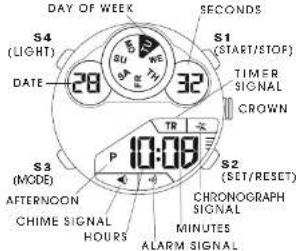
DIGITAL DISPLAY A
text_image
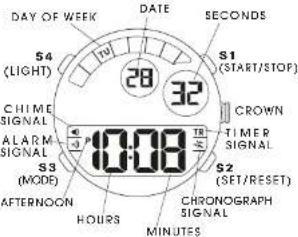
DAY OF WEEK S4 (LIGHT) DATE 28 32 S1 (START/STOP) TIMER SIGNAL CROWN S3 (MODE) AFTERNOON CHIME SIGNAL HOURS P 10:08 S2 (SET/RESET) CHRONOGRAPH SIGNAL MINUTES ALARM SIGNALDIGITAL DISPLAY B
text_image
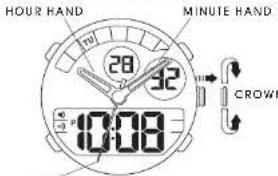
DAY OF WEEK DATE SECOND S1 (START/STOP) S4 (LIGHT) 28 32 CHIME SIGNAL ALARM SIGNAL S3 (MODE) AFTERNOON 10:08 HOURS S2 (SET/RESET) CHRONOGRAPH SIGNAL MINUTES■ SETTING THE TIME (ANALOGUE)
text_image
HOUR HAND MINUTE HAND 28 32 10:08 CROWNSECOND HAND
- Pull the crown out one step, the second hand will stop.
- Set the hands of the correct time by turning the crown.
- Push the crown back to the original position. The watch will sell running again.
The analogue indication and digital display of the time selling can be adjusted separately.
■ HOW TO CHANGE DISPLAY MODE
Press \$3 button to charge the display mode. Each time the button is pressed. The mode changes in the following order
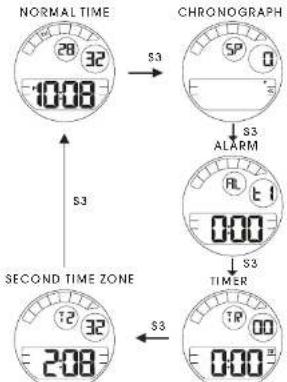
flowchart
graph TD
    A["NORMAL TIME"] -->|S3| B["CHRONOGRAPH"]
    B -->|S3 ALARM| C["TIMER"]
    C -->|S3| D["SECOND TIME ZONE"]
    D -->|S3| E["2:08"]
■ HOW TO SET NORMAL TIME/CALENDAR
- While a the normal time mode, press \$2 button once. The second lights start to flash
- While the second 6 girls are selected (flashing) press \1 outon to reset the seconds to 00. If you press \1 outon when the second count is in the range between 30 and 59, the seconds are reset to 00 and 1 is added to minutes. If the second count is in the range between 00 and 29, the seconds are reset to 00 but the minute count is unchanged.
- Press \$2 button to move on to the next setting
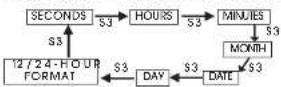
- Press \1 button to adjust the value. Holding \1 button down can fasten the process.
- When the 12-hour format is selected, the indicator "PM" incates "p.m." times. There is no indicator for "p.m." times.
- Press \$2 button to confirm the settings.
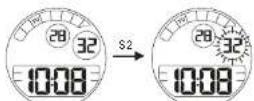
SECOND SETTING BY PRESSING S1
NORMAL TIME
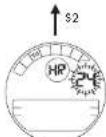
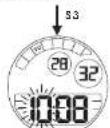
OUR SETTING BY PRESS NO 51
12/27 FORMAL SETTING BY PRESS NO 51
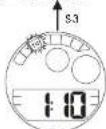
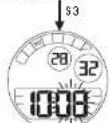
MINUTE SETTING BY PRESSING ST
DAY OF WEEK SETTING BY PRESS NO 51

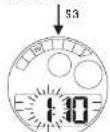
DATE SETTING BY PRESSING S
\3 MONTH SETTING BY PRESSING \1
■ HOW TO USE STOPWATCH
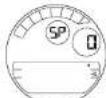
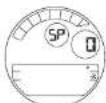
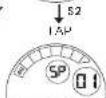
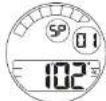
From the normal into mode, press \$3 billion once, you are now in the chronograph mode.
First Usage
- Press 31 button alternately to star and stop the chronograph.
- Press \$2 but for to reset the chronograph to zero.
- Press to bunch to be on the final time mode. (This can be done at any time with the chronograph still running.)
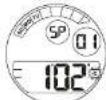
Second Usage:
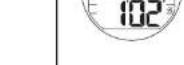
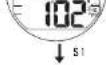
- Press 51 button to shot courling
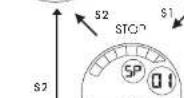
- Press S2 button to show the first split time T' (0 to 1). The digits stop flashing, out chronograph is all counting.
- Press 52 button again to continue counting.
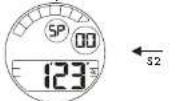
- Further press S2 button to show the second split time T2 (0 TO T2). This operation can be rejected and the split times can be react: 0 to T3, 0 to T4, S.C.
- Press \$1 burden to stop the measurement of the chlorograph.
- Press S2 button to show the last spot time In (C to In).
- Press \$2 button again, the chronograph is reset to zero.
- Press S3 output to return to the normal time mode.
NORMAL TIME
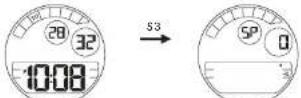
↑s3
STOPWATCH
■ HOW TO SET ALARM TIME
You can send alarm with hours and minutes. When the alarm is on, the alarm (B1 B2) sounds for 20 seconds of the press time. Press \1. \2 or \$3 button to stop the alarm offer in sports sound.
A arm is available in one time zone only (T1 or T2).
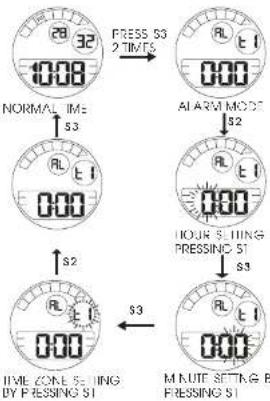
- From the rental line mode, press \$3 but for 2 times to enter the alarm mode.
- to change the alarm setting, press S2 button. The hot digits start flashing. To adjust the value, press S' button.
- o move or to the mure setting, press \$3 button. To adjust the valve, press \$1 button.
- To sell the time zone, press 53 button, "AL 11" or "AL 12" will last. Select the time zone by pressing 5" button.
flowchart
graph TD
    A["10:08"] --> B["FRESS S3 2 TIMES"]
    B --> C["ALARM MODE"]
    C --> D["0:00"]
    D --> E["S2"]
    E --> F["0:00"]
    F --> G["S3"]
    G --> H["0:00"]
    H --> I["S3"]
    I --> J["TIME ZONE SETTING BY PRESSING S1"]
    J --> K["M NUTE SETTING B PRESSING S1"]
■ HOW TO SET SECOND ZONE TIME
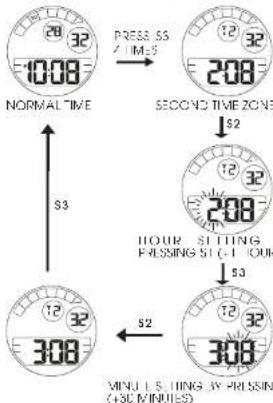
- From the normal time mode, press \$3 button 4 inches, e-gate the accord time zone mode.
- Press S2 button to start the setting procedure. The bar, dlints star, flashing.
- To adjust the value, press \$1 button (+1 hour).
- Press \$3 button once to move on to the minute setting.
- To adjust the value, price \$1 billion (+30 minutes or -20 minutes).
- Press \$2 button to confirm the selling
- Press \$3 button to return to the normal time mode.
flowchart
graph TD
    A["NORMAL TIME"] --> B["SECOND TIME ZONE"]
    B --> C["HOUR SETTING PASSING 51-1 HOUR"]
    C --> D["MINI L SETTING BY PASSING (+30 MINUES)"]
    A -->|S3| E["↓"]
    B -->|S2| F["↓"]
    C -->|S3| G["↓"]
    D -->|S2| H["↓"]
■ ALARM & CHIME ON/OFF
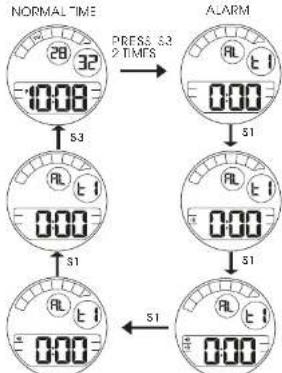
From the normal time mode, press \$3 button 2 times to enter the claim mode.
Press \$1 outtor to turn on or off the ALARM and HOUR Y CHIME signs.
flowchart
graph TD
    A["NORMAL TIME 28/32"] --> B["ALRM"]
    B --> C["S1"]
    C --> D["S0"]
    D --> E["S1"]
    E --> F["S0"]
    F --> G["S1"]
    G --> H["S0"]
    H --> I["S1"]
    I --> J["S0"]
    J --> K["S1"]
    K --> L["S0"]
    L --> M["S1"]
    M --> N["S0"]
    N --> O["S1"]
    O --> P["S0"]
    P --> Q["S1"]
    Q --> R["S0"]
    R --> S["S1"]
    S --> T["S0"]
    T --> U["S1"]
    U --> V["S0"]
    V --> W["S1"]
    W --> X["S0"]
    X --> Y["S1"]
    Y --> Z["S0"]
    Z --> AA["S1"]
    AA --> AB["S0"]
    AB --> AC["S1"]
    AC --> AD["S0"]
    AD --> AE["S1"]
    AE --> AF["S0"]
    AF --> AG["S1"]
    AG --> AH["S0"]
    AH --> AI["S1"]
    AI --> AJ["S0"]
    AJ --> AK["S1"]
    AK --> AL["S0"]
    AL --> AM["S1"]
    AM --> AN["S0"]
    AN --> AO["S1"]
    AO --> AP["S0"]
    AP --> AQ["S1"]
    AQ --> AR["S0"]
    AR --> AS["S1"]
    AS --> AT["S0"]
    AT --> AU["S1"]
    AU --> AV["S0"]
    AV --> AW["S1"]
    AW --> AX["S0"]
    AX --> AY["S1"]
    AY --> AZ["S0"]
    AZ --> BA["S1"]
    BA --> BB["S0"]
    BB --> BC["S1"]
    BC --> BD["S0"]
    BD --> BE["S1"]
    BE --> BF["S0"]
    BF --> BG["S1"]
    BG --> BH["S0"]
    BH --> BI["S1"]
    BI --> BJ["S0"]
    BJ --> BK["S1"]
    BK --> BL["S0"]
    BL --> BM["S1"]
    BM --> BN["S0"]
    BN --> BO["S1"]
    BO --> BP["S0"]
    BP --> BQ["S1"]
    BQ --> BR["S0"]
    BR --> BS["S1"]
    BS --> BT["S0"]
    BT --> BU["S1"]
    BU --> BV["S0"]
    BV --> BW["S1"]
    BW --> BX["S0"]
    BX --> BY["S1"]
    BY --> BZ["S0"]
indicated hourly on me is on indicated alarm is on
■ HOW TO USE EL BACKLIGHT
In any mode press 34 outfor to lum note the display for about 3 seconds.
Note:
-
The backlight of the watch employs an electro-luminoscent (EL) light, which loses to lose illuminating power after very long use.
-
The illumination provided by backlight may be hard to see when viewed under direct sunlight.
■ HOW TO USE TIMER
TO SET THE COUNTDOWN TIMER
- From the nominal lime mode, press \$3 bu for 3 times a enter the firmer mode
- While in the time mode, press 50 button. The hour digits oils to flesh
- Press \$3 button to change the select on a setting.
- Press \1 button to adjust the value. Folding \1 button down can foster the process.
- After you set the countdown time, press S2 button to return to the timer mode.
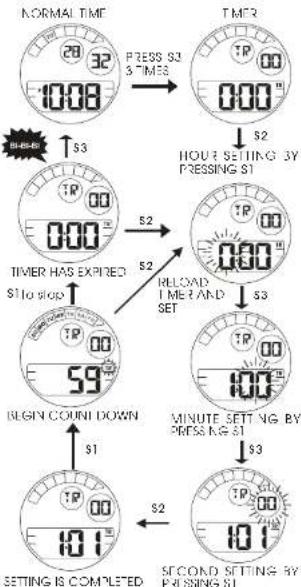
flowchart
graph TD
    A["NORMAL TIME"] --> B["28:32"]
    B --> C["10:08"]
    C --> D["TIME"]
    D --> E["00:00"]
    E --> F["S2"]
    F --> G["HOUR SETTING BY PRESSING S1"]
    G --> H["S2"]
    H --> I["TIME HAS EXPIRED"]
    I --> J["S2"]
    J --> K["RELOAD TIME AND SET"]
    K --> L["S3"]
    L --> M["TIME"]
    M --> N["59°"]
    N --> O["BEGIN COUNT DOWN"]
    O --> P["S1"]
    P --> Q["10:1"]
    Q --> R["S2"]
    R --> S["SECOND SETTING BY PRESSING S1"]
TO USE THE COUNTDOWN TIMER
- Press 51 button while in the timer mode to start the square-down line.
- Press S button edge to stop the countdown lirer
- While in the timer mode, press S2 button to reset the countdown time is its starting value and e start to countdown automation or where in the timer mode, press S2 output one then press S1 button to reset the countdown time.
- From 3 minutes prior to the expv time, the alarm (BI BI) beeps each time when the second d girs touch "J" or "30".
- With a 10 seconds to the expiry time, the alarm (60 open per second)
- When the timer expires, the alarm (B-BI-BI) beeps for 10 seconds, it may be served by pressing S1, S2 or S3 but on
■ BATTERY CHANGE
The batteries CR2016 and SR626SW which power your watch should last approximately 2 years. However, because they are inserted at the factory, the actual life of the batteries once in your possession may be seen than 2 years.
Be sure to replace the batteries to prevent any possible malfunction as soon as they can down. To replace the batteries, we recommend fixing the watch to a local watch repair shop.
Note: I the alarm is used for more than 20 seconds a day, the hourly line signal more than 24 times a day, the stopwatch more than once a day and/or the illuminating light for more than 1 second a day, the battery life may be less than the specified period.
■ CARE OF YOUR LORUS WATCH
This water contains precise electronic coironers. Never attempt to open the case or remove the back cover
• BATTERY
| CAUTION |
| Do not expose the old battery to fire or recharge it. Keep it at a place beyond the reach of children. If a child swallows it, consult a doctor immediately. |
- WATER RESISTANT
| Standard or airline, air, air, air, air, air, air, air, air, air, air, air, air, air, air, air, air, air, air, air, air, air, air, air, air, air, air, air, air, air, air, air, air, air, air, air, air, air, air, air, air, air, air, air, air, air, air, air, air, air, air, and air | Accidental control with water, such as applas and air | Air, air, gas, and taking a bath-wet | Skin dising | Skin dising |
| NoIndication | NO | NO | NO | NO |
| WATER RESISTANT | YES | NO | NO | NO |
| WATER RESISTANT(SOM/5 BAR) | YES | YES | NO | NO |
| WATER RESISTANT(100M/10 BAR)or above | YES | YES | YES | NO |
* If your watch is 200 M/20 BAR, 100 M/10 BAR or 50 M/s BAR water resistant. It is so indicated on the dial/case back
- Do not operate the buttons when the watch is wet
- If the watch is exposed to salt water, rinse it fresh water and then wipe, I thoroughly cry.
- Should you find any water or condensation inside the watch immediately have it checked. Water can console electric ports, place the case
Caution:
see her shops are no water resistant except so inside ed. even if the watch head is water resistant
• ALLERGIC REACTION
Because the case and bond touch the skin directly, it is important to clean them regularly. If not, so if sleeves may be strained and those with delicate skin may develop a rash. Please wear the watch with some play to avoid any possible allergic reaction. If you develop a rash on your wrist, stop wearing one consult a physician.
• MAGNETISM
Your watch will be adversely affected by strong magnetism. Keep it away from close contact with magnetic objects.
• SHOCKS AND VIBRATIONS
Your watch may be worn for home soots activities, but be careful not to drop it or hit on hard surfaces.
• TEMPERATURE
Your watch is preadjusted so that constant accuracy may be insured at home temperature.
• CLEANING
Use only a soft bath and clean water for cleaning your water. Never use chemicals, as the waterproof netel with corrode.
SERVICE
When your ORLS watch requires repair of servicing, please see the enclosed WARRANTY/CUARANTEE.