CDA1366 - Hi-Fi-System Durabrand - Kostenlose Bedienungsanleitung
Finden Sie kostenlos die Bedienungsanleitung des Geräts CDA1366 Durabrand als PDF.


| Produkttyp | Tragbares Hi-Fi-System mit CD, Kassette und Radio |
| Marke | Durabrand |
| Modell | CDA1366 |
| Kategorie | Hi-Fi-System |
| Stromverbrauch | 14 W |
| Stromversorgung | AC 110-120V/220-240V~50/60 Hz (je nach Region); DC 9V (6 x C-Batterien) |
| CD-Player | Ja, kompatibel mit CD-Audio |
| Kassettendeck | Ja, Wiedergabe und Aufnahme (Typ I Bänder) |
| Radio | Ja, UKW und MW (AM) |
| Kopfhöreranschluss | 3,5 mm Klinke |
| Lautsprecher | Integriert |
| Wiederholfunktion | Einzeltitel oder alle Titel wiederholbar |
| Reinigungshinweise | Linse mit weichem Tuch oder Druckluft reinigen; Tonköpfe mit Reinigungsflüssigkeit |
| Sicherheitshinweise | Vor Regen und Feuchtigkeit schützen; Netzstecker ziehen bei längerer Nichtbenutzung |
| Laserschutzklasse | Klasse 1 (unsichtbare Laserstrahlung) |
| Abmessungen (ca.) | 400 x 250 x 150 mm (B x T x H) |
| Gewicht (ca.) | 2,5 kg |
Häufig gestellte Fragen - CDA1366 Durabrand
Benutzerfragen zu CDA1366 Durabrand
0 Frage zu diesem Gerät. Beantworten Sie die, die Sie kennen, oder stellen Sie Ihre eigene.
Eine neue Frage zu diesem Gerät stellen
Laden Sie die Anleitung für Ihr Hi-Fi-System kostenlos im PDF-Format! Finden Sie Ihr Handbuch CDA1366 - Durabrand und nehmen Sie Ihr elektronisches Gerät wieder in die Hand. Auf dieser Seite sind alle Dokumente veröffentlicht, die für die Verwendung Ihres Geräts notwendig sind. CDA1366 von der Marke Durabrand.
BEDIENUNGSANLEITUNG CDA1366 Durabrand
CARE & MAINTENANCE
GENERAL GUIDELINES
- Do not touch the laser lens on the CD player.
- Temperature changes can cause condensation to form on the laser lens. If condensation forms on the lens, leave the disc compartment door open (without disc) for an hour to remove condensation.
- Exposure to direct sunlight or extreme heat (such as inside a car parked in the sun) can cause damage or malfunction.
- To prevent dust from reaching internal parts, keep the compartment door closed when not using (except when necessary to remove condensation).
HANDLING THE COMPACT DISC
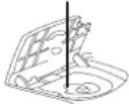
It's important that you periodically clean the laser lens:
- Turn off the unit's power and disconnect the AC power.
- Open the CD door and remove the disc.
- Clean the lens with a soft cloth or use an air blower brush designed for cameras.
- If you still are not able to remove dirt particles, moisten a cotton swab with isopropyl alcohol and gently apply to the face of the laser lens, rubbing gently until all traces of dirt are removed.
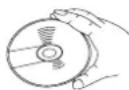
Although the music tracks in the disc are covered with a protective layer, it is still advisable to treat the disc carefully. Always pick up discs by the edge and put them back in their holders immediately after use.
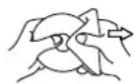
Laser lens
CLEANING THE TAPE HEADS
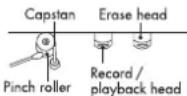
Clean the head with a cotton bud slightly moistened with cleaning fluid or denatured alcohol.
CLEANING THE UNIT
Do not use volatile chemicals on this unit. Clean by lightly wiping with a soft cloth.
IMPORTANT NOTICES:
- Should the CD door be opened before the reading of the CD is completed, a jamming noise may occur. This can be resolved by closing the CD door and then sliding the FUNCTION switch temporarily to TAPE.
- If an abnormal display indication or an operating problem occurs, disconnect the AC power cord and remove the batteries. Wait at least 5 seconds, then reconnect the AC power cord or reinstall the batteries.
TROUBLE SHOOTING TIPS
CD
Problems
System does not turn on Disc in place but unit won't play
Solutions
• Make sure AC power plug is secure in the outlet and inlet has power.
- Batteries may be dead. Install new batteries.
- Make sure the FUNCTION switch is set to CD position.
• Make sure disc is clean and undamaged.
• Make sure printed side of disc is facing up.
• Make sure PAUSE mode is not activated
- Make sure the unit is on a secure spot. Vibration or jarring can cause the disc to skip.
RADIO
Problems
Poor FM reception
Solutions
- Electrical interference in your home can cause poor reception. Move the unit away from them (especially those with motors and transformers).
- Reposition or turn the unit for better reception.
Poor AM(MW) reception
TAPE
Problems
Distorted or noisy recording
Record button won't depress
Solutions
- Tape heads are dirty; clean them.
- Tape is damaged. Try another tape.
- Tabs on edge of cassette may be missing or broken. If you want to record on that cassette, cover the holes with removable tape.
SPECIFICATIONS
GENERAL
Power consumption:
14 W
Power source:
AC 120V\~60 Hz (USA and Canada)
AC 220V \~50Hz (China)
AC 220V \~60Hz (Korea)
AC 230V\~50 Hz (Europe and Hong Kong)
AC 240V\~50 Hz (Australia)
AC 110-120V/220-240V\~50/60Hz (Others)
DC 9V (6 x "C" size or UM-2 batteries)
Specifications subject to change without notice.
PORTABLE CD SYSTEM
OPERATING INSTRUCTION
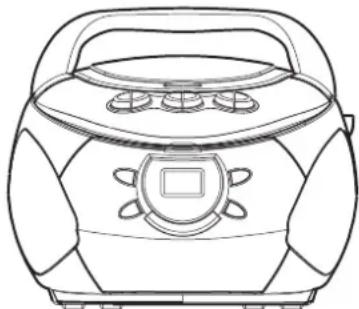
natural_image
Line drawing of a portable radio with front panel and keypad (no text or symbols)COMPACT disc DIGITAL AUDIO

The lightning flash and arrowhead within the triangle is a warning sign alerting you of "dangerous voltage" inside the product.
WARNING
RISK OF ELECTRIC SHOCK DO NOT OPEN
WARNING: TO REDUCE THE RISK OF ELECTRIC SHOCK, DO NOT REMOVE COVER (OR BACK) NO USER-SERVICEABLE PARTS INSIDE. REFER SERVICING TO QUALIFIED SERVICE PERSONNEL.

The exclamation point within the triangle is a warning sign alerting you of important instructions accompanying the product.
WARNING: TO REDUCE THE RISK OF FIRE OR ELECTRIC SHOCK, DO NOT EXPOSE THIS APPLIANCE TO RAIN OR MOISTURE.
CLASS 1 LASER PRODUCT
CLASS 1 LASER PRODUCT
CAUTION
INVISIBLE LASER RADIATION WHEN OPEN AND INTERLOCKS DEFEATED. AVOID EXPOSURE TO BEAM
This product contains a low power laser device.
SAFETY PRECAUTIONS
Follow the advice below for safe and appropriate operations.
ON PLACEMENT
- Do not use the unit in places which are extremely hot, cold, dusty or humid.
- Place the unit on a flat and even surface.
- Do not restrict the air flow of the unit by placing it in a place with poor air flow, by covering it with a cloth, or by placing it on a carpet.
ON SAFETY
- When connecting and disconnecting the AC cord, grip the plug and not the cord itself. Pulling the cord may damage it and create a hazard.
- When you are not going to use the unit for a long period of time, disconnect the AC power cord.
ON AC VOLTAGE
- Before use, check that the rated voltage of your unit matches your local voltage.
- When there is condensation inside the unit, the unit may not function normally.
- Let it stand for 1 to 2 hours before turning the power on, or gradually heat the room up and dry the unit before use.
FCC INFORMATION (for USA)
This device complies with part 15 of FCC Rules. Operations are subject to the following two conditions:
(1) This device may not cause harmful interference, and
(2) This device must accept any interference received, including interference that may cause undesirable operations.
Should any trouble occur, disconnect the AC power cord and refer servicing to qualified personnel.
RATING PLATE LOCATION
The rating plate location is on the bottom of product.
NAMES OF CONTROLS RADIO OPERATION
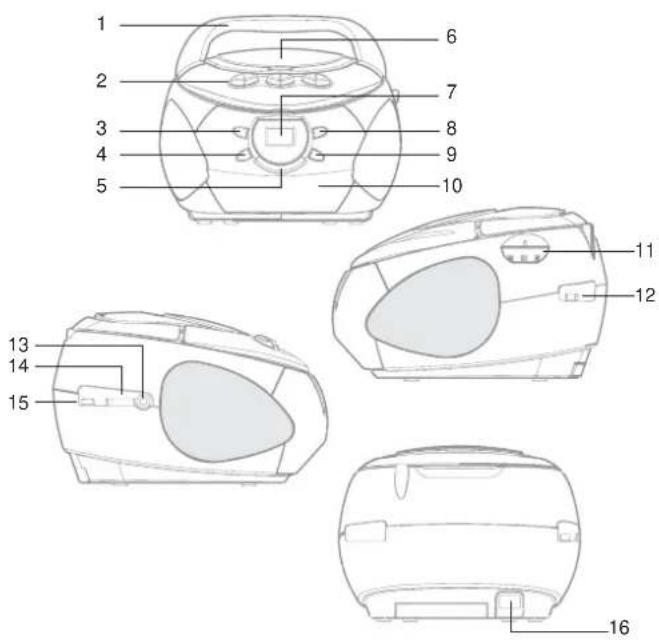
text_image
1 2 3 4 5 6 7 8 9 10 11 12 13 14 15 16-
Handle
-
Cassette deck
operation controls
II PAUSE button
STOP button
F.FWD button
▶ REW button
PLAY button
- RECORD button
- CD REPEAT button
- CD STOP ■button
- CD PLAY / PAUSE ▶Button
-
CD door
-
CD display
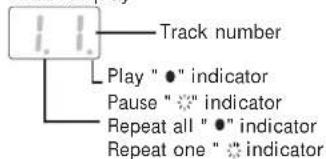
text_image
Track number Play "●" indicator Pause "⊗" indicator Repeat all "●" indicator Repeat one "⊗" indicator- CD SKIP ▶▶ button
- CD SKIP ◀◀ button
- Cassette compartment
- Tuning control
- BAND switch
- PHONES Jack
- VOLUME control
- FUNCTION switch
- AC socket
POWERING UP
AC POWER
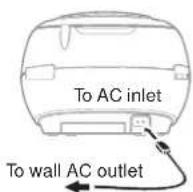
You can power your portable stereo system by plugging the detachable AC power cord into the AC inlet on the back of the unit and into a wall AC power outlet.
Check that the rated voltage of your unit matches your local voltage. Make sure that the AC power cord is fully inserted into the unit.
Caution: (for North America)
To prevent electrical shock, match wide blade of plug to wide slot, fully insert.
Note : When not being used on mains the
AC Cord should be unplugged from the unit.
BATTERY POWER
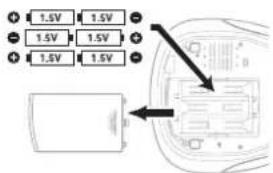
Insert "C" size batteries in the battery compartment. Be sure that the batteries are inserted correctly to avoid damage to the unit.
- Always remove the batteries when unit will not be used for a long period of time, as this will cause leakage of the batteries and subsequently damage to your unit.
- Playback will automatically come to a stop when the batteries have no more power. Replace all the batteries with new ones.
- Do not mix old and new batteries. Do not mix ALKALINE, standard (CARBON-ZINC) or rechargeable (NICKEL-CADMIUM) batteries.
text_image
1.5V 1.5V 1.5V 1.5V 1.5V 1.5VADJUSTING THE SOUND
VOLUME
Adjust the VOLUME control of the stereo system to a desired level.
FOR PRIVATE LISTENING
Connect headphones (∅3.5 mm stereo mini-plug) to the PHONES Ω jack. When headphones are connected, speakers automatically disconnected.
You can listen to your favourite radio stations by sliding the FUNCTION switch to RADIO, and then
- Slide the BAND switch to choose AM(MW) or FM.
- Using the TUNING control to choose a desired station.
- Adjust the VOLUME.
AM(MW)/FM
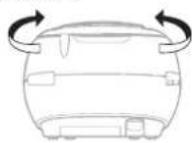
- Repositioning the unit to get better AM(MW)/FM reception.
Note: After listening, slide the FUNCTION switch to TAPE.
USING THE CD PLAYER
- Slide the FUNCTION switch to CD. "—" is shown in the display.
- Open the CD door. Place a disc in the centre with the label side up and then close the CD door gently. The total number of tracks will show in the display.
- Press the CD PLAY/PAUSE ▶II button to start CD play. The CD PLAY "●" indicator will light.
- Adjust the VOLUME.
TO STOP PLAYBACK
- Press the CD STOP ■ button to stop disc play.
TO INTERRUPT PLAYBACK
- Press the CD PLAY/PAUSE ▶II button while a CD is playing to pause play (the CD PAUSE " * " indicator will blink).
- Press the CD PLAY/PAUSE ▶II button again to resume play.
TO SKIP TO THE BEGINNING OF A TRACK
- Press either one of the CD SKIP ◄◀ or ▶▶1 button according to the desired direction. Each press skips one track. During play, the first press on the skip backwards ◄◀ button to the beginning of the current track.
- Playback resumes from the selected track.
TO SEARCH THROUGH TRACKS
- Keep either one of the CD SKIP ◀◀ or ▶▶1 button pressed, according to the desired direction, and release at the desired point.
REPEAT PLAY -- in play modes
This function allows one track or all tracks on a disc to be played repeatedly.
TO REPEAT THE SAME TRACK
- Press the CD REPEAT button once during playback, the REPEAT ONE indicator will blink.
TO REPEAT THE WHOLE DISC
- Press the CD REPEAT button a second time to repeat all tracks, the REPEAT ALL "●" indicator will light.
TO CANCEL REPEAT PLAY
- Press the CD REPEAT button until the REPEAT indicator is turned off.
Note: Repeat play can only be done when the unit is in the play mode.
USING THE CASSETTE COMPARTMENT
TAPE PLAYBACK
- Slide the FUNCTION switch to TAPE.
- Insert a cassette tape.
- Press the cassette of PLAY ◀ button.
TO STOP PLAYBACK
- Press the cassette of STOP ■ button.
TO FAST WIND
- Press the cassette of F.FWD ← or ▶ REWIND button.
- Press the cassette of STOP ■ button to stop winding at the desired position.
RECORDING
USE ONLY NORMAL (TYPE I) TAPE FOR RECORDING.
- Insert a cassette tape.
- Prepare the source to be recorded and play it.
RECORDING FROM THE RADIO ( Refer to radio operation )
RECORDING FROM A CD (Refer to CD play)
- Press the cassette of RECORD ● button which also engages the cassette of PLAY ◀ button. Recording starts immediately.
TO STOP RECORDING
Press the cassette of STOP ■ button.
WHEN THE END OF THE TAPE IS REACHED
The tape stop and the buttons are released automatically. To record on the other side, turn the cassette over and press the cassette of RECORD ● button again.
TO ERASE A RECORDED TAPE
- Slide the FUNCTION switch to TAPE.
- Insert a tape with the side you want to erase facing you.
- Press the cassette of RECORD • button to start erasing.