
Vortex Lumitron - Spielzeug Nerf - Kostenlose Bedienungsanleitung
Finden Sie kostenlos die Bedienungsanleitung des Geräts Vortex Lumitron Nerf als PDF.


Benutzerfragen zu Vortex Lumitron Nerf
0 Frage zu diesem Gerät. Beantworten Sie die, die Sie kennen, oder stellen Sie Ihre eigene.
Eine neue Frage zu diesem Gerät stellen
Laden Sie die Anleitung für Ihr Spielzeug kostenlos im PDF-Format! Finden Sie Ihr Handbuch Vortex Lumitron - Nerf und nehmen Sie Ihr elektronisches Gerät wieder in die Hand. Auf dieser Seite sind alle Dokumente veröffentlicht, die für die Verwendung Ihres Geräts notwendig sind. Vortex Lumitron von der Marke Nerf.
BEDIENUNGSANLEITUNG Vortex Lumitron Nerf
IMPORTANT: BATTERY INFORMATION

CAUTION:
- Always follow the instructions carefully. Use only batteries specified and be sure to insert them correctly by matching the + and - polarity markings.
- Do not mix old batteries and new batteries or standard (carbon-zinc) with alkaline batteries.
- Remove exhausted or dead batteries from the product.
- Remove batteries if product is not to be played with for a long time.
- Do not short-circuit the supply terminals.
- Should this product cause, or be affected by, local electrical interference, move it away from other electrical equipment. Reset (switching off and back on again or removing and re-inserting batteries) if necessary.
- RECHARGEABLE BATTERIES: Do not mix these with any other types of batteries. Always remove from the product before recharging. Recharge batteries under adult supervision. DO NOT RECHARGE OTHER TYPES OF BATTERIES.
Hey NERF Nation!
Join us online and keep up with the latest and greatest news from MERFI


Ask a parent before going online.
Questions? Call 1-800-327-8264
Product and colors may vary.
34382 PN 7225330000

YouTube and the YouTube logo are trademarks of Google Inc. ®* and/or TM* & © 2011 Hasbro. All Rights Reserved. TM & ® denote U.S. Trademarks. Patents Pending.

text_image
NERF®AGES 8+
VORTEX

CAUTION:
Do not aim at eyes or face. TO AVOID INJURY: Use only discs designed for this product. Do not modify discs or disc blaster.
LUMITRON
text_image
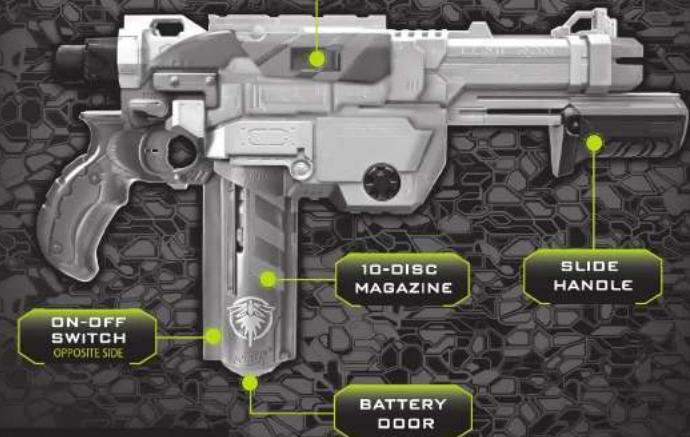
ON-OFF SWITCH OPPOSITE SIDE 10-DISC MAGAZINE SLIDE HANDLE BATTERY DOOR

ALKALINE BATTERIES
1.5VAA or 1.86 m/s NOT INCLUDED
BATTERIES REQUIRED
Philips/forces heat screwdriver (not included) needed to import batteries.
BATTERY DOOR
Be sure to read and follow all instructions carefully before using this product.
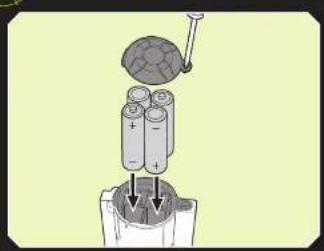
TO INSERT BATTERIES IN CLIP
text_image
Diagram illustrating battery charging process with labeled components and charge distribution- Loosen screw in battery compartment door with a Phillips/cross head screwdriver (not included).
- Remove battery door. Insert 4 x 1.5V "AA" or LR6 alkaline batteries.
- Replace battery door and tighten screw.
LOADING AND FIRING
text_image
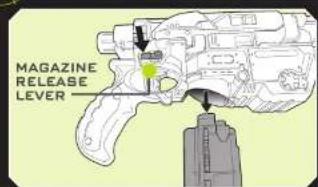
MAGAZINE RELEASE LEVER
(1) Push down the MAGAZINE RELEASE LEVER and pull out the 10-DISC MAGAZINE.
text_image
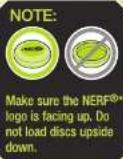
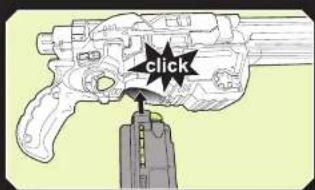
click(2) One at a time, load up to 10 discs into the 10-DISC MAGAZINE. Do not load discs upside down. Do not load more than 10 discs.
text_image
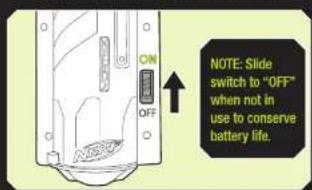
ON OFF NOTE: Slide switch to "OFF" when not in use to conserve battery life.(3) The 10-DISC MAGAZINE should slide easily into place. It only fits in one direction. Do not force it.
(4) Slide switch to "ON" position to charge glow discs.
natural_image
Technical line drawing of a firearm with an arrow pointing to the handle (no text or symbols present)
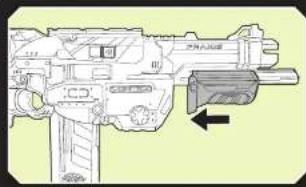
Pull SLIDE HANDLE all the way back, then slide it all the way forward to cock.
text_image
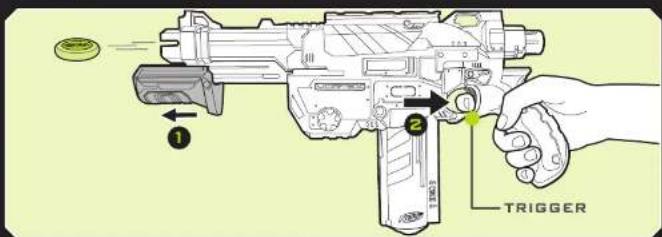
1 2 TRIGGER
Pull trigger to fire.
NOTE: Single fire only. You must release the trigger before pulling the SLIDE HANDLE back to avoid jams.
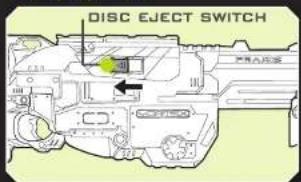
CLEARING A JAM
If the blaster is loaded but will not fire, it may be jammed.
text_image
DISC EJECT SWITCH
natural_image
Technical line drawing of a mechanical component with a green coin hanging from its tip (no text or symbols)
Point the blaster at the ground. The jammed disc will fall out.
(1) Remove the 10-DISC MAGAZINE following the loading instructions.
2 Press and hold the DISC EJECT SWITCH.