
CPBC4400WI - Externe Batterie CyberPower - Kostenlose Bedienungsanleitung
Finden Sie kostenlos die Bedienungsanleitung des Geräts CPBC4400WI CyberPower als PDF.


| Produkttyp | Externe Batterie (Powerbank) |
| Marke | CyberPower |
| Modell | CPBC4400 Series (CPBC4400WI) |
| Akku-Kapazität | 4400 mAh (Lithium-Ionen) |
| Eingang | DC 5 V, 1 A (Micro-USB) |
| Ausgang | DC 5 V, 1 A (USB-A) |
| Ladezeit (Powerbank) | ca. 6 Stunden |
| Abmessungen (B x H x T) | 3,0 x 2,3 x 0,9 Zoll (76 x 58 x 23 mm) |
| Gewicht | ca. 132 g (4,66 oz) |
| Betriebstemperatur | 0 °C bis 40 °C (32 °F bis 104 °F) |
| Lagertemperatur | -10 °C bis 50 °C (14 °F bis 122 °F) |
| LED-Anzeigen | 3 LEDs für Akkustand (35 %, 70 %, 100 %), Blinkcodes für Fehler/Überlast/niedrigen Akku |
| Funktionen | Ein-/Ausschalten (3 s halten), Taschenlampe (2x drücken), USB-Ausgang, Ladezustandsanzeige |
| Lieferumfang | USB-Akku, Bedienungsanleitung |
| Besonderheiten | Integriertes USB-Kabel, kompaktes Design, Überladeschutz |
| Wartung | Bei Nichtgebrauch alle 3 Monate nachladen; vor Feuchtigkeit und Hitze schützen |
| Reinigung | Mit trockenem Tuch abwischen, keine Flüssigkeiten verwenden |
| Sicherheitshinweise | Nicht zerlegen, nicht ins Wasser tauchen, nicht überhitzen, außerhalb der Reichweite von Kindern aufbewahren |
| Entsorgung | Gemäß örtlicher Umweltvorschriften recyceln (Elektroschrott) |
| Garantie | 1 Jahr (ausgenommen Akku) |
Häufig gestellte Fragen - CPBC4400WI CyberPower
Benutzerfragen zu CPBC4400WI CyberPower
0 Frage zu diesem Gerät. Beantworten Sie die, die Sie kennen, oder stellen Sie Ihre eigene.
Eine neue Frage zu diesem Gerät stellen
Laden Sie die Anleitung für Ihr Externe Batterie kostenlos im PDF-Format! Finden Sie Ihr Handbuch CPBC4400WI - CyberPower und nehmen Sie Ihr elektronisches Gerät wieder in die Hand. Auf dieser Seite sind alle Dokumente veröffentlicht, die für die Verwendung Ihres Geräts notwendig sind. CPBC4400WI von der Marke CyberPower.
BEDIENUNGSANLEITUNG CPBC4400WI CyberPower
CyberPower®
USB BATTERY PACK USER GUIDE

Model: CPBC4400 Series
INTRODUCTION
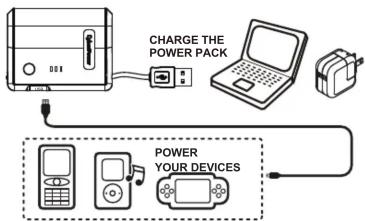
The USB Battery Pack (CPBC4400 Series) is a rechargeable lithium-ion battery that is designed for powering mobile devices such as phones, MP3 players, and handheld gaming devices while away from other power sources
FEATURES
- Compact and portable design
- Built in USB power cable
- Battery life indicator
PRODUCT VIEW:

| NO. | ITEM | DESCRIPTION |
| 1 | Discharge Display Switch | Press the button |
| Charging LED Indicator Switch | Press the button | |
| Power Off | Press and hold 3 seconds | |
| Flash Light ON / OFF | Press twice | |
| 2 | Flash Light | White light |
| 3 | 5V USB Output Port | 5V/1A USB port output |
| 4 | LED Indicator | As the “LED INDICATOR” table showing |
| 5 | Charger Input Port | 5V/1A USB port input |
LED INDICATOR
| NO. | CONDITION | LED INDICATION |
| 1 | Battery Life Indicator | Three LEDs represent 35%, 70% and 100% battery life from left to right side. |
| 2 | Battery Failure | The first and third LEDs are flashing simultaneously. |
| 3 | Overload | All three LEDs are flashing simultaneously. |
| 4 | Low Battery | The first LED is flashing rapidly. |
PACKAGE CONTENTS
• USB Battery Pack (CPBC4400 Series)
- User Guide
SPECIFICATIONS
Battery Capacity: 4400mA
Rated Input: DC 5V 1A
Rated Output: DC 5V 1A
PC Charging time: \~6 Hrs
Dimension: 3.0 x 2.3 x 0.9 inch
Weight: 4.66 oz
Environment:
Storage: 14 to 122°F (-10 to 50°C)
Operation: 32 to 104°F (0 to 40°C)
IMPORTANT! PRIOR TO FIRST USE
The CPBC4400 Series is packaged in a protection mode for shipping. Prior to use, connect the CPBC4400 Series to a USB power source to set it to normal mode and the suggested a full 10-hour charge.
TO CHARGE THE BATTERY PACK
Charge the USB Battery Pack by attaching the USB charging connector to any powered USB port, including but not limited to a desktop computer, laptop, USB powered hub or USB wall charger. Recharge the CPBC4400 Series every 3 months when not use to ensure the best battery performance. The battery capacity may decline after 300 times usage.
TROUBLE SHOOTING
| Problem | Possible Cause | Solution |
| USB Battery Pack does not power the device | a.The power of device is over specification. | Check the power specification of the device before charging with the CPBC4400 Series. |
| b.The battery is out of power | Charge the battery pack via a USB port. |
| Problem | Possible Cause | Solution |
| USB Battery Pack does not power the device | C.The battery pack is charging the device and the power source is charging the battery pack simultaneously. | The device can't be charged when the power source is charging the battery pack. The solution is to remove the device from the battery pack. |
| Power bank does not charge | a.Incorrect connection between charger and USB Battery Pack. | Re-attach the USB connector to the USB port. |
| b.No power from the source. | a.Check that power is provided to the USB port.b. The battery pack has a low charge. Recharge the power battery pack. | |
| C.Short Circuit of battery pack product | Reset the battery pack. |
SAFETY PRECAUTION
Before using the USB Battery Pack, please read the following warnings carefully. Use the product according to the procedures described in this manual. Failure to follow these safety precautions may result in fire, explosion, electrical shock or other dangers.
- Do not disassemble this product, or any of its parts.
- Store between 14 to 122°F (-10 to 50°C). Operate between 32 to 104°F (0 to 40°C).
- Do not immerse this product in water or other liquids, as such use may result in fire or electrical shock. If water or other liquids enter the battery interior, unplug the product immediately from any attached power source or device.
- Do not use this product with wet hands. Moisture in or on this product may result in electrical shock.
- Do not expose this product to direct flame or leave it in an overheated condition, as the battery may explode.
- Store this product in a cool and dry environment when not in use.
- Do not puncture this product. Puncturing the battery may cause the release of harmful substances.
- It is normal for the USB Battery Pack to become warm during charging.
- Keep this product out of the reach of children. Ensure that all users read these warnings and instructions before using 10. Please recycle USB Battery Pack in accordance with local environmental laws and regulations.
LEGAL NOTICES
FCC Part 15
This equipment has been tested and found to comply with the limits for a Class B digital device, pursuant to Part 15 of the FCC rules. These limits are designed to provide reasonable protection against harmful interference in a residential installation. This equipment generates uses and can radiate radio frequency energy and if not installed and used in accordance with the instructions, may cause harmful interference to radio communications. However, there is no guarantee that interference will not occur in a particular installation. If this equipment does cause harmful interference to radio or television reception, which can be determined by turning the equipment off and on, the user is encouraged to try to correct the interference by one or more of the following measures:
- Reorient or relocate the receiving antenna.
– Increase the separation between the equipment and receiver. - Connect the equipment into an outlet on a circuit different from that to which the receiver is connected.
- Consult the dealer or an experienced radio/TV technician for help.
If the LED indicator extinguishes automatically during the charging process, press the button to revert.
FCC WARNING
Changes or modifications not expressly approved by the party responsible for compliance with the FCC Rules could void the user's authority to operate this equipment.
LIMITED PRODUCT WARRANTY
CyberPower offers limited product warranty for the hardware of the USB Battery Pack* and the product is free from material and manufacturing defects for one year. (*battery excluded) A reasonable purchase proof with date must be provided when submission. CyberPower's sole responsibility is to repair or replace the product if a material or manufacturing defect results in product failure during its normal use. The warranty is void if the product is damaged due to abuse, alteration, misuse, negligence, incorrect voltage supply, air/water pollution, accidents and natural disasters.
CyberPower Systems, Inc.
www.cpsww.com
© 2013 CyberPower Systems, Inc.
All rights reserved. Reproduction in whole or in part without permission is prohibited.
K09-0000174-00


Marke : CyberPower
Modell : CPBC4400WI
Kategorie : Externe Batterie