BT120 - Support voiture Boytone - Kostenlose Bedienungsanleitung
Finden Sie kostenlos die Bedienungsanleitung des Geräts BT120 Boytone als PDF.


Benutzerfragen zu BT120 Boytone
0 Frage zu diesem Gerät. Beantworten Sie die, die Sie kennen, oder stellen Sie Ihre eigene.
Eine neue Frage zu diesem Gerät stellen
Laden Sie die Anleitung für Ihr Support voiture kostenlos im PDF-Format! Finden Sie Ihr Handbuch BT120 - Boytone und nehmen Sie Ihr elektronisches Gerät wieder in die Hand. Auf dieser Seite sind alle Dokumente veröffentlicht, die für die Verwendung Ihres Geräts notwendig sind. BT120 von der Marke Boytone.
BEDIENUNGSANLEITUNG BT120 Boytone
BOYTONE™ BT120 Stereo Bluetooth Speaker User Manual
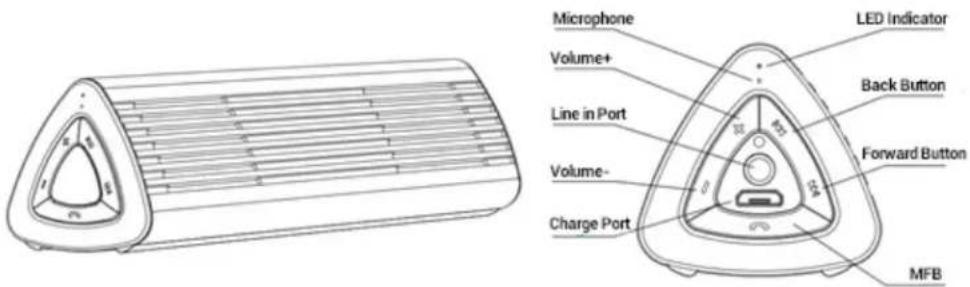
text_image
Microphone Volume+ Line in Port Volume- Charge Port LED Indicator Back Button Forward Button MFBOperating Instructions
Power On
When the speaker is off, press and hold the Multi-function Button(MFB) for 3 seconds, The LED indicator will flash slowly in blue. At this time you will hear a tone that increases in volume from the speaker of the set. The speaker will be paired with the last connected bluetooth device or mobile phone automatically when turned on.
Power Off
When the speaker is on, press and hold the MFB for 4 seconds. The LED indicator will flash slowly in red. At this time, you will hear a tone that decreases in volume from the speaker of the set. The speaker will disconnect from your phone devices when turned off.
Pairing Mode
When the speaker is OFF, (And confirm the line in port without 3.5mm audio cable) press and hold MFB for 6 seconds until the LED indicator flashes red and blue in alternating colors.
Notes:3mins pairing time,if not connect with any device,it will quit pairing mode.
Answering Calls
If a call comes in when listening to music or speaker is standing by, press the MFB to answer the incoming call. If the music is playing, it will pause automatically during the call. After finishing your call, the music will start playing automatically.
Reject Calls
If a call comes in when listening to music or speaker is standing by, press and hold the MFB for 2 seconds to reject the incoming call. After the call has been rejected, your music will start playing automatically.
End Calls: To end a call, press the MFB.
Volume :To adjust the volume when talking on the phone, press the V+ or V- to adjust the volume up or down. When you reach the max/min volume, you will hear a warning tone.
Last Number Redial: When listening to music or speaker is standing by, double click the MFB to redial the last number. If you are listening to music, it will pause automatically during the call.
Mute: When talking on the phone, press and hold Vol+ or Vol- for 2 seconds to mute your microphone. You will hear the caller, but the caller will not to hear you.
Note: There will be a warning tone every 3 seconds, reminding you that you are in mute mode.
Quit Mute: Hold Vol+ or Vol- for 2 seconds to exit mute mode.
Switching Between Your Mobile Phone and Headset
When talking on the phone, double-click the MFB to switch the voice from your speaker to your mobile phone. By double clicking the MFB again, the voice will switch back to the speaker.
Reconnect
When the speaker and mobile phone are disconnected, press MFB, it will reconnect.
Note: Some devices may have a prompt screen, that will ask you if you would like to pair your device.
Voice-Command Dial
If your mobile phone supports this function, press and hold MFB for 2 seconds to activate voice command. If the headset is playing music, the music will be paused automatically during this time. By re-pressing and re-holding MFB for 2 seconds during the voice dial mode, voice dial will be canceled.
Note: Please refer to the manual of your mobile phone for voice-command dial support.
Pause and Restart Music: When listening to music, click MFB to pause music and click MFB again to restart music.
Play Previous Song: Press backward button.
Play Next Song: Press forward button.
Specifications
V3.0+EDR Bluetooth Technology
Profile supports: HSF, HFP, A2DP, AVRCP
Transmission Distance: 10 meters/33 feet
Transmission range: 2.40GHz\~2.48GHz
Size: 137x10.3x38 mm
Net Weight: 176 grams
Music Time: 5 hours
Talk Time: 6 hours
Standby Time: 100 hours
Operating Temperature: -20-60 °C
Device ID: B120
Pin Code: 0000
LED Indicator Status
| Charging Red LED Light | |
| Charging Complete Red LED light turn off | |
| Stand by Blue LED light flashes twice every 5 seconds | |
| Power On (Talking) Blue LED light flashes twice every 3 seconds | |
| Power On (Incoming Call) Blue LED light flashes continuously | |
| Power On (Not Connected) Blue LED light flashes once every 5 seconds | |
| Battery Low | Red LED light flashes once every 5 seconds |
| Pairing Mode | LED light flashes in red and blue alternately |