
WEP-650 - Hi-Fi-System SAMSUNG - Kostenlose Bedienungsanleitung
Finden Sie kostenlos die Bedienungsanleitung des Geräts WEP-650 SAMSUNG als PDF.


| Produkttyp | Mini-Hi-Fi-System |
| Modell | Samsung WEP-650 |
| Abmessungen (B x H x T) | ca. 250 x 140 x 300 mm |
| Gewicht | ca. 3,5 kg |
| Stromversorgung | 230 V AC, 50 Hz |
| Leistungsaufnahme | max. 40 W |
| Ausgangsleistung | 2 x 10 W RMS |
| Lautsprecher | 2-Wege, 2 Lautsprecher |
| Wiedergabemedien | CD, FM/AM Radio, Kassette |
| Anschlüsse | Kopfhörerausgang, AUX-Eingang |
| Fernbedienung | ja, im Lieferumfang enthalten |
| Display | LCD, hintergrundbeleuchtet |
| Equalizer | voreingestellte Klangmodi (Pop, Rock, Classic) |
| Timer | Sleep-Timer, Weckfunktion |
| Reinigung | Gehäuse mit weichem, trockenem Tuch abwischen |
| Sicherheit | Netzstecker ziehen vor Reinigung, Gerät vor Feuchtigkeit schützen |
| Ersatzteile | Fernbedienung, Antenne, Lautsprecherkabel erhältlich |
Häufig gestellte Fragen - WEP-650 SAMSUNG
Benutzerfragen zu WEP-650 SAMSUNG
0 Frage zu diesem Gerät. Beantworten Sie die, die Sie kennen, oder stellen Sie Ihre eigene.
Eine neue Frage zu diesem Gerät stellen
Laden Sie die Anleitung für Ihr Hi-Fi-System kostenlos im PDF-Format! Finden Sie Ihr Handbuch WEP-650 - SAMSUNG und nehmen Sie Ihr elektronisches Gerät wieder in die Hand. Auf dieser Seite sind alle Dokumente veröffentlicht, die für die Verwendung Ihres Geräts notwendig sind. WEP-650 von der Marke SAMSUNG.
BEDIENUNGSANLEITUNG WEP-650 SAMSUNG


Bluetooth®
HEADSET
WEP650
Quick Start Guide
MOBILE ENHANCEMENT
Headquarters:
1301 East Lookout Drive Richardson, TX 75082
Internet Address:
http://www.samsungmobileusa.com/accessories
- Customer Care Center:
1-800-SAMSUNG
Guide No.: GH68-21227A
12/2008. Rev. 1.0
Charging the headset
This headset has a rechargeable internal battery which is non-removable. Ensure that you fully charge the battery before using the headset for the first time.
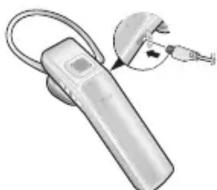
1 Plug the charger into the charger jack on the headset.
natural_image
Illustration of a handheld device with a close-up inset showing a small plug inserted into the main body (no text or symbols visible)2 Plug the charger into a power outlet. During charging, the indicator light will turn red. If charging does not begin, unplug the charger and plug it in again.
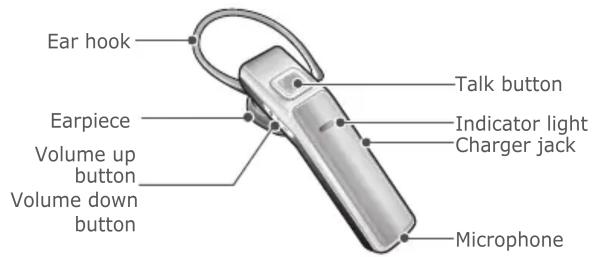
Your headset overview

NOTE:
Make sure you have the following items with your headset : Charger, User guide. The items supplied with your headset may vary depending on your region.
3 When the headset is fully charged, the indicator light changes to blue. Unplug the charger from the power outlet and the headset.

NOTE:
- Use only a Samsung-approved charger. Unauthorised chargers may cause an explosion or damage to the headset.
- The battery will gradually wear out while charging or discharging because it is a consumable part.
- The headset is not able to operate while charging. Try connecting after charging is completed.
When the battery is low
The headset beeps and the indicator light flashes red. Recharge the battery. If the headsets powers off during a call, the call will be automatically transferred to the phone.
Wearing on the headset
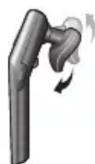
Place the headset on your ear. Ensure to put the correct (Left, Right) earpiece on each ear. Your headset has the E-Clip feature which keeps the headset stable on your ear with the adjustable earpiece.
Turning the headset on or off
- To turn the headset on, press and hold the talk button until the blue indicator light flashes 4 times.
- To turn the headset off, press and hold the talk button until both blue and red indicator lights flash.
Pairing and connecting the headset
Pairing and connecting the headset with a phone
1 Enter Pairing mode.
- Turn on the headset with pressing and holding the talk button until the indicator light turns blue and stays lit after blinking.
- When you turn on the headset for the first time, it automatically enters Pairing mode.
2 Activate the Bluetooth feature on your phone and search for the headset (see your phone's user guide).
3 Select the headset (Samsung WEP650) from the list of devices found by your phone.
4 Enter the Bluetooth PIN (0000, 4 zeros) to pair and connect the headset to your phone. Pairing and connecting the headset with a phone
Disconnecting the headset
To disconnect the headset from your phone,
- Turn off the headset
- Use the Bluetooth menu of your phone
Reconnecting the headset
When the headset is paired with a phone, it will attempt to automatically reconnect each time you turn it on. If the headset does not attempt to automatically reconnect,
- Press the talk button.
- Use the Bluetooth menu of your phone
Using call functions
Activated functions and features may differ depending on the types of your phone.
Making a call
Redialing the last number
Press and hold the talk button to redial the last number.
Dialing a number by voice
Press the talk button to dial a number by voice, and say a name.
Answering a call
Press the talk button to answer a call when you hear incoming call tones.
Ending a call
Press the talk button to end a call.
Rejecting a call
Press and hold the talk button to reject a call when a call comes in.
- HEADSET
- WEP650
- Quick Start Guide
- Charging the headset
- NOTE:
- When the battery is low
- Wearing on the headset
- Turning the headset on or off
- Pairing and connecting the headset
- Pairing and connecting the headset with a phone
- Disconnecting the headset
- Reconnecting the headset
- Using call functions
- Making a call
- Answering a call
- Ending a call
- Rejecting a call
Marke : SAMSUNG
Modell : WEP-650
Kategorie : Hi-Fi-System