
Sheen SHE-3806 - Uhr CASIO - Kostenlose Bedienungsanleitung
Finden Sie kostenlos die Bedienungsanleitung des Geräts Sheen SHE-3806 CASIO als PDF.


Benutzerfragen zu Sheen SHE-3806 CASIO
0 Frage zu diesem Gerät. Beantworten Sie die, die Sie kennen, oder stellen Sie Ihre eigene.
Eine neue Frage zu diesem Gerät stellen
Laden Sie die Anleitung für Ihr Uhr kostenlos im PDF-Format! Finden Sie Ihr Handbuch Sheen SHE-3806 - CASIO und nehmen Sie Ihr elektronisches Gerät wieder in die Hand. Auf dieser Seite sind alle Dokumente veröffentlicht, die für die Verwendung Ihres Geräts notwendig sind. Sheen SHE-3806 von der Marke CASIO.
BEDIENUNGSANLEITUNG Sheen SHE-3806 CASIO
Operation Guide 5420/5421
CASIO®
- Your watch may differ somewhat from the one shown in the illustration.
text_image
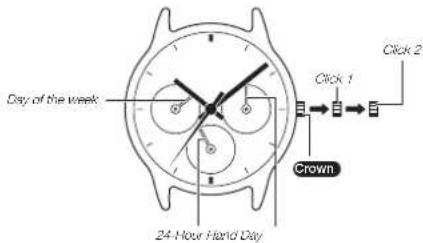
Day of the week 24-Hour Hard Day Crown Click 1 Click 2Crown Operations
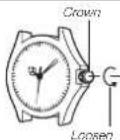
Some water-resistant models (100 meters, 200 meters) have a screw-in crown. When you need to perform a crown operation, rotate it towards you to unscrew it. Then pull the crown out. Avoid applying undue force when pulling. The watch loses its water resistance while the crown is unscrewed. After performing a crown operation, fully screw the crown back in.
If your watch has a rotary bezel...
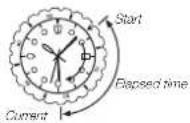
You can rotate the bezel to align its ▼ mark with the minute hand. Then you will be able to tell how much time has elapsed since aligning the ▼ mark.
To adjust the day of the week and time
When the second hand is at 12 o'clock, pull the Crown out to Click 2.

Rotate the Crown to advance the hour and minute hand settings, which will also change as the day of the week setting.
Rotate the Crown to change the time setting.

Push the Crown back in.
Note
• Take care that you set the correct AM or PM time.
- When changing the time,
move the minute hard tour or fl ve minutes past your final setting, and then back it up to the setting you want.
- The 24-Hour Hand indicates the current hour of the day. It makes one complete rotation every 24 hours.
To change the day setting
Pull the Crown out to Click 1.

Rotate the Crown to set the day.

Push the Crown back in.
Note
• The day setting uses a 31-day month. Make adjustments for months of shorter lengths.
- Avoid changing the day setting between the hours of 9 p.m. and 1 a.m. Otherwise, the day setting may not change correctly at midnight.
Specifications
| Accuracy at normal temperature (per month) | Battery type | Battery life |
| ±20 seconds | SR920SW | Approx. 3 years |