AS-820 - Fahrradcomputer Assize - Kostenlose Bedienungsanleitung
Finden Sie kostenlos die Bedienungsanleitung des Geräts AS-820 Assize als PDF.


Benutzerfragen zu AS-820 Assize
0 Frage zu diesem Gerät. Beantworten Sie die, die Sie kennen, oder stellen Sie Ihre eigene.
Eine neue Frage zu diesem Gerät stellen
Laden Sie die Anleitung für Ihr Fahrradcomputer kostenlos im PDF-Format! Finden Sie Ihr Handbuch AS-820 - Assize und nehmen Sie Ihr elektronisches Gerät wieder in die Hand. Auf dieser Seite sind alle Dokumente veröffentlicht, die für die Verwendung Ihres Geräts notwendig sind. AS-820 von der Marke Assize.
BEDIENUNGSANLEITUNG AS-820 Assize
OPERATING MANUAL
1 .Preface
Thank you very much for selecting AS series cycle computer as your bicycle partner. Please make sure that you have all accessories as shown below.
Thoroughly familiarize yourself this manual before operating and keep this manual for future reference please.
2 .Accessories
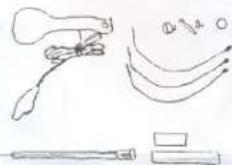
| Part name | Unit | Q'ty | Includings | |
| 1 | Cycle Computer | pcs | 1 | LR44 Battery |
| 2 | Bracket | set | 1 | sensor cable,,screwNUT |
| 3 | Magnet | set | 1 | magnet, screw |
| 4 | Cable Tie | pcs | 4 | |
| 5 | Rubber Pad | pcs | 2 | |
- Feature and function
| Feature and function | Symbol | Specification | AS-6/6G AS-506 AS-828/246 AS-900/900G | AS-8/8G AS-828/248 AS-818/508 | AS-904 AS-904G | AS-11/11G AS-820 AS-511 |
| Current speed | SPD | 0~99.9Km/h(62ml/n) | ● | ● | ● | ● |
| Elapsed time | TM | 0~9:59:59(0~18:00:00) | ● | ● | ● | ● |
| Trip distance | DST | 0~999.99km(ML) | ● | ● | ● | ● |
| Odometer | ODO | 0~9999.9km/mile | ● | ● | ● | ● |
| Maximum speed | MAS | 99.9km/h (62.2mile/h) | ● | ● | ● | |
| Average speed | AVS | 99.9km/h (62.2mile/h) | ● | ● | ● | |
| Rate per Minute | RPM | 0~3600 | ● | ● | ||
| calories burned | CAL | 0~999.9kcal | ● | |||
| Rear time clock | CLK | 12Hr/24Hr | ● | ● | ● | ● |
| Stop watch | STOP WATCH | 0.01sec-9 59.59 | ● | |||
| Scan | Scan | ● | ● | ● | ● | |
| Start / Stop Automatically | ● | ● | ● | ● | ||
| Power on/off Automatically | ● | ● | ● | ● |
Sensor : No contact magnetic Sensor
Battery type : LR44, AG13
Wheel size: 5"-31"(cycle),0.5"-3.1"(inline)
Operating temperature : 0 G\~55 G
Storage temperature : -20°C-60°C
4.Operation
(1) Function and Screen Selection (Screen display as above)

flowchart
graph TD
    A["SCAN TM"] -->|MODE KEY| B["TM"]
    B -->|MODE KEY| C["DST"]
    C -->|MODE KEY| D["ODO"]
    D -->|MODE KEY| E["MAS"]
    E -->|MODE KEY| F["AVS"]
    F -->|MODE KEY| G["rpm"]
    G -->|MODE KEY| H["CAL"]
    H -->|MODE KEY| I["CLK"]
    I -->|MODE KEY| J["STOP WATCH"]
    J -->|MODE KEY| K["STOP WATCH"]
    K --> A
(2)
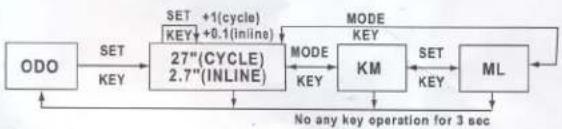
flowchart
graph LR
    A["ODO"] -->|SET KEY| B["27"(CYCLE) 2.7"(INLINE)"]
    B -->|MODE KEY| C["KM"]
    C -->|SET KEY| D["ML"]
    D -->|No any key operation for 3 sec| A
    B -->|SET +1(cycle) KEY+0.1(inline)| B
(3)
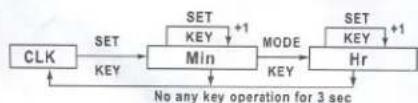
flowchart
graph TD
    CLK --> SET1["SET KEY"]
    SET1 --> MIN["MIN"]
    MIN --> MODE["MODE KEY"]
    MODE --> Hr["Hr"]
    Hr --> SET2["SET KEY +1"]
    SET2 --> MODE
    style SET1 fill:#f9f,stroke:#333
    style MIN fill:#ccf,stroke:#333
    style MODE fill:#cfc,stroke:#333
    style Hr fill:#fcc,stroke:#333
(4)

(5)clear

flowchart
graph LR
    A["TM\nDST\nAVS"] -->|SET\nKEY| B["0"]
    C["CAL"] -->|SET\nKEY| D["0"]
    E["MAS"] -->|SET\nKEY| F["0"]
(6)


NOTE: DON'T OPERATE THE KEY UNDER WATER.
5 .Installation
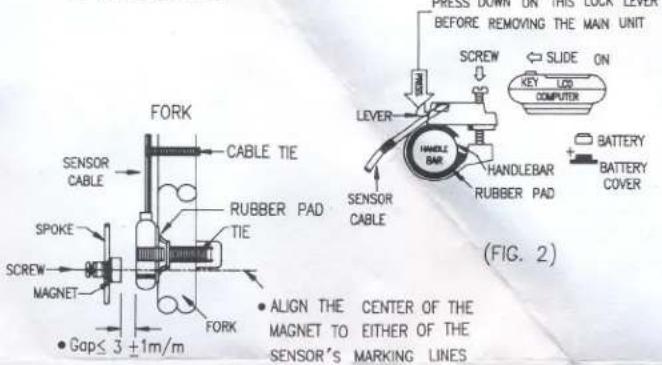
text_image
PRESS DOWN ON THIS LOAF LEVER BEFORE REMOVING THE MAIN UNIT SCREW SLIDE ON KEY LOD COMPUTER LEVER HANDLE BAR RUBBER PAD RUBBER PAD SENSOR CABLE CABLE TIE RUBBER PAD TIE SENSOR CABLE SPOKE MAGNET FORK CAPLE TIE FLUORE FORK • Gap≤ 3 ±1m/m • ALIGN THE CENTER OF THE MAGNET TO EITHER OF THE SENSOR'S MARKING LINES (FIG. 2)(FIG. 1)
6 .Troubles Shooting
Check the following may save time before taking unit in for repairs.
| Trouble | Check items | Remedy |
| No LCD display | 1.Is the battery dead?2.Is there correctbattery installation? | 1.Replace a newbattery.2.Making sure thatthe position poleof the battery isfacing the batterycap. |
| No Current speedReading | 1.Check for: BrokenWire, main unitincorrect positionor sensor andmagnet incorrectlyaligned2.Is the calibratingcorrect? | 1.install the mainunit againcarefully.2.Refer to theprocedure of"calibration"and set thecorrect value.3.Refer toinstallation.4.Replace wire.5.Clean thecontacts ofthe bracketand computer. |
| LCD Display randomly | Initiate the computeragain. | |
| LCD Display is dark | 1.Has the main unit beenunder direct sunlightfor a long time? | Place the main unitin the shady placeto recover to normalstate.Replace a new battery. |
| LCD display slowly | Is the temperature below0°C or 32°F | Computer will operatenormally whentemperature rise above0°C or 32°F |
Note: Any troubles except shown above, send to agency for repair please!
Don't use thinner, alcohol or benzine to clean!
| Bicycle wheel size Inch Vs. Cm | |||
| Inch | Cm | Inch | Cm |
| 8 | 64 | 9 | 72 |
| 10 | 80 | 11 | 88 |
| 12 | 96 | 13 | 104 |
| 14 | 112 | 15 | 120 |
| 16 | 128 | 17 | 136 |
| 18 | 144 | 19 | 152 |
| 20 | 160 | 21 | 168 |
| 22 | 176 | 23 | 184 |
| 24 | 192 | 25 | 200 |
| 26 | 208 | 27 | 216 |
| 28 | 224 | 29 | 231 |
Example :
8"(Inch)=8×2.54×3.1416=64 Cm