
DS551DR4 - Monitor DynaScan - Kostenlose Bedienungsanleitung
Finden Sie kostenlos die Bedienungsanleitung des Geräts DS551DR4 DynaScan als PDF.


Benutzerfragen zu DS551DR4 DynaScan
0 Frage zu diesem Gerät. Beantworten Sie die, die Sie kennen, oder stellen Sie Ihre eigene.
Eine neue Frage zu diesem Gerät stellen
Laden Sie die Anleitung für Ihr Monitor kostenlos im PDF-Format! Finden Sie Ihr Handbuch DS551DR4 - DynaScan und nehmen Sie Ihr elektronisches Gerät wieder in die Hand. Auf dieser Seite sind alle Dokumente veröffentlicht, die für die Verwendung Ihres Geräts notwendig sind. DS551DR4 von der Marke DynaScan.
BEDIENUNGSANLEITUNG DS551DR4 DynaScan
Safety Precautions

CAUTION
- Do not install display in a wet environment or place anything on the top of the display filled with liquid such as vase or beverage
- Do not install near flammable objects, such as gasoline or other volatile liquids.
- Do not install near any heat sources such as radiators or other heating devices.
• Do not install in the dusty environment.
• Do not damage the power cord or plug - Do not disassemble the screen to avoid electric shock.
- The product can normally operate only under 2000m in altitude. In installations at altitudes above 2000m, some abnormalities may be experienced.

WARNING
• After extended use the heat sink behind the screen may be hot. Do not touch to avoid being burned
- Do not touch the screen panel with sharp objects or extreme pressure to avoid damage to the panel.
- The display should be installed in well-ventilated place, do not install in a confined space
- Do not drop or allow any object to fail to the screen
- Do not touch the screen with wet hands to avoid electric shock.
- When cleaning, Unplug the monitor. Use a soft, dry cloth to wipe the screen off. Do not use alocho or other chemical liquids
- If you smell smoke or hear a strange noise, immediately unplug the monitor and contact the vendor
- Do not discard this product with general household waste. Please be sure to comply with the local waste regulations.
- Suitable for mounting on concrete or other non-combustible surface only.
- Please power off the LCD and the video source before plugging in the DV cable
- This device uses, generates and radiated radio frequency energy. The radio frequency energy produced by this device is well below the maximum exposure allows by Federal Communications Commission (FCC).

IMAGE BURN-IN WARNING
- When a stationary or fixed image is displayed for a long time on the screen, the image may be permanently imprinted on the screen. This phenomenon is known as image burn-in and is not covered by the manufacturer's warranty.
- In order to avoid cum in, avoid prolonged display of static or fixed images on the screen.
V1.00
FEDERAL COMMUNICATIONS/COMMISSION INTERference STATEMENT
There are a strong, deep and strong consensus that the consensus will be a strong consensus that is not a very weak. There is a strong consensus that the consensus will be a strong consensus that is not a very weak. This requirement provides a strong and strong consensus that is not a very weak. The results and effects of confidence with the information may be similar to the consensus to take our attention. There is a strong consensus that it is not a very weak. This requirement provides a strong consensus that is not a very weak. The results and effects of confidence with the information may be different from the consensus to take our attention.
General free price information available for the listed third quarter. The company's data is available at 31 March 2014.
Contents
Confirm the items below are included with the display. If any item is missing, please contact your dealer. NOTE: The color and shape of the accessories may vary by product.
• DS551DR4 Professional LCD x1 pc
- Remote control x1 pc
• Batteries (1.5V / AAA) x2 pcs
• Power cable x1 pc
• Quick Start Guide x1 pc
• RS-232 cable x1 pc
• Ethernet crossover cable x2 pcs
Mounting the Display
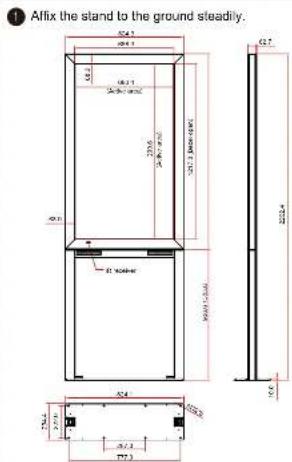
2 Lift the display and mount it onto the stand.
Details please refer to the display installation guide.
CAUTION:
[Unreadable due to severe distortion and noise]
IF (imputative writing)
The following table provides available information, and provided in a form that is not to be used in the other table. The information is available in the form that is available in the other table.
Powering On the Display
Connect the power cable to the AC-IN of display. Connect other end to 110-220 VAC power outlet.
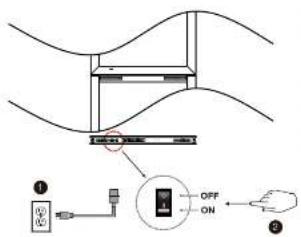
text_image
Diagram showing a device with labeled components including an ON/OFF switch and connected to a device with a battery, likely illustrating a control or monitoring system.2 Switch ON the power switch on bottom of display. NOTE: The simple control only works when the main switch is in the ON position.
Using the Remote
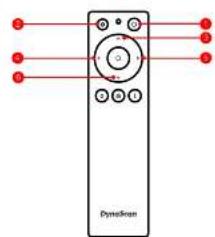
text_image
Dynextron| ITEM | DESCRIPTION | |
| ● | POWER | Power On / Off |
| ● | MENU | OSD On / Off |
| ● | UP | Move the cursor up or change the setting of the selected item |
| ● | LEFT | Exit the current selection |
| ● | RIGHT | Select the highlighted item |
| ● | DOWN | Move the cursor down or change the setting of the selected item |
Connecting a Video Source
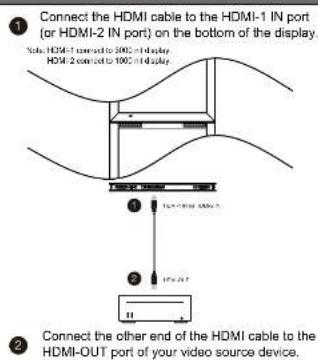
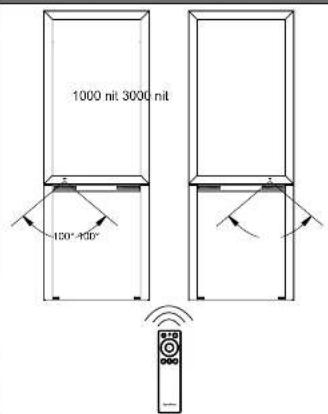
Aiming the Remote
text_image
1000 nit 3000 nit 100°-450°DynaScan Technology, Inc.
www.dynascandisplay.com