Vibro Stereo - Lautsprecher Ferguson - Kostenlose Bedienungsanleitung
Finden Sie kostenlos die Bedienungsanleitung des Geräts Vibro Stereo Ferguson als PDF.


| Produkttyp | Lautsprecher (Stereo) |
| Marke | Ferguson |
| Modell | Vibro Stereo |
| Abmessungen (ca.) | 200 x 150 x 250 mm (B x T x H) |
| Gewicht (ca.) | 1,5 kg |
| Stromversorgung | Netzteil (5V DC, USB) oder Akku (wiederaufladbar) |
| Leistungsaufnahme | ca. 10 W |
| Frequenzbereich | 60 Hz – 20 kHz |
| Anschlüsse | 3,5 mm Klinke, Bluetooth (optional) |
| Hauptfunktionen | Stereo-Klang, Vibrationsbass, integrierter Verstärker |
| Bedienelemente | Ein/Aus, Lautstärke, Eingangswahl |
| Lieferumfang | Lautsprecher, USB-Kabel, Bedienungsanleitung |
| Material | Kunststoffgehäuse mit Stoffbezug |
| Farbe | Schwarz |
| Schutzart | IPX2 (spritzwassergeschützt) |
| Betriebstemperatur | 0 °C bis 40 °C |
| Reinigung | Mit leicht feuchtem Tuch reinigen, kein Wasser ins Innere gelangen lassen |
| Sicherheitshinweise | Nicht in der Nähe von Wasser verwenden, kein übermäßiger Schalldruck |
| Ersatzteile | USB-Kabel, Akku (falls zutreffend) erhältlich |
| Reparierbarkeit | Durch Fachpersonal; Gehäuse nicht selbst öffnen |
| Allgemeine Informationen | Garantie: 2 Jahre; CE-Kennzeichnung |
Häufig gestellte Fragen - Vibro Stereo Ferguson
Benutzerfragen zu Vibro Stereo Ferguson
0 Frage zu diesem Gerät. Beantworten Sie die, die Sie kennen, oder stellen Sie Ihre eigene.
Eine neue Frage zu diesem Gerät stellen
Laden Sie die Anleitung für Ihr Lautsprecher kostenlos im PDF-Format! Finden Sie Ihr Handbuch Vibro Stereo - Ferguson und nehmen Sie Ihr elektronisches Gerät wieder in die Hand. Auf dieser Seite sind alle Dokumente veröffentlicht, die für die Verwendung Ihres Geräts notwendig sind. Vibro Stereo von der Marke Ferguson.
BEDIENUNGSANLEITUNG Vibro Stereo Ferguson
195mm
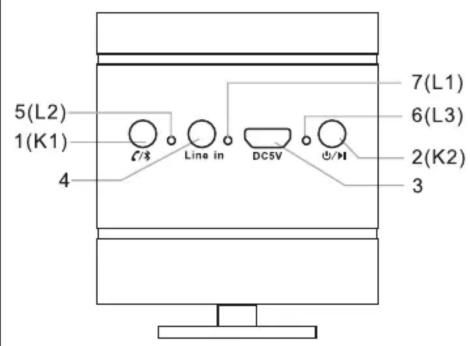
1.K1 button, Bluetooth pairing and phone call button
2.K2 button, Power and play/pause
- Micro USB charging port
4.Line in port
5.L2-Bluetooth pairing indicator light
6.L3-Charging indicator light, it's red light when charging,
green light when fully charged
7.L1- Bluetooth pairing indicator light

natural_image
Simple line drawing of a cylindrical container with a handle and circular ports, no text or symbols present.- First charge 5 hours (L3 indicator light turns red when charging, it becomes green when speaker is fully charged)

natural_image
Simple line drawing of a camera lens with a screwdriver inserted (no text or symbols)- Line in connection - connect audio device and speaker by 3.5mm audio jack.


natural_image
Diagram of a camera lens with musical notes on the base, no text or symbols present- Bluetooth pairing - Press call buttons by 3 seconds searching for Bluetooth connection, stream the music after connection is done.

natural_image
Hand pointing at a camera lens (no text or symbols visible)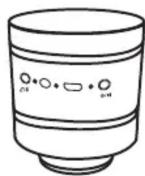
- Bluetooth stereo - Sync by double clicking call buttons on both speakers. Step done before delivery, this is for your use in case of malfunction.
1
2
3

Stream music on both speakers.

- Handsfree call - Short press on call button to answer the call, long press to reject the call (Operations are only available on master speaker).
Ferguson Sp. z o.o.
ul. Dworska 1
61-619 Poznań



MANUAL

natural_image
Simple line drawing of a cylindrical object with concentric rings and a base, no text or symbols present.SAFETY
- Indoor use only.
- Use in upright position with stand pointing down only on horizontal surfaces.
- Keep the speakers out of children's reach
- Please read user manual carefully before the first use.
- Do not open the housing.
- Do not listen to music too loud, it can cause hearing damage.