UR107 - Radiowecker Soundmaster - Kostenlose Bedienungsanleitung
Finden Sie kostenlos die Bedienungsanleitung des Geräts UR107 Soundmaster als PDF.


| Produkttyp | Radiowecker |
| Marke | Soundmaster |
| Modell | UR107 |
| Abmessungen (ca.) | 18 x 10 x 8 cm |
| Gewicht (ca.) | 300 g |
| Stromversorgung | Netzteil 230 V~, 50 Hz; Batterie-Backup (2x AAA, nicht im Lieferumfang) |
| Display | LED-Digitalanzeige mit Weckzeit und Datum |
| Radiofunktionen | UKW (FM) mit manuellem und automatischem Sendersuchlauf |
| Weckfunktionen | Alarm mit Radio oder Summer; Schlummerfunktion (Snooze) |
| Zusatzfunktionen | Dimmer für Display-Helligkeit; Einschlaf-Timer (Sleep) |
| Reinigung und Pflege | Gehäuse mit trockenem, weichem Tuch reinigen; keine aggressiven Reinigungsmittel |
| Sicherheitshinweise | Nicht in Feuchträumen verwenden; Netzstecker ziehen bei Gewitter oder längerem Nichtgebrauch |
| Reparatur und Ersatzteile | Keine reparaturfähigen Teile im Inneren; bei Defekt Gerät entsorgen oder Fachhändler kontaktieren |
| Zubehör | Netzteil (im Lieferumfang); Bedienungsanleitung |
| Garantie | 2 Jahre gesetzliche Gewährleistung |
Häufig gestellte Fragen - UR107 Soundmaster
Benutzerfragen zu UR107 Soundmaster
0 Frage zu diesem Gerät. Beantworten Sie die, die Sie kennen, oder stellen Sie Ihre eigene.
Eine neue Frage zu diesem Gerät stellen
Laden Sie die Anleitung für Ihr Radiowecker kostenlos im PDF-Format! Finden Sie Ihr Handbuch UR107 - Soundmaster und nehmen Sie Ihr elektronisches Gerät wieder in die Hand. Auf dieser Seite sind alle Dokumente veröffentlicht, die für die Verwendung Ihres Geräts notwendig sind. UR107 von der Marke Soundmaster.
BEDIENUNGSANLEITUNG UR107 Soundmaster
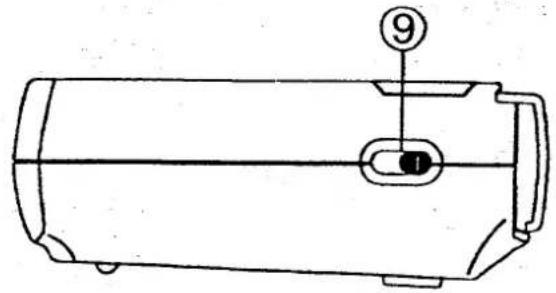
text_image
⑨ ①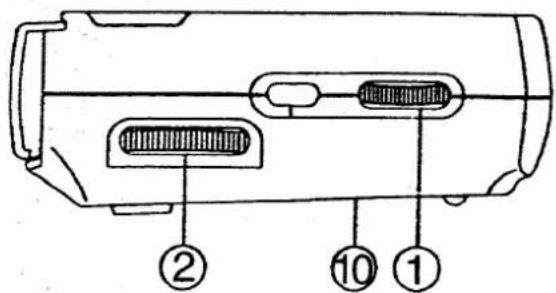
text_image
Diagram of a device with labeled components, showing internal structure and numbered parts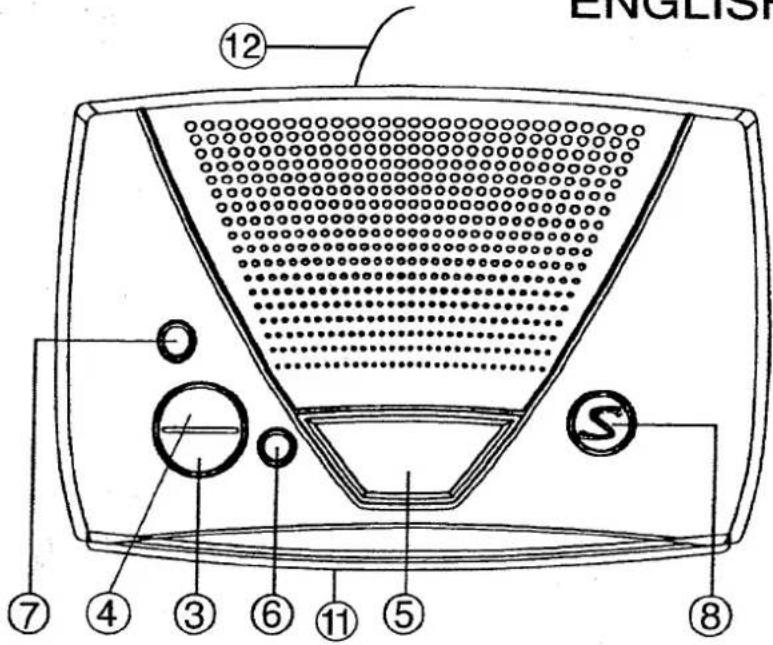
text_image
ENGLISH ⑫ ⑦ ④ ③ ⑥ ⑪ ⑤ ⑧LOCATION OF CONTROLS
- VOLUME / BUZZER CONTROL
- TUNING CONTROL
- MINUTE SET BUTTON
- HOUR SET BUTTON
- SNOOZE BUTTON
- WAKE SET / OFF BUTTON
- CLOCK SET BUTTON
- SLEEP BUTTON
- ON/OFF/AUTO SWITCH (SIDE OF UNIT)
- BATTERY COMPARTMENT
- CLOCK DISPLAY
- FM ANTENNA WIRE
POWER CONNECTION
Plug the AC POWER CORD to the household outlet. Make sure the voltage is correct for safety purpose and prevent plausible damages to the set.
Connect one 9 volt battery (not included) to the battery terminals in the BATTERY COMPARTMENT. It maintains the clock continue function whenever the AC power is interrupted.
Please note: The display will not exhibit time during. Power failure but the clock will keep correct time.
RADIO OPERATION
- Set the ON/OFF/AUTO FUNCTION SWITCH to "ON" position.
- Tune to the desired station with TUNING CONTROL.
- Adjust the volume level with VOLUME CONTROL.
- To obtain better FM reception, lay out the FM ANTENNA WIRE to it's full extent or for built-in FM antenna version, uncoil and fully extend AC POWER CORD.
The radio can be switched off by setting ON/OFF AUTO FUNCTION SWITCH to the "OFF" position.
SETTING THE CLOCK TO THE TIME OF DAY
- Press the CLOCK SET BUTTON at the same time together with HOUR SET BUTTON for hour setting or MINUTE SET BUTTON for minute setting.
SETTING THE WAKE TIME
- Press the WAKE SET/OFF BUTTON at the same time together with HOUR SET BUTTON for hour setting or MINUTE SET BUTTON for minute setting.
- Select the type of alarm with ON/OFF/AUTO FUNCTION SWITCH
RADIO: Wake to radio. The radio must be tuned to a station which will be broadcasting at the alarm time and the volume adjusted to the desired level.
ALARM : Wake to buzzer.
INTERRUPTING THE ALARM ('SNOOZE' FUNCTION)
The alarm can be interrupted for 9 minutes by pressing SNOOZE BUTTON, after which time the radio or the alarm will come on again.
SWITCHING OFF THE ALARM
To switch off the alarm, just press the ALARM OFF BUTTON.
SLEEP TIMER OPERATION
- This clock radio is equipped with a "sleep timer" function which will switch off the radio automatically after a preselected period from 59 to 01 minute.
- Press SLEEP BUTTON, the display will show 0:59 sleep time. At the same time radio will come on and stay for 59 minutes.
- To shorter the "sleep" time, press SLEEP BUTTON together with the MINUTE BUTTON until the desired "sleep" time is shown on display.
After preselected "Sleep" time has elapsed, the radio will switch off automatically.
- To switch it off before the preselected "Sleep" time has elapsed, press SNOOZE BUTTON.
SLEEP TO RADIO AND WAKE TO RADIO
- Set the desired alarm time as described in "SETTING THE ALARM TIME" and set ON/OFF/AUTO FUNCTION SWITCH to "RADIO" position.
- Set sleep time as described in SLEEP TIMER OPERATION.
- The radio will switch off after the "sleep" time has elapsed and radio alarm will switch on next day.
SPECIFICATIONS
| POWER SOURCE | : AC230V ~ 50Hz |
| SPEAKER | : 8 Ohm |
| OUTPUT POWER | : 300mw |
| RADIO FREQUENCY | : FM87.5 - 108MHz |
Dripping warning: "The product shall not be exposed to dripping or splashing and that no objects filled with liquids, such as vases, shall be placed on the product."
Ventilation warning: "The normal ventilation of the product shall not be impeded for intended use."
- No naked flame sources, such as lighted candles, should be placed on the apparatus;
- Do not place the product in closed bookcases or racks without proper ventilation.