GEBD47000 - Ofen GRUNDIG - Kostenlose Bedienungsanleitung
Finden Sie kostenlos die Bedienungsanleitung des Geräts GEBD47000 GRUNDIG als PDF.


Benutzerfragen zu GEBD47000 GRUNDIG
0 Frage zu diesem Gerät. Beantworten Sie die, die Sie kennen, oder stellen Sie Ihre eigene.
Eine neue Frage zu diesem Gerät stellen
Laden Sie die Anleitung für Ihr Ofen kostenlos im PDF-Format! Finden Sie Ihr Handbuch GEBD47000 - GRUNDIG und nehmen Sie Ihr elektronisches Gerät wieder in die Hand. Auf dieser Seite sind alle Dokumente veröffentlicht, die für die Verwendung Ihres Geräts notwendig sind. GEBD47000 von der Marke GRUNDIG.
BEDIENUNGSANLEITUNG GEBD47000 GRUNDIG
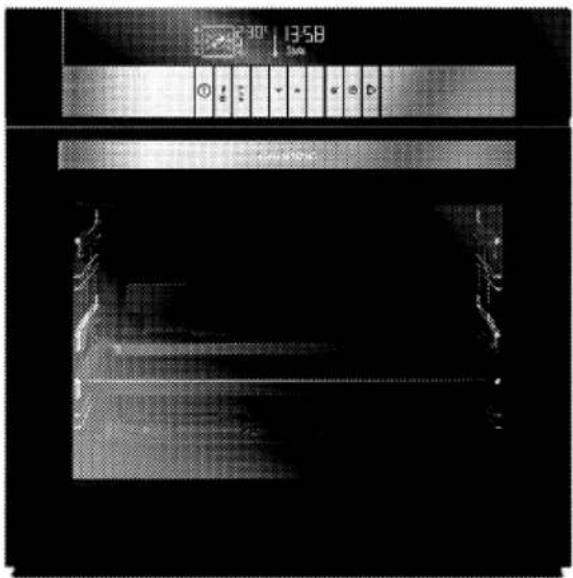
BUILT-IN OVEN
USER MANUAL
GEBD 47000 B
text_image
30° | 13:58 24m Control buttonsPlease read this user manual first!
Dear Customer,
Thank you for purchasing this Grundig product. We hope that you get the best results from your product which has been manufactured with high quality and state-of-the-art technology.
Therefore, please read this entire user manual and all other accompanying documents carefully before using the product and keep it as a reference for future use. If you handover the product to someone else, give the user manual as well. Follow all warnings and information in the user manual.
Remember that this user manual is also applicable for several other models. Differences between models will be identified in the manual.
Please visit the "Support" section on the Grundig website at www.grundig.co.uk to register your 5 year warranty.
Explanation of symbols
Throughout this user manual the following symbols are used:

Important information or useful hints about usage.

Warning of hazardous situations with regard to life and property.
Warning of electric shock.

Warning of risk of fire.

Warning of hot surfaces.
CE
1 Important instructions and warnings for safety and environment 4
General safety 4
Electrical safety....4
Product safety 5
Intended use 7
Safety for children 7
Disposing of the old product 7
Package information 8
2 General information 9
Overview 9
Package contents 10
Technical specifications 11
3 Installation 12
Before installation....12
Installation and connection 14
Future Transportation 16
4 Preparation 17
Tips for saving energy....17
Initial use 17
Day time....17
First cleaning of the appliance 18
Initial heating 18
5 How to operate the oven 20
General information on baking, roasting and grilling 20
How to operate the electric oven 20
Operating modes 23
How to operate the oven control unit.....25
Using the keylock 28
Using the clock as an alarm 28
Cooking times table 29
Ready meals functions 30
Settings menu....34
How to operate the grill....35
Cooking times table for grilling....35
6 Maintenance and care 36
General information....36
Cleaning the control panel....36
Cleaning the oven 37
Removing the oven door 38
Removing the door inner glass....39
Replacing the oven lamp 40
7 Troubleshooting 41
8 Guarantee 42
9 Service 43
1 Important instructions and warnings for safety and environment
This section contains safety instructions that will help protect from risk of personal injury or property damage. Failure to follow these instructions shall void any warranty.
General safety
This appliance can be used by children aged from 8 years and above and persons with reduced physical, sensory or mental capabilities or lack of experience and knowledge if they have been given supervision or instruction concerning use of the appliance in a safe way and understand the hazards involved.
Children shall not play with the appliance. Cleaning and user maintenance shall not be made by children without supervision.
■ Installation and repair procedures must always be performed by Authorized Service Agents. The manufacturer shall not be held responsible for damages arising from procedures carried out by unauthorized
persons which may also void the warranty. Before installation, read the instructions carefully.
- Do not operate the product if it is defective or has any visible damage.
- Ensure that the product function knobs are switched off after every use.
Electrical safety
If the product has a failure, it should not be operated unless it is repaired by an Authorized Service Agent. There is the risk of electric shock!
Only connect the product to a grounded outlet/line with the voltage and protection as specified in the "Technical specifications". Have the grounding installation made by a qualified electrician while using the product with or without a transformer. Our company shall not be liable for any problems arising due to the product not being earthed in accordance with the local regulations.
■ Never wash the product by spreading or pouring water
onto it! There is the risk of electric shock!
- The product must be disconnected during installation, maintenance, cleaning and repairing procedures.
If the power connection cable for the product is damaged, it must be replaced by the manufacturer, its service agent or similarly qualified persons in order to avoid a hazard. - Only use the connection cable specified in the "Technical specifications".
The appliance must be installed so that it can be completely disconnected from the mains supply. The separation must be provided by a switch built into the fixed electrical installation, according to construction regulations. - Rear surface of the oven gets hot when it is in use. Make sure that the electrical connection does not contact the rear surface; otherwise, connections can get damaged.
- Do not trap the mains cable between the oven door and frame and do not route it over
hot surfaces. Otherwise, cable insulation may melt and cause fire as a result of short circuit.
■ Any work on electrical equipment and systems should only be carried out by authorized and qualified persons.
In case of any damage, switch off the product and disconnect it from the mains. To do this, turn off the fuse at home.
* Make sure that fuse rating is compatible with the product.
Product safety
■ The appliance and its accessible parts become hot during use. Care should be taken to avoid touching heating elements. Children less than 8 years of age shall be kept away unless continuously supervised.
- Never use the product when your judgment or coordination is impaired by the use of alcohol and/or drugs.
- Be careful when using alcoholic drinks in your dishes. Alcohol evaporates at high temperatures and may cause fire since it can ignite when it comes into contact with hot surfaces.
- Do not place any flammable materials close to the product as the sides may become hot during use.
During use the appliance becomes hot. Care should be taken to avoid touching heating elements inside the oven. - Keep all ventilation slots clear of obstructions.
- Do not heat closed tins and glass jars in the oven. The pressure that would build-up in the tin/jar may cause it to burst.
- Do not place baking trays, dishes or aluminium foil directly onto the bottom of the oven. The heat accumulation might damage the bottom of the oven.
* Do not place aluminium foil on the base of the tray. - Do not use harsh abrasive cleaners or sharp metal scrapers to clean the oven door glass since they can scratch the surface, which may result in shattering of the glass.
-
Do not use steam cleaners to clean the appliance as this may cause an electric shock.
-
Placing the wire shelf and tray onto the wire racks properly
It is important to place the wire shelf and/or tray onto the rack properly. Slide the wire shelf or tray between 2 rails and make sure that it is balanced before placing food on it (Please see the following figure).

natural_image
Interior view of an oven with metal grating and rack (no text or symbols visible)- Do not use the product if the front door glass removed or cracked.
- Do not use the oven handle to hang towels for drying. Do not hang up towel, gloves, or similar textile products when the grill function is being used with the Grill door open.
■ Always use heat resistant oven gloves when putting in or removing dishes into/from the hot oven.
■ Ensure that the appliance is switched off before replacing the lamp to avoid the possibility of electric shock.
Prevention against possible fire risk!
■ Ensure all electrical connections are secure and tight to prevent risk of arcing.
■ Do not use damaged cables or extension cables.
■ Ensure liquid or moisture is not accessible to the electrical connection point.
Intended use
This product is designed for domestic use. Commercial use will void the guarantee.
This appliance is for cooking purposes only. It must not be used for other purposes, for example room heating.
This product should not be used for warming the plates under the grill, drying towels, dish cloths etc. by hanging them on the oven door handles. This product should also not be used for room heating purposes.
The manufacturer shall not be liable for any damage caused by improper use or handling errors.
■ The oven can be used for defrosting, baking, roasting and grilling food.
Safety for children
- Accessible parts may become hot during use. Young children should be kept away.
The packaging materials will be dangerous for children. Keep the packaging materials away from children. Please dispose of all parts of the packaging according to environmental standards. - Electrical products are dangerous to children. Keep children away from the product when it is operating and do not allow them to play with the product.
■ Do not place any items above the appliance that children may reach for. - When the door is open, do not load any heavy object on it and do not allow children to sit on it. It may overturn or door hinges may get damaged.
Disposing of the old product Compliance with the WEEE Directive and Disposing of the Waste Product:

This product complies with EU WEEE Directive (2012/19/EU). This product bears a classification symbol for waste electrical and electronic equipment (WEEE). This product has been manufactured with high quality parts and materials which can be reused and are suitable for recycling. Do not dispose of the waste product with normal domestic and other wastes at the end of its service life. Take it to the collection center for the recycling of electrical and electronic equipment. Please consult your local authorities to learn about these collection centers.
Compliance with RoHS Directive:
The product you have purchased complies with EU RoHS Directive (2011/65/EU). It does not contain harmful and prohibited materials specified in the Directive.
Package information
Packaging materials of the product are manufactured from recyclable materials in accordance with our National Environment Regulations. Do not dispose of the packaging materials together with the domestic or other wastes. Take them to the packaging material collection points designated by the local authorities.
2 General information
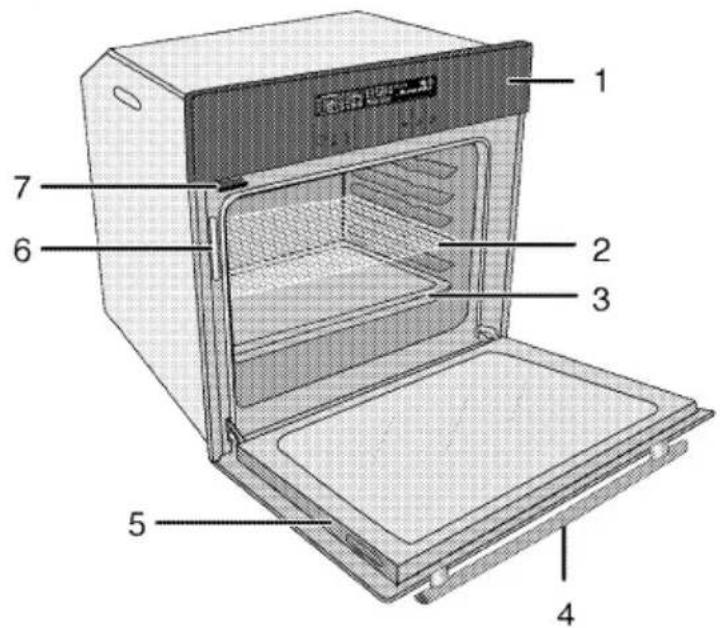
Overview
text_image
1 2 3 4 5 6 7
text_image
10 11 9 81 Control panel
2 Wire shelf
3 Tray
4 Handle
5 Front door
6 Water level indicator
7 Pitcher
8 Fan motor (behind steel plate)
9 Lamp
10 Top heating element
11 Shelf positions

text_image
1 2 3 4 5 6 5 4 3 2 1 ECO 28.0°C Wkg 13:58 Please Select ✓ ^ 14 13 12 11 10 9 8 7 ✓ ✓1 Shelf positions
2 Function display
3 Temperature/weight indicator field
4 Oven Inner Temperature symbol
5 Current time indicator field
6 Convenience food selection display
7 Start/stop cooking key
8 Time and settings key
9 OK key
10 Text display
11 Up/down keys (Menu step)
12 Temperature/weight/booster setting key
13 Program selection key
14 ON/OFF key
Package contents

Accessories supplied can vary depending on the product model. Not every accessory described in the user manual may exist on your product.
1. User manual
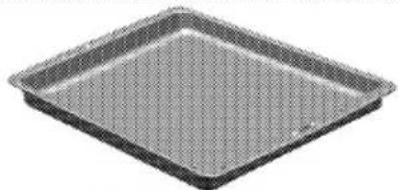
2. Oven tray
* Used for pastries, frozen foods and big roasts.
natural_image
Exterior view of a square baking tray with a mesh pattern (no text or symbols)3. Pastry tray
* Used for pastries such as cookies and biscuits.

natural_image
Exterior view of a rectangular baking tray with a grid pattern (no text or symbols)4. Wire Shelf
* Used for roasting and for placing the food to be baked, roasted or cooked in casserole dishes to the desired rack.

natural_image
Isometric line drawing of a rectangular metal grate or rack structure (no text or symbols)5. Placing the wire shelf and tray onto the telescopic racks properly
Telescopic racks allow you to install and remove the trays and wire shelf easily.
- When using the tray and wire shelf with telescopic racks, make sure that the pins at the rear section of the telescopic rack stands against the edges of the wire shelf and tray.

natural_image
Close-up of a mechanical component with grid pattern and ventilation grilles (no visible text or symbols)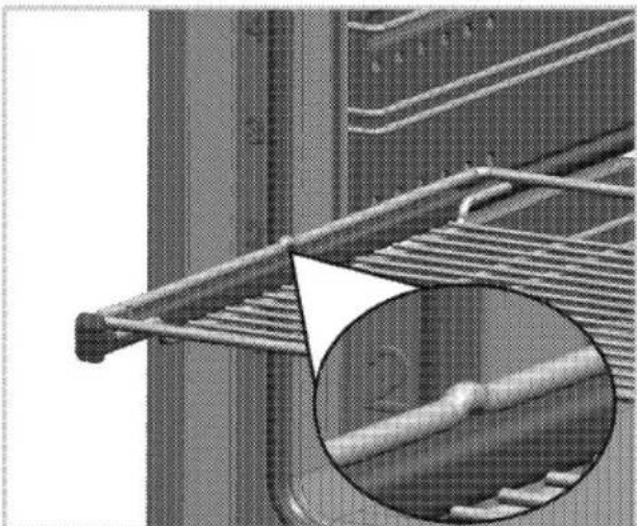
natural_image
Close-up of a metal rack with a magnified inset showing a hand holding a branch (no text or symbols visible)Technical specifications
| Voltage / frequency | 220-240 V ~ 50 Hz |
| Total power consumption | 3,1kW |
| Fuse | min. 16 A |
| Cable type / section | H05VV-FG 3 x 1,5 mm ^2 or equivalent |
| Cable length | max. 2 m |
| External dimensions (height / width / depth) | 595 mm/594 mm/567 mm |
| Installation dimensions (height / width / depth) | **590 or 600 mm/560 mm/min. 550 mm |
| Main oven | Multifunction oven |
| Inner lamp | 15/25 W |
| Grill power consumption | 2.2 kW |
券
Basics: Information on the energy label of electrical ovens is given in accordance with the EN 50304 standard. Those values are determined under standard load with bottom-top heater or fan assisted heating (if any) functions.
Energy efficiency class is determined in accordance with the following prioritization depending on whether the relevant functions exist on the product or not. 1-Cooking with eco-fan, 2-Turbo slow cooking, 3-Turbo cooking, 4-Fan assisted bottom/top heating, 5-Top and bottom heating.
大
See. Installation, page 12.

Technical specifications may be changed without prior notice to improve the quality of the product.

Figures in this manual are schematic and may not exactly match your product.

Values stated on the product labels or in the documentation accompanying it are obtained in laboratory conditions in accordance with relevant standards. Depending on operational and environmental conditions of the product, these values may vary.
3 Installation
Product must be installed by a qualified person in accordance with the regulations in force. The manufacturer shall not be held responsible for damages arising from procedures carried out by unauthorized persons which may also void the warranty.

Preparation of location and electrical installation for the product is under the installer's responsibility.
DANGER:
The product must be installed in accordance with all local electrical regulations.
DANGER:
Prior to installation, visually check if the product has any defects on it. If so, do not have it installed.
Damaged products cause risks for your safety.
Before installation
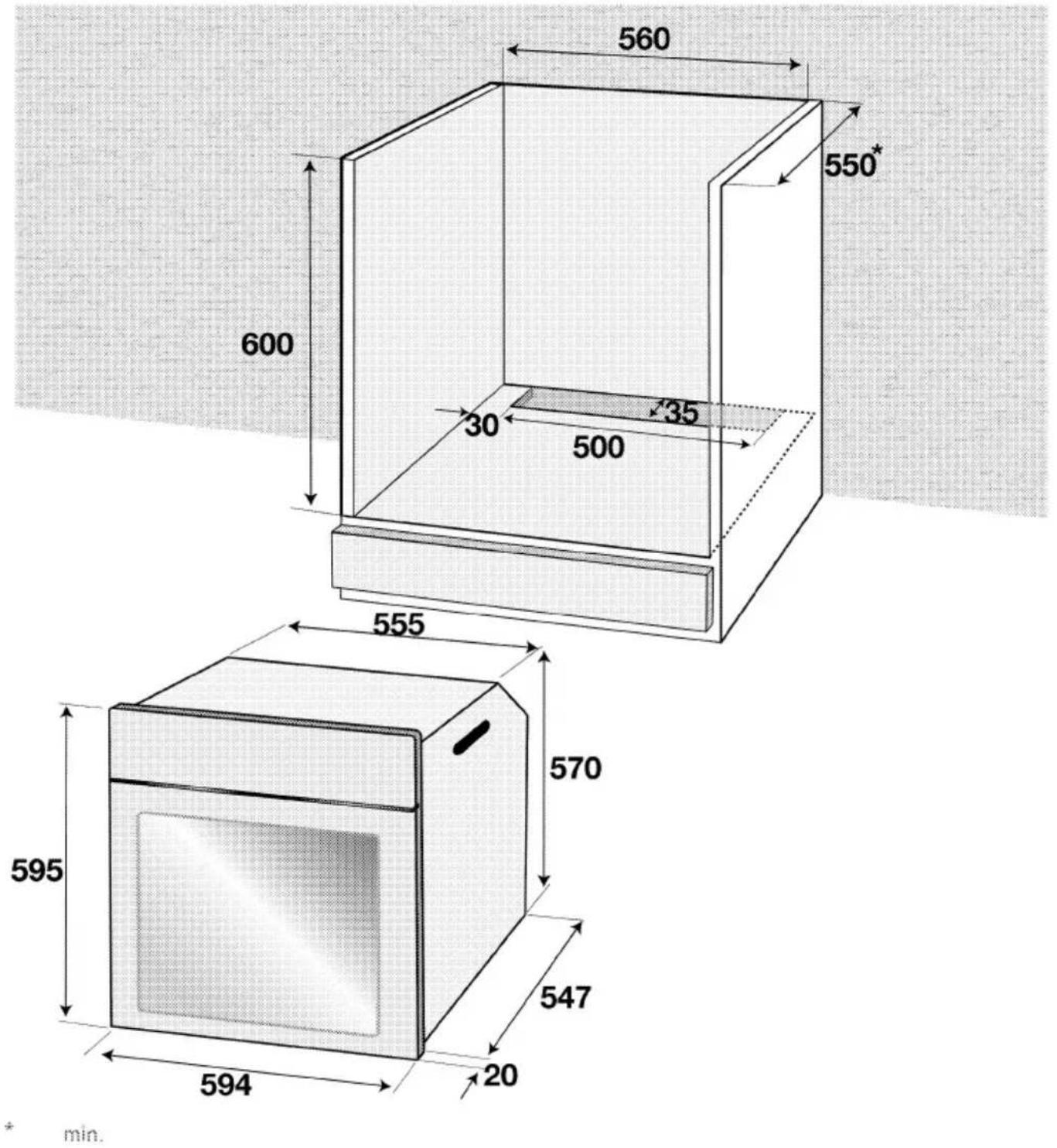
The appliance is intended for installation in commercially available kitchen cabinets. A safety distance must be left between the appliance and the kitchen walls and furniture. See figure (values in mm).
* Surfaces, synthetic laminates and adhesives used must be heat resistant (100 °C minimum).
* Kitchen cabinets must be set level and fixed.
* If there is a drawer beneath the oven, a shelf must be installed between oven and drawer.
* Carry the appliance with at least two persons.
The following installation drawings are representational and may not match exactly with your appliance.

Do not install the appliance next to refrigerators or freezers. The heat emitted by the appliance will lead to an increased energy consumption of cooling appliances.

The door and/or handle must not be used for lifting or moving the appliance.

If the appliance has wire handles, push the handles back into the side walls after moving the appliance.
text_image
560 550* 600 30 35 500 555 570 595 547 594 20 min.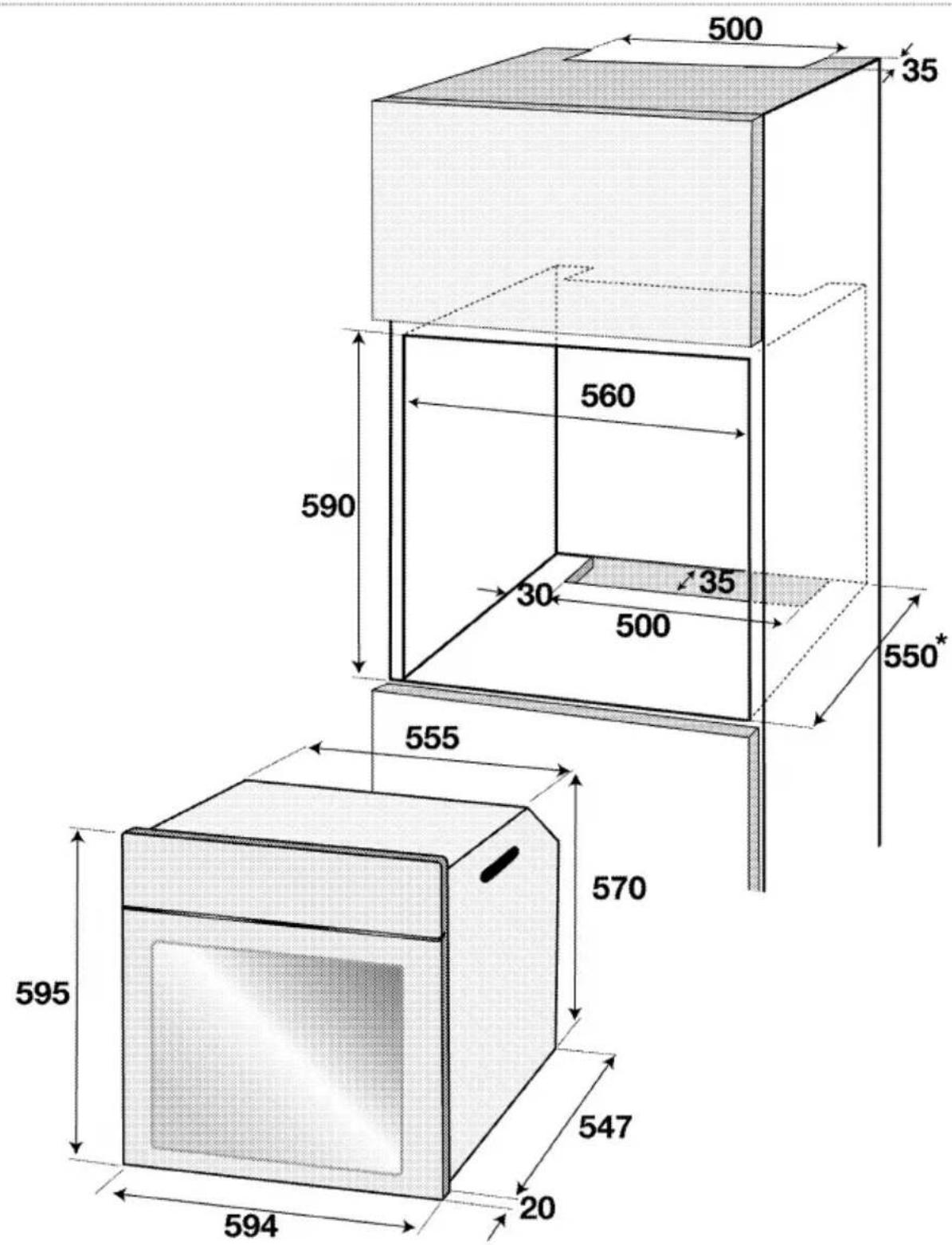
text_image
500 35 560 30 35 500 550* 590 555 570 595 547 20 594min.
Installation and connection
* Product can only be installed and connected in accordance with the statutory installation rules.
Electrical connection
Connect the product to a grounded outlet/line protected by a fuse of suitable
capacity as stated in the "Technical specifications" table. Have the grounding installation made by a qualified electrician while using the product with or without a transformer. Our company shall not be liable for any damages that will arise due to using the product without a grounding installation in accordance with the local regulations.

DANGER:
The product must be connected to the mains supply only by an authorised and qualified person. The product's warranty period starts only after correct installation.
Manufacturer shall not be held responsible for damages arising from procedures carried out by unauthorised persons.
DANGER:
The power cable must not be clamped, bent or trapped or come into contact with hot parts of the product.
A damaged power cable must be replaced by a qualified electrician.
Otherwise, there is risk of electric shock, short circuit or fire!
■ Connection must comply with national regulations.
The mains supply data must correspond to the data specified on the type label of the product. Open the front door to see the type label.
* Power cable of your product must comply with the values in "Technical specifications" table.

DANGER:
Before starting any work on the electrical installation, disconnect the product from the mains supply.
There is the risk of electric shock!
Connecting the power cable
- If a power cable is not supplied together with your product, a power cable that you would select from the table in accordance with the electrical installation at your home must be connected to your product by following the instructions in cable diagram.
This product must only be connected by a qualified electrician such as a technician from the local electricity company or NICEIC registered contractor to a suitable double-pole control unit with a minimum contact clearance of 3 mm in all poles. This control unit must be installed accordance with the IEE regulation. Failure to obey this instruction may cause operational problems and invalidate the product warranty.

Additional protection by a residual current circuit breaker is recommended.
- Open the terminal block cover with a screwdriver.
- Insert the power cable through the cable clamp below the terminal and secure it to the main body with the integrated screw on cable clamping component.
- Connect the cables according to the supplied diagram.
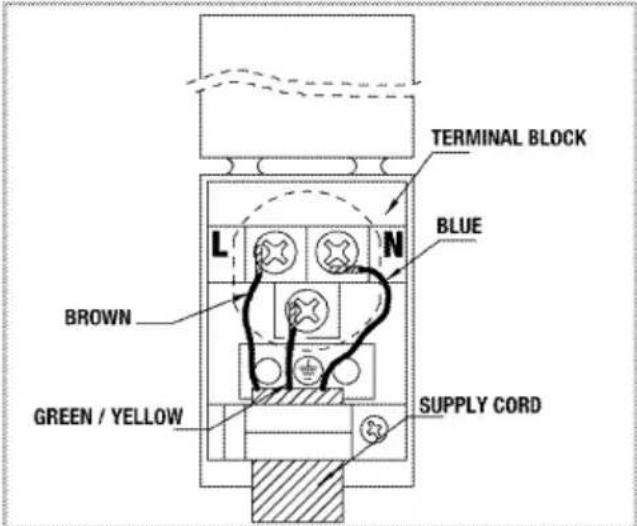
text_image
TERMINAL BLOCK BLUE L N BROWN GREEN / YELLOW SUPPLY CORD- After completing the wire connections, close the terminal block cover.
- Route the power cable so that it will not get squeezed between the product and the wall.

Power cable must not be longer than 2m because of safety reasons.
Installing the product
- Slide the oven into the cabinet, align and secure it while making sure that the power cable is not broken and/or trapped.
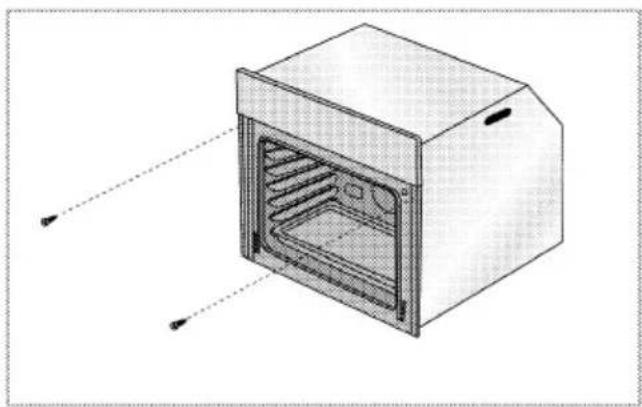
natural_image
Technical line drawing of a 3D oven with internal grating and ventilation slots (no text or symbols)Secure the oven with 2 screws as illustrated.
For products with cooling fan

text_image
1 2 31 Cooling fan
2 Control panel
3 Door
The built-in cooling fan cools both the built-in cabinet and the front of the product.

Cooling fan continues to operate for about 20-30 minutes after the oven is switched off.
Final check
- Connect the power cable and switch on the product's fuse.
- Check the functions.
Future Transportation
- Keep the product's original carton and transport the product in it. Follow the instructions on the carton. If you do not have the original carton, pack the product in bubble wrap or thick cardboard and tape it securely.
To prevent the wire grill and tray inside the oven from damaging the oven door, place a strip of cardboard onto the inside of the oven door that lines up with the position of the trays. Tape the oven door to the side walls.
* Do not use the door or handle to lift or move the product.

Do not place any objects onto the product and move it in upright position. Do not move the product when there is water in it. You can move the product after draining the water in it.

Check the general appearance of your product for any damages that might have occurred during transportation.
4 Preparation
Tips for saving energy
The following information will help you to use your appliance in an ecological way, and to save energy:
* Use dark coloured or enamel coated cookware in the oven since the heat transmission will be better.
* While cooking your dishes, perform a preheating operation if it is advised in the user manual or cooking instructions.
* Do not open the door of the oven frequently during cooking.
- Try to cook more than one dish in the oven at the same time whenever
possible. You can cook by placing two cooking vessels onto the wire shelf.
* Cook more than one dish one after another. The oven will already be hot.
- You can save energy by switching off your oven a few minutes before the end of the cooking time. Do not open the oven door.
* Defrost frozen dishes before cooking them.
Initial use
Day time

Before you can use the oven, the time must be set. If the time is not set, oven will not operate.

text_image
1 2 3 4 5 6 5 4 3 2 ECO 23.0°C Wkg 8:3:58 Please Select 14 13 12 11 10 9 8 7 ✓ ^ ✓ ✓ ✓ ✓ ✓ ✓ ✓ ✓ ✓ ✓ ✓ ✓ ✓ ✓ ✓ ✓ ✓ ✓ ✓ ✓ ✓ ✓ ✓ ✓ ✓ ✓ ✓ ✓ ✓ ✓ ✓ ✓1 Shelf positions
2 Function display
3 Temperature/weight indicator field
4 Oven Inner Temperature symbol
5 Current time indicator field
6 Convenience food selection display
7 Start/stop cooking key
8 Time and settings key
9 OK key
10 Text display
11 Up/down keys (Menu step)
12 Temperature/weight/booster setting key
13 Program selection key
14 ON/OFF key
Language setting
Language can only be set when the oven is switched off.
- Plug in the power cable and switch on the product's fuse.
-
When you switch on the oven for the first time, "Language: English" appears on the Text display
-
Touch √√ keys to select the desired language.
- Touch ☑ to confirm the setting.
» It returns to the stand-by display.
Set the time
00:00
Set day time
©
↑
-
After selecting the language, "Time setting" appears on the Text display and symbol flashes. Set the time with / keys.
-
Touch ☑ to confirm the time.
» It returns to the stand-by display. Only the current time appears on the display.
14:05

In case of power outage or when the product is disconnected and reconnected in again, time setting menu is displayed again. However, the set time is preserved in power outages shorter than 20 minutes. In such cases, you can continue by confirming the time value.
First cleaning of the appliance

The surface might get damaged by some detergents or cleaning materials. Do not use aggressive detergents, cleaning powders/creams or any sharp objects during cleaning. Do not use harsh abrasive cleaners or sharp metal scrapers to clean the oven door glass since they can scratch the surface, which may result in shattering of the glass.
- Remove all packaging materials.
- Wipe the surfaces of the appliance with a damp cloth or sponge and dry with a cloth.
Initial heating
Heat up the product for about 30 minutes and then switch it off. Thus, any production
residues or layers will be burnt off and removed.

WARNING
Hot surfaces cause burns! Product may be hot when it is in use. Never touch the hot burners, inner sections of the oven, heaters and etc. Keep children away. Always use heat resistant oven gloves when putting in or removing dishes into/from the hot oven.
Electric oven
- Take all baking trays and the wire grill out of the oven.
- Close the oven door.
- Select Static position.
- Select the highest oven power; See How to operate the electric oven, page 20.
- Operate the oven for about 30 minutes.
- Turn off your oven; See How to operate the electric oven, page 20
To clean the steam system:
- Take all baking trays and the wire grill out of the oven.
- Close the oven door.
- Select "Steam + Fan heating" function.
- Add 350 cc water into the Pitcher (2). See, Operating modes, page 23- "Steam + Fan heating" function usage.
- Run the oven for around one hour. Touch the key ☑ whenever "Press ☑ to spray steam" appears on the display.
- Turn off the oven; see,
Grill oven
- Take all baking trays and the wire grill out of the oven.
- Close the oven door.
- Select the highest grill power; see How to operate the grill, page 35.
- Operate the grill about 30 minutes.
- Turn off your grill; see How to operate the grill, page 35

Smoke and smell may emit for a couple of hours during the initial operation. This is quite normal. Ensure that the room is well ventilated to remove the smoke and smell. Avoid directly inhaling the smoke and the smell that emits.
5 How to operate the oven
General information on baking, roasting and grilling
WARNING
Hot surfaces cause burns! Product may be hot when it is in use. Never touch the hot burners, inner sections of the oven, heaters and etc. Keep children away. Always use heat resistant oven gloves when putting in or removing dishes into/from the hot oven.
DANGER:
Be careful when opening the oven door as steam may escape. Exiling steam can scald your hands, face and/or eyes.
Tips for baking
* Use non-sticky coated appropriate metal plates or aluminum vessels or heat-resistant silicone moulds.
* Make best use of the space on the rack.
- Place the baking mould in the middle of the shelf.
* Select the correct rack position before turning the oven or grill on. Do not change the rack position when the oven is hot.
* Keep the oven door closed.
Tips for roasting
* Treating whole chicken, turkey and large piece of meat with dressings such as lemon juice and black pepper before cooking will increase the cooking performance.
It takes about 15 to 30 minutes longer to roast meat with bones when compared to roasting the same size of meat without bones.
* Each centimeter of meat thickness requires approximately 4 to 5 minutes of cooking time.
- Let meat rest in the oven for about 10 minutes after the cooking time is over. The juice is better distributed all over the roast and does not run out when the meat is cut.
* Fish should be placed on the middle or lower rack in a heat-resistant plate.
Tips for grilling
When meat, fish and poultry are grilled, they quickly get brown, have a nice crust and do not get dry. Flat pieces, meat skewers and sausages are particularly suited for grilling as are vegetables with high water content such as tomatoes and onions.
* Distribute the pieces to be grilled on the wire shelf or in the baking tray with wire shelf in such a way that the space covered does not exceed the size of the heater.
- Slide the wire shelf or baking tray with grill into the desired level in the oven. If you are grilling on the wire shelf, slide the baking tray to the lower rack to collect fats. Add some water in the tray for easy cleaning.

Foods that are not suitable for grilling carry the risk of fire. Only grill food which is suitable for intensive grilling heat. Do not place the food too far in the back of the grill. This is the hottest area and fatty food may catch fire.
How to operate the electric oven

Before you can use the oven, the time must be set. If the time is not set, oven will not operate.
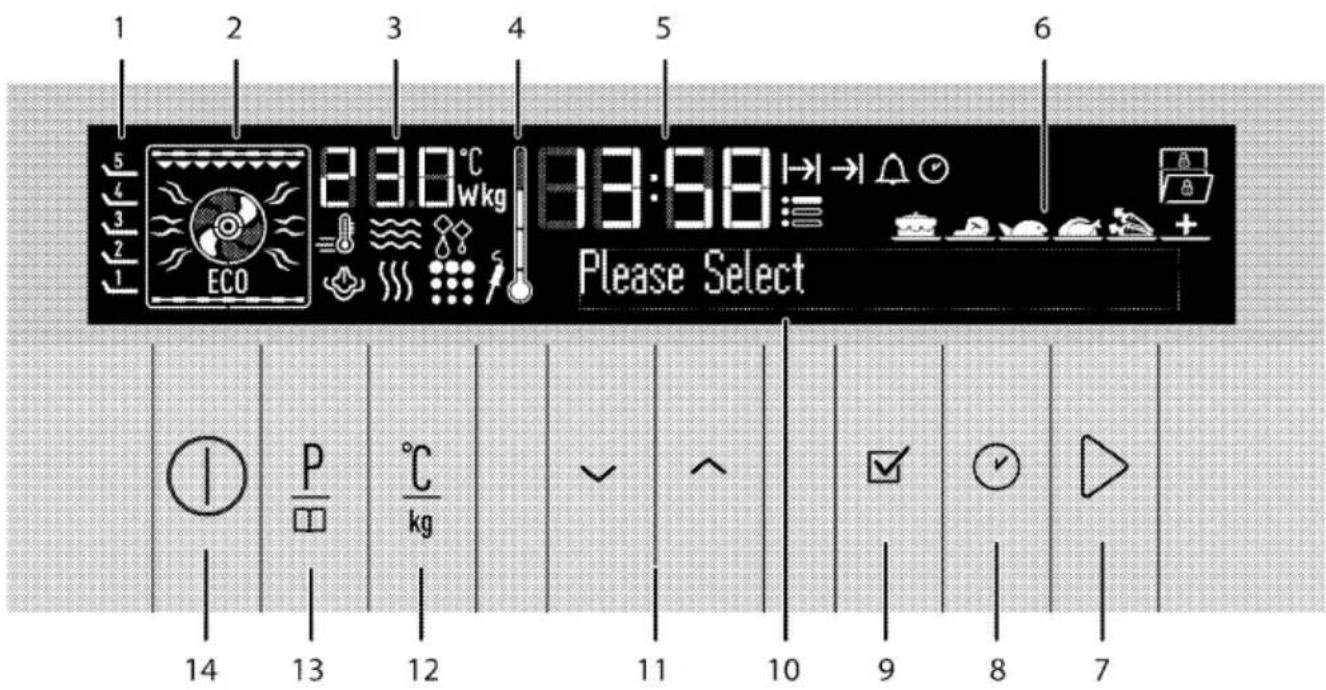
text_image
1 2 3 4 5 6 5 4 3 2 1 ECO 23.0°C Wkg 13:58 Please Select 14 P kg 12 ✓ ^ 11 10 9 8 7Varies depending on the product model.
1 Shelf positions
2 Function display
3 Temperature/weight indicator field
4 Oven Inner Temperature symbol
5 Current time indicator field
6 Convenience food selection display
7 Start/stop cooking key
8 Time and settings key
9 OK key
10 Text display
11 Up/down keys (Menu step)
12 Temperature/weight/booster setting key
13 Program selection key
14 ON/OFF key
Display symbols:
Rapid heating (Booster) symbol
Cooking time symbol
End of cooking time symbol
Alarm symbol
Current time symbol
Settings symbol
Defrost symbol
Keylock symbol
Door open symbol
Meat probe symbol *
Pyro symbol *
Steam symbol *
Oven returns to stand-by display after it is switched on and the current time is set. Only the current time appears on the display.
Only the Ⓐ and ⬇ keys are functional when the display is in this status. You can perform all actions in the Settings menu. See Settings menu, page 34.

If you touch Ⓘ key briefly in this screen, "Keep pressed for 1 second" warning appears in the text field. Touch the Ⓘ key for longer than 1 second to switch on the oven.
14:05
Keep pressed for 1 second

Select temperature and operating mode
- Touch ① key to switch on the oven.
- Initial operation screen appears when the oven is turned on.
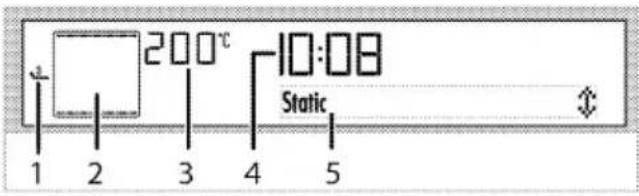
text_image
200°C 1 2 3 4 5 Static 1 2 3 4 51 Shelf positions
2 Function display
3 Temperature/weight indicator field
4 Current time indicator field
5 Text display
This screen contains the recommended temperature under temperature/weight indicator and the active heaters and recommended tray position in the function display.
- Touch ∧ or ∨ keys to select the desired operating mode (function).
After the function is selected, "Temperature", "Cook time", "Cook end time" and "Booster" (rapid heating) can be set. - If you want to change the temperature, touch ℃kg once to reach the temperature display.

text_image
200°C 10:08 Temperature- Touch ∧/∨ until the desired temperature appears in the Temperature/Weight Indicator field. Touch ☑ to set the temperature when the desired value appears on the display.
- If cooking function and temperature values are suitable, touch ▷ key to start cooking. Cooking starts and "Cooking" appears on the display.

text_image
200°C 10:08 Cooking
If the oven door is opened during cooking, "Door open" warning and symbol appears on the display.

If you touch ▷ key briefly in this screen, "Keep pressed for 1 second" warning appears in the text field. Touch the ▷ key for longer than 1 second to start cooking.
Switching off the electric oven
Touch ① key to switch off the oven.

text_image
1 2 3 4 5Rack positions (For models with wire grill)
It is important to place the wire grill onto the wire rack correctly. Wire grill must be inserted between the wire racks as illustrated in the figure.
To achieve the best performance during grilling, do not let the wire shelf touch the rear wall of the oven. Pull the wire shelf towards the front and position it centrally under the grill element by GENTLY closing the oven door against the shelf.
Function table
Function table indicates the functions that can be used in the oven and their respective maximum and minimum temperatures.

Functions vary depending on the product model.

Due to safety reasons, maximum time that can be set for "Cook time" is limited with 6 hours at all positions apart from "Warm Keeping" and "Low Temp. Cooking" functions.

While making any adjustment, related symbols will flash on the display.
| i | Program will be cancelled in case of power failure. You must reprogram the oven. |
| i | Current time cannot be set while the oven is operating in any function, or if semi-automatic or full automatic programming is made on the oven. |
| i | Even if the oven is switched off, oven lamp lights up when the oven door is opened. |
| Function | Recommended temperature (°C) | Temperature range (°C) |
| Static | 200 | 40-280 |
| Static + Fan | 175 | 40-280 |
| Fan heating | 180 | 40-250 |
| Multi (3D) | 205 | 40-250 |
| Fan heat + bottom | 210 | 40-250 |
| Full grill+Fan | 200 | 40-280 |
| Full grill | 280 | 40-280 |
| Low grill | 280 | 40-280 |
| Era fan | 180 | 160-220 |
| Bottom heating | 180 | 40-220 |
| Warm keeping | 60 | 40-100 |
| Low temp. cooking | 100 | 50-150 |
| Delrost | ||
| Steam + Fan heating | 180 | 150-280 |
| Steam clean | ||
| * Functions vary depending on the product model. | ||
Operating modes
The order of operating modes shown here may be different from the arrangement on your product.
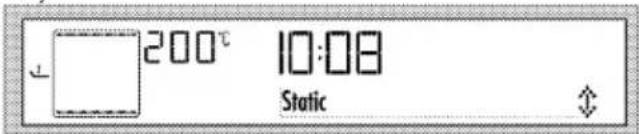
Static
Food is heated simultaneously from the top and bottom. It is suitable for cakes, pastries, or cakes and casseroles in baking moulds. Cook with one tray.
text_image
200°C 10:08 StaticStatic+fan
Hot air heated by the bottom and top heaters is evenly distributed throughout the oven rapidly by means of the fan. Cook with one tray.

text_image
175° 10:08 Static+fanFan heating
Warm air heated by the rear heater is evenly distributed throughout the oven rapidly by means of the fan. It is suitable for cooking your meals in different rack levels and preheating is not required in most cases. Suitable for cooking with multi trays.

text_image
180°C 10:08 Fan heating
text_image
When the oven door is opened, the fan motor will not run in order to keep the hot air inside.Multi (3-D) cooking
Top heating, bottom heating and fan assisted heating are in operation. Food is cooked evenly and quickly all around. Cook with one tray.

text_image
205°C 10:08 Multi cooking (3-D)Fan heat.+bottom
Bottom heating and fan assisted heating (in the rear wall) are in operation. Suitable for baking pizza.

text_image
2 10° 10:08 Fan heat.+bottomFull grill+Fan
Hot air heated by the full grill is distributed very fast in the oven by means of the fan. It is suitable for grilling large amount of meat.

text_image
200° 10:08 Full grill+FanFull grill+Fan
* Put big or medium-sized portions in correct rack position under the grill heater for grilling.
* Set the temperature to maximum level.
* Turn the food after half of the grilling time.
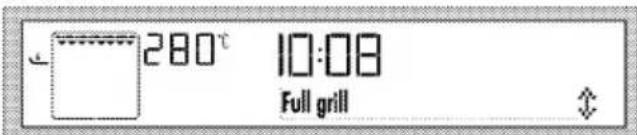
Full grill
Large grill at the ceiling of the oven is in operation. It is suitable for grilling large amount of meat.
text_image
280°C 10:08 Full grill- Put big or medium-sized portions in correct rack position under the grill heater for grilling.
* Set the temperature to maximum level.
* Turn the food after half of the grilling time.
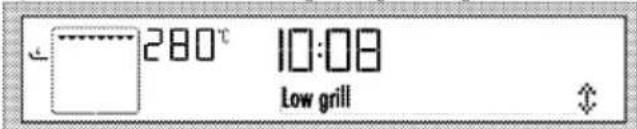
Low Grill
Small grill at the ceiling of the oven is in operation. Suitable for grilling and gratin dishes.
text_image
280°C 10:08 Low grill* Put small or medium-sized portions in correct rack position under the grill heater for grilling.
- Set the temperature to maximum level.
- Turn the food after half of the grilling time.
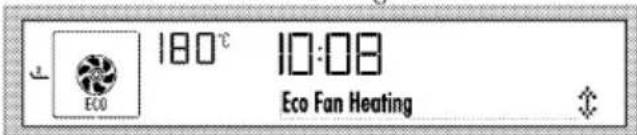
Eco Fan Heating
To save power, you can use this function instead of the cooking operations that you would perform by using Fan Heating at 160-220 °C temperature range. However, the cooking time will increase a little bit.
Cooking times related to this function are indicated in "Eco Fan Heating" table.
text_image
180°C 10:08 ECO Eco Fan HeatingBottom Heating
Only bottom heating is in operation. It is suitable for pizza and for subsequent browning of food from the bottom.

text_image
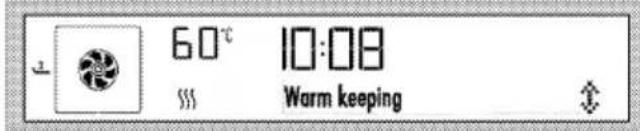
180°C 10:08 Bottom heatingWarm keeping
Used for keeping food at a temperature ready for serving for a long period of time.
text_image
60°C 10:08 Warm keepingLow temperature cooking
Used for cooking at low temperatures in longer times (10-1.5 hours).

text_image
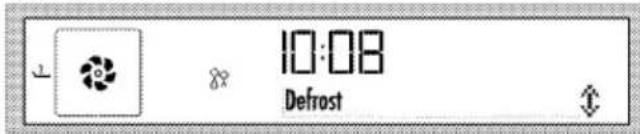
100°C 10:08 Low temp. cookingDefrost
Suitable for thawing frozen granular food slowly at room temperature and cooling down the cooked food.
text_image
10:08 DefrostSteam Turbo
In addition to the cooking operations that you perform by using Fan Heating between 150-280°C, you will also have the option of applying steam to the dishes after the oven reaches the set temperature. This will increase the cooking time slightly.
This option allows you to cook dishes that fit to your own taste apart from the automatic menus.

text_image
180°C 10:08 Steam + fan heatingSteam Turbo
- Touch the key ①.
- Put the dish into the oven.
- Touch ▲ or ▼ to select "Steam + Fan heating" function. Then, touch the key ▷ key to start cooking. If there is no water in your system, "Fill with 350 ml water" appears on the display. Fill up the water using the water container supplied with your oven until you hear the audio warning. See; Adding water page 32. □ symbol will be displayed when there is sufficient water.

Do not use any other liquids apart from potable water in the steam system.
Steam Turbo
Close the door and "Cooking" is displayed.
"Press ☑ to spray steam" appears when the set temperature is attained. Touch the key ☑ to deliver steam into the oven for 5 minutes. You can apply steam for 3 times whenever you want during the cooking time.

Remaining water in the system must be drained at the end of cooking. See., Draining water.
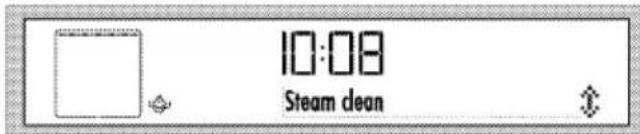
Steam cleaning
This mode is for softening dirt inside the oven after you have completed cooking. See Steam Cleaning, .
text_image
10:08 Steam cleanHow to operate the oven control unit
text_image
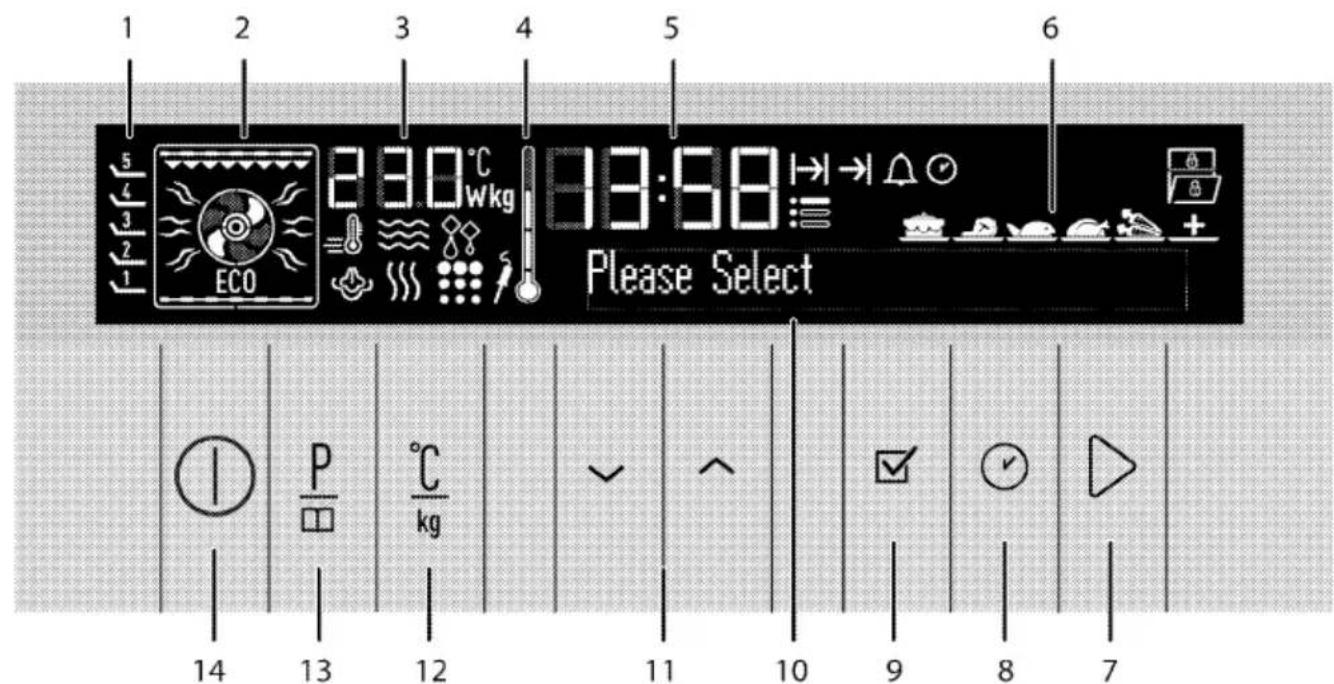
1 2 3 4 5 6 5 4 3 2 1 ECO 23.0°C Wkg 83:58 Please Select 14 P kg 13 12 ✓ ^ 11 10 9 8 71 Shelf positions
2 Function display
3 Temperature/weight indicator field
4 Oven Inner Temperature symbol
5 Current time indicator field
6 Convenience food selection display
7 Start/stop cooking key
8 Time and settings key
9 OK key
10 Text display
11 Up/down keys {Menu step}
12 Temperature/weight/booster setting key
13 Program selection key
14 ON/OFF key
Enable semi-automatic operation
In this operation mode, you may adjust the time period during which the oven will operate (cook time).
- Touch ① key to switch on the oven.

If you touch Ⓐ key briefly in this screen, "Keep pressed for 1 second" warning appears in the text field. Touch the Ⓐ key for longer than 1 second to switch on the oven.
- Touch ▲ or ▼ keys to select the desired operating mode (function).
- If you want to change the temperature, touch ℃kg once to reach the temperature display.
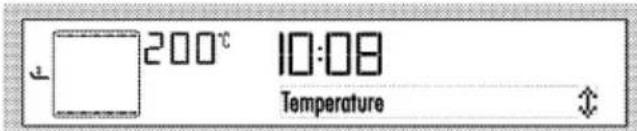
text_image
200°C 10:08 Temperature- Touch ∧/∨ until the desired temperature appears in the Temperature/Weight Indicator field. Touch ☑ to set the temperature when the desired value appears on the display.
- For cooking time, press ⬇ key once to scroll to the "Cook time" on the text display. |→| symbol flashes at the same time.
- Touch ∧/∨ keys to set the desired cooking time and confirm the setting by touching the √ key. Once the Cook Time is set, |→| will be displayed continuously.
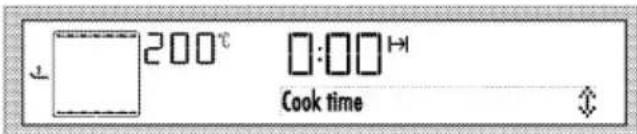
text_image
200°C Cook time- Put your dish into the oven and close the door.
- If cooking function, temperature and time values are suitable, touch ▷ key to start cooking. Cooking starts and "Cooking" appears on the display.

If you touch ▷ key briefly in this screen, "Keep pressed for 1 second" warning appears in the text field. Touch the ▷ key for longer than 1 second to start cooking.
» The oven will be heated up to the preset temperature and will maintain this temperature until the end of the cooking time you selected. The oven lamp is lit during the cooking process.

All segments of the inner oven temperature symbol (4) will turn on when the oven reaches the set temperature.
-
After the cooking is completed, "Good appetite... Press ▷ to continue" appears on the display and alarm signal is heard.
-
To stop the alarm signal, just touch any key. Oven will continue operating at the selected mode if you touch ▷ key. Alarm stops.
-
Oven is switched off automatically and the current time is displayed if you do not touch the ▷ key.
Switch on fully automatic operation
In this operation mode you can adjust cooking time and end of cooking time.
- Touch Ⓐ key to switch on the oven.
- Touch ∧ or ∨ keys to select the desired operating mode (function).
- If you want to change the temperature, touch ℃kg once to reach the temperature display.

text_image
200°C 10:08 Temperature- Touch ∧/∨ until the desired temperature appears in the Temperature/Weight Indicator field.
Touch ☑ to set the temperature when the desired value appears on the display.
- For cooking time, press ⏻ key once to scroll to the "Cook time" on the text display. |→| symbol flashes at the same time.
- Touch ∧/∨ keys to set the desired cooking time and confirm the setting by touching the √ key. Once the Cook Time is set, |→| will be displayed continuously.

text_image
200°C Cook time- For the end of cooking time, touch √ with short intervals until "Cook end time" appears on the text display. →l flashes at the same time.
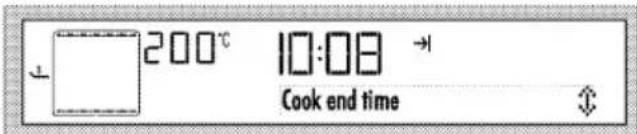
text_image
200°C 10:08 Cook end time- Touch √√ keys to set the desired end of cooking time and confirm the setting by touching the ☑ key. Once the Cook end time is set, →I will be displayed continuously.
- Put your dish into the oven and close the door.
- If cooking function, temperature, time and end of cooking time values are suitable, touch ▷ key to start cooking.
"Waiting" appears on the display.
» Oven timer automatically calculates the startup time for cooking by deducting the cooking time from the end of cooking time you have set.
- Selected operation mode is activated when the startup time of cooking has come, "Cooking" appears on the display and the oven is heated up to the set temperature. It maintains this temperature until the end of the cooking
time. The oven lamp is lit during the cooking process.

All segments of the inner oven temperature symbol (4) will turn on when the oven reaches the set temperature.
- After the cooking is completed, "Good appetite... Press ▷ to continue" appears on the display and alarm signal is heard.
- To stop the alarm signal, just touch any key. Oven will continue operating at the selected mode if you touch ▷ key. Alarm stops.
- Oven is switched off automatically and the current time is displayed if you do not touch the ▷ key.

If you want to cancel the semi-automatic or automatic programming after you have set them, you need to reset the cooking time. You can also switch off the oven by touching the ① key if you want.
Setting the booster (Quick heating)
Use Booster (rapid pre-heating) function to make the oven reach the desired temperature faster.

Booster can not be selected in Defrost, Eco fan heating, Warm keeping and Low temperature cooking functions. Booster settings will be cancelled in case of power outage.
Select the desired cooking function and then:
- Touch the key twice. "Booster passive" appears on the display.

text_image
180°C 10:08 Booster passive- Touch the key for once. "Booster active" warning and symbol appear
on the display. Touch ☑ to confirm the setting.
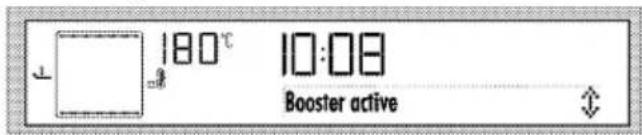
text_image
180°C 10:08 Booster active- If cooking function and temperature values are suitable, touch ▷ key to start cooking. Cooking starts and "Cooking" appears on the display.
» ≡ symbol disappears as soon as the oven reaches the desired temperature and oven resumes operating in the function it was in before the Booster function. - To cancel Booster function, touch the ^ key with short intervals until "Booster active" appears on the display.
- Touch the √ key once. "Booster passive" warning appears, Touch ☑ to confirm the setting and ≡ symbol disappears on the display.

text_image
180°C 10:08 Booster passiveUsing the keylock
You can prevent oven from being intervened with by activating the Keylock function.

text_image
Keylock can be used either when the oven is operating or not. Oven can be switched off by touching the ① key even when the keylock is activated while the oven is operating.Activating the keylock
- Touch ⬇ key with short intervals until "Keylock passive" appears on the display. ≡ symbol flashes on the display.
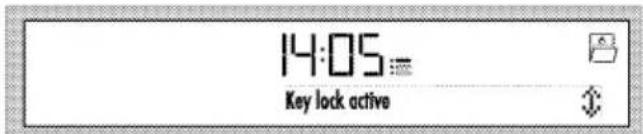
- Touch ▲ key for once to activate the keylock. After activating the keylock, "Key lock active" will appear on the display. Then, the ☐ symbol will appear.
- Touch ☑ to confirm the setting.
text_image
14:05 Key lock active» After activating the keylock, "Keylock active" warning and symbol will appear on the display when you press any key.
text_image
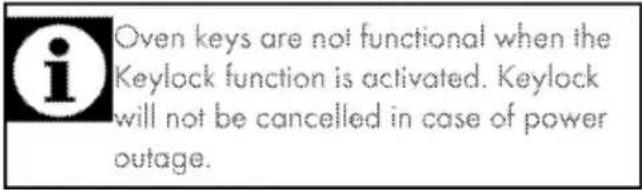
i Oven keys are not functional when the Keylock function is activated. Keylock will not be cancelled in case of power outage.Deactivating the keylock
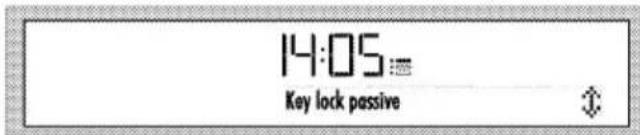
- Touch √ key twice to deactivate the keylock. "Key lock passive" appears on the display.
- Touch ☑ to confirm the setting.
text_image
14:05 Key lock passive» Key lock is deactivated and the □ symbol on the display disappears.
Using the clock as an alarm
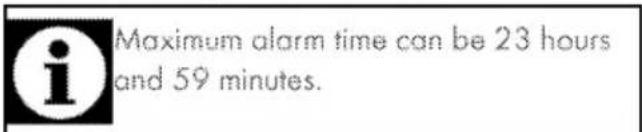
The alarm clock has no influence on the functions of the oven. It is only used as a warning. For example, this is useful when you want to turn food in the oven at a certain point of time. Alarm clock will give a signal once the time you set is over.
text_image
i Maximum alarm time can be 23 hours and 59 minutes.To set the alarm:
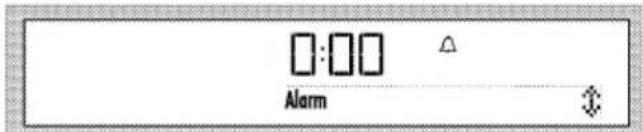
text_image
Alarm- Touch ⏻ key with short intervals until △ symbol appears on the display.
-
Touch ∧/∨ keys to set the desired time and confirm the setting by touching the √ key. △ symbol remains lit after setting the alarm time.
-
After the alarm time is finished, ⚠ will start flashing and an alarm signal is heard.
- Press any key to stop the alarm.
To cancel the alarm:
- Touch ⚙ key with short intervals until symbol appears on the display.
- Touch the √ key until "00:00" appears on the display and confirm the setting by touching the ☑ key.
» Alarm is cancelled and ⚠ symbol disappears.
Cooking times table

The timings in this chart are meant as a guide. Timings may vary due to temperature of food, thickness, type and your own preference of cooking.
Baking and roasting

1st rack of the oven is the bottom rack.
| Dish | Cooking level number | Rack position | Temperature (°C) | Cooking time (approx. in min.) | ||
| Cakes in tray* | One level | 3 | 175 | 25...30 | ||
| Cakes in mould* | One level | 2 | 180 | 40...50 | ||
| Cakes in cooking paper* | One level | 3 | 175 | 25...30 | ||
| 2 levels | 1-5 | 175 | 30...40 | |||
| 3 levels | 1-3-5 | 180 | 45...55 | |||
| Sponge cake* | One level | 3 | 200 | 5...10 | ||
| 2 levels | 1-5 | 175 | 20...30 | |||
| Cookies* | One level | 3 | 175 | 25...30 | ||
| 2 levels | 1-5 | 170...190 | 30...40 | |||
| 3 levels | 1-3-5 | 175 | 35...45 | |||
| Dough pastry* | One level | 2 | 200 | 30...40 | ||
| 2 levels | 1-5 | 200 | 45...55 | |||
| 3 levels | 1-3-5 | 200 | 55...65 | |||
| Rich pastry* | One level | 2 | 200 | 25...35 | ||
| 2 levels | 1-5 | 200 | 35...45 | |||
| 3 levels | 1-3-5 | 190 | 45...55 | |||
| Leaven* | One level | 2 | 200 | 35...45 | ||
| 2 levels | 1-3 | 190 | 35...45 | |||
| Lasagna* | One level | 2-3 | 200 | 30...40 | ||
| Pizza* | One level | 2 | 200...220 | 15...20 | ||
| One level | 3 | 200 | 10...15 | |||
| Beef steak (whole) / Roast | One level | 3 | 25 min. 250/max, then 180...190 | 100...120 | ||
| Leg of Lamb (casserole) | One level | 3 | 25 min. 250/max, then 190 | 70...90 | ||
| One level | 3 | 25 min. 250/max, then 190 | 60...80 | |||
| Roasted chicken | One level | 2 | 15 min. 250/max, then 180...190 | 55...65 | ||
| One level | 2 | 15 min. 250/max, then 180...190 | 55...65 | |||
| Turkey (5.5 kg) | One level | 1 | 25 min. 250/max, then 180...190 | 50...210 | ||
| One level | 1 | 25 min. 250/max, then 180 ... 190 | 150 ... 210 | ||
| Fish | One level | 3 | 200 | 20 ... 30 | |
| One level | 3 | 200 | 20 ... 30 | ||
| When cooking with 2 trays at the same time, place the deeper tray on the upper rack and the other one on the lower rack* It is suggested to perform preheating for all foods. | |||||
Eco Fan Heating

Do not change the cooking temperature after cooking starts in Eco Fan Heating mode.

Do not open the door during cooking in the Eco Fan Heating mode.
| Dish | Cooking level number | Rock position | Temperature (°C) | Cooking time (approx. in min.) | ||
| Cokes-in cooking paper | One level | 3 | 200 | 35...40 | ||
| Cookie | One level | 3 | 200 | 30...35 | ||
| Dough pastry | One level | 3 | 200 | 40...45 | ||
| Rich pastry | One level | 3 | 200 | 40...45 | ||
Tips for baking cake
If the cake is too dry, increase the temperature by 10^ C and decrease the cooking time.
* If the cake is wet, use less liquid or lower the temperature by 10°C.
If the cake is too dark on top, place it on a lower rack, lower the temperature and increase the cooking time.
If cooked well on the inside but sticky on the outside use less liquid, lower the temperature and increase the cooking time.
Tips for baking pastry
* If the pastry is too dry, increase the temperature by 10°C and decrease the cooking time. Dampen the layers of dough with a sauce composed of milk, oil, egg and yoghurt.
If the pastry takes too long to bake, pay care that the thickness of the pastry you have prepared does not exceed the depth of the tray.
If the upper side of the pastry gets browned, but the lower part is not cooked, make sure that the amount of sauce you have used for the pastry is not too much at the bottom of the pastry.
Try to scatter the sauce equally between the dough layers and on the top of pastry for an even browning.

Cook the pastry in accordance with the mode and temperature given in the cooking table. If the bottom part is still not browned enough, place it on one lower rack next time.
Tips for cooking vegetables
If the vegetable dish runs out of juice and gets too dry, cook it in a pan with a lid instead of a tray. Closed vessels will preserve the juice of the dish.
If a vegetable dish does not get cooked, boil the vegetables beforehand or prepare them like canned food and put in the oven.
Ready meals functions
Selecting the ready meals functions
Ready Meals menu contains meal programmes that are prepared for you by professional cooks specially and stored in the memory of the control unit.
In this menu, temperature, rack position, weight and cooking functions are set automatically.
You can change the weight and cooking time according to your meal and your taste.
To select the Ready Meals functions:
- Touch ① key to switch on the oven. Initial operation screen appears when the oven is turned on.

If you touch Ⓐ key briefly in this screen, "Keep pressed for 1 second" warning appears in the text field. Touch the Ⓐ key for longer than 1 second to switch on/off the oven.
P
- Touch ☐ key to select the Ready Meals function display. In this step,
"Cakes&breads&tarts" and the symbol appears on the display.

text_image
14:05 Cakes&breads&tarts- Touch ∧/∨ keys to select the desired Ready Meals function main menu (Cakes&breads&tarts 📁, Meat 📁, Fish 📁, Meat Poultry 📁, Light meals 📁, Special +).
- Touch the ☑ key to confirm the Main Meal menu you have selected.
- Touch ▲/▽ keys to select the desired meal (Cookies, Cake, Small cake, etc).
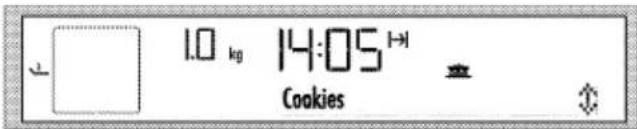
text_image
1.0 kg 14:05 Cookies- Put your dish into the oven.
- Touch ▷ key to start cooking. "Cooking" appears on the display.

If you touch ▷ key briefly in this screen, "Keep pressed for 1 second" warning appears in the text field. Touch the ▷ key for longer than 1 second to start cooking.
- After the cooking is completed, "Good appetite..." appears on the display and alarm signal is heard.

To stop the alarm signal, just press any key.

"Back" appearing on the display while navigating in the meal menu allows you to return to the upper menu. Touch key to switch to the initial function display.
Before starting to cook in the Ready Meals menu, you can set the weight depending on the meal type you have selected. To do this:
- Touch key after selecting the desired meal. "Weight" appears and the kg symbol flashes on the display.
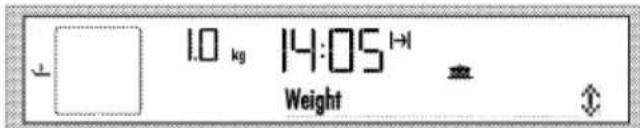
text_image
1.0 kg 14:05 Weight- Touch ↗/√ keys to set the weight and confirm by touching the √ key.

Oven will change the temperature and the cooking time automatically on basis of the weight change.

You can only change the weight for meals for which a weight is indicated.
- Touch ▷ key to start cooking.
Ready Meals menu:
May vary depending on the models
| Cakes&breads&tarts | Meat | Fish | Meat poultry | Special meals | Special |
| Cookies | Meat loaf (lamb) | Fish fillet | Chicken baguette | Casserole | Fermenting |
| Cakes in cooking paper | Dalyan meatball | Baked anchovy | Chicken, fillet | Quiches | Home-made Yoghurt |
| Cheese cake | Roast beef | Haddock merlans | Macaroni cheese | Dried apple | |
| Brownie | Salmon fillet | Lasagna | Fried chestnut | ||
| Sponge cake | Moussaka | ||||
| Apple strudel | |||||
| Apple pie | |||||
| Cinnamon rolls |
To select the steam assisted convenience food functions:
- Touch ① key to switch on the oven. Initial operation screen appears when the oven is turned on.

If you touch Ⓐ key briefly in this screen, "Keep pressed for 1 second" warning appears in the text field. Touch the Ⓐ key for longer than 1 second to switch on/off the oven.
P
- Touch ☐ key with short intervals until symbol appears on the display. In this step, "Cakes&Breads&Tarts" appears on the display.
- Touch ∧/∨ keys to select the desired Ready Meals function main menu (Cakes&breads&tarts , Meat , Fish , Meat Poultry , Light meals , Special +).
- Touch the ☑ key to confirm the Main Meal menu you have selected.
- Touch ▲/▽ keys to select the desired meal (Cookies, Cake, Small cake, etc).
- Put your meal into the oven.
- Touch ▷ key to start cooking. "Cooking" appears on the display.

If you touch ▷ key briefly in this screen, "Keep pressed for 1 second" warning appears in the text field. Touch the ▷ key for longer than 1 second to start cooking.

If the ▷ key is not louched within 20 seconds, the oven will switch itself off.
- "Fill with 350 ml water" appears on the display.

Risk for health! Do not use any other liquids apart from water in the steam system.
- Open the door and add water through the water inlet. □ symbol appears on the display together with the audio warning when filling in water.
- Oven starts cooking and "Cooking" appears on the display as soon as the door is closed.
- After the cooking is completed, "Good appetite" appears on the display and alarm signal is heard.
» To stop the alarm signal, just press any key. - Open the oven door and take out the meal as soon as cooking completes.
Close the oven door to start the Automatic Water Vaporization function.
» In this step, "Disposing water" and the required time appears on the display.
» It is important for your health not to use the remaining water since the quality of the water that remains will deteriorate. Water disposal smoothens the dirt in the oven and allows it to be removed easily after cooking. » Wipe inside of the oven with a cloth after disposing of the water.
Using the water container:
Water container consists of 2 pieces. Upper piece removes the lime in the water.
Assemble the lower and upper parts of the container as illustrated.
Do not fill more than 150 cc, otherwise the water is not purified.
Remove the upper part and pour the water into the oven with the lower part.

Remove the lime in the water container by applying the following procedure once in every 4 usages. Dissolve 2 teaspoon of salt in a glass and pour into the water container. And then, wash the lower container.
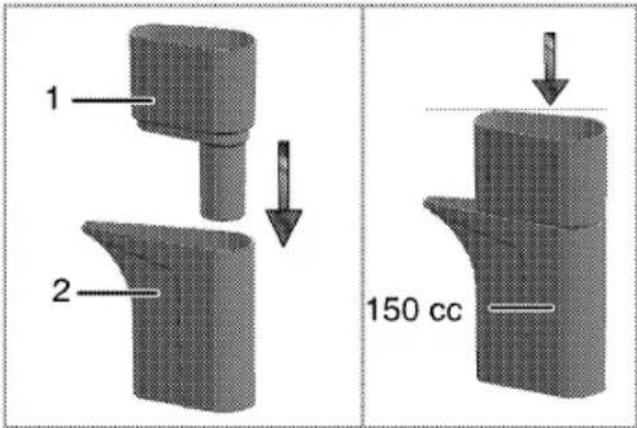
text_image
1 2 150 cc1 Upper part
2 Lower part
Adding water:
- Pull the pitcher illustrated in the figure (1).
- Pour water into the container until you hear the signal sound. Observe the
amount of water from the water level indicator (2).

text_image
1 2 3 41 Pitcher
2 Water indicator
3 Vapour exit pipe
4 Drainage pipe for excessive water

The system waits at least 10 minutes for you to add water. If you do not add water in 10 minutes, oven switches off.

To clean the pitcher, remove it from the oven and wash with water only.

Water level in the tank should be checked through the water indicator while adding water. If the water level exceeds the tank full level, excessive water will run into the oven. Excessive water that runs into the oven can affect cooking in steam assisted automatic cooking programmes and cause condensation on the door. In order to avoid this, remove the excessive water that has run into the oven before cooking starts.

If the oven is switched off before the cooking is completed and no cooking function is selected within 2 minutes, "Please take the meal. Water will evaporize." message will appear on the Text display as soon as the oven is switched on with Ⓐ key. Water disposal starts automatically after around 1 minute.
CAUTION
Keep the door closed during water vaporization.
Steam assisted convenience food menu:
May vary depending on the models
| Cakes&Breads&Tarts | Meat poultry | Light meals | Fish | Meat |
| Pizza, fresh thinbase | Chicken < 1600 gr | Fresh vegetable,graten | Trout casserole | Roast lamb |
| Pizza, fresh thickbase | Chicken > 1600 gr | Frozen vegetable,graten | Leg of lamb | |
| Dough pastry | Turkey, thigh | Jacket potatoes | Veal pot roast | |
| Vol au vent | Duck, whole | Tandoori | ||
| Fruit cake | ||||
| Short bread | ||||
| Rich pastry | ||||
| Bagel | ||||
| Loaf bread (yeasted) | ||||
| Sandwich bread | ||||
| Baguette | ||||
| Bread rolls, frozen |
Settings menu
Brightness setting
Brightness can only be set when the oven is switched off.
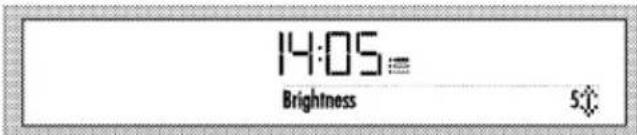
- Touch ⚙ key with short intervals until "Brightness" appears on the display. ≡ symbol flashes on the display.
text_image
14:05 Brightness 5:0- There are 5 brightness levels, namely 1, 2, 3,4 and 4. Touch ∨/∨ keys to select the desired level.
- Touch ☑ to confirm the setting.

Brightness level decreases to save power when the oven is switched off. It restores to the set level again when the oven is switched on.
» It returns to the stand-by display. Only the current time appears on the display.
Voice Level setting
Voice level can only be set when the oven is switched off.
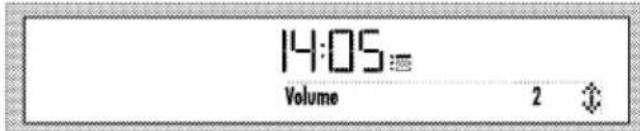
- Touch ⏻ key with short intervals until "Voice Level" appears on the display. : symbol flashes on the display.
text_image
14:05 Volume 2- There are 2 voice levels, namely 1 and 2. Touch ∨/√ keys to select the desired level.
- Touch ☑ to confirm the setting.
» It returns to the stand-by display. Only the current time appears on the display.
Language setting
Language can only be set when the oven is switched off.
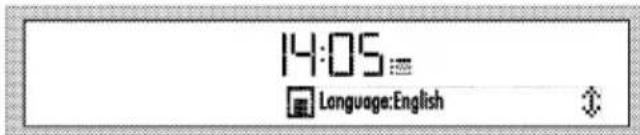
- Touch ⚙ key with short intervals until "Language" appears on the display. ≡ symbol flashes on the display.
text_image
14:05 Language:English-
Touch ▲/▽ keys to select the desired language.
-
Touch ☑ to confirm the setting.
» It returns to the stand-by display. Only the current time appears on the display.
Current time setting
Current time can only be set when the oven is switched off. If you want to change the time that was set during initial setup:
- Touch ⏻ key with short intervals until "Day time" appears on the display. Time and : symbol flashes on the display. Touch ∧/√ keys to set the time.
00:00
Set day time
↑
- Touch ☑ to confirm the hour.
» It returns to the stand-by display. Only the current time appears on the display.
14:05
How to operate the grill
WARNING
Close oven door during grilling.
Hot surfaces may cause burns!
Switching on the grill
- Touch ① key to switch on the oven.
- Touch ∨/∨ to select the desired grill function.
Grilling with electric grill
| Food | Insertion level | Grilling time (approx.) |
| Fish | 4..5 | 20..25 min.3 |
| Sliced chicken | 4..5 | 25..35 min |
| Lamb chops | 4..5 | 20..25 min. |
| Roast beef | 4..5 | 25..30 min.4 |
| Veal chops | 4..5 | 25..30 min.2 |
| Toast bread | 4 | 1..2 min. |
| depending on thickness | ||
After the function is selected, "Temperature", "Cook time", "Cook end time" and "Booster" (rapid heating) can be set.
- If you want to change the temperature, touch once to reach the temperature display.
- Touch ∧/∨ until the desired temperature appears in the Temperature/Weight Indicator field. Touch ☑ to set the temperature when the desired value appears on the display.
- If cooking function, temperature and time values are suitable, touch ▷ key to start cooking. Cooking starts and "Cooking" appears on the display.
Switching off the grill
- Touch ⏻ key to switch off the oven.

Foods that are not suitable for grilling carry the risk of fire. Only grill food which is suitable for intensive grilling heat.
Do not place the food too far in the back of the grill. This is the hottest area and fatty food may catch fire.
Cooking times table for grilling
6 Maintenance and care
General information
Service life of the product will extend and the possibility of problems will decrease if the product is cleaned at regular intervals.

DANGER:
Disconnect the product from mains supply before starting maintenance and cleaning works.
There is the risk of electric shock!
DANGER:
Allow the product to cool down before you clean it.
Hot surfaces may cause burns!
- Clean the product thoroughly after each use. In this way it will be possible to remove cooking residues more easily, thus avoiding these from burning the next time the appliance is used.
- No special cleaning agents are required for cleaning the product. Use warm water with washing liquid, a soft cloth or sponge to clean the product and wipe it with a dry cloth.
* Always ensure any excess liquid is thoroughly wiped off after cleaning and any spillage is immediately wiped dry.
Do not use cleaning agents that contain acid or chloride to clean the stainless or inox surfaces and the handle. Use a soft cloth with a liquid detergent (not abrasive) to wipe those parts clean, paying attention to sweep in one direction.

The surface might get damaged by some detergents or cleaning materials.
Do not use aggressive detergents, cleaning powders/creams or any sharp objects during cleaning.
Do not use harsh abrasive cleaners or sharp metal scrapers to clean the oven door glass since they can scratch the surface, which may result in shattering of the glass.

Do not use steam cleaners to clean the appliance as this may cause an electric shock.
Cleaning the pitcher
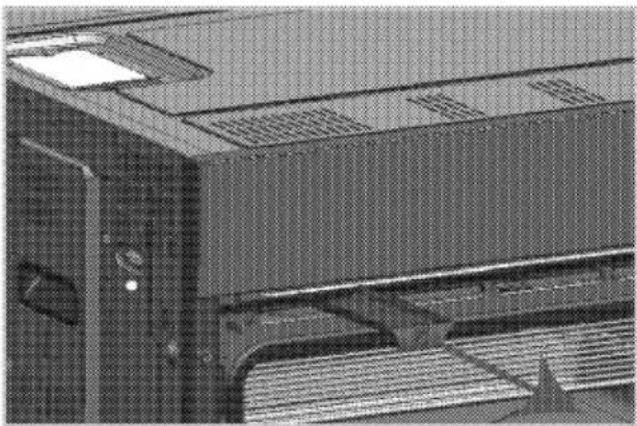
The pitcher stops at a certain point when you pull it towards yourself.
When you continue pulling, it arrives at the second stop point and stops again.
If you continue pulling after this point it will be removed.
natural_image
Close-up of a mechanical device with ventilation grilles and a paper feed (no visible text or symbols)You can clean the pitcher under tap water after removing it.

Do not use chemical materials when cleaning the pitcher. Use only water.
Cleaning the control panel
Clean the control panel and knobs with a damp cloth and wipe them dry.

Do not remove the control buttons/knobs to clean the control panel.
Control panel may get damaged!
Cleaning the oven
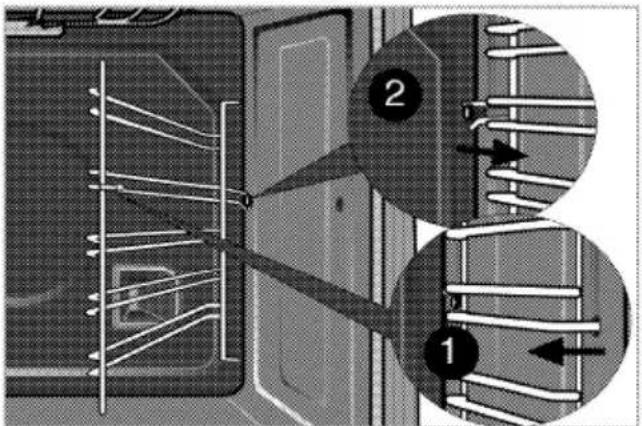
To clean the side wall
- Remove the front section of the side rack by pulling it in the opposite direction of the side wall.
- Remove the side rack completely by pulling it towards you.
text_image
Technical diagram showing two labeled components (1 and 2) of a mechanical or electrical assembly with internal wiring and directional arrows.Catalytic walls
Side walls or just back wall of oven interior may be covered with catalytic enamel.
The catalytic walls of the oven must not be cleaned. The porous surface of the walls is self-cleaning by absorbing and converting spitting fat (steam and carbon dioxide).
Steam Cleaning
It ensures easy cleaning because the dirt is quickly softened with water drops condensing inside the oven after producing steam for a certain time.
- Press Ⓐ key to switch on the oven.
- Make sure you have removed the food.
-
Press ∧ or ∨ key to select "Steam cleaning" mode.
-
Press ▷ key to start cleaning. If there is no water in the system, "Fill with
350 ml water" appears on the displayed.
-
Fill up with water using the water container supplied with your oven until you hear the audio warning.
-
□ warning will be displayed when you fill with enough amount of water.

Risk for health! Do not use any other liquids apart from water in the steam system.
» If the temperature inside the oven is below 100 C when the door is closed, cleaning starts without delay. If inner temperature is not below 100 C with the water filled and door closed, "Cooling" message appears on the screen.
» When inner temperature falls below 100 C, cleaning starts automatically.
7. When cleaning starts, "Cleaning" message is displayed.
» Steam is delivered into the oven until the water of the system runs out.

Steaming takes approximately 35 minutes with the completely full container. This time will be shorter for less water.
- When the water runs out, "Wipe the surfaces" is displayed.
- Open the door and wipe the inner surfaces of the oven with a damp sponge or cloth.
When the cleaning is over (generally water runs out), and remaining water should be drained in any case. See Cooking Guide Functions, , Draining water.
Clean oven ceiling
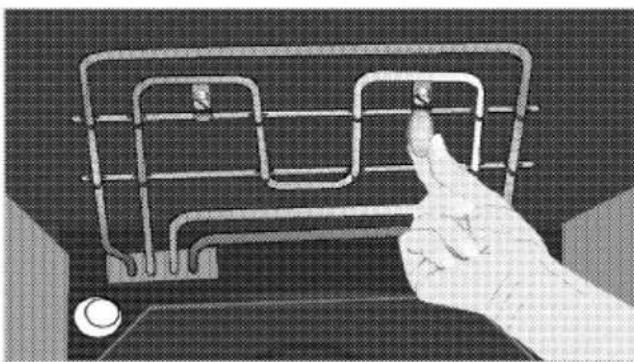
The grill element can be folded out for cleaning the oven ceiling.
- Loosing locking screws at the grill element with a screwdriver or a coin.
natural_image
Hand pressing a wireframe maze on a computer monitor (no text or symbols visible)
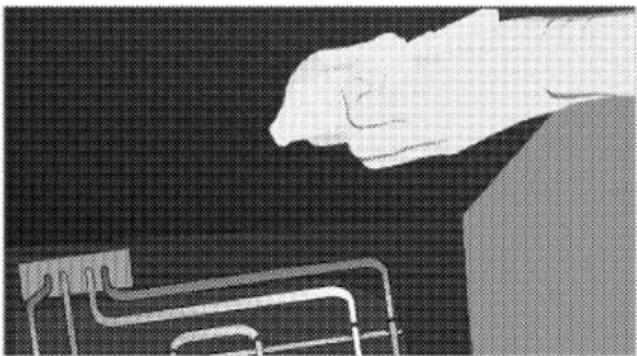
The grill element folds down. It remains anchored at the oven ceiling.
- Clean oven ceiling with a damp cloth.
natural_image
Illustration of a hand gripping a metal bracket against a dark background (no text or symbols)- Fold the grill element up again and tighten the locking screws with a screwdriver or a coin.
Clean oven door
To clean the oven door, use warm water with washing liquid, a soft cloth or sponge to clean the product and wipe it with a dry cloth.

Don't use any harsh abrasive cleaners or sharp metal scrapers for cleaning the oven door. They could scratch the surface and destroy the glass.

Front door inner glass is coated to easy clean material. Do not use any harsh abrasive cleaners, hard metal scrapers, scouring pads or bleach to clean front door inner glass as they may scratch the surface. This may destroy the coating material.
Removing the oven door
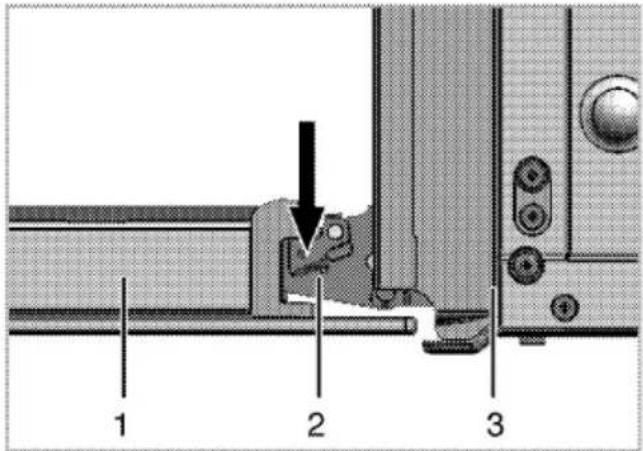
- Open the front door (1).
- Open the clips at the hinge housing (2) on the right and left hand sides of the front door by pressing them down as illustrated in the figure.
text_image
1 2 31 Front door
2 Hinge
3 Oven

natural_image
Technical diagram of a mechanical component with a curved arrow indicating direction (no text or symbols present)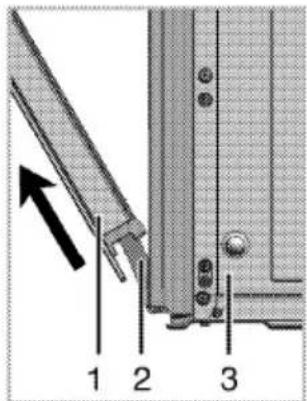
text_image
Technical diagram showing a mechanical assembly with labeled parts 1, 2, and 3, including an arrow indicating direction.- Move the front door to half-way.
- Remove the front door by pulling it upwards to release it from the right and left hinges.

Steps carried out during removing process should be performed in reverse order to install the door. Do not forget to close the clips at the hinge housing when reinstalling the door.
Removing the door inner glass
The inner glass panel of the oven door can be removed for cleaning.
Open the oven door.
natural_image
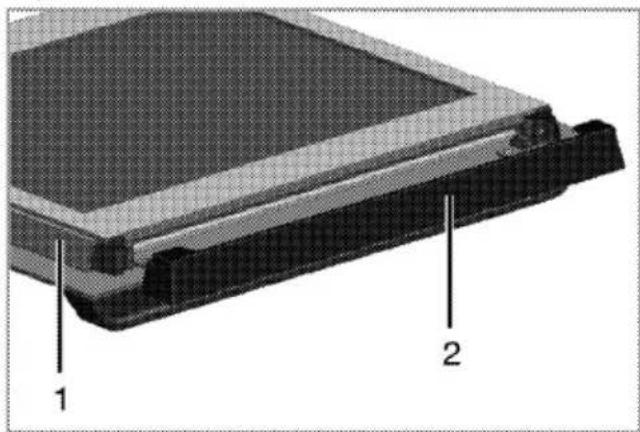
3D diagram of a mechanical component with labeled parts (1 and 2), showing layered structure without any text or symbols beyond labels.1 Frame
2 Plastic part
Pull towards yourself and remove the plastic part installed to upper section of the front door.

text_image
1 2 3 4 1 2 31 Innermost glass panel
2 inner glass panel
3 Outer glass panel
4 Plastic glass panel slot-Lower
As illustrated in figure, raise the innermost glass panel (1) slightly in direction A and pull it out in direction B.
Repeat the same procedure to remove the inner glass panel (2).

natural_image
3D diagram of a mechanical component with labeled parts A and B, showing internal structure and directional arrows (no text or symbols beyond labels)The first step to regroup the door is reinstalling inner glass panel (2).
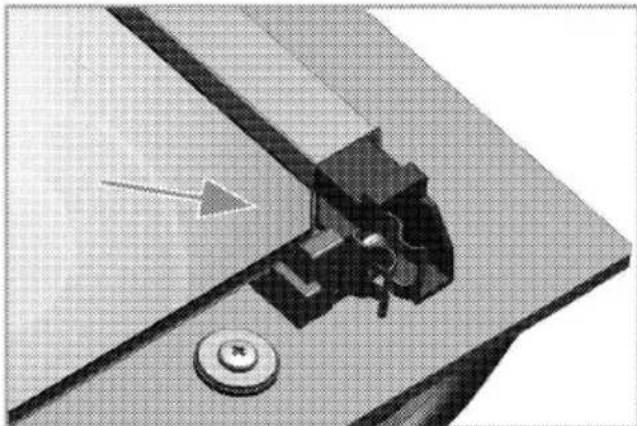
As illustrated in figure, place the chamfered corner of the glass panel so that it will rest in the chamfered corner of the plastic slot.
natural_image
Mechanical assembly diagram showing a cutting tool interacting with a workpiece, with no visible text or symbols.Inner glass panel (2) must be installed into the plastic slot close the innermost glass panel (1).
When installing the innermost glass panel (1), make sure that the printed side of the panel faces towards the inner glass panel.
It is important to seat lower corner of inner glass panel into the lower plastic slot.
Push the plastic part towards the frame until you hear a "click".
Replacing the oven lamp
text_image
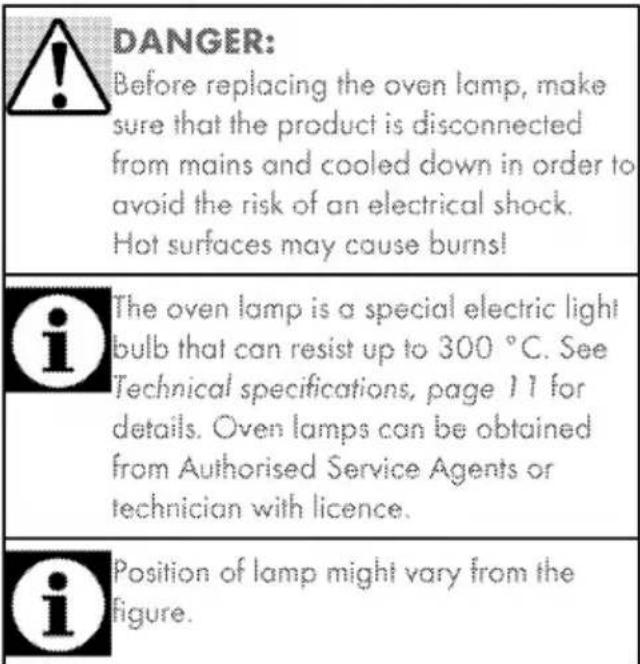
DANGER: Before replacing the oven lamp, make sure that the product is disconnected from mains and cooled down in order to avoid the risk of an electrical shock. Hot surfaces may cause burns! The oven lamp is a special electric light bulb that can resist up to 300 °C. See Technical specifications, page 11 for details. Oven lamps can be obtained from Authorised Service Agents or technician with licence. Position of lamp might vary from the figure.If your oven is equipped with a square lamp:
- Disconnect the product from mains.
- Remove the wire racks as described. See Cleaning the oven, page 37.

natural_image
Diagram showing a device with a scroll and a tool inserted, alongside a close-up of the screen area (no text or symbols visible)- Remove the protective glass cover with a screwdriver.
- Pull out oven lamp and replace it with new one.
- Install the glass cover and then the wire racks.
7 Troubleshooting
Oven emits steam when it is in use
It is normal that steam escapes during operation. >>> This is not a fault.
Product emits metal noises while heating and cooling.
* When the metal parts are heated, they may expand and cause noise, >>> This is not a fault.
Product does not operate.
The mains fuse is defective or has tripped. >>> Check fuses in the fuse box. If necessary, replace or reset them.
* Product is not plugged into the (grounded) socket. >>> Check the plug connection.
* Buttons/knobs/keys on the control panel do not function. >>> Keylock may be enabled. Please disable it. (See.)
Oven light does not work.
* Oven lamp is defective. >>> Replace oven lamp.
* Power is cut. >>> Check if there is power. Check the fuses in the fuse box. If necessary, replace or reset the fuses.
Oven does not heat.
* Function and/or Temperature are not set. >>> Set the function and the temperature with the Function and/or Temperature knob/key.
Power is cut. >>> Check if there is power. Check the fuses in the fuse box. If necessary, replace or reset the fuses.

Consult the Authorised Service Agent or technician with licence or the dealer where you have purchased the product if you can not remedy the trouble although you have implemented the instructions in this section. Never attempt to repair a defective product yourself.
Guarantee for Refrigeration, Cooking Appliances, Washing Machines & Dishwashers
Your new Grundig product is guaranteed against the cost of breakdown repairs for 5 years from the date of the original purchase.
"Please visit the "support" section on the Grundig website at www.grundig.co.uk to register your 5 year warranty."
What is covered?
* Repairs necessary as a result of faulty materials, defective components or manufacturing defect.
The cost of functional replacement parts, but excluding consumable items.
The labour costs of a Grundig approved repairer to carry out the repair.
What is not covered?
■ Transit, delivery or accidental damage or misuse and abuse.
* Cabinet or appearance parts, including knobs, flaps, handles or container lids.
* Accessories or consumable items including but not limited to, ice trays, scrapers, cutlery baskets, filters and light bulbs.
- Repairs required as a result of unauthorised repair or inexpert installation that fails to meet the requirements contained in the user instruction book.
* Repairs to products used on commercial or non-residential household premises.
Loss of frozen food in freezers or fridge/freezers.(Food loss insurance is often included within your household contents insurance policy, or may be available separately from your retailer.)
Important notes
* Your Grundig product is designed and built for domestic household use only.
The guarantee will be void if the product is installed or used in commercial or non-residential domestic household premises.
The product must be correctly installed, located and operated in accordance with the instructions contained in the User Instructions Booklet provided.
* Professional installation by a qualified Electrical Domestic Appliance Installer is recommended for all Washing Machines, Dishwashers and Electric Cookers
Gas Cookers must only be installed by a Gas Safe (or BORD GAIS) registered Gas Installer.
The guarantee is given only within the boundaries of the United Kingdom and the Republic of Ireland.
The guarantee is applicable only to new products and is not transferable if the product is resold.
Grundig disclaims any liability for incidental or consequential damages.
The guarantee does not in anyway diminish your statutory or legal rights.
Should you experience any difficulty in obtaining service please contact the Grundig Customer Help-Line.
Tel: 0845 603 1234
0345 603 1234
e-mail:service@Grundig.co.uk
Please keep your purchase receipt or other proof of purchase in a safe place; you will need to have it should the product require attention under guarantee.
You should also complete the details below; it will help us assist you when requesting service. (The model number is printed on the Instruction Booklet and the serial number is printed on the Rating Label affixed to the appliance)
Model No:
Serial No:
Retailer:
Date of purchase:
For service under guarantee simply telephone the appropriate number below UK Mainland & Northern Ireland
0845 603 1234
0345 603 1234
Republic of Ireland
All Refrigeration, All Cookers
Washing Machines and Dishwashers
01 862 3411
Before requesting service please check the trouble-shooting guide in the Operating Instructions as a charge may be levied where no fault is found even though your product may still be under guarantee. Service once the manufacturers guarantee has expired.
If you have purchased an extended guarantee please refer to the instructions contained within the extended guarantee agreement document. Otherwise please call the appropriate number above where service can be obtained at a charge.
Grundig, 1 Greenhill Crescent, Watford Herts WD18 8QU
FOR A GOOD REASON
GRÜNDIG
