
Electone BK-20C - Tastatur YAMAHA - Kostenlose Bedienungsanleitung
Finden Sie kostenlos die Bedienungsanleitung des Geräts Electone BK-20C YAMAHA als PDF.


| Produkttyp | Elektronische Orgel (Electone) |
| Modell | Yamaha Electone BK-20C |
| Abmessungen (B x T x H) | 112 cm x 56 cm x 90 cm |
| Gewicht | 72 kg |
| Stromversorgung | 100 W, 50/60 Hz AC |
| Oberes Manual | 44 Tasten (3 2/3 Oktaven) |
| Unteres Manual | 44 Tasten (3 2/3 Oktaven) |
| Pedale | 13 Tasten (1 Oktave) |
| Klangregler (Upper Manual) | 9 Zugriegel: Flöte 16', 8', 4', 2 2/3'; Posaune 16'; Brass 8'; Oboe 8'; Streicher 8', 4' |
| Klangregler (Lower Manual) | 5 Zugriegel: Flöte 8', 4'; Horn (oder Piano) 8'; Cello (oder Gitarre) 8'; Cello (oder Cembalo) 4' |
| Klangregler (Pedal) | 2 Zugriegel: Bass 16', Bass Guitar |
| Preset-Tonwähler (Upper) | 7 Tasten: Akkordeon, Klavier, Hawaiigitarre, Banjo, Kombinationen 1-3, Abbrechen |
| Effekte | Vibrato, Vibrato-Geschwindigkeit, Brillanz, Hall, Sustain (Upper 8'/4'), Percussive (Upper 4', 2 2/3'), Anschlagswah-Wah, Repeat, Glide, Tremolo/Chorus, Rotary-Lautsprecher |
| Auto-Rhythmus | 8 Rhythmen (Marsch, Swing, Jazz Rock, Bossa Nova u.a.), Variation, Synchro-Start, Fußschalter, Tempo, Lautstärke, Balance |
| Auto-Bass/Akkord (Fun Blocks) | Single Finger Chord, Fingered Chord, Constant, Memory, Bass Variation (1-5, 1-3-5, 1-7-5) |
| Anschlüsse | Kopfhörer, AUX IN, AUX OUT, Expressionseingang, Tone Cabinet |
| Reinigung und Pflege | Nur feuchtes Tuch; keine Lösungsmittel; vor direktem Sonnenlicht, Feuchtigkeit und Hitze schützen |
| Sicherheitshinweise | Nur angegebene Netzspannung verwenden; keine inneren Teile berühren; Netzschalter nach Gebrauch ausschalten; Gerät muss geerdet sein (britisches Modell) |
| Reparierbarkeit | Keine vom Benutzer zu reparierenden Teile; bei Störungen Yamaha-Händler kontaktieren |
| Zubehör (optional) | Yamaha Kopfhörer, Yamaha Tone Cabinet |
| Besondere Merkmale | Drei Manuale, integrierter Rotary-Lautsprecher, Rolltop-Fallbrett mit Schloss, Notenpult, Sitzbank mit Stauraum |
Häufig gestellte Fragen - Electone BK-20C YAMAHA
Benutzerfragen zu Electone BK-20C YAMAHA
0 Frage zu diesem Gerät. Beantworten Sie die, die Sie kennen, oder stellen Sie Ihre eigene.
Eine neue Frage zu diesem Gerät stellen
Laden Sie die Anleitung für Ihr Tastatur kostenlos im PDF-Format! Finden Sie Ihr Handbuch Electone BK-20C - YAMAHA und nehmen Sie Ihr elektronisches Gerät wieder in die Hand. Auf dieser Seite sind alle Dokumente veröffentlicht, die für die Verwendung Ihres Geräts notwendig sind. Electone BK-20C von der Marke YAMAHA.
BEDIENUNGSANLEITUNG Electone BK-20C YAMAHA
BK·20C series
series
GUIDE TO YOUR YAMAHA ELECTONE

Welcome to the Yamaha world of music. We are sure your selection of a Yamaha Electone was a wise one, and we want you to know that we will do everything possible to help you derive a lifetime of enjoyment from this fine musical instrument. Please read this manual carefully to be sure you are familiar with each of the Electone's features and their expressive possibilities. In that way you and your Electone can become lifelong partners in musical creativity.
Contents
Read the following before playing Page 1
This is the BK-20C 2
Keyboards 3
The Tone Levers, Preset Tones .. 4
Vibrato, Vibrato Speed, Brilliance, Upper 8', 4' Sustain, Reverb, Upper Percussive, Percussion, Attack Wah-Wah, Repeat Speed, Glide, Pedal Sustain .... 5
Tremolo/Chorus, Manual Balance, Expression Pedal, Master Volume. 6
Auto Rhythm Section ..... 7
Auto Bass/Chord Fun Blocks .... 9
Bass Variation 11
To Fully Enjoy Your Electone .. 12
Electone is not out of order if .. 13
Specifications 15
Read the following before playing
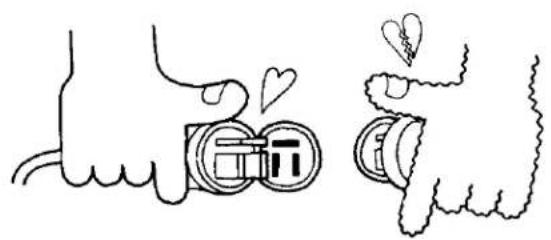
In general, treat your Electone with the same care you would any fine musical instrument. The following points are suggested for optimum enjoyment.
- Use only proper line voltage. Consult your Yamaha serviceman for changes.
As to British-Standard Model, its information is in 'Specifications' on the last page.
natural_image
Illustration of two hands holding circular objects with hearts above, no text or symbols present- Never touch the inside parts yourself.
natural_image
Cartoon illustration of a person using a handheld device to press or write on a keyboard (no text or symbols present)-
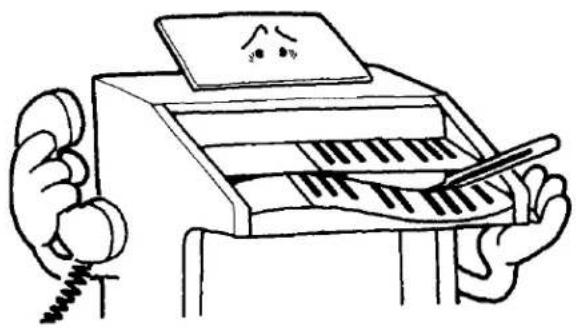
Always shut off the power after playing.
-
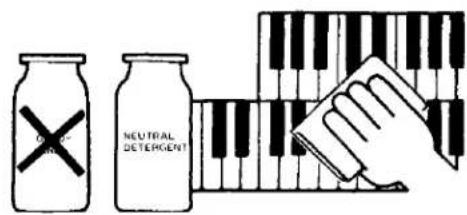
Clean keys, etc, with a damp cloth only. Never use solvents such as gasoline; they will damage the finish.
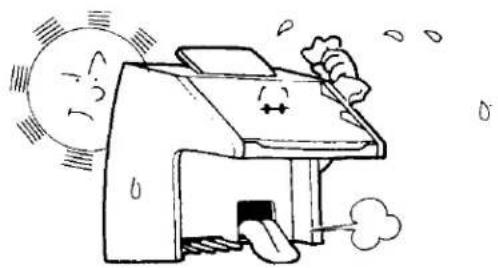
- Shield the cabinet from direct sunlight, humidity and heat to protect the finish and joints.
natural_image
Cartoon illustration of a smiling computer with sun and smoke effects (no text or symbols)- Do not hit or scratch the cabinet with a hard object.
natural_image
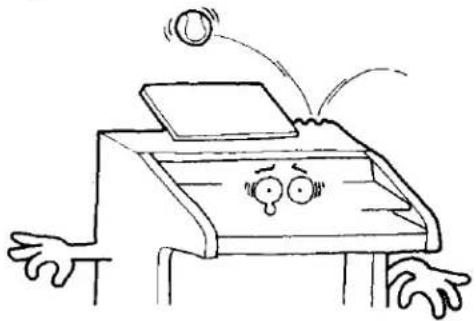
Cartoon illustration of a person looking at a computer with a surprised face and flying out (no text or symbols)- To open or close the fallboard grasp the front lip with both hands and slide gently. Never pull directly upwards. Do not place anything heavy on the fallboard.
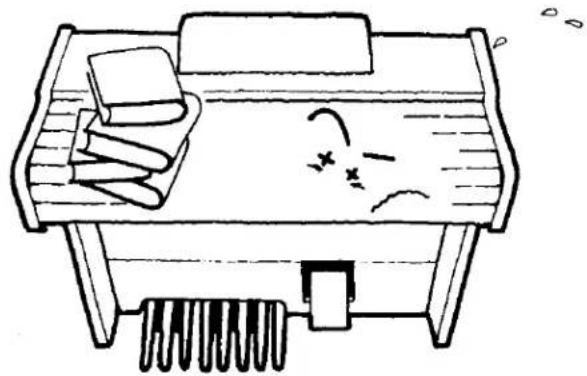
natural_image
Simple line drawing of a desk with books, a bed, and a spring (no text or symbols)This is the BK·20C
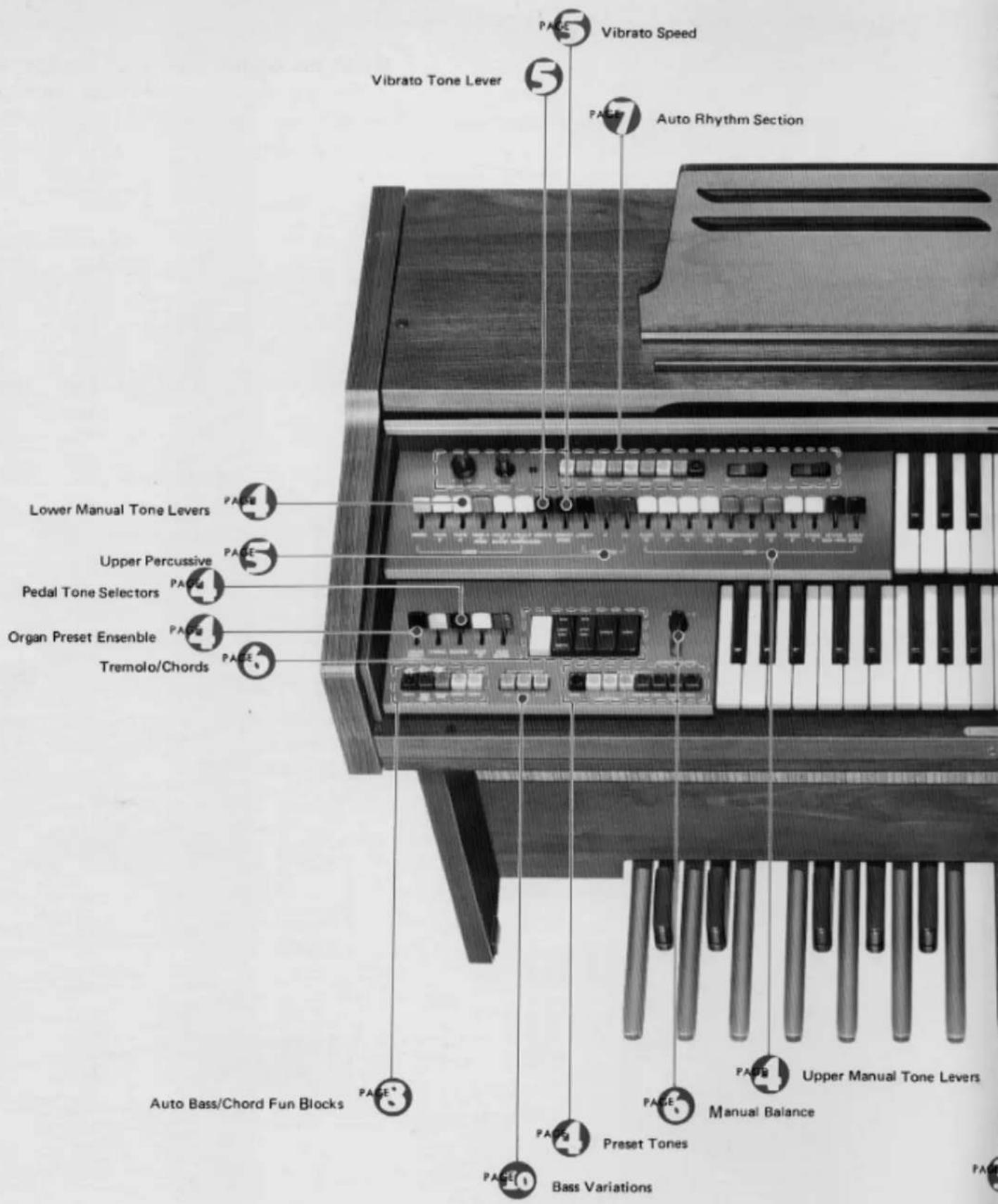
While reading the manual, keep this page open for reference.
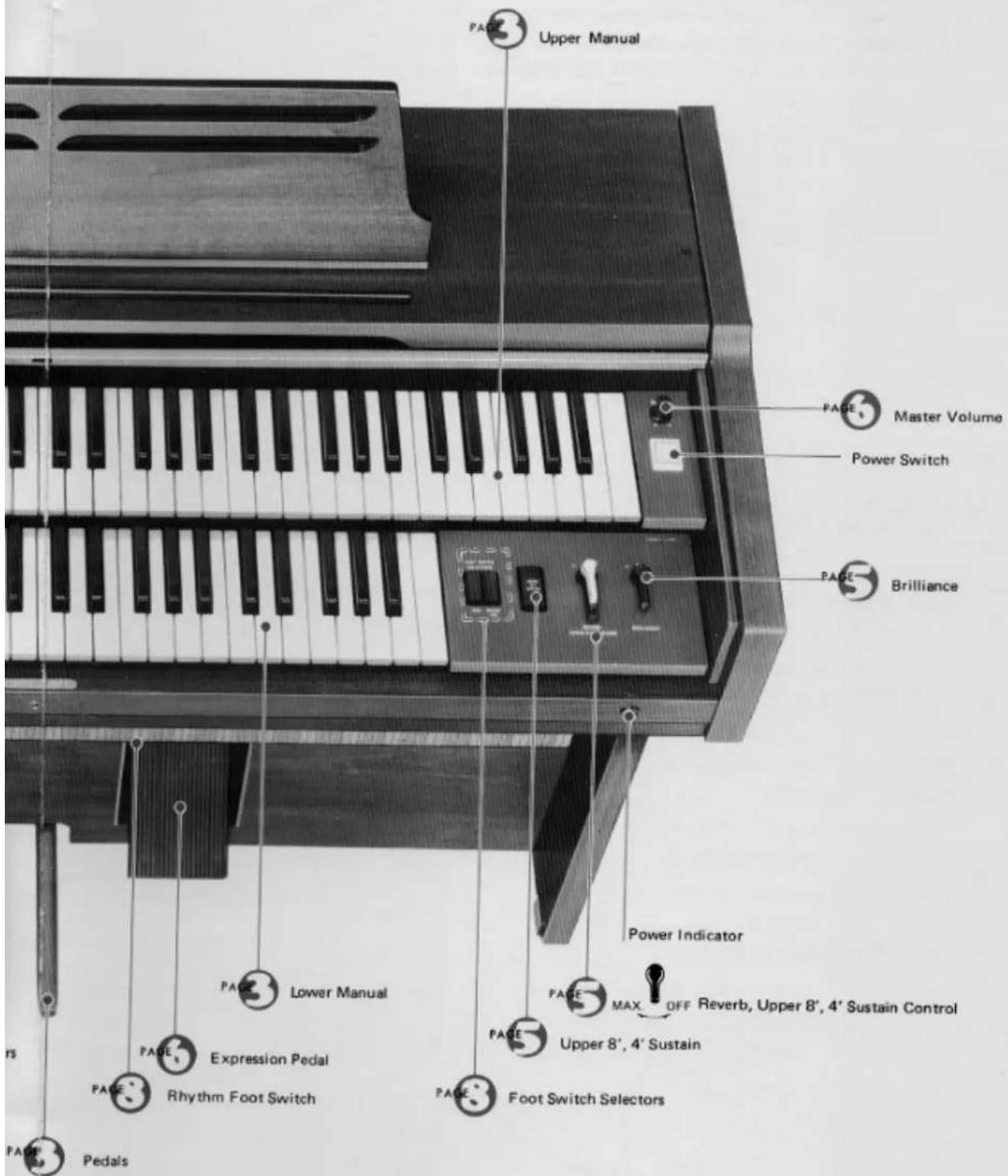
Keyboards
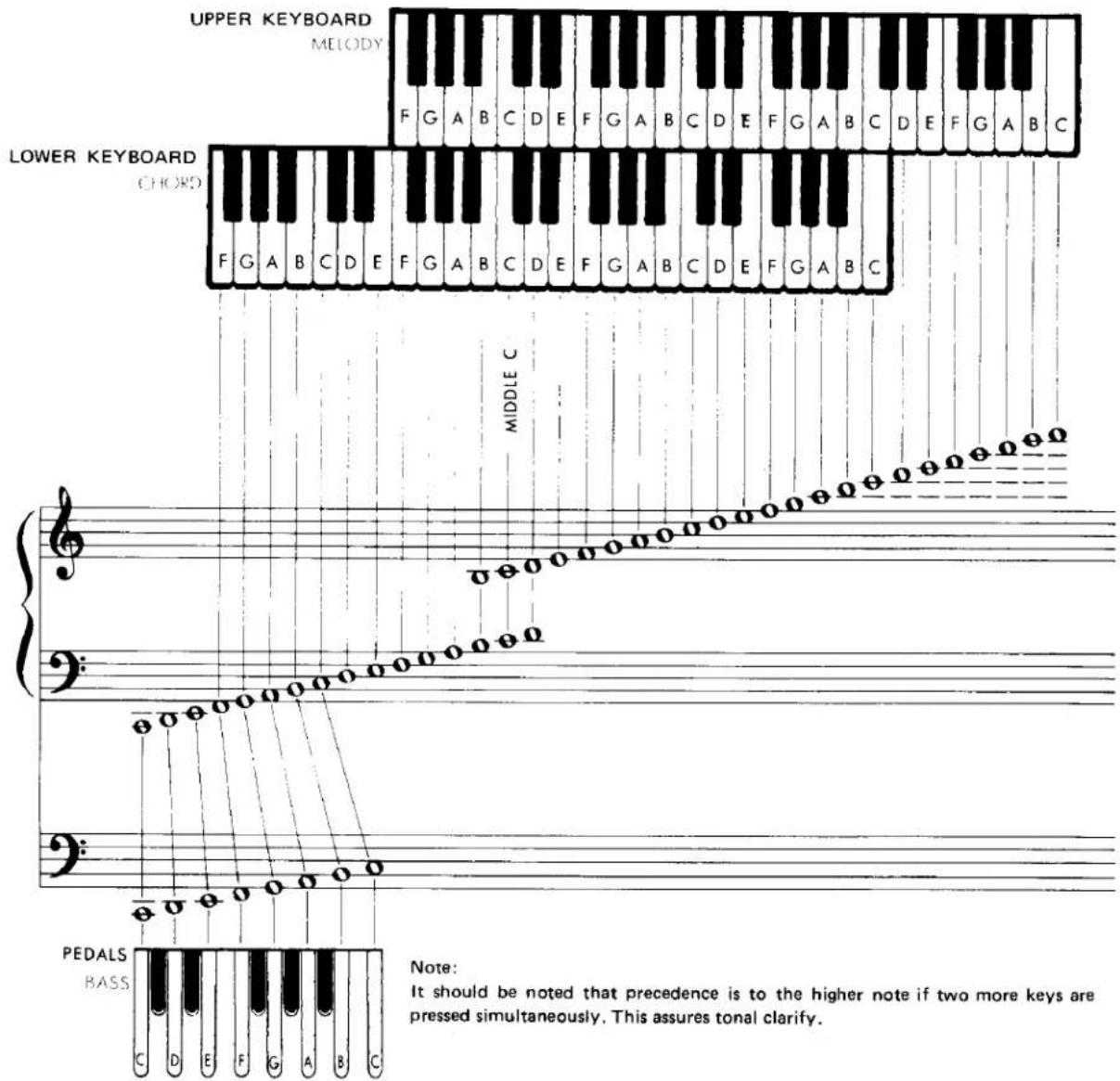
This Electone has three keyboards. They have keys and octaves as follows:
Upper Keyboard
44 keys (3-2/3 octaves)
Lower Keyboard
44 keys (3-2/3 octaves)
Pedals
13 keys (1 octave)
This Electone is designed to permit playing the melody on the upper keyboard with the right hand, the chords on the lower keyboard with the left hand, and bass note on the pedals with the left foot.
All keys are arranged in the keyboard method layout shown below. Each white key has a name (from C to B), and the blacks are sharps or flats.
The Tone Levers
Preset Tones

natural_image
Cartoon character playing a musical instrument with notes (no text or symbols)To the left of the upper and lower manuals are series of tone levers which control the Electone voices that will sound when the keys are depressed. They are divided into groups for upper, lower and pedals, so that different registrations can be set for each.
Upper Manual Levers 9 voices
Lower Manual Levers 5 voices
Pedal Levers 2 voices
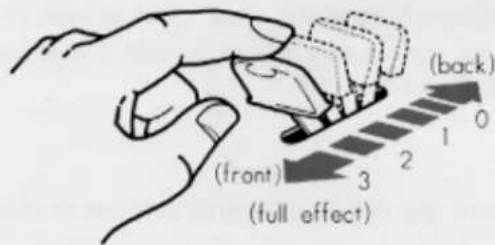
Each lever provides two methods of control. One is by continuously moving the lever from off to full, to achieve the exact setting for that tone, and thus balancing the overall tone setting with perfect precision. Each lever also has two easy-to-feel click stops, at 1/3 and 2/3 positions. This lets you refind any setting with mathematical precision and no guesswork in a matter of seconds.
PITCHES OR FOOTAGES
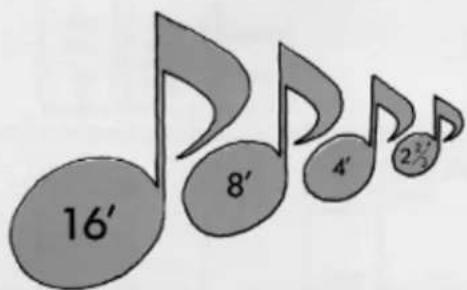
The BK-20C has four different pitch levels, indicated by the numbers 16', 8', 4' and 2 ^3/8 '. These are standard musical abbreviations showing the tone's pitch in relation to the fundamental (written note). An 8' tone will sound just as it has been written. As the numbers increase, the tones lower. A 16' tone will provide a tone exactly one octave lower than the written note.
Similarly, 4' tones are one octave higher than the written note, 2 ^3/5 tones are one octave and a fifth higher than the 8' fundamental.
To the left of the lower manual are eight Upper Preset Tone selectors (seven tones plus Cancel). These on/off switches are special tonal blends that most closely resemble the instruments they name (Accordion, Piano, Hawaiian Guitar, Banjo) as well as three special preset combinations.
Since these buttons are factory preset, they automatically cancel all other upper manual tone lever settings. This lets you switch back and forth. In addition, precedence is to the right. This means that if two or more buttons are pressed, the one to the right will take effect. To switch from one button to another it is not necessary to first press the cancel button.
Note: Upper Sustain control lever does not work with the Accordion, Piano, Hawaiian Guitar and Banjo preset selectors.
ORGAN PRESET ENSEMBLE
This lever controls the effect which adds the upper tone lever to the upper preset tone. (Accordion, Piano, Hawaiian Guitar, Banjo)
Vibrato,Vibrato Speed
Vibrato is a waving of the tone. You will see violin and cello players use it freely by an oscillating motion of the left hand. That increases the emotional quality of the violin tone. This vibrato lever produces the same vibrato effect. The Vibrato lever provides continuous adjustment of this effect's depth, while Vibrato Speed lets you continuously set the desired speed.
Brilliance
With this single, continuously-variable control you can pinpoint the degree of overall softness or clarity desired for any mood of music.
Upper 8'4'Sustain
When this is switched on, the sustain effect is evoked. As the name of the tab implies, only 8' and 4' tones are affected. The length of such sustain is set by the Upper Sustain control.
Note: When combined with Upper Percussive 4', all sound is cancelled.
Reverb
The reverberation effect, which makes your playing sound full and rich as if you were playing in a large hall, can be adjusted continuously and smoothly to suit your taste.
Upper Percussive
Changing the beginning of some or all notes can do wonders for lively selections. Your BK-20C's percussive effects provide subtle but important shading at the moment each note is heard. The special popping 4', 2 ^3/8 ' percussive drive can be smoothly blended into all upper manual tones with percussive 4', 2 ^3/8 ', and a percussive length lever regulates the length of decay for this effect.
With percussive, use a detached fingering. Each note should be played cleanly; slurred notes will diminish the percussive impact.
Note: If Upper Percussive 4' is set at the same time as Upper Sustain, no sound will be heard.
Percussion (LOWER BRUSH, PEDAL CYMBAL)
Provide lively brush (hissing snare drum brush) and cymbal percussion sounds with each lower manual or pedal note.
Attack Wah-Wah
Provides a spicy wah-wah sound at the beginning of every upper manual tone.
Repeat Speed
Cuts and repeats each note just like the double-strumming effect of a mandolin. The lever provides continuous speed adjustment to create a full variety of different moods. Affect upper manual notes only.
Glide
While the foot switch is pushed when the Glide selector is on, tones will be lowered one half tone.
Pedal Sustain
This control provides continuous adjustment of the sustain effect on the pedals and allows the pedal note to continue to sound a few seconds after you have released it.
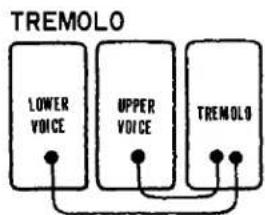
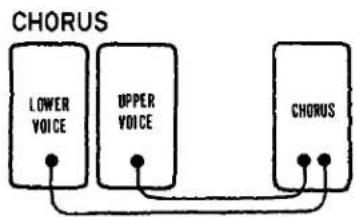
Tremolo/Chorus
TREMOLO SPEED
flowchart
graph TD
    A["LOWER VOICE"] --> B["TREMOLO"]
    C["UPPER VOICE"] --> B["TREMOLO"]
    D["TREMOLO"] --> B["TREMOLO"]
flowchart
graph TD
    A["CHORUS"] --> B["LOWER VOICE"]
    A --> C["UPPER VOICE"]
    A --> D["CHORUS"]
    B --> E["•"]
    C --> F["•"]
    D --> G["•"]
flowchart
graph TD
    A["FLUTE SPLIT"] --> B["TREMOLD"]
    A --> C["CHORUS"]
    B --> A
    C --> A
The Electone's special tremolo is produced by a rotary speaker that actually spins just behind the rotary speaker grille on the side of the cabinet.
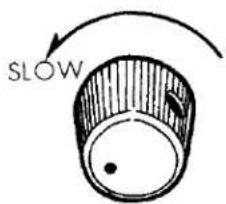
The tremolo selector is complemented by a continuous tremolo speed control knob.
When the speed control is set to its maximum position, the Tremolo will turn the speaker at normal revolution. The Chorus will turn it at one revolution. Once either tablet is switched on, it takes several seconds for the rotary speaker to attain the standard speed. This is also true when switching to a slower speed (Tremolo to Chorus), the speed variation will be heard in the music.
If you wish an instant tremolo or chorus sound, be sure to switch on that tablet well in advance of the speaker selector. For special selections you can use this speed variation by switching the speaker on first, the Tremolo or Chorus switch later.
Note: Only Tremolo is produced when Tremolo and Chorus are switched on simultaneously.
UPPER VOICE
Lets you divert upper manual voices from the main to the rotary speaker.
LOWER VOICE
Does the same for lower manual voices.
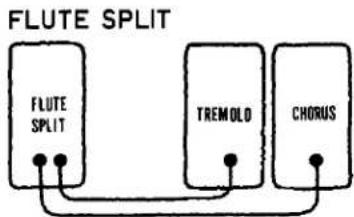
FLUTE SPLIT
This tablet feeds Flute voices of the upper and lower manuals and preset Combinations to the rotary speaker. Combined with other manual voices through the main speaker it creates a rich, singing blend.
Note: Only Flute Split is produced when Flute Split and Upper or Lower Voices are switched on simultaneously.
Manual Balance
This control governs the volume strength of the upper and lower manuals. It is normally left in the center position, but can be shifted to stress the melody or accompaniment in a selection or passage. This control can also be used to compensate for a higher number of total tone lever settings (which would ordinarily result in higher volume) on one of the two manuals.
Expression Pedal
Affect the emotional mood of every passage by letting you vary the volume continuously with your right foot. This works within the range set by the master volume control.
Master Volume
This is determines the maximum volume obtainable by depressing the expression pedal.
Auto Rhythm Section
natural_image
Cartoon illustration of three musicians playing with a Yamaha guitar and drum, no text or symbols present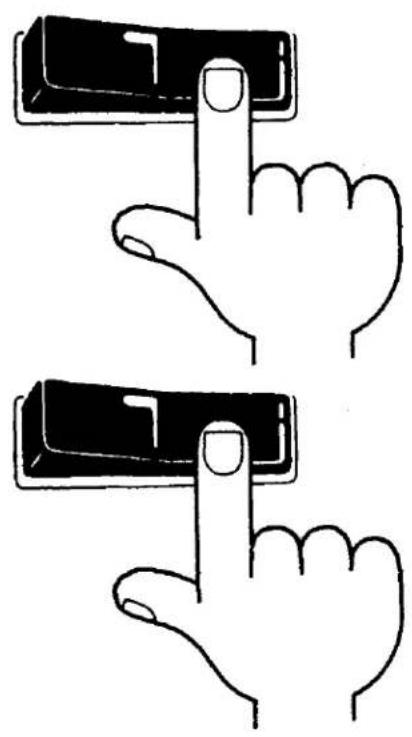
natural_image
Two hand gestures pointing at a black rectangular object, no text or symbols presentThis section provides eight catchy rhythms, each one produced by a simple button. You can also create more rhythm variations with the variation button. In addition to a combined volume and balance knob, tempo control and tempo indicator light, there are two other switches: ordinary Start and the Yamaha Synchro-Start which begins the rhythm accompaniment on the first beat of a measure, when the first lower manual or pedal note is struck. The special expression pedal foot switch lets you stop and restart the rhythm at any point during play.
NORMAL START
For instant rhythm at the beginning of a selection, push the rhythm selector desired, then flick the Start switch on.
SYNCHRO-START
Select the rhythm, switch on the Synchro-Start and begin to play once you have the beat established. The rhythm will begin as soon as you strike a lower manual or pedal note. This switch permits you to lead in with a rhythm-free melody at first if so desired.
You can switch off the Auto Rhythm with the foot switch. When you wish to continue hearing the Auto Rhythm, be sure to switch on with the foot switch.
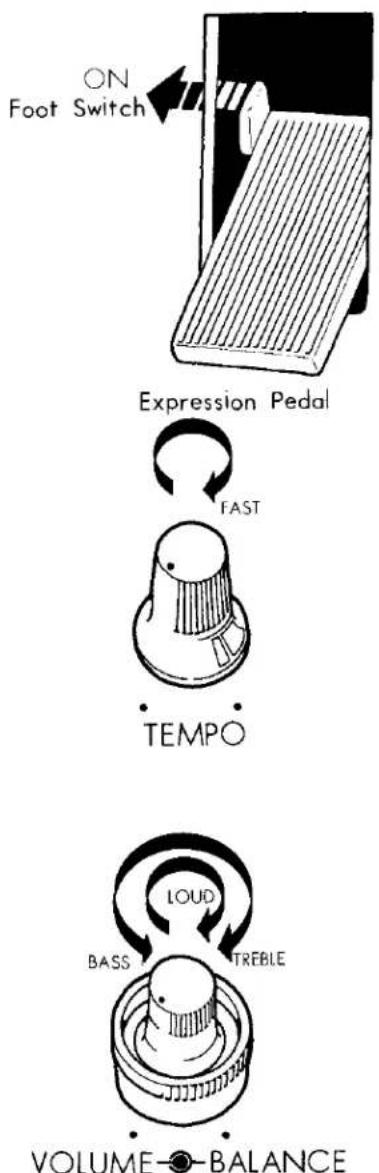
flowchart
graph TD
    A["ON Foot Switch"] --> B["Expression Pedal"]
    B --> C["FAST"]
    C --> D["TEMPO"]
    D --> E["LOUD"]
    E --> F["BASS"]
    F --> G["TREBLE"]
    G --> H["VOLUME-Balance"]
RHYTHM FOOT SWITCH
This tab activates a click-switch located at the left side of the expression pedal. When the tab is on and the rhythm section operating, touch the foot switch once and the rhythm automatically stops. Touch it again to switch back on.
Note: The tab controls the foot switch. If the rhythm has been cut by the switch and one of the rhythm start switches is still on, cancelling the tab will erase the effect of the foot switch -- in other words, the rhythm will go back on again.
TEMPO
The tempo of the Auto Rhythm section can be adjusted by a continuous control knob. This is best accomplished by turning on the Synchro-Start switch.
Although no sound will be produced, the indicator lamp will flash each quarter note, letting you visually check the tempo while you adjust.
VOLUME
Use it to balance the volume of the rhythm section and the manuals. This volume is then varied during the selection by the expression pedal, just like that of the other tones.
BALANCE
This control lets you balance the low rhythm sounds, such as drums, and the high sounds (i.e., cymbals) according to your mood and the selection. It can make a big difference even when using the same rhythm. Turn the knob to the right to accentuate the higher (treble) sounds, to the left for lower (bass). If you accentuate the treble sounds the rhythm becomes brighter.
Check the playing hints for specific settings.
Auto Bass/Chord Fun Blocks
natural_image
Cartoon illustration of a grand piano playing guitar, violin, and string instrument (no text or symbols)The BK-20C is equipped with a "Fun Block" section of five buttons which can be used in conjunction with the Auto Rhythm section (see p. 7). It enables you to play a variety of alternating bass chord rhythms, with the pedal and chords automatically matching the melody notes, simply by holding down either a single lower manual key or a lower manual chord, according to which fun block button you press. From your very first keyboard attempt, the fun block feature will let you sound like a pro, making full rhythmic use of the lower manual and pedals. Here is how it works.
Note: When the Auto Bass/Chord section is used, the tone color of the lower manual voices will change from Horn 8' to Piano, from Cello 8' to Guitar, and from Cello 4' to Harpsichord.
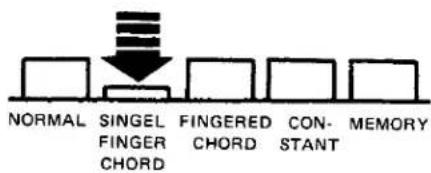
SINGLE FINGER CHORD (THE EASY PLAY WAY)
- Set the tone levers for the tones you want on the lower manual both Piano and Guitar sounds are available); use either or both levers to adjust the Auto Bass Chord tone color and volume in the normal way.
- Match the setting of the Pedal tone lever to the lower manual tones.
- Select a rhythm pattern and push the corresponding button until it clicks and stays down.
- Set the Rhythm Start switch on.
- Adjust the rhythm tempo and volume.
- Press the Single Finger Chord button.
Now, if you press a C key on the lower manual, a C major chord will play in an alternating pattern which matches the rhythm pattern and tempo set.
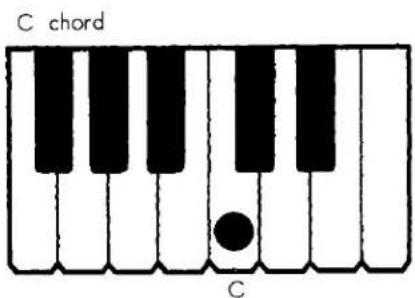
As long as the key is held down, the bass chord rhythm continues. When the Black-key pedal is pressed, the chord changed from major to minor, and when released, the chord returns to major. When the White-key pedal is pressed, the chord changes from major to seventh, and when released, the chord returns to major. When both Black- and White-key pedals are pressed, a minor seventh results.
Note: The bass note will play the root and fifth of any chord pressed, except when the Jazz Rock rhythm is used; in that case the bass sounds the root only.
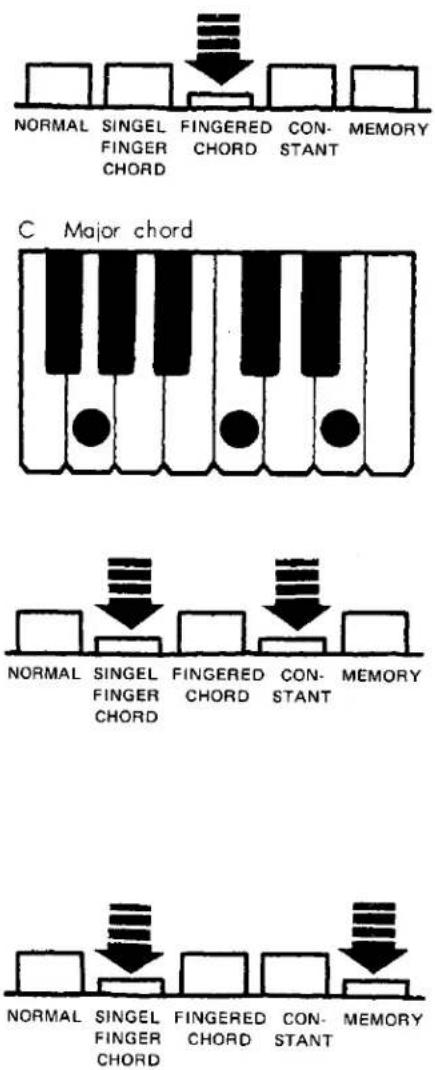
FINGERED CHORD
- Select the rhythm and set both its tempo and volume as explained earlier.
- Depress the Fingered Chord button.
- Play a desired chord (major, minor, seventh, minor seventh) on the lower manual.
Now as long as you hold that chord it will play according to the rhythm and tempo you have set.
If the Single Finger Chord and Fingered Chord buttons are both pressed, the Single Finger Chord takes procedure.
CONSTANT
- Select the rhythm and set both its tempo and volume as explained above.
- Depress the Constant button and either Single Finger Chord button or the Fingered Chord button.
- Press the desired key on the lower manual. As long as this key is held down, the chord, as well as a pedal note the same as the root of the chord, will sound as if they were held down during normal play (i.e., without any rhythm pattern). As soon as this key is released the chord stops.
MEMORY
This button can be used in conjunction with the (Single Finger Chord button only) press both buttons and set the rhythm (including tempo and volume) as explained above. Now, when a lower manual key is held down the bass chord rhythm will play according to the rhythm set, but will also continue to play even when the key is released. The memory function also has another use. When this button is depressed along with both the Single Finger Chord and Constant buttons, it provides a continuing bass chord just as when the latter two buttons are used alone. In this case, however, the bass chord will continue to sound even alter the key is released.
NORMAL
This button cancels the other Fun Blocks, returning the lower manual and the pedals to normal playing functions.
Note: The Flute voices on the lower manual are not affected by the Auto Rhythm rhythm pattern. If it is set on it will sound continuously for any key held down. Use it to soften the mood of the Auto Bass Chord accompaniment.
Bass Variation
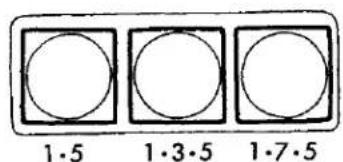
The Electone BK-20C lets you choose one of three bass patterns to match the lower manual harmony.
When the Single Finger Chord button is depressed, the three bass variations are created, just as when the Fingered Chord button is depressed.
Note: This bass variation works with Rhumba and Slow Rock beats. If the Rhythm Variation button is pressed, however, then bass variation will be available with Rhumba only.
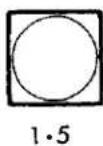
This is the basic pattern; it alternates the root (1) and fifth (5) in the bass regardless of rhythm chosen or type of chord. The one exception is the Jazz Rock rhythm, which maintains root (1) pedal and no alternation.
Note: The Slow Rock and Jazz Rock rhythms play only the root (1), when the Rhythm Variation is switched on.
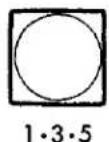
This selector effects the Slow Rock and Rhumba rhythms, with which it will play a root (1), third (3), and fifth (5) pattern. All other rhythms function as with the (1.5) selector.
Note: The Rhumba rhythm will play a root (1), third (3), and fifth (5) pattern, when the Rhythm Variation is switched on.
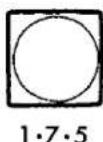
This selector effects the Slow Rock and Rhumba rhythms when a seventh or minor seventh chord is being played, with which you will hear the root (1), seventh (7), and fifth (5) bass notes. When playing a major or minor chord the unit will perform exactly as it does with the second Bass Variation selector (1·3·5).
Note: The Rhumba rhythm will play a root (1), seventh (7), and fifth (5) pattern, when the Rhythm Variation is switched on.
To Fully Enjoy Your Electone
HEADPHONES
A Yamaha headphones set (optional) can be plugged into the jack under the keyboard. With the headphones connected, the speakers are automatically shut off, allowing you to play or practice at any volume level without disturbing anyone.
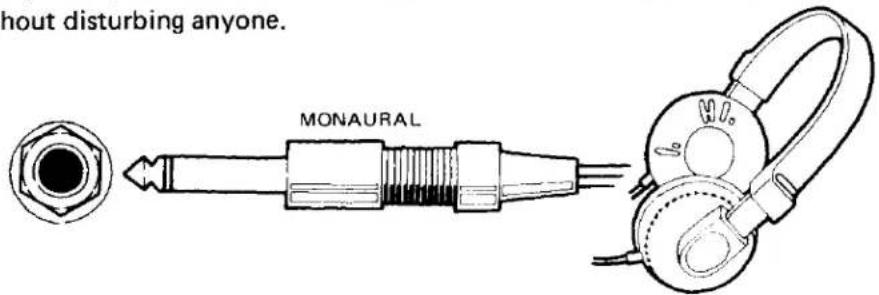
EXP. IN
This jack accepts any sound sources and reproduces them through this Eectone's speakers.
Note: The volume of the sound source can be controlled by the expression pedal.
AUX OUT
For recording, connect the AUX OUT jack with the tape deck's LINE IN jack. Control the recording levels on the tape deck.
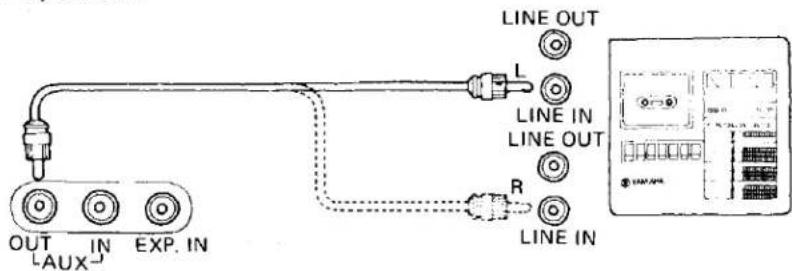
AUX IN
For playback, connect the AUX IN jack with the tape deck's LINEOUT jack. Control the playback levels on the tape deck.
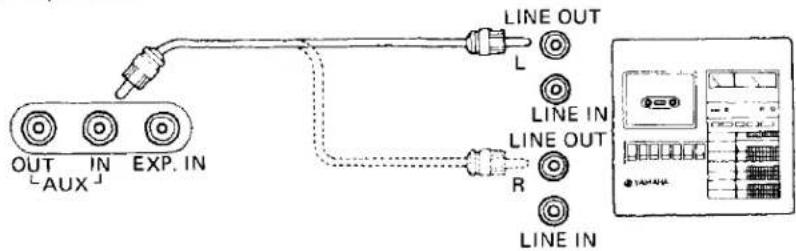
Note: These sound sources (tape recorder, etc.) are not affected by the expression pedal.
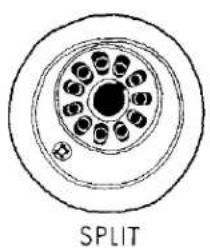
TONE CABINET (REAR PANEL)
natural_image
Cross-sectional diagram of a multi-layer cable or optical fiber structure with no text or symbols
natural_image
Cross-sectional diagram of a multi-layered cable or optical fiber structure, labeled 'GENERAL' below (no other text or symbols)This socket is on the rear panel. Use it to connect a Yamaha Tone Cabinet, without any rewiring required.
Electone is not out of order If...
- ..... the set does not go on when the power switch is turned on. Check the following.
Is the AC plug fully inserted into the electric wall outlet? Reinsert it to be sure. Is there power coming from that outlet?
If there is power in the outlet but the Electone does not play, unplug the cord and contact your Yamaha dealer. There are NO USER SERVICEABLE PARTS inside.
- ..... a sound should occur the instant you turn on the switch.
This merely indicates normal operation consequent to a surge of electricity in the main amplifier.
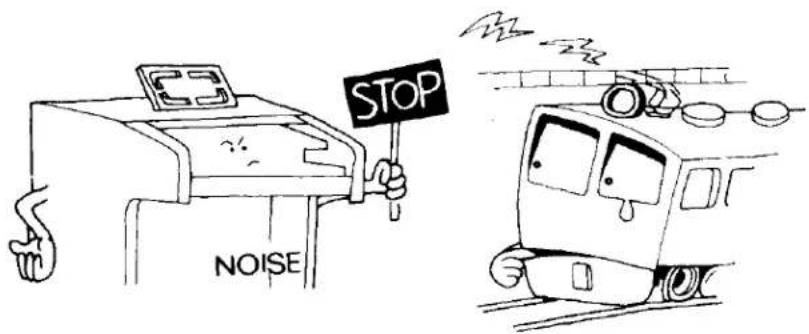
- ..... occasional unpleasant static occurs.
In the majority of such cases, the cause can be traced to the turning on or off of refrigerators, washing machines, electric pumps or other household appliances. Electrical faults in a neighboring outdoor neon sign may also be to blame.
If the cause is a fault in a neon or fluorescent lighting fixture, it should be repaired. When the cause is unknown, or in case of doubt, contact your Yamaha dealer.
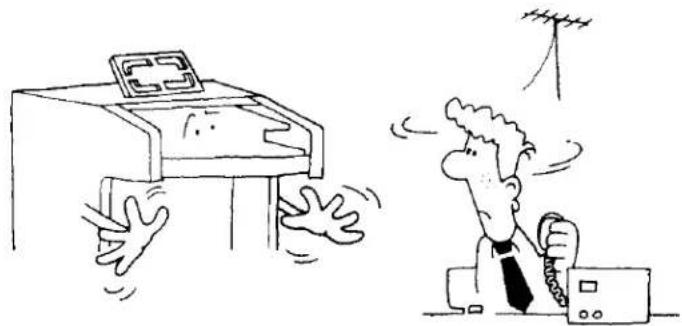
- ..... the Electone reproduces radio or TV signals.
If there is a powerful transmitter such as a radio station in the vicinity this can occur. Contact your Yamaha dealer.
natural_image
Cartoon illustration of a person reacting to a device with a grid on top, while another person holds a device with a cable (no text or symbols present)-
..... pedal notes sound too high, upper keyboard's notes too low. This is especially noticeable when comparing the Electone with piano. Piano tones are combinations of harmonics and must interact with their surroundings, while Electone harmonics are simpler (multiples of the fundamental tone), requiring the Electone to be adjusted differently at the assembly stages.
-
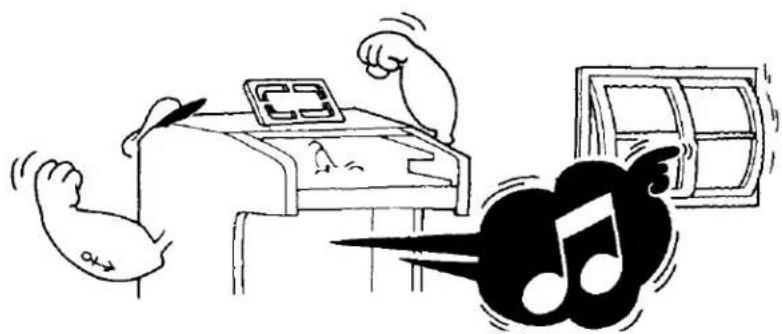
..... rattling (sympathetic vibration) occurs.
All materials have critical resonance frequencies at which they vibrate. The Electone's continuous tones will naturally cause other objects (windows, shelves, etc.) to vibrate.
natural_image
Cartoon illustration of a person using a device with arms raised, next to a guitar and musical notes (no text or symbols)Specifications
KEYBOARDS
| Upper Manual | 44 keys f~c4(3 23 octaves) |
| Lower Manual | 44 keys F~c3(3 23 octaves) |
| Pedals | 13 keys C1~C(1 octave) |
TONE LEVERS
| Upper Manual | Flute | 16' |
| Flute | 8' | |
| Flute | 4' | |
| Flute | 223 | |
| Trombone | 16' | |
| Brass | 8' | |
| Oboe | 8' | |
| String | 8' | |
| String | 4' | |
| Lower Manual | Flute | 8' |
| Flute | 4' | |
| Horn(or Piano) | 8' | |
| Cello(or Guitar) | 8' | |
| Cello(or Harpsichord) | 4' | |
| Pedals | Bass | 16' |
| Bass Guitar |
PRESET TONE SELECTORS
| Combinations 1, 2, 3 | |
| Accordion | (Upper) |
| Piano | (Upper) |
| Hawaiian Guitar | (Upper) |
| Banjo | (Upper) |
| Cancel | |
EFFECT LEVERS
| Vibrato | |
| Vibrato Speed | |
| Percussive 4' | (Upper) |
| Percussive 2 23 | (Upper) |
| Percussive Length | |
| Attack Wah-Wah | (Upper) |
| Repeat Speed | (Upper) |
| Organ Preset Ensemble | (Upper) |
| Pedal Sustain | |
| Percussion (Lower Brush, Pedal Cymbal) | |
EFFECT CONTROLS
| Brilliance |
| Reverb |
| Upper Sustain (8', 4') |
| Manual Balance |
EFFECT SELECTORS
| Upper Sustain (8', 4') |
| Foot Control (Glide, Rhythm Foot Control) |
TREMOLO SELECTORS
| Flute Split | |
| Upper Voice | (Main/Rotary) |
| Lower Voice | (Main/Rotary) |
| Tremolo | |
| Chorus | |
ABC FUN BLOCKS
| ABC Selectors |
| Normal |
| Single Finger Chord |
| Fingered Chord |
| Constant |
| Memory |
| Bass Variation Selectors |
| 1·5 |
| 1·3·5 |
| 1·7·5 |
AUTO RHYTHM SECTION
| Rhythm Selectors |
| March |
| Swing |
| Jazz Rock |
| Bossanova |
| Variation |
| Rhythm Controls |
| Rhythm Start |
| Synchro-Start |
| Rhythm Foot Control |
| Tempo |
| Volume |
| Tone Balance |
| Tempo Indicator |
OTHER CONTROLS
| Master Volume |
| Expression Pedal |
| Foot Effect Switch |
| Tremolo Speed Control |
| Power Switch |
OTHER FITTINGS
| Headphone Jack |
| Expression Input Jack |
| AUX IN Jack |
| AUX OUT Jack |
| Tone Cabinet Socket |
| Power Indicator |
| Roll-top Fallboard with Lock |
| Music Rest |
| Matching,Bench with Music Storage Space |
SPEAKERS
| Main (4): Yamaha 30cm (12") x 2, 20cm (8"), 5cm (2") |
| Rotary (1): 16 x 23cm (61⁄2 x 9") |
CIRCUITRY
| Solid State (Incl. LSIs and ICs) |
| Output Power: Main 30 Watts (RMS) |
| Rotary 30 Watts (RMS) |
| Power Consumption: 100 Watts |
| Power Source: 50/60Hz AC |
DIMENSIONS
| BK-20C | BK-20CI, BK-20CS | |
| Width: | 112cm (44") | 122cm (48") |
| Depth: | 56cm (22") | 56cm (22") |
| Height: | 90cm (35 12 ") | 91cm (36") |
| EIGHT | 72kg (158 lbs.) | 75kg (165 lbs.) |
FINISH
| BK-20C, BK-20CI: Natural American Walnut |
| BK-20CS: Antique Oak |
| Specifications subject to change without notice. |
Special Instructions for British-Standard Model
As the colours of the wires in the mains lead of the apparatus may not correspond with the coloured markings identifying the terminals in your plug proceed as follows.
The wire which is coloured GREEN-and-YELLOW must be connected to the terminal in the plug which is marked by the letter E or by the safety earth symbol or coloured GREEN or GREEN-and-YELLOW.
The wire which is coloured BLUE must be connected to the terminal which is marked with the letter N or coloured BLACK.
The wire which is coloured BROWN must be connected to the terminal which is marked with the letter L or coloured RED.
IMPORTANT
THE WIRES IN THE MAINS LEAD ARE COLOURED IN ACCORDANCE WITH THE FOLLOWING CODE.
GREEN-AND-YELLOW: EARTH
BLUE: NEUTRAL
BROWN: LIVE
WARNING:
THIS APPARATUS MUST BE EARTHED.
SINCE 1887

YAMAHA
NIPPON GAKKI CO. LTD. HAMAMATSU, JAPAN
- BK·20C series
- Contents
- Read the following before playing
- Keyboards
- The Tone Levers
- Preset Tones
- PITCHES OR FOOTAGES
- ORGAN PRESET ENSEMBLE
- Vibrato,Vibrato Speed
- Brilliance
- Upper 8'4'Sustain
- Reverb
- Upper Percussive
- Percussion (LOWER BRUSH, PEDAL CYMBAL)
- Attack Wah-Wah
- Repeat Speed
- Glide
- Pedal Sustain
- Tremolo/Chorus
- UPPER VOICE
- LOWER VOICE
- FLUTE SPLIT
- Manual Balance
- Expression Pedal
- Master Volume
- Auto Rhythm Section
- NORMAL START
- SYNCHRO-START
- RHYTHM FOOT SWITCH
- TEMPO
- VOLUME
- BALANCE
- Auto Bass/Chord Fun Blocks
- SINGLE FINGER CHORD (THE EASY PLAY WAY)
- FINGERED CHORD
- CONSTANT
- MEMORY
- NORMAL
- Bass Variation
- To Fully Enjoy Your Electone
- HEADPHONES
- IN
- AUX OUT
- AUX IN
- TONE CABINET (REAR PANEL)
- Electone is not out of order If...
- Specifications
- Special Instructions for British-Standard Model
- IMPORTANT
- WARNING:
Marke : YAMAHA
Modell : Electone BK-20C
Kategorie : Tastatur