A1000UA - Netzwerkkarte / Adapter Totolink - Kostenlose Bedienungsanleitung
Finden Sie kostenlos die Bedienungsanleitung des Geräts A1000UA Totolink als PDF.


Waehlen Sie Ihre Sprache und Ihre E-Mail-Adresse: wir senden Ihnen eine speziell uebersetzte Version.
Benutzerfragen zu A1000UA Totolink
0 Frage zu diesem Gerät. Beantworten Sie die, die Sie kennen, oder stellen Sie Ihre eigene.
Eine neue Frage zu diesem Gerät stellen
Noch keine Fragen. Stellen Sie die erste.
Laden Sie die Anleitung für Ihr Netzwerkkarte / Adapter kostenlos im PDF-Format! Finden Sie Ihr Handbuch A1000UA - Totolink und nehmen Sie Ihr elektronisches Gerät wieder in die Hand. Auf dieser Seite sind alle Dokumente veröffentlicht, die für die Verwendung Ihres Geräts notwendig sind. A1000UA von der Marke Totolink.
BEDIENUNGSANLEITUNG A1000UA Totolink
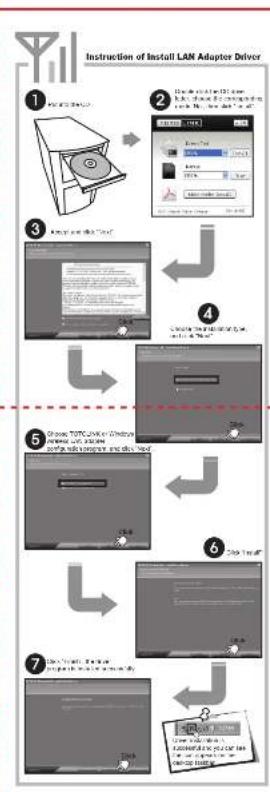
flowchart
graph TD
    A["1. Input TCP/IP"] --> B["2. Setup a 3D printer with a network interface"]
    B --> C["3. Copy and edit 'Tout'"]
    C --> D["4. Create a new adapter device with a 'OK' button"]
    D --> E["5. Write TCP/IP on Windows before adding a USB drive and add a USB icon"]
    E --> F["6. Use 'OK' button"]
    F --> G["7. Use 'OK' button to create a new adapter device with a USB icon"]
    G --> H["8. Use 'OK' button to generate a new adapter device with a USB icon"]
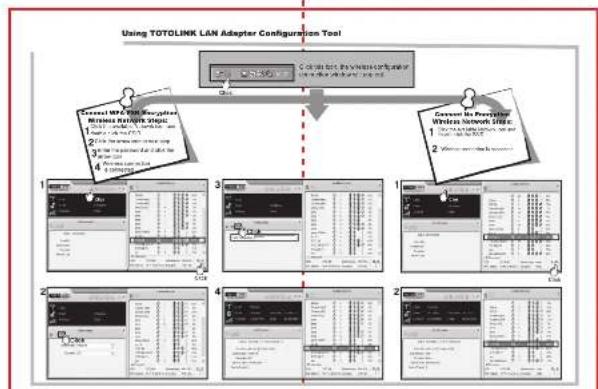
flowchart
graph TD
    A["Using TOTOLINK LAN Adapter Configuration Tool"] --> B["Component 1: Data input, processing steps"]
    A --> C["Component 2: Data output, processing steps"]
    A --> D["Component 3: Data generation, processing steps"]
    A --> E["Component 4: Data output, processing steps"]
    B --> F["Data table with columns"]
    C --> G["Data table with rows"]
    D --> H["Data table with columns"]
    E --> I["Data table with rows"]
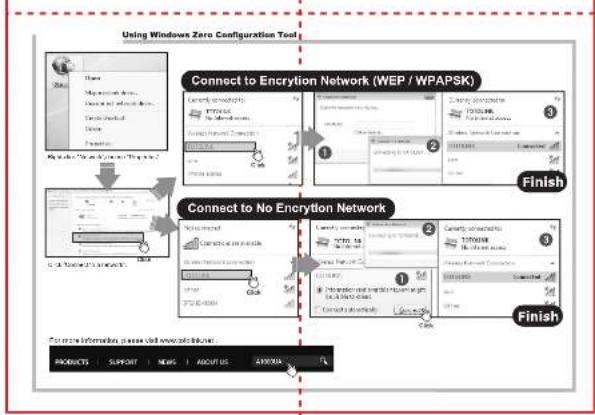
flowchart
graph TD
    A["Using Windows Zero Configuration Tool"] --> B["Connect to Encryption Network (WEP / WPAPSK)"]
    B --> C{Connect to No Encryption Network}
    C --> D["Finish"]