
ALMDT-2000 - Bewegungsmelder TRUST - Kostenlose Bedienungsanleitung
Finden Sie kostenlos die Bedienungsanleitung des Geräts ALMDT-2000 TRUST als PDF.


| Marke | Trust |
| Modell | ALMDT-2000 |
| Produkttyp | Bewegungsmelder |
| Abmessungen (ca.) | 10 x 6 x 4 cm |
| Gewicht | ca. 100 g |
| Stromversorgung | Batteriebetrieben (2x AA, nicht im Lieferumfang) |
| Erfassungsbereich | bis zu 10 m |
| Erfassungswinkel | 120° |
| Lichtempfindlichkeit | einstellbar (Tag/Nacht) |
| Funktionen | Bewegungserkennung, automatische Lichtsteuerung |
| Montage | Wandmontage, inkl. Halterung und Schrauben |
| Reichweite der Funkübertragung | nicht zutreffend (kabelgebunden) |
| Schutzart | IP44 (spritzwassergeschützt) |
| Betriebstemperatur | -10 °C bis +40 °C |
| Farbe | Weiß |
| Zertifizierungen | CE, RoHS |
| Reinigung | Mit einem trockenen, weichen Tuch abwischen. Keine Reinigungsmittel verwenden. |
| Sicherheitshinweise | Nicht in der Nähe von Wärmequellen installieren. Vor Feuchtigkeit schützen (außerhalb IP44). |
| Ersatzteile | Keine Ersatzteile lieferbar. Bei Defekt Gerät ersetzen. |
| Reparatur | Nicht reparierbar. Bei Fehlfunktion bitte entsorgen und Neugerät erwerben. |
| Garantie | 2 Jahre |
Häufig gestellte Fragen - ALMDT-2000 TRUST
Benutzerfragen zu ALMDT-2000 TRUST
0 Frage zu diesem Gerät. Beantworten Sie die, die Sie kennen, oder stellen Sie Ihre eigene.
Eine neue Frage zu diesem Gerät stellen
Laden Sie die Anleitung für Ihr Bewegungsmelder kostenlos im PDF-Format! Finden Sie Ihr Handbuch ALMDT-2000 - TRUST und nehmen Sie Ihr elektronisches Gerät wieder in die Hand. Auf dieser Seite sind alle Dokumente veröffentlicht, die für die Verwendung Ihres Geräts notwendig sind. ALMDT-2000 von der Marke TRUST.
BEDIENUNGSANLEITUNG ALMDT-2000 TRUST
www.trust.com

natural_image
White plastic container with a transparent lid and internal grid pattern (no text or symbols visible)USER MANUAL MULTI LANGUAGE
Item 71114 Version 1.0
Visit www.trust.com
for the latest instructions
ALMDT-2000 INFRARED MOTION SENSOR
1

2
3
4

natural_image
Hand holding a tool inside a device with a label 'OTHER' visible (no other text or symbols)5

6

natural_image
Diagram of a mechanical component with a downward arrow, no text or symbols present7

8


flowchart
graph LR
    A["DEL"] --> B["2 sec"]
    B --> C["DEL"]
    C --> D["3 sec"]
    D --> E["DEL Short press"]
EN
1. Place batteries
Open the battery slot on the back side of the motion sensor by pushing the pull-tab down and removing the battery cover. Insert two AA 1,5V Alkaline batteries as shown above. Observe the correct polarity of the batteries (place plus and minus on the correct side). Close the battery slot.
2. LED indicator
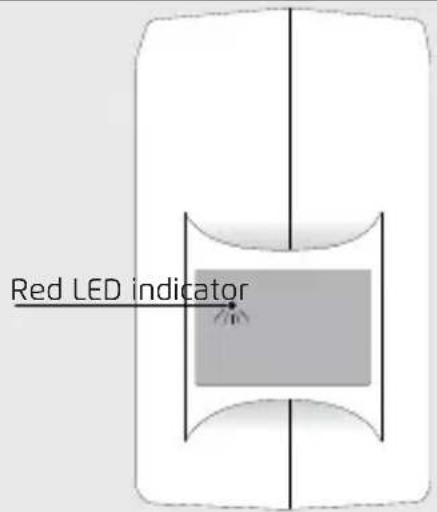
The sensor has a LED indicator in the detection window. The LED behaviour is as followed:
Confirm pair: LED will blink 5 times
Confirm unpair: LED will blink 5 times
Low battery: LED will blink 3x every 6 sec
3. Pairing the ALMDT to Siren
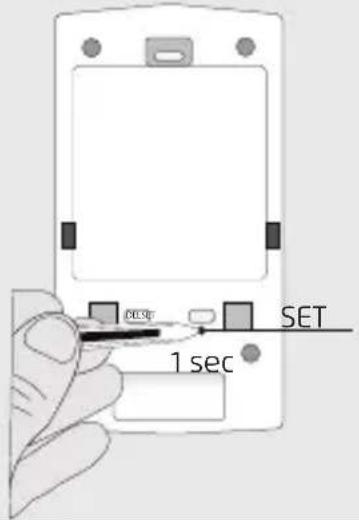
Consult the manual of the Siren to activate the learn mode. Send (while the learn mode of the Siren is active) a connect-signal by pressing the SET button with a sharp object on the back of the sensor. The LED indicator will flash 5x to confirm that the pairing has been done successfully.
4. Mounting the ALMDT
Because the motion sensor is wireless, it can be easily placed in your house. Mount the backplate of the motion sensor on a flat surface and secure it with screws. (Screws are included).
5. Place ALMDT on the backplate
Place the ALMDT on the backplate. Make sure that the backplate is fitted in the location of the tamper switch. This is a switch that prevents the sensor from being removed when it is mounted. When the sensor is removed from the backplate and the Siren is armed the tamper switch will activate the alarm immediately.
6. Secure the ALMDT
When the ALMDT is placed on the backplate pull it down to secure it and lock the tamper switch.
Note: After arming the Siren it is possible to move in front of the sensor for 1 min. It takes \~1.5 minute before the sensor will be completely active.

7. Detection angle
De horizontal detection angle of the sensor is max. 120^ and the vertical detection angle is max 62^ . Within these angles movements will be detected by the sensor.
Note: After a motion has been detected by the sensor it needs about 6-8 sec to initialize before a new motion can be detected.
8. Unpairing ALMDT
Consult the manual of the Siren to activate the learn mode. Send (while the learn mode of the Siren is active) a disconnect-signal by pressing the DEL button with a sharp object on the back of the ALMDT. The LED indicator will flash 5x to confirm that the unpairing has been done successfully.
Note: When the sensor is not used unpair it from the Siren first before removing it.
9. Delete ALMDT memory
To delete the memory of the ALMDT press the DEL button for 2 seconds with a sharp object (until the LED starts to blink). Release the button and press the DEL button again for 3 seconds. (until the LED starts to blink fast). Press the DEL button shortly to delete the memory of the ALMDT. The LED will blink 5x to confirm the memory has been deleted.
NL
NL


PT

NO

DA
DA

1. Podłącz lampę/urządzenie i umieść odbiornik
Najpierw sprawdź, czy lampa lub urządzenie jest włączone. Następnie podłącz lampę lub urządzenie do odbiornika i włącz odbiornik do gniazda zasilania. Nie należy przekraczać maksymalnego obciążenia: 1000 W.
CS

HU
RO
1. Свържете лампата/устройството и сложете приемателя
Първо проверете дали лампата или устройството е включено. След това включете щепсела на лампата или устройството в приемателя и включете приемателя в контакт. Не надвишавайте максимальната мощност: 1000 W.
RU
RU
HR
UA
UA
AR
AR




Marke : TRUST
Modell : ALMDT-2000
Kategorie : Bewegungsmelder