POR-1100 - Wi-Fi-Repeater LEVELONE - Kostenlose Bedienungsanleitung
Finden Sie kostenlos die Bedienungsanleitung des Geräts POR-1100 LEVELONE als PDF.


| Produkttyp | Wi-Fi Repeater |
| Marke | LevelOne |
| Modell | POR-1100 |
| Abmessungen (B x T x H) | 80 x 80 x 30 mm |
| Gewicht | 100 g |
| Stromversorgung | 5 V / 1 A über Micro-USB oder Netzadapter |
| WLAN-Standard | IEEE 802.11 b/g/n |
| Frequenzband | 2,4 GHz |
| Maximale Übertragungsrate | 300 Mbit/s |
| WLAN-Sicherheit | WEP, WPA, WPA2 |
| WPS (Wi-Fi Protected Setup) | Ja |
| Anzahl LAN-Ports | 1 x 10/100 Mbit/s |
| Antennentyp | Intern |
| Reichweite (Innen) | Bis zu 300 m (freies Feld) |
| Betriebsmodi | Repeater, Access Point |
| LED-Anzeigen | Strom, WLAN, WPS, LAN |
| Gehäusematerial | Kunststoff |
| Betriebstemperatur | 0 °C bis 40 °C |
| Luftfeuchtigkeit bei Betrieb | 10 % bis 90 % (nicht kondensierend) |
| Zulassungen | CE, FCC |
| Garantie | 2 Jahre |
| Lieferumfang | Wi-Fi Repeater, Netzadapter, Ethernet-Kabel, Kurzanleitung |
Häufig gestellte Fragen - POR-1100 LEVELONE
Benutzerfragen zu POR-1100 LEVELONE
0 Frage zu diesem Gerät. Beantworten Sie die, die Sie kennen, oder stellen Sie Ihre eigene.
Eine neue Frage zu diesem Gerät stellen
Laden Sie die Anleitung für Ihr Wi-Fi-Repeater kostenlos im PDF-Format! Finden Sie Ihr Handbuch POR-1100 - LEVELONE und nehmen Sie Ihr elektronisches Gerät wieder in die Hand. Auf dieser Seite sind alle Dokumente veröffentlicht, die für die Verwendung Ihres Geräts notwendig sind. POR-1100 von der Marke LEVELONE.
BEDIENUNGSANLEITUNG POR-1100 LEVELONE
POR-1100
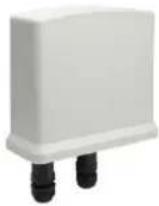
PoE Repeater, Cascadable, Indoor/Outdoor

flowchart
graph LR
    A["POE Ethernet Switch"] -->|POWER 100 m| B["POR-1100"]
    B -->|POWER 100 m| C["POR-1100"]
    C -->|POWER 100 m| D["PD Device ≤6.5W"]
Maximum Range
Connect with Standard 15.4W PSE
| End to end distance | 100m | 200m | 300m | 400m | 500m |
| Daisy-Chaining(POR-1100) | 0 | 1 | 2 | 3 | 4 |
| Power Available | ≤10.9 W | ≤6.5 W | ≤3.84 W | Data onlyNo power |
Connect with Hi-Power 30W PSE
| End to end distance | 100m | 200m | 300m | 400m | 500m | 600m | 700m | 800m |
| Daisy-Chaining(POR-1100) | 0 | 1 | 2 | 3 | 4 | 5 | 6 | 7 |
| Power Available | ≤25.5W | ≤21W | ≤16.5W | ≤12W | ≤7.5W | ≤3.84W | Data onlyNo Power |
Connect with Hi-Power 40W PSE
| End to end distance | 100m | 200m | 300m | 400m | 500m | 600m | 700m | 800m | 900m |
| Daisy-Chaining (POR-1100) | 0 | 1 | 2 | 3 | 4 | 5 | 6 | 7 | 8 |
| Power Available | ≤28W | ≤25.5W | ≤21W | ≤16.5W | ≤12W | ≤7.5W | ≤3.84W | Data onlyNo Power |
Quick Guide
Step 1: Connection to Power over Ethernet Switch
A. Connect one of the Ethernet Switch port with PoE power supply to the in port of POR-1100 as the following connection.

text_image
PoE Switch 100 mStep 2: Connection to PoE PD
B. Connect the OUT port of POR-1100 to power up the PD device as the following connection.
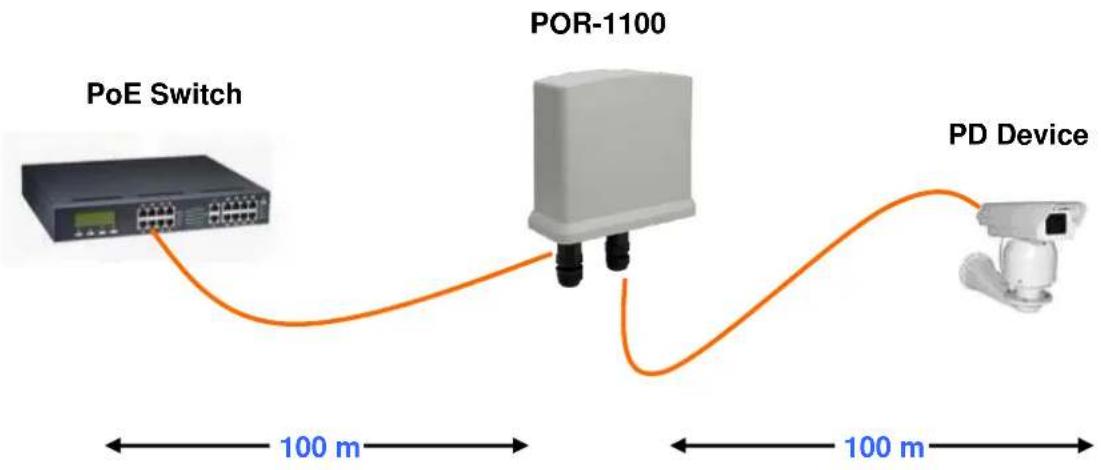
flowchart
graph LR
    A["PoE Switch"] -->|100 m| B["POR-1100"]
    B -->|100 m| C["PD Device"]
    style A fill:#f9f,stroke:#333
    style B fill:#ccf,stroke:#333
    style C fill:#cfc,stroke:#333
** Note: If the Ethernet cable is not standard CAT5 cable, the POR-1100 may be working for shorter length than 100 meter.