POR-0100 - Wi-Fi-Repeater LEVELONE - Kostenlose Bedienungsanleitung
Finden Sie kostenlos die Bedienungsanleitung des Geräts POR-0100 LEVELONE als PDF.


| Produkttyp | Wi-Fi-Repeater |
| Marke | LevelOne |
| Modell | POR-0100 |
| Abmessungen (B x T x H) | 70 x 60 x 30 mm |
| Gewicht | 50 g |
| Stromversorgung | Eingebauter Netzstecker (100-240 V AC, 50/60 Hz) |
| WLAN-Standard | IEEE 802.11 b/g/n |
| Frequenzband | 2,4 GHz |
| Maximale Übertragungsrate | 300 Mbit/s |
| Anzahl Antennen | 2 interne |
| Sicherheit | WEP, WPA, WPA2 |
| Reichweite (Freifeld) | bis zu 100 m |
| WPS-Taste | Ja |
| Reset-Taste | Ja |
| LED-Anzeige | Status-LED |
| Betriebstemperatur | 0°C bis 40°C |
| Lagertemperatur | -20°C bis 65°C |
| Luftfeuchtigkeit (Betrieb) | 10% bis 90% (nicht kondensierend) |
| Zertifizierungen | CE, RoHS |
| Lieferumfang | Wi-Fi-Repeater, Bedienungsanleitung, Netzteil |
| Garantie | 2 Jahre |
| Entsorgung | Richten Sie sich nach den örtlichen Vorschriften zur Entsorgung von Elektrogeräten. |
Häufig gestellte Fragen - POR-0100 LEVELONE
Benutzerfragen zu POR-0100 LEVELONE
0 Frage zu diesem Gerät. Beantworten Sie die, die Sie kennen, oder stellen Sie Ihre eigene.
Eine neue Frage zu diesem Gerät stellen
Laden Sie die Anleitung für Ihr Wi-Fi-Repeater kostenlos im PDF-Format! Finden Sie Ihr Handbuch POR-0100 - LEVELONE und nehmen Sie Ihr elektronisches Gerät wieder in die Hand. Auf dieser Seite sind alle Dokumente veröffentlicht, die für die Verwendung Ihres Geräts notwendig sind. POR-0100 von der Marke LEVELONE.
BEDIENUNGSANLEITUNG POR-0100 LEVELONE

text_image
level® onePOR-0100
Power over Ethernet Repeater
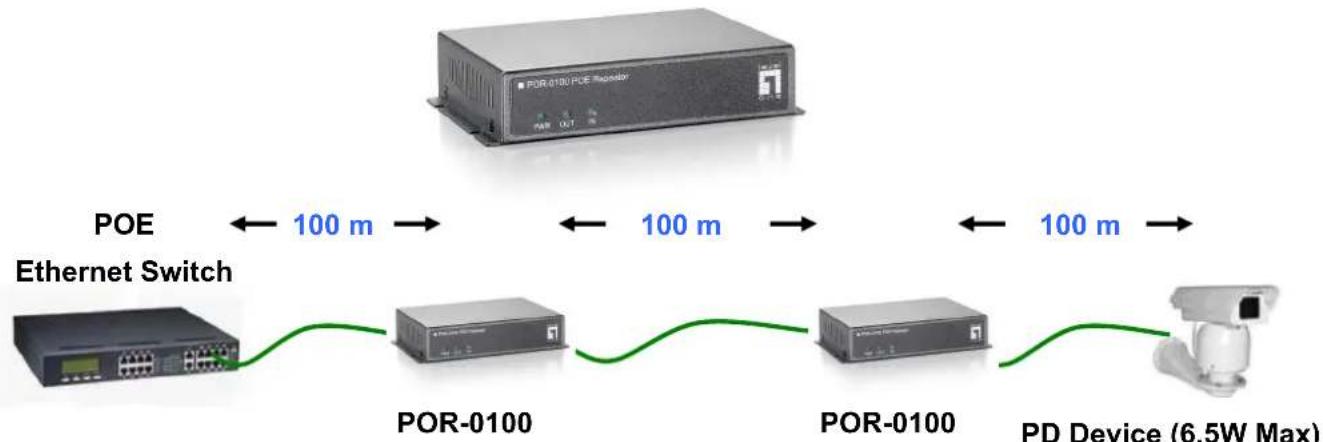
flowchart
graph LR
    A["POE Ethernet Switch"] -->|100 m| B["POR-0100"]
    B -->|100 m| C["POR-0100"]
    C -->|100 m| D["PD Device (6.5W Max)"]
Maximum Range
Connect with Standard 15.4W PSE
| End to end distance | 100m | 200m | 300m | 400m | 500m |
| Daisy-Channing(POR-0100) | 0 | 1 | 2 | 3 | N/A |
| Power Available | ≤10.9 W | ≤6.5 W | ≤3.84 W | Data onlyNo power |
Connect with Hi-Power 30W PSE
| End to end distance | 100m | 200m | 300m | 400m | 500m | 600m | 700m | 800m |
| Daisy-Channing (POR-0100) | 0 | 1 | 2 | 3 | 4 | 5 | 6 | 7 |
| Power Available | ≤ 25.5W | ≤ 21W | ≤ 16.5W | ≤ 12W | ≤ 7.5W | ≤ 3.84W | Data only No Power |
Connect with Hi-Power 40W PSE
| End to end distance | 100m | 200m | 300m | 400m | 500m | 600m | 700m | 800m | 900m |
| Daisy-Channing (POR-0100) | 0 | 1 | 2 | 3 | 4 | 5 | 6 | 7 | 8 |
| Power Available | ≤ 28W | ≤ 25.5W | ≤ 21W | ≤ 16.5W | ≤ 12W | ≤ 7.5W | ≤ 3.84W | Data only No Power |
Quick Guide
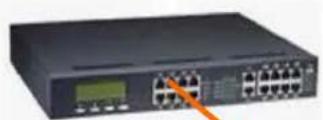
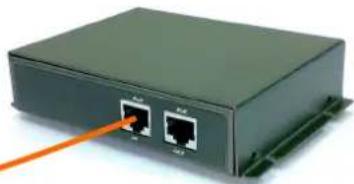
Step 1: Connection to Power over Ethernet Switch
A. Connect one of the Ethernet Switch port with PoE power supply to the LAN IN port of POR-0100 as the following connection.
B. The LED indicators "POWER" and "IN" will turn on indicating the PoE and Ethernet connection.
C. The LED indicators "IN" will flash to indicate Ethernet data activity.
PoE Switch
natural_image
Black rectangular electronic device with two Ethernet ports and a green connector (no visible text or symbols)100 m
Step 2: Connection to PoE PD
D. Connect the LAN OUT port of P0R-0100 to power up the PD device as the following connection.
E. The LED indicators "OUT" will turn on indicating the PoE and Ethernet connection.
F. The LED indicators "OUT" will flash to indicate Ethernet data activity.

text_image
PoE Switch PR100 PD Device (6.5W Max) 100 m** Note: If the Ethernet cable is not standard CAT5 cable, the POR-0100 may be working for shorter length than 100 meter.