AS610C - Aktenvernichter AURORA - Kostenlose Bedienungsanleitung
Finden Sie kostenlos die Bedienungsanleitung des Geräts AS610C AURORA als PDF.


| Produkttyp | Aktenvernichter |
| Modell | AS610C |
| Marke | Aurora |
| Schnittart | Partikelschnitt (Kreuzschnitt) |
| Schnittgröße | 4 x 35 mm |
| Blattanzahl (A4 70g) | 10 Blatt pro Durchgang |
| Arbeitsbreite | 230 mm |
| Auffangvolumen | 15 Liter |
| Abmessungen (B x T x H) | 350 x 250 x 500 mm |
| Gewicht | 4,5 kg |
| Stromversorgung | 230 V, 50 Hz, 1,2 A |
| Leistungsaufnahme | 280 W (max.) |
| Sicherheitsstufe | P-4 (DIN 66399) |
| Überhitzungsschutz | Ja, automatische Abschaltung |
| Rücklauffunktion | Ja, Papierstau manuell behebbar |
| Dauereinschaltung | Max. 2 Minuten, dann Abkühlphase |
| Geräuschpegel | ca. 60 dB(A) |
| Reinigung | Äußere Reinigung mit trockenem Tuch; Schneidwerk regelmäßig ölen |
| Wartung | Schneidwerk alle 500 Blatt mit speziellem Öl schmieren |
| Zubehör | Ölflasche, Ersatzbeutel (optional) |
| Reparierbarkeit | Ersatzteile über den Hersteller erhältlich; Schneidwerk nicht kundenwartbar |
Häufig gestellte Fragen - AS610C AURORA
Benutzerfragen zu AS610C AURORA
0 Frage zu diesem Gerät. Beantworten Sie die, die Sie kennen, oder stellen Sie Ihre eigene.
Eine neue Frage zu diesem Gerät stellen
Laden Sie die Anleitung für Ihr Aktenvernichter kostenlos im PDF-Format! Finden Sie Ihr Handbuch AS610C - AURORA und nehmen Sie Ihr elektronisches Gerät wieder in die Hand. Auf dieser Seite sind alle Dokumente veröffentlicht, die für die Verwendung Ihres Geräts notwendig sind. AS610C von der Marke AURORA.
BEDIENUNGSANLEITUNG AS610C AURORA
Warranty
Your Aurora shredder comes with a 12 months return to base warranty, please contact your supplier for further details.
Aurora warrants all parts of the machine to be free from defects in materials and workmanship for a period of 1 year from the date of the purchase by the original consumer. If the shredder is found to be defective during the warranty period the sole and exclusive remedy will be the repair or replacement at Aurora's option and expense.
Aurora Electronics (UK) Ltd disclaims any liability for incidental or consequential damages attributable to the product. The liability of Aurora Electronics (UK) Ltd is limited to the cost of the repair/replacement of the unit under warranty.
The warranty shall be immediately invalidated if unauthorized repairs or modifications are made, if the machine has been abused or mishandled, if the product has been re-sold, or if the product has not been operated in accordance with the instructions contained in this document.
The warranty is in addition to and does not diminish the consumer's statutory or legal rights.
Aurora Electronics (UK) Ltd.
Units 1 & 2, Shires Industrial Estate,
Essington Close,
Lichfield,
Staffordshire.
WS14 9AZ
Email: sales@aurora-ltd.co.uk
www.aurora-ltd.co.uk
AURORA
AURORA
User Manual
AS610C
natural_image
Exterior view of a modern office building (no signage)CROSS-CUT
User Manual for the AS610C Aurora Shredder IMPORTANT! READ ALL INSTRUCTIONS BEFORE USE
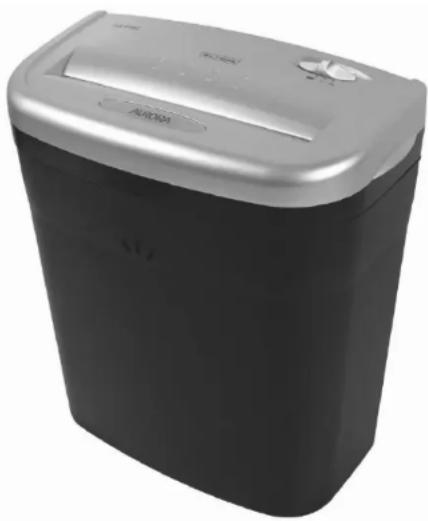
Thank you for purchasing the AS610C Paper Shredder. This product is designed to shred paper and small staples it will also accept small paper clips and credit cards. It does not shred adhesive labels, self-seal enclopes, transparencies, fabrics, glossy paper, newspaper, plastic (other than credit cards), cardboard or continuous forms. Please note that using it for these purposes is likely to cause damage and will invalidate your warranty. This paper shredder is not designed to shred large volumes so please refer to the recommended usage capacity quoted below. You may find paper particles in the bin when first opening the shredder this is a result of QC testing procedures.
Recommended Daily Usage = 25 passes per day. (2 minutes on/20 minutes off)
■ Safety Instructions
- Before use inspect the shredder, mains cable and plug for damage or defects.
- Locate the shredder away from heat and water sources.
- Ensure the switch is set to 'off' before connecting to the mains.
- Always keep ties, loose clothing, jewelry and long hair away from the shredder.
- Keep children and pets away from the shredder.
- Disconnect from the mains when not in use or when emptying or cleaning.
- Do not insert fingers or objects into the shredder at any time.
- Never attempt to dismantle the shredder for any reason, please return to an authorized service agent for repair or servicing.
- Never dispose of flammable chemicals or materials that have come into contact with flammable chemicals (for example nail polish, acetone and petroleum) in the shredder bin. Never use flammable oils, petroleum based products or flammable aerosols of any kind in the vicinity of the machine including compressed air dusters.
■ Operational Instructions
- Remove all packaging and install the shredder unit on top of the waste bin ensuring it locates firmly in position. There is a safety cut out on the shredder head to prevent operation when not safely located on the waste bin, the shredder will not operate unless placed correctly on the waste bin. The shredder will only operate with the waste bin provided.
- Please slide the switch to "Auto", the shredder is now in standby mode.
- The shredder will start automatically when paper is fed into the paper entry slot.
- Ensure paper is fed in using a straight paper path, avoid feeding paper at an angle as this will cause the paper to curl and fold as it enters the shredder, multiplying the number of sheets passing through the blades and is likely to result in a jam.
- Do not enter more sheets of paper than stated on the shredder at one time. Sheet capacity is based on a paper thickness of 75gsm . Thicker paper will reduce the amount of sheets the shredder can shred in one go, as will the presence of staples or paperclips.
- Do not operate continuously for more than 2 minutes.
- Prolonged shredding will cause the unit to overheat and shut down. This is not a fault and indicates the unit has reached its maximum temperature tolerance, turn the unit off at the mains and allow it to cool down for 60 minutes before resuming normal operation.
- If the amount of paper inserted is too much or is not fed in straight then the shredding speed will slow or even stop. If this happens stop shredding and use the reverse function to clear the jam. Always ensure the waste bin is not full before reversing.
- To shred a credit card insert the credit card in to the centre of the paper entry slot. You should only shred one credit card at a time. The shredder is designed for the occasional shredding of credit cards.
■ Maintenance
- Empty the waste bin frequently.
-
Reversing the shredder often helps to clear a buildup of paper dust and particles, always ensure the waste bin is not full before reversing.
-
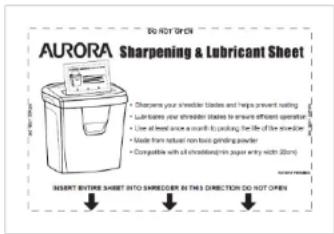
It is not essential to oil an Aurora shredder however regular lubrication will extend the life of your shredder, prevent an increase in noise and help to keep the shredder in optimum working condition. We recommend using the 'Aurora
SP1000 Shredder Lubrication and Sharpening sheets' at least once a month to keep your shredder blades lubricated and free from a buildup of paper dust. The Aurora SP1000 sheets also contain a special grinding powder that will keep your shredder blades sharp.
These are available from your supplier in packs of 12.
text_image
DO NOT OPEN AURORA Sharpening & Lubricant Sheet • Disprove your strokeable blades and help prevent wailing. • Lubricant's your strokeable blades to ensure sufficient operation • Use of bed snow a month by packing the life of the strokeable • Made from natural non-bone grinding powder • Compatible with all strokeable paper entry with 20cm INSERT ENTIRE SHEET INTO SHRICDER IN THIS DIRECTION DO NOT OPEN■ FAQ & Troubleshooting
If you experience problems with your shredder please try some of the solutions below. Under no circumstance should you attempt to open the shredder unit, this will expose you to a risk of electric shock and will invalidate your warranty.
● Problem 1-The shredder fails to operate
Is the shredder connected at the mains and is the power turned on?
Is the shredder switch set to 'auto'?
Is the shredder located correctly on top of the bin? (Press down firmly on the shredder head to ensure it is in the correct position).
Is enough paper being inserted into the machine?-(Very thin or damp paper will cause the auto switch to not operate).
Has the shredder over heated? (Turn off at the mains and leave to cool down for 60 minutes then try again).
Has the shredder blown a fuse? (Turn off at the mains and try replacing the fuse in the mains plug).
● Problem 2-The shredder will not stop working
The shredder is designed to operate for a couple of seconds after paper has cleared the machine this is normal and helps clear paper through the cutting heads.
If the shredder continues to work after a shredding cycle and does not stop then this is either;
- The waste bin is full. You should empty the bin or compact the shredded paper.
- Some paper is blocking the auto sensor, try clearing it by reversing and then returning the switch to auto or by shredding some more paper. Always ensure the waste bin is not full before reversing.
- Glue from encvelopes or label's is making the sensor lever stick. You should not shred gummed envelopes or sticky labels, try cleaning and lubricating the shredder with Aurora SP1000 Lubrication and sharpening sheets, see above.
● Problem 3-The shredder has jammed whilst shredding
Empty the waste bin and try reversing the unit to clear the jam.
If this does not work disconnect power, trim off paper above and below the jam, reconnect power and try alternating between reverse and auto until the jam clears. If at any point the shredder stops working during this process it has probably over heated and will need to cool down for 60 minutes.
Please be careful not to exceed the maximum paper capacity and feed the paper in straight, please be aware damage caused to the shredder by inserting too much paper or by failing to shred using a straight paper path is classed as misuse and invalidates your warranty.
Never attempt to clear paper jams by inserting implements into the shredder or by opening the unit.