
V-9953 - Intercom Valcom - Kostenlose Bedienungsanleitung
Finden Sie kostenlos die Bedienungsanleitung des Geräts V-9953 Valcom als PDF.


| Produkttyp | Gegensprechanlage |
| Marke | Valcom |
| Modell | V-9953 |
| Abmessungen (ca.) | 120 mm x 80 mm x 30 mm |
| Gewicht (ca.) | 200 g |
| Stromversorgung | 12 V DC über Netzteil |
| Stromaufnahme | max. 100 mA |
| Anschluss | 2-Draht-Bus für Innen- und Außeneinheit |
| Reichweite | bis zu 100 m |
| Audio | Voll-Duplex-Gegensprechen |
| Lautstärkeregelung | Einstellbar an der Inneneinheit |
| Türöffnerfunktion | Ja (potentialfreier Kontakt) |
| Klingeltaste | Integriert in Außeneinheit |
| Befestigung | Wandmontage (Schrauben und Dübel enthalten) |
| Schutzart (Außeneinheit) | IP44 (wettergeschützt) |
| Betriebstemperatur | -10 °C bis +50 °C |
| Lieferumfang | 1 Inneneinheit, 1 Außeneinheit, Netzteil, Montagematerial, Bedienungsanleitung |
Häufig gestellte Fragen - V-9953 Valcom
Benutzerfragen zu V-9953 Valcom
0 Frage zu diesem Gerät. Beantworten Sie die, die Sie kennen, oder stellen Sie Ihre eigene.
Eine neue Frage zu diesem Gerät stellen
Laden Sie die Anleitung für Ihr Intercom kostenlos im PDF-Format! Finden Sie Ihr Handbuch V-9953 - Valcom und nehmen Sie Ihr elektronisches Gerät wieder in die Hand. Auf dieser Seite sind alle Dokumente veröffentlicht, die für die Verwendung Ihres Geräts notwendig sind. V-9953 von der Marke Valcom.
BEDIENUNGSANLEITUNG V-9953 Valcom
V-9953 HANDSFREE TALKBACK PLUG-IN BOARD
INTRODUCTION
The V-9953, Handsfree Talkback Plug-In Board, designed to be used with the V-2003A, allows the V-2003A to be converted to a V-2003AHF to permit handsfree operation.
These instructions contain the specifications and information necessary to install and operate the V-9953 used in conjunction with the V-2003A.
DIMENSIONS/WEIGHT
• 6.80" H x 4.75" W x 1.50" D
(17.27cm H x 12.07cm W x 3.81cm D)
• 1.0 lbs (.45 kg)
CONNECTIONS
The V-9953 can be purchased as an "add on" feature after the initial purchase of a V-2003A. By adding a V-9953, Handsfree Talkback Plug-In Board, the V-2003A unit can be modified to a V-2003AHF.
The V-2003AHF is programmable on a per zone basis for one-way or talkback communication. A single zone may have both one-way and talkback speakers. One-way speakers should be connected to the low level outputs for zone 1 (R/BL pair), zone 2 (R/G pair) and zone 3 (R/S pair). These speakers will act as one-way for the associated zone whether or not the zone is programmed for one-way or talkback paging.
If 45 Ohm speakers are connected to the handsfree output and the zone is programmed for one-way, the speakers will receive the page. The zone must be programmed for talkback communication in order to utilize the talkback option. The page volume control located on the handsfree board regulates the volume of the 45 Ohm talkback speakers under both these circumstances.
Do not connect amplified speakers to the V-9953 talkback zones as they are already amplified.

_ 1. Unplug the V-2003A from the AC power source; unplug the battery backup if one is used.
_ 2. Remove the cover of the V-2003A unit by first removing the four (4) - #32 screws that attach the cover to the base.
3. Plug the V-9953 board into the chassis of the V-2003A. Insure the proper alignment of all pins for proper fit and operation.
_ 4. Secure the V-9953 board to the V-2003A chassis using the two (2) screws and lockwashers provided.
_ 5. Insert the Phone-Speaker and Speaker-Phone volume controls into the cover of the V-2003A as shown in Figure 2. The control with the long shaft is Phone to Speaker; the control with the shorter shaft is Speaker to Phone. Secure these controls with the washers and nuts provided.
Make sure the tab on the body of the control engages the enclosure.
_ 6. Replace the cover of the V-2003A unit.
Insert the four (4) - #32 screws and tighten snugly to hold in place.
7. Affix the enclosed label to the side of the
V-2003A unit to make certain the controls relative to the V-9953 are identified.
- Using twisted pair telephone wire, connect the Talkback Speakers to the appropriate output on the V-2003A connection block (Figure 3). Zone 1 speakers connect to the BK/G pair, Zone 2 speakers connect to the BK/BR pair, and Zone 3 speakers connect to the BK/S pair. No more than two (2) 45 Ohm speakers should be connected to any Talkback zone. Do not use 8 Ohm speakers.
_ 9. Restore power to the V-2003A; access page and adjust the volume controls as required. There are separate volume controls for the Phone to Speaker, Speaker to Phone, Page, Background Music, and Night Ring/Warble Tone. For best results, the Speaker to Phone volume control should be turned as low as possible to where background music is just barely audible.
_ 10. When using talkback speakers, the zone must be set (utilizing the dip switches) for talkback communication.
dip switch activates/de-activates.
TECHNICAL ASSISTANCE
When trouble is reported, verify that power is being supplied to the unit and there are no broken connections. Check voltages for proper polarity on the crossconnect block. If a spare unit is available, continue to troubleshoot by substituting the spare unit for the suspected defective unit.
Assistance in troubleshooting is available from the factory. When calling, you should have a VOM, a telephone test set, several clip leads available and be calling from the job site. Call (540) 563-2000 and ask for Technical Support, or call (540) 767-1555 for Valcom 24-hour Faxback System or visit our website at http://www.valcom.com.
The V-9953 contains no user serviceable parts and is not field repairable. A service facility is maintained in Roanoke, VA. Should repairs be necessary, attach a tag to the unit clearly stating your company name, address, phone number, contact person and the nature of the problem. Send the unit to:
Valcom, Inc. Repair and Return Dept. 5614 Hollins Road Roanoke, VA 24019-5056
Refer to the V-2003A VSP to determine what each
VALCOM LIMITED WARRANTY
Valcom, Inc. warrants its products to be free from defects in materials and workmanship under conditions of normal use and service for a period of one year from the date of shipment. The obligation under this warranty shall be limited to the replacement, repair or refund of any such defective device within the warranty period, provided that:
- inspection by Valcom, Inc. indicates the validity of the claim,
- the defect is not the result of damage, misuse or negligence after the original shipment.
- the product has not been altered in any way or repaired by others and that factory sealed units are unopened (a service charge plus parts and labor will be applied to units defaced or physically damaged),
- freight charges for the return of products to Valcom are prepaid,
- all units 'out of warranty' are subject to a service charge. The service charge will cover minor repairs (major repairs will be subject to additional charges for parts and labor).
This warranty is in lieu of and excludes all other warranties, expressed or implied, and in no event shall Valcom, Inc. be liable for any anticipated profits, consequential damages, loss of time or other losses incurred by the buyer in connection with the purchase, operation or use of the product.
This warranty specifically excludes damage incurred in shipment. In the event a product is received in damaged condition, the carrier should be notified immediately. Claims for such damage should be filed with the carrier involved in accordance with the F.O.B. point.
Headquarters:
Valcom, Inc. CMX Corporation
5614 Hollins Road 35 Van Kirk Drive #11 and 12
Roanoke, VA 24019 Brampton, Ontario L7A 1A5
Phone: (540) 563-2000
FAX: (540) 362-9800
Phone: (905) 456-1072
FAX: (905) 456-2269
Figure 1
Dip Switches for V-2003A/V-2003AHF and Volume Controls for the V-2003A

Figure 2

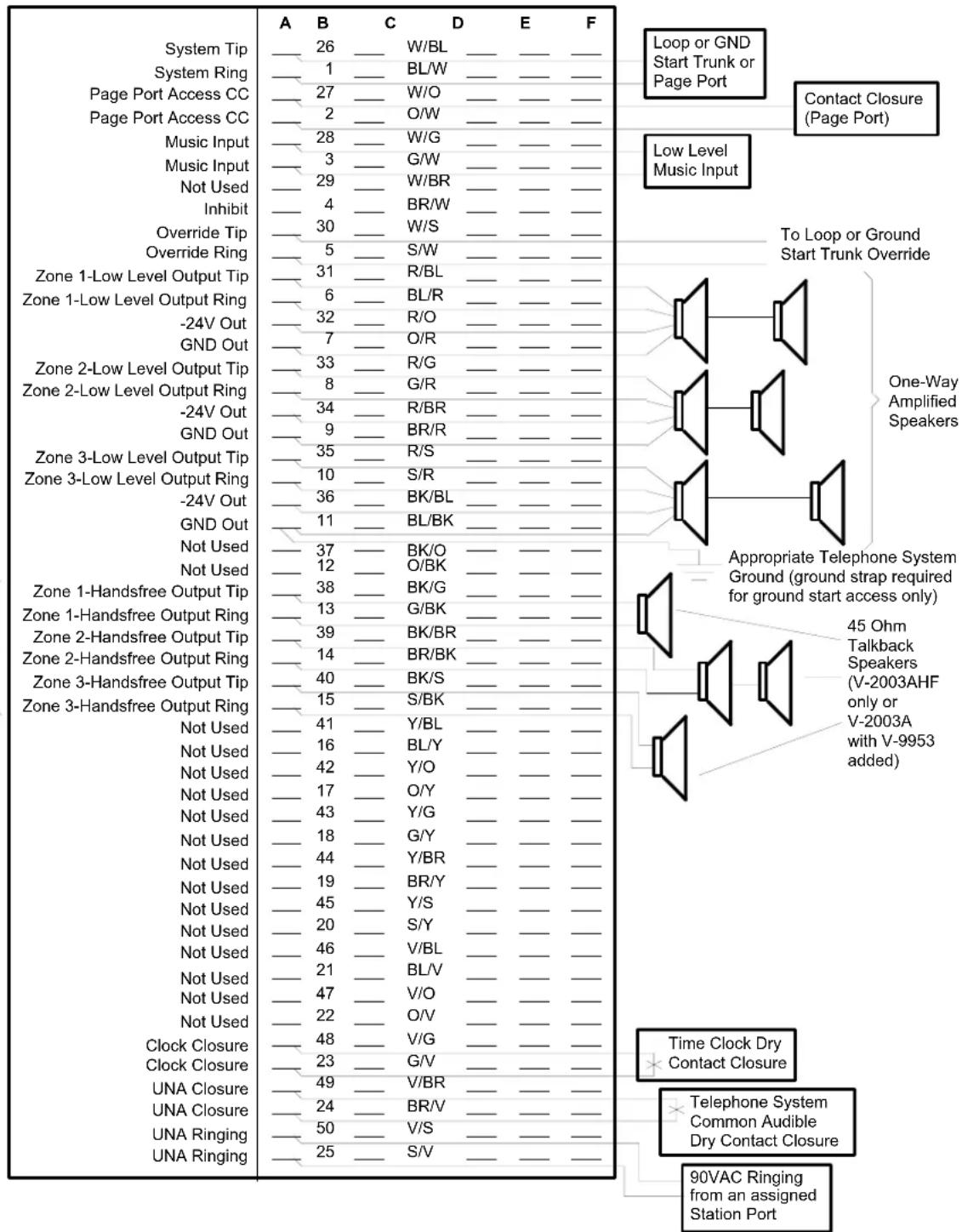
FIGURE 3 - 66 BLOCK CONNECTIONS FOR THE V-9953


Marke : Valcom
Modell : V-9953
Kategorie : Intercom